
Discover powerful Dolibarr extensions designed to automate your business processes
Accounting Firm Integration turns Dolibarr into a complete, professional solution for running a chartered-accountant / bookkeeping practice. It is delivered...
Couldn't load pickup availability


Accounting Firm Integration turns Dolibarr into a complete, professional solution for running a chartered-accountant / bookkeeping practice. It is delivered as a business layer that sits ON TOP of Dolibarr’s native accounting rather than replacing it.
Core principle — no duplication of the ledger
The module never reinvents Dolibarr accounting. It relies on the existing native modules and extends them with the specific workflow of an accounting firm. Every heavy computation reuses native tables (third parties, customer & supplier invoices, payments, bank, accounting bookkeeping, projects, users, agenda, document management) and adds only the firm-specific business objects on top.
What the module adds
· Client centralisation — a dedicated accounting client file (dossier comptable) extending each native third party.
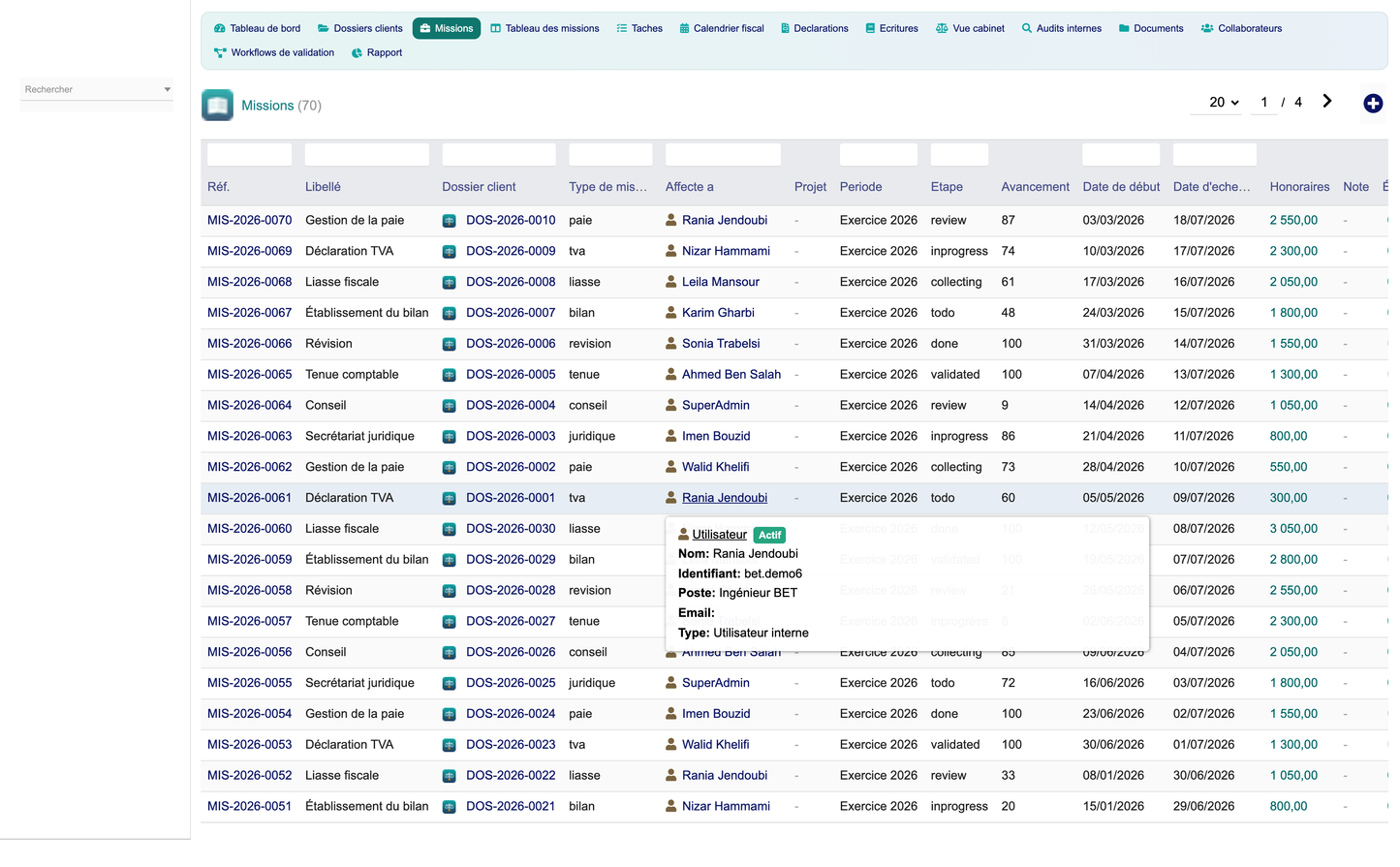
· Mission steering — accounting missions with a drag & drop Kanban board, deadlines and progress.
· Fiscal supervision — a fiscal & social deadline calendar, declaration tracking and filing workflow.
· Task automation — accounting tasks, recurring fees, and a daily supervision cron.
· Financial analysis — per-client turnover, unpaid invoices, profitability and a cabinet dashboard.
· Firm & staff management — collaborator workload, performance and client assignments.
The module is connected directly and deeply to the following native Dolibarr modules. When an optional module is disabled, the related features degrade gracefully and never block activation (only the Third Parties module is a hard dependency).
|
Native module |
How the module uses it |
|
Third Parties |
Each accounting client file extends a native third party (societe). No duplicate customer record. |
|
Customer/Supplier Invoices |
Managed turnover, unpaid amounts and per-client billing read directly from native invoices. |
|
Payments & Bank |
Payment status feeds the unpaid-invoice KPIs; a trigger marks fees invoiced on payment. |
|
Accounting |
The multi-client cabinet view consolidates native bookkeeping movements per client file. |
|
Projects |
Missions can be linked to a native project for time & document tracking. |
|
Products & Services |
Fee lines and engagement letters reuse native products/services and VAT rates. |
|
Agenda |
Tasks and deadlines integrate with the native agenda and reminders. |
|
Documents (GED) |
Accounting documents are classified per client file on top of the native GED. |
|
Users |
Collaborators are native Dolibarr users; workload & performance are computed from them. |
|
Triggers / Hooks |
A native business trigger keeps the firm layer coherent with invoice events. |
Centralises every accounting client as a structured file (dossier comptable) built on top of the native third party, adding the accounting-specific attributes a firm needs.
· Native extension — linked one-to-one to a Dolibarr third party; the native record is never duplicated.
· Client classification — company, individual or association, plus legal form (SARL, SAS, EI, SCI, association…).
· Fiscal identity — SIREN, intra-community VAT number, VAT regime (normal / simplified / franchise) and tax regime (CIT, PIT-BIC, PIT-BNC, micro).
· Assignment — a lead accountant (native user) and recurring fee amount and periodicity per file.
· Complete history — automatic link to native invoices, payments and accounting entries via the card cockpit.
· Client cockpit — the file card shows native invoiced turnover, VAT regime, fee, number of missions and every linked record.
Each client file acts as the central hub that centralises everything the firm handles for that client.
· Centralisation — invoices, accounting entries, fiscal declarations and documents are all reachable from the file.
· Linked-records panel — missions, deadlines, entries, audits and documents of the file are listed with one-click "add linked" buttons.
· File status tracking — active / closed / cancelled status with a clear visual badge.
· Deep-link creation — any linked record can be created already attached to the file, without retyping the relation.
Provides a multi-client cabinet accounting view on top of the native accounting engine — with no duplicated ledger.
· Multi-client consolidation — one row per client file showing debit, credit and balance from the entry-control layer.
· Native turnover — per-client managed turnover read from native customer invoices.
· Native movements — when the Accounting module is enabled, native bookkeeping movement counts are shown per file.
· Entry quality control — the number of entries still to be controlled is surfaced per client and globally.
· Integration status — live badges show which native modules (Accounting, Invoicing) are active.
Adds a firm-oriented quality-control and validation layer over the native bookkeeping.
· Simplified entry sheet — piece, journal (VE/AC/BQ/OD/CA), account, debit, credit and date per entry.
· Control workflow — each entry carries a control status: to control, validated or anomaly.
· Validation by collaborator — entries record who entered and who validated them (native users).
· Correction workflow — entries flagged as anomaly are surfaced in the validation cockpit for correction.
Manages engagement letters and recurring fees using native Dolibarr invoicing.
· Engagement letters — per-client engagement type, fee amount, periodicity and validity dates, optionally linked to a native contract.
· Fee models — recurring fee lines with amount, VAT rate and period, linked to an engagement.
· Native invoicing — fee lines link to native customer invoices; a trigger marks them invoiced when the invoice is paid.
· Client profitability — the reporting hub compares fees vs. invoiced amounts per client.
Uses the native Dolibarr VAT computation and adds fiscal deadline supervision and preparation.
· Deadline tracking — fiscal & social deadlines (VAT, CIT, tax package/liasse, CFE, CVAE, DSN, DAS2, PIT) per client file.
· Automatic alerts — the dashboard and calendar highlight deadlines due soon and overdue; a daily cron flags them.
· Declaration preparation — estimated amounts, periods and responsible collaborators per deadline.
· VAT summary — a dedicated report summarises VAT base, tax and filing status per period.
Analytical reporting generated from Dolibarr accounting and the module layer.
· Cabinet multi-client view — debit/credit/balance and result per client from the entry-control layer.
· Comparative analysis — turnover, result and profitability compared across the whole client portfolio.
· Exports — every report exports to PDF, Excel and CSV, plus direct print.
Uses native Dolibarr users and adds firm-level workload and performance steering.
· Client assignment — collaborators are assigned to client files with a role (lead, assistant, reviewer, payroll manager).
· Workload — workload percentage per collaborator and number of files handled.
· Performance — missions, open missions, late missions, tasks to do and a computed performance score per collaborator.
Uses the native agenda / projects and adds accounting missions and deadlines.
· Accounting missions — bookkeeping, review, annual accounts, tax package, VAT, payroll, legal and advisory missions.
· Kanban board — missions move across six stages (to do, collecting, in progress, under review, validated, closed) by drag & drop.
· Deadlines & reminders — each mission and deadline carries a due date; a daily cron flags lateness automatically.
· Tasks — granular accounting tasks (capture, reconciliation, declaration, control, lettering, review) linked to missions and files.
Uses the native Dolibarr document management and classifies documents per client file.
· Automatic classification — documents typed by nature (balance sheet, tax package, invoices, bank statement, articles, Kbis, general ledger, trial balance).
· Fiscal archiving — each document carries a fiscal year and an archived flag for legal retention.
· Per-file organisation — documents are attached to the client file and reachable from its linked-records panel.
Analysis built on Dolibarr data to verify accounting consistency and report anomalies.
· Audit types — consistency, VAT, lettering and analytical review audits per client file.
· Anomaly reports — each audit lists detailed anomalies (imbalance, unusual account, inconsistent VAT, missing voucher, duplicate) with severity, account and amount.
· Quality score — a per-audit quality score and anomaly count feed the dashboard and reports.
Uses Dolibarr triggers/hooks and provides a one-click validation cockpit.
· Entry validation — validate an entry or flag it as an anomaly directly from the cockpit.
· Declaration validation — mark declarations as filed once submitted.
· Invoice coherence — a native trigger marks linked fees as invoiced when the customer invoice is paid.
A modern accounting-firm cockpit connected to Dolibarr data, organised in KPI zones and charts.
· Client portfolio — active clients, open missions, late missions and recurring fees.
· Fiscal supervision — VAT to file, deadlines due within 15 days, overdue deadlines and declarations filed this year.
· Entry quality control — entries to control, entries in anomaly, audit anomalies and controlled volume.
· Managed billing — managed turnover this year, unpaid invoices and invoice count (from native invoices).
· Missions by stage — distribution of missions across the Kanban stages.
· Turnover by client — top clients by native invoiced turnover (pie).
· Deadlines by month — upcoming fiscal deadlines over the next months.
· Missions by collaborator — workload distribution across the team.
Twelve reports, based only on Dolibarr data (native invoices) and the module business layer, each exportable to PDF, Excel and CSV with a print option.
|
Report |
Content |
|
Client portfolio |
All client files with type, VAT regime and fee. |
|
Turnover by client |
Native invoiced turnover and invoice count per client. |
|
Result by client |
Debit, credit and balance per client file. |
|
VAT summary |
VAT base, tax and filing status per period. |
|
Declarations |
Declaration counts, filed counts and tax per declaration type. |
|
Deadline compliance |
Deadline counts, filed and overdue per fiscal type. |
|
Fee profitability |
Missions, fee amount and invoiced fees per client. |
|
Missions by stage |
Mission count and fee total per Kanban stage. |
|
Missions by collaborator |
Missions, open and late missions per collaborator. |
|
Entry control |
Entry counts, debit and credit per control status. |
|
Audit quality |
Audit counts, anomalies and average quality score per type. |
|
Unpaid invoices |
Unpaid amount and invoice count per client (native). |
· Firm parameters — default currency, deadline alert threshold (days), default VAT regime and quality target.
· Native integration status — live indicators for Third Parties, Invoicing, Accounting, Bank, Projects, Agenda and GED.
· Permissions — granular Dolibarr rights per feature group (see Security).
· Demo data — one-click install or secure removal of the demonstration dataset.
· Dashboard colours — a consistent teal / navy accounting charter across all screens.
On first activation the module seeds a complete, realistic demonstration dataset so dashboards, KPIs, charts, reports and lists are immediately meaningful. The purge removes only the module’s own demo data and the native objects it created — never core Dolibarr data.
· 30 native third parties + 30 accounting client files
· 70 accounting missions across all Kanban stages
· 90 accounting tasks and 50 collaborator assignments
· 130 fiscal deadlines, 80 declarations, 160 bookkeeping entries to control
· 30 engagement letters and 90 recurring fee lines
· 24 internal audits with 36 detailed anomalies and 60 classified documents
· 60 native customer invoices (a mix of drafts, validated and paid) linked to the demo clients
· Standard Dolibarr module — follows native conventions: hooks, triggers, cron jobs and extended native classes.
· SQL prefix — all module tables use the llx_accountingfirm_ prefix (14 tables).
· Business objects — 12 objects: client files, missions, tasks, deadlines, declarations, entries, engagements, fees, audits, anomalies, documents and assignments.
· Cron — a daily fiscal-deadline supervision job flags overdue deadlines and late missions.
· Dolibarr permissions — read/write/delete rights per feature group plus an admin right (32 rights in total).
· CSRF & XSS protection — CSRF tokens on all state-changing actions and systematic output escaping.
· SQL safety — prepared/escaped queries throughout the data layer.
· Multi-company — fully multi-entity compatible (entity-scoped data).
|
Item |
Value |
|
Technical name |
accountingfirm |
|
Module number |
506000 |
|
Version |
1.0 |
|
Editor |
DoliResources — www.doliresources.com |
|
Dolibarr compatibility |
16.0 and above |
|
PHP requirement |
7.1 and above |
|
Hard dependency |
Third Parties (modSociete) |
|
Languages |
French, English, Spanish, Italian, German |
|
License |
GPL v3+ |
The module ships with five complete language files, so every label, menu, report and message is fully translated:
· French (fr_FR)
· English (en_US)
· Spanish (es_ES)
· Italian (it_IT)
· German (de_DE)


