
Discover powerful Dolibarr extensions designed to automate your business processes
Advanced Digital Agency / ESN Management is a complete, integrated ERP/CRM solution that transforms Dolibarr into a full business-management platform purpose-built for digital agencies...
Couldn't load pickup availability


Advanced Digital Agency / ESN Management is a complete, integrated ERP/CRM solution that transforms Dolibarr into a full business-management platform purpose-built for digital agencies and IT service companies. Rather than juggling spreadsheets, standalone CRMs, project trackers and time-tracking tools, agencies obtain a single source of truth covering the entire value chain: from the first prospect contact, through opportunity, quotation, project delivery and support, all the way to invoicing and profitability analysis.
The module industrializes the day-to-day operations of service organizations that sell human expertise and recurring digital services. It links commercial activity, production, resource planning, time tracking, quality control and finance so that every stakeholder — from the sales representative to the agency director — works from consistent, real-time data.
The solution is designed for the full spectrum of digital and IT service organizations:
· Digital agencies and web agencies delivering websites, e-commerce and digital products.
· IT service companies (ESN / SSII) staffing consultants on client engagements.
· Digital marketing agencies managing campaigns, retainers and recurring services.
· Software development companies running Web, Mobile, ERP, CRM and Data projects.
· IT consulting firms selling advisory, audit and expert time.
· SaaS companies managing subscriptions, MRR and customer lifecycle.
· System integrators coordinating multi-phase deployments, subcontractors and support.
· One unified platform: CRM, sales pipeline, project management, planning, timesheets, helpdesk, subscriptions, invoicing and profitability in a single Dolibarr module.
· 360° client and project visibility, with cockpit cards linking every related record.
· Real-time profitability: revenue versus consultant time, purchases and subcontracting, computed per project, per client and per consultant.
· Faster commercial cycles thanks to a drag-and-drop opportunity Kanban and weighted pipeline.
· Reliable delivery through phases, milestones, deliverables and quality control.
· Recurring-revenue management with SaaS subscriptions, MRR tracking and renewal alerts.
· Proactive management via automatic alerts (late projects, expiring contracts, SLA breaches, consultant overload, unpaid invoices).
· Native to Dolibarr: leverages Third Parties, Proposals, Orders, Invoices, Projects, Products/Services, Banking, Accounting, REST API and multi-company.
The module is built on Dolibarr's proven modular architecture. It ships as a self-contained module directory registered through a standard descriptor and integrates seamlessly with the Dolibarr core and other native modules. All business logic is layered on top of Dolibarr's CommonObject foundation, guaranteeing consistency, upgradability and native look-and-feel.
At the heart of the module is a generic engine that powers 22 business objects. Each object is implemented consistently, which keeps the codebase compact, robust and easy to maintain:
· A dedicated SQL table following the llx_dag_* naming convention.
· A PHP class extending Dolibarr's CommonObject, with standardized CRUD, fetch and validation.
· List and card pages rendered through a shared generic list/card engine, providing filters, sorting, pagination, mass actions and a uniform user experience across every object.
The descriptor class modDigitalAgency declares the module (number 515000), its menus, permissions, dictionaries, triggers, dependencies and constants. Activation is handled through Dolibarr's standard module-activation workflow.
· Trigger support to react to business events and chain automated actions.
· Hook support so third-party modules and customizations can extend behavior cleanly.
The module includes a self-healing schema mechanism that verifies and repairs its database structure on activation and upgrade — creating missing tables, columns and indexes so the installation stays consistent across Dolibarr versions and upgrade paths.
· Dedicated module CSS and JavaScript parts for the dashboard, Kanban boards, Gantt and charts.
· Multilingual language files covering French, English, Spanish, Italian and German.
· ECM / GED integration for storing and retrieving documents attached to business objects.
The module is designed to reuse Dolibarr's native building blocks rather than duplicate them:
· Third Parties (Societe) — companies and contacts (mandatory dependency).
· Proposals / Quotes, Orders and Invoices for the commercial and billing chain.
· Projects and Products/Services for delivery and catalog integration.
· Banking and Accounting for payments and financial consolidation.
· REST API for external integrations and multi-company (entity) awareness.
The module manages 22 dedicated business objects, each backed by its own table (llx_dag_*), PHP class and list/card pages. The table below summarizes each object and its purpose.
|
Object |
Purpose |
|
Prospects |
Potential clients being tracked before conversion, with enriched profiling. |
|
Clients |
Active customer accounts with sector, technologies, size and relationship history. |
|
Opportunities |
Sales deals moving through the pipeline, with stage, value and probability. |
|
Service Catalog |
Reusable digital services with pricing, cost, recurrence and required skills. |
|
Quotes |
Commercial proposals with types, VAT and signature/validation status. |
|
Contracts |
Maintenance and managed-service agreements (TMA, support) with SLA and renewal. |
|
SaaS Subscriptions |
Recurring subscription plans with billing cycle, users, MRR and status. |
|
IT Projects |
Digital projects (Web, Mobile, ERP, CRM, Data, Marketing) with budget and progress. |
|
Phases |
Project phases from framing to maintenance, with progress and scheduling. |
|
Milestones |
Key project checkpoints and deliverable gates with target dates. |
|
Missions (tasks) |
Actionable work items assigned to consultants, with estimates and billing flag. |
|
Timesheets |
Time entries (timer or manual) with billable/internal split and hourly rate. |
|
Deliverables |
Produced artifacts with versions and approval status. |
|
Project Quality |
Quality controls with anomalies, severity, score and corrective actions. |
|
Consultants |
Internal experts with skills, availability, hourly cost and workload. |
|
Teams |
Groupings of consultants for planning and reporting. |
|
Subcontractors |
External partners engaged on projects, with cost tracking. |
|
Expenses |
Project and operating expenses, billable and reimbursable tracking. |
|
Invoices |
Billing documents (fixed price, time, milestone, subscription, deposit). |
|
Payments |
Payment records reconciled against invoices. |
|
Support Tickets |
Helpdesk / after-sales tickets with priority, SLA, assignment and resolution. |
|
Documents |
Files and attachments linked to objects through ECM / GED integration. |
Each functional area below corresponds to a coherent set of screens, objects and business rules. Together they cover the complete operating cycle of a digital agency or ESN.
A modern, SaaS-style dashboard gives management an at-a-glance overview of the whole agency. A gradient hero header frames KPI cards grouped into functional zones, complemented by interactive charts:
· Activity & projects zone: active projects, projects by status, open missions.
· Finance & profitability zone: revenue, margins, outstanding invoices.
· Production & time zone: logged hours, billable ratio, utilization.
· Sales pipeline zone: opportunities, weighted value, conversion rate.
· Deliverables & satisfaction zone: deliverables status, quality score, support satisfaction.
· Charts: revenue evolution, expenses evolution, projects by status, pipeline by stage, time per project, and profit by client / consultant.
The CRM provides enriched third-party sheets so sales and account managers understand each relationship in depth. Prospects and clients share a rich data model that feeds pipeline, projects and reporting:
· Business sector and vertical classification.
· Technologies used by the client (tech stack profiling).
· Company size and estimated budget.
· Complete relationship history across opportunities, projects, quotes and tickets.
· Loyalty and scoring indicators to prioritize commercial effort.
Opportunities are managed on a visual Kanban board with drag-and-drop between stages, giving sales teams an intuitive, always-current view of the pipeline:
· Pipeline stages: New → Contacted → Qualification → Proposal → Negotiation → Won / Lost.
· Drag-and-drop cards to move deals between stages instantly.
· Weighted pipeline value based on probability per stage.
· Conversion-rate and sales-cycle KPIs to measure commercial performance.
· Direct linkage from opportunity to quote and, once won, to project creation.
A structured catalog of the agency's sellable services accelerates and standardizes quoting. Services are organized by category and carry commercial and delivery metadata:
· Categories: Development, Digital Marketing, Design, IT, Consulting.
· Unit pricing and internal cost for margin computation.
· Recurring flag to distinguish one-off services from subscriptions/retainers.
· Required skills, enabling matching to consultants and planning.
The module manages the commercial documents that formalize engagements and the recurring agreements that follow them:
· Quote types adapted to services, with VAT handling and signature/validation status.
· Maintenance contracts: TMA, support and managed services.
· SLA definition, renewal management and automatic expiry alerts.
· Conversion of validated quotes into projects and invoices.
Projects are the operational backbone of the module. Each project is a cockpit that aggregates phases, missions, deliverables, time, expenses and finances:
· Project types: Web, Mobile, ERP, CRM, Data, Marketing.
· Standard phases: Cadrage → Conception → Développement → Tests → Validation → Déploiement → Maintenance.
· Budget tracking, progress percentage and risk register.
· Project cockpit card linking all related records (quotes, missions, timesheets, deliverables, invoices, tickets).
Missions are the actionable tasks that make up project delivery, organized on a Kanban task board for daily production management:
· Task board columns: To do / In progress / Review / Blocked / Done.
· Assignment of missions to consultants and teams.
· Estimated versus real hours for accuracy and re-estimation.
· Billable flag to separate chargeable from internal work.
Consolidated planning tools help managers allocate people to work and anticipate bottlenecks:
· Consolidated agenda across projects, phases and consultants.
· Gantt bars for projects and phases with dependencies and timelines.
· Workload view to balance assignments across the team.
· Availability tracking to spot free capacity and overload.
Time tracking captures how consultant hours are spent, feeding both invoicing and profitability:
· Timer stopwatch for live tracking plus manual entry for retroactive logging.
· Billable versus internal time classification.
· Validation workflow for submitted time.
· Hourly rate applied to compute cost and revenue.
Deliverables document what the agency produces, while quality controls ensure it meets standards before client validation:
· Deliverable versioning and approval status.
· Quality controls with control type and control status.
· Anomaly count and severity classification.
· Quality score and corrective actions tracking.
Recurring revenue is managed through subscription objects tailored to SaaS and retainer business models:
· Subscription plans with monthly or yearly billing cycles.
· User counts per subscription.
· MRR (monthly recurring revenue) computation.
· Renewal date tracking and status: Active / Trial / Cancelled / Expired.
An integrated helpdesk handles client support requests with SLA discipline and satisfaction measurement:
· Ticket attributes: category, priority, severity and SLA due date.
· Assignment to consultants/teams and resolution tracking.
· Ticket lifecycle: New → Assigned → In progress → Resolved → Closed.
· Satisfaction capture on resolution.
Financial operations tie production back to billing and cash:
· Expense types with billable and reimbursable flags.
· Invoice types: fixed price (forfait), time, milestone, subscription and deposit.
· Payment tracking reconciled against invoices.
The module continuously computes profitability by comparing revenue against all cost components:
· Costs consolidated from consultant time, purchases and subcontracting.
· Margin per project.
· Margin per client.
· Margin per consultant.
A comprehensive reporting suite delivers more than 15 reports spanning every dimension of the business, each exportable for sharing and analysis:
· Reports across commercial, projects, time, invoicing, payments, profitability, expenses, clients, consultants, teams, deliverables, productivity and KPIs.
· Exports to CSV, Excel and PDF, plus a print-friendly layout.
Proactive alerts surface issues before they become problems, keeping managers ahead of risk:
· Late projects.
· Expiring contracts.
· Consultant overload.
· SLA breaches.
· Quotes without a reply.
· Unpaid invoices.
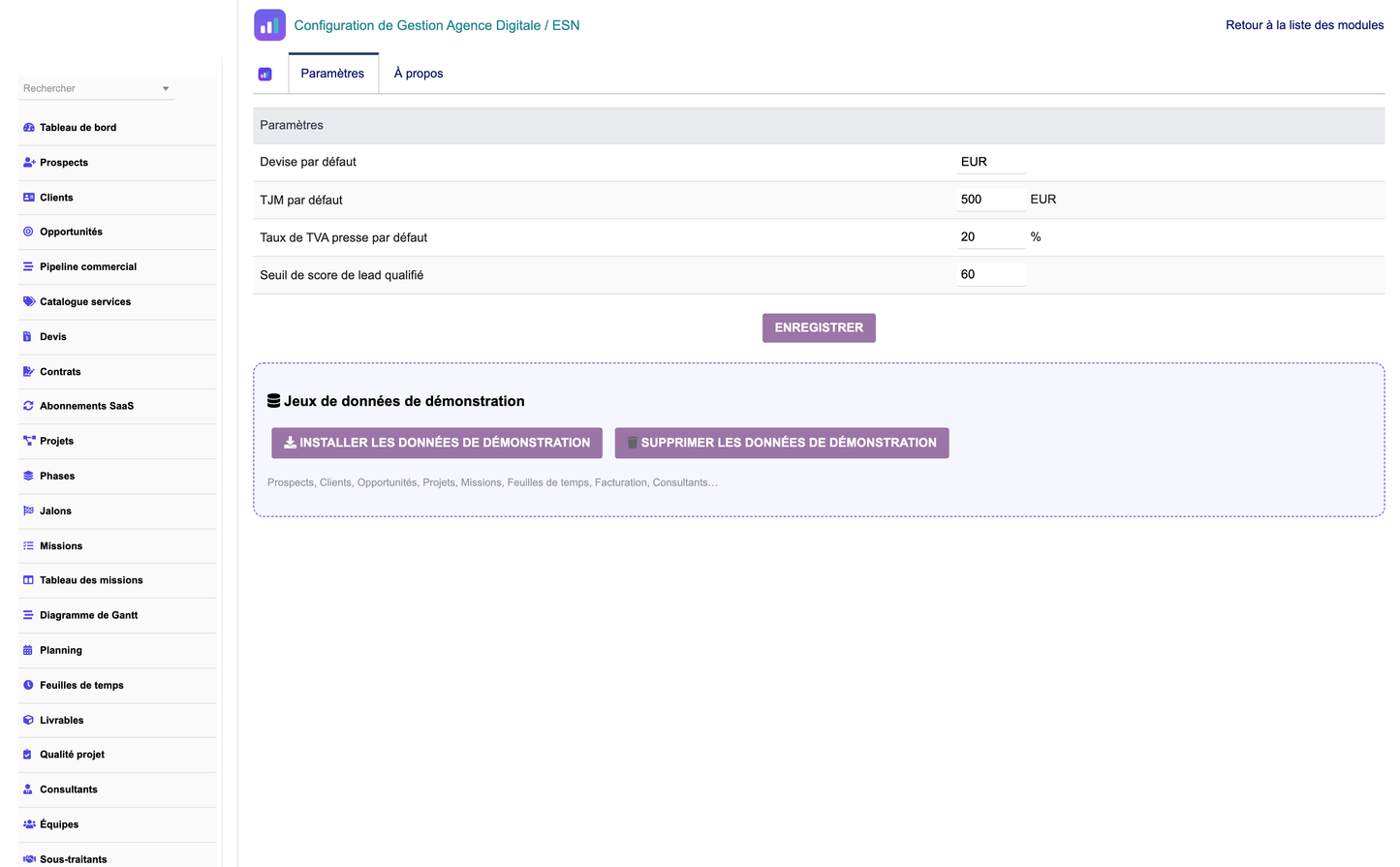
To ease evaluation and onboarding, the module can generate and remove a coherent demonstration dataset with a single click:
· One-click generation of a consistent demo dataset: clients, projects, consultants, tickets, contracts, quotes, invoices, subscriptions and quality controls.
· One-click removal that deletes only the generated demo data, leaving real data untouched.
The module orchestrates the complete lifecycle of a digital engagement, from first contact to profitability review. The table below describes the end-to-end workflow.
|
Step |
Stage |
Description |
|
1 |
Prospecting |
Identify and record potential clients as prospects. |
|
2 |
Qualification |
Assess fit, budget and needs to qualify the lead. |
|
3 |
Opportunity |
Create an opportunity and position it on the sales pipeline. |
|
4 |
Audit / Needs analysis |
Analyze the client's requirements and constraints. |
|
5 |
Commercial proposal (Quote) |
Build a quote from the service catalog. |
|
6 |
Quote validation |
Client validates and signs the quote. |
|
7 |
Digital project creation |
Convert the won deal into an IT project. |
|
8 |
Team planning |
Assign consultants and schedule phases via planning/Gantt. |
|
9 |
Development / Production |
Execute missions and log time on the project. |
|
10 |
Testing & client validation |
Run quality controls and obtain client sign-off. |
|
11 |
Delivery |
Deliver approved deliverables to the client. |
|
12 |
Maintenance |
Operate maintenance/support contracts and SLAs. |
|
13 |
Invoicing |
Invoice by forfait, time, milestone or subscription. |
|
14 |
Profitability analysis |
Compare revenue vs costs; analyze margins. |
Access is governed by a granular permission system: 18 permission groups and 53 granular rights (read / write / delete per functional area, plus administration). Rights can be combined freely, but the module is designed around typical agency roles:
|
Role |
Scope |
|
Administrator |
All rights, including module administration and configuration. |
|
Agency Director |
Global vision across CRM, projects, finance and reporting. |
|
Project Manager |
Projects, missions, phases, deliverables and planning. |
|
Sales Rep |
Clients, prospects, opportunities and quotes. |
|
Consultant |
Time entry and assigned missions. |
|
Support |
Support tickets and helpdesk operations. |
Permissions are enforced on every screen and action. Combined with Dolibarr's entity isolation, this ensures each user sees and edits only what their role and company allow.
The module is a first-class Dolibarr citizen. It builds on native modules and reuses their data and features instead of reinventing them:
· Third Parties (Societe) — companies and contacts (required dependency).
· Proposals / Quotes — commercial proposals.
· Customer Orders — order management.
· Invoices — customer invoicing.
· Projects — native project linkage.
· Products & Services — catalog integration.
· Banking — bank accounts and payment reconciliation.
· Accounting — financial consolidation and exports.
· REST API — programmatic access and external integrations.
· Multi-company — entity-aware isolation across companies.
· ECM / GED — document management for attachments.
|
Item |
Specification |
|
PHP |
7.1 to 8.x |
|
Dolibarr |
16 to 23+ |
|
Database |
MySQL / MariaDB |
|
User interface |
Responsive, Bootstrap-based, native Dolibarr look-and-feel |
|
Security |
Permission checks on every action, entity isolation, SQL escaping |
|
Performance |
Optimized, indexed SQL queries |
|
Multi-company |
Entity-aware throughout |
|
Objects |
22 business objects on a shared generic engine |
|
Permissions |
18 groups / 53 granular rights |
|
Languages |
French, English, Spanish, Italian, German |
|
License |
GPL v3 |
Security and robustness highlights:
· Server-side permission verification for read, write, delete and admin actions.
· Strict entity isolation so multi-company data never leaks across entities.
· Systematic SQL escaping to prevent injection.
· Indexed schema and self-healing structure for reliability at scale.
The module installs like any standard Dolibarr module:
1. Copy the digitalagency module directory into the Dolibarr custom modules folder (htdocs/custom), or install the module ZIP from Home → Setup → Modules → Deploy/install.
2. Go to Home → Setup → Modules/Applications and locate "Advanced Digital Agency / ESN Management".
3. Click activate. The self-healing schema creates the required llx_dag_* tables, columns and indexes automatically.
4. Ensure the native Third Parties (Societe) module is enabled, as it is a required dependency.
5. Open the module configuration page to review settings and permissions.
6. Assign permissions to users and groups according to their roles.
7. Optionally, generate the demonstration dataset with one click to explore the module, then remove it with one click when finished.
For more information, updates and support, visit www.doliresources.com.


