
Discover powerful Dolibarr extensions designed to automate your business processes
Advanced Form Builder turns Dolibarr into a complete intelligent form-building...
Couldn't load pickup availability


Advanced Form Builder turns Dolibarr into a complete intelligent form-building platform, with no coding required. It lets any user design, publish, share and analyse professional business forms directly inside the ERP, replacing external SaaS tools such as Google Forms, Microsoft Forms, Jotform, Typeform or Form.io while remaining fully integrated with Dolibarr data.
Typical use cases include customer intake, HR, after-sales service, maintenance, audit, quality control, registration, questionnaires, surveys, complaints, internal requests, purchasing, field interventions, visits, delivery and reception notes, site and safety inspections, inventory, production, health, education and administration forms.
· Visual drag & drop form builder with live preview, versioning, publishing and archiving.
· Complete field library: text, numeric, date/time, choice, media, geolocation, advanced, calculated, layout and native Dolibarr link fields.
· Conditional logic engine and a data validation engine (required, email, phone, numeric ranges, regex, duplicates).
· Ready-to-use form templates library.
· Full response management: search, filter, review, validate, comment, export and archive.
· Workflow & automation engine triggering native Dolibarr object creation and integrations.
· Timestamped electronic signature with SHA-256 integrity sealing.
· PDF generation, and CSV/JSON exports.
· Secure public portal (token link, QR code, expiry, response cap, password, captcha).
· REST API and webhooks for external integration.
· Modern analytics dashboard (Advanced Form Analytics Center) and reporting suite.
· Fine-grained permissions, multi-company and multilingual (FR, EN, DE, ES, IT).
The module follows Dolibarr development standards: object-oriented PHP (PHP 8.x compatible, no warnings), CommonObject-based classes, a descriptor with rights/menus/cron, SQL schema with self-healing migration, module CSS/JS parts, language packs and a demo-data generator.
|
Object |
Table |
Purpose |
|
Form |
llx_afb_form |
Form definition + JSON schema, publishing, public token |
|
Field library |
llx_afb_field |
Reusable field-type catalogue |
|
Response |
llx_afb_response |
Submitted response + JSON answers |
|
Response value |
llx_afb_response_line |
One row per answered field (search/report) |
|
Template |
llx_afb_template |
Reusable form templates |
|
Workflow |
llx_afb_workflow |
Automation rule (trigger/condition/action) |
|
Signature |
llx_afb_signature |
Electronic signature + hash |
|
Share |
llx_afb_share |
Public share link / portal |
|
Webhook |
llx_afb_webhook |
External integration endpoint |
|
Notification |
llx_afb_notification |
Notification log |
The form structure (fields, options, validation, conditional logic and settings) is stored as a normalised JSON schema, which makes the builder fully dynamic — users create unlimited new form types without database changes. A companion per-field response table is written on submission so answers remain searchable and reportable.
· core/modules — module descriptor (rights, menus, cron)
· class — object classes, workflow engine, REST API, sample data
· lib — shared helpers, object registry, navigation, dynamic renderer
· sql — table + index definitions
· css / js — builder, dashboard and rendered-form assets
· langs — fr_FR, en_US, de_DE, es_ES, it_IT
· admin — configuration page
· builder.php / preview.php / fill.php / public.php / pdf.php — front pages
· dashboard.php / reporting.php — analytics
A dedicated top menu “Form Builder” exposes the following left-menu entries, each synced with an in-page tab bar:
|
Menu |
Page |
Description |
|
Dashboard |
dashboard.php |
Advanced Form Analytics Center |
|
Forms |
afbform_list.php |
Manage all forms |
|
Builder |
builder.php |
Visual drag & drop designer |
|
Templates |
afbtemplate_list.php |
Template library |
|
Field library |
afbfield_list.php |
Reusable field catalogue |
|
Responses |
afbresponse_list.php |
All collected responses |
|
Signatures |
afbsignature_list.php |
Captured e-signatures |
|
Workflows |
afbworkflow_list.php |
Automation rules |
|
Public links |
afbshare_list.php |
Public share links |
|
Webhooks |
afbwebhook_list.php |
Integration endpoints |
|
Notifications |
afbnotification_list.php |
Notification log |
|
Reporting |
reporting.php |
Decisional reports |
|
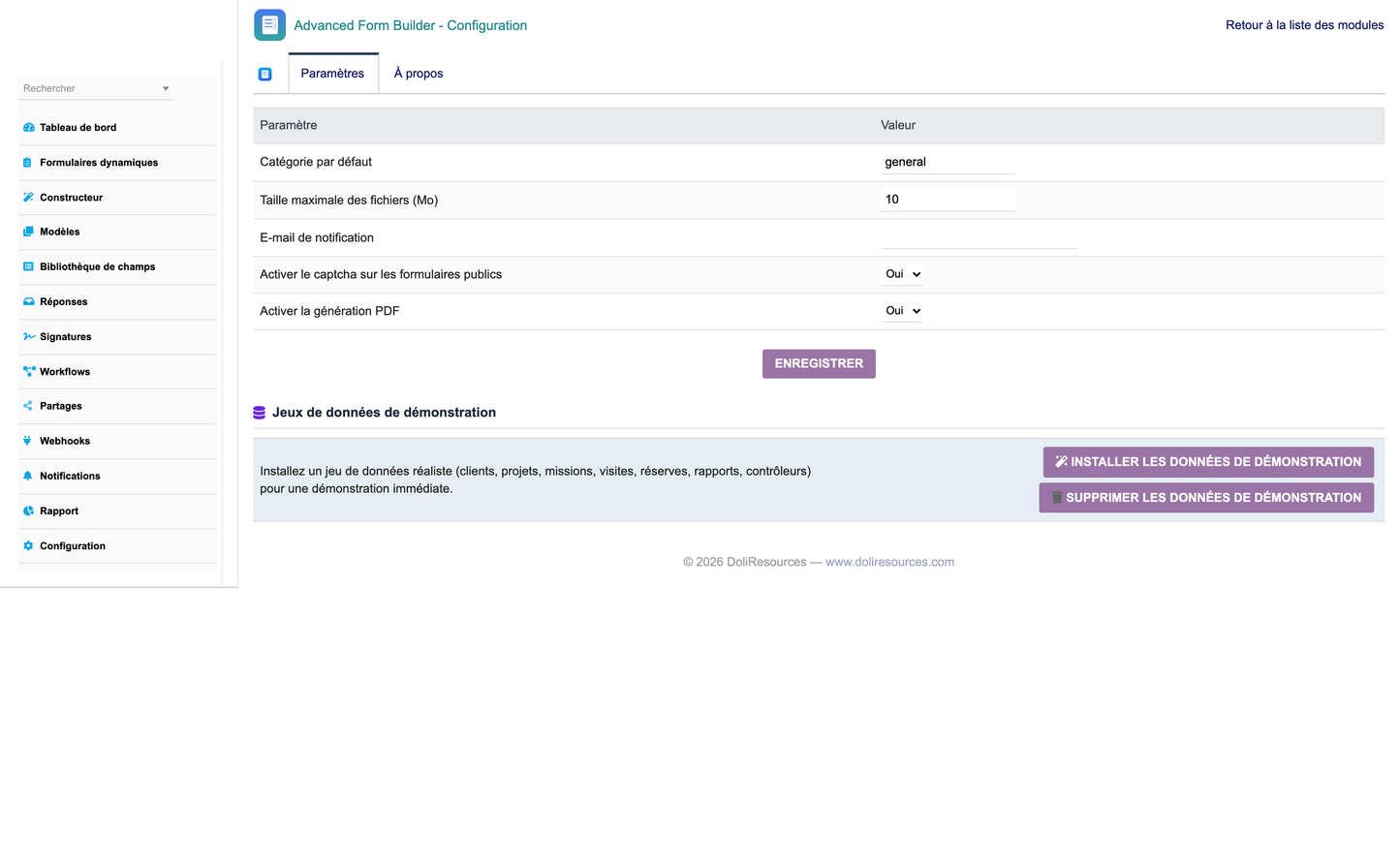
Setup |
admin/setup.php |
Configuration + demo data |
The builder palette groups every field type by family. All types render dynamically both in the builder canvas and in the live form.
|
Family |
Field types |
|
Text |
Short text, Long text, Rich text, HTML block |
|
Numeric |
Integer, Decimal, Currency, Percentage, Slider, Rating |
|
Date & time |
Date, Time, Date & time |
|
Choice |
Dropdown, Radio, Checkboxes, Multi-select, Yes/No |
|
Media |
File upload, Image upload, Signature |
|
Advanced |
Email, Phone, URL, Color, Password, QR code |
|
Geolocation |
GPS position, Address / map |
|
Calculated |
Formula |
|
Dolibarr links |
Third party, Product, User, Project, Contact |
|
Layout |
Section title, Static text |
Conditional logic engine: show/hide fields based on other answers using conditions combined with AND / OR / NOT operators and comparisons (=, !=, >, <, >=, <=). Example: IF Country = France THEN show VAT field.
Validation engine: enforced both client-side and server-side. Rules include required fields, valid email, valid phone, valid URL, numeric type/min/max, text length, regex patterns and duplicate detection, plus business rules used by workflows (e.g. score >= 60).
The automation engine evaluates active workflow rules attached to a form when a response is submitted, validated or rejected. Delayed actions are processed by a scheduled cron job.
|
Action |
Result in Dolibarr |
|
Create customer |
New third party (Societe) |
|
Create contact |
New contact |
|
Create project / task |
New project or task |
|
Create ticket |
New support ticket |
|
Create order / invoice / proposal |
New commercial document |
|
Create intervention |
New field intervention |
|
Send email |
Automatic email to respondent / admin |
|
Call webhook |
POST JSON payload to an external endpoint |
|
Notification |
Internal notification log entry |
Electronic signature: handwritten capture (mouse or touch), timestamp, respondent IP and a SHA-256 hash sealing the response for traceability and integrity.
Public portal: every published form has a secure token URL usable without a Dolibarr login, protected by optional expiry date, maximum response count, access password and captcha. Share links (with QR code support) can be individually managed, disabled and tracked.
Security: CSRF protection, XSS output escaping, SQL-injection-safe parameterised queries, permission checks on every page, activity/notification logging and GDPR-friendly consent fields. All privileged workflow actions are sandboxed so a missing module never breaks a submission.
Each response can be turned into a timestamped PDF document (form header + all answers). Reports and responses export to CSV; the schema and responses are available as JSON via the API.
|
Method / URL |
Description |
|
GET /advancedformbuilder/forms |
List forms |
|
GET /advancedformbuilder/forms/{id} |
Get a form and its schema |
|
POST /advancedformbuilder/forms/{id}/submit |
Submit a response |
|
GET /advancedformbuilder/forms/{id}/responses |
List a form's responses |
Authentication uses a Dolibarr API key (requires the API/Web services module). Webhooks additionally push submissions to external systems with Bearer/Basic/OAuth authentication.
The Advanced Form Analytics Center dashboard shows real-time KPIs (forms, published forms, total and daily responses, completion rate, average time, respondents, signatures), a category kanban, and dynamic charts (responses over time, form distribution, top forms, response sources), plus response and automation zones.
The reporting suite provides Activity, Popular forms, Responses by source, Performance, Workflows and Category reports, each exportable to CSV and printable.
Fine-grained permissions cover four groups (Design, Responses, Workflows, Public links) each with read/write/delete, plus cross-cutting Publish, Validate, Export, Reporting and Administer rights.
Every form carries a version number incremented on each save, with history and publish/archive lifecycle. The module is MultiCompany compatible (entity-scoped) and ships full translations for French, English, German, Spanish and Italian.
Advanced Form Builder integrates natively with the Dolibarr ecosystem through workflows, hooks, triggers, the object registry and the REST API. Compatible / interoperable modules include:
· Third parties (CRM) & Contacts
· Products & Stocks
· Projects & Tasks
· Proposals, Orders & Invoices
· Tickets (helpdesk)
· Interventions (field service)
· Agenda & Events
· HR, Leave & Expense reports
· Accounting, Banks & Payments
· Suppliers & Purchasing
· Manufacturing & Quality
· API / Web services, Cron, Hooks & Triggers
Public satisfaction survey: build the form, publish it, share the link / QR code, collect responses and analyse the completion rate on the dashboard.
Internal request with validation: internal form, “create ticket” workflow on submission, manual validation then PDF generation.
Field intervention sheet: mobile-friendly form with customer signature, “create intervention” workflow and manager notification.
Supplier evaluation: scored questionnaire with conditional logic and a “score >= 60” condition routing high performers to an automated follow-up.
© 2026 DoliResources — www.doliresources.com


