
Discover powerful Dolibarr extensions designed to automate your business processes
DoliResources - Advanced Warehouse Management System (technical name wmsavance) transforms Dolibarr ERP/CRM into a complete Warehouse Management System. It covers the entire...
Couldn't load pickup availability


DoliResources - Advanced Warehouse Management System (technical name wmsavance) transforms Dolibarr ERP/CRM into a complete Warehouse Management System. It covers the entire physical and informational flow of one or many warehouses - from inbound reception through storage, picking, packing and shipping - without requiring any external WMS software.
The module is designed for real-world logistics operations. It is multi-site, multi-warehouse, multi-entity aware and multilingual, shipping with French, English, Spanish, Italian and German translations. It integrates natively with Dolibarr's own products, stock, purchasing, sales, reception, shipment and accounting features, so warehouse operations remain a first-class part of the ERP rather than a disconnected silo.
· Commercial name: DoliResources - Advanced Warehouse Management System
· Functional name (FR): Gestion Entrepot WMS Avancee
· Technical module name: wmsavance
· Version: 1.0.0
· Editor / Copyright: (c) 2026 DoliResources - https://www.doliresources.com
· Family: Products, stock & logistics
· License: GPLv3
· Requires: Dolibarr 16.0+ and PHP 7.1+
· Depends on: Product module and Societe (Third parties) module
· Multi-entity aware (per-entity data separation)
A single installation can model very different facilities. Each warehouse is typed so that behaviour, constraints and reporting adapt to its purpose:
· Distribution centre and logistics platform
· Industrial and raw-materials warehouse
· Cold-storage and food warehouse
· Pharmaceutical warehouse
· Spare-parts warehouse
· E-commerce and micro-fulfillment centre
· Finished-goods warehouse
· Cross-docking platform
· Third-party logistics (3PL) warehouse
The module is built to deliver measurable operational value. Its objectives map directly to the metrics warehouse managers care about:
· Increase inventory accuracy through permanent and cycle counting.
· Accelerate order fulfillment with optimized picking methods and waves.
· Reduce picking and shipping errors with barcode/RFID verification.
· Optimize space utilization with slotting and put-away intelligence.
· Guarantee traceability of lots and serial numbers, upstream and downstream.
· Enforce FIFO / FEFO / LIFO allocation rules automatically.
· Improve labour productivity by measuring operator performance.
· Support regulated environments (cold chain, pharma, dangerous goods).
· Enable 3PL billing of logistics services against SLAs.
The module introduces 20 business objects. Each is implemented as a Dolibarr CommonObject with dedicated list and card pages and a backing database table in the llx_wms_* namespace. Together they form the complete warehouse data model.
· Warehouse: Physical facility with a type, address and configuration.
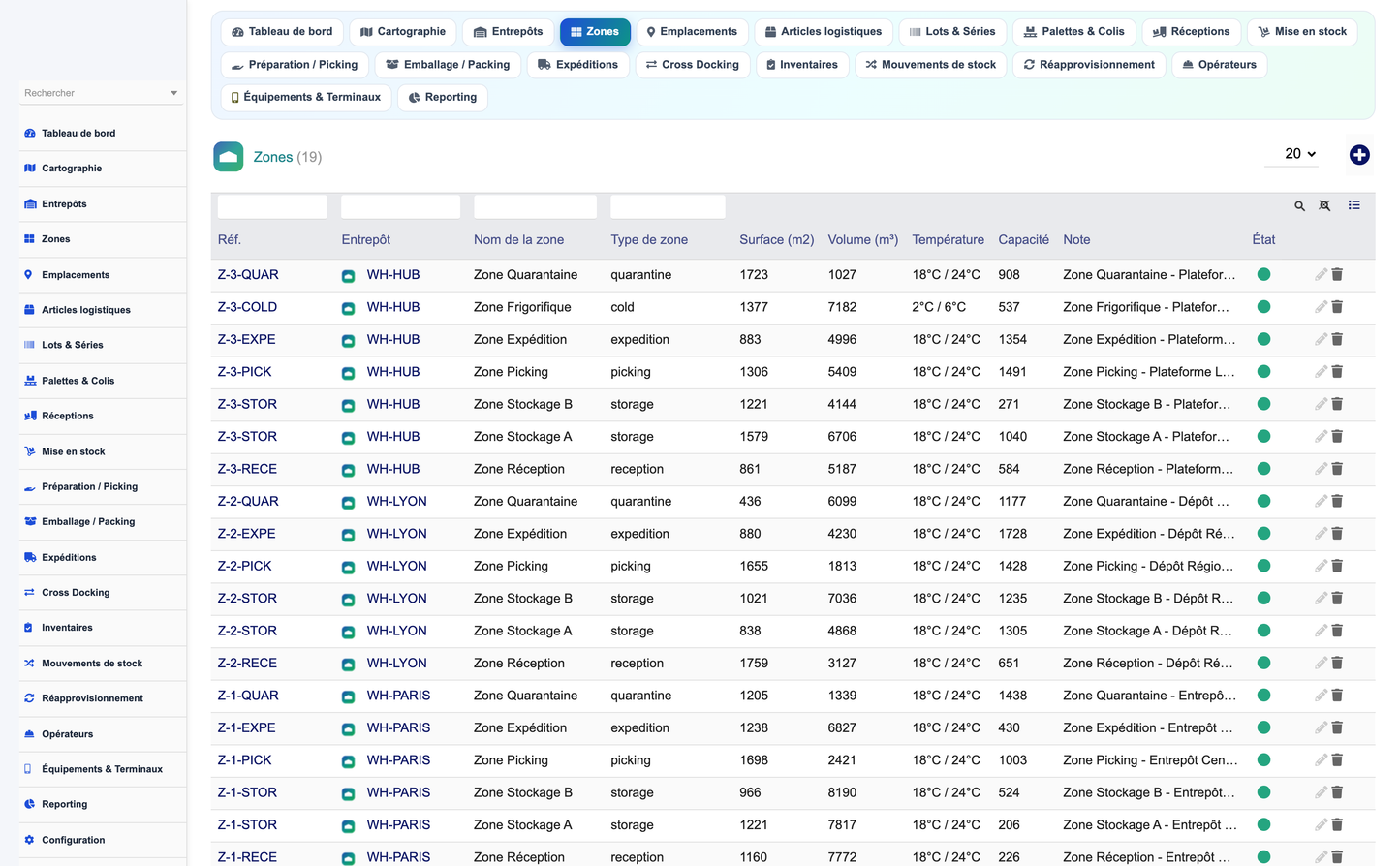
· Zone: A logical or physical area inside a warehouse (receiving, storage, picking, shipping, quarantine, cold zone...).
· Location: Individual storage address (the atomic storable position).
· Product (logistics): Logistics attributes for an article: ABC class, rotation, FIFO/LIFO/FEFO rule, dimensions, weight, volume, units per carton/pallet, dangerous and perishable flags, preferred location and barcode.
· Lot: Lots and serial numbers with expiry dates for full traceability.
· Pallet: Handling units / SSCC for palletized goods.
· Reception: Inbound ASN (Advanced Shipping Notice) header, with reception lines.
· Putaway: Put-away missions that move received goods to storage.
· Picking: Pick orders supporting single, batch, zone, wave and cluster methods, with picking lines.
· Packing: Parcel and packing operations.
· Shipment: Outbound shipment of packed goods.
· Crossdock: Cross-docking operations that bypass storage.
· Inventory: Annual, cycle, permanent and by-zone inventories, with inventory lines.
· Movement: Traced stock movements: entree_stock, sortie_stock, consommation, transfert, ajustement, retour.
· Replenishment: Min/max and automatic replenishment orders.
· Operator: Warehouse operators with productivity and error-rate tracking.
· Equipment: Mobile terminals and devices: barcode, QR and RFID readers.
Reception, picking and inventory each carry dedicated line objects (reception_line, picking_line, inventory_line), bringing the total to 20 objects covering headers, lines and supporting master data.
Physical space is modelled as a strict hierarchy so that every stored item has an unambiguous, addressable position:
company > establishment > site > warehouse > building > zone > aisle > bay > rack > level > location
Locations are addressed with a standard, human-readable and scannable scheme:
WAREHOUSE-ZONE-AISLE-BAY-LEVEL-LOCATION
Each address can be printed as a barcode or QR code and physically applied to racks and shelves, so operators confirm positions by scanning rather than reading.
Locations carry capacity, dimensions, temperature class, weight limit and compatibility rules. The system knows what can and cannot be stored where, which underpins the put-away engine and slotting logic.
A 2D graphical warehouse map renders zones, aisles and locations visually. Positions are colour-coded by occupancy so managers can see at a glance where space is free, saturated or blocked. The cartography turns abstract location data into an operational picture of the floor.
· 2D graphical representation of the physical layout.
· Colour coding by occupancy rate.
· Quick visual identification of free, full and blocked locations.
· Direct navigation from the map to a location's card page.
Beyond Dolibarr's standard product data, each article gains logistics attributes that drive storage and movement decisions:
· ABC classification and rotation profile.
· Allocation rule: FIFO, LIFO or FEFO.
· Dimensions, weight and volume.
· Units per carton and units per pallet.
· Dangerous-goods and perishable flags.
· Preferred storage location.
· Product barcode / GTIN.
Goods are grouped into handling units - pallets and parcels - each identified by an SSCC (Serial Shipping Container Code). Handling units are tracked as first-class objects through receiving, storage, picking, packing and shipping, giving full visibility of logistics containers and not just of individual products.
Lots and serial numbers are tracked end to end, each with production and expiry dates. When a product is configured for FEFO (First Expired, First Out), allocation automatically favours the earliest-expiring lots, which is essential for food, pharmaceutical and other perishable goods.
· Lot and serial-number management per product.
· Production and expiry date capture.
· FEFO allocation driven by expiry.
· Expiry alerts and quarantine of expired stock.
· Full upstream/downstream traceability for recalls.
Expected inbound goods are declared as receptions based on Advanced Shipping Notices. Planning inbound volume in advance lets the warehouse prepare dock capacity, labour and storage space before trucks arrive.
Docks are scheduled against planned receptions and shipments, avoiding congestion and idle waiting. Each dock appointment is tied to its reception or shipment for full accountability.
On arrival, goods are received against the ASN. Quantities are confirmed by scanning, discrepancies are recorded, and received handling units are registered and made ready for put-away.
· Receive against expected ASN lines.
· Scan-based quantity confirmation.
· Discrepancy and damage capture.
· Automatic creation of put-away missions.
Received goods can be routed to quality control. Items under control or rejected are placed in quarantine, which blocks allocation and shipping until they are released. This protects downstream customers from non-conforming stock.
The put-away engine proposes the best storage location for each received item, evaluating compatibility, remaining capacity, temperature class and product rotation. Operators are guided to the proposed location and confirm by scanning, keeping the digital and physical stock in sync.
· Location proposal by compatibility and capacity.
· Temperature and hazard constraints respected.
· Rotation-aware placement (fast movers near shipping).
· Directed, scan-confirmed put-away.
Slotting analyses product rotation and order patterns to recommend where each article should live. Optimising slot assignments shortens travel distance, balances zone workload and increases overall throughput.
The module supports general (annual) inventories, cycle counting and permanent inventory, as well as inventories restricted to a single zone. Counts are captured on mobile terminals and reconciled against system quantities, generating adjustment movements where needed.
· General / annual full inventory.
· Cycle counting on a rolling schedule.
· Permanent (perpetual) inventory.
· Inventory by zone.
Every stock change is recorded as a traced movement with a typed reason: stock-in, stock-out, consumption, transfer, adjustment or return. The movement journal is the single source of truth for how stock reached its current state.
Stock is allocated and reserved for orders according to each product's FIFO, FEFO or LIFO rule. Reserved stock is protected from being consumed by other demand, preventing over-commitment.
Forward pick faces are kept stocked through min/max and automatic replenishment, including wave-driven replenishment ahead of large pick campaigns, so pickers never travel to an empty face.
Picking supports multiple strategies chosen to fit order profiles:
· Single-order picking.
· Batch picking across multiple orders.
· Zone picking with hand-off between zones.
· Wave picking synchronised with shipping cut-offs.
· Cluster picking to multiple containers at once.
Orders are grouped into waves aligned with carrier departures, resource availability and priorities. Wave management balances workload across the day and keeps shipping deadlines under control.
Operators work from a mobile PDA interface that directs them location by location, verifies picks by scanning and reports progress in real time - reducing errors and eliminating paper pick lists.
Picked goods are packed into parcels. Cartonization suggests suitable box sizes for the items being shipped, reducing void fill, dimensional weight and shipping cost.
The module generates and reads the barcode and label standards used across logistics:
· Code128 and EAN.
· GS1-128 for logistics labels.
· QR Code and DataMatrix.
· SSCC for handling units.
Packed parcels are consolidated into shipments, verified, documented and dispatched. Shipping documents and labels are produced automatically as part of the workflow.
Loading is organised by shipment and dock. The module provides an integration architecture for carriers, so shipment data, tracking and confirmations can be exchanged with transport partners through the connector and webhook layer.
Goods flagged for cross-docking bypass long-term storage: they are moved directly from receiving to shipping, cutting handling and dwell time for fast-moving or pre-allocated inbound.
Both customer and supplier returns are handled. Returned goods are received, inspected, and routed to restocking, quarantine or disposition, with full movement traceability.
Cycle counting continuously verifies a subset of locations, keeping inventory accuracy high without the disruption of a full stock freeze.
Full upstream and downstream traceability links every lot and serial number to its receptions, movements and shipments. A recall simulation identifies, from a suspect lot, every customer shipment and remaining stock location affected - turning a recall from a crisis into a controlled procedure.
Non-conformities are logged and managed, with quarantine holds that block affected stock from allocation and shipping until resolved.
Operators, equipment and docks are planned as constrained resources. The module measures operator productivity and error rates and tracks equipment assignment, so labour and assets are allocated where they deliver most value.
For logistics providers hosting multiple clients, the module supports multi-owner stock and billable logistics services governed by SLAs, together with a client portal for visibility.
· Multi-owner (multi-client) stock segregation.
· Billable logistics services and activity metering.
· Service-level agreement (SLA) tracking.
· Client portal for stock and order visibility.
The flagship dashboard is a Warehouse Digital Twin Command Center that presents the warehouse as a live operational model. It consolidates the state of the whole facility into one screen.
· A global WMS performance index summarising overall health.
· The 5 core flows: inbound, storage, picking, packing and shipping.
· More than 30 KPIs across the operation.
· Interactive charts for drill-down analysis.
· Light and dark themes.
· Real-time refresh of live indicators.
The module ships with 50 standard reports spanning inbound, storage, picking, shipping, inventory, traceability, quality and productivity. Reports support rich filtering and can be exported to multiple formats.
· 50 standard reports out of the box.
· Flexible filtering on every report.
· Export to PDF, XLSX, CSV, ODS and HTML.
· Scheduled reports delivered automatically.
The module is a good Dolibarr citizen and reuses the ERP's existing objects wherever possible, integrating natively with:
· Products and Stock.
· Suppliers and purchase orders.
· Receptions.
· Customer orders.
· Shipments.
· Invoices.
· Third parties.
· Projects.
· Manufacturing / Bills of Materials.
· Interventions.
· Contracts.
· Agenda.
· ECM / GED (document management).
· Accounting.
A full REST API exposes warehouse operations for integration with external systems, mobile apps and automation. It is served under the base path /api/index.php/wmsavance, authenticated with a DOLAPIKEY and gated by the same fine-grained rights as the user interface.
Representative endpoints:
· GET warehouses, warehouses/{id}
· GET zones, locations, locations/{id}
· GET stock, lots, pallets
· GET receptions, receptions/{id} (with lines); POST receptions
· GET putaways, pickings, pickings/{id} (with lines)
· GET packings, shipments, shipments/{id}
· GET crossdocks
· GET movements; POST movements
· GET inventories, inventories/{id} (with lines)
· GET operators, equipments, replenishments
· GET kpis
An extensible connector and webhook architecture links the warehouse to carriers and EDI partners. It can exchange ASNs, orders, confirmations, inventories and shipments in EDIFACT, XML, JSON and CSV, so the WMS plugs into existing supply-chain messaging without custom core changes.
Security is enforced at every layer, consistent with Dolibarr best practices:
· CSRF protection on state-changing actions.
· XSS protection and strict input validation.
· Server-side permission checks on every operation.
· Per-entity data separation in multi-entity setups.
· Transactional locking to keep stock consistent under concurrency.
· Audit logging of sensitive operations.
The module defines 20 user profiles, ranging from a full WMS administrator to a read-only auditor. Each profile is composed from 8 fine-grained rights groups, so access can be tailored precisely to each job.
The 8 rights groups are:
· Warehouse
· Product
· Inbound
· Outbound
· Inventory
· Operator
· Replenishment
· Reporting
Profiles range from WMS administrator, warehouse manager, team leader, receiving clerk, put-away operator, picker, packer, shipping clerk, inventory controller and quality officer through to a read-only auditor, each mapped to an appropriate subset of the rights groups.
The module follows the standard Dolibarr module architecture and never modifies core files. It is composed of the usual, well-understood building blocks:
· A module descriptor declaring rights, menus, triggers and cron jobs.
· CommonObject classes for the 20 business objects.
· Hooks to extend Dolibarr pages and behaviour.
· Cron / scheduled jobs (e.g. replenishment, scheduled reports).
· Dictionaries for reference data.
· SQL install / update / uninstall scripts.
· Translations for FR, EN, ES, IT and DE.
· PDF and label templates.
· A REST API module.
Because it only extends Dolibarr through supported extension points, the module upgrades cleanly and coexists with other modules.
Installation follows the standard Dolibarr procedure:
· Copy the wmsavance directory into the Dolibarr custom modules folder.
· Enable the module from Home > Setup > Modules/Applications.
· The SQL install scripts create the llx_wms_* tables automatically.
· Grant the relevant rights groups to each user or group.
· Optionally load demo data using the seed button, and remove it later with the purge button.
The module includes seed and purge buttons that populate and remove a coherent set of demonstration data, so evaluators can explore a realistic, fully-populated warehouse immediately after installation.
Approximately 58 screenshots illustrating the module are provided in the Captures_Ecran folder accompanying this document. They cover the dashboard, warehouse map, object list and card pages, receiving, put-away, picking, packing, shipping, inventory, traceability and reporting screens.


