
Discover powerful Dolibarr extensions designed to automate your business processes
1. Executive Summary
Ambulance Operations Management turns Dolibarr into a complete operating system for a...
Couldn't load pickup availability


1. Executive Summary
Ambulance Operations Management turns Dolibarr into a complete operating system for a medical transport company. It covers the full chain from the incoming call to the cashed payment: call intake, request qualification, dispatching, missions with a fully timestamped chronology, fleet and crew management, onboard medical equipment and stock, regulatory documents, hygiene and maintenance, pricing, third-party payment, billing, and cost and margin per mission.
The module is published by DoliResources. It installs as a standard Dolibarr custom module, never modifies the core, and integrates with the native third-party, product, stock, quotation, order, invoice, payment, project, agenda and document modules.
The module is a management, coordination and traceability tool. It never replaces medical dispatching, clinical assessment, or any decision reserved to an authorised professional, and it never produces a clinical instruction automatically.
2. Business Objectives
· Answer every call and turn it into a qualified, traceable transport request.
· Give the dispatcher a single screen showing what is waiting, what is running and what is available.
· Record a mission chronology precise enough to measure real response times.
· Keep the fleet legal and roadworthy: documents, inspections, maintenance, cleaning.
· Keep the onboard equipment and stock complete and in date.
· Bill correctly the first time, including third-party payment and coverage agreements.
· Know the cost and the margin of every single mission.
· Provide the evidence trail that quality reviews and audits require.
3. Functional Scope
The module ships 49 business objects across twelve functional areas, 145 rights in twelve menu sections, five languages, a REST API, a scheduled alerting job, PDF document models and a complete demonstration dataset.
· Calls and requests: incoming calls, transport requests, recurring transports.
· Dispatching: dispatch board, assignment log, operational map.
· Missions: missions, timeline steps, multi-patient routes, inter-hospital transfers, mission reports, onboard crew interface.
· Patients: patients, legal representatives, transport prescriptions, patient portal.
· Crews: crew members, teams, shifts, absences, qualifications.
· Fleet: vehicles, regulatory documents, mileage, fuel, mission expenses.
· Equipment and stock: medical equipment, consumables, onboard stock, batches, inventories, oxygen cylinders.
· Hygiene and maintenance: checklists, cleaning and disinfection, maintenance.
· Geolocation: positions, geofences, intervention zones.
· Network: bases, partner institutions, prescribers, paying bodies, agreements.
· Billing: pricing grid, coverage, mission billing, payments, costs.
· Quality: incidents, accidents, complaints, satisfaction surveys, audits.
4. User Roles
Rights are grouped by function. Read and write are granted by default so the module is usable immediately after activation; delete, the validation, signature and decision sub-rights, and the administrative rights stay off, following least privilege.
· Dispatcher: calls, requests, missions, dispatching with the assign sub-right, geolocation in read.
· Ambulance crew: missions and steps, mission reports, checklists, cleaning records.
· Fleet manager: vehicles, documents, mileage, fuel, maintenance, equipment, stock.
· Billing officer: pricing, coverage, billing, payments.
· Quality officer: incidents, accidents, complaints, surveys, audits.
· Management: reporting and costs in read, export.
· Partner institution and patient: portal access only, limited to their own records.
5. Dashboard
The Ambulance Emergency and Transport Command Center gathers today's activity, the mission journey, the fleet and crew state, the alert list, the financial position and the charts on a single screen.
The mission journey band counts, for the current month, how many missions reached each of the nine milestones. A drop between two neighbouring milestones localises a bottleneck immediately.
Every ratio is computed over the same population on both sides. The late rate divides late missions by completed missions, never by missions that have not happened yet; fleet availability excludes archived vehicles from numerator and denominator alike.
6. Incoming Calls
Every request starts as a call. The record holds the caller and their type, the patient, the pickup address, the destination, the declared reason, the declared priority and the operator.
The answer delay and the call duration are stored: they are the first two indicators of the response chain and feed the calls-per-hour chart used for staffing decisions.
7. Transport Requests
Qualification turns a call into an actionable request: mission type, retained priority level, wanted date and time, accepted flexibility, required vehicle and equipment, number of companions, declared mobility, origin and destination, zone, paying body and coverage reference.
The module offers administrative and logistic checks. It never decides the medical level of urgency: that determination stays with the authorised professional.
8. Patients
The patient file carries identity, address with floor and access details, contact details, mobility level, required vehicle category, and the practical needs that decide the transport: oxygen, stretcher, wheelchair, bariatric handling, weight, and free-text logistic instructions.
Data protection consent and geolocation consent are two separate flags, granted and withdrawn independently. Duplicate detection, multi-criteria search, archiving and access restriction are supported; minors are flagged and linked to their legal representatives.
9. Transport Prescriptions
Prescriber, institution, prescription date, transport type, required vehicle, trip kind, itinerary, frequency, number of trips granted and already used, validity period and supporting document.
The used-trips counter makes an entitlement close to exhaustion visible before it blocks a transport.
10. Patient Portal
Patients and their representatives with portal access can view their requests, missions, prescriptions, coverage agreements, invoices and payments, download their documents and answer a satisfaction survey. The portal overview screen lists who has access and their consent state.
11. Partner Institutions
Hospitals, clinics, surgeries, dialysis and rehabilitation centres, nursing homes, imaging centres, laboratories, maternity units. Each record carries the ward, the pickup point and the access instruction, which together remove a large share of avoidable delays.
Institutions are linked to native third parties, so quotations, orders, invoices and payments stay in the standard Dolibarr flow.
12. Dispatching
The dispatch board lists missions awaiting assignment, ordered by priority level then by planned time, together with the patient, the required vehicle category, the itinerary, the zone and the estimated distance.
The fleet panel shows every vehicle with its status, base, last signal and cleaning state. The crew panel shows the teams on duty today with their leader, vehicle, base and mission count.
13. Assignment Rules
The proposal engine ranks eligible vehicles using configurable rules: the vehicle category must match the patient's requirement, the status must be genuinely available, and a vehicle awaiting cleaning or already reserved is down-ranked.
The module proposes; it never assigns on its own. Every assignment is logged with its type (manual, accepted proposal, reassignment, escalation, backup), the dispatcher, the score, the distance, the estimated time of arrival and, where applicable, the refusal reason.
14. Missions
The mission is the central object, linking patient, request, vehicle, crew, itinerary, distances, costs and invoice. Eighteen statuses cover the full cycle from draft to closure, including en route, on scene, patient pickup, in transport, arrived and handover.
Distances are stored separately as estimated, actual, empty and billable kilometres, because the empty-kilometre share is one of the strongest levers on profitability.
15. Mission Timeline
Twelve timestamped steps per mission: request received, qualified, assigned, confirmed, departed from base, on scene, patient picked up, left the scene, arrived at destination, handover, back available, mission closed.
Each step stores the elapsed time since the request was received, the target where one applies, the position, the odometer and the source of the timestamp: manual entry, mobile interface, geofence, GPS device or API. Every response-time indicator in the module is derived from this table.
16. Mobile Crew Interface
A responsive screen designed for a tablet or a phone in the cab. It shows the missions assigned to a crew member for the day with everything needed on the road: patient and phone number, pickup and destination addresses, vehicle, mobility level, oxygen, stretcher or wheelchair needs, floor access and logistic instruction.
A twelve-dot strip shows the chronology: a green dot carries the recorded time, the amber dot is the next step to record.
17. Geolocation
Vehicle positions carry timestamp, coordinates, speed, heading, accuracy, odometer, zone, nearest landmark, signal quality and source. A last-known position is denormalised onto the vehicle for the dispatch board.
Geolocation is switchable off entirely by a single configuration constant, which hides the map and the position screens across the whole application. Positions are visible only to authorised profiles.
18. Maps
The operational map projects bases, vehicles by availability, partner institutions and pending missions onto a self-contained canvas. No external tile provider is contacted, so the screen works offline and no patient location ever leaves the instance.
19. Geofencing
Configurable zones around bases, institutions, intervention areas, forbidden areas, special-rate areas and long-distance areas. Each geofence declares the event raised on entry and on exit (base departure or arrival, on scene, destination, zone entry or exit) and whether it should record a mission step automatically.
20. Scheduled Transport
Single, return, recurring and round-trip transports, with anticipated vehicle and crew reservation, cleaning time and return-to-availability time taken into account.
21. Multi-Patient Routes
A route groups several missions into one run with a stop order, a vehicle, a team, a seated capacity, start and end times, total distance and duration. The module can propose a logistic optimisation; a route carries an explicit human-validation flag.
22. Inter-Hospital Transfers
A dedicated workflow: requesting institution and ward, patient, destination institution and ward, prescriber, contact, date, priority, required equipment, explicit acceptance by the destination with its timestamp, documents handed over and the name of the receiving professional.
23. Recurring Transport
Dialysis, radiotherapy, chemotherapy, rehabilitation, periodic consultations and regular care. Period, weekdays, outbound and return times, round-trip flag, preferred vehicle and team, planned, performed and cancelled counts, and grouped billing.
24. Crews
Function, base, licence number and categories with expiry date, driving, attending and nursing-care authorisations, spoken languages, weekly hours, hourly cost, availability code and status.
25. Teams
Constituted teams per day and per vehicle: type (standard, reinforced, medicalised, scheduled transport, long distance, event, backup), base, leader and members, shift, completeness flag.
26. Shifts
Shifts and on-call duty per crew member: shift code, kind, date, start and end times, duration, break, overtime and replacement tracking. Absences carry type, period, number of days, approval and the replacing crew member.
27. Fleet
Registration, type, brand, model, year, VIN, base, stretcher and seated capacity, wheelchair and bariatric readiness, minimum crew, fuel type and average consumption, odometer, purchase price or monthly lease, insurance and roadworthiness expiry, next maintenance by date and by mileage, GPS device, last known position and monthly counters.
Twelve statuses distinguish an available vehicle from one being cleaned, disinfected, inspected, maintained, broken down, immobilised or out of service.
28. Vehicle Types
Standard ambulance, medicalised ambulance, light medical vehicle, wheelchair-accessible vehicle, transfer vehicle, rescue vehicle, logistic vehicle and backup vehicle, each with its capacity, minimum crew and eligible mission types.
29. Vehicle Documents
Registration certificate, insurance, roadworthiness test, operating permit, sticker, road tax, sanitary certificate, lease contract and warranty. Each document carries its issuer, number, issue and expiry dates, amount, mandatory flag and its own alert window.
30. Mileage
Odometer at departure and arrival, mission distance, empty distance and billable distance, crew member, and an explicit correction flag with its reason so an adjusted reading stays auditable.
31. Fuel
Date, station, fuel type, quantity, unit price, amount, odometer and distance since the previous refuelling. Consumption per 100 km is derived from the quantity and distance on the same row, and a marked deviation from the vehicle's reference consumption is flagged as an anomaly.
32. Mission Expenses
Tolls, parking, fuel, meals, accommodation, motorway charges, administrative and exceptional expenses, each linked to its mission, vehicle, crew member and supporting document, with a rebillable flag feeding the invoice.
33. Onboard Medical Equipment
Stretchers, carry chairs, wheelchairs, oxygen units, suction units, defibrillators, monitors, blood pressure monitors, oximeters, immobilisation devices, first-aid and maternity kits, radios.
Each item carries manufacturer, model, serial number, assigned vehicle, service date, mandatory and calibration flags, last and next check dates, failure count, downtime and availability.
34. Onboard Inventory
Standard allocation, actual quantity, minimum quantity and shortfall per vehicle and per article, with batch, monthly consumption, storage location and a restocking flag derived from the actual quantity against the minimum. Vehicle inventories record lines checked, missing and expired items, gaps and the resulting compliance rate.
35. Oxygen Cylinders
Serial number, type, supplier, capacity, pressure and fill level, vehicle and storage location, check date, next inspection, last filling and exchange count. The low-level marker is derived from the recorded fill level.
36. Pre-Departure Checklists
A configurable check before every departure covering vehicle condition, fuel, odometer, documents, lighting, tyres, equipment, stretcher, oxygen, consumables, cleanliness and communication.
The checklist counts compliant, non-compliant and blocking points and derives a compliance rate. A blocking point marks the checklist non-conforming, signalling that the vehicle must not depart.
37. Post-Mission Checklists
Vehicle condition, odometer, fuel, equipment and consumables used, incident, damage, cleaning and restocking requirements, observations and signature.
38. Cleaning
Routine, deep and terminal cleaning with the triggering element, protocol reference, products and batch used, operator, date, duration and contact time.
39. Disinfection
Disinfection and biological decontamination follow the same record, with an explicit control step: controller, control flag and conformity flag, and a status that distinguishes to do, in progress, to be checked, validated, non-conforming and to be redone.
40. Vehicle Maintenance
Preventive and corrective maintenance, inspections, calibrations and manufacturer recalls, by work category: service, oil change, brakes, tyres, battery, air conditioning, bodywork, special equipment, roadworthiness test, breakdown repair and towing.
Each intervention carries planned and completion dates, odometer, provider, technician, description, parts and labour cost, duration, downtime, immobilisation flag and next due date and mileage.
41. Medical Equipment Maintenance
The same record covers medical devices, with calibration and functional inspection as first-class types, feeding the equipment availability, failure count and downtime figures.
42. Continuity Planning
Vehicle breakdowns, crew unavailability, immobilisations and backup vehicles are tracked through the vehicle status, the maintenance record with its immobilisation days, the absence record with its replacement crew member, and the backup vehicle type.
43. Operational Incidents
Delay, breakdown, accident, address problem, patient absent or refusing, administrative problem, equipment problem, transport incident and communication problem.
Each incident carries severity, place, description, immediate action, person in charge, root-cause analysis, corrective action, delay, financial impact and closing date. The status follows the real treatment: open, under analysis, action in progress, under monitoring, closed.
44. Accidents
Vehicle, driver, mission, date, place, type, circumstances, third party and their registration, insurer, claim number, report filed, photographs, damage description, immobilisation days, repair cost, recorded liability and injury flag.
45. Refusals and Cancellations
A cancelled mission carries an explicit reason: by the patient, by the institution, by the company, patient refusal, no vehicle available, no crew available, no longer needed or duplicate. The cancellation rate is computed over settled missions only.
46. Mission Reports
An administrative and operational report per completed mission: chronology, itinerary, distance, duration, companion, equipment and consumables used, documents handed over, observations and signatures. The report never imposes clinical content.
47. Signatures and Proofs
Patient or representative signature, institution signature with the name of the receiving professional, crew signature, signature timestamp, optional signature coordinates and a proof code for later verification.
48. Insurance
Public health insurance, mutual insurers, private insurers, companies, administrations and self-paying patients, each with coverage rate, ceiling, third-party payment flag, agreement reference, validity period, payment delay, required supporting documents and outstanding amount.
49. Pricing
A configurable engine: pickup base amount, rate per kilometre, kilometres included, night, weekend and public holiday surcharges, waiting rate per hour, companion supplement, long-distance threshold and rate, round-trip adjustment, cancellation fee and VAT rate, scoped by vehicle type, mission type, zone, agreement or paying body with an explicit application order.
The computation is fully explainable: every component appears separately on the billing record and can be adjusted before validation.
50. Quotations
Quotations are produced through the native Dolibarr module and linked back to the billing record, so a scheduled transport, a long-distance transfer, an agreement or an event assignment can be quoted before it is performed.
51. Customer Orders
Accepted quotations, agreements, transport orders and recurring series are transformed into native customer orders, with the link kept on the billing record.
52. Billing
Per mission, per patient, per institution, per paying body, per agreement, per period, per series, per route, per kilometre, per package or per contract.
The record shows the base amount, billed kilometres and their amount, night, weekend, waiting, companion and toll supplements, discount, net, VAT and gross amounts, then the covered amount, the patient share, the amount paid and the amount still due, with a due date and an overdue flag.
Ten statuses cover draft, to validate, validated, invoiced, partially paid, paid, overdue, disputed, credit note issued and written off.
53. Cost Management
Nine cost lines per mission: crew, fuel, tolls, maintenance, depreciation, insurance, consumables, cleaning and overhead, giving a total cost, a cost per kilometre, the corresponding revenue, the margin and the margin rate, with a loss-making flag.
Revenue and cost are computed from the same mission row, so the margin shown on a card is always reproducible from the figures beside it. Costs are reported by mission, vehicle, base, transport type, agreement and paying body.
54. Quality
Audits by scope: dispatching, response times, vehicles, crews, documents, equipment, stock, cleaning, billing, data protection and safety. Each audit records the applied standard, the number of checks, conforming and non-conforming points, the resulting conformity rate, the findings, the action plan and the follow-up date.
55. Complaints
Complainant and their type, patient, institution, mission, topic, severity, description, person in charge, written answer, answer delay in days, corrective action and any commercial gesture.
56. Satisfaction
Eight scored criteria — call handling, punctuality, communication, comfort, vehicle, crew, safety and billing — plus an overall score, a recommendation flag and a free comment. Aggregated statistics feed the dashboard and the reporting.
57. Reporting
A period selector replays every table over 1, 3, 6, 12 or 24 months. Sections cover activity, response times, fleet and mileage, crews and scheduling, stock and equipment, maintenance, quality and incidents, billing and payments, and costs and profitability.
The cost structure breaks the nine cost lines down with their relative weight, taken over the same period total so the column sums to one hundred.
58. Business Intelligence
Projected mission volume, projected vehicle requirement, expiry risk and ageing of unpaid invoices, computed from the history over the selected period.
These projections are presented explicitly as administrative and logistic aids. They are in no way a medical recommendation.
59. API
A REST API exposes every object under the module namespace with list, read, create, update and delete routes, plus an aggregate reporting endpoint. Authentication uses the standard DOLAPIKEY header; each route enforces the same right as the corresponding screen; an invalid key returns HTTP 401. Sort fields are whitelisted against the real column list before reaching SQL.
60. Security
· Prepared statements and escaping on every query; integer casts on identifiers.
· Output escaped on rendering; exports escape markup while preserving accented characters.
· Right enforced before rendering on every page; costs and profitability behind their own right.
· Geolocation switchable off in one constant, hiding the map and position screens entirely.
· Explicit data and geolocation consent flags on the patient record.
· Multi-entity isolation on every query.
· Dolibarr's own CSRF token handling used as-is, with no re-implemented helper.
· No sensitive data written to the application log.
61. End-to-End Traceability
Call to payment: call, request, patient, mission, vehicle, crew, timeline, pickup, destination, mission report, billing, payment.
Vehicle to cost: vehicle, missions, mileage, fuel, equipment, onboard stock, cleaning, breakdowns, maintenance, costs.
Every object carries its creation and modification user and timestamp.
62. Demo Data
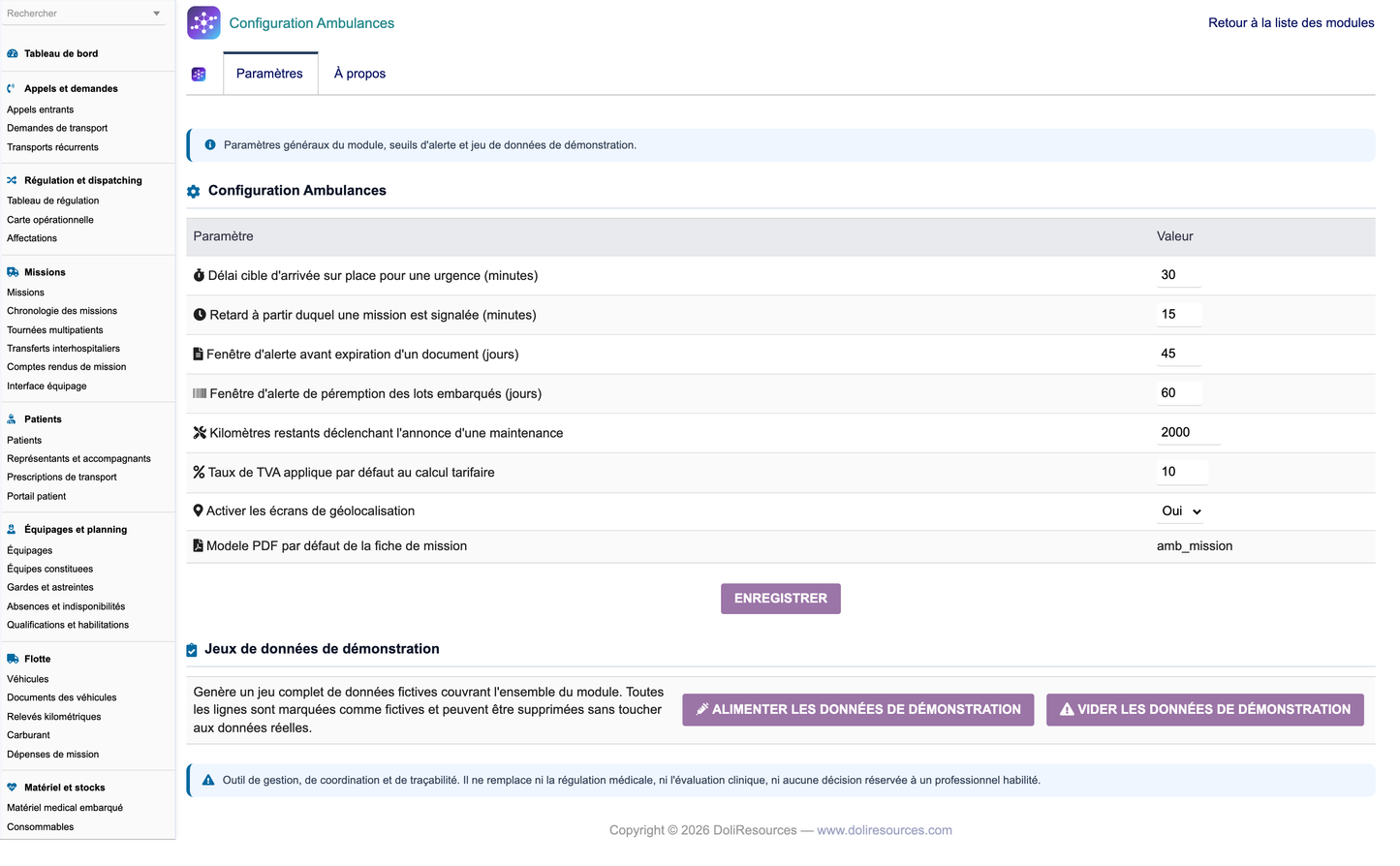
The configuration page offers Populate and Purge. Every generated row is tagged, including the native third parties and products, and the purge removes only tagged rows, cascading onto records a user created under a demonstration parent.
The dataset is deliberately realistic: dated objects spread over twelve full months so no monthly chart has an empty bar, a cohort forced onto today so the today tiles are never zero, missions allocated from a per vehicle and per day cursor so two can never overlap on one vehicle, and revenue and cost computed from the same mission so the printed margin is reproducible.
63. Installation
Unzip module_ambulancemanagement-1.0.zip into htdocs/custom/ so that htdocs/custom/ambulancemanagement/ exists, then enable the module in Home > Setup > Modules. Activation creates the tables and indexes, inserts the rights and the menu tree, and seeds the demonstration dataset.
The module depends on the native Third Parties and Products modules. It requires PHP 8.0 or above and supports Dolibarr 18 through 23.
64. Deliverables
· module_ambulancemanagement-1.0.zip - the installable module.
· screenshots/ - annotated screen captures of every major screen.
· Ambulance_Management_User_Training_Manual_FR.pdf - French user and training manual.
· Ambulance_Management_Complete_Features_EN.docx - this functional documentation.
· Ambulance_Management_Technical_Documentation_EN.md - technical documentation.
Appendix: business objects
49 objects, 116 coded columns sharing 73 controlled vocabularies.
|
Object |
Table |
Fields |
|
Ambbase |
llx_amb_base |
23 |
|
Ambzone |
llx_amb_zone |
15 |
|
Ambfacility |
llx_amb_facility |
21 |
|
Ambprescriber |
llx_amb_prescriber |
14 |
|
Ambinsurer |
llx_amb_insurer |
17 |
|
Ambconvention |
llx_amb_convention |
17 |
|
Ambpatient |
llx_amb_patient |
39 |
|
Ambguardian |
llx_amb_guardian |
14 |
|
Ambprescription |
llx_amb_prescription |
20 |
|
Ambcall |
llx_amb_call |
19 |
|
Ambrequest |
llx_amb_request |
29 |
|
Ambrecurring |
llx_amb_recurring |
22 |
|
Ambmission |
llx_amb_mission |
45 |
|
Ambstep |
llx_amb_step |
15 |
|
Ambassignment |
llx_amb_assignment |
15 |
|
Ambroute |
llx_amb_route |
18 |
|
Ambtransfer |
llx_amb_transfer |
20 |
|
Ambreport |
llx_amb_report |
27 |
|
Ambcrew |
llx_amb_crew |
23 |
|
Ambqualification |
llx_amb_qualification |
13 |
|
Ambteam |
llx_amb_team |
15 |
|
Ambshift |
llx_amb_shift |
17 |
|
Ambabsence |
llx_amb_absence |
13 |
|
Ambposition |
llx_amb_position |
16 |
|
Ambgeofence |
llx_amb_geofence |
15 |
|
Ambvehicle |
llx_amb_vehicle |
36 |
|
Ambvehicledoc |
llx_amb_vehicledoc |
14 |
|
Ambmileage |
llx_amb_mileage |
14 |
|
Ambfuel |
llx_amb_fuel |
17 |
|
Ambexpense |
llx_amb_expense |
16 |
|
Ambequipment |
llx_amb_equipment |
19 |
|
Ambconsumable |
llx_amb_consumable |
14 |
|
Ambvstock |
llx_amb_vstock |
14 |
|
Amblot |
llx_amb_lot |
14 |
|
Ambinventory |
llx_amb_inventory |
15 |
|
Ambcylinder |
llx_amb_cylinder |
17 |
|
Ambchecklist |
llx_amb_checklist |
20 |
|
Ambcleaning |
llx_amb_cleaning |
17 |
|
Ambmaintenance |
llx_amb_maintenance |
23 |
|
Ambincident |
llx_amb_incident |
20 |
|
Ambaccident |
llx_amb_accident |
22 |
|
Ambcomplaint |
llx_amb_complaint |
19 |
|
Ambsurvey |
llx_amb_survey |
19 |
|
Ambaudit |
llx_amb_audit |
17 |
|
Ambtariff |
llx_amb_tariff |
26 |
|
Ambcoverage |
llx_amb_coverage |
19 |
|
Ambbilling |
llx_amb_billing |
33 |
|
Ambpayment |
llx_amb_payment |
16 |
|
Ambcost |
llx_amb_cost |
24 |
The module is a management, coordination and traceability tool. It never replaces medical dispatching, clinical assessment, or any decision reserved to an authorised professional.


