
Discover powerful Dolibarr extensions designed to automate your business processes
Annual HR Performance Reviews (technical name gestionentretiensannuelsrh) turns Dolibarr ERP into a complete platform for running the annual appraisal cycle end to...
Couldn't load pickup availability


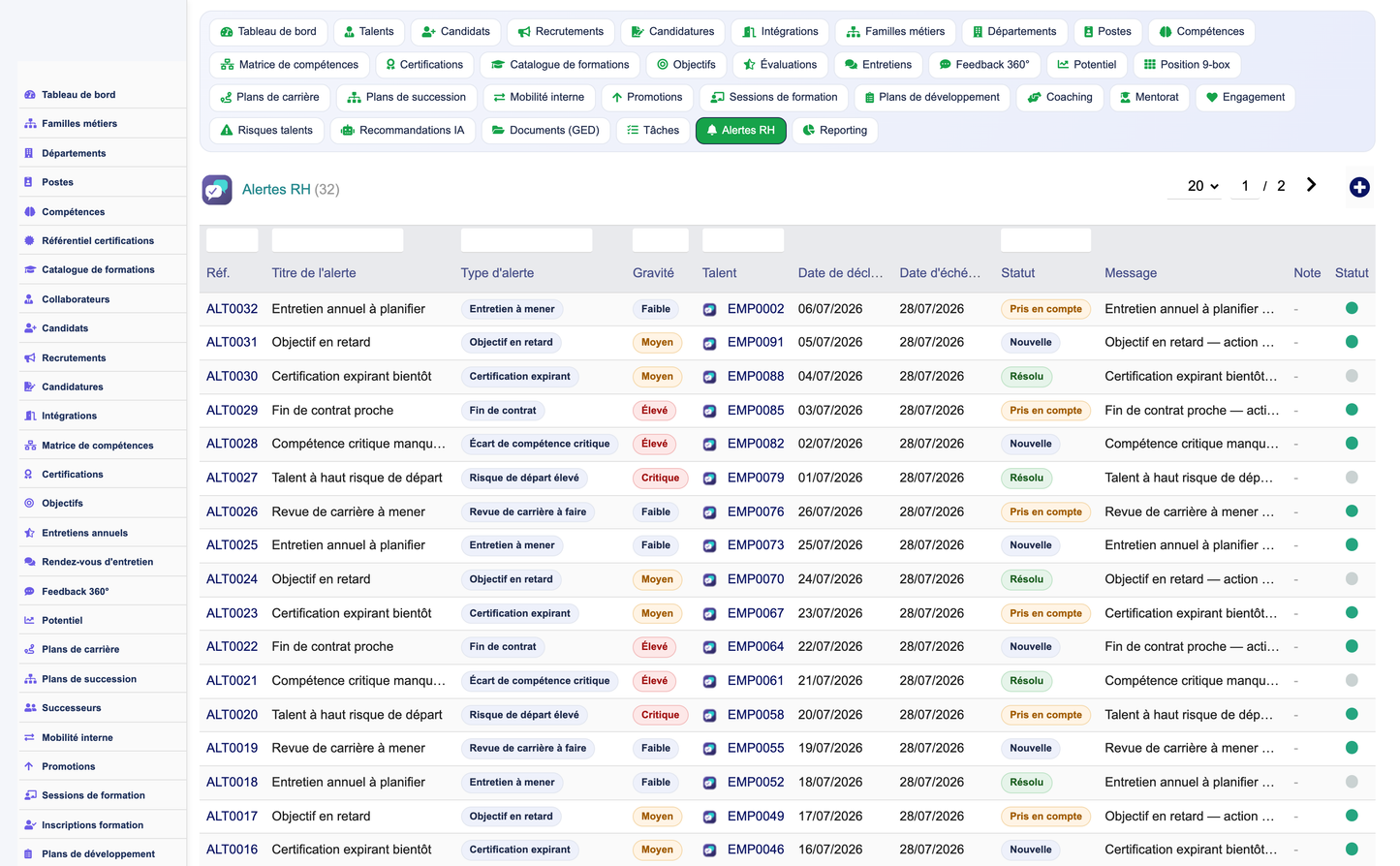
Annual HR Performance Reviews (technical name gestionentretiensannuelsrh) turns Dolibarr ERP into a complete platform for running the annual appraisal cycle end to end. It covers the full chain of events that make up a performance review: campaign creation and scheduling, interview preparation, employee self-assessment, manager assessment, SMART/OKR goal tracking, competency and behaviour evaluation, action and individual development plans, training follow-up, internal mobility, promotions, succession planning, electronic signatures, structured approval workflows, and a full reporting and People Analytics layer built around the module's central concept, the "Annual Performance Center" dashboard.
The module is published by DoliResources (www.doliresources.com) as version 1.0, targets Dolibarr 17 and later running on PHP 8, and is distributed under the GNU General Public License v3 or later. It belongs to the Human Resources application family inside Dolibarr and is designed to sit alongside — and interoperate with — the ERP's native Users, Third Parties, Agenda, Projects and Document Management (GED/DMS) modules rather than duplicating them.
Functionally, the module is organised as thirty-five interrelated business objects stored in thirty-five dedicated SQL tables (table prefix llx_gea_). Every object follows the same Dolibarr CommonObject conventions — reference, status, entity, creation/modification timestamps and audit columns — so the objects behave like native Dolibarr records: they can be listed, filtered, exported, linked to other objects, and attached to documents.
The module addresses HR teams, line managers, and employees, with three main goals:
· Standardise the annual review process — a single, auditable workflow from campaign launch to signed review, replacing spreadsheets and email threads.
· Connect performance to talent decisions — goals, competencies, potential and 9-box positioning feed directly into career plans, mobility, promotion and succession.
· Give HR and Direction a live cockpit — the Annual Performance Center dashboard and nine reporting modules turn review data into decision-ready indicators.
· Multi-campaign annual review cycles with configurable periods and status tracking.
· Structured interviews (self, manager, 360°) with scheduling, duration and outcome capture.
· SMART and OKR goal management with weighting, progress tracking and target/current values.
· Competency and skill-gap assessment against a shared skills and job-family referential.
· 9-box performance/potential grid feeding talent category and succession decisions.
· Individual development plans (IDP), coaching, mentoring and training session tracking.
· Career plans, internal mobility, promotions and succession/successor management.
· Nine dedicated reporting modules with PDF, Excel, CSV and Word export.
· A dashboard-driven "Annual Performance Center" with KPI cards, 9-box matrix, charts and AI recommendations.
· A documented REST API and a granular, nine-group permission model with 26 individual rights.
The module is built around four functional layers that map directly onto its thirty-five business objects: a Referential layer that defines the organisational and skills framework, a Talent Acquisition layer that manages recruitment through onboarding, a Review & Performance layer that runs the annual appraisal cycle itself, and a Career & Development layer that turns review outcomes into concrete talent actions. A transverse Reporting & Analytics layer reads across all four and feeds the dashboard.
Job families, departments, positions, skills, certification references and the training catalogue form the shared vocabulary that every other object refers to. Positions are attached to departments and job families; skills can be flagged as strategic, future-critical or mandatory-critical, which downstream reports use to flag organisational risk.
· Job families and departments define the organisational hierarchy and cost centres.
· Positions carry job level, grade, headcount targets, salary bands and criticality flags.
· The skills and certification catalogues are shared by employee skill matrices, evaluations, and training.
Candidates, recruitment requisitions, applications and onboarding plans give the module a lightweight but complete hiring pipeline, so that a new hire's data — position, department, manager, contract type — flows straight into the employee record used by the review process, with no re-entry.
This is the operational core described in sections 3 to 9: campaigns (represented as evaluations), interviews, self-assessment and manager assessment, objectives, competency assessment lines, and the resulting performance and potential scores.
Individual development plans, coaching, mentoring, career plans, mobility, promotion and succession/successor objects consume the outputs of the review layer (scores, 9-box position, skill gaps) and turn them into concrete HR actions, closing the loop between assessment and talent management.
· Documents (DMS) — links generated or uploaded files (review forms, signed PDFs, certificates) to any object.
· Tasks and Alerts — operational reminders (overdue objectives, interviews to conduct, expiring certifications).
· AI Recommendations — scored, prioritised suggestions attached to an employee record.
· Talent Risk — departure-risk scoring used by the 9-box and succession modules.
A review campaign is represented in the module by the Evaluation object (list page geaevaluation_list.php), which carries an evaluation type, a period label, an evaluation date, the evaluator, and the resulting overall, performance and potential scores. Grouping evaluations by period is how HR administers a company-wide annual campaign (for example "Annual Review 2026") while still tracking each individual appraisal as a discrete, auditable record.
Each evaluation is linked to a single employee (Talents, geaemployee_list.php) and carries a status field (eval_status) that HR uses to track where the appraisal sits in the cycle — draft, in progress, submitted, validated or closed — together with free-text comments and an internal note. A recommendation field lets the evaluator capture a summary decision (promote, develop, retain, monitor) directly on the campaign record.
1. HR (or Direction) opens the campaign by creating evaluation records for the target population, typically one evaluation per employee per period.
2. Preparation: interviews are scheduled, objectives from the previous period are reviewed, and self-assessment access is opened to employees.
3. Execution: self-assessment and manager assessment are completed, competency assessment lines are scored, and the interview itself is conducted and logged.
4. Consolidation: overall, performance and potential scores are computed, the 9-box position is updated, and a recommendation is recorded.
5. Closure: the evaluation is validated, optionally signed, archived through the DMS integration, and feeds the reporting and dashboard layers.
· Evaluation type — distinguishes annual review, mid-year check-in, probation review or 360° cycle.
· Period — free-form label used to group and filter campaign-wide reporting (e.g. "2026", "H1-2026").
· Evaluator — the user (typically the direct manager) responsible for the appraisal.
· Overall / performance / potential scores — numeric outcomes that feed the 9-box matrix and People Analytics.
· Recommendation and comments — narrative and structured summary used by career and succession processes.
Interviews (Interviews, geainterview_list.php) are scheduled events distinct from the evaluation record itself: an evaluation can be supported by several interviews (preparation meeting, the formal annual interview, a follow-up), each tracked with its own date, duration, interviewer, type, status and outcome.
· Interview type — annual appraisal interview, self-assessment review, manager calibration, 360° feedback session, or ad hoc follow-up.
· Interviewer — the user conducting the interview (usually the manager, sometimes HR or a peer for 360°).
· Duration — planned or actual meeting length in minutes, used for workload reporting.
· Status — scheduled, held, postponed or cancelled.
· Outcome and summary — free-text minutes and a structured outcome flag consumed by the reporting layer.
Interviews integrate with Dolibarr's native Agenda module so that scheduled interviews can appear on the manager's and employee's calendars, and with 360-degree Feedback (geafeedback_list.php) records, which capture rating, competency and comment from any designated author — peers, direct reports, or cross-functional stakeholders — independently of the formal manager assessment.
· The Alerts module (geaalert_list.php) proactively surfaces "interviews to conduct" so HR and managers do not miss a scheduling deadline before the campaign closes.
· Interview outcomes flow into the evaluation's overall score and recommendation, and are visible in the employee's People Analytics history.
Self-assessment is the stage of the campaign where the employee records their own view of performance against objectives and competencies before the manager interview takes place. In the data model it uses the same Evaluation and Evaluation Line structures as the manager assessment, distinguished by evaluation type and evaluator, which keeps both perspectives comparable side by side without requiring a separate object family.
· The employee reviews the objectives set for the period and records progress against each one (current value vs. target value, and a progress percentage).
· The employee rates their own level on each competency line (Evaluation Lines: expected level, rated level, score, comment) against the expected level attached to their position.
· Free-text comments capture achievements, difficulties encountered, and development wishes for the coming period.
· The self-assessment stage feeds directly into the interview preparation, giving the manager a documented starting point rather than a blank form.
Self-assessment records are visible to the employee (via the Employee/Talent record they are linked to) and to their manager, but are governed by the same performance permission group as manager assessments — read access is required to view them and write access to submit or amend them, so an organisation can choose whether employees see manager comments before or after the formal interview.
Manager assessment mirrors the self-assessment structure but is completed by the employee's direct manager (or another designated evaluator) and forms the formal, decision-bearing half of the appraisal. The manager rates each competency line, validates or adjusts objective progress, and records the overall performance and potential scores that ultimately populate the employee's 9-box position.
· Evaluation lines — one row per competency, each with an expected level (from the position's requirements), a rated level, a computed score and a free-text comment.
· Overall / performance / potential scores — entered or computed at the evaluation header level and used across reporting and the dashboard.
· Recommendation — a structured decision (e.g. promote, develop, monitor, exit-risk) attached to the evaluation.
· Comments — the manager's narrative assessment, kept alongside — and distinguishable from — the employee's own comments.
Manager assessment is the point at which competency gaps identified during the review are reconciled with the employee's skill matrix (SkillMatrix, geaemployeeskill_list.php), updating current level, target level and the resulting gap, which subsequently drives development-plan and training recommendations.
Calibration across a team or department is supported by grouping evaluations under the same period and reviewing them together in the reporting module's performance report, which distributes scores and flags outliers before scores are finalised.
Objectives (Objectives, geaobjective_list.php) are first-class records, independent of the evaluation they are ultimately reviewed against, so that goals can be set at the start of a period and tracked continuously rather than only at review time. Each objective belongs to an employee, carries a title, an objective type, a period, a weight, a target value, a current value, a computed progress percentage, a status, a start date and a due date.
Individual, Specific-Measurable-Achievable-Relevant-Time-bound objectives are the default objective type: a single target value, a due date, and a weight that determines how much the objective contributes to the employee's overall performance score when several objectives are combined.
The same object model supports Objectives-and-Key-Results usage: a higher-level objective can be declared with several linked key-result objectives (each with its own target and current value), letting teams cascade company or department objectives down to individual key results while keeping every key result independently trackable and reportable.
· Weight — relative importance of the objective within the employee's total goal set.
· Target value / current value — quantitative measurement basis for progress.
· Progress percentage — computed indicator surfaced on KPI cards and in the performance report.
· Status — not started, in progress, at risk, achieved, or missed.
· Due date — drives the "overdue objectives" alert shown on the Annual Performance Center.
The REST API exposes objectives directly (GET objectives, PUT objectives/{id}), so objective progress can be updated from external systems — a project management tool, a CRM pipeline target, or a custom integration — without requiring a manual entry in Dolibarr, keeping goal-tracking data current between formal review cycles.
Competency assessment rests on a shared Skills referential (Skills, geaskill_list.php) that defines each skill's type, category, owning job family, and whether it is flagged strategic, future-critical or currently critical, plus a maximum proficiency level used consistently across the module.
· Skill Matrix (geaemployeeskill_list.php) — one row per employee per skill, tracking current level, target level, computed gap, last assessment date and certification status.
· Evaluation lines — competency ratings captured inside a specific campaign (expected level vs. rated level, with score and comment), which is how a single interview updates the skill matrix.
· Certification catalogue and records (CertificationRefs / Certifications) — issuer, domain, validity period, mandatory flag, and each employee's obtained/expiry dates and status, connecting formal certifications to the same skills referential.
Because skills carry criticality and strategic flags, the reporting module's skills report can highlight organisation-wide gaps on skills marked critical or future-critical — the skills the business needs but does not currently have enough proficient employees to cover — well before those gaps become a delivery risk.
Behaviours and values are assessed using the same evaluation-line mechanism as technical competencies: a behavioural or values-based skill is simply a Skill record with skill_type set accordingly, so behaviours, values and technical competencies are rated, gapped and reported on through one consistent engine rather than three separate ones.
Performance review consolidates the outputs of sections 5 to 8 — self-assessment, manager assessment, objective progress and competency ratings — into the employee-level indicators used throughout the rest of the module: performance_score, potential_score, engagement_score, skills_score and the resulting nine_box position, all stored directly on the Employee (Talent) record for fast reporting and dashboard access.
Potential (Potential, geapotential_list.php) records combine a performance axis and a potential axis, computed on an assessment date, into the classic nine-box talent grid (nine_box), together with a talent category, a readiness indicator and an action plan reference. The same nine_box value is mirrored on the employee record so it can be filtered and charted without a join.
· High potential / key talent flags — boolean indicators (is_high_potential, is_key_talent) set from the 9-box outcome, used to drive succession and retention priority.
· Risk level — departure-risk classification, cross-referenced with the dedicated Talent Risk object for a fuller risk assessment (risk type, probability, impact, mitigation).
· Talent category — the qualitative label (e.g. star, core performer, underperformer) attached to the 9-box cell, used consistently across dashboards and reports.
Performance outcomes are the direct input to career plans, promotions, and succession candidacy: an employee's readiness for a target position (Career Plans) and their fit score as a successor (Successors) are evaluated against the same performance and potential scores recorded here, keeping the whole talent chain traceable back to a specific review campaign.
Individual Development Plans (Development Plans, geaidp_list.php) turn a skill gap or a review outcome into a concrete, trackable action: each IDP is tied to an employee, a period, and typically a target skill, and carries a development action description, a status, a progress percentage, a start date and a due date.
· Coaching (geacoaching_list.php) — structured coaching engagements between an employee and a coach, with a coaching type, a planned number of sessions, sessions completed, dates, status and an explicit objective.
· Mentoring (geamentoring_list.php) — mentee/mentor pairings under a named program, with frequency, dates, status and objective, distinct from coaching in that it is peer- or senior-led rather than professionally facilitated.
· Training sessions and registrations (geatrainingsession_list.php / geatrainingreg_list.php) — sessions scheduled against the training catalogue (modality, trainer, seats, cost), with per-employee registration status, attendance rate, quiz score and satisfaction.
· Tasks (geatask_list.php) — generic, assignable follow-up actions linked to an employee, used to operationalise any item from a development plan that does not warrant its own object.
Development plans close the loop opened by competency assessment: a skill gap recorded on the skill matrix is the natural trigger for an IDP, a training registration, or a coaching engagement, and progress on all three is visible together on the employee's record and in the development-oriented views of the reporting module.
Because career mobility depends on closing the same gaps, development plan progress is one of the readiness inputs used by Career Plans when computing an employee's readiness percentage for a target position.
The Reporting menu entry (reporting.php) exposes nine dedicated sub-reports, each addressable as reporting.php?report=CODE and each governed by the reporting permission group, which is read-only by design — reporting never modifies underlying data, it only aggregates it.
|
Report code |
Report name |
Content |
|
headcount |
Headcount |
Employee counts by department, position, contract type and job level, with trend over time. |
|
recruitment |
Recruitment |
Requisitions, applications, time-to-fill and pipeline conversion by stage. |
|
performance |
Performance |
Evaluation score distribution, calibration view and campaign completion rate. |
|
skills |
Skills |
Skill coverage, critical and strategic skill gaps, and certification compliance. |
|
training |
Training |
Session attendance, completion, satisfaction and cost by catalogue category. |
|
succession |
Succession |
Position criticality, bench strength, vacancy risk and successor readiness. |
|
mobility |
Mobility |
Internal transfers, promotions and department-to-department movement. |
|
engagement |
Engagement |
Engagement survey scores, eNPS and satisfaction/wellbeing trends. |
|
turnover |
Turnover |
Departure rate, voluntary vs. involuntary split, and departure risk by segment. |
Table 1 — The nine reporting.php sub-reports
Every report can be exported in four formats to match how the recipient will consume it: PDF for board-ready and archival documents, Excel for further analysis and pivoting, CSV for integration with external BI tools, and Word for narrative HR documents that combine charts with commentary.
· PDF export — formatted, print-ready layout suitable for Direction and works council reporting.
· Excel export — structured workbook preserving underlying values for further analysis.
· CSV export — flat, tool-agnostic format for data warehouses and BI pipelines.
· Word export — narrative report combining tables, charts and free-text commentary.
All reports respect the multi-entity boundary described in section 13, so a report run in a given Dolibarr entity only ever aggregates data belonging to that entity, keeping group-level and subsidiary-level reporting properly isolated in MultiCompany deployments.
The module's dashboard (dashboard.php) is branded the "Annual Performance Center" and acts as the daily entry point for HR, managers and Direction: a single page that blends headline indicators, the talent grid, trend charts, actionable widgets and AI-generated recommendations.
At the top of the dashboard, a global HR performance index summarises the health of the whole review cycle into one hero number, with supporting axis indices breaking that summary down by dimension — performance, potential, skills, engagement — so a reader can see at a glance which axis is driving the overall score up or down.
A row of KPI cards surfaces the metrics HR checks most often, each with its own drill-down:
· Active headcount and headcount vs. target, by department.
· Campaign completion rate for the current period.
· Average performance and potential scores.
· Share of high-potential and key-talent employees.
· Open objectives at risk or overdue.
· Critical positions with insufficient succession bench strength.
The dashboard renders the live 9-box grid (GeaChartNineBox) built from the Potential object, placing every assessed employee at the intersection of their performance and potential axis, colour-coded by talent category, giving HR and Direction an immediate visual map of the talent population.
· Headcount by department, hiring trend, and promotions trend.
· Evaluation score distribution and skills distribution.
· Certifications distribution and training trend.
· Engagement trend and departure-risk distribution by level.
Operational widgets — the Alerts panel — proactively list career plans due for review, expiring certifications, contracts nearing their end, high departure-risk talents, interviews still to be conducted, overdue objectives and missing critical skills, each linking straight through to the underlying record.
The AI Recommendations panel (AIRecommendations, geaairecommendation_list.php) lists system-generated suggestions per employee — a recommendation type, a label, a confidence percentage, a priority, a score and a rationale — surfaced on the dashboard as a priority action list so HR can act on the highest-confidence, highest-priority items first without having to comb through every individual record.
The module is designed to extend Dolibarr's native modules rather than replace them, so that installations already using Dolibarr for CRM, HR or project management gain review functionality without duplicate data entry.
· Users — every Employee (Talent) record can be linked to a Dolibarr internal user (fk_user), and evaluators, interviewers, coaches and mentors are all standard Dolibarr users, so permissions and login are managed in one place.
· Third parties — employees can be linked to a company record (fk_soc), and departments can be attached to a third party for organisations that model subsidiaries or business units as companies.
· Agenda — interviews and scheduled events can appear on the native Dolibarr calendar, keeping review scheduling visible alongside every other appointment.
· Projects — objectives and development actions can be cross-referenced with Dolibarr projects and tasks for organisations that track goals at the project level.
· HR module — complements Dolibarr's native HR features (leave, expense reports) rather than duplicating them; the two modules can be run side by side against the same employee base.
· DMS / GED — the Documents object (geadocument_list.php) links generated or uploaded files (review forms, signed PDFs, certification proofs) to any module object through Dolibarr's shared document management system.
· REST API — all major objects are exposed over Dolibarr's standard REST API framework (see section 16), enabling integration with external HRIS, BI or signature platforms.
· MultiCompany / MultiEntity — every table carries an entity column and every list and report respects the active entity, so the module works correctly in single-company and multi-company (MultiCompany module) Dolibarr installations.
Access control follows Dolibarr's standard rights model. The module declares twenty-six individual rights, organised into nine permission groups that mirror the module's functional areas, plus one administration right. For eight of the nine groups, each group exposes a Read, a Write (create/modify) and a Delete right; the ninth group, Reporting, is deliberately read-only since reports never write data. Read and Write are granted by default on module activation so the module is immediately usable; Delete and Administer are off by default and must be granted explicitly.
|
Permission group |
Read |
Write |
Delete |
|
Referential |
Yes |
Yes |
No |
|
Talent |
Yes |
Yes |
No |
|
Recruitment |
Yes |
Yes |
No |
|
Skills |
Yes |
Yes |
No |
|
Performance |
Yes |
Yes |
No |
|
Career |
Yes |
Yes |
No |
|
Development |
Yes |
Yes |
No |
|
Analytics |
Yes |
Yes |
No |
|
Reporting |
Yes |
N/A |
N/A |
Table 2 — Permission matrix (26 rights = 8 groups × Read/Write/Delete + Reporting Read-only + Administer)
An additional "Administer" right controls access to the module's own setup page, distinct from all nine functional groups, so day-to-day HR users never need administrative access simply to use the module.
· Every page and list controller checks the matching permission group and action before rendering or writing data, using Dolibarr's standard $user->hasRight(...) mechanism.
· The REST API applies the identical rights model server-side through a dedicated guard() method (see section 16) — module rights are never bypassed for API access.
· Module administrators (user->admin) implicitly pass every check, matching standard Dolibarr behaviour.
Because the module handles sensitive personal and performance data, every business object carries creation and modification user references (fk_user_creat, fk_user_modif) and timestamps (date_creation, tms), giving a full audit trail of who created or last modified any review, objective, competency rating or salary-related record. Confidential documents can be flagged explicitly on the Documents object. Demonstration data is tagged with a dedicated import_key so it can be identified and purged independently of real production data, and doing so never touches genuine records.
Organisations subject to GDPR or similar regulations should apply the same data-minimisation, retention and subject-access principles to this module's employee, candidate and evaluation records as to any other personal data held in Dolibarr; the module's rights model and audit columns provide the technical basis for demonstrating compliance (who accessed or changed what, and when).
The module follows standard Dolibarr module conventions: a descriptor class (core/modules/modGestionEntretiensAnnuelsRh.class.php) declares the module's numero, tables, rights, menus and permissions; every business object extends Dolibarr's CommonObject class, which provides create/fetch/update/delete, list, and cloning behaviour consistently across all thirty-five objects; and every list and card page reuses a shared generic list/card engine rather than thirty-five bespoke implementations, which keeps the UI consistent and the maintenance surface small.
All data lives in thirty-five SQL tables under the llx_gea_ prefix. Each table follows the same baseline column set — rowid, ref, business columns, note, status, entity, date_creation, tms, fk_user_creat, fk_user_modif, import_key — which is what lets the generic engine operate uniformly across every object.
|
Domain |
Tables (llx_gea_ prefix) |
|
Referential |
llx_gea_jobfamily, llx_gea_department, llx_gea_position, llx_gea_skill, llx_gea_certificationref, llx_gea_trainingcat |
|
Talent acquisition |
llx_gea_candidate, llx_gea_recruitment, llx_gea_application, llx_gea_onboarding |
|
Employee & skills |
llx_gea_employee, llx_gea_employeeskill, llx_gea_certification |
|
Review & performance |
llx_gea_evaluation, llx_gea_evaluation_line, llx_gea_interview, llx_gea_feedback, llx_gea_objective, llx_gea_potential |
|
Career & mobility |
llx_gea_careerplan, llx_gea_mobility, llx_gea_promotion, llx_gea_succession, llx_gea_successor |
|
Development |
llx_gea_idp, llx_gea_coaching, llx_gea_mentoring, llx_gea_trainingsession, llx_gea_training_reg |
|
Engagement & risk |
llx_gea_engagement, llx_gea_talentrisk, llx_gea_potential |
|
Operational / cross-cutting |
llx_gea_document, llx_gea_task, llx_gea_alert, llx_gea_airecommendation |
Table 3 — The 35 SQL tables grouped by functional domain (llx_gea_potential appears under both Review and Engagement & Risk, as it feeds both)
Every object class exposes the standard CommonObject field map (element, table_element, picto, fields[]) so Dolibarr's core list, export, and permission-checking machinery works without per-object customisation. Business columns are strongly typed per object — for example the Employee object alone carries over forty fields spanning identity, organisational attachment (department, position, manager), contract data, and the five computed scores (performance, potential, engagement, skills, and the resulting nine_box position).
· Standard Dolibarr hook points are used to extend native pages (for example, surfacing a "Talent" tab on the native Dolibarr user or third-party card) without modifying core files.
· Object triggers fire on create/update/delete for auditability and for cross-object consequences (e.g. updating an employee's nine_box when a related Potential record changes).
· The module's install/activation logic verifies the full table schema on activation and repairs missing tables or columns automatically, so a partially-installed or upgraded schema self-heals on the next activation rather than leaving silent gaps.
Rather than maintaining thirty-five separate list and card controllers, the module drives its pages from field metadata declared once per object class, so adding or adjusting a column is a metadata change, and every object automatically gets consistent search, sort, mass actions, export and permission behaviour.
The module exposes a REST API under the base path /api/index.php/gestionentretiensannuelsrh/ using Dolibarr's standard Restler-based API framework. The API class (class/api_gestionentretiensannuelsrh.class.php) declares the @class DolibarrApiAccess {@requires user,external} annotation required for authentication to run at all; every route additionally calls an internal guard() method that re-checks the authenticated caller's module rights (via DolibarrApiAccess::$user->hasRight(...)) before returning any data, so API access is governed by exactly the same permission groups described in section 14 — it is never a bypass of them.
|
Method |
Route |
Description |
|
GET |
evaluations |
List evaluations (annual review campaigns), filterable by type and status. |
|
GET |
evaluations/{id} |
Fetch a single evaluation, including its evaluation lines. |
|
GET |
objectives |
List objectives (SMART/OKR goals), filterable by employee and status. |
|
PUT |
objectives/{id} |
Update an objective — typically its current value and progress. |
|
GET |
interviews |
List interviews, filterable by interview type. |
|
GET |
employees |
List employee (Talent) records. |
|
GET |
actionplans |
List individual development plan actions, filterable by status. |
|
GET |
notifications |
List module notifications for the authenticated user. |
|
GET |
dashboard/kpis |
Return the headline KPI values used on the Annual Performance Center. |
Table 4 — REST API routes exposed by the module
As with every Dolibarr API, calls must present a valid API key via the DOLAPIKEY header (or equivalent query parameter, depending on API framework configuration). A request presenting a bogus or unrecognised key is rejected with an HTTP 401 Unauthorized response before it reaches any module code; a request with a valid key but insufficient module rights is rejected by the guard() method with an HTTP 403 Forbidden response naming the missing right group and action, so API consumers can distinguish an authentication failure from a permission failure.
· Sort fields are whitelisted against each table's real columns before being used in SQL, so arbitrary client-supplied sort input can never be used to inject SQL.
· List routes share a common listTable() helper that applies entity filtering, pagination (limit/page) and sort/order consistently across all endpoints.
· The PUT objectives/{id} route is currently the module's only write endpoint; all other routes are read-only, matching the API's primary use case of feeding external dashboards and syncing goal progress.
The module is installed like any standard Dolibarr add-on module and requires Dolibarr 17 or later running on PHP 8.
6. Download the module package (a folder named gestionentretiensannuelsrh) and copy it into the Dolibarr custom/ directory (or the location configured for external modules).
7. In the Dolibarr back office, go to Home > Setup > Modules/Applications and refresh the module list so the new module is detected.
8. Locate "Gestion des Entretiens Annuels RH" (Annual HR Performance Reviews) in the Human Resources family and click Activate.
9. On activation, the module creates its thirty-five llx_gea_ tables, registers its 26 rights, and installs its top and left menu entries; if any table or column is found missing on a later activation (for example after an upgrade), the schema is automatically repaired.
10. Open the module's Setup page (requires the Administer right) to review default configuration.
11. Assign the appropriate permission groups (section 14) to each user group or role (section 18) before opening the module to end users.
12. Optionally load demonstration data from the module setup page to explore the dashboard and reports with representative sample records; demonstration data is tagged with a dedicated import key and can be removed at any time without affecting real data.
No manual SQL execution is required: table creation, rights registration and menu wiring are all handled by the module descriptor during activation, consistent with standard Dolibarr module installation practice.
The module does not hard-code named roles; instead, Dolibarr user groups are configured with the combination of permission groups (section 14) appropriate to each real-world role. The table below shows a typical configuration for the five roles most installations define.
|
Role |
Typical permission configuration |
|
HR |
Full read/write across all nine groups; delete on referential and administrative data; typically the only role with the Administer right. |
|
Manager |
Read/write on talent, performance, career and development for their own team; read-only on referential, skills and reporting; no delete. |
|
Employee |
Read/write limited to their own self-assessment, objectives and development plan; read-only elsewhere; no delete. |
|
Direction |
Read across all nine groups, including reporting and analytics; write typically restricted to career, succession and promotion decisions; no delete. |
|
Read-only / Auditor |
Read on all nine groups (including reporting) and nothing else — no write, no delete, no administer — suited to compliance or works-council reviewers. |
Table 5 — Typical role-to-permission mapping (configured via standard Dolibarr user groups)
Because permissions are granted at the Dolibarr user-group level using the standard nine-group / 26-right model, organisations are free to define additional or narrower roles — for instance splitting "HR" into "HR Business Partner" (talent, career, development) and "HR Operations" (referential, recruitment, reporting) — without any code change, simply by assigning a different combination of the rights listed in Table 2.
This concludes the functional documentation for Annual HR Performance Reviews (gestionentretiensannuelsrh) version 1.0. For technical support, module updates or licensing questions, contact DoliResources at www.doliresources.com.


