
Discover powerful Dolibarr extensions designed to automate your business processes
Asset Management is a Dolibarr module that turns the ERP into a complete Enterprise...
Couldn't load pickup availability


Asset Management is a Dolibarr module that turns the ERP into a complete Enterprise Asset Management (EAM) platform. It centralises every piece of equipment, installation and infrastructure of the organisation and manages the full asset lifecycle — from acquisition and assignment, through operation and maintenance, to depreciation and renewal.
The module is designed around a single source of truth: the asset register. Every operational event (assignment, inter-site movement, intervention request, diagnostic, quote, purchase order, intervention, maintenance plan, contract, cost, inventory count, document and alert) is linked back to the asset it concerns, giving a 360° view of each item of the asset base.
The module addresses organisations that operate a large, distributed base of physical assets across several sites — industry, facilities management, healthcare, utilities, public sector and services.
· Asset & facility managers: who need a real-time inventory and location of every asset.
· Maintenance / CMMS teams: who run the maintenance cycle (requests, diagnostics, interventions, plans).
· Finance & controlling: who track acquisition value, depreciation, operating costs and the total cost of ownership.
· Operations & logistics: who follow assignments, inter-site movements and responsibilities.
A single register of all assets with real-time location, status, criticality and availability. It offers multi-criteria search and advanced filters (site, category, status, criticality, responsible), a view by asset type, and Excel export. Each row links to the full asset sheet.
.
A centralised technical, administrative and maintenance view of a single asset: code, label, type, brand, model, serial number, site, location, department, supplier, warranty, acquisition value and responsible. A visual maintenance cycle stepper shows the latest record at each stage, and quick tiles summarise the asset activity (open requests, interventions, downtime, availability). Recent history and associated documents complete the view.
Assignments allocate an asset to a site, department, employee or project, with start/end dates and status. The movement log traces every transfer, responsible change, creation and decommissioning between sites, giving full traceability of who holds what, where and since when.
The module implements the complete corrective and preventive maintenance chain, CMMS/GMAO-ready:
· Intervention request (DI): an issue reported on an asset, with priority and requester.
· Diagnostic: the root-cause analysis, with symptom, cause and recommendation.
· Quote: the supplier quotation (amounts, VAT, validity).
· Purchase order: the firm order derived from the accepted quote.
· Intervention: the executed work, with technician, provider, duration, downtime and cost.
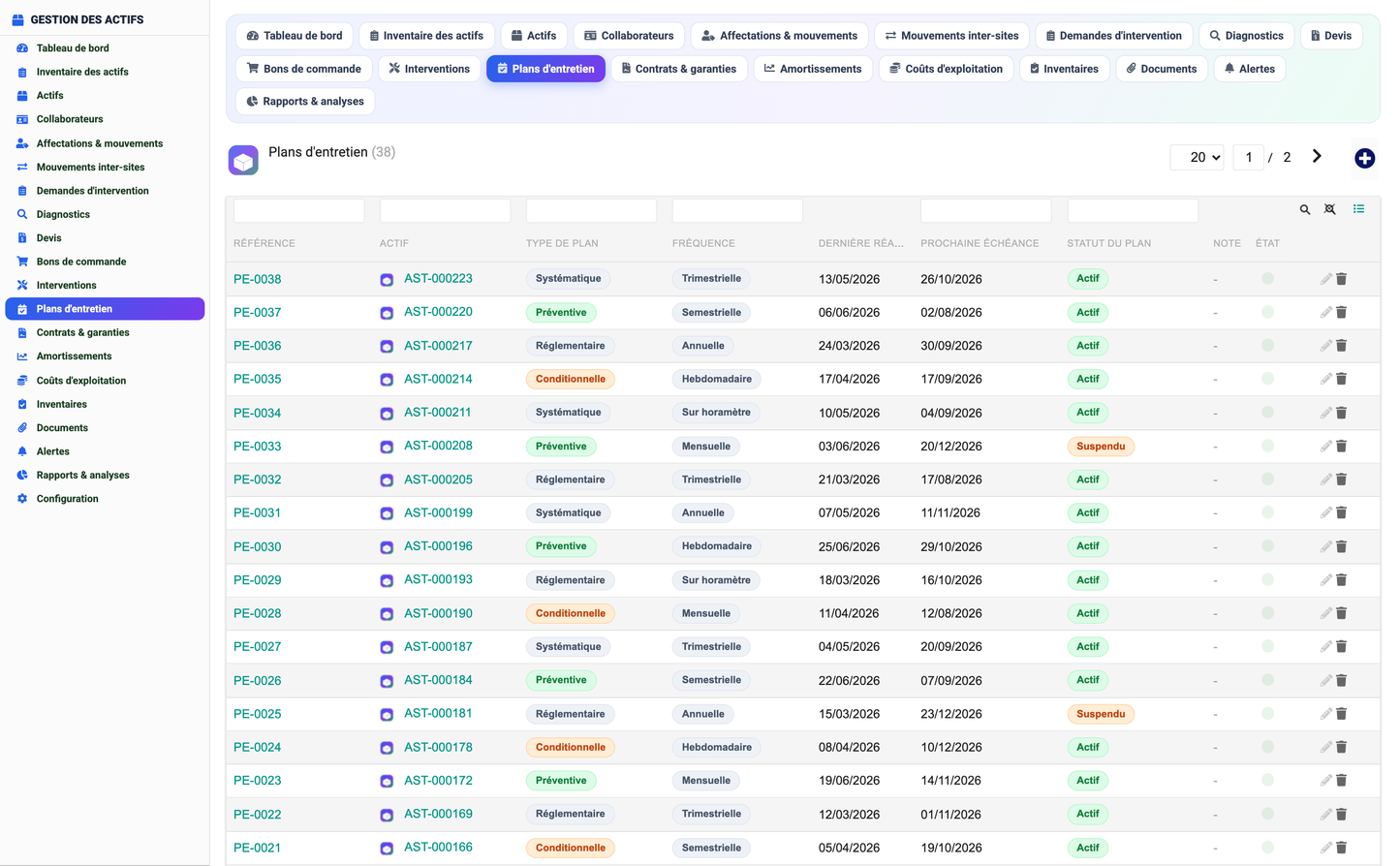
· Maintenance plan: preventive/systematic/conditional/regulatory plans with frequency, last done and next due.
· Contracts & warranties: warranty, maintenance, insurance, rental and leasing contracts with expiry tracking.
· Depreciation & renewal: straight-line or declining-balance schedules, residual value and renewal planning.
· Operating costs & TCO: acquisition, maintenance, energy, operation, insurance and depreciation entries feeding a Total-Cost-of-Ownership breakdown.
· Physical inventories: periodic physical counts with condition and compliance status.
· Documents: technical manuals, warranty contracts, maintenance reports, compliance certificates, invoices and photos attached to each asset.
· Automatic alerts: warranty expiry, maintenance due, contract deadlines, inventory discrepancies, criticality, low availability and renewal alerts, each with a severity level.
The dashboard is a modern cockpit organised in four zones — asset-base overview, operations & maintenance, costs & valuation, and alerts & deadlines — with KPI cards, an availability gauge, a per-site distribution, a TCO cost-breakdown donut and an open-alerts list.
The reporting studio provides a library of ready-made analytical reports:
.
|
Report |
Description |
|
Asset inventory |
Complete view of the asset inventory. |
|
Assets by site |
Distribution of the asset base across sites. |
|
Assets by category |
Distribution of the asset base by category. |
|
Assignment history |
History of asset assignments. |
|
Inter-site movements |
Transfers and movements between sites. |
|
Asset availability |
Analysis of asset availability. |
|
Critical assets |
List and analysis of critical assets. |
|
Renewal plan |
Planning of asset renewals. |
The module ships sixteen managed objects (database tables prefixed llx_gda_), all multi-company aware and integrated with the native Third parties, Users and Projects modules.
|
Object |
Purpose |
|
Asset |
Central register: code, label, category, type, brand, model, serial, site, location, department, criticality, responsible, acquisition value/date, supplier, warranty, availability, status. |
|
Collaborator |
Responsibles and technicians (employee id, name, function, department, site). |
|
Assignment |
Allocation of an asset to a site/department/employee/project. |
|
Movement |
Inter-site transfer / responsible change / creation / decommissioning. |
|
Intervention request |
Reported issue on an asset (priority, requester, status). |
|
Diagnostic |
Root-cause analysis linked to a request. |
|
Quote |
Supplier quotation (amounts, VAT, validity). |
|
Purchase order |
Firm order derived from an accepted quote. |
|
Intervention |
Executed work (type, technician, provider, duration, downtime, cost). |
|
Maintenance plan |
Preventive/systematic/conditional/regulatory plan (frequency, next due). |
|
Contract |
Warranty / maintenance / insurance / rental / leasing contract. |
|
Depreciation |
Depreciation schedule and renewal planning. |
|
Operating cost |
TCO source entries by cost family. |
|
Inventory |
Physical count with condition and compliance status. |
|
Document |
File attached to an asset (manual, contract, report, certificate, invoice, photo). |
|
Alert |
Automatic alert with type, severity and status. |
Access is governed by seven permission groups; read and write are granted by default so the module is usable immediately after activation, while delete and administration stay restricted.
|
Permission group |
Scope |
|
Assets |
Read/manage assets and collaborators. |
|
Assignments |
Read/manage assignments and inter-site movements. |
|
Maintenance |
Read/manage the maintenance cycle (requests, diagnostics, interventions, plans). |
|
Procurement |
Read/manage quotes, purchase orders and contracts. |
|
Finance |
Read/manage depreciation and operating costs. |
|
Documents |
Read/manage inventories, documents and alerts. |
|
Reporting |
Access reporting and dashboards. |
· Platform: Dolibarr 16.0 and above; PHP 7.1 and above.
· Integration: native Third parties (suppliers), Users and Projects modules.
· Internationalisation: French, English, Spanish, Italian and German language files.
· Demo data: a realistic multi-site demo dataset (Moroccan context, MAD currency) is installed on first activation and can be reinstalled or removed from the setup page.
· Licence: GNU General Public License v3 or later.
· Editor: DoliResources — www.doliresources.com.
© 2026 DoliResources — www.doliresources.com


