
Discover powerful Dolibarr extensions designed to automate your business processes


1. Product Overview
Auto Business Management transforms Dolibarr into a complete, specialized business solution for car dealerships, used-car resellers, importers, distributors and automotive trading companies. It manages the entire activity - purchasing, importing, stocking, selling, financing, preparing, delivering and after-sales - inside a single ERP/CRM, while fully leveraging native Dolibarr third parties, products, quotes, orders, invoices, payments, projects and agenda.
The module follows the native Dolibarr MVC architecture, uses the core CommonObject classes, respects the user permission system, triggers and hooks, and is compatible with Dolibarr 16 through 23 on PHP 7.1+. It ships fully multilingual (French, English, Italian, German, Spanish).
Key figures
|
Item |
Value |
|
Business objects |
20 dedicated objects (vehicles, sales, purchases, imports, warranties...) |
|
Permission profiles |
8 right groups covering 6 job roles |
|
Dashboard |
Automotive Premium cockpit: 5 alert tiles, 15 KPIs, 4 charts, live pipeline |
|
Reporting |
13 business reports with CSV / Excel / PDF export |
|
Languages |
French, English, Italian, German, Spanish |
|
Demo dataset |
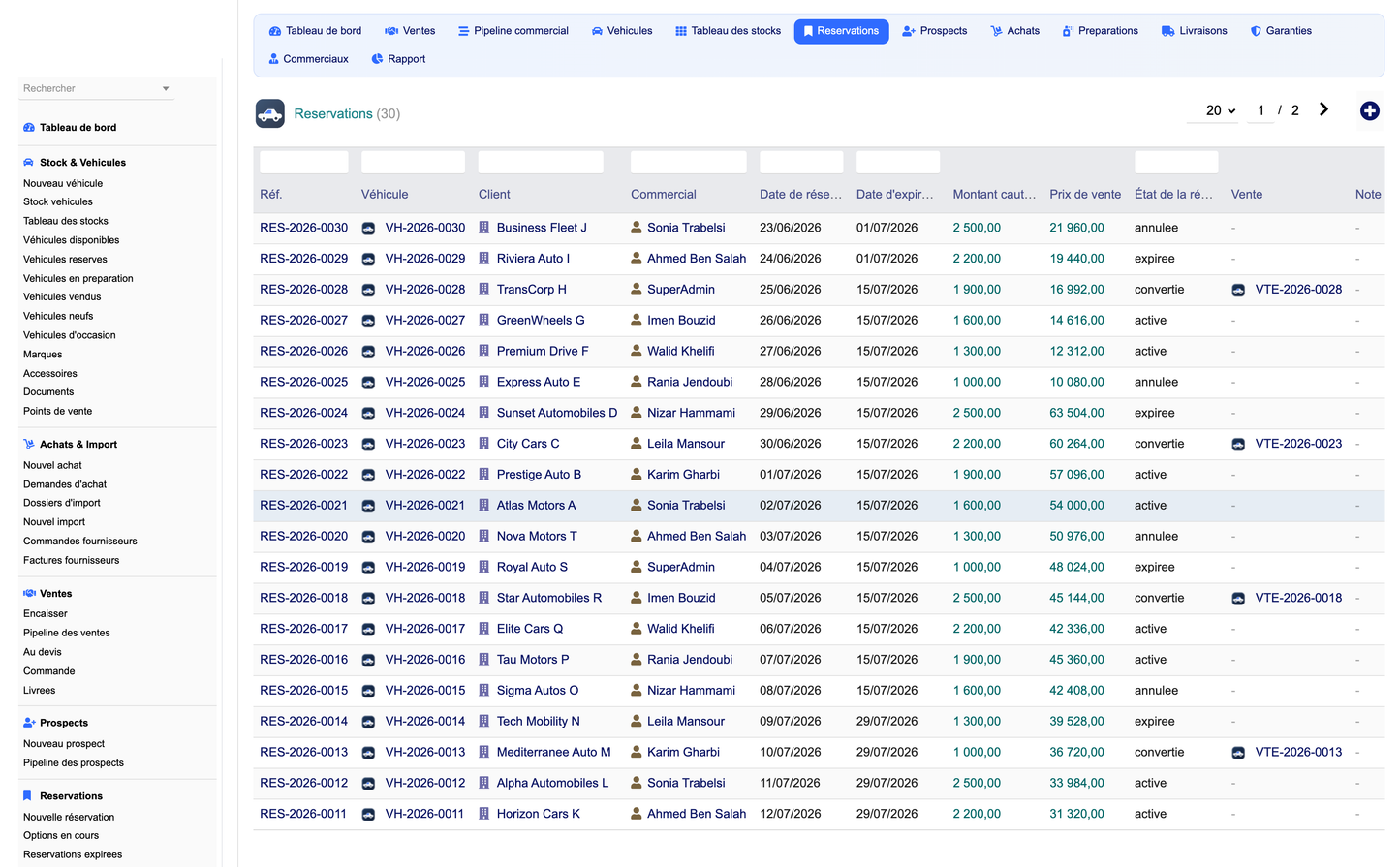
60 vehicles, 50 customers, 40 sales, 30 reservations and more |
2. Functional Scope
2.1 Vehicle stock management
· Each vehicle records automatic reference, type (new / used / import / demo / long-term lease), brand, model, version, year, category and bodywork.
· Technical data: VIN / chassis number, engine number, registration, mileage, fuel, fiscal & engine power, gearbox and transmission.
· Commercial data: purchase price, sale price, promotional price, expected margin and vehicle state (available, reserved, in preparation, sold, delivered, in maintenance).
· A real-time stock board grouping vehicles by state, plus multi-criteria search and quick filters.
2.2 Purchasing & import
· Purchasing: vehicle purchase requests, supplier orders, reception and stock allocation, connected to native supplier orders and invoices.
· Import files: origin country, foreign supplier, transport, customs duties and taxes, insurance and extra fees, with automatic real cost = purchase + transport + customs + fees.
2.3 Sales cycle & CRM
· CRM: prospect and opportunity capture with budget, vehicle of interest, source and assigned salesperson.
· Sales pipeline: a visual Kanban pipeline (Quote -> Reservation -> Order -> Invoice -> Delivered) with drag-and-drop stage changes.
· Each sale computes options, accessories, discounts, total amount and automatic margin computation per deal.
· Full native connection to Dolibarr third parties, quotes, orders, invoices and payments.
2.4 Reservations, financing & warranties
· Reservations: reserve a vehicle with a deposit and expiry date, automatic conversion to a sale and expiry alerts.
· Financing: cash, credit or leasing files with organism, financed amount, down payment, duration, rate and monthly payment.
· Warranties: manufacturer, internal and extended warranties with start/end dates, mileage limit and expiry alerts.
2.5 Preparation, delivery & after-sales
· Preparation workflow: mechanical check, cleaning, polishing, administrative check, accessory fitting and delivery validation, each with a responsible, planned/done date, cost and status.
· Delivery: delivery planning with address, documents handed over and customer signature.
· After-sales: maintenance and after-sales interventions linked to vehicles and warranties.
2.6 Sales force & profitability
· Team management: salespeople, monthly objectives (sales & revenue targets vs achieved) and automatically computed commissions.
· Profitability: purchase cost, total cost, sale price, gross and net margin per vehicle, per brand and per salesperson.
· Loyalty: customer loyalty tiers, points and total spent.
3. Dashboard & Reporting
The Automotive Premium dashboard offers an executive cockpit distinct from the standard Dolibarr home page, using a deep automobile-blue and elegant-black theme.
· It displays a premium header (available vehicles, annual revenue, vehicles sold) and five stock alert tiles.
· Then six KPI cards: stock & value, monthly revenue, average margin, vehicles sold, pending reservations, vehicles in preparation.
· Followed by a live sales pipeline preview and four charts: monthly revenue, stock by category, revenue by brand and top selling models.
The reporting hub provides 13 business reports - vehicle stock, monthly sales, revenue, profitability per vehicle and per brand, sales-team performance, import costs, purchases, customers, reservations, financing, warranties and commissions - each exportable to CSV, Excel and PDF, and directly printable.
4. Architecture & Integration
The module is built on a generic, key-driven engine: a single object registry describes every business object (fields, foreign keys, hub flag), from which the list pages, card pages, cockpits and linked-record panels are rendered. This keeps the code compact, consistent and maintainable.
|
Layer |
Implementation |
|
Objects |
20 CommonObject classes, one SQL table each (llx_cartrade_*) |
|
Lists & cards |
Generic engines with column selector, filters and CSRF-safe forms |
|
Hubs |
Vehicle, sale, purchase, import, reservation, warranty and preparation cockpits |
|
Navigation |
Two-level left menu + in-page tab bar, session-synced highlighting |
|
Automation |
Daily cron engine: warranty/CT expiry, expired reservations, pending commissions |
|
Triggers |
Native events kept coherent (company / user deletion cleanup) |
|
Integration |
Third parties, products, quotes, orders, invoices, payments, projects, agenda |
Permissions (6 job roles, 8 right groups)
|
Role |
Scope |
|
Administrator |
Full module administration |
|
Sales manager / Salesperson |
Prospects, sales, reservations, loyalty |
|
Stock manager |
Vehicles, brands, accessories, documents, dealerships |
|
Vehicle preparer |
Preparation workflow and deliveries |
|
Accountant |
Financing and commissions |
|
Purchasing |
Purchase orders and import files |
5. Quick User Guide
Installation
· Copy the cartrade folder into htdocs/custom/ and enable it from Home > Setup > Modules (dependencies: Third parties and Products).
· Open the module setup page to define default currency, reservation deposit and VAT rate.
· Optionally install the demonstration dataset to explore the module with realistic data.
Typical business scenario
· Buy or import a vehicle, then place it in stock with its purchase price and expected margin.
· Capture a prospect, issue a quote, then reserve the vehicle with a deposit.
· Run the preparation workflow, then move the sale along the pipeline to Order and Invoice.
· Plan the delivery, collect the customer signature and mark the sale as delivered.
· Track margin, commissions and profitability from the dashboard and reporting hub.
(c) 2026 DoliResources - Auto Business Management v1.0. This document describes the complete feature set, architecture and usage of the module.


