
Discover powerful Dolibarr extensions designed to automate your business processes
BPMN Workflow Designer Enterprise turns Dolibarr into a complete Business Process Management (BPM) platform...
Couldn't load pickup availability


BPMN Workflow Designer Enterprise turns Dolibarr into a complete Business Process Management (BPM) platform with a BPMN 2.0-compliant graphical workflow designer, comparable to leading market solutions such as Camunda, Bizagi, Bonita BPM, IBM Business Automation Workflow, Appian, ProcessMaker, Flowable, jBPM and Oracle BPM.
It allows organizations to design, model, automate, execute, monitor, optimize and analyze all their business processes directly inside Dolibarr, without any external BPM tool. The module fully respects Dolibarr development standards: modular architecture, user rights, multi-company / multi-entity, multi-language, security, responsive design and compatibility with the latest stable Dolibarr versions.
· Graphical BPMN 2.0 process modeling (drag & drop, no code).
· Workflow automation, multi-level approval circuits and business rules.
· Automatic triggers, multichannel notifications, human and automatic tasks, events.
· SLA management with escalation, KPI, reporting and process performance analytics.
· Workflow versioning, simulation, audit trail and AI applied to workflows.
· Bidirectional integration with native Dolibarr modules.
Publisher: DoliResources — https://www.doliresources.com. The DoliResources name appears in the module information. Module technical name: bpmnworkflowdesigner. Version 1.0.
A dedicated top menu “WORKFLOW BPMN” groups all sub-menus:
· Dashboard — next-generation BPM cockpit.
· Business processes — workflow models and their lifecycle.
· Workflow Designer — graphical BPMN 2.0 editor.
· BPMN library — process diagrams (BPMN 2.0 XML/model store).
· Process categories — business domains.
· Workflow templates — ready-to-use models.
· Versions — workflow versioning and history.
· Simulations — pre-deployment load/delay/cost analysis.
· Deployments — publishing to test/production environments.
· Running instances & Execution log — live executions and journal.
· User tasks — queues and inboxes, human & automatic tasks.
· Validations — approval circuits.
· Events, Triggers — automation.
· Business rules — IF/THEN engine.
· SLA, Notifications — service levels and multichannel alerts.
· Variables, Forms — dynamic form builder and process variables.
· Connectors — integrations and API.
· KPI, Reporting — performance and decisional reporting.
· Setup — configuration and demo data management.
A modern BPM dashboard, completely different from the standard Dolibarr dashboard, inspired by leading BPM platforms with an electric-blue / workflow-violet / automation-teal / validation-green / waiting-orange / blocking-red color charter.
· Dynamic KPI cards: processes, active workflows, running & completed instances, average execution and validation time, automation rate.
· Instance kanban by status (running, pending, blocked, completed, cancelled).
· Interactive charts: instances by status (donut), instances by process (bar), tasks and validations by decision.
· Dedicated zones: process performance, workload & approvals, automation & SLA.
The business process list manages every modeled workflow with its own lifecycle (draft, active, archived), category, domain, owner, department, priority, SLA and automation rate.
· Elegant filters and show/hide column selector.
· Full lifecycle: creation, duplication, archiving, versioning, activation/deactivation, publishing, draft, validation, testing, deployment.
· Per-process indicators: current version, number of instances, average duration, automation rate.
A drag & drop graphical editor compliant with the BPMN 2.0 standard, letting users model processes visually without writing a single line of code.
· Complete palette: events (start, timer, message, end), activities (user task, service task, script task, business rule task, sub-process), gateways (exclusive, parallel, inclusive).
· Interactive SVG canvas: move nodes, create sequence & conditional flows, select and delete.
· Properties panel to rename and configure each element.
· Saves the BPMN model to the library with automatic element and flow counting.
The BPMN library centralizes all process diagrams, each storing its BPMN 2.0 model, element and flow counts and last modification date.
· One-click opening in the graphical designer.
· Diagram ↔ process association.
· Element (node) and flow (connection) detail per diagram.
A library of ready-to-use BPMN workflow templates deployable in one click: quote/order/invoice/purchase approval, hiring, leave, expense, contract, onboarding, complaint, intervention, budget.
· Each template auto-generates a process and its BPMN diagram.
· Immediate opening in the designer for customization.
The execution engine tracks every process instance with its status, current step, progress, owner and SLA status, plus a step-by-step execution log.
· Lifecycle: running, pending, blocked, completed, cancelled.
· Delays, SLA, escalation, reminders, cancellation, suspension, resume, reassignment.
· Complete history and journal per instance.
Human and automatic tasks form the queues and inboxes. Each task is typed (user, manual, service, script) and follows a new → in-progress → blocked → done lifecycle.
· Smart assignment: manual, automatic, rotation, workload, availability, skills, service, department, location.
· Priority, due date, duration and associated form.
· Per-agent workload monitoring.
An advanced approval engine supporting simple, double, triple, hierarchical, parallel, conditional, group, role and department validations.
· Decisions: pending, approved, rejected, return for modification, cancellation.
· Multiple validation levels with comment and signature.
· Full traceability (validator, decision date).
A rules engine applying IF / THEN / ELSE conditions, expressions and automatic decisions to drive the conditional branches of workflows.
· Multiple conditions, THEN and ELSE actions, priorities.
· Sequential or parallel execution.
· Secured PHP scripts and JavaScript for forms.
SLA management defines a target time and a maximum time per process, with automatic reminders, escalation and breach calculation.
· Target and maximum time per process.
· Escalation to a manager and automatic reminders.
· SLA breach counting and business-hours tracking.
The form builder attaches typed forms to workflows: text, number, date, time, attachment, signature, image, QR/barcode scanner, dropdown, checkbox, radio, upload, address, GPS.
· Required fields, default values, options and dynamic validation.
· Display conditions and automatic calculation.
· Publishing and process association.
Connectors provide bidirectional integration with native Dolibarr modules (third parties, products, orders, invoices, projects, DMS, HR...) and external services (REST, webhook, Slack).
· Types: module, REST, webhook, database. Direction: in, out, bidirectional.
· The BPM engine triggers actions on native modules (create, validate, modify, send e-mail, generate PDF, change status, create tasks, stock movements) and reacts to their events.
· REST API and webhooks, MultiCompany / multi-entity aware.
The simulation engine evaluates load, delays, costs and detects bottlenecks before deployment, from the process model and historical data.
· Load simulation (concurrent instances).
· Estimated duration and cost, bottleneck detection.
· Pre-production SLA verdict.
The AI assistant optimizes workflows, detects blockers, forecasts delays and generates a process from a natural-language description.
· Detection of most-blocked processes with recommendations.
· Identification of low-automation processes to optimize.
· Forecast of SLA-at-risk instances.
· BPMN sequence generation from a textual description; conversational BPM assistant.
The reporting suite covers processes, instances, tasks, validations, automation, SLA and workload. Every report is exportable (CSV/Excel) and printable.
· 7 thematic tabbed reports.
· CSV/Excel export and printing.
· Analyses by process, user, decision and month.
The KPI catalogue defines process performance indicators (average processing time, SLA compliance, automation rate, cost per instance...) with target value, current value and trend.
· Formula, unit, target and current value.
· Trend (up, stable, down) and period.
· Association with the measured process.
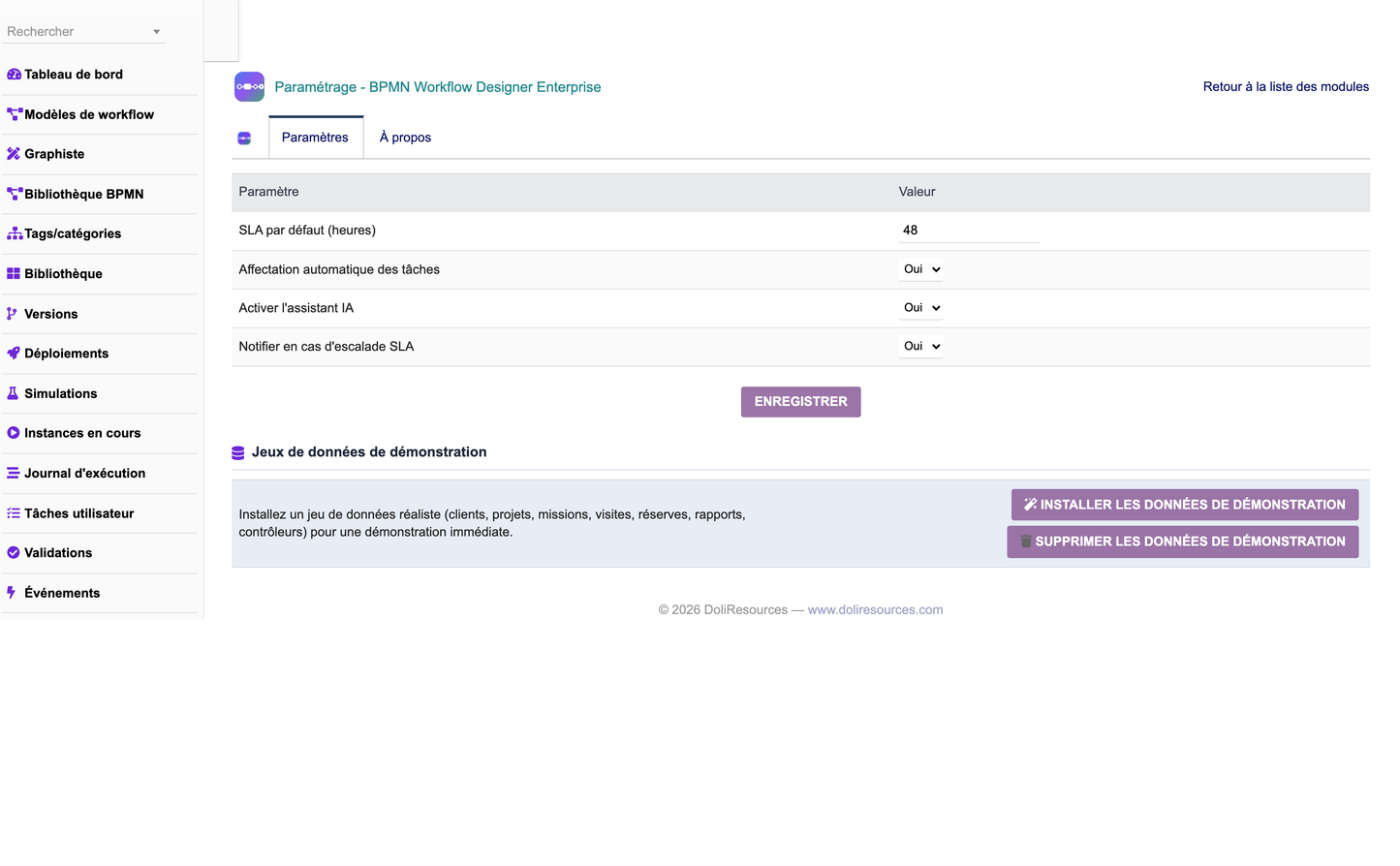
The Setup menu manages module configuration (default SLA, automatic assignment, AI assistant, escalation notifications) and provides two demo-data buttons.
· “Install demo data”: categories, processes, BPMN diagrams, versions, instances, tasks, validations, rules, forms, SLA, notifications, KPI and execution logs.
· “Remove demo data”: removes only demonstration data, preserving real user data.
· 23 granular rights across 8 permission groups; MultiCompany / multi-entity; 5 languages (FR, EN, IT, DE, ES).
· Advanced permission management with profiles and roles (read/write/delete per group + admin).
· Audit trail, complete history and execution journal.
· GDPR-oriented data handling, archiving and backup friendly.
· CSRF protection, escaped SQL and access control on every page.
· Object-oriented, modular, documented, optimized, secure and maintainable code.
· Dolibarr standards compliant; PHP 8.x; MySQL/MariaDB (PostgreSQL-friendly).
· Responsive design; performant on very large data volumes.
· 21 business objects, generic list/card engine, registry-driven architecture.
· Delivered as module_bpmnworkflowdesigner-1.0.zip (official Dolibarr format).
The module is fully translated using Dolibarr's native translation system into French, English, Italian, German and Spanish. All visible header/title keys are module-prefixed to avoid cross-module collisions.


