
Discover powerful Dolibarr extensions designed to automate your business processes
Clothing Store Management is a complete, ready-to-use business application that turns Dolibarr ERP/CRM into a specialised management platform for clothing and fashion retail....
Couldn't load pickup availability


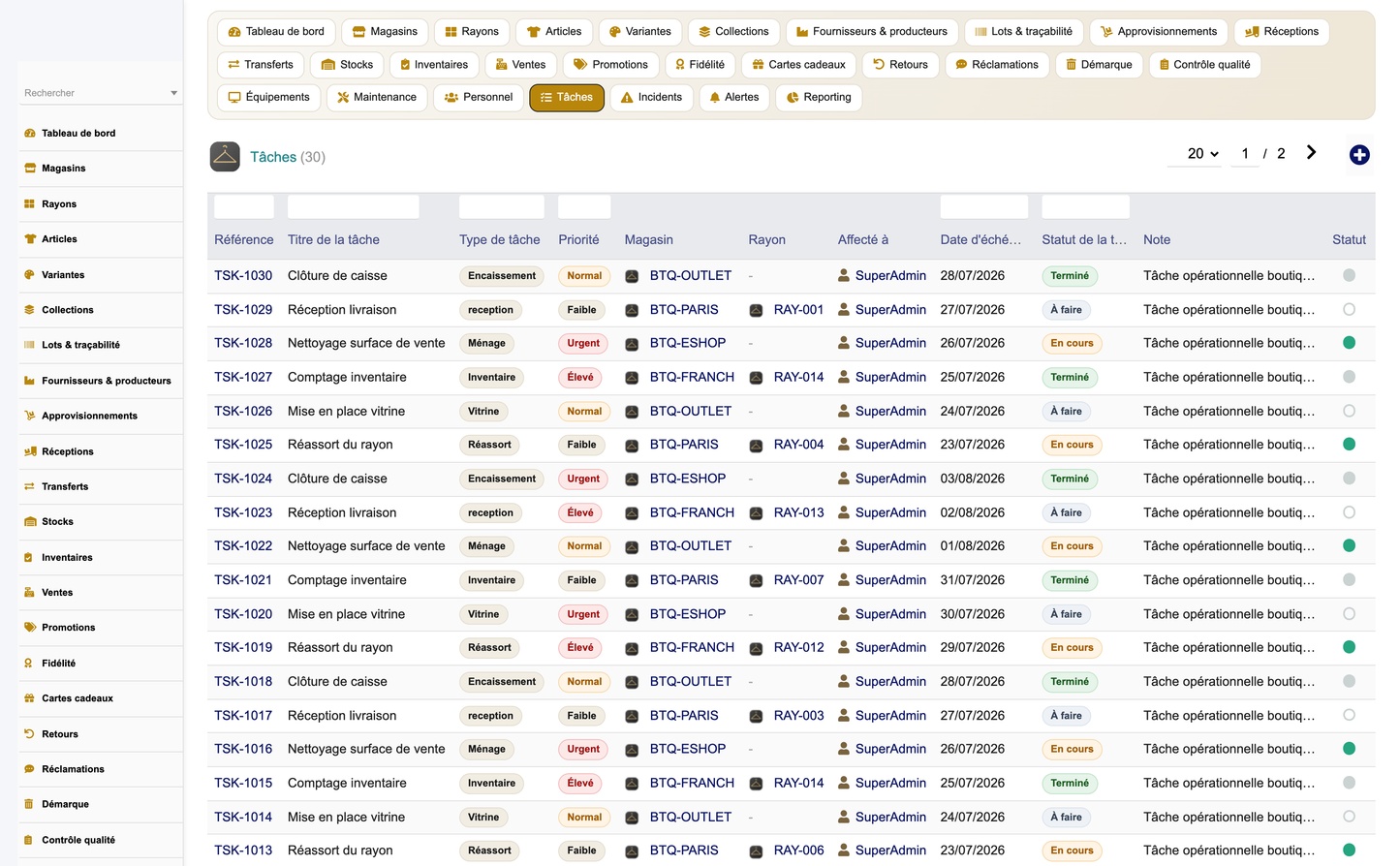
Clothing Store Management is a complete, ready-to-use business application that turns Dolibarr ERP/CRM into a specialised management platform for clothing and fashion retail. Published by DoliResources, it consolidates every operational dimension of a modern apparel business — network of stores and departments, seasonal catalogue with size×colour variants, purchasing and receptions, multi-store stock and inventories, in-store and omnichannel sales, promotions and sales periods, customer loyalty and gift cards, returns and claims, shrinkage and quality control, equipment and maintenance, staff, tasks, incidents and alerts — behind a single top-level menu and a dedicated "Fashion Retail Cockpit" dashboard.
The module is built entirely on native Dolibarr foundations. It reuses the third-party (Societe) and product (Product) repositories, warehouses, users and the multi-company (entity) framework, so a clothing retailer benefits from a purpose-built vertical solution without leaving the familiar Dolibarr environment, and without duplicating master data already held in the core.
The solution is designed for a broad range of fashion and textile businesses, including:
· Ready-to-wear shops and independent fashion boutiques
· Retail chains and franchise networks operating multiple points of sale
· Textile wholesalers, importers and distributors
· Shoe shops and footwear specialists
· Accessory and leather-goods shops
· Luxury boutiques and premium concept stores
· Sportswear and activewear retailers
· Kids and baby clothing shops
· Men's, women's and unisex apparel stores
· Plus-size specialists
· Destockers, outlets and off-price stores
· Textile e-commerce operators and click-and-collect retailers
· Showrooms, corners and pop-up stores
· Buying groups and central purchasing offices
The module follows the standard Dolibarr external-module architecture. A single descriptor class registers the module with the ERP, and a generic object engine drives all business entities from a central registry, which keeps the code base compact, consistent and easy to maintain.
The descriptor modGestionMagasinVetements (core/modules/) declares the module to Dolibarr. Its key properties are:
|
Property |
Value |
|
Class |
modGestionMagasinVetements |
|
Module number (numero) |
894000 (verified free of collision) |
|
Family |
products |
|
Version |
1.0.0 |
|
Editor |
DoliResources — https://www.doliresources.com |
|
Dependencies |
modSociete (Third parties), modProduct (Products) |
|
Minimum PHP |
7.1 |
|
Minimum Dolibarr |
16.0 (validated on Dolibarr 17) |
|
Table prefix |
llx_gmv_* |
|
Rights class |
gestionmagasinvetements |
|
Config page |
admin/setup.php |
On activation the init() method loads the SQL schema, deletes and rebuilds the menu tree, provisions the permission set, invokes a schema self-heal routine (gmvEnsureSchema) that reconciles the live tables with the expected columns on every upgrade, and finally generates the demonstration dataset if none is present. Deactivation is handled by remove().
All thirty business objects extend Dolibarr's CommonObject base class and are described declaratively in a single registry, lib/gestionmagasinvetements_objects.php. Each entry defines the PHP class, the physical table, an icon, a menu label, whether the object is a navigation "hub", its line/parent relationship where relevant, and the full field list (name, type, label, searchable flag). A shared list/card engine (objectlist.inc.php and objectcard.inc.php) renders every object's list view and record card from this metadata, so the presentation layer is uniform across the whole module while individual per-object PHP entry points remain thin wrappers.
Every table uses the llx_gmv_ prefix (for example llx_gmv_product, llx_gmv_sale, llx_gmv_stock). Tables carry the standard Dolibarr technical columns — rowid primary key, entity for multi-company isolation, status, creation and modification timestamps, author and modifier user references, and an import_key column used to tag and later safely remove seeded demonstration records. Foreign keys link module objects to one another and to native Dolibarr objects (User, Societe, Product, Entrepot).
A shared helper library (lib/gestionmagasinvetements.lib.php) centralises cross-cutting concerns: permission checks (gmvCan), scalar SQL helpers, KPI card and colour-palette rendering, menu activation, label forcing, the schema self-heal routine, and — importantly — the coded-vocabulary renderer (gmvVocabLabel). Business enumerations such as garment category, gender, season, material, cut, pattern, sale channel, payment method, promotion type, loyalty level and status codes are stored as short, language-neutral codes in the database and rendered at display time into the active user language. This keeps stored data stable and portable while presenting fully localised labels in five languages.
The module defines eight functional right groups plus an administration right. Read and write are granted by default so the module is usable immediately after activation, while delete and admin stay off until explicitly granted:
|
Right group |
Covers |
Read |
Write |
Delete |
|
store |
Stores & departments |
Yes |
Yes |
Optional |
|
catalog |
Catalog, articles, variants, collections, lots |
Yes |
Yes |
Optional |
|
purchase |
Suppliers, supplies, receptions, transfers |
Yes |
Yes |
Optional |
|
stock |
Stock & inventories |
Yes |
Yes |
Optional |
|
sales |
Sales, promotions, loyalty, gift cards, returns, claims |
Yes |
Yes |
Optional |
|
quality |
Losses & quality/hygiene controls |
Yes |
Yes |
Optional |
|
maintenance |
Equipment, maintenance, staff, tasks, incidents, alerts |
Yes |
Yes |
Optional |
|
reporting |
Reporting suite (read-only) |
Yes |
— |
— |
|
admin |
Administer the module (setup) |
— |
— |
— |
This yields 23 discrete permissions in total: read/write/delete for the seven operational groups, a single read permission for reporting, and one module administration right.
The module ships thirty business objects, organised into functional areas. The table below lists each object with its physical table and purpose.
|
Object |
Table |
Purpose |
|
Store |
llx_gmv_store |
Points of sale — flagship, franchise, outlet, corner, pop-up, e-shop |
|
Department |
llx_gmv_department |
In-store departments / universes (women, men, children, footwear…) |
|
Article |
llx_gmv_product |
Catalogue article (SKU), brand, family, season, prices, margins |
|
Variant |
llx_gmv_variant |
Size × colour declination of an article, with barcode / EAN-13 |
|
Collection |
llx_gmv_collection |
Seasonal collection / drop with theme, dates and budget |
|
Lot |
llx_gmv_lot |
Received lot linked to article and supplier, with arrival date |
|
Supplier |
llx_gmv_supplier |
Textile supplier / manufacturer with lead time and score |
|
Supply |
llx_gmv_supply |
Supply (purchase) order header |
|
Supply line |
llx_gmv_supply_line |
Ordered article/variant lines of a supply order |
|
Reception |
llx_gmv_reception |
Goods reception against a supply, with anomalies count |
|
Reception line |
llx_gmv_reception_line |
Expected vs received quantities and conformity per line |
|
Transfer |
llx_gmv_transfer |
Inter-store stock transfer of an article/variant |
|
Stock |
llx_gmv_stock |
Per store/article/variant physical, available, reserved & alert qty |
|
Inventory |
llx_gmv_inventory |
Stock count campaign (full or rolling) with gap count |
|
Inventory line |
llx_gmv_inventory_line |
Theoretical vs counted quantity and gap per line |
|
Sale |
llx_gmv_sale |
Sales ticket: store, seller, channel, payment, totals & margin |
|
Sale line |
llx_gmv_sale_line |
Ticket line: article/variant, size, colour, qty, discount, total |
|
Promotion |
llx_gmv_promotion |
Promotion / sales period: code, type, value, dates, usage |
|
Loyalty |
llx_gmv_loyalty |
Loyalty card: level, points, total spent, visits, size preference |
|
Gift card |
llx_gmv_giftcard |
Gift card: initial amount, balance, issue/expiry, status |
|
Return |
llx_gmv_return |
Customer return / exchange with reason, type and refund |
|
Claim |
llx_gmv_claim |
Customer claim with category, priority, status and satisfaction |
|
Loss |
llx_gmv_loss |
Shrinkage / breakage / theft / donation with buy & sell value |
|
Control |
llx_gmv_control |
Quality / hygiene / floor check with result and score |
|
Equipment |
llx_gmv_equipment |
Store equipment (register, terminal, gate, labeller…) |
|
Maintenance |
llx_gmv_maintenance |
Preventive/corrective maintenance of equipment |
|
Staff |
llx_gmv_staff |
Store staff: role, team, sales target, linked user |
|
Task |
llx_gmv_task |
Operational task with type, priority, assignee and due date |
|
Incident |
llx_gmv_incident |
In-store incident with severity, category and corrective action |
|
Alert |
llx_gmv_alert |
Operational alert (stockout, low stock, season end, transfer…) |
Article (Gmvproduct) — the heart of the catalogue. Beyond the SKU (ref) and label it carries an optional link to a native Dolibarr Product (fk_product), and to store, department and collection. Merchandising attributes include barcode, brand, designer, gender, category, product family, material, cut, pattern, season, country of origin and care instructions, plus new-arrival and eco-responsible flags. The commercial block holds purchase price, cost price, sale price, VAT rate and margin percentage, while stock_min and stock_max drive replenishment thresholds.
Variant (Gmvvariant) — the size×colour declination of an article. Each variant belongs to an article (fk_product) and carries its own SKU, size, colour, colour hex, material, barcode, EAN-13, stock quantity, weight, sale price and physical location. Variants are what customers actually buy and what stock is counted against.
Collection (Gmvcollection) — a seasonal grouping with name, season, collection year, theme, start and end dates, number of products and budget, enabling season-over-season analysis of the assortment.
Sale (Gmvsale) and Sale line (Gmvsaleline) — the sales ticket and its lines. The header records store, customer (native Societe), seller (staff), sale datetime, payment method, channel, item count, totals excluding and including tax, and total margin. Each line references the article, variant and department, and stores the sold size and colour, quantity, unit price, discount and line total — giving fine-grained analytics down to the individual size and colour sold.
The module installs one top-level menu, "Magasin Vêtements" (Clothing store), that opens the Fashion Retail Cockpit dashboard. Its left-hand menu exposes every functional area; each entry is guarded by the relevant permission so users only see what they are entitled to. The left menu entries are:
· Dashboard
· Stores
· Departments
· Articles
· Variants
· Collections
· Suppliers
· Lots
· Supplies
· Receptions
· Transfers
· Stocks
· Inventories
· Sales
· Promotions
· Loyalty
· Gift cards
· Returns
· Claims
· Losses
· Controls
· Equipment
· Maintenance
· Staff
· Tasks
· Incidents
· Alerts
· Reporting
· Setup
Every menu URL is module-local, so the entries never collide with another module's shared native pages. Icons are Font Awesome glyphs rendered in the module's signature gold (#B8860B).
The dashboard (dashboard.php) is the module's landing page, titled "Fashion Retail Cockpit". It opens with a hero banner and a live store-status strip, then presents KPI cards grouped into functional zones (sales performance, catalogue & stock, customers & loyalty), a set of analytical charts, and best-seller rankings. A closing alert bar surfaces the number of open alerts when any exist.
|
KPI |
Definition |
|
Today's revenue |
Sum of ticket totals (incl. tax) since midnight |
|
Week revenue |
Revenue over the trailing 7 days |
|
Month revenue |
Revenue since the first day of the current month |
|
Year revenue |
Revenue since 1 January of the current year |
|
Number of tickets |
Total count of sales tickets |
|
Average basket |
Total revenue divided by number of tickets |
|
Number of sales |
Total items sold across all tickets |
|
Gross margin |
Sum of ticket margins |
|
Margin rate |
Total margin ÷ revenue excl. tax (green ≥ 40%) |
|
Stock value |
Physical stock qty × sale price, summed |
|
Number of references |
Count of catalogue articles |
|
Number of variants |
Count of size×colour variants |
|
Out of stock |
Stock rows with available quantity ≤ 0 |
|
Under threshold |
Stock rows with available quantity ≤ alert level |
|
Active promotions |
Promotions live at the current date |
|
Active gift cards |
Gift cards active with a positive balance |
|
Return rate |
Returns ÷ tickets (amber above 10%) |
|
Open alerts |
Operational alerts still open |
· Sales evolution — monthly revenue over the last 13 months (bar chart, gold)
· Sales by category — revenue split across garment categories (pie)
· Sales by department — revenue by in-store universe (bar)
· Sales by channel — in-store, online, click & collect, phone (pie)
· Stock by department — physical stock rotation per universe (bar)
· Top brands — highest-revenue brands (ranked table)
· Top articles — best-selling articles by quantity and revenue (ranked table)
· Top stores — leading stores by tickets and revenue (ranked table)
The reporting suite (reporting.php) offers eight decisional reports selectable from a tabbed bar. Each report shows a contextual KPI row above a detailed data table, and can be exported to CSV or sent to the printer. CSV export decodes all HTML entities so accented labels and currency values export cleanly.
|
Report |
What it shows |
|
Revenue & sales by month |
13-month table of tickets, revenue, average basket and margin |
|
Sales by category & gender |
Quantity and revenue crossed by garment category and gender |
|
Sales by brand |
Quantity and revenue ranked by brand |
|
Sales by collection |
Quantity and revenue by collection and season |
|
Margins by department |
Revenue, margin and margin rate per department |
|
Stock & stockouts |
Stock value, under-threshold and out-of-stock counts per store |
|
Returns & exchanges |
Return counts and refunds by return type and reason |
|
Loyalty & gift cards |
Members, points and spend by loyalty level; gift-card balances |
The module supports the end-to-end operational cycle of a clothing retailer.
Buyers register textile suppliers (with lead time, minimum order, service and conformity rates, and a supplier score), then raise supply orders with article/variant lines. When goods arrive, a reception is recorded against the supply: expected versus received quantities and conformity are captured line by line, anomalies are counted, received lots are tracked with their arrival date, and stock is updated accordingly.
Articles are created with their full merchandising and pricing profile and attached to a collection and department. Size×colour variants are generated for each article, each with its own barcode/EAN-13 and sale price, so that stock, sales and inventories all operate at the precise variant level customers buy.
Sales are captured as tickets tied to a store, a seller and a customer, across multiple channels — in-store, online e-shop, click & collect and phone — and multiple payment methods (card, cash, cheque, gift card, mixed). Each line records the exact size and colour sold, quantity, discount and line total, and the ticket rolls up totals excluding/including tax and margin.
Promotions and statutory sales (soldes) are defined by code, type (percentage, amount, pack, buy-one-get-one, coupon, strikethrough price), value, validity dates, optional department scope and minimum amount, with usage tracked. The dashboard surfaces the number of currently active promotions.
Loyalty cards accumulate points and total spend, classify customers into levels (classic, silver, gold, VIP), and store a preferred size for clienteling. Gift cards carry an initial amount and a running balance with issue and expiry dates; active cards with a positive balance are reported on the cockpit.
Customer returns and exchanges are logged with reason, type (refund or exchange), quantity, refund amount and status, feeding both the return-rate KPI and the returns report. Claims capture qualitative customer feedback with category, priority, status and a satisfaction score.
Inventory campaigns (full or rolling) reconcile theoretical against counted quantities and record gaps per line. Inter-store transfers move stock of an article/variant from a source to a destination store with a status lifecycle, keeping multi-store stock balanced.
Quality, hygiene and floor checks are recorded with a result and score and optional corrective action. Losses capture shrinkage, breakage, theft, expiry and donations with both purchase and sale value, so that the financial impact of shrinkage is quantified alongside operational incidents and alerts.
The interface is fully translatable and ships with five native Dolibarr language files: French (fr_FR), English (en_US), Spanish (es_ES), Italian (it_IT) and German (de_DE). Labels are resolved through Dolibarr's standard translation layer, so the module respects each user's language preference.
Business enumerations are stored as short, language-neutral codes and rendered on the fly by the coded-vocabulary helper (gmvVocabLabel). This means the underlying data stays identical regardless of interface language, while every category, gender, season, material, cut, pattern, channel, payment method, promotion type, loyalty level and status code is displayed with a correctly localised label. The same mechanism guarantees that charts, tables and CSV exports remain consistent and correctly decoded across all supported languages.
Rather than duplicating core data, the module integrates with native Dolibarr objects:
|
Native object |
Integration |
|
Third parties (Societe) |
Customers and suppliers reuse the native third-party repository (fk_soc) |
|
Products (Product) |
Articles can link to a native product (fk_product) for shared master data |
|
Warehouses (Entrepot) |
Stores can reference a native warehouse (fk_warehouse) |
|
Users (User) |
Store/department managers, sellers and assignees reference Dolibarr users |
|
Multi-company (entity) |
Every table is entity-aware for multi-store / multi-company isolation |
|
Rights framework |
Permissions plug into Dolibarr's standard user/group rights model |
The module declares hard dependencies on modSociete and modProduct, ensuring those repositories are available before activation.
To let evaluators explore a fully populated cockpit from the first login, the module can generate a coherent demonstration dataset in a single click. All seeded records are tagged with the import key GMVDEMO, so the dataset can be removed cleanly and safely without touching real data. Generation runs automatically on first activation when no data is present, and both generation and removal are also available from the setup page.
The demonstration dataset includes, among other records:
· A network of stores of varied types (flagship, franchise, outlet, corner, e-shop) with departments
· Textile suppliers linked to native third parties, with scores and service metrics
· A seasonal catalogue of articles with size×colour variants, brands and collections
· Supplies, receptions and lots covering the procurement cycle
· Multi-store stock rows, plus inventory campaigns with gaps
· Approximately 1,500 sales tickets spread over 13 months across all channels and payment methods
· Promotions and sales periods, loyalty members and gift cards
· Returns, claims, losses, quality controls, equipment, maintenance, staff, tasks, incidents and alerts
Roughly thirteen months of history are seeded so that every monthly chart, trend and margin metric is meaningful from the outset.
Access is governed by the eight functional right groups described in section 2.5, each exposing read, write and (optionally) delete permissions, plus a dedicated read-only reporting right and a module administration right — 23 permissions in total. Read and write are granted by default so the module is immediately usable, while delete and administration remain disabled until an administrator grants them.
· Every page enforces the relevant permission (gmvCan / hasRight); the dashboard and reporting require the corresponding read rights, and the setup page requires administrator status.
· All data is entity-scoped: multi-company and multi-store installations are isolated by the native Dolibarr entity mechanism on every query.
· Demonstration data is isolated by the GMVDEMO import key so it can be removed without affecting production records.
· The module is distributed under the GNU General Public License v3 or later; Copyright © 2026 DoliResources.
· Copy the gestionmagasinvetements folder into the htdocs/custom directory of the Dolibarr installation, or install the packaged ZIP through Home ▸ Setup ▸ Modules ▸ Deploy/install external module.
· Enable the module from Home ▸ Setup ▸ Modules (Products family). Activation automatically creates the llx_gmv_* tables, builds the menus, provisions the rights, self-heals the schema and seeds the demo dataset.
· Assign the desired read/write/delete permissions to user groups from Home ▸ Users & Groups.
The configuration page (admin/setup.php) exposes the module settings and the demonstration-data controls:
|
Setting |
Constant |
Default |
|
Default currency |
GMV_DEFAULT_CURRENCY |
EUR (site currency) |
|
Low stock threshold |
GMV_LOW_STOCK_THRESHOLD |
8 |
|
Return window (days) |
GMV_RETURN_WINDOW_DAYS |
30 |
|
Loyalty points per euro |
GMV_LOYALTY_POINTS_PER_EURO |
1 |
|
Enable variants |
GMV_ENABLE_VARIANTS |
Yes |
|
Enable loyalty |
GMV_ENABLE_LOYALTY |
Yes |
The same page provides one-click actions to generate or remove the demonstration dataset, with a confirmation prompt before removal.
|
Item |
Value |
|
Module name |
Gestion Magasin de Vêtements (Clothing Store Management) |
|
Module number |
894000 |
|
Version |
1.0 |
|
Editor |
DoliResources |
|
Website |
https://www.doliresources.com |
|
License |
GNU General Public License v3 or later (GPL v3+) |
|
Copyright |
© 2026 DoliResources |
|
Compatibility |
Dolibarr 16.0+ (validated on Dolibarr 17), PHP 7.1+ |
|
Documentation date |
27 July 2026 |
This document describes version 1.0 of the module and is provided for functional and technical reference. Copyright © 2026 DoliResources — https://www.doliresources.com. Distributed under the GNU GPL v3 or later.


