
Discover powerful Dolibarr extensions designed to automate your business processes
Courier Management turns Dolibarr into a professional courier, tour and delivery management platform. It targets express couriers, e-commerce fulfilment operations,...
Couldn't load pickup availability


Courier Management turns Dolibarr into a professional courier, tour and delivery management platform. It targets express couriers, e-commerce fulfilment operations, urban distribution networks, B2B and B2C last-mile delivery companies and any organisation that has to plan, dispatch, track and prove deliveries performed by its own riders or by subcontracted couriers.
The module covers the full operational chain: the reference data (branches, delivery zones, couriers, teams, vehicles, ordering customers and recipients), the operations themselves (missions, dispatching, tours and stops, pickups, deliveries and returns), the field evidence (barcode and QR code scans, GPS positions, proofs of delivery, electronic signatures), the service quality (incidents, claims, vehicle maintenance) and the management layer (costs, KPIs, fourteen reports, documents, notifications, workflows and a documented REST API).
Everything is native Dolibarr: the module reuses the standard third party, product, order, project, agenda and document repositories, honours the permission system and the multi-company separation, and exposes its data through the standard REST API module.
|
Item |
Value |
|
Commercial name |
Gestion Coursiers |
|
Technical name |
couriermanagement |
|
Descriptor class |
modCourierManagement |
|
Module number |
1340000 |
|
SQL prefix |
llx_couriermanagement_ |
|
Version |
1.0.0 |
|
Archive |
module_couriermanagement-1.0.zip |
|
Dolibarr |
16.0 and above (validated on 17.0.3) |
|
PHP |
7.1 and above (PHP 8.1 compatible) |
|
Dependencies |
Third parties (modSociete), Products (modProduct) |
|
Languages |
French, English, Spanish, Italian, German |
|
Publisher |
DoliResources — www.doliresources.com |
The module ships its own dashboard, deliberately different from the standard Dolibarr home page. Its colour charter is navy blue, turquoise, green, orange, red, light grey and white.
A six-step ribbon shows the daily pipeline at a glance: waiting, assigned, in progress, delivered, failed and returned. Each step is a card with its own accent colour and a live counter.
Forty-four indicators are grouped into four themed zones.
|
Zone |
Indicators |
|
Missions and daily flow |
Missions today · this month · total · waiting · in progress · cancelled · assigned; deliveries, collections and pickups today; open returns; parcels carried |
|
Couriers and fleet |
Couriers available · on mission · total; vehicles available · in maintenance; tours today and in progress; active geolocations; distance covered; mileage this month; load rate gauge; scans today; productivity per courier and per team |
|
Service quality and SLA |
On-time deliveries; late deliveries; SLA compliance against the contractual target; success rate; average delivery time; average collection time; proofs of delivery; signatures; incidents reported and open; open claims; vehicles under maintenance |
|
Costs and productivity |
Mission revenue; costs incurred; cost per mission; fuel and energy; cash collected on delivery; average cost |
Fourteen charts are rendered with the native Dolibarr graph engine, using an explicit module palette so they never fall back to the default colours.
· Delivery trend over the last 30 days (missions versus deliveries)
· Tour trend over 13 months, with the distance covered
· Missions by status and missions by type (pie charts)
· Deliveries by hour of the day
· Deliveries by courier (top 10) and by vehicle type
· Deliveries by city and by zone
· Deliveries by ordering customer (top 10)
· Average delivery time per day
· Incidents by type and returns by reason
· Costs by nature
· SLA compliance per month
A heat map lays out every delivery zone as a tile whose intensity is proportional to its mission volume, and shows the SLA compliance and the traffic level of the zone. Below it, six clickable alert tiles route straight to the work that needs attention: missions to assign, open incidents, open claims, returns in progress, vehicles under maintenance and late deliveries. The page closes on the fourteen latest missions.
Urban branches, sorting hubs, logistics platforms, pickup points, relay depots and head office. Each branch carries its city, address, manager, phone, GPS coordinates, courier and vehicle headcount, daily mission capacity, opening and closing times and an operational status (active, saturated, under maintenance, closed).
Sectors, districts, regions, outskirts, industrial areas and city centres. A zone belongs to a branch and carries the postcodes it covers, its perimeter in kilometres, its recipient count, its average daily mission volume, its traffic level (free flowing, moderate, heavy, congested) and its contractual SLA in hours.
A complete courier record: reference, first name, last name, staff number, photo, linked Dolibarr user, branch, zone, team, phone, e-mail, address, contract type (permanent, fixed term, temporary agency, self-employed, subcontractor, internship), driving licence and its expiry date, insurance reference and expiry, hire date, assigned vehicle, shift, parcel capacity, completed missions, success rate, average delivery time and average rating.
Five availability statuses drive the dispatching engine: available, on mission, off duty, on leave and on break.
Eight vehicle types are supported — bicycle, cargo bike, scooter, motorcycle, cargo trike, van, panel van and truck — with their energy source (human powered, electric, petrol, diesel, hybrid, LPG), registration, brand, model, branch, payload, volume, odometer, insurance and expiry, next service mileage, last service date and cost per kilometre. Statuses: available, on tour, under maintenance, immobilised, withdrawn.
Every maintenance operation is tracked separately: service, tyres, braking system, battery, bodywork, roadworthiness test, repair and cleaning, with planned and actual dates, odometer reading, service provider, amount and downtime in hours.
Teams group couriers by branch and shift with a headcount and a mission target. Ordering customers carry their Dolibarr third party link, their sector, their contract reference, their contractual SLA and their price per mission. Recipients carry their address, postcode, city, GPS coordinates, access instructions, type (private individual, business, pickup point, parcel locker, construction site) and status.
A mission is the unit of work. Six types are supported: delivery, collection, pickup, return, express and shuttle.
|
Field group |
Content |
|
Identification |
Reference, type, priority (low, normal, high, urgent, critical) |
|
Parties |
Ordering customer, recipient, branch, delivery zone |
|
Assignment |
Courier, vehicle, tour, linked Dolibarr order |
|
Location |
Pickup address, delivery address, latitude, longitude |
|
Planning |
Planned date and time, time slot, SLA in hours |
|
Execution |
Start time, completion time, duration, distance, on-time flag |
|
Load |
Number of parcels, total weight |
|
Money |
Billed amount, cash-on-delivery amount |
|
State |
Draft, waiting, assigned, accepted, in progress, delivered, failed, postponed, cancelled |
Each mission carries its own parcels: designation, tracking number, barcode, quantity, weight, volume, declared value, nature (standard, fragile, food, temperature controlled, document, high value, bulky, dangerous goods) and parcel status (to load, loaded, in transit, delivered, refused, lost, damaged).
A guided creation page lets an operator raise a mission and its parcels in one form, with the customer contract automatically supplying the SLA and the price.
The dispatching page is the operational cockpit of the regulator. It lists the missions waiting for a courier, sorted by priority then by planned time, and proposes the best candidate for each one together with its score.
|
Rule |
Weighting |
|
Geographic proximity |
45 % distance · 25 % zone · 20 % workload · 10 % quality |
|
Assigned zone |
45 % zone · 25 % branch · 20 % workload · 10 % quality |
|
Lowest workload |
55 % workload · 20 % zone · 15 % availability · 10 % quality |
|
SLA priority |
40 % availability · 30 % quality · 20 % distance · 10 % workload |
|
Vehicle capacity |
50 % capacity · 25 % workload · 25 % zone |
|
Availability |
50 % availability · 30 % workload · 20 % distance |
Assignment can be performed one mission at a time or on the whole queue in a single click. The fleet-wide run keeps every courier's workload up to date in memory between two missions, so the queue is genuinely balanced instead of being handed to the first candidate. A configurable ceiling caps the number of missions a courier may receive in a day.
Every assignment writes a dispatch record: mode (automatic, manual, reassignment, by zone, by capacity, by availability, load balancing), rule applied, score, dispatch time, acceptance delay and status (offered, accepted, refused, expired, replaced).
A courier board below the queue shows, for every courier, the vehicle type, the parcel capacity, the current workload as a progress bar, the success rate, the average delivery time and the availability status.
Note on external services: the proximity score is computed from a local great-circle distance over the stored coordinates. Real road routing and map tiles require an external mapping provider, which the architecture supports through a configuration setting but which is not bundled with the module.
A tour groups the missions a courier performs with a given vehicle on a given day. Five types are handled: distribution, collection, mixed, express and inter-branch shuttle.
· Creation, optimisation method (shortest distance, shortest duration, SLA compliance, geographic clustering, manual or none), grouping of missions
· Departure and return times, number of stops and of missions
· Distance, duration, load rate and fuel cost
· Status ladder: planned, optimised, loaded, in progress, returning, closed, cancelled
Each stop of a tour is a record of its own: order of passage, address, coordinates, estimated time of arrival, actual arrival, waiting time, distance from the previous stop and status (upcoming, approaching, on site, served, failed, skipped).
Pickup at customer, collection at branch, pickup-point collection, return to sender and shuttle. Each record carries the mission, the customer, the courier, the address, the planned and actual times, the number of parcels collected, the weight, the contact met on site and a status (planned, en route, done, partial, failed, cancelled).
A delivery records the attempt number, the number of parcels, the receiver name, the delivery coordinates, the payment method (prepaid, cash, card, cheque, bank transfer, cash on delivery), the amount actually collected, the delay in minutes and, when the attempt fails, the reason: recipient absent, incorrect address, parcel refused, access impossible, payment refused or damaged parcel. Statuses: planned, in progress, delivered, refused, absent, postponed, cancelled.
Returns are raised from a failed delivery with their reason (recipient absent, refused by recipient, wrong address, damaged parcel, shipping error, storage period expired, customer cancellation), the number of parcels and attempts, the return cost and a status ladder: declared, in transit, received at branch, returned to customer, destroyed, closed.
Six proof types: handwritten signature, photograph, one-time SMS code, identity document, stamp and safe-place drop. Each proof stores the receiver name and capacity (recipient, concierge, neighbour, colleague, family member, pickup point), the timestamp, the GPS coordinates, an optional photograph and a free comment, and follows a status ladder: captured, validated, disputed, archived. Proofs are exportable as PDF.
Signatures are stored separately from the proof: signer name, capture mode (touch, stylus, one-time code, biometric validation, paper slip scan), timestamp, device used, digital fingerprint and file name, with a status of collected, validated, invalid or archived.
Seven scan events are tracked — loading, branch departure, arrival at customer, delivery, return, control and transfer — with the code format (QR code, Code 128, EAN 13, DataMatrix, NFC or manual entry), the code value, the timestamp, the coordinates, the device and the result (OK, unknown code, duplicate, outside the tour, read error).
Positions carry latitude, longitude, accuracy in metres, speed, heading, battery percentage, timestamp, source (mobile application, telematics box, partner API, manual entry) and a state of online, offline, stale or error. A dedicated tracking page shows the last known position of every courier, the running tours with their stop progress, and the geolocation settings in force: reporting frequency, history retention and the configured external provider.
A separate mapping page projects the branches and the delivery points on a schematic plan drawn from the stored coordinates — no external tile service is contacted — together with a heat map by zone and charts of deliveries by city and incidents by zone.
Ten incident types are covered: customer absent, incorrect address, damaged parcel, customer refusal, road accident, delay, vehicle breakdown, theft, weather conditions and other. Each incident carries a severity (minor, medium, major, critical), the mission, tour, courier and vehicle involved, the declaring user, the declaration and resolution times, the financial impact and the resolution text, and follows the workflow declared, in progress, resolved, closed.
Claims are handled separately: type (late delivery, lost parcel, damaged parcel, wrong recipient, courier behaviour, invoicing, other), inbound channel (Dolibarr, e-mail, phone, customer portal, webhook), claim and answer dates, compensation amount and status (open, under review, compensated, rejected, closed).
Ten cost natures are tracked — fuel, energy for charging, tolls, parking, labour, subcontracting, maintenance, insurance, fines and disputes — each linked to its mission, tour, courier and vehicle, with quantity, unit amount, total, date, invoiced flag and status (forecast, committed, invoiced, disputed).
Documents cover the mission order, the delivery note, the proof of delivery, the tour report, the incident report, the daily report, the roadsheet, photographs and miscellaneous files, in PDF, CSV, XLSX, JSON, PNG or JPG, with a draft / generated / validated / archived lifecycle.
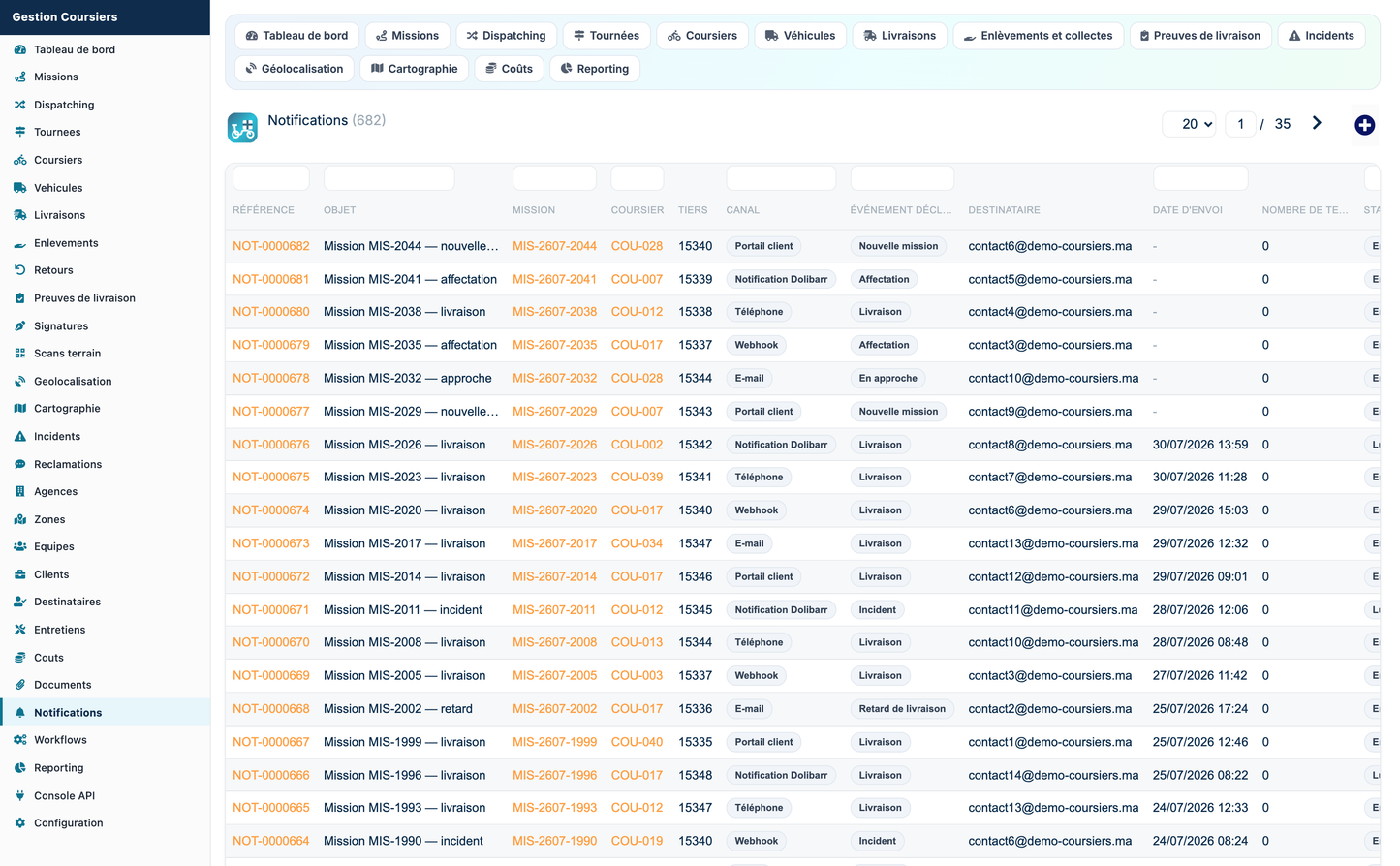
Notifications are raised on eight events — new mission, assignment, tour departure, approach, delivery, delay, incident and return — over four channels: Dolibarr notification, e-mail, phone and outbound webhook. Twelve workflows automate the chain: automatic assignment on creation, tour optimisation after assignment, customer and courier notification, proof generation on delivery, return creation after a failed delivery, incident declaration on repeated failure and archiving of closed missions.
Fourteen operational reports, each with an interactive chart, a totalled table and four export formats — PDF, CSV, XLSX and JSON.
|
Report |
Breakdown |
|
Deliveries |
By month, with delivered volume and billed amount |
|
Collections |
By status, with parcels and weight |
|
Couriers |
Missions, deliveries and average duration per courier |
|
Tours |
By status, with distance and stops |
|
Vehicles |
By type, with average mileage and cost per kilometre |
|
Customers |
Missions, deliveries and revenue per ordering customer |
|
Costs |
By nature |
|
Distances |
By month, total and average per tour |
|
Times |
By mission type, average and maximum duration |
|
Productivity |
By branch, missions per day and average duration |
|
SLA |
By zone, on-time count and compliance percentage |
|
Delays |
By failure reason, average delay and attempts |
|
Incidents |
By type, with financial impact |
|
Proofs of delivery |
By proof type |
Exports are encoding-safe: every cell is decoded before it reaches a CSV, a PDF or a spreadsheet, so no HTML entity ever leaks into a delivered file, and the HTML-based spreadsheet export escapes only the characters that must be escaped, leaving real accented characters intact.
Nineteen routes are exposed under /api/index.php/couriermanagement, authenticated by the standard Dolibarr DOLAPIKEY header and gated by the module permissions. An in-application console lists every route, the permission it requires, whether the current user holds it, and ready-to-paste call examples.
|
Method |
Route |
Purpose |
|
GET |
/missions |
List and search missions |
|
GET |
/missions/{id} |
One mission with its parcels |
|
GET |
/tracking/{code} |
Track a parcel and its scan events |
|
POST |
/missions |
Create a mission and its parcels |
|
PUT |
/missions/{id} |
Update status, courier, vehicle |
|
POST |
/missions/{id}/accept |
Courier accepts a mission |
|
DELETE |
/missions/{id} |
Delete a mission |
|
GET |
/couriers |
List couriers |
|
GET |
/vehicles |
List vehicles |
|
GET |
/tours |
List tours |
|
POST |
/tours/{id}/start |
Start a tour |
|
GET |
/deliveries |
List deliveries |
|
POST |
/pods |
Record a proof of delivery and close the mission |
|
POST |
/incidents |
Report an incident from the field |
|
POST |
/positions |
Push a GPS position |
|
GET |
/positions |
Last known position per courier |
|
GET |
/notifications |
List notifications |
|
GET |
/sync/{courier} |
Mobile synchronisation bundle |
|
GET |
/kpi |
Twenty-five dashboard indicators |
No mobile application ships with this module. The architecture and the REST routes are designed to host one — Android, iOS or a progressive web application — developed separately. A single call to /sync/{courier} returns the courier, the missions assigned to them, the current tour and its stops; accepting a mission, starting a tour, recording a proof of delivery, reporting an incident and pushing a position each have their own route.
Six configuration tabs.
|
Tab |
Settings |
|
General |
Mission and tour numbering masks, delivery SLA in hours, late threshold in minutes, archiving delay |
|
Dispatching |
Default mode, default rule, maximum missions per courier per day |
|
Geolocation |
Enable tracking, reporting frequency, history retention, external map provider |
|
Notifications |
E-mail, Dolibarr notifications, mandatory proof of delivery, electronic signature, outbound webhook URL |
|
Appearance |
Dashboard accent colour and widget order, colour charter preview |
|
API |
Enable the REST routes |
Two buttons are provided. Install the demo data generates a complete, consistent twelve-month dataset — around 25 900 rows across the 26 tables: branches, zones, couriers, vehicles, teams, ordering customers, recipients, missions and their parcels, dispatches, tours and stops, pickups, deliveries, returns, proofs of delivery, signatures, scans, GPS positions, incidents, claims, maintenance operations, costs, documents, notifications and workflows.
Remove the demo data deletes only what the generator created. Every generated row is tagged, the purge cascades to any record a user created under a demonstration parent so nothing is stranded on a dead foreign key, the third parties created by the generator are removed through the native Dolibarr class, and a per-table removal report is displayed. Real data is never touched, and the removal asks for confirmation.
Forty permissions across seventeen groups: reference data, couriers, vehicles, missions, dispatching, tours, pickups, deliveries, returns, proofs of delivery, geolocation, incidents, costs, documents, notifications, reporting and API access, plus module administration. Read and write are granted by default so the module is usable straight after activation; deletion and administration are not.
· Every page, every menu entry and every API route checks its permission
· All inbound values are filtered and escaped; enumerations are validated against a whitelist before any write
· CSRF protection through the standard Dolibarr token on every form
· API sort fields are validated against the physical table columns
· Multi-company separation is enforced on every query
· Errors are written to the Dolibarr syslog
· No key, password or service URL is hard-coded: the map provider and the webhook endpoint are configuration settings, empty by default
|
Module |
Integration |
|
Third parties |
Ordering customers are linked to a Dolibarr third party; the demo generator creates and removes them natively |
|
Contacts |
Contact names on customers, recipients and pickups |
|
Products / Stock / Warehouses |
Mission parcels can reference a product |
|
Customer orders |
A mission can be linked to a Dolibarr order |
|
Quotations, invoices |
Costs and mission amounts feed the billing chain |
|
Shipments, receptions |
Deliveries and pickups mirror the logistics flow |
|
Projects |
Missions and tours can be grouped under a project |
|
Agenda |
Planned dates are compatible with the agenda repository |
|
Documents (ECM) |
The document object stores file name, format and size |
|
Categories |
Reference objects can be categorised |
|
Users |
Couriers can be linked to a Dolibarr user; supervisors are users |
|
Multi-company |
Every table carries the entity column and every query filters on it |
|
REST API |
The module registers its own API class in the native module |
The module was installed, activated and exercised on a live Dolibarr 17.0.3 instance before delivery.
|
Check |
Result |
|
Syntax check on 101 PHP files |
No error |
|
Activation |
40/40 permissions, 35 menus, 26/26 tables, constant set |
|
Demonstration dataset |
25 885 rows, no empty table |
|
Business realism assertions |
80+ aggregates, all within range |
|
HTTP smoke test |
81/81 pages |
|
Functional suite |
46/46 checks |
|
Screenshots |
76 captures reviewed |
The realism assertions run the exact aggregates the dashboard, the reports and the API print, and fail on any that is zero or business-implausible. Two defects were caught this way and fixed before delivery: a degenerate distribution that had collapsed the dataset onto two ordering customers, and a courier parcel capacity derived from the raw vehicle payload that gave a van 311 parcels.
Developed by DoliResources — Copyright © DoliResources — www.doliresources.com


