
Discover powerful Dolibarr extensions designed to automate your business processes


1. Overview
Craft Product Management (Gestion des Produits Artisanaux) transforms Dolibarr into a specialised ERP solution dedicated to the manufacturing and commercialisation of handmade and artisanal products. It is designed for individual artisans, cooperative workshops, and companies specialised in craft trades.
The module is flexible enough to cover every craft trade, including:
· Traditional crafts & fine art crafts
· Pottery, ceramics, sculpture
· Textile, rugs, weaving, embroidery, sewing
· Leatherwork, jewellery, ironwork, woodwork, basketry
· Artisanal cosmetics, soap-making, candle-making
· Terroir products and artisanal food products
It delivers 20 dedicated business objects, a modern dashboard, a drag-and-drop production board, 16 decision-making reports, an automation engine, a document library and full native integration with Dolibarr — the result is a commercial-grade, secure, responsive and scalable ERP.
2. Key Highlights
|
Area |
Description |
|
Business objects |
20 dedicated, fully CRUD-enabled objects with search, filters and column selectors |
|
Dashboard |
6 zones: workshop & artisans, production, analytics, stock & alerts, finance, production timeline |
|
Production board |
Drag-and-drop Kanban across 7 fabrication stages (AJAX) |
|
Reporting |
16 reports with CSV, Excel, PDF export and print |
|
Automation |
Rule engine (cron + on-demand) for stock alerts, quality control and follow-ups |
|
Integration |
Native Dolibarr third parties, products, warehouses, quotes, orders, invoices |
|
Demo data |
One-click install / removal of a complete demonstration dataset |
|
Languages |
French, English, Spanish, Italian, German |
|
Design |
Artisan visual identity (terracotta / olive / turquoise / beige / wood brown) + dark mode |
3. Business Management Modules
The module is organised around 20 interconnected business objects. Every object provides a list view (multi-criteria search, column show/hide, elegant filters), a detailed record card, and — for hub objects — a KPI cockpit and a panel of linked records for fast, connected data entry.
3.1 Artisans
A complete profile for each artisan: reference, first and last name, specialty, assigned workshop, contact details (email, phone, mobile), skills, certifications, years of experience, photo and notes. Artisans can be linked to Dolibarr users. The cockpit surfaces specialty and experience, and lists every product, recipe, fabrication and document tied to the artisan.
3.2 Workshops
Workshops (ateliers) record their reference, label, responsible artisan, location, capacity, equipment, surface area and phone. They centralise the activity and history of the production sites.
3.3 Craft Products
An extremely detailed product record: reference, label, category, sub-category/collection, responsible artisan, workshop, dimensions, weight, colours, materials used, making time, cost price, sell price, stock quantity, photo and description. A native Dolibarr product can be linked for commercial operations. The cockpit computes margin, margin rate and stock at a glance.
3.4 Categories & Collections
Configurable categories (Textile, Rugs, Pottery, Ceramics, Wood, Leather, Metal, Jewellery, Soaps, Candles, Cosmetics, Decoration, and more) classify the catalogue. Collections group products into seasonal collections, permanent collections, limited editions and special series, with season, year, start/end dates and piece counts.
3.5 Raw Materials & Suppliers
Full raw-material management (wood, leather, wool, cotton, clay, metals, glass, fabrics, dyes, oils, wax, packaging, labels, supplies): stock, alert threshold, unit price, unit, supplier and warehouse. Low-stock materials are automatically flagged on the dashboard. Suppliers are managed with their material types, contact, payment terms and rating, and are linked to native Dolibarr third parties.
3.6 Manufacturing Recipes (Bill of Materials)
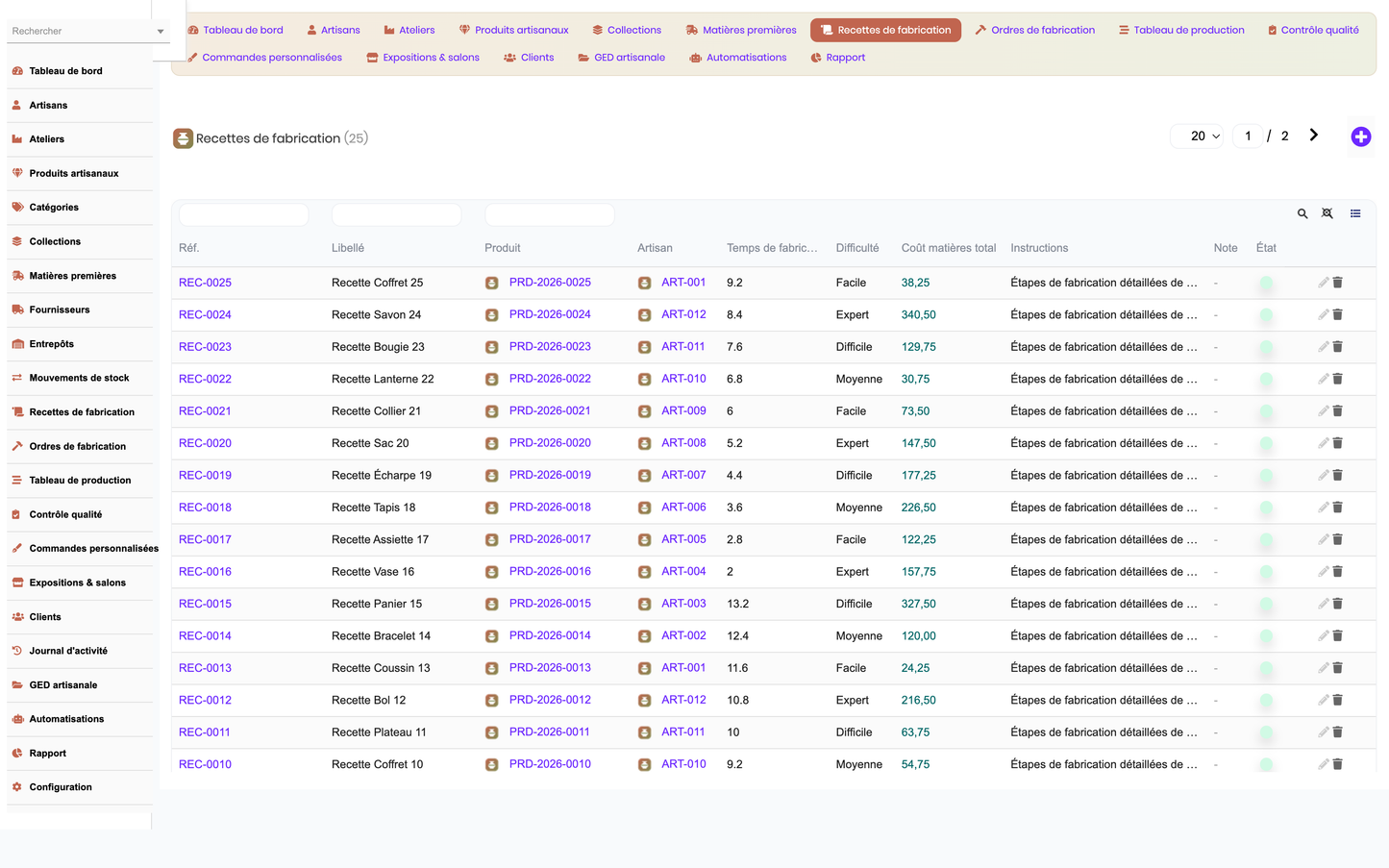
Recipes describe how a product is made: linked product, artisan, making time, difficulty, instructions and a set of recipe lines. Each line consumes a raw material with a quantity, unit and unit cost, and the total material cost is aggregated automatically.
3.7 Fabrication Orders & Steps
Fabrication orders drive production: product, recipe, artisan, workshop, quantity, stage, start/end dates, making time, material cost and labour cost. Each order breaks down into ordered fabrication steps (preparation, shaping, drying, finishing, control) with duration, assigned artisan and step status. Orders flow through seven language-independent stages: Draft, Planned, In production, Quality check, Finished, Delivered, Cancelled.
3.8 Custom / Personalised Orders
Personalised order management captures customer, base product, customisation details, engraving, embroidery, colours, dimensions, amount, order and delivery dates, client validation flag and order stage — covering the full made-to-order workflow from request to delivery.
3.9 Quality Control
Quality controls are recorded against fabrications and products: control type, inspector, control date, result (conforming / non-conforming / to correct), defects, corrections and a quality score, ensuring traceable quality management.
3.10 Exhibitions & Trade Shows
Events, exhibitions and trade shows are tracked with type, location, city, dates, cost, revenue, number of visitors, contacts obtained and sales made — with an automatic net-result computation on the record cockpit.
3.11 Warehouses & Stock Movements
Warehouses (linked to native Dolibarr warehouses) hold location, capacity and manager. Stock movements log inbound, outbound and transfer operations on materials and products, with quantity, date, warehouse and reason.
3.12 Clients
Client records enrich native Dolibarr third parties with preferences, discount rate, loyalty points and total purchases, providing a craft-focused customer view and purchase history.
3.13 Document Library, Activity Journal & Automations
A document library (GED) stores photos, technical sheets, certificates, notices, contracts and quality documents with type, version and date. The activity journal logs workshop operations. Automation rules define the module’s smart behaviours.
4. Modern Dashboard
An entirely bespoke dashboard with an artisan visual identity presents the business at a glance across six zones:
· Workshop & artisans — workshops & artisans, products, collections, suppliers and clients counters.
· Production — a production board preview plus KPIs for products in fabrication, finished products, orders in progress, delivered orders and custom orders.
· Analytics & trends — interactive charts for sales evolution, production evolution and category distribution.
· Stock & alerts — stock value, critical-stock counter and clickable red alert tiles for materials below their threshold.
· Finance & events — turnover, fabrication cost, margin, planned exhibitions and trade shows.
· Production timeline — a chronological view of the latest fabrications with their stage.
KPIs include artisans, workshops, products, products in fabrication, finished products, sold products, orders in progress and delivered, materials in stock, critical stock, collections, suppliers, clients, turnover, fabrication cost, margin, planned exhibitions, trade shows and custom orders. Charts are rendered with Dolibarr’s native graphing engine and are fully responsive.
5. Production Board (Kanban)
The production board displays all fabrication orders as cards organised in columns by stage. Dragging and dropping a card onto another column instantly changes the fabrication stage through an AJAX call, with server-side permission checks and automatic status updates. Won-type stages (Finished, Delivered) close the order; the Cancelled stage marks it accordingly. The drag-and-drop logic is bound once to avoid duplicate handlers.
6. Decision-Making Reporting
A comprehensive reporting hub offers 16 reports grouped by domain. Every report can be exported to CSV, Microsoft Excel and PDF, and printed with a clean print layout.
|
Domain |
Reports |
|
Products |
Products fabricated, Products sold, Products in stock, Profitability by product |
|
Fabrication |
Fabrication orders by stage, Fabrication cost by product, Making time by artisan |
|
Materials |
Material consumption, Materials stock & value |
|
Commercial |
Sales by month, Orders by stage, Clients by purchases |
|
Finance |
Turnover, Margin by category |
|
Events |
Exhibitions results, Trade-show results |
Exports correctly decode accented characters, and the PDF export uses the artisan colour charter.
7. Automation Engine
The automation engine evaluates active IF/THEN rules, either on demand from the console or automatically through a daily scheduled task (cron). Built-in, non-destructive actions include: raw-material low-stock alerts, automatic quality control at the end of a fabrication, custom-order confirmation, delivery notifications and post-show follow-ups. Each rule tracks its trigger event, action type, delay, active flag and run count, and the engine is resilient to per-rule failures so the scheduled job always completes.
8. Document Management (GED)
The document library centralises photos, technical sheets, certificates, notices, contracts and quality documents, with type, versioning and dates. It integrates with the native Dolibarr ECM for storage, preview and advanced search, and shows a per-type distribution of documents.
9. Native Dolibarr Integration
All commercial operations rely on native Dolibarr objects, so the module enriches rather than replaces the core ERP. It integrates with:
· Third parties and contacts (customers and suppliers)
· Products, services, stocks and warehouses
· Purchases and suppliers
· Quotes (Propal), orders and invoices (Facture) with drafts seeded automatically when those modules are enabled
· Payments, bank and accounting
· Projects, agenda and e-mails
· Document management (ECM) and shipments
· Business triggers that keep craft objects coherent when a third party or user is removed
10. Configuration & Demonstration Data
A dedicated administration page lets administrators configure the default currency, the default stock-alert threshold and the margin target. Two one-click buttons manage a full demonstration dataset:
· Install demo data — generates artisans, workshops, products, materials, suppliers, clients, recipes, fabrications, custom orders, quality controls, exhibitions, stock movements, documents, activities, automations and (when the relevant modules are active) native quotes and invoices.
· Remove demo data — safely deletes only the data created by the module, leaving the rest of the instance untouched.
11. Security
The module follows Dolibarr security best practices:
· Granular permissions across eight right groups (artisans, products, materials, fabrication, commercial, documents, automations, reporting) plus administration
· CSRF protection and token renewal on create/edit actions
· XSS protection through systematic output escaping
· Prepared / escaped SQL queries
· Multi-entity and multi-company (MultiCompany) compatibility
· Journaling and business triggers
12. User Interface & Experience
The interface is modern, elegant and fully responsive (desktop, tablet, mobile). It features a distinctive artisan visual identity (terracotta, natural beige, olive green, turquoise blue, off-white, wood brown), an in-page navigation bar, KPI cards, interactive widgets, a Kanban board, a production timeline, status badges, modern icons, elegant list filters with a column selector, and a dark-mode compatible stylesheet.
13. Technical Architecture
The module respects the official Dolibarr module architecture (class, core, admin, sql, langs, css, js, img, lib) with an object-oriented, documented and modular codebase. All SQL tables use the prefix llx_craftproduct_. The code follows Dolibarr coding standards and PHP best practices, includes an automatic schema self-heal on upgrade, and avoids code duplication through a generic list/card engine shared by all objects.
|
Property |
Value |
|
Technical name |
craftproductmanagement |
|
Table prefix |
llx_craftproduct_ |
|
Business objects |
20 |
|
Reports |
16 |
|
Languages |
FR / EN / ES / IT / DE |
|
Compatibility |
Dolibarr v16 – v23+ |
|
Dependencies |
Third parties (Societe) and Products modules |
|
Publisher |
DoliResources — www.doliresources.com |
|
Version |
1.0.0 |
14. Installation
The module is delivered as a ready-to-install ZIP archive (module_craftproductmanagement-1.0.zip). It can be installed directly from the Dolibarr module manager without any additional modification. On activation it creates all tables, menus and permissions, self-heals the schema and seeds the demonstration dataset. It can be cleanly uninstalled and reinstalled without duplicating menus or losing configuration.
© 2026 DoliResources — www.doliresources.com


