
Discover powerful Dolibarr extensions designed to automate your business processes
Dermatology Practice Management is a Dolibarr add-on module published by DoliResources that turns a standard Dolibarr installation into a complete business solution for...
Couldn't load pickup availability


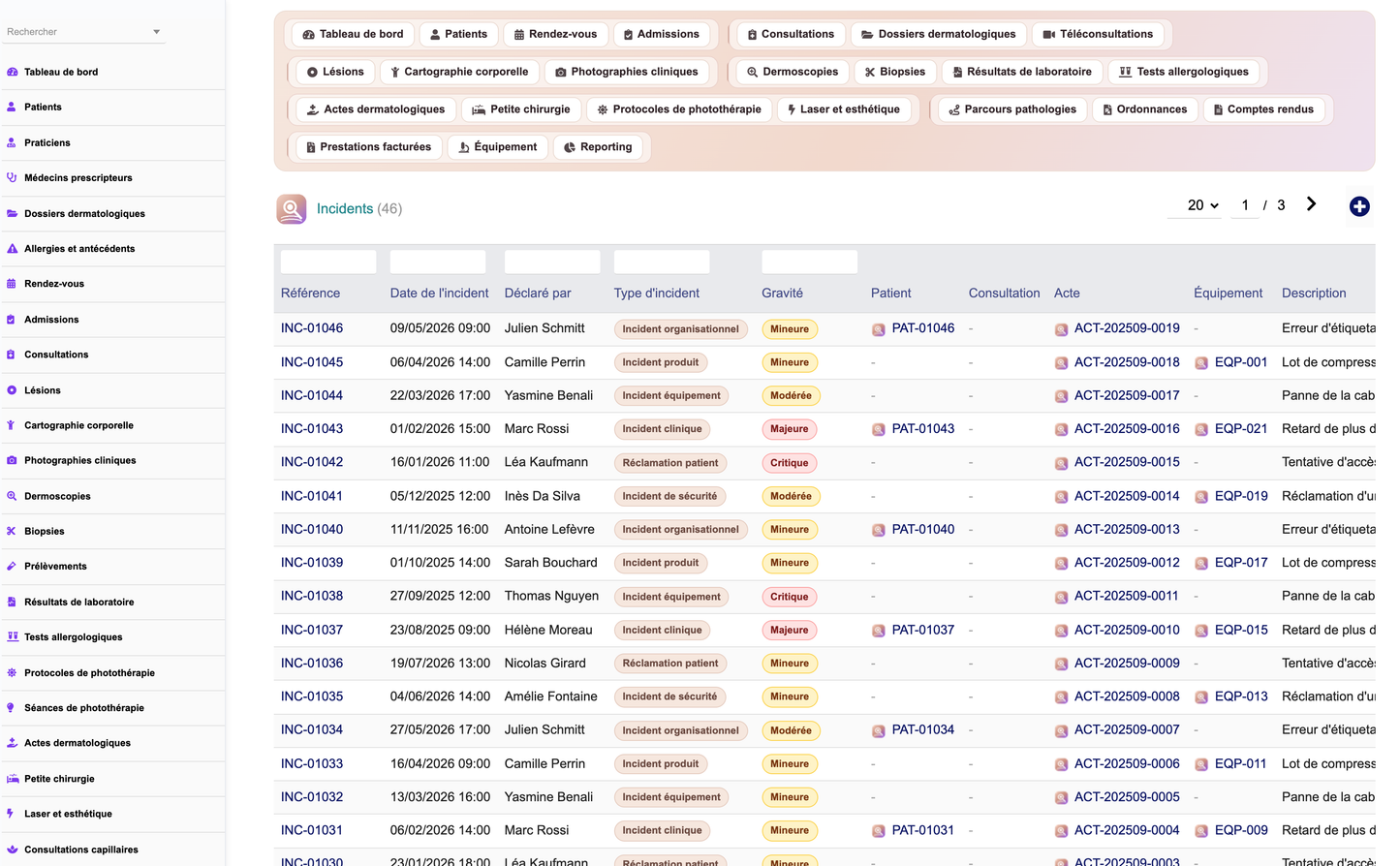
Dermatology Practice Management is a Dolibarr add-on module published by DoliResources that turns a standard Dolibarr installation into a complete business solution for a dermatology practice, centre or clinic. It covers the administrative, clinical, organisational, documentary, technical, logistical, commercial, financial, quality and analytical dimensions of the activity in a single, coherent application.
The module is addressed to the independent dermatologist, the group practice, the dermatology clinic, the medical or surgical dermatology centre, the photography and dermoscopy centre, the phototherapy centre, the multi-site practice and the dermatology network. Version 1.0.0 ships thirty-six interconnected business objects, each with its own list view, record card, multi-criteria search, column selector and grouped filters.
Around those objects the module adds a dedicated command centre dashboard, an interactive body-mapping page, a six-axis reporting workspace with CSV export, a secured REST API, a daily scheduled alert job, eleven PDF models, and an installable and removable demonstration dataset. Fifty permissions spread across fifteen functional groups make it possible to apply the least-privilege principle in practice: a receptionist can book appointments without reading the dermatology history, and a biomedical technician can be limited to equipment alone.
The module never alters the Dolibarr core. It builds on the standard extension points — hooks, triggers, business objects, permissions, PDF models, the document management system, the agenda, notifications, the REST API and scheduled tasks — so that upgrades of the host application remain straightforward.
This subsection states the functional boundary of the product and applies to every section of this document without exception.
Dermatology Practice Management is a practice management tool. It records, structures, retrieves and reports on information that a registered practitioner has entered and validated. It contains no clinical decision-support engine, no image analysis, no scoring algorithm and no automated interpretation of any kind.
· The module never produces a diagnosis. Fields such as "recorded diagnosis" store what the practitioner typed; they are never computed.
· The module never interprets a lesion, a clinical photograph or a dermoscopic image. Dermoscopy records store observed structures, pigment network, vascular pattern and the practitioner's own conclusion as free text.
· The module never grades or estimates malignancy risk. The surveillance level of a lesion is a value chosen by the practitioner, not a computed score.
· The module never computes a therapeutic dose, a phototherapy dose or an incremental dose schedule. Phototherapy fields are explicitly named "recorded dose" and "initial dose recorded" because the value is transcribed from the practitioner's protocol.
· The module never prescribes. Prescriptions and treatments record content authored by the prescriber, together with the signature and validation metadata.
· The scheduled alert engine only counts and reports records that match date or status criteria. It never modifies a clinical record and never derives a medical decision.
Responsibility for all clinical content, for its accuracy and for any decision taken on its basis rests entirely with the licensed healthcare professional who enters and validates it.
The module was designed around the practical constraints of a dermatology practice: a high volume of short consultations, a long-lived clinical record per patient, a strong dependence on imaging and on external laboratories, a mix of reimbursed medical activity and private aesthetic activity, and equipment whose availability directly conditions the schedule.
The first objective is to keep the whole patient trajectory in one place. From the first appointment through admission, consultation, skin examination, dermoscopy, biopsy, specimen dispatch, laboratory result, treatment and billing, every step is a record linked to the patient and, where relevant, to the lesion concerned. Nothing has to be reconciled manually between separate tools.
The second objective is longitudinal follow-up. A lesion carries a discovery date, a body location expressed both as a coded zone and as map coordinates, a measured diameter and a next-check date. Clinical photographs are versioned and can be compared over time, which is the day-to-day working method of dermatological surveillance.
The third objective is operational control. The dashboard, the alert engine and the reporting workspace exist so that the practice manager can see, without running a query, which lesions are overdue for review, which laboratory results have been pending too long, which reports are unsigned, which stock is below minimum, which equipment is down and which invoices remain unpaid.
· Consolidate the administrative and clinical record of every patient in a single application.
· Support longitudinal lesion surveillance with structured location, measurement and photography.
· Trace specimens from collection to laboratory result, with turnaround measurement.
· Separate front-desk duties from clinical data access through explicit permission groups.
· Give management measurable indicators of activity, quality, logistics and profitability.
· Integrate with native Dolibarr third parties, products, stock, invoices, projects and agenda rather than duplicating them.
Version 1.0.0 declares thirty-six business objects in a single registry, which drives the list engine, the record cards, the permission mapping and the REST API. Each object has its own database table, its own field definition and its own permission group. The table below gives the complete inventory with the purpose of each object.
|
Object |
Table |
Purpose |
|
Patients |
derm_patient |
Patient identity, phototype, contacts, guardian, insurance link, photo consent |
|
Practitioners |
derm_practitioner |
Practitioner identity, role, registration number, site, fee, workload |
|
Referring doctors |
derm_referrer |
Referrers, their organisation, referral count and portal access flag |
|
Dermatology records |
derm_record |
Clinical file: phototype, sun exposure, photoprotection, histories, immunosuppression |
|
Allergies and antecedents |
derm_allergy |
Allergens, observed reaction, severity and confirmation, as lines of the record |
|
Appointments |
derm_appointment |
Booking, type, duration, room, site, priority, confirmation, teleconsultation flag |
|
Admissions |
derm_admission |
Arrival, waiting time, room, identity, insurance and consent checks |
|
Consultations |
derm_consultation |
Reason, symptoms, clinical examination, recorded diagnosis, treatment plan, validation |
|
Lesions |
derm_lesion |
Lesion type, body zone and side, map coordinates, morphology, surveillance level, next check |
|
Clinical photographs |
derm_photo |
Dated images with device, orientation, scale, consent, watermark and version |
|
Dermoscopies |
derm_dermoscopy |
Dermoscopic examination with observed structures and practitioner conclusion |
|
Biopsies |
derm_biopsy |
Technique, punch size, material, sutures, removal date, biopsy status |
|
Specimens |
derm_sample |
Specimen type, container, fixative, barcode, destination laboratory, dispatch |
|
Laboratory results |
derm_labresult |
Macroscopic and microscopic description, conclusion, margins, turnaround, validation |
|
Allergy tests |
derm_allergytest |
Test type, allergen series, readings, positive allergens, conclusion |
|
Phototherapy protocols |
derm_phototherapy |
Modality, indication, planned sessions, treated area, recorded doses |
|
Phototherapy sessions |
derm_pt_session |
Session log with recorded dose, exposure, equipment, pre-check and reaction |
|
Dermatology procedures |
derm_procedure |
Procedure type, indication, room, equipment, consumables, checklist, price and cost |
|
Minor surgery |
derm_surgery |
Excision dimensions, margins, closure, sutures, operative report, follow-up |
|
Laser and aesthetics |
derm_laser |
Laser type, session number, recorded parameters and fluence, before/after photographs |
|
Hair consultations |
derm_haircare |
Scalp examination, recorded density, pull test, trichoscopy findings |
|
Nail consultations |
derm_nailcare |
Nail position and side, nail examination, linked specimen, treatment plan |
|
Pathology pathways |
derm_pathway |
Chronic condition follow-up with recorded score, baseline, objective and review dates |
|
Treatments |
derm_treatment |
Product, galenic form, recorded dosage, route, application zone, renewal, side effects |
|
Prescriptions |
derm_prescription |
Prescription type, content, validity, renewals, signature and dispatch |
|
Consents |
derm_consent |
Consent type, template version, signatory, guardian, withdrawal date, document |
|
Medical reports |
derm_report |
Report type, content, conclusion, recipient, version, validation, signature, lock |
|
Teleconsultations |
derm_teleconsult |
Remote session, meeting link, questionnaire, photographs received, follow-up need |
|
Insurance schemes |
derm_insurance |
Insurer, convention reference, coverage rate, ceiling, third-party payment, validity |
|
Coverage requests |
derm_coverage |
Request, covered amount, patient share, decision, rejection reason, appeal |
|
Billing records |
derm_billing |
Service, act code, amounts, insurance and patient parts, payment mode and date |
|
Stock items |
derm_item |
Consumables and devices with batch, expiry, minimum and maximum quantities, value |
|
Equipment |
derm_equipment |
Devices with serial number, warranty, status, usage, availability and next maintenance |
|
Maintenance |
derm_maintenance |
Planned and completed operations, provider, parts, downtime, cost, planning impact |
|
Incidents |
derm_incident |
Declared events with severity, immediate action, root cause, corrective action, owner |
|
Quality audits |
derm_audit |
Audit scope, checkpoints, conformity percentage, satisfaction, findings, action plan |
Beyond the object inventory, the module provides a set of cross-cutting functions: the Skin Health Command Center dashboard, interactive body mapping with temporal photograph comparison, six-axis reporting with CSV export, a REST API, scheduled alerts, eleven PDF models and a demonstration dataset that can be installed and removed at will.
Access control is built on fifteen functional permission groups, each corresponding to a real business area of the practice. Every group exposes read, create/modify and delete permissions, and five transversal permissions complete the set, for a total of fifty permissions.
Read and write permissions are granted by default so the module is usable immediately after activation. Delete, validate, export, demonstration-data management and administration are opt-in, in line with the least-privilege principle. Every object in the registry is mapped to exactly one group, so granting a group is enough to define what a user sees.
|
Permission group |
Objects covered |
|
patient |
Patients, practitioners, referring doctors |
|
record |
Dermatology records, allergies and antecedents, consents |
|
photo |
Clinical photographs |
|
appointment |
Appointments, admissions |
|
consultation |
Consultations, hair and nail consultations, pathology pathways, medical reports, teleconsultations |
|
lesion |
Lesions and the body-mapping page |
|
exam |
Dermoscopies, biopsies, specimens, laboratory results, allergy tests |
|
phototherapy |
Phototherapy protocols and sessions |
|
procedure |
Dermatology procedures, minor surgery, laser and aesthetics |
|
prescription |
Prescriptions, treatments |
|
billing |
Billing records |
|
insurance |
Insurance schemes, coverage requests |
|
stock |
Stock items |
|
equipment |
Equipment, maintenance |
|
quality |
Incidents, quality audits |
The five transversal permissions are listed below. They are deliberately not granted by default.
|
Transversal permission |
Effect |
|
Read reporting and analytics |
Access to the reporting workspace and its CSV exports |
|
Validate consultations, results and medical reports |
Right to set a record to a validated state |
|
Export dermatology data |
Right to extract data sets |
|
Manage demonstration data |
Right to install and remove the demonstration dataset |
|
Administer the module |
Access to the module setup page and its settings |
Typical role profiles follow directly from these groups.
· Receptionist: patient and appointment read/write, no record, lesion, photo or exam access.
· Dermatologist: full clinical groups plus validate, reporting read.
· Nurse or technician performing phototherapy: phototherapy read/write, patient read.
· Biomedical technician: equipment read/write only.
· Practice manager: reporting, billing, insurance, stock and quality, without clinical detail.
· Administrator: all groups plus admin, export and demonstration-data management.
The dashboard, titled Skin Health Command Center, is the landing page of the module. It opens with a stylised skin cross-section representing the seven stages of the dermatology care pathway, from the front desk to billing, each stage rendered as a layer with its own colour and icon.
Below the pathway, thirty-eight indicators are grouped into five sections: today's activity, clinical follow-up, procedures and phototherapy, finance, and inventory and equipment. Indicator tiles change colour according to thresholds, so a waiting room above five patients, an average wait above twenty-five minutes or a non-zero count of urgent cases is visible at a glance.
A live waiting list section shows the patients currently admitted, with their arrival time, waiting minutes, room, priority and assigned practitioner. Twelve charts then present monthly trends and distributions, and the page closes with the alert panel fed by the same computation as the scheduled job, so the screen and the nightly report can never disagree.
|
Dashboard section |
Representative indicators |
|
Today's activity |
Today's appointments, scheduled and completed consultations, patients on site, patients waiting, urgent cases, new patients this month, patients in follow-up, teleconsultations, average wait, average consultation duration, cancellation rate, no-show rate |
|
Clinical follow-up |
Lesions recorded, lesions due for review, dermoscopy exams this month, photographs this month, biopsies this month, pending histopathology results, pending specimens, allergy tests, reports awaiting validation, prescriptions this month |
|
Procedures and phototherapy |
Procedures performed this month, phototherapy sessions this month, sessions remaining to perform, equipment available out of total |
|
Finance |
Revenue today, revenue this month, collections this month, outstanding balances, average cost per consultation, average margin per procedure |
|
Inventory and equipment |
Items at critical stock, items expiring within 60 days, upcoming maintenance, open incidents, patient satisfaction |
The twelve charts cover monthly consultation activity, new patients per month, dermoscopy exams and biopsies per month, procedures per month, phototherapy sessions per month, monthly revenue and collections, and four distribution pies: consultation types, lesion types, affected body zones and billed services by status.
The patient record is the identity hub of the module. It carries the reference, civility, names, date of birth, gender, national identifier, address, telephone, e-mail and preferred language, together with the elements that matter specifically in dermatology, starting with the skin phototype.
A patient can be linked to a native Dolibarr third party, which keeps commercial and accounting processing on the standard Dolibarr objects rather than duplicating them. The record also holds the referring doctor, the insurance scheme and the member number, so that coverage requests and billing can be prepared without re-entering the same data.
Minor patients are flagged explicitly and carry a legal guardian, which is the value used when a consent has to be signed by someone other than the patient. A photo consent flag sits on the record itself; combined with the module setting that requires a consent before photography, it governs whether clinical images may be captured for that patient.
· Reference, civility, surname, first name, date of birth, gender and national identifier.
· Skin phototype recorded at patient level and again on the dermatology record.
· Postal address, town, postcode, telephone, e-mail, profession and preferred language.
· Emergency contact name and telephone.
· Link to a Dolibarr third party, to a referring doctor and to an insurance scheme with member number.
· Minor flag and legal guardian.
· Photo consent flag and patient status.
· Consultation counter and last visit date for quick triage in the list view.
· Multi-criteria search on reference, names, date of birth, gender, national identifier, phototype, town, telephone, e-mail, referrer, insurance and status.
The dermatology record is the clinical file attached to a patient, kept deliberately separate from patient identity so that front-desk staff can book and admit patients without gaining access to the clinical history. It is opened once and enriched over time.
The record structures the anamnesis that dermatological practice actually relies on: phototype, habitual sun exposure, sunburn history, photoprotection habits and occupational exposure. These fields are the reference context against which lesions and their surveillance are later read.
Family history, general medical history, dermatological history and surgical history are held as long text fields. Chronic conditions, trigger factors and habits are recorded as structured short fields, and an explicit immunosuppression flag marks patients for whom the follow-up regime differs.
Allergies and antecedents are managed as lines of the record. Each line names the allergen, the observed reaction, a severity, the confirmation date and who confirmed it, which keeps a verified allergy distinguishable from a reported one.
· One record per patient, opened on a dated event, with its own reference.
· Phototype, sun exposure, sunburn history, photoprotection and occupational exposure.
· Family, medical, dermatological and surgical histories.
· Chronic conditions, trigger factors, habits and an immunosuppression flag.
· Allergy and antecedent lines with allergen, reaction, severity, confirmation date and confirming person.
· Gated by the dedicated "record" permission group, alongside consents.
Appointments are the entry point of the practice workflow. Each booking names the patient, the practitioner, the appointment type, the date and time, the duration in minutes, the room and the site, which makes the object usable in a single-room practice as well as in a multi-site network.
The default consultation duration comes from the module settings and can be overridden per practitioner, since each practitioner record carries its own default consultation duration. The reason for the visit is captured at booking time so that preparation can begin before the patient arrives.
Operationally, the record carries a status, a priority, a confirmation flag, a reminder-sent flag, a teleconsultation flag and a cancellation reason. Unconfirmed appointments within the next forty-eight hours are one of the eleven daily alerts, which turns confirmation into a measurable front-desk task rather than an informal habit. An appointment may also reserve a piece of equipment.
· Patient, practitioner, appointment type, date and time, duration, room and site.
· Reason for the visit, status and priority.
· Confirmation flag and reminder-sent flag.
· Teleconsultation flag linking the booking to a remote session.
· Cancellation reason recorded on cancelled bookings.
· Optional equipment reservation for procedures or phototherapy.
· Cancellation rate and no-show rate reported on the dashboard and in the activity report.
Admission records what happens between the patient arriving and the consultation starting. It is the object that feeds the live waiting list on the dashboard and the wait-time indicators used throughout the reporting workspace.
An admission links to the patient and, when one exists, to the originating appointment. It stores the arrival time, the expected time, the actual start time and the resulting waiting time in minutes, so the practice can measure punctuality rather than estimate it.
Three verification flags — identity checked, insurance checked and consents checked — turn the front-desk checklist into stored data. Room, priority, assigned practitioner and reason complete the record, and the admission status drives whether the patient appears in the waiting list.
· Link to the patient and to the originating appointment.
· Arrival time, expected time, start time and computed waiting minutes.
· Identity, insurance and consent verification flags.
· Room, priority, assigned practitioner and reason.
· Admission status feeding the dashboard waiting list.
· Source of the average wait time indicator on the dashboard and in the activity report.
The consultation is the central clinical event of the module. It links the patient, the practitioner and, when applicable, the appointment, and records the date, the consultation type and the effective duration in minutes.
The clinical content is structured in the order in which it is produced: reason for the visit, symptoms, duration of evolution, current treatments, clinical examination, recorded diagnosis with an optional classification code, treatment plan, advice given and tests requested. Every one of these fields stores what the practitioner wrote; none is derived by the module.
A next appointment date can be captured directly on the consultation. The record carries a status and, where the practice requires it, a validation: the person who validated and the validation date are stored, and the right to validate is a separate permission that is not granted by default.
A consultation fee can be recorded on the consultation itself, which is what feeds the average cost per consultation indicator and the practitioner activity table in the reporting workspace. Lesions, photographs, dermoscopies, procedures, prescriptions and billing records all reference the consultation they originate from.
· Patient, practitioner, originating appointment, date, type and duration.
· Reason, symptoms, duration of evolution and current treatments.
· Clinical examination, recorded diagnosis and classification code.
· Treatment plan, advice given and tests requested.
· Next appointment date, consultation status, validating user and validation date.
· Consultation fee used by the financial indicators.
· Hair consultations, nail consultations, pathology pathways, medical reports and teleconsultations share the same "consultation" permission group.
The lesion is the object around which dermatological surveillance is organised. Each lesion belongs to a patient and, usually, to the consultation at which it was discovered or reviewed, and carries a discovery date and a lesion type.
Localisation is recorded twice, deliberately. A coded body zone with a side and a free-text detail makes the lesion searchable and groupable; map coordinates with a view code place the same lesion on the interactive body map. A lesion captured without clicking the map still resolves to a default position for its zone, so no lesion disappears from the map.
Morphology is described through structured fields: measured diameter in millimetres, computed surface, shape, colour, border, surface aspect, relief, distribution, evolution and associated symptoms. These are observations transcribed by the practitioner; the module applies no morphological rule to them.
Follow-up is driven by three fields: the surveillance level chosen by the practitioner, the next check date and the lesion status. Lesions that are active or monitored and whose next check date has passed are counted by the daily alert engine and shown on the dashboard as lesions due for review.
· Patient, originating consultation, discovery date and lesion type.
· Body zone, body side and free-text location detail.
· Map coordinates and map view for placement on the interactive body map.
· Diameter in millimetres and derived surface.
· Shape, colour, border, surface, relief, distribution, evolution and symptoms.
· Recorded diagnosis as entered by the practitioner.
· Surveillance level, next check date and lesion status.
· History available through a dedicated REST route returning the lesion timeline.
The body-mapping page renders the patient's lesions on inline SVG silhouettes. Nine views are available, so a lesion can be placed on the region that actually shows it rather than being approximated on a single front silhouette.
|
View |
Label |
|
front |
Anterior view |
|
back |
Posterior view |
|
left |
Left profile |
|
right |
Right profile |
|
head |
Head and face |
|
scalp |
Scalp |
|
hands |
Hands |
|
feet |
Feet |
|
nails |
Nails |
The silhouettes are drawn as inline SVG, with no external image dependency. The posterior view is drawn with spine and scapulae so that it can never be mistaken for the anterior view, the scalp view is a vertex projection, and the hands and feet views present both sides with the patient's right on the viewer's left.
Lesions are positioned from their stored map coordinates as percentages, which keeps placement correct whatever the rendering size. Records that predate mapping, imports, or lesions captured by selecting a zone without clicking the map fall back to a defined default position for that zone.
The page provides filters and a legend, and lines up the clinical photographs attached to a lesion so that successive images can be compared over time. Access is governed by the "lesion" permission group, the same as the lesion records themselves.
· Nine inline SVG views with no external asset dependency.
· Lesion placement from stored percentage coordinates, with a per-zone fallback position.
· Filtering and a legend to isolate lesion types or surveillance levels.
· Temporal comparison of the clinical photographs attached to a lesion.
· Gated by the "lesion" permission group.
Clinical photographs are first-class records, not simple attachments. Each photograph is linked to the patient and, where relevant, to a lesion and to a consultation, and carries its own date and photograph type.
The metadata that makes a clinical image comparable over time is stored explicitly: the capturing device, the operator, the orientation, a scale reference and the magnification. Two images taken months apart can therefore be read against each other with their acquisition conditions visible.
Governance is built in. A consent flag sits on each photograph, a confidentiality level can be set, and a watermark flag controls marking on export. Both the consent requirement before photography and the watermark on exported photographs are module-level settings, enabled by default.
Photographs are versioned, so a re-take does not overwrite the earlier image, and annotations can be stored alongside the file. The file path and thumbnail path are held on the record, and the module creates its own photographs directory at activation. Photography has its own permission group, separate from the clinical record.
· Link to patient, lesion and consultation, with photograph date and type.
· Device, operator, orientation, scale reference and magnification.
· Consent flag, confidentiality level and watermark flag.
· Version number so successive images are preserved rather than replaced.
· Annotations and free notes.
· File path and thumbnail path, with a dedicated photographs directory created at activation.
· Dedicated "photo" permission group.
· Module settings: require a consent before photography, watermark exported photographs.
The dermoscopy record documents a dermoscopic examination of a specific lesion. It links the patient, the lesion, the consultation and the practitioner, and records the examination date and the dermatoscope used, which is a reference to the equipment inventory.
The observation fields follow the structure of a dermoscopic description: magnification, the clinical photograph and the dermoscopic image, the structures observed, the pigment network, the vascular pattern and the measured diameter. All of these are transcriptions of what the practitioner observed.
The conclusion field is named explicitly as the practitioner's conclusion, and the follow-up recommendation and next check date are likewise the practitioner's decision. The module performs no image analysis, applies no dermoscopic algorithm and produces no risk grading of any kind.
A validation workflow is available: the record carries a status, a validating user and a validation date, and validation is a permission that is not granted by default.
· Patient, lesion, consultation, practitioner and examination date.
· Dermatoscope taken from the equipment inventory, with magnification.
· Clinical photograph and dermoscopic image references.
· Observed structures, pigment network, vascular pattern and measured diameter.
· Practitioner's observations and conclusion, entered manually.
· Follow-up recommendation and next check date.
· Status, validating user and validation date.
The biopsy record covers the act of taking tissue, from the prescription to the removal of sutures. It links the patient, the lesion and the practitioner, and holds both the prescribed date and the date on which the biopsy was actually performed.
The technical description includes the technique used, the body zone and side, the punch size in millimetres, the anaesthesia as recorded by the practitioner and the material used. A consent flag records that the patient agreed to the procedure before it took place.
Post-procedure follow-up is part of the same record: whether sutures were placed, the planned suture removal date, the biopsy status and any complications observed. The specimen number and barcode connect the biopsy to the specimen that leaves the practice.
· Patient, lesion, practitioner, prescribed date and performed date.
· Biopsy technique, body zone and side, punch size in millimetres.
· Anaesthesia as recorded and material used.
· Consent flag checked before the procedure.
· Sutures placed and planned suture removal date.
· Specimen number and barcode linking to the specimen and the laboratory result.
· Status and complications.
· Dedicated PDF model for the biopsy record.
The specimen record traces material from collection to dispatch. It links the patient, the lesion and, where the material came from a biopsy, the biopsy itself, and records the specimen type and the collection date.
Handling conditions are stored because they condition the validity of the analysis: the container, the fixative used, the body zone of origin and the person who collected the specimen. A specimen number and a barcode identify the container unambiguously.
Dispatch is tracked through the destination laboratory, the date on which the specimen was sent and a transport note. Specimens that have been collected but whose result has not yet arrived are counted on the dashboard as pending specimens.
· Patient, lesion and originating biopsy.
· Specimen type, collection date, body zone and collecting person.
· Container, fixative, specimen number and barcode.
· Destination laboratory, dispatch date and transport note.
· Pending specimens reported as a dashboard indicator.
· Nail consultations can reference a specimen directly, for mycology sampling.
The laboratory result closes the diagnostic loop opened by the specimen. It links the patient, the specimen, the biopsy and the laboratory, and records the examination type, which covers histopathology, mycology and bacteriology.
Four dates structure the lifecycle: the request date, the dispatch date, the reception date and, through the turnaround field, the elapsed time. Turnaround is reported in the tests and laboratories axis of the reporting workspace, per examination type and per status.
The result content is stored as the laboratory issued it: laboratory reference, macroscopic description, microscopic description, result summary, conclusion and margin status. A file path holds the original report document.
The record then carries the practice's own workflow: the status, the validating user, the validation date and a flag stating whether the patient has been informed. Results still in progress after twenty-one days are one of the daily alerts, and pending histopathology results are a dashboard indicator.
· Patient, specimen, biopsy and laboratory.
· Examination type covering histopathology, mycology and bacteriology.
· Request, dispatch and reception dates with turnaround in days.
· Laboratory reference, macroscopic and microscopic descriptions, summary and conclusion.
· Margin status and attached report document.
· Status, validating user, validation date and patient-informed flag.
· Alert when a result has been pending for more than twenty-one days.
· Dedicated PDF model for the laboratory result.
Allergy testing is handled as its own object because its lifecycle differs from a laboratory examination: the test is applied at the practice and read at fixed intervals afterwards.
The record links the patient and the practitioner, and states the test type, the indication, the allergen series used and the number of allergens applied. The application date and the two reading dates are stored separately, matching the standard patch-test reading schedule.
The readings themselves are recorded as the practitioner interpreted them: the reading result, the list of positive allergens and the recorded reaction. The operator who applied the test, the conclusion and the recommendations complete the record. No result is graded or interpreted by the module.
· Patient, practitioner, test type and indication.
· Allergen series and number of allergens applied.
· Application date and two separate reading dates.
· Reading result, positive allergens and recorded reaction.
· Operator, conclusion and recommendations.
· Monthly allergy test count reported on the dashboard.
Phototherapy is modelled as a protocol with a session log. The protocol links the patient, the practitioner and the cabin or lamp taken from the equipment inventory, and states the modality: UVB, narrowband UVB, UVA, PUVA or a custom protocol.
The protocol carries the indication, the number of sessions planned, the number completed, the frequency per week, the treated area and the start and end dates. A consent flag records the patient's agreement before the series begins.
Doses are recorded, never computed. The protocol holds an initial recorded dose, a cumulative dose and the dose unit; each session holds its own recorded dose, dose unit and exposure time in seconds. The module performs no dose escalation calculation and issues no dose recommendation.
Each session records the session number, the date, the equipment actually used, the operator, a pre-session check flag, any reaction recorded by the operator, the session status and whether an incident was reported. Protocols with three or fewer sessions remaining are raised as a daily alert so that the next series can be arranged in time.
· Modalities: UVB, narrowband UVB, UVA, PUVA and custom protocols.
· Indication, planned and completed sessions, weekly frequency and treated area.
· Treated area, start and end dates, protocol status and consent flag.
· Initial recorded dose, cumulative dose and dose unit, all entered by the practitioner.
· Session log with session number, date, recorded dose, exposure seconds, equipment and operator.
· Pre-session check flag, recorded reaction, session status and incident flag.
· Alert on protocols with three or fewer sessions remaining.
· Dedicated PDF model for the phototherapy protocol.
The procedure record covers the dermatological acts that are neither minor surgery nor laser treatment: cryotherapy, curettage, electrocoagulation, infiltrations and comparable interventions. It links the patient, the consultation, the lesion treated and the practitioner.
Execution context is fully recorded: procedure type, date, indication, body zone and side, assistant, room and the equipment used. Consumables used are captured on the record, which connects the clinical act to the stock consumption reported in the logistics axis.
Two flags govern safety and governance: a checklist flag and a consent flag. The number of sessions, the practitioner's observations, the procedure status and a follow-up date complete the clinical part.
Economically, a procedure carries both a price and a cost. This pair is what allows the dashboard to report an average margin per procedure that reflects reality rather than treating an unknown cost as zero.
· Patient, consultation, lesion, practitioner, procedure type and date.
· Indication, body zone and side, assistant, room and equipment used.
· Consumables used, linking the act to stock consumption.
· Checklist completed flag and consent flag.
· Number of sessions, observations, status and follow-up date.
· Price and cost, feeding the average margin per procedure indicator.
Minor surgery is separated from general procedures because its documentation requirements are different. The record links the patient, the lesion and the practitioner, and states the surgery type, the date and the recorded diagnosis.
The surgical description is dimensional: excision length and width in millimetres, planned margin in millimetres, closure type and number of sutures. The body zone and side, the room and the team complete the operative context.
A flag records whether a specimen was sent for analysis, which links the surgery to the specimen and laboratory result chain. The operative report and the postoperative instructions are stored as text on the record, and a dedicated PDF model produces the operative report document.
Follow-up is scheduled from the record itself through the suture removal date and the control date. Complications and the surgery status are recorded, and a price can be attached for billing.
· Patient, lesion, practitioner, surgery type, date and recorded diagnosis.
· Body zone and side, excision length and width, margin in millimetres.
· Closure type, number of sutures, room and team.
· Specimen sent flag connecting to the specimen and laboratory chain.
· Operative report and postoperative instructions.
· Suture removal date, control date, complications and status.
· Price for billing, and a dedicated operative report PDF model.
Laser and aesthetic procedures form a distinct activity, frequently private-pay, and the module allows the whole area to be switched off through a dedicated setting for practices that do not offer it.
Each session links the patient and the practitioner and states the laser type, the session date, the session number within the series and the number of sessions planned. The indication, the treated area and the equipment used complete the context.
Machine settings are recorded as the operator set them: the recorded parameters, the recorded fluence and the pulse duration in milliseconds. The module stores these values for traceability; it never proposes, computes or validates a laser setting.
Before and after photographs are referenced on the record, and a consent flag is required. Side effects, observations, the next session date and the price close the record.
· Laser type, session date, session number and number of sessions planned.
· Indication, treated area and equipment used.
· Recorded parameters, recorded fluence and pulse duration in milliseconds.
· Before and after photograph references.
· Consent flag, side effects and observations.
· Next session date and price.
· The whole area can be disabled through the aesthetics and laser module setting.
Hair consultations are recorded as a specialised examination attached to the patient and, usually, to a consultation. The record states the examination date, the reason and the hair zone examined.
The examination findings are structured around what a trichological assessment produces: the recorded hair density, the pull test result, the trichoscopy findings and the scalp examination. Each of these is a value observed and entered by the practitioner.
A photograph reference links the examination to the clinical imaging of the scalp, which supports comparison across visits. The recorded diagnosis, the treatment plan and the next check date complete the record and place the patient in a follow-up rhythm.
· Patient, originating consultation, examination date and reason.
· Hair zone examined and recorded hair density.
· Pull test result, trichoscopy findings and scalp examination.
· Photograph reference for visual comparison across visits.
· Recorded diagnosis, treatment plan and next check date.
· Governed by the "consultation" permission group.
Nail consultations follow the same pattern as hair consultations, adapted to onychological practice. The record links the patient and the originating consultation and states the examination date.
Localisation is precise: the nail position and the body side identify exactly which nail was examined, which matters when several nails are followed independently over a long treatment course.
Symptoms and the nail examination are recorded as text, together with a photograph reference. Because onychomycosis diagnosis relies on sampling, the record can reference the specimen directly, connecting the nail consultation to the mycology result chain.
· Patient, originating consultation and examination date.
· Nail position and body side.
· Symptoms and nail examination findings.
· Photograph reference and direct link to a specimen for mycology sampling.
· Recorded diagnosis, treatment plan and next check date.
The treatment record follows an individual therapeutic line over time, independently of the prescription that created it. It links the patient and, where applicable, the prescription and a native Dolibarr product.
The therapeutic description covers the label, the galenic form, the recorded dosage, the frequency, the route of administration and, specifically for dermatology, the application zone. All of these values are entered by the prescriber; the module performs no dosage calculation.
The treatment lifecycle is explicit: a start date, an end date, the prescriber, the indication, a renewable flag, a status, a stop reason and any side effects observed. This makes it possible to answer the question of what a patient is currently taking, and why a previous line was stopped.
· Patient, originating prescription and linked Dolibarr product.
· Label, galenic form, recorded dosage, frequency and route.
· Application zone, which is specific to topical dermatological treatment.
· Start date, end date, prescriber and indication.
· Renewable flag, treatment status, stop reason and side effects.
· Shares the "prescription" permission group with prescriptions.
The prescription record holds the document issued to the patient. It links the patient, the prescribing practitioner and the consultation at which it was issued, and states the prescription type and date.
A validity date and a renewal count define how long the prescription remains usable and how many times it may be renewed. The content of the prescription is stored on the record, along with the number of items it contains.
Traceability of issue is recorded through the signature flag, the signing person, the recipient and the dispatch date, and a file path holds the generated document. A dedicated PDF model produces the prescription document itself.
· Patient, prescribing practitioner and originating consultation.
· Prescription type, date and validity date.
· Content, number of items and number of renewals.
· Recipient, signature flag, signing person and dispatch date.
· Attached document file, produced through the dedicated PDF model.
· Monthly prescription count reported on the dashboard.
Consent is managed as a record in its own right rather than as a flag buried in another object, because a practice must be able to prove what was consented to, when, on which template version and by whom.
Each consent links the patient and states the consent type, the consent date and the template version used. The signatory is recorded, and where the patient is a minor the legal guardian is recorded separately. The practitioner who obtained the consent is stored on the record.
Withdrawal is supported explicitly: the consent status and a withdrawal date allow a consent to be revoked without deleting the historical fact that it was once given. The signed document itself is attached through a file path, and a dedicated PDF model produces the consent form.
Consents interact with photography. The module setting that requires a consent before photography, enabled by default, and the photo consent flag on the patient record together govern whether images may be captured. Missing consents are one of the alert conditions surfaced in the module.
· Patient, consent type, consent date and template version.
· Signatory, legal guardian for minors, and the practitioner who obtained the consent.
· Consent status and withdrawal date, preserving the historical record.
· Attached signed document and a dedicated consent PDF model.
· Consent flags on photographs, biopsies, procedures, laser sessions, phototherapy protocols and teleconsultations.
· Governed by the "record" permission group, alongside the dermatology record.
The medical report is the document sent to a referring doctor, another specialist or the patient. It links the patient, the authoring practitioner and the originating consultation, and states the report type, the date and the title.
The report holds its content and its conclusion as separate fields, together with the recipient. A version number allows successive drafts to be tracked rather than overwritten.
The validation chain is the strictest in the module. A report carries a status, a validating user, a validation date, a signature flag and a lock flag, so a signed and locked report is definitively fixed. The right to validate is a separate permission that is not granted by default.
Reports still unvalidated seven days after their report date are one of the eleven daily alerts, and reports awaiting validation are shown as a dashboard indicator, which prevents an unsigned report from being forgotten.
· Patient, authoring practitioner, originating consultation, report type, date and title.
· Content, conclusion and recipient.
· Version number for successive drafts.
· Status, validating user, validation date, signature flag and lock flag.
· Dispatch date and attached document file.
· Alert on reports unvalidated for more than seven days.
Teleconsultation is recorded as its own object so that remote activity can be measured separately from in-person consultation. A booking can be marked as a teleconsultation at appointment level, and the session record then carries the detail.
The record links the patient, the practitioner and the originating appointment, and holds the session date, the duration in minutes and the meeting link used for the remote session.
Two fields address the specific limits of remote dermatology: the number of photographs received from the patient before or during the session, and an explicit flag stating whether a physical examination is still needed. A pre-session questionnaire flag records whether the patient completed the intake form.
The reason, the recorded diagnosis, a consent flag, the session status and the fee complete the record. Monthly teleconsultation volume is reported on the dashboard.
· Patient, practitioner and originating appointment.
· Session date, duration and meeting link.
· Questionnaire completed flag and number of photographs received.
· Reason, recorded diagnosis and explicit physical examination needed flag.
· Consent flag, session status and fee.
· Monthly teleconsultation count on the dashboard.
The scope of the patient portal in version 1.0.0 must be stated precisely, because it is an area where the data model is ahead of the user interface.
The module ships a setting, enabled by default, that activates the patient and referrer portal area, and the data model contains the elements a portal needs: the patient record holds an e-mail address, a preferred language and a photo consent flag; teleconsultations hold a meeting link and a questionnaire flag; consents are versioned records with a signatory; prescriptions, reports and laboratory results carry dispatch dates and attached documents; and laboratory results carry a patient-informed flag.
However, version 1.0.0 does not ship a separate public-facing portal user interface. There is no anonymous login page, no patient self-service web area and no patient-side document download screen delivered with the module. What is delivered is the setting, the supporting data model and the dispatch and information tracking fields that a portal would consume.
· Setting DERMATOLOGYPRACTICE_ENABLE_PORTAL activates the portal area and is enabled by default.
· Patient e-mail address and preferred language available for outbound communication.
· Teleconsultation meeting link and pre-session questionnaire flag.
· Consent records with template version, signatory and withdrawal date.
· Dispatch dates and attached documents on prescriptions and medical reports.
· Patient-informed flag on laboratory results.
· No separate public-facing portal user interface is delivered in version 1.0.0.
The referrer portal is described here on the same honest basis as the patient portal. The referring doctor is a full business object in the module, with reference, name, speciality, organisation, an optional link to a Dolibarr third party, contact details and a referral counter.
The referrer record carries a dedicated portal access flag, which marks which referrers are intended to be granted access to the shared portal area governed by the portal setting. Patients are linked to their referring doctor, and medical reports carry a recipient and a dispatch date, so the referral loop is fully represented in the data.
As with the patient portal, version 1.0.0 does not deliver a separate referrer-facing web interface. There is no external referrer login area and no referrer-side document repository shipped with the module. The portal access flag, the referral counters and the report dispatch tracking are the foundations on which such an interface would be built.
· Referring doctors as a first-class object with speciality, organisation and contact details.
· Optional link to a native Dolibarr third party for commercial and accounting continuity.
· Portal access flag on each referrer record.
· Referral counter per referrer.
· Patients linked to their referring doctor, searchable by referrer.
· Medical reports carrying recipient, dispatch date and attached document.
· No separate referrer-facing web interface is delivered in version 1.0.0.
Insurance is handled through two objects: the insurance scheme, which describes the payer and the terms of the agreement, and the coverage request, which is the individual claim for a given patient and service.
The insurance scheme record states the insurer name, the insurance type, an optional link to a Dolibarr third party, the convention reference, the coverage rate, the ceiling amount, whether third-party payment applies and which documents are required. A contact name, telephone, e-mail and a validity date complete the record, and expired agreements are surfaced as an alert condition.
The coverage request links the patient, the insurance scheme and the billing record, and holds the member number, the request date, the service label, the total amount, the covered amount and the patient share. The decision is recorded with its date, and where a request is refused the rejection reason and an appeal-sent flag are stored.
· Insurance schemes with type, convention reference, coverage rate and ceiling amount.
· Third-party payment flag and list of required documents.
· Insurer contact details and agreement validity date.
· Coverage requests linking patient, scheme and billing record.
· Total amount, covered amount and patient share computed into the request.
· Coverage status, decision date, rejection reason and appeal-sent flag.
· Patients carry their insurance scheme and member number for pre-filled requests.
The billing record is the bridge between clinical activity and the native Dolibarr financial objects. Each record links the patient, the originating consultation or procedure and, when one has been issued, the Dolibarr invoice itself.
The service is described by its label, its act code, the quantity and the unit price, from which the net and gross totals are derived. A cost field is stored alongside, which is what makes margin reporting meaningful rather than assuming a zero cost.
The split between payer and patient is explicit: the insurance part and the patient part are separate fields, alongside the amount actually paid, the payment mode and the payment date. The billing status drives the distribution chart on the dashboard and the finance axis of the reporting workspace.
Unpaid billing records are one of the eleven daily alerts, and outstanding balances are reported on the dashboard both as an amount and as a record count. A dedicated PDF model produces the billing document.
· Patient, originating consultation or procedure, and linked Dolibarr invoice.
· Service label, act code, quantity, unit price, net total and gross total.
· Cost field supporting realistic margin reporting.
· Insurance part, patient part, paid amount, payment mode and payment date.
· Billing status feeding the distribution chart and the finance report.
· Alert on unpaid billing records; outstanding balances on the dashboard.
· Dedicated billing PDF model.
Stock items cover the consumables and medical devices a dermatology practice uses daily: punches, blades, sutures, anaesthetics, dressings, cryogen and laser consumables. Each item can be linked to a native Dolibarr product and to a warehouse, so the module complements rather than replaces standard stock management.
Traceability is batch-level. Each item carries a batch number and an expiry date, which is what makes the expiry alert possible. A medical device flag distinguishes regulated devices from ordinary consumables.
Quantities are managed against thresholds: current stock, minimum quantity and maximum quantity, with the unit, the unit cost and the resulting stock value. Items at or below their minimum are raised daily, and items expiring within sixty days are raised separately.
Consumption is connected to clinical activity, since procedures and laser sessions record the consumables they used. The logistics axis of the reporting workspace summarises stock by category with value, critical count and expiring count.
· Item label, category, linked Dolibarr product and warehouse.
· Batch number, expiry date and medical device flag.
· Current, minimum and maximum quantities with unit.
· Unit cost, stock value, supplier and storage location.
· Alert on items at or below their minimum quantity.
· Alert on items expiring within sixty days.
· Stock alerting can be switched off through a module setting.
Equipment covers the devices whose availability directly conditions the practice schedule: dermatoscopes, phototherapy cabins, lasers, cryotherapy units, surgical instruments and imaging systems. Each device is identified by its manufacturer, model and serial number, and located by site and room.
The commercial and contractual dimension is stored on the record: installation date, service entry date, supplier as a Dolibarr third party, warranty expiry, contract reference and purchase cost. This is what allows a maintenance cost to be read against the asset it applies to.
Reliability metrics are held on the equipment record itself: number of uses, number of failures, downtime hours, mean time between failures, mean time to repair and an availability percentage. The next maintenance date drives the upcoming maintenance indicator.
Equipment is referenced from the clinical objects that use it: appointments can reserve a device, dermoscopies name the dermatoscope, phototherapy protocols and sessions name the cabin, and procedures and laser sessions name the device used. Devices in breakdown or under maintenance are raised as a daily alert, and the dashboard shows available devices against the total.
· Manufacturer, model, serial number, equipment type, site and room.
· Installation date, service entry date, supplier, warranty expiry and contract reference.
· Purchase cost and equipment status.
· Number of uses, failures, downtime hours, MTBF, MTTR and availability percentage.
· Next maintenance date driving the upcoming maintenance indicator.
· Referenced by appointments, dermoscopies, phototherapy, procedures and laser sessions.
· Alert on equipment in breakdown or under maintenance.
Maintenance operations are recorded against a piece of equipment, covering both planned preventive work and corrective interventions. The record states the maintenance type, the planned date and the date on which the work was actually done.
The intervention itself is described by the work performed, the provider, the technician, the parts used, the duration in hours and the resulting downtime in hours. A cost is recorded, which allows the total cost of ownership of a device to be assembled from its purchase cost and its maintenance history.
A specific flag states whether the operation blocks the planning, which is the operational question that matters most: a phototherapy cabin under maintenance means sessions must be rescheduled. Operations past their planned date are raised as a daily alert.
· Equipment reference, maintenance type, planned date and completion date.
· Description of the work, provider and technician.
· Parts used, duration in hours and downtime in hours.
· Cost, contributing to the total cost of ownership of the device.
· Planning-blocking flag for operations that make a room or device unusable.
· Maintenance status and alert on operations past their planned date.
· Maintenance per month reported in the logistics axis of the reporting workspace.
Quality management in the module rests on two objects: the quality audit, which measures conformity against a defined scope, and the incident, which records what went wrong. Both share the "quality" permission group.
An audit record states the label, the audit date, the scope, the auditor, the number of checkpoints, the number conform, the number non-conform and the resulting conformity percentage. A satisfaction score can be captured alongside, and the dashboard reports patient satisfaction as an indicator.
The findings and the action plan are recorded as text, and a next audit date closes the loop so that the audit cycle is scheduled rather than ad hoc. The audit status tracks progress from planning to closure.
· Audit label, date, scope and auditor.
· Number of checkpoints, conform and non-conform counts, conformity percentage.
· Satisfaction score feeding the patient satisfaction indicator.
· Findings, action plan, audit status and next audit date.
· Quality axis in the reporting workspace summarising incidents by type and severity.
The incident record documents an adverse or unexpected event. It states the incident date, who declared it, the incident type and the severity, and can be linked to the patient, the consultation, the procedure or the equipment concerned.
The record follows the structure of a proper incident analysis rather than a simple log entry: the description of what happened, the immediate action taken, the root cause identified and the corrective action decided. This separation is what distinguishes a reactive note from a corrective process.
Accountability is explicit through the owner of the corrective action and its due date. The closure date and the incident status track resolution, and incidents that remain open are raised as a daily alert and shown as a dashboard indicator.
· Incident date, declaring person, incident type and severity.
· Links to the patient, consultation, procedure or equipment concerned.
· Description, immediate action, root cause and corrective action.
· Owner of the corrective action and due date.
· Closure date and incident status.
· Alert on incidents that remain open; incidents by severity charted on the dashboard.
· Phototherapy sessions carry their own incident-reported flag.
The reporting workspace is a separate page organised into six analysis axes, each presented as a tab. It is gated by its own reporting permission, which can be granted independently of clinical access.
Every axis is computed over a selectable period. The period selector offers the current month, the current year and a custom range defined by a from and a to date, and the selected range is printed on the page so that a printed or exported report is never ambiguous.
Each axis combines indicator tiles, charts and a detail table. The detail table and the CSV export are built from the same structure, so the file and the screen can never diverge. Coded values are resolved to their labels before display and before export, so a raw internal code never leaks into a report.
|
Reporting axis |
Detail table columns |
|
Activity report |
Practitioner, site, number of consultations, average consultation duration, amount |
|
Clinical report |
Body zone, lesion type, count, diameter in millimetres |
|
Tests and laboratories report |
Examination type, status, count, turnaround in days |
|
Financial report |
Billing status, count, gross total, paid amount, outstanding |
|
Inventory and equipment report |
Item category, count, stock value, critical stock, expiring soon |
|
Quality report |
Incident type, severity, count, open incidents |
Charts in the activity axis include monthly activity, the breakdown by consultation type, activity by practitioner, new patients per month, and cancellations and absences per month, all computed on a shared twelve-month axis so that series are directly comparable.
· Six axes: activity, clinical, tests and laboratories, finance, logistics, quality.
· Period selector: current month, current year, or a custom from and to range.
· Indicator tiles, charts and a detail table on every axis.
· CSV export built from the same structure as the on-screen table.
· Coded values resolved to labels before display and export.
· Governed by a dedicated reporting permission, separate from clinical access.
Beyond the reporting page, the module provides analytical material in three other places: the dashboard indicators and charts, the scheduled alert engine, and a REST route returning the dashboard indicators for consumption by an external tool.
The analytical model is built on a shared twelve-month axis. A monthly chart is always computed over twelve buckets ending on the anchor month, which means an empty month renders as a zero bar rather than disappearing from the axis and silently distorting a trend.
Ratio indicators are computed on a consistent population on both sides of the fraction, and derived values are rounded before printing so that a computed ratio does not render with eight decimal places on instances that raise the decimal precision settings. Margin indicators use the stored cost field rather than treating a missing cost as zero.
|
Analytical family |
Content |
|
Dashboard indicators |
38 indicators across activity, clinical, care, finance and logistics |
|
Dashboard charts |
12 charts: 8 monthly series and 4 distribution pies |
|
Reporting axes |
6 axes with tiles, charts, detail table and CSV export |
|
Alert engine |
11 counters recomputed daily and shown on the dashboard |
|
API analytics |
A dashboard indicator route for external consumption |
· Shared twelve-month axis so that empty months are visible as zero, not absent.
· Distribution pies with labels decoded before rendering, so accented labels display correctly.
· Ratio indicators computed on a consistent population on both sides.
· Margin computed from the stored cost, not from an assumed zero cost.
· Dated indicators anchored on the application current date rather than raw database date functions.
· An optional dashboard widget for the Dolibarr home page.
The module exposes a REST API through the native Dolibarr API layer. Every route is authenticated and permission-checked using the same permission groups as the user interface, so an API client can never reach data that the corresponding user could not open in the browser.
The API is generic over the object registry: a single set of routes serves all thirty-six objects, addressed by their registry element key. This means a new object added to the registry is exposed consistently, with the same filtering, sorting and pagination behaviour.
Three purpose-built routes complete the generic ones: a patient summary, a lesion history and the dashboard indicators. Sort fields are whitelisted against the real columns of the target table, so a crafted sort parameter cannot be used to probe the schema.
|
Method and route |
Purpose |
|
GET dashboard/kpi |
Return the dashboard indicators |
|
GET patients/{id}/summary |
Return a consolidated summary for one patient |
|
GET lesions/{id}/history |
Return the chronological history of one lesion |
|
GET {element} |
List records of any registry object, with sort, limit, page and SQL filters |
|
GET {element}/{id} |
Read one record of any registry object |
|
POST {element} |
Create a record of any registry object |
|
PUT {element}/{id} |
Update a record of any registry object |
|
DELETE {element}/{id} |
Delete a record of any registry object |
· Element keys follow the registry, for example dermpatient, dermlesion, dermbiopsy.
· List route supports sortfield, sortorder, limit, page and a universal SQL filter expression.
· Sort fields whitelisted against the real table columns.
· Permissions enforced per element through the same fifteen functional groups.
· Entity scoping applied to every query, so multi-entity installations remain isolated.
Security in the module operates on four levels: authentication and permissions, entity isolation, data governance on sensitive content, and defensive coding practices in the data access layer.
Permissions are the primary control. Fifty permissions across fifteen functional groups plus five transversal rights allow access to be granted by business area. Delete, validate, export, demonstration-data management and administration are all opt-in. Every registry object is mapped to exactly one group, and the bespoke pages are mapped explicitly so that the reporting page uses the reporting right and the body map uses the lesion right, rather than falling back to a default.
Entity isolation is applied consistently. Every query, including those in the alert engine and the API, is scoped by the Dolibarr entity mechanism on the matching element key, so a multi-entity installation keeps its practices separate.
Governance on sensitive content is explicit rather than implied. Photographs carry consent, confidentiality and watermark flags; the module can be configured to require a consent before any photograph is taken and to watermark exported photographs, both enabled by default. Medical reports support signature and locking. Consents are versioned and can be withdrawn without erasing history.
· 50 permissions across 15 functional groups, plus reporting, validate, export, demo and admin.
· Least-privilege defaults: read and write granted, delete and administration opt-in.
· Entity scoping on every query, including scheduled job and API queries.
· API permission checks mirroring the user interface permission groups.
· Whitelisted sort fields on API list routes.
· Consent, confidentiality and watermark controls on clinical photography.
· Signature and lock on validated medical reports.
· Language keys fully prefixed so no other installed module can alter the rendering of module labels.
The module ships a complete demonstration dataset that can be installed and removed from the setup page. It exists so that the module can be evaluated, demonstrated or used for training on realistic volumes without any manual data entry.
The dataset is generated coherently rather than randomly. Around two hundred and twenty patients and four hundred and twenty lesions anchor the data, and the dependent records — consultations, photographs, dermoscopies, biopsies, specimens, laboratory results, procedures, phototherapy sessions, prescriptions, billing, stock, equipment, maintenance, incidents and audits — are attached to them so that every relationship in the model is populated.
Records are spread over a rolling twelve-month history so that the monthly charts on the dashboard and in the reporting workspace show a genuine trend rather than a single populated bar. Records are also forced into the current period where the indicators require it, so that month-to-date figures are not misleadingly empty.
All generated data is explicitly fictitious and carries the technical marker DERMDEMO. The removal action deletes only rows carrying that marker, cascading to records the user created underneath a demonstration parent, inside a transaction and after a strong confirmation. Real data is never affected.
· Installed and removed from the module setup page, under a dedicated permission.
· Approximately 220 patients and 420 lesions, with all dependent records attached.
· Rolling twelve-month history so monthly charts show a real trend.
· Every generated row marked with the technical import key DERMDEMO.
· Removal restricted to marked rows, cascading to user-created children, inside a transaction.
· Strong confirmation required before removal; real data is never touched.
· Generated automatically at first activation if no dataset is present.
The module installs like any Dolibarr external module. Either copy the dermatologypractice folder into the custom directory of the installation, or upload the distribution archive from Home, Setup, Modules, Deploy an external module.
Once deployed, enable Dermatology Practice Management in the module list. Activation creates the tables, the menus and the permissions, and self-heals the schema on version upgrades, which matters because Dolibarr only ever creates tables and never alters them. The module then opens its setup page for the general parameters.
The module depends on the native Third Parties and Products modules, and integrates with Stock, Warehouses, Batches, Quotations, Orders, Invoices, Payments, Banks, Projects, Agenda, Documents, Contracts and the REST API where those are enabled.
|
Requirement |
Value |
|
Dolibarr versions |
18, 19, 20, 21, 22, 23 |
|
Minimum Dolibarr declared |
16.0 |
|
PHP |
8.0 and above |
|
Database |
MySQL and MariaDB; PostgreSQL where possible |
|
Web server |
Apache or Nginx, on Linux, Windows Server, VPS, hosted or SaaS |
|
Entities |
Single-entity and multi-entity |
|
Dependencies |
Third Parties, Products |
|
Licence |
GPL v3 |
The setup page exposes the module settings. All of them have a working default, so the module is usable immediately after activation.
|
Setting |
Default |
Effect |
|
Default site |
Main practice |
Site proposed on new records in a multi-site practice |
|
Default consultation duration |
20 minutes |
Duration proposed when booking an appointment |
|
Alert anticipation |
30 days |
Look-ahead window used by the alert logic |
|
Require consent before photography |
Yes |
Blocks photography without a recorded consent |
|
Watermark exported photographs |
Yes |
Marks photographs on export |
|
Stock alerts active |
Yes |
Enables stock and expiry alerting |
|
Aesthetics and laser active |
Yes |
Enables the laser and aesthetic procedures area |
|
Patient and referrer portal active |
Yes |
Enables the portal area described earlier in this document |
Version 1.0.0 is a complete, self-contained deliverable. It comprises the module descriptor, the thirty-six business objects with their list and card pages, the three bespoke pages, the shared libraries, the SQL schema, the PDF models, the API class, the alert class, the demonstration data generator, the stylesheet, the scripts and the icon set.
Eleven PDF models are provided, each targeting a specific document a dermatology practice has to produce. They are registered as Dolibarr document models and are therefore available from the record cards of the corresponding objects.
|
PDF model |
Document produced |
|
derm_patient |
Patient record |
|
derm_consultation |
Consultation record |
|
derm_lesion |
Lesion record |
|
derm_dermoscopy |
Dermoscopy record |
|
derm_biopsy |
Biopsy record |
|
derm_labresult |
Laboratory result |
|
derm_phototherapy |
Phototherapy protocol |
|
derm_surgery |
Operative report |
|
derm_prescription |
Prescription |
|
derm_consent |
Consent form |
|
derm_billing |
Billing document |
A scheduled task is declared by the module and runs once a day. It recomputes eleven alert counters and writes a readable report into the scheduled job log. The same computation feeds the dashboard alert panel, so the screen and the nightly report always agree. The job only counts and reports; it never modifies a clinical record.
|
Alert |
Condition |
|
Lesions overdue for review |
Active or monitored lesions whose next check date has passed |
|
Unconfirmed appointments |
Appointments in the next 48 hours that are still unconfirmed |
|
Late laboratory results |
Results pending for more than 21 days |
|
Late medical reports |
Reports unvalidated for more than 7 days |
|
Stock below minimum |
Items at or below their minimum quantity |
|
Items expiring |
Items expiring within 60 days |
|
Equipment unavailable |
Equipment in breakdown or under maintenance |
|
Overdue maintenance |
Maintenance operations past their planned date |
|
Unpaid billing |
Billing records still unpaid |
|
Open incidents |
Quality incidents not yet closed |
|
Phototherapy series ending |
Protocols with three sessions or fewer remaining |
The interface is delivered in five languages — French, English, Italian, German and Spanish — with 1064 keys per language. No functional string is hard-coded, and every key is prefixed so that no other installed module can alter the rendering of the module's labels.
· 36 business objects with list views, record cards, multi-criteria search, column selector and filters.
· Skin Health Command Center dashboard with 38 indicators, waiting list, 12 charts and alert panel.
· Interactive body mapping with nine views and temporal photograph comparison.
· Reporting workspace with six axes, period selection and CSV export.
· Secured REST API over every object plus three purpose-built routes.
· 11 PDF document models.
· Daily scheduled alert job covering 11 conditions.
· 50 permissions across 15 functional groups.
· Five interface languages with 1064 keys each.
· Installable and removable demonstration dataset marked DERMDEMO.
· Schema self-repair at activation for version upgrades.
· Published by DoliResources — www.doliresources.com. Copyright (C) 2026 DoliResources. Licence GPL v3.


