
Discover powerful Dolibarr extensions designed to automate your business processes
Doli Travaux BTP is a professional module for the...
Couldn't load pickup availability


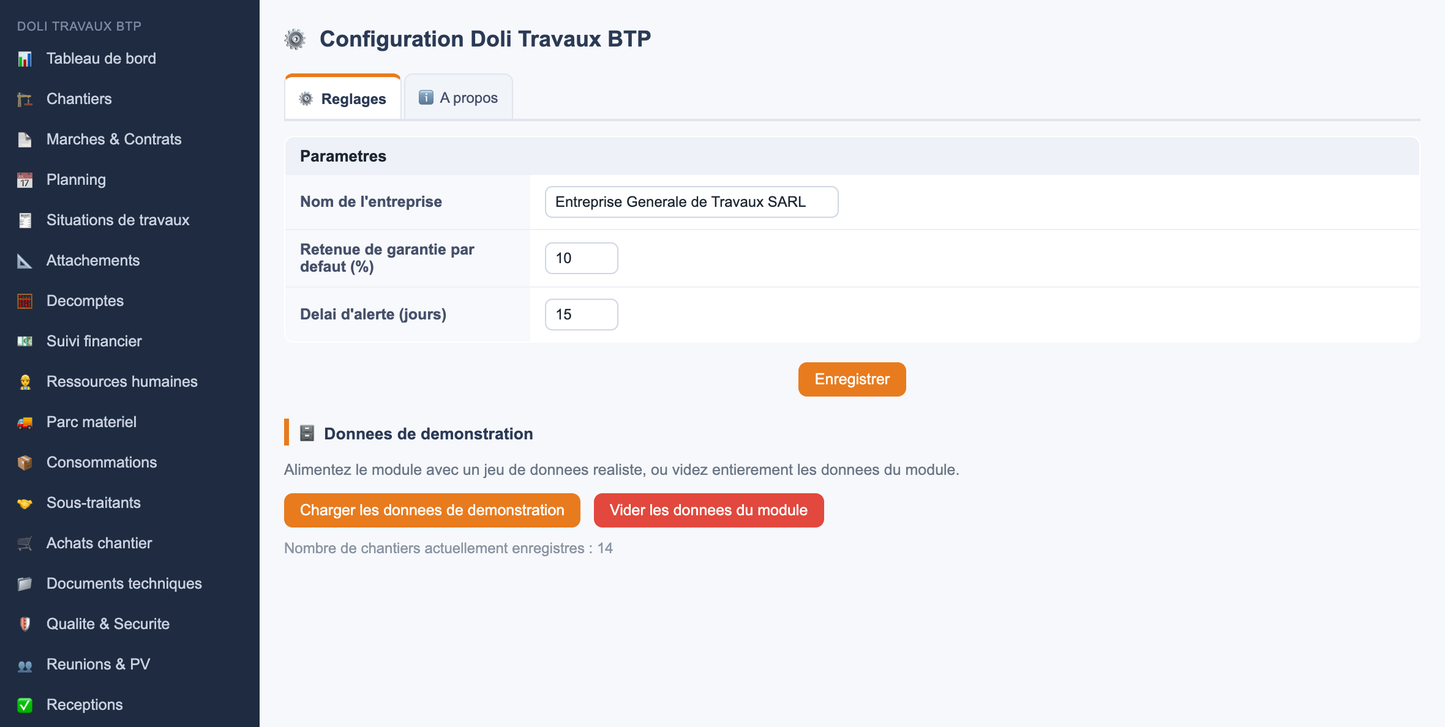
Doli Travaux BTP is a professional module for the open source ERP/CRM Dolibarr. It transforms Dolibarr into a true business management solution for Building and Public Works: managing construction sites, contracts, progress billing (progress reports and invoices), field human resources, equipment fleet, purchasing, subcontracting, quality-safety and management reporting.
The module relies on Dolibarr's native modules (Third Parties, Products/Services, Projects, Users) and enriches them with business objects specific to the construction industry, all around a dynamic architecture centered on the construction site.
|
Trade name |
Doli Construction Works |
|
Technical name |
dolitravauxbtp |
|
Publisher / Copyright |
Doli Resources - www.doliresources.com (exclusive property) |
|
Version |
2.6 (2026) |
|
License |
GPL v3+ |
|
Compatibility |
Dolibarr v16 to v23 |
|
LANGUAGES |
French, English, Italian, German, Spanish |
|
PHP |
7.0 minimum |
|
Facility |
ZIP file installable in htdocs/custom/ |
Civil engineering, Building, Roads and utilities, Hydraulics, Sanitation, Drinking water, Electricity, Public lighting, Roads, Engineering structures, Housing developments, Real estate development, Public works and Infrastructure.
The module's ergonomics are based on a central principle: the CONSTRUCTION SITE is the hub of all activity. From its profile, the user accesses all related areas via tabs, each displaying a real-time counting badge.
· Summary cockpit : financial KPIs (amount spent, revenue achieved, expenses, margin), physical and financial progress bars, and a grid of clickable modules.
· Contextual input : from a construction site, the "+ Add" button of a domain pre-fills AND locks the construction site; no need to re-select it.
· Automatic calculations : total attachment = quantity x price, cumulative situation automatically taken over, financial progress recalculated.
Result: quick setup, data entry without redundancy, and immediately usable dashboards.
Management KPI cards (number of contracts, active/completed/delayed projects, contract value, revenue generated, cash receipts, expenses, gross margin), Project & Resource KPIs (average progress, hours worked, available/broken equipment, alerts), Meter & Invoice KPIs (number of attachments, number of invoices, total excluding/including tax). Graphs: profitability per project, breakdown of project statuses, and chronological evolution of monthly invoices (12 months).
Complete sheet: reference, name, client, project owner (MOA), project manager (MOE), design office (BET), GPS location, municipality, region, contract amount, service order date, contractual/planned/actual start/end dates, status, project manager, works supervisor, site manager, physical and financial progress.
Public and private contracts, purchase orders, contracts. Information: subject, amount excluding VAT, VAT, amount including VAT, deadline, guarantees, retention of guarantee, provisional and final guarantee.
Status number, period, previous amount, current amount, cumulative total, VAT, retention money, penalties, net amount payable. Automatic numbering and carryover of the previous cumulative total for the project.
Each attachment contains several lines: product or service from the Dolibarr catalogue (or free text label), unit of measure, and quantity. Dynamic line editor (add/delete).
The breakdown is generated from an attachment: it automatically takes the labels and quantities, retrieves the unit price from the Dolibarr product database (modifiable line by line), then calculates the Total excluding tax, applies the VAT rate (which can be entered) and displays the Total including tax.
Chronological view of construction sites with progress bars, based on the start and planned end dates.
Job profiles (works manager, project manager, driver, site manager, technician, worker, surveyor, land surveyor, storekeeper, mechanic), site assignment, timekeeping, hours worked, attendance, hourly cost.
Equipment, trucks, vehicles, tools. Monitoring: availability, site assignment, fuel, maintenance, insurance, technical inspection, with detailed usage (hours, fuel, cost).
Cement, steel, sand, concrete, pipes, fuel, supplies. Forecast/actual/variance indicators.
Purchase requests, purchase orders, receipts, supplier invoices: supplier, type, amount, request and delivery dates.
Subcontractors, contracts, amounts committed and paid, start and end dates.
Non-conformities, accidents, incidents, quality controls, audits, with severity, event date and resolution date.
Document management by site (plans, CPS, CCTP, bills of quantities, execution plans, as-built drawings, minutes) with file upload.
Site meetings, client meetings, internal meetings: participants, decisions, location and date.
Provisional and final acceptance: reservations, lifting of reservations, end of warranty.
Management / Site / HR / Equipment / Financial reports, with CSV and Excel export.
Planned task (cron): construction delay, budget overrun, insurance and technical inspection deadlines for equipment.
The module includes a realistic data generator (companies, construction sites, markets, situations, attachments, accounts, equipment, HR, purchases, subcontractors, quality, meetings, receptions, reports, alerts) as well as the linked native objects (third parties, products/services, projects).
· Automatic generation unique on first activation (and on demo platform), tracked by a dedicated constant to avoid any duplication.
· From the Settings page: "Load demo data" button and "Clear module data" button (with confirmation).
Objective: dashboards, KPIs, graphs and lists that are immediately understandable for demonstrations, tests and screenshots.
· Granular rights per role (read, create, modify, delete, validate) on each domain, plus an administration right.
· Multi-entity (multicompany): each record is linked to its entity.
· Dolibarr-style list filters: search by column, magnifying glass button, reset and column display selector; sortable headers and pagination.
· Lists and records generated by a generic engine driven by object metadata, guaranteeing homogeneity and maintainability.
llx_btp_site, llx_btp_market, llx_btp_statement, llx_btp_attachment (+ lines), llx_btp_progress (+ lines), llx_btp_equipment, llx_btp_equipment_usage, llx_btp_hr_assignment, llx_btp_consumption, llx_btp_subcontractor, llx_btp_purchase, llx_btp_quality, llx_btp_meeting, llx_btp_reception, llx_btp_report, llx_btp_alert. Each table integrates entity, date_creation, tms, fk_user_creat, fk_user_modif and status.
1. Install the ZIP via Home > Configuration > Modules > Deploy an external module, or copy the dolitravauxbtp/ folder into htdocs/custom/.
2. Activate the Doli Construction Works module (Projects/Site tab of the module list).
3. Configure the module via Doli Travaux BTP > Settings.
4. (Optional) Enable the Scheduled Jobs (Cron) module for automatic alerts.


