
Discover powerful Dolibarr extensions designed to automate your business processes
DoliArchitecture Manager is a central platform for managing the activity of...
Couldn't load pickup availability


DoliArchitecture Manager is a central platform for managing the activity of an architecture firm, fully integrated with the Dolibarr ERP/CRM. The module covers the entire lifecycle of an architectural project: from prospecting and feasibility studies to final site acceptance, including the design phases (sketch, preliminary design, detailed design), administrative authorizations, production of plans and deliverables, site monitoring, human resources management, financial tracking of fees, and meeting management.
Designed and published exclusively by DoliResources, the module is aimed at architecture firms, design offices and project managers wishing to centralize the administrative, technical, financial and human management of their operations in a single tool.
The module adheres to a strict architectural rule: it never modifies the Dolibarr source code ("core"). All integration relies exclusively on official extension mechanisms.
· Hooks — architectural summary block injected onto the native project sheet.
· Triggers — automatic reactions to business events.
· Native classes — Projects, Third Parties, Contacts, Users, Quotes, Orders, Invoices, Payments, Calendar.
· User rights — 13 granular permissions.
· Menus & tabs — dedicated menu entries and tabs added to native cards.
· Scheduled task (cron) — automatic generation of dashboard alerts.
This approach guarantees backward compatibility: Dolibarr updates never overwrite the module, and the module does not introduce any regressions in the core.
The module is organized into a vertical menu grouping the following functional areas. Each area offers filterable lists, creation/modification forms, and export options.
|
Functional space |
Description |
|
Dashboard |
Overall management view: Administrative KPIs (total projects / ongoing / completed / suspended, permits pending / granted / refused), technical KPIs (phases in progress, deliverables produced / overdue), financial KPIs (fees invoiced, collected, outstanding invoices/receipts), and HR KPIs. Three graphs: project breakdown by status, invoicing vs. collection, margin per project, and breakdown by building type. Active alerts bar based on severity. |
|
Architectural projects |
Overlay to the native Dolibarr project: project owner (MOA), partner engineering firm, inspection agency, laboratory, construction company, municipality, surface areas (land / building / floor), number of levels, estimated work, fees, payment method, and five progress levels (overall, architectural, administrative, site, financial). Accessible in the "Architectural Summary" tab of the native project. |
|
Phases & missions |
Management of standardized architectural phases (feasibility, sketch, preliminary design, detailed design, authorization, execution, tender documents, assistance, construction site, provisional and final acceptance) with responsible party, planned/actual dates, priority, progress, expected deliverables, internal and client validations, and dedicated status. |
|
Plans & Deliverables |
Tracking of deliverables with versioning (V0/V1/V2), revision indices (A/B/C), plan type, file format, planned/actual delivery dates and internal/client/administration validation workflow. |
|
Administrative authorizations |
Monitoring of regulatory files (building permit, subdivision permit, demolition permit, certificates, conformity, habitability, etc.): administration concerned, file number, filing dates / expected return / obtaining, documents filed and missing, and processing status. |
|
Project planning |
Overall planning of phases (simplified Gantt) based on start and end dates, to visualize the workload and deadlines of the entire portfolio. |
|
Site monitoring |
Site visit recording: type, date, location, participants, weather, progress observed, observations, reservations and actions to be taken (visit report). |
|
Human Resources |
Workload view by collaborator: planned/actual hours, overload detection according to the parameterized threshold, distribution by profile (architect, draftsman, designer, driver, economist, engineer). |
|
Team assignments |
Assignment of collaborators at the project/phase/deliverable level, with role, profile, planned/actual workload and dates. |
|
Financial monitoring & fees |
Economic management: amount of work, percentage and amount of fees, method of remuneration, planned budget, planned / actual HR costs, external costs and subcontracting, amounts invoiced / collected, amount to be invoiced / collected and margin. |
|
Meetings & Minutes |
Meeting management (launch, follow-up, coordination, technical, client, administration) with agenda, participants, decisions and the ability to generate Dolibarr tasks from actions. |
|
Documents (EDM/ECM) |
Documents tab on each object (uploading, downloading and deleting real files via the native document manager) and specialized EDM view per project. |
|
Reports |
Report dashboard with five full-width widgets (financial, permissions, deliverables, phases, HR) and detailed reports exportable to CSV, Excel and PDF. |
|
Automatic alerts |
Generated by scheduled task (cron): late phases/deliverables, incomplete or late authorization files, HR overload, unpaid invoices, budget overrun — displayed on the dashboard by severity. |
|
Setup & demonstration data |
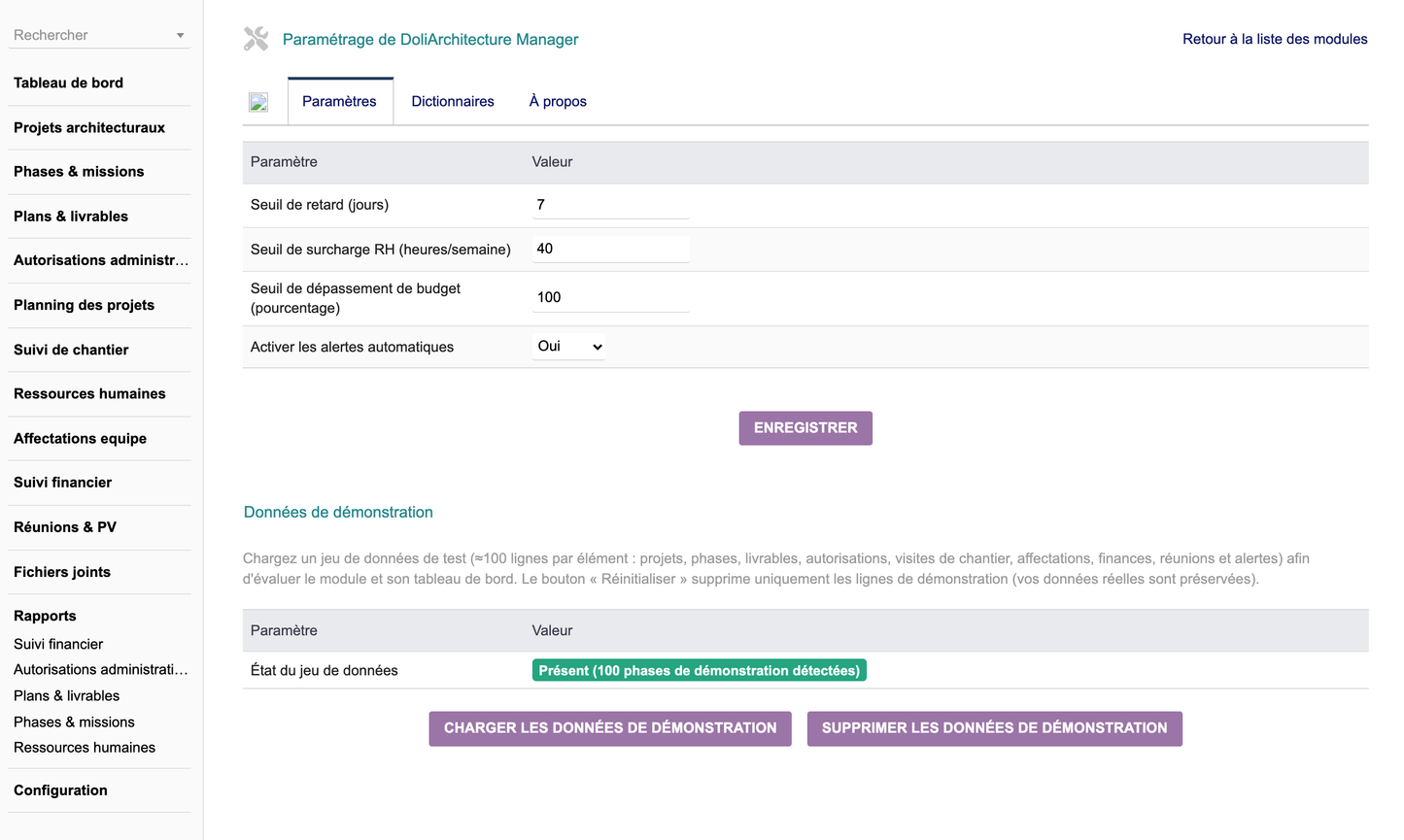
Configuration page (delay thresholds, HR overload thresholds, budget overrun thresholds, activation of alerts) and management of a demonstration dataset (≈100 lines per element) that can be loaded/reset with one click. |
The module defines 13 granular access rights, assignable by user or group from their profile. Read and write permissions are granted by default upon activation to make the module immediately usable.
|
Domain |
Permission |
|
Projects |
Reading / creating-modifying / deleting architectural projects |
|
Phases & missions |
Phase and mission management |
|
Plans & Deliverables |
Plan and deliverable management |
|
Permissions |
Management of administrative authorizations |
|
Site monitoring |
Site visit and observation management |
|
Human Resources |
Workload and assignment management |
|
Finance |
Financial tracking and fee management |
|
Meetings |
Meeting management and minutes |
|
Dashboard |
Consulting the dashboard |
|
Reports |
Viewing and exporting reports |
|
Administration |
Module configuration |
Upon activation, 13 llx_doliarchitecture_* tables are automatically created. All support multi-entity (entity), timestamping (date_creation, tms), traceability (fk_user_creat, fk_user_modif), import (import_key) and status.
project_extra · phase · deliverable · authorization · site_visit · site_action · assignment · finance · meeting · meeting_action · document · alert · settings
· Internationalization 5 languages — adding Italian, German and Spanish in addition to French and English (≈334 keys per language).
· Exclusive copyright DoliResources — the entire module (code, diagrams, languages, icons, documentation, manual) is published and protected exclusively by DoliResources; LICENSE.txt GPL v3+ file added.
· Column display selector — on all lists, hide/show each column, preserved on pagination and sorting.
· Compact filter bar — search and column selector grouped on one line.
· Font Awesome 5 icons — replacing outdated icon names that were displayed as empty squares.
· Left menu synchronized — the module's vertical menu remains displayed and highlighted on all pages, including cards.
· Reliable loading of demo data — dedicated button on the settings page, independent of the activation cycle.
· Reliable date entry — all dates are recorded and displayed correctly for both viewing and editing.
1. Home menu > Configuration > Modules > Deploy/install an external module.
2. Select the file module_doliarchitecture-3.5.zip.
3. Activate the "DoliArchitecture Manager" module in the list — the 13 tables are created automatically and a demonstration dataset is provided.
4. Assign rights to the relevant users/groups.


