
Discover powerful Dolibarr extensions designed to automate your business processes
DoliConserverie is a native Dolibarr external module. It installs under custom/doliconserverie and follows the standard Dolibarr module contract: a descriptor...
Couldn't load pickup availability


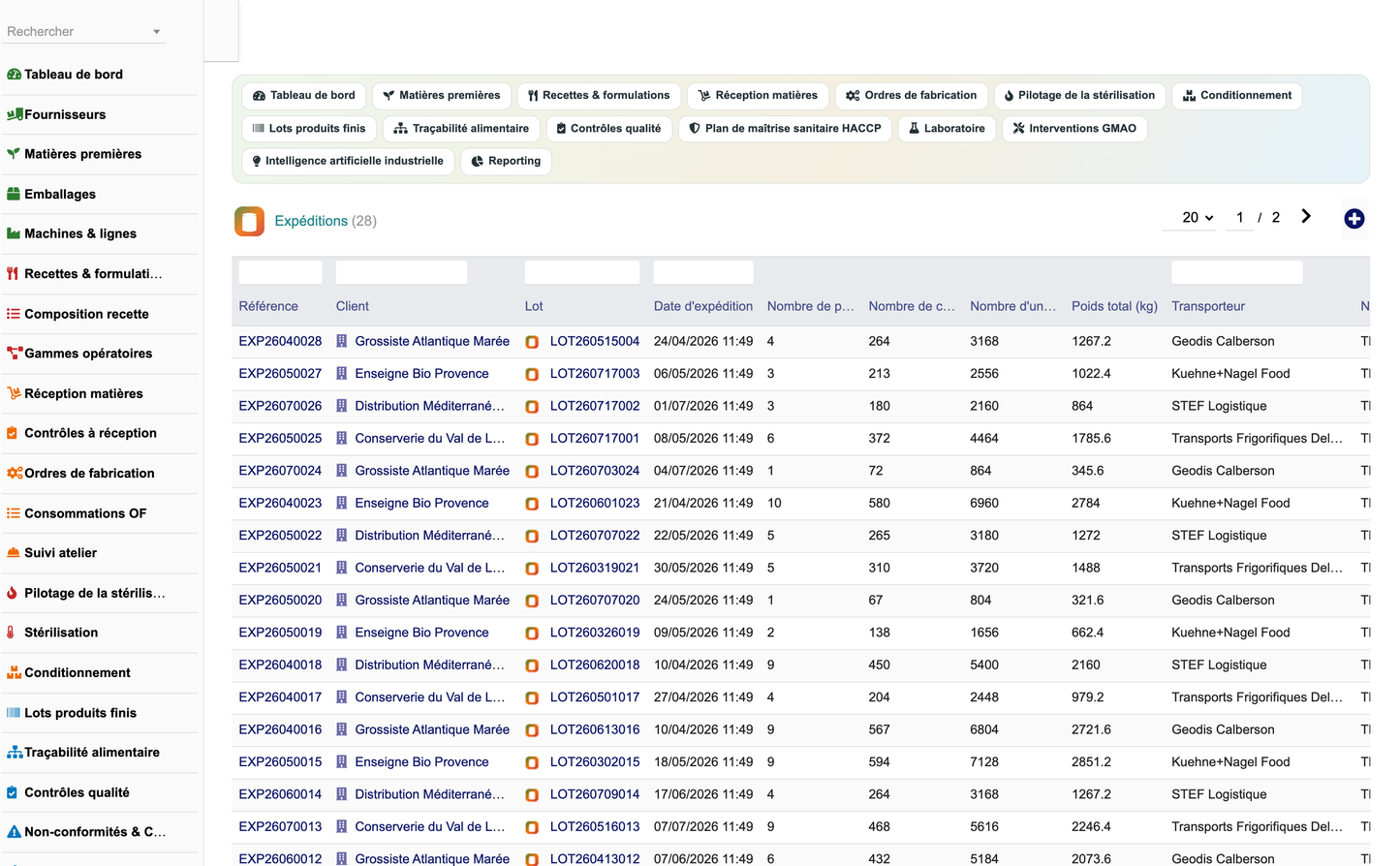
DoliConserverie is a native Dolibarr external module. It installs under custom/doliconserverie and follows the standard Dolibarr module contract: a descriptor class declares the tables, menus, permissions, constants, boxes and cron jobs, and Dolibarr creates them on activation.
· core/modules/modDoliConserverie.class.php — Module descriptor: numero, rights, menus, constants, cron, init()/remove().
· class/*.class.php — 26 business objects extending CommonObject, plus the demo data generator and the REST API class.
· sql/llx_cns_*.sql — Table definitions and index files loaded by _load_tables().
· lib/doliconserverie.lib.php — Shared helpers: right resolution, vocabularies, KPI card renderer, schema self-heal.
· lib/doliconserverie_menu.php — Menu activation helper and the in-page tab bar renderer.
· lib/doliconserverie_objects.php — Generated registry describing every object and field, driving the generic list/card engine.
· objectlist.inc.php / objectcard.inc.php — Generic list and card engine shared by all 26 objects.
· dashboard.php, traceability.php, haccp.php, sterilization.php, ai.php, reporting.php — Bespoke pages.
· admin/setup.php, admin/about.php — Configuration and about pages.
· css/doliconserverie.css.php, js/doliconserverie.js.php — Assets declared through module_parts.
· langs/<lang>/doliconserverie.lang — Translations (fr_FR, en_US, es_ES, it_IT, de_DE).
· img/ — Module and object pictograms.
· A single generic list/card engine serves all 26 objects, driven by the generated registry. Adding a field means editing the generator, not 26 pages.
· Every language key is prefixed with Cns. Dolibarr merges all active modules' language files into one translation table and the last loaded value wins, so unprefixed generic keys (Ref, Qty, Note, Machine) silently render another module's wording. The prefix removes the collision surface entirely.
· A schema self-heal runs after _load_tables(): Dolibarr only ever CREATEs tables, it never ALTERs them, so added columns are applied on upgrade.
· Pictograms use Font Awesome 5 names only: Dolibarr 16 to 23 bundles FA5 Free and FA6-only names render as empty squares.
· The demo dataset is versioned (DATASET_VERSION). A boolean guard would never re-seed an improved dataset after a module upgrade.
The module creates 26 tables, all prefixed llx_cns_. Every table carries the standard Dolibarr envelope: rowid, entity (multi-company), status, date_creation, tms, fk_user_creat, fk_user_modif and import_key (used to tag and purge the demo dataset). Foreign keys to native Dolibarr objects (societe, product, entrepot, user) are plain integer columns, consistent with Dolibarr practice.
|
Table |
Purpose |
Columns |
|
cns_audit |
Internal, supplier, customer and certification audits (IFS, BRCGS, ISO 22000) |
21 |
|
cns_conditioning |
Conditioning, labelling and palletising output |
22 |
|
cns_energy |
Energy readings: electricity, water, gas, steam, industrial cooling, with CO2 |
21 |
|
cns_haccp |
HACCP plan: hazard analysis, CCP, PRP, PRPo, critical limits, monitoring |
27 |
|
cns_haccp_check |
HACCP monitoring records with deviations and actions taken |
18 |
|
cns_lab_analysis |
Laboratory analyses: pH, microbiology, sensory, texture, stability, heavy metals |
26 |
|
cns_lot |
Finished product lots: the traceability hub |
23 |
|
cns_machine |
Machines and production lines, with OEE, availability, MTBF and MTTR |
24 |
|
cns_maintenance |
CMMS interventions: preventive, corrective and predictive |
22 |
|
cns_nonconformity |
Non-conformities and CAPA (corrective and preventive actions) |
27 |
|
cns_of |
Manufacturing orders: the GPAO core, with quantities, yield and full costing |
31 |
|
cns_of_line |
Material consumption of an order, linked to the source reception lot (upstream traceability) |
18 |
|
cns_operation |
Shop floor operation tracking, including stop time and reason (feeds OEE) |
23 |
|
cns_packaging |
Packaging: glass jars, metal cans, pouches, lids, labels, cartons, pallets |
20 |
|
cns_quality_control |
Quality controls at reception, in process, on finished product and at shipping |
24 |
|
cns_rawmaterial |
Raw materials: vegetables, fruit, fish, seafood, ingredients, oils, spices, additives |
24 |
|
cns_reception |
Raw material receptions: quantities, supplier lot, use-by and best-before dates |
25 |
|
cns_reception_check |
Incoming inspection measurements against tolerance limits |
19 |
|
cns_recipe |
Versioned recipes and formulations with nutrition, allergens and cost |
32 |
|
cns_recipe_line |
Recipe composition: ingredient, quantity, dosage and line cost |
18 |
|
cns_route |
Operating routes: ordered steps, machine, setup and run time, operators |
19 |
|
cns_shipment |
Shipments closing the downstream traceability loop |
23 |
|
cns_sparepart |
Spare parts stock with lead time and storage location |
20 |
|
cns_sterilization |
Autoclave cycles: thermal scale, pressure, duration, F0 sterilizing value, validation |
27 |
|
cns_stock |
Stock movements: inbound, outbound and transfers |
22 |
|
cns_supplier |
Raw material suppliers (farmers, fishermen, cooperatives, ingredient and packaging vendors) |
22 |
· cns_of.fk_recipe -> cns_recipe : the order applies a versioned recipe.
· cns_of_line.fk_reception -> cns_reception : this link is what makes upstream traceability possible. It ties every consumed material back to the supplier delivery it came from.
· cns_lot.fk_of -> cns_of : the finished lot is produced by an order, giving internal traceability.
· cns_shipment.fk_lot -> cns_lot : the shipment ties the lot to the customer, giving downstream traceability.
· cns_sterilization.fk_of -> cns_of : the thermal record of the CCP for that order.
· cns_haccp_check.fk_haccp -> cns_haccp : monitoring records attached to their HACCP point.
· Suppliers with health approval number, certification, origin, rating and audit date
· Raw materials with family, variety, origin, cost, stock, shelf life, storage temperature and allergens
· Packaging with capacity, net weight, cost, stock and recyclability
· Machines and lines with hourly capacity, power, state, OEE, availability, MTBF and MTTR
· Versioned recipes with process, yield, cooking scale, pH/Brix/salt targets
· Nutritional values per 100 g and allergen declaration
· Composition lines with dosage and line cost, feeding the material cost simulation
· Traced validation (validator and date) for ISO 22000 document control
· Operating routes with machine, setup time, run time, operators and hourly cost
· Manufacturing orders with status workflow, priority, planning and full costing
· Material consumption lines linked to the source reception lot
· Shop floor operation tracking with stop time and reason
· Automatic yield computation from planned versus produced quantities
· Autoclave cycles with target and reached temperature, pressure and duration
· F0 sterilizing value against the 3.0 minute regulatory floor for low-acid canned food
· Cycle validation gated by a dedicated permission
· Full history for audit
· One-click upstream, internal and downstream tree for any finished lot
· Upstream: supplier, certification, origin, supplier lot, harvest and reception dates
· Internal: order, recipe version, line, sterilization record, quality controls and lab analyses
· Downstream: customer, carrier, pallets, tracking number, delivery date
· Search by lot number or designation; also exposed through the REST API
· Controls at the four regulatory stages: reception, in process, finished product, shipping
· Non-conformities with root cause, cost impact and CAPA workflow
· Laboratory analyses with normative method and tolerance limits
· HACCP plan with CCP/PRP/PRPo, hazard rating and a severity by probability risk matrix
· Audits: internal, supplier, customer and certification
· Preventive, corrective and predictive maintenance with downtime and cost
· Spare parts with minimum stock, lead time and location
· Energy readings with cost, ratio per unit produced and CO2 emissions
· Stock movements and shipments
· Dashboard with 28 KPIs across production, raw materials, quality, performance and finance
· Order kanban and eight dynamic charts
· AI space computed locally: no external service, no API key, works offline
· Trend and forecast by ordinary least squares, reported with its R2 confidence
· Predictive maintenance by z-score of MTBF against the fleet mean
· Nine reports exportable to CSV, Excel, Word and PDF
The module implements the full cannery cycle:
Procurement -> Reception -> Incoming inspection -> Preparation -> Transformation -> Cooking -> Filling -> Seaming -> Sterilization -> Cooling -> Labelling -> Conditioning -> Palletising -> Storage -> Shipping, with Traceability, Quality and Reporting spanning the whole chain.
· draft — Created, not yet scheduled.
· planned — Scheduled on a line for a given date.
· released — Released to the shop floor; material consumption can be recorded.
· inprogress — Operations running; partial quantities recorded.
· done — Completed; yield computed, finished lot created.
· cancelled — Abandoned.
· quarantine — Produced, awaiting release (typically pending lab results).
· released — Released for sale after conforming controls.
· blocked — Blocked following a non-conformity.
· sold — Fully shipped.
· expired — Past its use-by date; set automatically by the daily cron.
· recalled — Subject to a withdrawal or recall.
The module exposes a REST API under /api/index.php/doliconserverie/. Authentication uses the standard Dolibarr API key passed in the DOLAPIKEY header; the Dolibarr API module must be enabled. Every route is guarded by the module's own permissions, so an API caller can never exceed the rights of its user.
|
Method and route |
Description |
Right required |
|
GET /{entity} |
List records (sortfield whitelisted, paginated) |
<entity group> / read |
|
GET /{entity}/{id} |
Read one record |
<entity group> / read |
|
POST /{entity} |
Create a record |
<entity group> / write |
|
PUT /{entity}/{id} |
Update a record |
<entity group> / write |
|
DELETE /{entity}/{id} |
Delete a record |
<entity group> / delete |
|
GET /traceability/{id} |
Full upstream, internal and downstream tree of a finished lot |
trace / read |
|
GET /kpi |
Production, quality, performance and finance indicators |
reporting / read |
Entities: suppliers, rawmaterials, recipes, machines, orders, receptions, sterilizations, lots, controls, analyses, haccp.
Example: curl -H "DOLAPIKEY: <key>" https://<host>/api/index.php/doliconserverie/traceability/42
The module is built on top of the native Dolibarr objects rather than replacing them, so accounting, purchasing and sales stay in the standard modules.
· Third parties (Societe) — Suppliers and customers link to native third parties; the module depends on modSociete.
· Products — Raw materials and recipes link to native products; the module depends on modProduct.
· Warehouses (Entrepot) — Lots and stock movements carry a warehouse reference, supporting multi-warehouse setups.
· Stock — Stock movements record type, direction, quantity, value and temperature.
· Users — Operators, technicians, analysts, controllers and validators are native Dolibarr users.
· Purchasing and sales — Supplier orders, receptions, customer orders, invoices and shipments remain in the native modules; the cannery objects reference them through the third party and product links.
· Projects and Agenda — Standard Dolibarr tabs remain available on module objects.
· GED — Documents can be attached to module objects through the standard document tab.
· Multi-company — Every table carries an entity column and all queries filter through getEntity().
· Cron — A daily scheduled job moves lots past their use-by date to the expired status.
· Analytical accounting — Order costing separates material, labour and energy, giving the unit cost used for margin analysis.
27 permissions are declared across 11 groups. Read and write are granted by default on activation so the module is usable immediately; delete and administration must be granted explicitly.
|
Group |
Scope |
|
referential |
Suppliers, raw materials, packaging, machines, recipes, routes |
|
production |
Receptions, manufacturing orders, consumption, operations, conditioning |
|
sterilization |
Autoclave cycles and cycle validation |
|
quality |
Quality controls, non-conformities, CAPA, audits |
|
lab |
Laboratory analyses |
|
haccp |
HACCP plan and monitoring records |
|
maintenance |
CMMS interventions and spare parts |
|
stock |
Stock movements, energy, shipments |
|
trace |
Lots and the traceability tree (read only) |
|
reporting |
Reports and the AI space (read only) |
|
admin |
Module administration |
1. Copy the doliconserverie directory into the custom/ directory of your Dolibarr installation.
2. Log in as an administrator and open Home > Setup > Modules.
3. Find 'Gestion Conserverie' and activate it. The 26 tables, 34 menu entries, 27 permissions and the default configuration are created automatically.
4. Open the module configuration to enable or disable features (sterilization, HACCP, laboratory, CMMS, energy, AI) and set the production, quality and traceability parameters.
5. Optionally click 'Load demo data' to install a complete, realistic dataset. 'Remove demo data' deletes only the automatically generated rows, never your own data.
6. Grant the permissions to your user groups under Home > Setup > Users & Groups.
Uninstalling the module through the Dolibarr module list removes the menus, permissions and constants. The llx_cns_ tables are intentionally left in place so no production data is ever lost by a mis-click; drop them manually if you want a full removal.
Developed by DoliResources — Copyright (C) 2026 DoliResources — www.doliresources.com


