
Discover powerful Dolibarr extensions designed to automate your business processes
DoliEpanouissement transforms Dolibarr into a complete,...
Couldn't load pickup availability


DoliEpanouissement transforms Dolibarr into a complete, dedicated ERP/CRM platform for wellbeing and personal-development centres ("centres d'épanouissement"). It centralises the educational, social, cultural and sporting life of a centre — from the beneficiaries it serves (children, youth and adults) to the activities they attend, the facilitators who run them, the enrollments and subscriptions that fund them, and the invoicing that turns all of this into accountable revenue inside native Dolibarr.
The module is built on a professional, modular architecture (MVC, granular permissions, hooks, dynamic menus, multi-language) and ships with a modern SaaS-style dashboard, an advanced reporting engine, and a one-click demonstration dataset so the solution can be evaluated and deployed in a real multi-activity environment.
|
Business objects |
23 dedicated entities (beneficiaries, responsibles, facilitators, staff, contracts, categories, groups, activity types, schedules, enrollments, attendance, progress reviews, skills, follow-up reports, fees, payments, transport, catering, menus, events, documents, notifications) |
|
Granular permissions |
44 rights across 16 functional domains (read / write / delete per area) |
|
Dynamic menus |
32 menu entries (top-bar + left menu, auto-synced) |
|
Languages |
French, English, Italian, German, Spanish (standard /langs files) |
|
Native integration |
Third parties, quotes, orders, invoices, payments, agenda, products/services, projects, documents, users |
|
Dashboard |
Custom SaaS cockpit — 6 headline KPIs, 4 KPI zones, smart alerts, 6 charts |
The beneficiary is the heart of the module — a child, teenager, young adult or adult who takes part in the centre's activities. Each beneficiary has a complete, 360° record.
· Identity — first name, last name, gender, date and place of birth, nationality, photo.
· Responsible contact — linked legal responsible/parent, relationship, emergency contact and phone.
· Special needs — medical information and allergies captured on the record for safe activity planning.
· Level / category — age category (early years, children, teenagers, young adults, adults) driving eligibility and reporting.
· Group assignment — the activity group the beneficiary belongs to, with season/year.
· Third-party link — optional link to a native Dolibarr third party for billing continuity.
· Participation history — attendance across sessions, enrollments and events attended.
· Personal progress tracking — progress reviews and acquired skills recorded over time, consolidated into follow-up reports.
· Status lifecycle — active, suspended, transferred or archived — reflected in KPIs and lists.
Activities are organised in two complementary levels: reusable activity types (the catalogue) and concrete activity groups (running sessions with a capacity and a facilitator).
Create and classify the centre's offering across the full spectrum:
· Sports activities (football, team sports, yoga & wellbeing…)
· Artistic activities (dance & body expression, visual arts & painting, theatre & improvisation, music & singing)
· Educational activities (tutoring, IT & robotics)
· Cultural activities (workshops, discovery, cooking workshop)
· Social activities (citizenship & social life)
Each activity type carries a colour code, coefficient, programme and educational objectives, and can be assigned a facilitator and a target age category.
· Maximum capacity — each activity group defines a capacity; the dashboard flags over-booked groups.
· Facilitator assignment — a lead facilitator is attached to each group and to the weekly schedule slots.
· Activity planning — weekly schedule of sessions by group and facilitator, with activity type, room, weekday and times.
· Attendance tracking — present / absent / late marking per session, with reason for absence.
· Participant evaluation — progress reviews per activity and period, with acquired skills and facilitator appreciation.
The module manages the whole supervising team — facilitators, educators and coordinators — with the information needed to run and payroll the centre.
· Roles — facilitators / educators / coordinators, plus non-teaching support staff (administration, reception, maintenance, accounting).
· Skills & specialities — activity specialities and diplomas (e.g. BPJEPS, DEJEPS, BAFA/BAFD, STAPS, specialised educator).
· Assignment by activity — facilitators are linked to activity types, groups and schedule slots.
· Intervention planning — the weekly planning shows each facilitator's sessions.
· Working-hours tracking — intervention hours are recorded per facilitator; employment contracts capture type, dates, hourly rate and monthly salary.
Enrollment is modelled as a visual Kanban workflow and linked to flexible subscription options.
· Drag-and-drop pipeline — admission request → file review → approved → assigned to a group (or rejected).
· Enrollment / re-enrollment — distinguishes new enrollments from renewals across seasons.
· Document check — each file tracks whether the required documents have been verified.
· Subscriptions — monthly, yearly or free — multi-activity subscriptions are supported.
· Waiting list — enrollments beyond a group's capacity are naturally surfaced (over-capacity alert on the dashboard).
· Absences & attendance — full presence management with justified/unjustified absences and reasons.
· Participation certificates — attendance and progress data support the issuing of participation certificates.
DoliEpanouissement is fully integrated with Dolibarr's native commercial modules so that every activity and subscription becomes accountable revenue.
· Customer invoices
· Quotes (proposals)
· Sales orders
· Contracts
· Payments
· Per-activity pricing — each activity/fee has its own price; fee products are created as native services.
· Multi-activity subscriptions — monthly and yearly subscription products covering several activities.
· Family discounts — discounts applied through native pricing when multiple beneficiaries share a responsible/third party.
· Periodic automatic billing — recurring monthly/annual fees drive periodic invoicing via native Dolibarr.
· Receivables tracking — amount due vs paid per enrollment, outstanding balance and late-payment alerts.
A bespoke, non-standard Dolibarr cockpit with a modern SaaS design. Colour theme: wellbeing green, trust blue, energy orange and clean white.
· Total number of beneficiaries
· Participation rate
· Number of active activities
· Monthly revenue
· Activity fill rate
· Average satisfaction
· Beneficiaries & headcount (total, active, new enrollments this month, groups, facilitators, archived)
· Attendance & assiduity (attendance rate, absence rate, present/absent today)
· Finance (monthly & yearly revenue, outstanding payments, unpaid enrollments)
· Progress follow-up (average progress, number of reviews and follow-up reports)
· Enrollment evolution — monthly trend of new enrollments over 12 months.
· Activity breakdown — distribution of activities across activity types.
· Revenue by activity type — revenue split per fee/activity type.
· Attendance / presence rate — presence analytics and absences by group.
UX/UI: modern KPI cards with gradient headline band, interactive widgets, smart alerts, responsive grid layout and a fluid SaaS-style interface.
A dedicated "Reporting" menu consolidates operational, educational and financial analytics.
· Participation reports — beneficiary lists, enrollment lists, attendance and tardiness.
· Financial reports — revenue, payment situation, unpaid list, fees by type.
· Most popular activities — ranking of activities and events by participation.
· Reports by age category — breakdown of beneficiaries and outcomes per age category.
· Exports — CSV / Excel / PDF exports with UTF-8 handling.
· Dynamic advanced filters — season, category, group and date filters across reports.
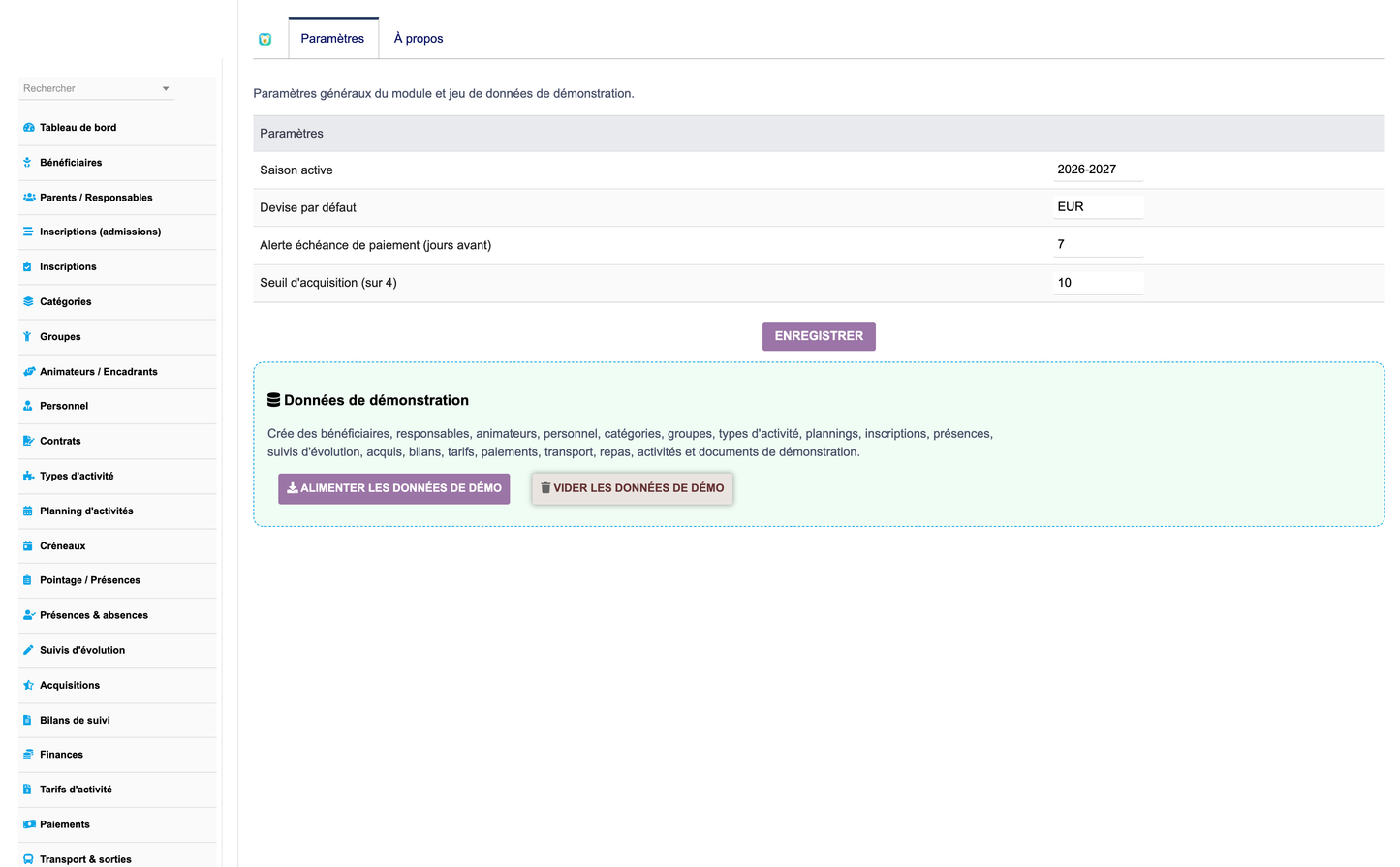
An administration section centralises setup and demonstration data.
· Generate demonstration data — one-click button seeding a complete, realistic dataset (beneficiaries, responsibles, facilitators, groups, activities, enrollments, attendance, payments, events…).
· Remove demonstration data — secure one-click purge of all demo records (versioned dataset guard).
· Pricing configuration — default currency and fee parameters.
· Activity configuration — active season, alert thresholds and satisfaction/acquisition scale.
· Module activation — enable/disable functional areas through granular permissions.
The module enriches, rather than replaces, native Dolibarr. It connects to:
· Third parties (customers) — responsibles and partner organisations are linked to native third parties.
· Invoices, quotes, orders — fees and subscriptions flow into native commercial documents.
· Payments & banks — payments are tracked and reconciled with native modules.
· Dolibarr agenda — sessions and events integrate with the native calendar.
· Automatic emails & notifications — multichannel communication (email/SMS) to responsibles: information, payment reminders, absence alerts.
· Products/services, projects, documents, users — fee products, project links, a document library and user accounts.
Full translation coverage through standard Dolibarr /langs files:
· French (Français)
· English
· Italian (Italiano)
· German (Deutsch)
· Spanish (Español)
A dedicated label-enforcement mechanism guarantees the correct wellbeing-centre vocabulary is displayed even when other modules define overlapping generic keys.
The module follows the strict Dolibarr module architecture and best practices:
· /class — business object classes (CommonObject-based) and the demo data generator.
· /core/modules — module descriptor (rights, menus, dependencies, triggers).
· /admin — setup and about pages.
· /sql — table definitions and keys (with schema self-heal on upgrade).
· /langs — five language files.
· /css & views — the SaaS stylesheet and the dashboard, Kanban, planning and reporting views.
· Hooks & permissions — Dolibarr hooks, 44 granular permissions, and dynamic top-bar + left menu kept in sync.
The module targets Dolibarr v16 to v23+ and PHP 7.1 to 8.x, and installs cleanly from a standard ZIP.
· Production-ready — clean, commented and structured code; installable via Dolibarr ZIP.
· Deliverables — the installable module ZIP, a PDF user manual and a screenshot pack.
Publisher: DoliResources
https://www.doliresources.com
© 2026 DoliResources — All rights reserved.


