
Discover powerful Dolibarr extensions designed to automate your business processes
Emergency Service Management equips Dolibarr with everything a hospital emergency department needs to run the administrative and operational side of its patient pathway, from...
Couldn't load pickup availability


Emergency Service Management equips Dolibarr with everything a hospital emergency department needs to run the administrative and operational side of its patient pathway, from the moment a patient arrives to the moment the visit is closed and billed. It is delivered as a standard external module: it never modifies the Dolibarr core and uses only the documented extension points.
The module is organised around one central object, the emergency visit, and 32 satellite objects that attach to it: identity, triage, vital signs, reassessments, rooms and movements, care episodes, examination requests and results, prescriptions, procedures, observation stays, orientation decisions, hospital admission requests, transfers, discharges, ambulance missions, emergency inventory, equipment, staff rotas, quality records, billing lines and a full audit trail.
Everything a professional decides is recorded, timestamped, attributed and traceable. Nothing a professional must decide is decided by the software.
|
Figure |
Value |
|
Business objects |
33 |
|
Database tables |
33 (llx_ems_*) |
|
Granular permissions |
38 across 17 functional groups |
|
Menu entries |
1 top entry, 110 left entries in 13 sections |
|
Controlled vocabularies |
67 domains, 392 codes |
|
Languages |
French, English, Italian, German, Spanish (1092 keys each) |
|
Dashboard indicators |
21 key indicators, 14 charts, 17 alert types |
|
Report families |
10, each exportable to PDF, Excel, CSV and Word |
|
PDF document models |
23 |
|
REST resources |
33 generic + dashboard, queue and vocabulary endpoints |
· Give the department a single, live picture of its load: who is present, at which stage, waiting how long, in which room.
· Make waiting times measurable rather than anecdotal: time to triage, time to doctor and total length of stay are computed per visit and aggregated per month and per priority level.
· Guarantee that a reassessment due is a reassessment visible: the configured delay produces an operational alert instead of relying on memory.
· Trace every patient movement between spaces, so that the location of a patient is never a question asked out loud in a corridor.
· Keep the emergency inventory usable under pressure: batches, expiry dates, room endowments and per-visit consumption.
· Close the administrative loop: every visit can be billed, linked to the native invoicing modules and to the paying organisation.
· Support the quality process with incidents, corrective actions and audits attached to the process, the room or the equipment concerned.
· Protect confidentiality: granular permissions, an anonymised public display and an audit trail of access to patient files.
|
Area |
What the module covers |
|
Identity |
Patient files, insurers and paying bodies, multi-criteria search, minors and unknown patients, archiving, anonymisation, access logging |
|
Admissions |
Arrival modes, companion, ambulance, referring facility and doctor, stated reason, identity status, coverage, reception agent, thirteen visit statuses |
|
Triage |
Configurable referentials, priority-level dictionary, orientation, isolation need, target delay, next reassessment, signature |
|
Vital signs |
Fourteen parameters, timestamped and attributed, charted over the stay |
|
Flow |
Real-time queue, anonymised waiting-room display, rooms and boxes board, movements |
|
Clinical |
Care episodes, examination requests and results, prescriptions, procedures, observation stays |
|
Outcomes |
Orientation decisions, hospital admission requests, transfers, discharges, ambulance missions |
|
Logistics |
Stock items, batches and expiry, movements, room endowments, equipment, maintenance |
|
People |
Staff linked to Dolibarr users, shifts, on-call and standby rotas |
|
Quality |
Incidents and adverse events, corrective and preventive actions, audits |
|
Billing |
Visit billing lines, insurer share, patient share, payments, unpaid |
|
Steering |
Command centre dashboard, ten report families, exports, REST API |
The module ships 38 rights grouped into 17 functional groups. The job profiles below are assembled as Dolibarr user groups combining those rights; the table shows the intended combination for each profile.
|
Profile |
Typical rights |
|
Administrator |
Everything, including configuration and demonstration data |
|
Management |
Read on every group, plus reporting |
|
Emergency unit manager |
Read and write on the whole pathway, plus reporting and quality |
|
Emergency doctor |
Clinical read/write, exams, results, prescriptions, procedures, outcomes |
|
Nurse |
Clinical read/write, triage, vital signs, procedures, rooms |
|
Triage agent |
Admission read/write, triage read/write, clinical read, rooms read |
|
Reception agent |
Patient read/write, admission read/write |
|
Medical secretary |
Patient read/write, admission read, outcomes read, billing read |
|
Nursing assistant |
Clinical read, procedures write, rooms read |
|
Porter |
Rooms read/write (movements), admission read |
|
Room manager |
Rooms read/write, equipment read |
|
Stock manager |
Stock read/write/delete, equipment read/write |
|
Quality manager |
Quality read/write, reporting, audit trail read |
|
Billing manager |
Billing read/write, patient read, admission read |
|
Accountant |
Billing read, reporting |
|
Auditor |
Read on every group, plus audit trail read |
|
Read-only user |
Read on the groups explicitly granted, nothing else |
The Emergency Operations Command Center is the module home page. It refreshes automatically at a configurable interval and is composed of five zones.
A horizontal representation of the pathway with a live count at each step: Arrival, Admission, Triage, Waiting room, Box, Examinations, Decision, and the outcome step (discharge, hospital admission or transfer).
· Patients present, waiting, to triage, priority patients
· Patients in consultation, under observation, in resuscitation
· Boxes available and occupied
· Average time to triage, average time to doctor, average length of stay
· Discharges, hospital admissions and transfers today
· Patients who left without being seen today
· Pending examinations and pending prescriptions, for patients currently present
· Open incidents, items at critical stock, revenue billed today
Note on "pending": these tiles count what is pending FOR A PATIENT WHO IS PRESENT. Counting the whole history would produce an ever-growing archive figure that nobody can act on.
· Arrivals by hour, patients by priority level
· Average waiting time and average length of stay, per month over twelve months
· Room occupancy by type, administrative admission reasons
· Discharges by type, hospital admissions by department, transfers by facility
· Activity per doctor and per nurse
· Examinations requested by type, stock consumption per month, billing per month
Seventeen alert types are computed by a single engine shared by the dashboard, the alerts page, the notifications tab and the API, so the four can never disagree. The dashboard shows only the alerts that are firing; the dedicated alerts page also shows those at zero, so a reader can distinguish "nothing is wrong" from "nothing is measured".
The patient file carries the internal identifier and file number, title, name, first name, date of birth, administrative sex, national identifier, address, telephone, e-mail, emergency contact, legal guardian, family doctor, insurer and member number, declared allergies, declared history, declared treatments, consent, visit counter, last visit and file status.
· Multi-criteria search on reference, name, first name, date of birth, national identifier, town and telephone.
· Duplicate control: the search surfaces near matches before a new file is created.
· Unknown patients and minors: the identity status (verified, provisional, unknown) and the legal guardian field carry these cases explicitly.
· Archiving and anonymisation are file statuses, so an anonymised file remains countable without remaining identifiable.
· Access to a patient file is written to the audit trail.
The admission is the emergency visit and the hub of the whole module. It carries the reference, patient, arrival date and time, arrival mode, companion, ambulance, referring facility and doctor, stated reason, stated main complaint, identity status, insurer and coverage, reception agent, room, queue number, priority level, pathway stage, visit status, the three pathway timestamps, the three computed durations, the outcome and the amount billed.
|
Arrival modes |
Visit statuses |
|
Ambulance |
Arrived, In admission, Admission completed |
|
Personal vehicle |
To triage, In triage, Waiting |
|
On foot |
In care, Under observation |
|
Inter-hospital transfer |
Discharged, Hospitalised, Transferred |
|
Security forces |
Cancelled, Archived |
|
Other |
|
Triage is configurable without touching the code. The referential is a vocabulary (internal, ESI, Manchester, CTAS or an establishment-defined one) and the priority levels are a dictionary object with code, label, colour, description, target delay, reassessment frequency, alert level and status.
A triage record carries the patient, the visit, the date and time, the professional, the stated main complaint, the stated circumstances, the priority level assigned, the reason for that level, the alerts recorded, the proposed orientation, the isolation need, a comment, the next reassessment and the signature.
|
The module never assigns a definitive clinical priority level. The level is recorded because a professional assigned it, and the record carries who signed it. |
Temperature, systolic and diastolic blood pressure, heart rate, respiratory rate, oxygen saturation, weight, height, stated pain, recorded blood glucose and recorded consciousness state, plus the measurement context (triage, box, observation, reassessment, discharge).
Every measurement is timestamped and linked to the patient, the visit and the professional who took it. The module stores and charts them; it never interprets them and never derives a conclusion from them.
A reassessment records the previous and the new priority level, the justification, the new orientation, the professional, the signature and the gap to the target delay. When the configured reassessment delay is exceeded the record is flagged as late and an operational alert fires.
The queue lists every visit still in progress, ordered by the priority level a professional recorded and then by arrival time. Each line shows the queue number, the patient (or the anonymised file reference), the priority level, the pathway stage, the room, the arrival time, the waiting time colour-coded against the configured threshold, and the visit status. Six named views are provided: full queue, to triage, waiting, priority patients, awaiting a doctor, in care.
A separate anonymised screen is provided for the waiting room itself. It shows the queue number and the pathway stage only: no name, no identifier, no clinical information, and deliberately no priority level, which would disclose a clinical judgement to the whole room. It carries a notice explaining that patients are called by clinical priority and not by arrival order.
Nine space types are supported: reception, triage, waiting room, consultation box, resuscitation room, observation room, isolation room, treatment room and a configurable other type. Each space carries a code, name, type, capacity, location, equipment, status, availability, last cleaning, last disinfection, next maintenance, the visit currently occupying it, a manager and a use counter.
Statuses: available, reserved, occupied, being cleaned, unavailable, under maintenance. The board shows the occupancy rate computed over the spaces that can actually receive a patient, so reception and the waiting room never dilute it.
· Manual assignment to a room or box.
· Change of room or box, with the reason recorded.
· Transfer to observation, to resuscitation or to isolation.
· Return to the waiting room.
· A full movement history per visit: origin, destination, reason, stage, operator, duration.
The module proposes availability; it never decides the final clinical assignment.
The care episode links the visit, the doctor and the nurse, and carries the observations, the information declared by the patient, the clinical examination as recorded by the doctor, the hypotheses as recorded by the doctor, the room, counters of procedures and examinations, and a status (open, in progress, awaiting an examination, awaiting a decision, closed).
|
The module generates no diagnosis. The hypotheses field stores what a doctor wrote; nothing computes or suggests it. |
Laboratory, radiology, CT scan, MRI, ultrasound, electrocardiogram and a configurable other type. A request carries the patient, the visit, the prescriber, the type, the priority, the date and time, the recorded indication, the destination department, the status, the result date, the turnaround time and the cost.
Statuses: requested, accepted, in progress, result available, validated, cancelled, refused.
· Manual entry, document import, CSV import, REST API, or an external module.
· Validation by an authorised professional, with the validator recorded.
· A critical result flag, declared by the professional, never derived by the module.
· Notification through the alert engine when a result becomes available or when a critical result is declared for a patient still present.
· Full history, with statuses draft, available, validated, amended and cancelled.
A prescription carries the patient, the visit, the prescriber, the medication or product (optionally linked to the native product catalogue), the dosage, the route, the frequency, the duration, the instruction, the date and time, the status, the validation, the declared administration and the quantity.
Routes: oral, intravenous, intramuscular, subcutaneous, inhaled, topical, rectal, nasal. Statuses: draft, prescribed, validated, administration declared, refused, cancelled.
|
The module proposes no dosage and no posology. Every value is entered by an authorised prescriber. |
A configurable catalogue of procedures: nursing care, dressing, suture, immobilisation, intravenous line placement, sampling, oxygen therapy, monitoring, internal transport and other. Each record carries the patient, the visit, the type, the professional, the date and time, the duration, the product used, the consumables, the quantity, observations, the status, the unit and total cost and whether it is billable. A completed procedure generates the matching stock movement against the visit.
An observation stay carries the entry date, the room, the bed or slot, the responsible doctor, the nurse, the monitoring frequency, counters of vital signs and procedures, the duration, the status and the final decision. Prolonged observation beyond the configured threshold raises an operational alert.
Orientation decisions: discharge home, hospital admission, transfer, keep under observation, referral to a consultation, departure against advice, left without being seen, and a configurable other type. Each decision carries the professional, the date and time, the reason, the destination department and facility, the recorded instructions, the status and the signature.
A hospital admission request carries the patient, the visit, the requested department, the requested bed, the priority, the doctor, the request and confirmation timestamps, the bed waiting time, the internal-transfer flag and the attached document. Statuses: requested, waiting for a bed, accepted, refused, patient transferred, cancelled.
A transfer carries the destination facility and department, the recorded reason, the doctor, the ambulance and its crew, the request and departure timestamps, the acceptance by the receiving facility, the status, the handover proof, the distance and the cost.
A discharge carries the date and time, the professional, the discharge type, whether a prescription and a certificate are attached, the recorded instructions, the follow-up appointment and who will provide it, the companion, the linked invoice, the amount billed, the payment flag and the status.
An ambulance mission records the mission type (inbound, transfer, return home), the vehicle, the crew, the linked visit and transfer, the origin and destination, the call, arrival and patient-handover timestamps, the status, the distance and the cost. The REST resource ambulances is the integration surface for a dedicated ambulance module: a transfer request can create or open a mission on the other side.
Emergency items are linked to the native product catalogue and grouped into families: medication, medical device, consumable, emergency kit, oxygen and disinfectant. Each item carries the unit, the warehouse, the available and reserved quantities, the minimum and maximum stock, the unit price, a temperature-sensitive flag, a risk class (standard, controlled substance, high alert, cytotoxic, flammable, cold chain), the storage room, the last movement and a status.
Batches carry the batch number, the item, the quantity, the expiry date, the receipt date, the supplier, the storage location, the days to expiry and a status (valid, near expiry, expired, quarantined, destroyed) refreshed by the scheduled job. Movement types: inbound, outbound, internal transfer, patient consumption, loss, destruction, inventory.
A room endowment declares, for a box, a resuscitation room, an observation room, an isolation room, a crash cart or a department, the theoretical quantity of an item against the available quantity, the consumed quantity, the missing quantity and the quantity to restock, with the date of the last check and a status (complete, incomplete, to restock, checked).
Fourteen equipment families are supported: monitor, defibrillator, ventilator, infusion pump, syringe driver, aspirator, stretcher, wheelchair, bed, crash cart, computer, tablet, printer and other. Each item carries the code, designation, manufacturer, model, serial number, room, commissioning date, status, availability, the last and next regulatory control, the next maintenance, the failure counter, the purchase value and the attached documentation.
Preventive maintenance, corrective maintenance, calibration, regulatory control and breakdown. Each intervention carries the equipment, the request, planned and completion dates, the provider, the technician, the parts used, the description, the downtime in hours, the cost and the status. Requested and planned interventions raise an alert so a maintenance never falls silently due.
Staff records are linked to Dolibarr users and carry the role (emergency doctor, nurse, nursing assistant, porter, reception agent, medical secretary, triage agent, unit manager, quality manager), the speciality, the professional number, the contact details, the assigned zone, the qualification expiry and the status.
Shifts carry the staff member, the date, the type (day, night, on-call, standby, overtime), the start and end times, the room, the zone, the planned hours, the status and any replacement. Statuses cover planned, confirmed, in progress, completed, absent and replaced, which is what makes under-staffing, an incomplete on-call and a schedule conflict visible.
A single PDF engine renders any record with its patient and visit context, its fields (coded columns resolved into their translated labels), the scope statement and a signature block. Twenty-three document names are provided:
· Admission form, triage sheet, vital signs chart, reassessment sheet, care sheet
· Examination request, result report, prescription, procedure sheet, observation sheet
· Orientation decision sheet, hospital admission request, transfer form, discharge form
· Incident report, corrective action sheet, quality audit report
· Billing receipt, patient file, room sheet, equipment sheet, maintenance sheet, staff sheet
Each billing line links the visit, the patient, the third party, the native invoice and the paying organisation, and carries the date, the nature of the service, the designation, the quantity, the amount excluding and including tax, the insurer share, the patient share, the deposit, the amount paid, the payment method, the due date and the status.
Billable natures: admission, consultation, procedure, examination, medication, medical device, observation, transport, service, package and emergency stay. Statuses: draft, issued, partially paid, paid, overdue, credit note issued, cancelled. The billing section of the menu points at the native quotation, order, invoice and payment lists, and a hook on the invoice card links back to the visit.
Eleven incident types are supported: identification error, file error, care delay, room incident, equipment failure, stock shortage, transfer problem, complaint, non-conformity, adverse event and other. Each record carries the reference, the date and time, the type, the process concerned, the linked visit, patient, room or equipment, the description, the recorded severity, the immediate action, the owner, the analysis, the status and the closure date.
Corrective and preventive actions attach to an incident and carry the label, the description, the owner, the due and completion dates, the evidence, the observed effectiveness, the status and the cost. Quality audits carry the scope, the date, the auditor, the number of checkpoints, findings and non-conformities, and a conformity rate computed over the same population it describes.
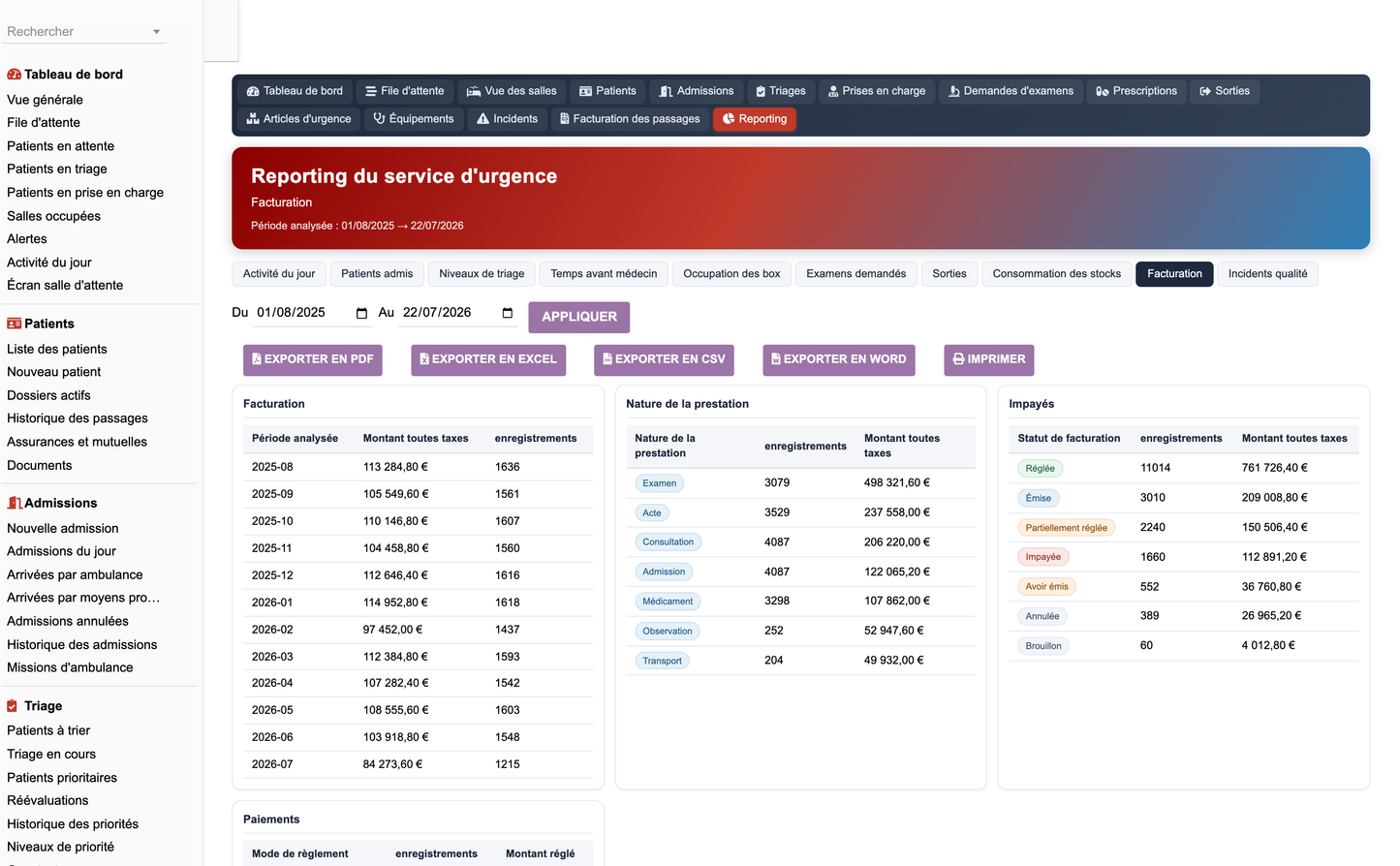
Ten report families, each a set of blocks declared once and rendered identically on screen and in the four export formats, so an export can never show different figures from the page it was launched from.
|
Family |
Content |
|
Today's activity |
Arrivals by hour, arrivals by mode, discharges by type |
|
Activity |
Visits per month with average length of stay, visits per day, arrivals by mode |
|
Triage |
Levels with counts and time to triage, reassessments, referentials used |
|
Waiting times |
Time to triage and to doctor per month, length of stay per priority, patients who left without being seen |
|
Rooms |
Occupancy by room type, movements by reason, observation occupancy and duration |
|
Examinations |
Requests by type with turnaround, statuses, prescriptions by route, procedures with cost |
|
Outcomes |
Discharges by type, hospital admissions by department with bed wait, transfers by facility, orientation decisions |
|
Stock |
Consumption by movement type, items by family, batches by expiry status |
|
Billing |
Billing per month, by nature, by status, payments by method |
|
Quality |
Incidents by type and severity, corrective actions by status, audits with conformity rate |
Every family accepts a custom period, and exports to PDF, Excel, CSV and Word; printing is available from the browser. Access is gated by the reporting right.
The twelve-month series and the hourly arrival profile are the organisational decision-support layer: peak periods and load by hour and by day, staffing pressure, room occupancy, waiting-time trend, patients who left without being seen, stock consumption and shortage risk, equipment utilisation, cost and revenue per visit.
|
These analyses are organisational aids only. They inform how the department is staffed and supplied; they never inform a clinical decision about a patient. |
Seventeen alert types, each counting records against a configured operational threshold, sorted by severity (critical, high, medium, informational):
· Priority patient waiting, critical result declared, triage not performed
· Reassessment overdue, prolonged wait, patient without an assigned room
· Prolonged observation, hospital admission not confirmed, transfer pending
· Result available, prescription pending
· Low stock, batch near expiry, equipment unavailable, maintenance due
· Open incident, unpaid invoice
Alerts that concern a patient are scoped to patients still present: a critical result declared eight months ago is history, not an alert. Channels: the Dolibarr notification system, e-mail, the agenda, and the REST API for a webhook or an SMS gateway.
A secured REST API exposes every object plus three purpose-built endpoints.
|
Route |
Purpose |
|
GET /{resource} |
List, with pagination, sorting and an equality filter |
|
GET /{resource}/{id} |
One record |
|
POST /{resource} |
Create |
|
PUT /{resource}/{id} |
Update |
|
DELETE /{resource}/{id} |
Delete |
|
GET /dashboard/kpi |
Live indicators and the alerts currently firing |
|
GET /queue/live |
The waiting queue with computed waiting times |
|
GET /vocabularies |
Every controlled vocabulary with its translated labels |
· Authentication through the standard Dolibarr API key (DOLAPIKEY header).
· Every route enforces the same permission groups as the interface.
· Page size capped, sort column whitelisted against the real table columns, filters restricted to declared columns.
· Structured errors: 400, 401, 403, 404, 500, 503.
· Every read, create, update and delete written to the audit trail.
· The administration screen lists the exact routes for the installed objects.
· CSRF protection through the Dolibarr token mechanism on every form.
· XSS protection: output escaped on every surface, with the correct escaping per format so that accents survive exports intact.
· SQL: identifiers whitelisted, values escaped or cast; no user string reaches a query unfiltered.
· Granular permissions enforced through a single gate used by the pages, the hooks, the PDF engine and the API.
· Multi-entity isolation on every query.
· Audit trail of access to and modification of patient files: user, timestamp, action, object, patient, visit, previous value, new value, result and IP address. It stores no clinical content.
· Anonymisation of the public display, and an anonymised file status.
· Traceability of exports and prints.
· The demonstration purge deliberately keeps audit-trail rows it did not write: they record real access to patient files and must never be erased.
The administration screen offers a Populate demonstration data button and a Purge demonstration data button. Populating creates a full year of fictitious activity: insurers, priority levels, rooms and boxes, staff and Dolibarr users, shifts, products and stock items, batches, room endowments, equipment and maintenance, patients, visits spread over twelve months with a realistic hourly arrival profile, triage records, vital signs, reassessments, movements, care episodes, examinations and results, prescriptions, procedures, observation stays, decisions, hospital requests, transfers, discharges, ambulance missions, stock movements, billing lines, incidents, corrective actions, audits and audit-trail entries.
· Every record is explicitly labelled as fictitious and tagged with a technical marker.
· The purge removes only tagged rows, cascades to records a user created under a demonstration parent, asks for confirmation and reports how many rows were deleted.
· Real data is never touched.
· A dataset version governs regeneration, so an improved dataset is re-seeded on upgrade rather than skipped by a boolean flag.
Copy the emergencyservice folder into htdocs/custom (or deploy the ZIP from Home, Setup, Modules, Deploy an external module), then enable the module from the module list. Activation creates the tables, the permissions, the menu tree and the demonstration dataset, and self-heals the schema on upgrade.
|
Requirement |
Value |
|
Dolibarr |
18 to 23 (also runs on 16 and 17) |
|
PHP |
8.0 or later |
|
Database |
MySQL / MariaDB, PostgreSQL where the driver allows it |
|
Required native modules |
Third parties, Products |
|
Web server |
Apache or Nginx, Linux or Windows Server, SaaS environments |
|
Entities |
Mono-entity and multi-entity |
|
File |
Content |
|
module_emergencyservice-1.0.zip |
The installable module, containing emergencyservice/ |
|
screenshots/ |
53 documentation captures at 3200x1980 |
|
Emergency_Service_User_Training_Manual_FR.pdf |
French user and training manual |
|
Emergency_Service_Complete_Features_EN.docx |
This document |
|
Emergency_Service_Technical_Documentation_EN.md |
Technical documentation |
|
Reminder. This module is a management and coordination tool. All medical decisions - diagnosis, clinical triage, prescription, hospital admission, discharge and transfer - remain under the control of authorised healthcare professionals. |
Copyright (c) DoliResources - www.doliresources.com


