
Discover powerful Dolibarr extensions designed to automate your business processes
Engineering School Management (Gestion École d'Ingénieurs) is a complete, native Dolibarr module that turns the ERP/CRM into a full management platform for an...
Couldn't load pickup availability


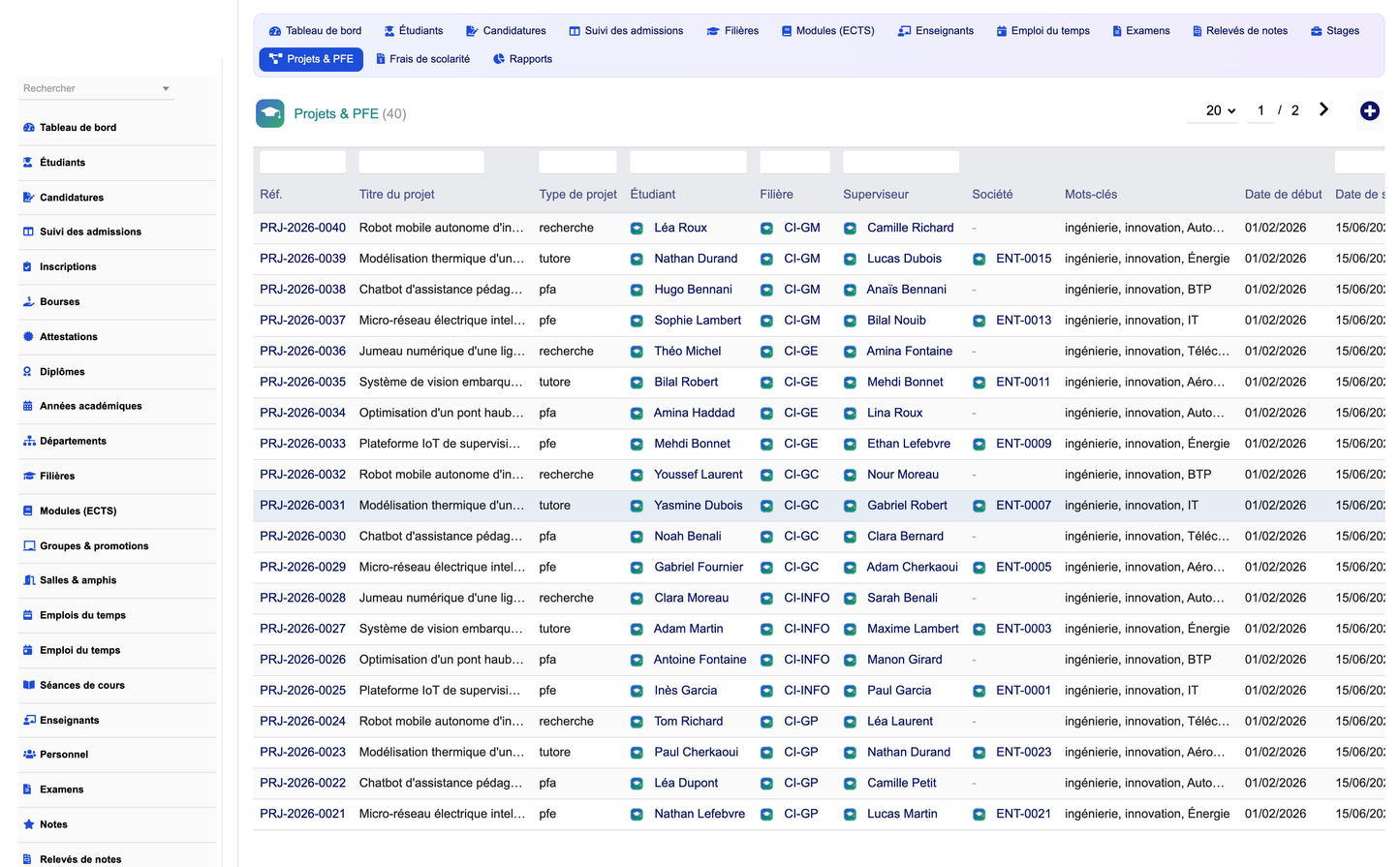
Engineering School Management (Gestion École d'Ingénieurs) is a complete, native Dolibarr module that turns the ERP/CRM into a full management platform for an engineering school or any higher-education institution. It covers the entire academic, administrative, pedagogical and financial lifecycle — from a prospect's application to a graduate's diploma — through 28 interconnected business objects, a premium campus dashboard, an admissions Kanban, a weekly timetable board, an advanced reporting hub, and a one-click demonstration dataset.
The module is designed as an intelligent business layer on top of native Dolibarr: it reuses third parties, products/services, projects, quotes, invoices, payments, bank, accounting and the document management system (DMS) instead of duplicating them. Everything is multi-company (multi-entity) aware, permission-controlled per functional area, and available in five languages.
|
Property |
Value |
|
Technical name |
engineeringschoolmanagement (module numero 507100) |
|
Version |
1.0.0 |
|
Publisher |
DoliResources — https://www.doliresources.com |
|
Compatibility |
Dolibarr v16 → v23+, PHP 7.1+ |
|
Dependencies |
Third-Party module (modSociete); optional native Invoices/Quotes/Projects/DMS |
|
Languages |
French, English, Italian, German, Spanish |
|
Business objects |
28 (grouped in 6 functional domains) |
|
Multi-company |
Yes — full multi-entity support |
· Premium campus dashboard — a brand-new academic cockpit (not the standard Dolibarr home) with live KPI cards and DolGraph charts across five zones: admissions & headcount, academics & results, finance, internships/capstones & companies, and resources & research.
· Admissions funnel (Kanban) — a drag-&-drop board that moves each application through Received → Under review → Exam/interview → Admitted → Enrolled (or Rejected).
· ECTS academic model — engineering programs, ECTS credit modules (lecture/tutorial/lab hours), semester transcripts with earned credits, class rank, honours and jury decision.
· Internships & capstone projects — full tracking of company internships and end-of-studies (PFE) projects, with academic and company tutors, defense, jury and grading.
· Partner-company network — a directory of partner companies with their internships and projects, materialising the school's professional ecosystem.
· Advanced reporting hub — 16 built-in reports across six families, each exportable to PDF, Excel and CSV.
· Native Dolibarr integration — tuition fees and payments are backed by native invoices, quotes, bank and accounting; documents live in the Dolibarr DMS.
· Demonstration dataset — one click generates a realistic school (students, teachers, applications, exams, grades, internships, fees…) and one click removes it cleanly.
The 28 objects are organised into six functional domains, each protected by its own permission group (read / create-modify / delete). Every object provides a filterable list with quick search and a column selector, plus a detailed record card; hub objects additionally expose a KPI cockpit and a “linked records” panel for one-click related-data entry.
The student lifecycle, from application to graduation certificate.
|
Feature |
Description |
|
Students |
Complete student records: unique registration number (matricule), civil status, program (filière), study group/promotion, study year (1A–5A), status (active, graduated, repeating), scholarship flag, baccalaureate, emergency contacts and linked third party. The card is a hub aggregating grades, transcripts, absences, internships, projects, scholarships, diplomas, certificates, fees and payments. |
|
Applications |
Admissions funnel: candidate identity, target program, origin school, baccalaureate average, admission channel (competitive exam / application file / lateral entry), score, request and decision dates. Managed on a drag-&-drop Kanban board with six stages. |
|
Enrollments |
Administrative registration of an admitted student for an academic year: program, group, study year, enrollment type (new / re-enrollment / transfer), total fees and payment status. |
|
Scholarships |
Financial aid records: type (merit, social, mobility, corporate), provider, amount, period and status. |
|
Certificates |
Administrative attestations (enrollment, success, internship, registration) with issue date, purpose and delivery status. |
|
Diplomas |
Awarded diplomas: type (engineering degree, master), academic year, award date, final average, honours and serial number. |
Programs, ECTS modules, groups, rooms, timetable, sessions, labs and research.
|
Feature |
Description |
|
Academic years |
Reference calendar years with start/end dates and a “current year” flag driving default filters. |
|
Departments |
Engineering departments (Computer Science, Civil, Electrical, Mechanical, Industrial, Process Engineering…) with head and location. |
|
Programs (filières) |
Engineering study tracks: degree type, cycle (preparatory / engineering), duration in years, total ECTS credits and department. Hub card showing enrolled students and attached modules. |
|
Modules (ECTS) |
Teaching units: semester, ECTS credits, coefficient, lecture (CM) / tutorial (TD) / lab (TP) hours, responsible teacher, prerequisites and syllabus. |
|
Groups & promotions |
Student groups/promotions bound to a program and study year, with section, capacity, room and academic tutor. |
|
Rooms & lecture halls |
Rooms, amphitheatres and labs with type, capacity, building, floor and equipment. |
|
Timetable |
Weekly schedule board per group displaying sessions (module, teacher, room) on a day × time-slot grid. |
|
Course sessions |
Individual CM/TD/TP sessions with date, time range, topic, group, teacher and room. |
|
Laboratories |
Teaching and research labs with type, department, room, head, capacity and equipment. |
|
Research projects |
Research initiatives led from a lab: lead teacher, domain, partner, budget, period and status. |
|
Feature |
Description |
|
Teachers |
Faculty (professors, senior lecturers, PRAG, adjuncts): rank, speciality, department, diplomas, annual teaching load and optional link to a Dolibarr user. Hub card showing taught modules, supervised internships and projects. |
|
Staff |
Administrative and technical staff: department, job, contact details and hire date. |
|
Feature |
Description |
|
Exams |
Assessments (mid-term, final, continuous assessment, resit, project) with module, group, date, duration, maximum score, coefficient and session. Grades are entered as lines of the exam. |
|
Grades |
Per-student marks (out of 20), ECTS letter grade (A–F), appreciation and absence flag, tied to an exam, a module and a teacher. |
|
Transcripts |
Semester transcripts computing the general average, earned ECTS credits, group rank, honours (mention) and jury decision (validated / deferred / admitted). |
|
Absences |
Attendance tracking (absences and lateness) per student, group and module, with justification status and reason. |
|
Feature |
Description |
|
Partner companies |
Directory of partner companies: sector, contacts, town/country, partnership type (internship / apprenticeship / recruitment / research) and agreement status. Hub card listing the company's internships and projects; linkable to a native third party. |
|
Internships |
Internships (labour, technician, assistant-engineer, PFE) linking a student to a company, with company tutor and academic tutor, dates, location, compensation, evaluation and status. |
|
Projects & PFE |
End-of-studies projects, applied projects and tutored/research projects: type, supervisor, company, keywords, defense date, jury, grade and honours. |
|
Student life |
Clubs, associations and student-life activities with type, date, supervisor, capacity and location. |
|
Feature |
Description |
|
Tuition fees |
Scholarship/registration/international/certification/housing fees per student and academic year: amount, due date and optional link to a native Dolibarr invoice. |
|
Payments |
Payments recorded against a fee: amount, date, payment mode and reference — feeding the finance KPIs and the unpaid-fees report. |
The dashboard replaces the standard Dolibarr home with a modern, tech-academy interface (academic blue, success green, innovation orange). It is organised in five zones of live KPI cards plus interactive charts and an admissions board preview.
· Admissions & headcount — active students, applications, admitted candidates, enrollment rate, active teachers, programs, present/absent today.
· Academics & results — general average (/20), success rate, planned and graded exams, plus a students-by-program bar chart and an admissions-funnel chart.
· Finance — monthly and yearly revenue, payments received, pending fees, overdue count, and a 12-month payments-trend chart.
· Internships, capstones & companies — students on internship, ongoing capstone projects, partner companies and scholarship holders.
· Resources & research — research projects, rooms, awarded diplomas and graduates.
An embedded admissions Kanban preview shows live counts per funnel stage with a one-click link to the full drag-&-drop board.
A dedicated reporting area groups 16 ready-made reports into six families. Each report renders as a KPI-topped data table and can be exported to PDF (landscape), Excel and CSV (UTF-8).
|
Report family |
Included reports |
|
Students |
Headcount by program; headcount by study year. |
|
Academic |
Averages by group; results by module; success rate by program; absences by group. |
|
Finance |
Fees by type; unpaid fees; payments by mode; scholarships by type. |
|
Internships & projects |
Internships by company; internships by type; projects by type. |
|
Teachers |
Teachers by department. |
|
Administrative |
Applications by stage; diplomas by year. |
The module never duplicates existing Dolibarr features — it enriches them:
· Third parties — students, partner companies and providers can be linked to native companies/contacts.
· Products & services — training offers and modules can map to native products/services.
· Projects — capstone projects, internships and research can leverage the native Projects module.
· Quotes, invoices & payments — tuition is billed through native quotes and invoices with native bank and accounting.
· Document management (DMS/GED) — administrative documents, transcripts, agreements and diplomas are archived and versioned in the Dolibarr DMS.
· Agenda, API REST & notifications — sessions and events integrate with the agenda; all data is reachable through the Dolibarr REST API.
A dedicated setup page (Administrator only) lets you define the institution name, the current academic year, the default currency and the passing average. Reference data (programs, modules, grading, exam parameters, diploma types, fee parameters and academic years) is managed directly through the module's lists.
Two buttons are provided in the setup page:
· Generate demonstration data — creates a full, realistic sample school (students, teachers, applications, exams, grades, transcripts, internships, capstone projects, partner companies, scholarships, diplomas, tuition fees and payments, plus native quotes and invoices).
· Remove demonstration data — safely deletes only the data generated by the module (identified by a dedicated import key), including the native objects it created.
· Granular permissions — nine rights groups (student, academic, teacher, exam, attendance, partnership, finance, reporting, administration), each with read / create-modify / delete where relevant. Read and write are granted by default on activation so the module is immediately usable.
· CSRF & XSS protection — all forms use Dolibarr's token mechanism and output escaping.
· Secure SQL — all queries use parameter escaping and entity filters; multi-entity isolation is enforced everywhere.
· Multi-academic-year — data is scoped by academic year for clean historical separation.
· Multi-company — fully compatible with Dolibarr MultiCompany (multi-entity).
· Five languages — the complete interface ships in French, English, Italian, German and Spanish.
|
Deliverable |
Description |
|
Module archive |
module_engineering_school-1.0.zip — installable via Home ▸ Setup ▸ Modules, or by copying into htdocs/custom. |
|
Technical documentation |
README, ChangeLog and in-package guides. |
|
User guide |
Step-by-step usage of every functional area. |
|
Installation guide |
Requirements, installation methods, permissions and upgrade notes. |
|
Illustrated manual |
PDF manual with annotated screenshots of every screen. |
|
Demonstration dataset |
Built-in generator/purge for an instant realistic school. |
© 2026 DoliResources — All rights reserved. · www.doliresources.com


