
Discover powerful Dolibarr extensions designed to automate your business processes
The ENT Clinic Management module turns Dolibarr into a complete management solution for an ear, nose and throat clinic. It...
Couldn't load pickup availability


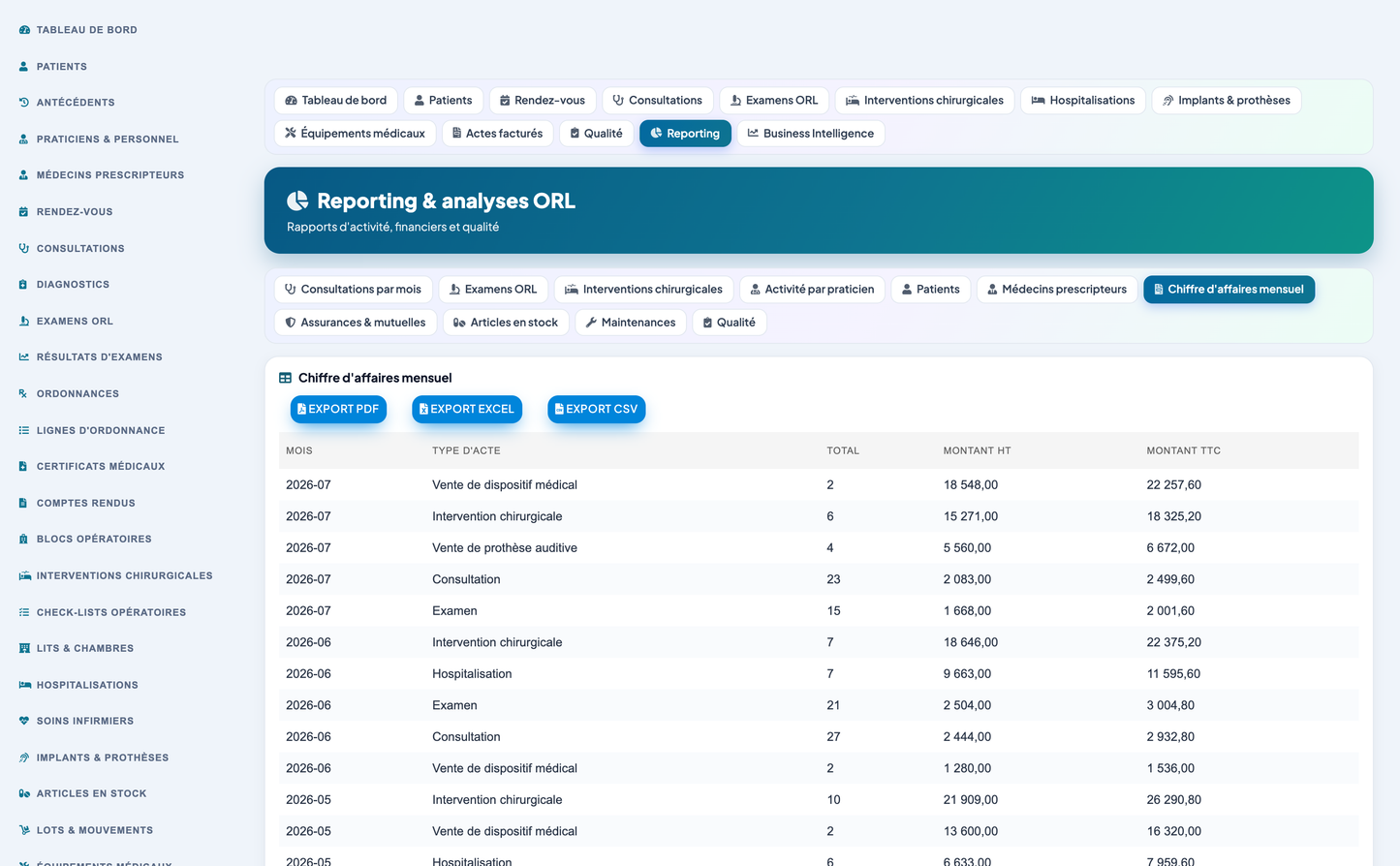
The ENT Clinic Management module turns Dolibarr into a complete management solution for an ear, nose and throat clinic. It covers the whole patient journey, from appointment booking through consultation, ENT investigation, surgery, inpatient stay, device fitting and billing, and adds quality management, patient and referrer portals, reporting and business intelligence.
IMPORTANT - Medical responsibility. This module is a MANAGEMENT tool. Medical decisions, diagnoses and treatments remain the exclusive responsibility of qualified healthcare professionals. The module structures, stores and presents information; it never substitutes for clinical judgement.
|
Property |
Value |
|
Technical name |
entclinic |
|
Module number |
548300 |
|
Version |
1.0.0 |
|
Publisher |
DoliResources - www.doliresources.com |
|
Business objects |
31 |
|
Database tables |
31 (prefix llx_orl_) |
|
Languages |
French, English, Spanish, Italian, German |
|
Translation keys |
733 per language |
|
Minimum Dolibarr |
16.0 |
|
Minimum PHP |
7.1 |
|
Licence |
GNU GPL v3 or later |
The module depends on the Third Parties and Products modules and integrates with:
· Third Parties - suppliers of implants, devices and consumables; insurance organisations.
· Products and Services - hearing aids, implants and medicines as native products.
· Stocks and Warehouses - physical stock behind the clinic's own stock items.
· Quotes, Orders and Invoices - each billed act can be linked to a native quote and invoice.
· Payments and Banks - settlements recorded against billed acts.
· Accounting - through the native invoice chain.
· Agenda - appointment and surgery scheduling.
· EDM (GED) - storage of generated PDF documents.
· Projects and Tickets - optional linkage for transversal follow-up.
· Users and Groups - practitioners can be linked to Dolibarr users.
· REST API - the module publishes its own documented API.
The module is organised in eight functional zones. Each zone groups the business objects that belong to the same stage of the clinic's work.
|
Zone |
Covered objects |
|
Patients and team |
Patients, medical history, practitioners and staff, referring doctors |
|
Care pathway |
Appointments, consultations, diagnoses |
|
ENT investigations |
ENT exams, exam results |
|
Medical documents |
Prescriptions and lines, medical certificates, reports |
|
Surgery and stays |
Operating rooms, surgeries, surgical checklists, beds, hospitalisations, nursing care |
|
Devices and logistics |
Implants and prostheses, stock items, lots and movements, medical equipment, maintenance |
|
Billing |
Insurances and mutuals, billed acts, payments |
|
Quality and relations |
Quality audits, incidents, patient satisfaction, secure messages |
Each object below has its own list, card, creation form, permissions and REST endpoint.
|
Object |
Table |
Description |
|
Patient |
orl_patient |
Full patient record: identity, contacts, emergency contact, insurer and mutual, blood group, allergies, current treatment, referring doctor, follow-up status, first and last visit. |
|
Medical history |
orl_antecedent |
Medical, surgical, ENT, allergic, family and long-term-treatment history items, each with onset date and severity. |
|
Practitioner / staff |
orl_practitioner |
ENT doctors, surgeons, anaesthetists, audiologists, speech therapists, nurses, medical secretaries and biomedical technicians, with speciality, registration number, fee and weekly hours. |
|
Referring doctor |
orl_referrer |
External correspondents who refer patients, with speciality, referral count and portal access. |
|
Appointment |
orl_appointment |
Consultation, exam, surgery, follow-up, emergency and device-fitting slots; SMS and e-mail reminders; confirmation, waiting list and no-show tracking. |
|
Consultation |
orl_consultation |
General, specialised, pre-operative, post-operative, emergency and tele-consultation; reason, anamnesis, symptoms, clinical examination, conclusion and treatment plan. |
|
Diagnosis |
orl_diagnosis |
Coded diagnosis attached to a consultation, with family, laterality, severity and confirmation flag. |
|
ENT exam |
orl_exam |
Audiology, vestibular, rhinology, laryngology, endoscopy and imaging investigations, with laterality, equipment used and pathological flag. |
|
Exam result |
orl_exam_result |
Individual measures of an exam, including per-frequency and per-ear hearing thresholds with their reference range. |
|
Prescription |
orl_prescription |
Medication, hearing-aid, exam-request, rehabilitation and device prescriptions, with validity and renewability. |
|
Prescription line |
orl_prescription_line |
Individual prescribed item with dosage, intake frequency, duration and quantity. |
|
Medical certificate |
orl_certificate |
Medical certificates, sick leave, fitness, school and disability certificates with start/end dates and day count. |
|
Report |
orl_report |
Consultation, operative, exam, discharge and referral reports, with a flag for transmission to the referring doctor. |
|
Operating room |
orl_op_room |
Operating theatres, day-surgery theatres, endoscopy rooms, audiometry booths, consultation rooms and recovery rooms, with capacity, hourly cost and occupancy. |
|
Surgery |
orl_surgery |
Full ENT procedure catalogue with surgeon, anaesthetist, team, room, anaesthesia type, laterality, implant used, complication flag and operative report. |
|
Surgical checklist |
orl_checklist |
Safety checklist items in three phases (before induction, before incision, before leaving theatre), each timestamped and signed. |
|
Bed / room |
orl_bed |
Standard, single, paediatric and day-care beds by ward, with daily rate and occupancy. |
|
Hospitalisation |
orl_hospitalization |
Inpatient stay linking patient, bed, surgery and practitioner, with admission reason, discharge summary and length of stay. |
|
Nursing care |
orl_care |
Care acts during a stay: medication administration, dressing change, vital-signs monitoring, hygiene care and therapeutic education. |
|
Implant / prosthesis |
orl_implant |
Cochlear implants, hearing aids, bone-anchored implants, middle-ear implants, ossicular prostheses and surgical consumables, with serial number, lot, expiry, fitting date and warranty. |
|
Stock item |
orl_stock_item |
Medicines, consumables, medical devices, implants, instruments and hygiene products, with alert threshold, lot tracking and cold-chain flag. |
|
Stock lot / movement |
orl_stock_lot |
Inbound, outbound, inventory, supplier-return and scrapping movements, with lot number and expiry date. |
|
Medical equipment |
orl_equipment |
Audiometers, tympanometers, fibroscopes, endoscopes, operating microscopes, lasers, video columns and surgical equipment, with warranty, contract and maintenance schedule. |
|
Maintenance |
orl_maintenance |
Preventive, corrective, calibration and regulatory-inspection interventions with provider, technician, cost, compliance and next due date. |
|
Insurance / mutual |
orl_insurance |
Public health insurance, complementary insurance, private insurance and employer coverage, with coverage rate, direct-billing flag and payment delay. |
|
Billed act |
orl_billing |
Consultation, exam, surgery, hospitalisation and device-sale acts, with VAT, insurer share, patient share and links to native Dolibarr quotes and invoices. |
|
Payment |
orl_payment |
Settlements by method and payer type, including partial payments and insurer settlements. |
|
Quality audit |
orl_audit |
Hygiene, process, patient-safety, equipment and traceability audits with scope, score and non-conformity count. |
|
Incident |
orl_incident |
Non-conformities, adverse events, equipment failures, hygiene breaches, patient complaints and logistics shortages, with root cause, corrective action, owner and due date. |
|
Patient satisfaction |
orl_satisfaction |
Survey with overall, welcome, waiting, care and cleanliness scores plus recommendation intent and free comment. |
|
Secure message |
orl_message |
Secure messaging between patients, referring doctors, practitioners and the secretariat. |
The dashboard is the landing page of the module and is refreshed on every load.
|
Band |
Indicators |
|
Today |
Consultations today, patients present, patients waiting, ENT emergencies, scheduled surgeries, surgeries performed this month |
|
ENT investigations |
Audiograms, endoscopies, vestibular exams and total exams this month; available rooms; bed occupancy rate with occupied/total detail |
|
Billing and quality |
Monthly revenue, unpaid amount, devices fitted, critical stock, planned maintenance, average patient satisfaction |
· Twelve-month trend combining consultations, exams and surgeries.
· Distribution of exams by family (audiology, vestibular, rhinology, laryngology, endoscopy, imaging).
· Activity per practitioner, limited to ENT doctors and surgeons.
· Distribution of diagnoses by family.
· Today's agenda and the upcoming surgical schedule, both clickable.
· Complete record: identity, contact details, emergency contact, address, insurer, mutual, insurance number, blood group, allergies and current treatment.
· Structured medical history with type (medical, surgical, ENT, allergy, family, long-term treatment), onset date and severity.
· Consultation, exam, surgery and billing history reachable from the record.
· Referring doctor linked to the patient, feeding the referrer portal.
· Patient record printable as a PDF file with the clinic letterhead.
· Six appointment types and seven lifecycle statuses, including in-waiting-room and no-show.
· SMS and e-mail reminders, confirmation tracking and waiting list.
· Six consultation types including emergency and tele-consultation.
· Emergency consultations carry an emergency level that feeds the dashboard.
· Structured clinical record: reason, anamnesis, symptoms, clinical examination, conclusion, treatment plan and follow-up date.
|
Family |
Exam types |
|
Audiology |
Pure-tone audiometry, speech audiometry, tympanometry, stapedial reflexes, auditory evoked potentials, otoacoustic emissions |
|
Vestibular |
Videonystagmography, caloric tests, Romberg test, posturography |
|
Rhinology |
Nasal endoscopy, rhinomanometry, olfactory test |
|
Laryngology |
Nasofibroscopy, laryngoscopy, stroboscopy |
|
Endoscopy |
ENT fibroscopy, nasal endoscopy |
|
Imaging |
Complementary imaging |
· Each exam records laterality, the equipment used, duration, conclusion and a pathological flag.
· Audiograms store one hearing threshold per frequency (250 to 8000 Hz) and per ear, with the reference range.
· Exam status distinguishes scheduled, performed and interpreted; performed-but-not-interpreted exams are raised in the alert centre.
Ten diagnosis families are supported - ear, hearing, balance, nose, sinus, throat, larynx, sleep, oncology and other - covering otitis, hearing loss, tinnitus, vertigo, Meniere's disease, rhinitis, sinusitis, polyps, septal deviation, tonsillitis, adenoids, sleep apnoea, ENT cancers, dysphonia and swallowing disorders. Custom diagnoses are supported through free-text labels and codes.
· Twelve procedure types including tympanoplasty, septoplasty, sinus surgery, tonsillectomy, adenoidectomy, laryngeal surgery, cervical surgery, cochlear implantation, salivary gland surgery, grommet insertion and turbinoplasty.
· Surgeon, anaesthetist, team, room, anaesthesia type, laterality, planned and actual dates, duration.
· Implant used is linked to the procedure, giving end-to-end device traceability.
· Three-phase surgical safety checklist, each item timestamped and signed.
· Operative report and post-operative follow-up, exportable as PDF.
· Complication flag feeding the quality complication rate.
· Beds organised by ward and type (standard, single, paediatric, day-care), each with a daily rate.
· Stays link patient, bed, surgery and referring practitioner.
· Admission reason, discharge summary and computed length of stay.
· Bed occupancy on the dashboard is derived directly from ongoing stays.
· Nursing care acts recorded per stay with nurse, time, completion and observation.
· Six device families with brand, model, serial number, lot number, supplier, expiry, purchase and sale price.
· Fitting date, fitted patient and warranty end are tracked per device.
· Stock items in six families with alert threshold, storage location, lot-tracking and cold-chain flags.
· Stock movements typed as inbound, outbound, inventory, supplier return and scrapping, each with lot and expiry.
· Items below their alert threshold and lots nearing expiry are raised in the alert centre.
· Ten equipment types covering the full ENT technical platform.
· Purchase date and price, warranty end, maintenance contract reference.
· Last and next maintenance, last calibration and operational status.
· Four maintenance natures: preventive, corrective, calibration and regulatory inspection.
· Provider, technician, duration, cost, compliance and next due date recorded per intervention.
· Five organisation types with coverage rate, direct-billing flag and payment delay.
· Billed acts cover consultations, exams, surgeries, hospitalisations, device sales and hearing-aid sales.
· Insurer share and patient share are computed from the patient's insurance coverage rate.
· Each act can be linked to a native Dolibarr quote and invoice.
· Six billing statuses including partially paid and unpaid; unpaid amounts feed the dashboard and alerts.
· Payments recorded by method and payer type, including partial settlements.
· Five audit types with scope, auditor, score and non-conformity count.
· Six incident natures with severity, root cause, corrective action, owner, due date and closure date.
· Patient satisfaction survey with five score dimensions and recommendation intent.
· Quality indicators computed over a homogeneous population: the complication rate and checklist compliance are measured over performed surgeries only, and the recommendation rate over answered surveys only.
· Charts for incident severity distribution and monthly satisfaction trend.
· Patient portal: appointments, validated reports, prescriptions, invoices and secure messaging; the patient record can be exported as PDF.
· Referring doctor portal: referred patients with their follow-up, reports transmitted to the referrer with per-report PDF download, and secure messaging.
· Draft reports are never exposed on the portals; only validated, sent or archived reports are.
|
Alert family |
Trigger |
|
Missed appointments |
Appointment status set to no-show |
|
Surgeries within 7 days |
Planned or confirmed surgery in the next seven days |
|
Items below alert threshold |
Stock quantity at or under the item alert threshold |
|
Lots nearing expiry |
Lot expiry date within the configured window (default 30 days) |
|
Equipment due for maintenance |
Next maintenance within the configured window (default 30 days) |
|
Unclosed incidents |
Incident status other than closed |
|
Unpaid acts |
Billing status unpaid or partially paid |
|
Exams awaiting validation |
Exam performed but not yet interpreted |
Eleven reports are available, each exportable to PDF, Excel and CSV: activity, exams, surgery, practitioners, patients, referrers, finance, insurance, stock, equipment and quality. Exports preserve accented characters and contain no HTML entities.
· Revenue to date and end-of-month forecast, prorated on elapsed days.
· Change against the monthly average, computed on complete closed months only so the figure is not distorted by the running month or by the month truncated by the analysis window.
· Bed and theatre occupancy, average length of stay.
· Stock value and consumed quantities.
· Profitability per act type, as chart and table, with the average price per act.
|
Document |
Content |
|
Patient record |
Identity, insurance, allergies, current treatment, medical history, consultation and surgical history |
|
Prescription |
Prescriber, patient, prescribed lines with dosage, frequency and duration, instructions |
|
Medical report |
Consultation, exam or discharge report with full narrative |
|
Operative report |
Procedure, laterality, anaesthesia, team, surgeon, operative narrative and post-operative follow-up |
|
Medical certificate |
Certificate type, period, day count and content |
|
Report exports |
Any of the eleven reports, as a landscape PDF table |
Every generated document carries the clinic letterhead, the generation date, the medical-responsibility notice and the DoliResources publisher line.
The module configuration page provides a Demonstration datasets section with two actions: Populate demonstration data and Purge demonstration data.
· The generator creates a coherent twelve-month dataset: insurers, suppliers, referring doctors, practitioners, operating rooms, beds, patients with medical history, appointments, consultations, diagnoses, exams with detailed results, prescriptions, certificates, reports, surgeries with checklists, hospitalisations with nursing care, implants, stock items and lots, equipment with maintenance, billed acts, payments, audits, incidents, satisfaction surveys and secure messages.
· Data is realistic, not merely present: figures are drawn so that the dashboard reads like a working clinic (around 62 percent bed occupancy, 7.9/10 average satisfaction, roughly 5 percent complication rate, 96 percent checklist compliance).
· Every generated row is tagged, and the purge removes only tagged rows plus the native third parties and products the generator created. Real data is never touched.
· The purge cascades onto records a user may have created under a demonstration parent, so no row is left on a dead foreign key.
· A dataset version guard re-seeds improved demonstration content on module upgrade.
Eleven permission groups are defined. Read and write are granted by default so the module is usable immediately after activation; delete and administration are not.
|
Group |
Covers |
|
patient |
Patient records and medical history |
|
staff |
Practitioners and referring doctors |
|
care |
Appointments, consultations and diagnoses |
|
exam |
ENT examinations and results |
|
document |
Prescriptions, certificates and reports |
|
surgery |
Surgeries, theatres, checklists, beds, stays and nursing care |
|
stock |
Implants, stock items and lots |
|
equipment |
Medical equipment and maintenance |
|
billing |
Insurance, billed acts and payments |
|
quality |
Audits, incidents, satisfaction and messages |
|
reporting |
Reporting and business intelligence (read only) |
The module exposes a documented REST API under /api/index.php/entclinic/. It requires the native Dolibarr API module to be enabled and a valid API key on the calling user. Every route enforces the same permission groups as the user interface.
|
Method and route |
Purpose |
|
GET /entclinic/{resource} |
Paginated, sortable and searchable list |
|
GET /entclinic/{resource}/{id} |
Read one record |
|
POST /entclinic/{resource} |
Create a record |
|
PUT /entclinic/{resource}/{id} |
Update a record |
|
DELETE /entclinic/{resource}/{id} |
Delete a record |
|
GET /entclinic/reporting/kpi |
Clinic-wide KPI snapshot |
|
GET /entclinic/patients/{id}/file |
Complete patient file, all blocks aggregated |
Twenty-seven resources are exposed: patients, practitioners, referrers, appointments, consultations, diagnoses, exams, examresults, prescriptions, certificates, reports, surgeries, oprooms, beds, hospitalizations, implants, stockitems, stocklots, equipments, maintenances, insurances, billings, payments, audits, incidents, satisfactions and messages.
Sort fields are validated against the real table columns before reaching SQL, and a caller lacking the read permission on a group receives HTTP 403.
The module ships 733 translation keys in five languages: French, English, Spanish, Italian and German. Every user-visible key is namespaced to the module, which prevents another installed module from overriding the wording, and the module re-asserts its own translations on each page so its labels always win.
Coded database columns (statuses, types, families) store language-independent codes and are always displayed through a translated vocabulary, both in lists and in creation forms, where they are offered as drop-down lists.
· Copy the entclinic folder into the custom/ directory of Dolibarr, or deploy module_entclinic-1.0.zip from Home > Setup > Modules > Deploy external module.
· Enable the module from Setup > Modules, CRM family.
· Activation creates the 31 tables, the permissions, the menus and the demonstration dataset.
· Assign the permission groups to users from the user card.
· Adjust the module settings: clinic name, default consultation duration, stock alert threshold, expiry and maintenance alert windows, SMS reminders and patient portal.
Published by DoliResources - www.doliresources.com
Copyright (C) 2026 DoliResources. All rights reserved.


