
Discover powerful Dolibarr extensions designed to automate your business processes
EventHall Management is a complete, native Dolibarr vertical module that turns the Dolibarr ERP/CRM platform into a full-featured management system for event...
Couldn't load pickup availability


EventHall Management is a complete, native Dolibarr vertical module that turns the Dolibarr ERP/CRM platform into a full-featured management system for event halls, wedding and reception venues, banquet rooms, conference and event centres, and private party spaces. It is published by DoliResources and delivered as a ready-to-install module (module directory “sallefetes”) that plugs directly into the standard Dolibarr back office.
The module lets venue operators run their entire business inside a single tool — from the first customer enquiry, through quotation, reservation and event preparation, all the way to invoicing, deposit and balance collection, and post-event reporting. Because it is built on top of native Dolibarr objects (third parties, quotes, orders, invoices, payments, products and bank accounts), there is no need for any external booking, CRM or accounting software: the commercial pipeline, the operational planning and the financial books all live in the same database.
· Wedding & reception venues — wedding and reception halls managing high-value, date-critical bookings;
· Conference & event centres — meeting rooms, seminar and gala spaces with recurring corporate clients;
· Private party spaces — banquet rooms and party spaces rented for birthdays, baptisms and ceremonies;
· Multi-hall / multi-site operators — operators running several halls or sites who need a shared calendar and shared catalogue.
· Run the whole venue business inside Dolibarr — no external software to license, sync or reconcile.
· Prevent costly double-bookings through built-in reservation conflict detection.
· Turn every enquiry into a structured pipeline with a clear commercial and operational lifecycle.
· Standardise your offer with reusable spaces, services and commercial packages.
· Track deposits and balances against native Dolibarr invoices and payments.
· Get an executive dashboard and a full reporting hub without building spreadsheets by hand.
EventHall Management groups its capabilities into commercial, operational, financial and platform functions. All features are driven by a single, coherent object model and are accessible from a dedicated top-level menu inside Dolibarr.
· Client management — Full client management with contacts, history and links to native Dolibarr third parties.
· Event management — Every event follows a clear lifecycle pipeline from enquiry to completion.
· Reservation planning — Calendar-oriented reservation planning with automatic double-booking / conflict detection.
· Spaces & halls catalogue — Catalogue of spaces and halls with type, capacity and availability.
· Services & packages — Reusable services / prestations bundled into commercial packages.
· Equipment inventory — Equipment inventory with assignment and movement tracking per event.
· Suppliers & staff — Suppliers and staff directories linked to events and tasks.
· Contracts — Contracts attached to events, spaces and clients.
· Preparation workflow — Event-preparation workflow with tasks, owners and checklists.
· Seasons & maintenance — Seasonal parameters and hall maintenance scheduling.
· Payment tracking — Deposit and balance payment tracking against native invoices.
· Native billing — Full reuse of Dolibarr quotes, orders, invoices, payments and bank accounts.
· Executive dashboard — Premium executive dashboard with KPIs, pipeline and financial indicators.
· Reporting hub — Reporting hub with commercial, operational and financial reports.
· Automation & alerts — Automation & alerts engine for reminders, deadlines and follow-ups.
· Integration — Native Dolibarr integration — third parties, quotes, orders, invoices, payments, products and bank.
· Exports — CSV, Excel and PDF export across the reporting hub and object lists.
EventHall Management is built on a generic, key-driven engine. Each business object is described once and the engine renders its list view, its card (detail) view and its edit form from that description — an MVC-ish list/card engine that keeps the whole module consistent. Every object maps to exactly one SQL table, all prefixed with “llx_sallefetes_”, and the module reuses native Dolibarr classes wherever a standard concept already exists (Societe, Product, Propal, Commande, Facture, Paiement, User).
Business objects (18)
|
Object |
Purpose |
|
SpaceType |
Reference categories of spaces (ballroom, meeting room, garden, etc.). |
|
Space (hub) |
A physical hall / room with capacity, type and availability. |
|
Client (hub) |
Customer record, linked to a native Dolibarr third party. |
|
Event (hub, Kanban) |
Central event record following the sales/operational pipeline. |
|
EventLine |
Line items of an event (services, spaces, options sold). |
|
Service |
A prestation offered to clients (catering, DJ, decoration, etc.). |
|
Package (hub) |
Commercial bundle grouping several services at a set price. |
|
PackageLine |
Individual service lines composing a package. |
|
Equipment (hub) |
Inventory item (tables, chairs, sound, lighting, etc.). |
|
EquipmentMove |
Assignment / movement of equipment to and from an event. |
|
Supplier |
External provider linked to services and events. |
|
Staff |
Internal or contracted people assigned to events and tasks. |
|
Contract (hub) |
Contractual agreement tied to an event, space and client. |
|
Payment |
Deposit / balance payment record tied to invoices. |
|
Task (hub) |
Event-preparation task with owner, due date and status. |
|
Season |
Seasonal period driving pricing and availability rules. |
|
Maintenance |
Scheduled maintenance / unavailability of a space. |
|
Automation |
Rule for alerts, reminders and automated follow-ups. |
Permissions are organised in 8 functional groups so that each role sees only the screens it needs. The module registers under Dolibarr numero 510300.
Permission groups (8)
|
Permission group |
Scope |
|
Catalog |
Manage space types, spaces, services and packages. |
|
Clients |
Read and manage client records and their history. |
|
Events |
Create and drive events through the lifecycle pipeline. |
|
Finance |
Access payments, deposits, balances and invoicing links. |
|
Resources |
Manage equipment, suppliers and staff. |
|
Operations |
Handle contracts, tasks, seasons and maintenance. |
|
Automation |
Configure the alerts and automation engine. |
|
Reporting |
Access dashboards, reports and data exports. |
Technical summary
· Generic key-driven engine with a shared list/card/edit renderer.
· One SQL table per object, prefixed llx_sallefetes_.
· Native Dolibarr classes reused: Societe, Product, Propal, Commande, Facture, Paiement, User.
· Module numero 510300; 8 permission groups; 18 business objects.
The heart of the module is the Event object, which moves through a seven-stage pipeline. The pipeline is visualised as a Kanban board so that the team can see, at a glance, where every booking stands and what needs attention next.
|
Pipeline stage |
What happens |
|
1. Request received |
A new enquiry is logged with client, date and requested space. |
|
2. Quote sent |
A native Dolibarr quotation is produced and sent to the client. |
|
3. Reservation confirmed |
The client accepts; the date and space are firmly booked (conflict-checked). |
|
4. In preparation |
Tasks, staff, equipment and suppliers are organised for the event. |
|
5. Ongoing |
The event is taking place; on-site operations are tracked. |
|
6. Completed |
The event is finished; final invoicing and balance are settled. |
|
Cancelled |
The event is cancelled at any stage (kept for history and reporting). |
Supported event types
Each event is typed so the venue can filter, price and report by category. Supported types include: wedding, engagement, birthday, seminar, conference, gala, business meeting, baptism and private ceremony.
This section walks through the main screens of EventHall Management. All screens share the same look and feel and are reached from the module's top menu inside Dolibarr.
The premium executive dashboard is the landing screen. It surfaces key indicators — upcoming events, pipeline value by stage, occupancy, revenue and outstanding payments — together with quick shortcuts to the most common actions. It gives management an immediate read on the health of the venue business.
The Events screen lists every event and offers a Kanban pipeline view. Cards can be moved between stages, and each event opens onto a full card showing the client, space, services, contract, tasks, equipment and payments in one place.
The planning calendar shows reservations across dates and spaces. It highlights availability, flags conflicts, and prevents double-booking by checking any new reservation against existing confirmed events for the same space and time slot.
The Clients screen manages customer records, each linked to a native Dolibarr third party. From a client card you can see their event history, contracts, quotes and payment status, giving a complete 360-degree view of the relationship.
The Spaces catalogue lists every hall and room with its type, capacity and availability. Spaces can be marked for maintenance and are the basis for the planning calendar and conflict detection.
The Services screen holds the catalogue of prestations (catering, decoration, sound, staff, etc.). Services are combined into commercial packages with set prices, which can then be added to an event in a single click.
The Equipment screen manages the physical inventory. Items can be assigned to events, and each movement is recorded so the team always knows what is available, reserved or out on an event.
The Contracts screen manages the contractual agreements tied to events, spaces and clients. Contracts capture the agreed terms and are linked to the corresponding event and billing documents.
Payments are tracked as deposits and balances against native Dolibarr invoices. The screen shows what has been billed, what has been paid, and what remains outstanding for each event, using Dolibarr's standard invoicing and bank reconciliation.
The Reporting hub gathers commercial, operational and financial reports. Every report can be filtered by period, space, type or client and exported to CSV, Excel or PDF.
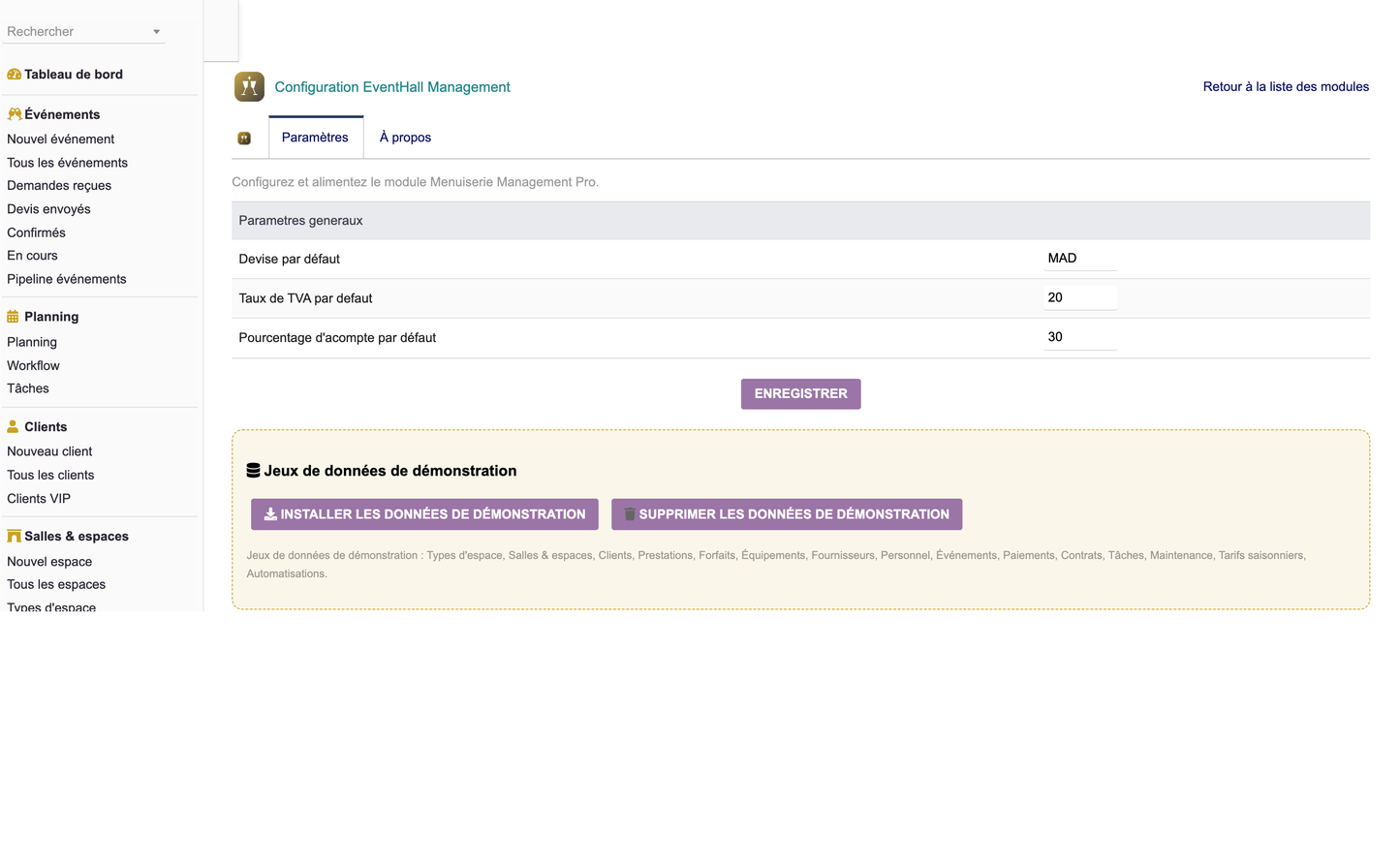
The Configuration screen manages module settings, permission groups, seasons, automation rules and reference data. It also includes a one-click demo-data loader that populates a realistic sample dataset so new users can explore the module immediately, and a purge option to clean it up afterwards.
EventHall Management ships with a structured reporting hub organised into three families. Each report can be filtered and exported for further analysis or client communication.
|
Family |
Report |
Purpose |
|
Commercial |
Sales |
Turnover generated by events, packages and services. |
|
Commercial |
Reservations |
Volume and value of reservations over a period. |
|
Commercial |
Clients |
Client activity, ranking and repeat business. |
|
Operational |
Planning |
Scheduled events and reservations by date and space. |
|
Operational |
Occupancy |
Space occupancy rate and idle capacity. |
|
Operational |
Equipment |
Equipment usage, assignment and availability. |
|
Operational |
Services |
Most requested services and package take-up. |
|
Financial |
Revenue |
Recognised revenue by period, type and space. |
|
Financial |
Margins |
Gross margin per event, package and service. |
|
Financial |
Payments |
Deposits and balances collected over time. |
|
Financial |
Profitability |
Profitability by event, client and space. |
|
Financial |
Unpaid |
Outstanding balances and overdue invoices. |
|
Financial |
Suppliers |
Supplier costs and their impact on margins. |
Export formats
· CSV — for import into spreadsheets and third-party tools.
· Excel — formatted workbooks for finance and management.
· PDF — print-ready documents for clients and archives.
EventHall Management follows Dolibarr's security and coding standards so it can be deployed safely in production, including multi-user and multi-company environments.
· CSRF protection — All forms and actions are protected against Cross-Site Request Forgery (CSRF).
· Per-group permissions — Access is governed by 8 permission groups, assignable per user and per role.
· Multi-user — Designed for concurrent use by front-desk, operations and finance teams.
· Multi-entity — Fully compatible with Dolibarr's multi-entity (multi-company) mode.
· Data validation — Input is validated server-side to protect data integrity.
· Code quality — Clean, documented PHP following Dolibarr conventions for maintainability.
· Compatibility — Tested and compatible with recent Dolibarr releases (16 and above).
Installing EventHall Management follows the standard Dolibarr external-module procedure.
Requirements
|
Item |
Requirement |
|
Dolibarr |
Version 16 or higher |
|
PHP |
Version 7.1 or higher |
|
Required modules |
Societe (Third parties) and Product |
|
Languages |
French, English, Italian, German, Spanish |
|
Module numero |
510300 |
Installation steps
1. Copy the sallefetes module directory into htdocs/custom/ of your Dolibarr installation.
2. Log in as an administrator and open Setup → Modules / Applications.
3. Locate EventHall Management and enable it. Dependencies (Societe, Product) must be active.
4. Open the module configuration to review permission groups and settings.
5. Optionally click the demo-data button to load a sample dataset, then explore the module.
6. Assign permission groups to your users and start creating spaces, services and events.
EventHall Management is distributed under the GNU General Public License version 3 (GPLv3), in line with the Dolibarr ecosystem.
· License — GNU GPL v3.
· Publisher — DoliResources.
· Website — www.doliresources.com.
· Copyright — © 2026 DoliResources — All rights reserved.
· Version — Version 1.0 (July 2026).
For support, updates and additional Dolibarr vertical modules, visit www.doliresources.com.
EventHall Management — Functional Documentation — DoliResources — Version 1.0


