
Discover powerful Dolibarr extensions designed to automate your business processes
Facility Management Enterprise turns Dolibarr ERP & CRM into a full-featured Facility Management platform (Computer-Aided Facility Management / Integrated Workplace...
Couldn't load pickup availability


Facility Management Enterprise turns Dolibarr ERP & CRM into a full-featured Facility Management platform (Computer-Aided Facility Management / Integrated Workplace Management System) comparable to leading solutions such as Planon, Archibus, IBM Maximo, ServiceChannel, Facilio, MRI Software and iOFFICE. It enables companies, public administrations, hospitals, universities, industrial parks, shopping centres, hotels, office buildings and multi-site organisations to manage the entire lifecycle of their buildings, infrastructure, assets, spaces, equipment, general services and facility operations directly inside Dolibarr — without any external software.
The module is published by DoliResources (www.doliresources.com) and fully complies with Dolibarr development standards: modular object-oriented architecture, hooks, REST API compatibility, MultiCompany / multi-entity, multi-language, multi-currency, granular user rights, responsive design, import/export and PDF generation.
· Object-oriented, modular and maintainable PHP 8.x code following Dolibarr CommonObject conventions.
· 18 business objects with automatic table creation, schema self-healing (ALTER on upgrade) and a central object registry.
· MySQL / MariaDB compatible (PostgreSQL-friendly SQL); multi-entity aware (getEntity) for MultiCompany deployments.
· Unique module numero 516200; nine rights groups with read / write / delete granularity plus an administration right.
· Native integration points with Third Parties, Products, Stocks, Interventions, Projects, Contracts, Assets, Invoices and Agenda.
· Five bundled languages (French, English, Spanish, Italian, German) using Dolibarr's native translation system with module-unique keys to avoid cross-module collisions.
The portfolio is organised as a strict hierarchy that mirrors real estate reality:
Site → Campus → Building → Floor → Zone → Space → Equipment
Each level carries its own attributes (surface, GPS, capacity, occupancy, value) and rolls up into consolidated KPIs.
|
Object |
Description |
|
Site |
Geographical site with GPS, surface and building count. |
|
Building |
Building with type, surface, floors, rooms, year built/renovated and asset value. |
|
Floor |
Vertical level of a building with surface and usage. |
|
Space |
Office, meeting room, technical room, common area or parking with capacity, occupants and monthly cost. |
|
Asset |
Real-estate asset / fixed asset with acquisition value, residual value and depreciation. |
|
Equipment |
Technical equipment (HVAC, elevators, lighting, networks, fire, access control, generators, solar panels, EV chargers…) with warranty and maintenance dates, criticality and provider. |
|
Service Request |
Service desk request with type, priority, SLA, assignment, status and rating. |
|
Intervention |
Preventive / corrective / predictive / regulatory maintenance with equipment, provider, technician, duration and cost. |
|
Provider |
Facility service provider linked to a Third Party, with specialty, certifications, insurance, SLA and hourly rate. |
|
Contract |
Facility contract (maintenance, cleaning, security, energy, insurance, lease) with amount, renewal and SLA. |
|
Consumption |
Utility reading per building and fluid (electricity, water, gas, heating, cooling, renewable) with cost and CO₂. |
|
Reservation |
Booking of rooms, desks, vehicles, parking or equipment with attendees and status. |
|
Move |
Relocation between spaces with team, inventory and status. |
|
Visitor |
Visitor management with badge, check-in/out, host and purpose. |
|
Access Badge |
Access badge with authorised zones, validity period and access level. |
|
Audit |
Safety / technical / quality / HSE / regulatory audit with score, non-conformities and action plan. |
|
Compliance |
Regulatory control and periodic verification with next-due date, status and certificate. |
|
Document |
Document library (plans, notices, certificates, contracts, reports, invoices, photos) with versioning. |
A dedicated Facility Management top menu exposes the full functional scope through a left menu and an in-page tab bar. Every list offers multi-criteria search, sortable columns, a column selector and pagination; every hub record displays a KPI cockpit and its linked records.
· Dashboard — Smart-Building cockpit: portfolio & occupancy KPIs, service-request kanban, energy & environment indicators, operations & compliance indicators, and four analytical charts.
· Sites / Buildings / Floors / Spaces — Full portfolio management along the Site→Building→Floor→Space hierarchy, with surfaces, occupancy, responsibles and costs.
· Assets — Real-estate assets and fixed assets with valuation and depreciation.
· Equipment — Complete technical asset register with maintenance scheduling and criticality; ready to connect to the CMMS (GMAO) module.
· Service Requests — Self-service request portal with automatic assignment, priority, SLA, validation, intervention, closing and rating.
· Interventions — Preventive and corrective maintenance tracking with cost and report.
· Providers / Contracts — Provider directory and facility contracts linked to Third Parties, Buildings and Projects.
· Consumption & Energy — Energy and utility metering with cost and CO₂ emissions per building and fluid.
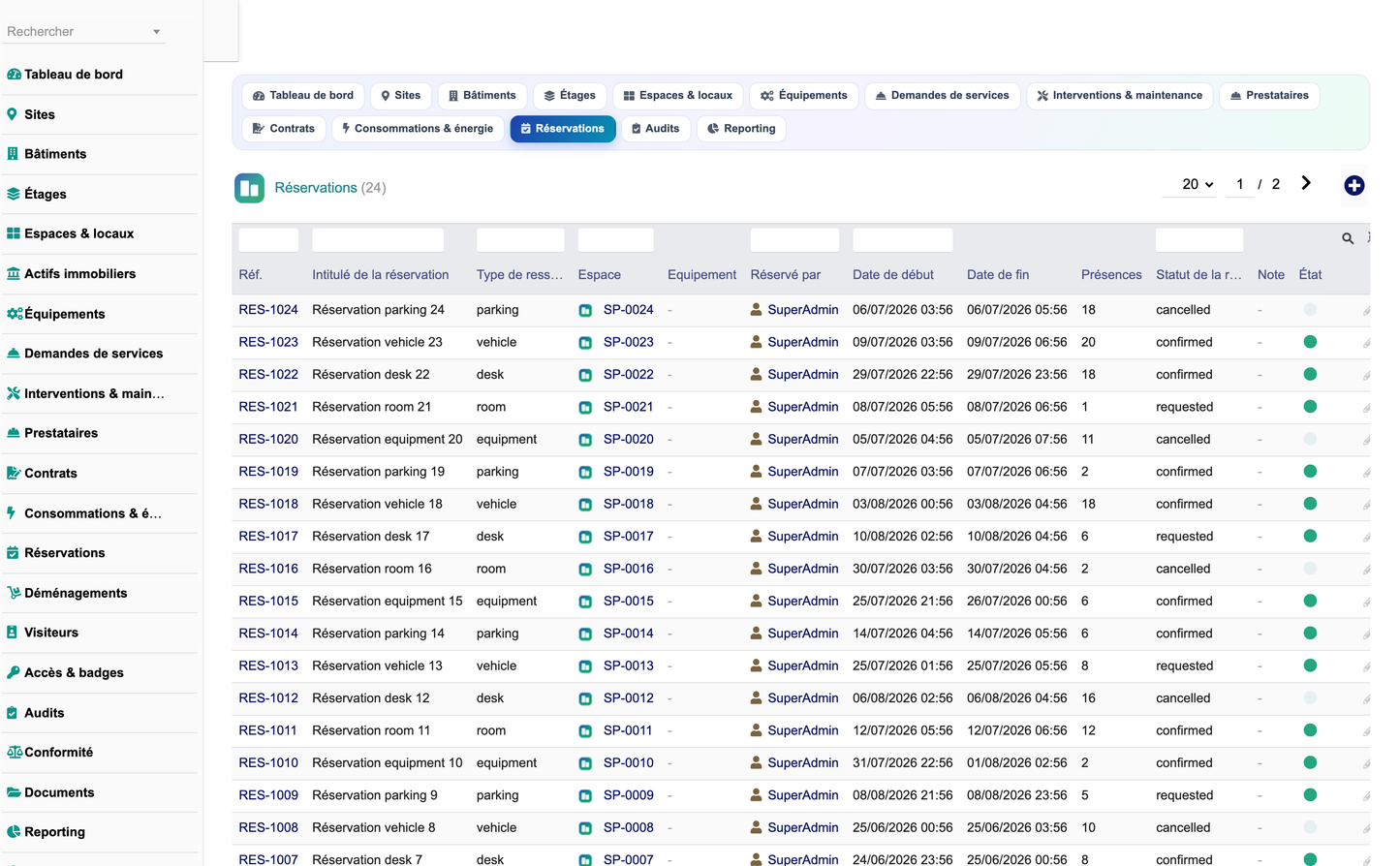
· Reservations / Moves — Booking engine for rooms, desks, vehicles, parking and equipment; relocation planning.
· Visitors / Access — Visitor reception (pre-registration, badge, check-in/out) and access badge management with traceability.
· Audits / Compliance / Documents — Audits (safety, technical, quality, HSE, regulatory), regulatory compliance tracking with deadlines and alerts, and a versioned document library.
· Reporting — Eight decision-support reports (buildings, spaces, equipment, energy, interventions, providers, audits, finance) exportable to CSV and printable.
· Configuration — Module settings and one-click demonstration data generation / removal.
The module implements a fully traceable facility workflow:
Request → Validation → Planning → Intervention → Control → Final validation → Closing
Service requests follow a seven-state lifecycle (new, assigned, in progress, on hold, resolved, closed, cancelled) visualised as a kanban on the dashboard. Interventions are typed (preventive, corrective, predictive, regulatory) and linked to the equipment they service, feeding the maintenance history shown on each equipment record.
The dashboard aggregates real-time indicators across five zones and renders four DolGraph charts (energy evolution, energy by fluid, requests by type, equipment by category). Key performance indicators include number of sites and buildings, total and occupied surface, occupancy rate, equipment count, open requests, energy cost, electricity / water / gas consumption, CO₂ emissions, active contracts, upcoming maintenance, non-conformities and total facility cost.
· Metering of electricity, water, gas, heating, cooling and renewable energy per building.
· Automatic computation of consumption, cost and CO₂ emissions with 12-month trend analysis.
· Energy alert threshold configurable in the setup page; breakdown charts by fluid type.
The analytical foundation of the module (consumption trends, cost breakdowns, anomaly-prone criticality flags, maintenance forecasting via next-maintenance scheduling, space-optimisation occupancy metrics) provides the data layer required for AI-assisted facility management: consumption analysis, energy forecasting, anomaly detection, cost prediction, space and energy optimisation, intervention suggestion and risk detection. These indicators are surfaced on the dashboard and in the reporting suite.
Facility Management Enterprise is designed to interoperate with the native Dolibarr modules, allowing facility contracts to be linked to quotes, orders, supplier orders, customer and supplier invoices, projects, interventions, fixed assets and stock movements — ensuring an integrated management of assets, costs and services:
· Third Parties & Contacts
· Products & Services
· Stocks & Warehouses
· CMMS / Interventions
· Projects & Tasks
· Agenda
· Contracts
· Fixed Assets
· Customer & Supplier Invoices
· Accounting & Banks
· REST API & Webhooks
· MultiCompany / Multi-entity
· Nine rights groups (portfolio, equipment, service, provider, energy, reservation, access, compliance, reporting) with read / write / delete granularity.
· Administration right, full audit trail through Dolibarr, entity isolation and GDPR-friendly data handling.
The configuration page manages the default currency, energy alert threshold, default SLA and new-request notifications. Two buttons let administrators generate a rich, FK-coherent demonstration dataset (sites, buildings, floors, spaces, equipment, providers, contracts, interventions, reservations, consumption, audits, visitors, documents…) and remove it safely without affecting real data. The module is fully translated into French, English, Spanish, Italian and German.
· Deploy the facilitymanagement folder into htdocs/custom and enable the module from Home → Setup → Modules.
· Demonstration data is generated automatically on first activation.
· Deliverables: module_facilitymanagement-1.0.zip, the Captures_Ecran screenshot set, the French PDF user manual and this English technical documentation.
© 2026 DoliResources — www.doliresources.com


