
Discover powerful Dolibarr extensions designed to automate your business processes
Field Service Management (FSM) is a commercial Dolibarr module, published by DoliResources, that turns Dolibarr into a genuine field-service and intervention-management solution. It...
Couldn't load pickup availability


Field Service Management (FSM) is a commercial Dolibarr module, published by DoliResources, that turns Dolibarr into a genuine field-service and intervention-management solution. It is designed for companies whose core business is intervening on site: maintenance providers, after-sales (SAV) departments, installers, technical services and any organisation dispatching technicians in the field.
The module covers the entire lifecycle of an intervention — capturing the customer request, turning it into a scheduled work order, dispatching technicians and teams, tracking time and travel, recording the on-site work report with the customer signature, and finally invoicing the service — without ever leaving Dolibarr and without any additional software.
It is delivered as a self-contained, ready-to-use package: activate the module, optionally load a realistic demonstration dataset in one click, and start operating immediately.
· Single source of truth: requests, work orders, contracts, equipment, technicians and invoices in one place.
· Faster dispatching: weekly planning board and drag-and-drop Kanban of interventions by status.
· Field-ready: mobile customer/technician portal and on-site signature capture on tablet or phone.
· SLA under control: response/resolution targets, automatic breach alerts and compliance KPIs.
· Full visibility: a dedicated control-center dashboard with the most significant KPIs and charts.
· Native integration: quotes, orders, invoices, third parties, products, stock, projects and ECM.
FSM fits any service-oriented business that plans, executes and bills interventions on customer sites, for example:
· HVAC, refrigeration, plumbing and electrical maintenance companies;
· Equipment installers and commissioning specialists;
· After-sales (SAV) and technical-support departments;
· Facility-management and multi-technical service providers;
· IT / network on-site support and any dispatch-based service organisation.
Whatever the trade, the workflow is the same: a request comes in, it becomes a work order, a technician is scheduled and dispatched, the job is done and signed, and it is invoiced. FSM models exactly that flow.
The module ships thirteen fully-integrated business objects, each with its own list, search, filters, column selector and record card. Hub objects also expose a KPI cockpit and a "Linked records" panel for one-click creation of related items across interfaces.
|
Object |
Role in the solution |
|
Service Requests |
Incoming tickets from any channel, qualified and turned into work orders |
|
Work Orders |
Central object; full intervention lifecycle with a dedicated workflow |
|
Work-order Lines |
Labor, parts/supplies and travel billed on each intervention |
|
Sites / Locations |
Customer sites and intervention locations, with geo-zone and access info |
|
Equipment (Installed Base) |
Assets serviced per customer/site: brand, serial, warranty, criticality |
|
Maintenance Contracts |
Bronze/Silver/Gold/Premium SLA contracts with response/resolution targets |
|
Preventive Maintenance |
Scheduled recurring maintenance with next-due dates and checklists |
|
Technicians |
Field technicians with skills, certifications, zone, rate and availability |
|
Teams |
Technical teams with a leader, specialty and coverage zone |
|
Timesheets |
Hours and travel logged per intervention and per technician |
|
Alerts |
Operational alerts (SLA, overdue, maintenance, contract, warranty) |
|
Activity Log |
Chronological journal of calls, emails, visits and notes |
|
Automations |
IF/THEN rules executed by the automation engine (cron) |
Every intervention starts as a service request. Requests can be captured from any channel — phone, email, web portal, contract or on-site — and are fully qualified before being scheduled.
· Channel & type: phone, email, web portal, contract, on-site; breakdown/repair, installation, maintenance, commissioning, audit.
· Priority & criticality: colour-coded pills (low, normal, high, urgent) and asset criticality.
· SLA due date: each request carries a target date used to drive breach alerts and KPIs.
· Context links: linked to the customer, the site and the specific equipment concerned.
· One-click conversion: a qualified request becomes a work order pre-filled with its context.
The work order is the heart of the solution. It carries the full context of the intervention and advances through a clear operational workflow.
Each work order moves through five stages, visible both on the record and on the Kanban board:
|
Stage |
Meaning |
|
Planned |
Scheduled and assigned, waiting to start |
|
In progress |
Technician on site, work started |
|
Done |
Work completed on site (report captured) |
|
Closed |
Validated and closed by the back office |
|
Invoiced |
Billed to the customer |
· Assignment: type (curative, preventive, installation, commissioning, audit), priority, assigned team and technician.
· Scheduling & tracking: planned start/end vs. actual start/end, on-site duration and travel distance.
· On-site report: work done, recommendations, customer satisfaction score.
· Signature: customer signature, signatory name and date (see On-Site Signature).
· Billing: labor, parts and travel lines with a computed total, ready for invoicing.
· Context: linked request, customer, site, equipment, SLA contract and native Dolibarr project.
A seven-day planning grid lays out interventions by day, colour-coded by workflow status, with the current day highlighted and urgent jobs flagged. Back and forward navigation moves week by week, and an "unplanned backlog" section lists work orders still waiting for a slot.
A drag-and-drop Kanban presents every intervention in a column per workflow status. Moving a card to another column instantly updates the work order (and automatically stamps the actual start/end dates). Each card shows the reference, customer, type and planned date, with urgent jobs visually emphasised.
Resources are modelled as technicians grouped into teams:
· Technicians: role, linked Dolibarr user, skills, certifications, coverage zone, hourly rate and availability.
· Teams: team leader, specialty (electrical, mechanical, plumbing, multi-technical, IT), members and zone.
· Load & productivity: interventions and logged hours are aggregated per technician and per team for reporting.
FSM maintains a complete installed base so that every intervention is traceable to a physical asset on a physical location.
· Sites / locations: per-customer sites with address, geographic zone, GPS coordinates, on-site contact and access information.
· Equipment: brand, model, serial number, install date, warranty end, criticality and last-intervention date.
· Traceability: each equipment links to its site, its SLA contract and its full intervention history.
Recurring service is driven by SLA maintenance contracts and a preventive-maintenance planner.
· SLA contracts: Bronze / Silver / Gold / Premium tiers with response-time and resolution-time targets, periodicity, visits per year and yearly amount.
· Renewals: start/end dates and renewal type feed automatic renewal alerts.
· Preventive maintenance: scheduled recurring visits with periodicity, last/next dates, assigned technician and a checklist.
· Due-date alerts: upcoming preventive maintenance is surfaced on the dashboard and by the automation engine.
A responsive, card-based portal gives both field technicians and customers a focused, mobile-friendly view of interventions.
· Technician view: select a technician to see their assigned interventions as mobile cards (status, customer, type, scheduled time, contact), with direct access to on-site signature.
· Customer view: select a customer to review all of their interventions, requests and equipment.
· Field-ready design: large touch targets, colour-coded status and one-tap navigation, optimised for tablets and phones.
The signature module lets the technician have the customer sign off the intervention directly on a tablet or phone, closing the loop between the field and the office.
· Signature pad: a smooth HTML5 canvas that captures the signature with mouse or touch (finger/stylus).
· Proof of service: the signature image, the signatory name and the date are stored on the work order and shown on its record.
· Automatic validation: signing the work order marks it as "Done" and time-stamps the completion.
The module opens on a distinctive "Field Service Control Center" dashboard, designed specifically for field-service operations rather than a generic layout. Its colour language — orange (field), blue (technical), green (done) and red (urgency) — reflects the intervention business at a glance.
The dashboard is organised into operational zones:
· Alert band: eight clickable tiles — today’s interventions, open, overdue, SLA at risk, unclosed, upcoming preventive, new requests and active alerts.
· Activity & performance KPIs: new requests, jobs done this month, open interventions, satisfaction, first-time-fix rate, mean resolution time, SLA compliance and revenue.
· Resources & contracts: active contracts, technicians, tracked equipment and utilisation rate.
· Graphical analysis: four charts — interventions per month, breakdown by type, breakdown by status and load per technician.
|
KPI |
What it measures |
|
First-Time Fix Rate (FTFR) |
Share of interventions resolved on the first visit |
|
Mean Time To Repair (MTTR) |
Average on-site resolution duration (hours) |
|
SLA compliance |
Share of completed jobs meeting their SLA target |
|
Open / overdue interventions |
Current backlog and jobs past their planned end |
|
SLA at risk |
Open requests approaching their SLA due date |
|
Revenue (month) |
Value of completed/invoiced interventions |
|
Utilisation rate |
Average technician availability/occupancy |
A dedicated Reporting hub produces situation reports across the whole activity. Every report supports CSV, Excel and PDF export plus direct printing, and can be filtered by period.
|
# |
Report |
Content |
|
1 |
Interventions by period |
Monthly volume and revenue |
|
2 |
By type |
Curative / preventive / installation / commissioning / audit |
|
3 |
By status |
Distribution across the workflow stages |
|
4 |
Technician productivity |
Interventions and logged hours per technician |
|
5 |
By customer |
Interventions and revenue per customer |
|
6 |
SLA performance |
Completed jobs and SLA compliance over time |
|
7 |
Contract portfolio |
Contracts and yearly value by tier |
|
8 |
Maintenance |
Preventive vs. curative maintenance |
|
9 |
Equipment installed base |
Equipment count by category |
|
10 |
Intervention revenue |
Billed value per period |
|
11 |
Logged hours |
Hours and travel per technician |
|
12 |
To invoice |
Completed interventions awaiting invoicing |
A cron-driven automation engine continuously refreshes the operational alert centre so that nothing slips through the cracks.
· SLA breaches on open requests past their due date;
· Overdue interventions past their planned end;
· Preventive maintenance due within the coming weeks;
· Maintenance contracts approaching renewal;
· Equipment warranties about to expire.
Automation rules are stored as configurable objects (trigger event, action, delay), letting the catalogue of automated behaviours grow over time.
FSM does not reinvent Dolibarr — it enriches it. Interventions and contracts flow straight into the native sales documents, and every record cross-links to the standard Dolibarr objects.
· Quotes, orders, invoices: create a Dolibarr quote/order/invoice pre-filled from an intervention in one click.
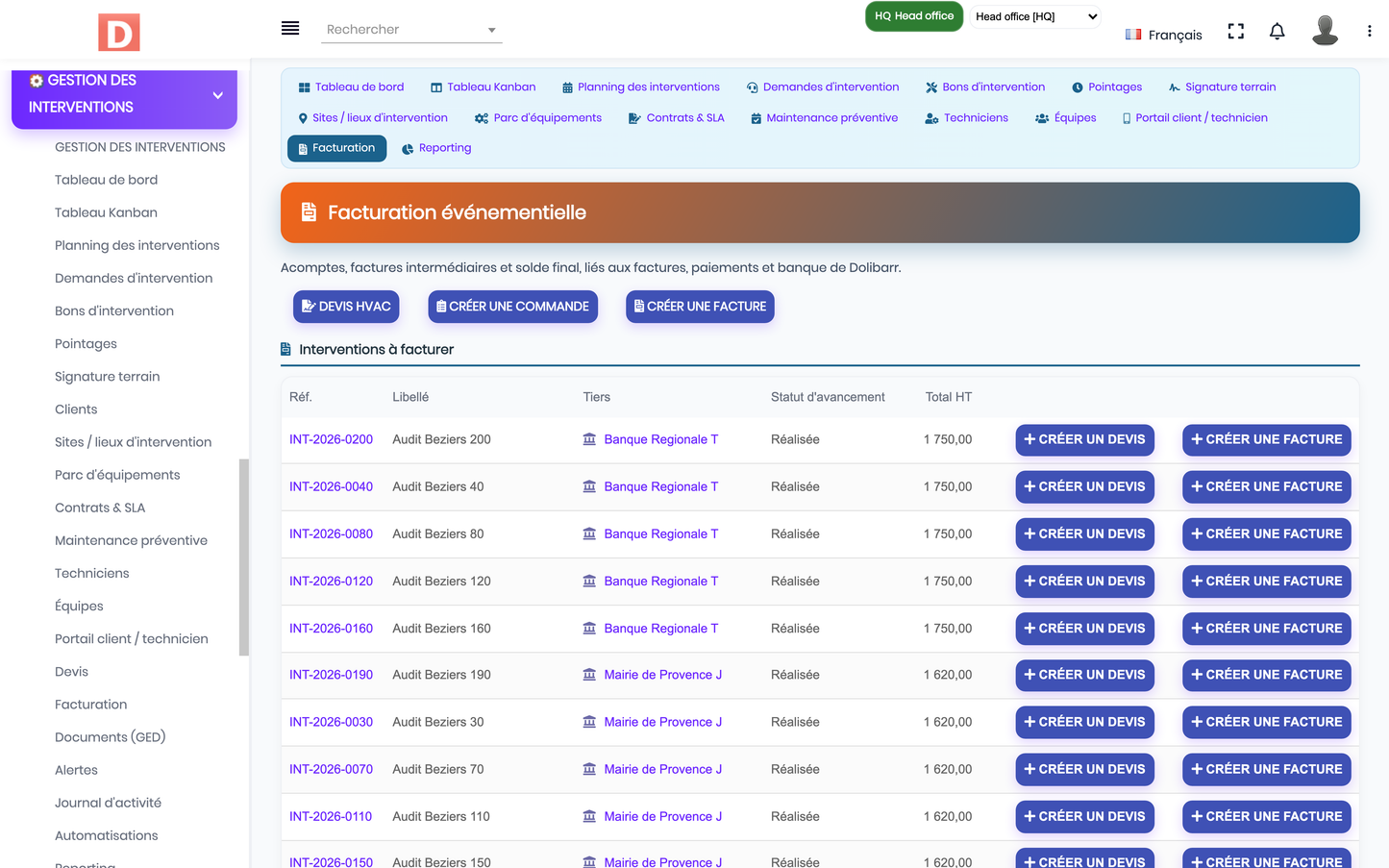
· Invoicing hub: a ready-to-invoice list of completed interventions with their total and quick-create buttons.
· Third parties & contacts: customers, sites and on-site contacts reuse native Dolibarr companies.
· Products & stock: parts and consumables are linked to the product catalogue.
· Projects, agenda & ECM: interventions attach to projects, planning aligns with the agenda, documents live in the ECM.
· "Linked records" panel: each record card lets you create and navigate related items across interfaces.
From the module configuration page, an administrator can populate a complete, realistic demonstration dataset in one click, and remove it just as easily.
· Load demo data: generates 60 customers, 40 sites, 120 equipment, 50 contracts, 120 requests, 200 work orders, 90 maintenances, 30 technicians, 12 teams, timesheets, alerts and automations — plus native quotes/invoices when those modules are active.
· Purge demo data: safely removes only the generated demo records (tagged with a dedicated import key), never touching real data.
· Versioned dataset: the demo set is re-seeded automatically on upgrade so new features are always illustrated.
· Five languages: every label, menu, status, report and screen is translated into French, English, Italian, German and Spanish.
· Consistent charter: a dedicated orange/blue/green/red intervention colour scheme with a cog icon.
· Elegant lists: compact filter row, column show/hide selector and colour-coded status pills.
· Synchronised navigation: in-page tabs keep the Dolibarr left menu highlighted and expanded.
|
Item |
Detail |
|
Technical name |
fieldservicemanagement |
|
Unique module ID |
503800 |
|
Version |
2.0 |
|
Publisher / copyright |
DoliResources — www.doliresources.com |
|
Dolibarr target |
v16 → v23 and above |
|
PHP |
7.1 → 8.x (PHP 8 compliant) |
|
Dependencies |
Third parties (modSociete) and Products (modProduct) |
|
Business objects |
13 objects, tables prefixed llx_fsm_* |
|
Multi-entity |
Supported (multi-company / SaaS ready) |
|
Cron |
Daily automation & alert engine |
|
Exports |
CSV, Excel, PDF, print |
|
Package |
module_fieldservicemanagement-2.0.zip |
· Offline technician mobile app (PWA) with real-time geolocation;
· AI-assisted predictive maintenance and automatic fault diagnosis;
· Automatic route optimisation and intelligent technician assignment;
· Advanced self-service customer portal (booking, tracking, history);
· Advanced e-signature, SMS/WhatsApp notifications and automatic PDF reports;
· Full REST API and IoT equipment monitoring.
DoliResources designs and publishes professional vertical modules that transform Dolibarr into a complete, industry-specific management solution. Field Service Management is part of this catalogue, built to the same quality standards: full native integration, multilingual coverage, a distinctive dashboard, comprehensive reporting and a ready-to-use demonstration dataset.
Publisher: DoliResources · Website: www.doliresources.com · © 2026 DoliResources.


