
Discover powerful Dolibarr extensions designed to automate your business processes
Fleet Management Advanced transforms Dolibarr into a complete, professional ERP solution for automotive fleet...
Couldn't load pickup availability


Fleet Management Advanced transforms Dolibarr into a complete, professional ERP solution for automotive fleet management. An organisation can run its entire fleet - vehicles, drivers, missions, maintenance, fuel and costs - from a single integrated interface, without any external software.
The module targets companies with company cars, transport and rental companies, construction (BTP) firms, logistics operators, public administrations, industrial and service companies. It manages vehicles, categories, drivers, assignments, missions, planning, mileage, fuel, maintenance, repairs, tires, insurance, technical inspections, accidents, fines, costs, profitability, suppliers and documents - while enriching the native Dolibarr modules (third parties, products, invoices, bank, accounting, stocks, projects, agenda and GED).
The module is built on a generic, key-driven object engine and follows Dolibarr coding standards (CommonObject, DolibarrModules descriptor, hooks, multi-entity support). It ships 17 business objects, each with a list view, a card view, SQL schema with self-healing migrations, and 5-language files.
· Fleet: vehicles, vehicle categories, documents
· People & operations: drivers, assignments, missions, mileage logs
· Running costs: fuel entries, maintenance, repairs, tires, cost ledger
· Compliance & risk: insurance, technical controls, accidents, fines
· Third parties: fleet suppliers (garages, stations, insurers, parts)
· PHP 8+, MySQL/MariaDB, responsive UI, optimised SQL, Dolibarr hooks
· Multi-entity and multi-company ready, compatible with Dolibarr v16 to v23+
· One-click demonstration dataset generator and secure purge
· Automatic expiry alerts (insurance, technical control, driving licence, maintenance, documents)
The module adds a dedicated top menu and a full left-hand navigation tree:
· Dashboard, Vehicles, Categories, Drivers, Assignments, Missions, Planning, Mileage
· Fuel, Maintenance, Repairs, Tires, Insurance, Technical inspections
· Accidents, Fines, Costs, Suppliers, Documents, Reporting, Setup
· Real-time overview of the whole fleet: fleet, operations, costs and alerts.
· Fleet zone: total vehicles, available, in maintenance, immobilized, active drivers, fleet value.
· Operations zone: missions today, total mileage, active assignments, fleet profitability.
· Costs zone: monthly fuel cost, yearly maintenance cost, cost per km, total cost, consumption.
· Alerts zone: insurance, technical control, licence, maintenance, open claims and expiring documents.
· Charts: mileage evolution, fuel consumption, monthly costs, fleet by status and by type, cost by category.
· Centralised fleet: cars, utility vans, trucks, buses, motorcycles and machines.
· Full data sheet: code, plate, brand, model, version, category, type, year, colour, seats, fuel, power, VIN.
· Administrative data: acquisition date, purchase price, financing mode, insurance and registration.
· Technical data: current mileage, last oil change, next maintenance, average consumption, condition and current value.
· Synthesis cockpit: status, mileage, fuel cost, maintenance cost, number of missions and current value.
· All vehicle characteristics grouped on a single card.
· Links to supplier (garage), category and Dolibarr third parties.
· Each vehicle is connected to its missions, fuel entries, maintenance, insurance and documents.
· Driver record: staff ID, name, phone, email and linked Dolibarr user.
· Licence tracking: number, category and expiry date with automatic alerts.
· Safety training and expiry, hire date and status.
· History of assignments, missions, accidents and fines; cockpit KPIs.
· Types: business trip, material transport, client intervention.
· Mission order: vehicle, driver, destination, distance, departure and return dates.
· Link to related customer and Dolibarr project; status and cost tracking.
· Basis for vehicle and driver profitability analysis.
· Monthly calendar view of assignments, missions and maintenance.
· Previous/next month navigation and quick return to today.
· Colour legend: mission, maintenance, assignment; clickable events.
· Visual detection of vehicle and driver conflicts.
· Fuel entries: date, vehicle, driver, station and fuel type.
· Litres, price per litre and total amount; mileage and average consumption.
· Optional link to a Dolibarr invoice.
· Consumption evolution and cost-per-kilometre tracking.
· Preventive maintenance: oil change, service, timing belt, brakes, tires, periodic check.
· Corrective maintenance: breakdown, diagnosis, repair.
· Supplier (garage), mileage, description and detailed parts/labour/total costs.
· Next due date and status (planned, ongoing, done).
· Fleet organised by families: light vehicles, utility, heavy, passenger transport, machines.
· Code, label and family for each category; automatic vehicle count.
· Used in filters, charts and cost analyses.
· Fleet report: vehicle status, mileage and number of missions.
· Maintenance report: jobs and costs by category.
· Fuel report: litres, cost and average consumption per month.
· Cost report per vehicle; CSV export and printing on all reports.
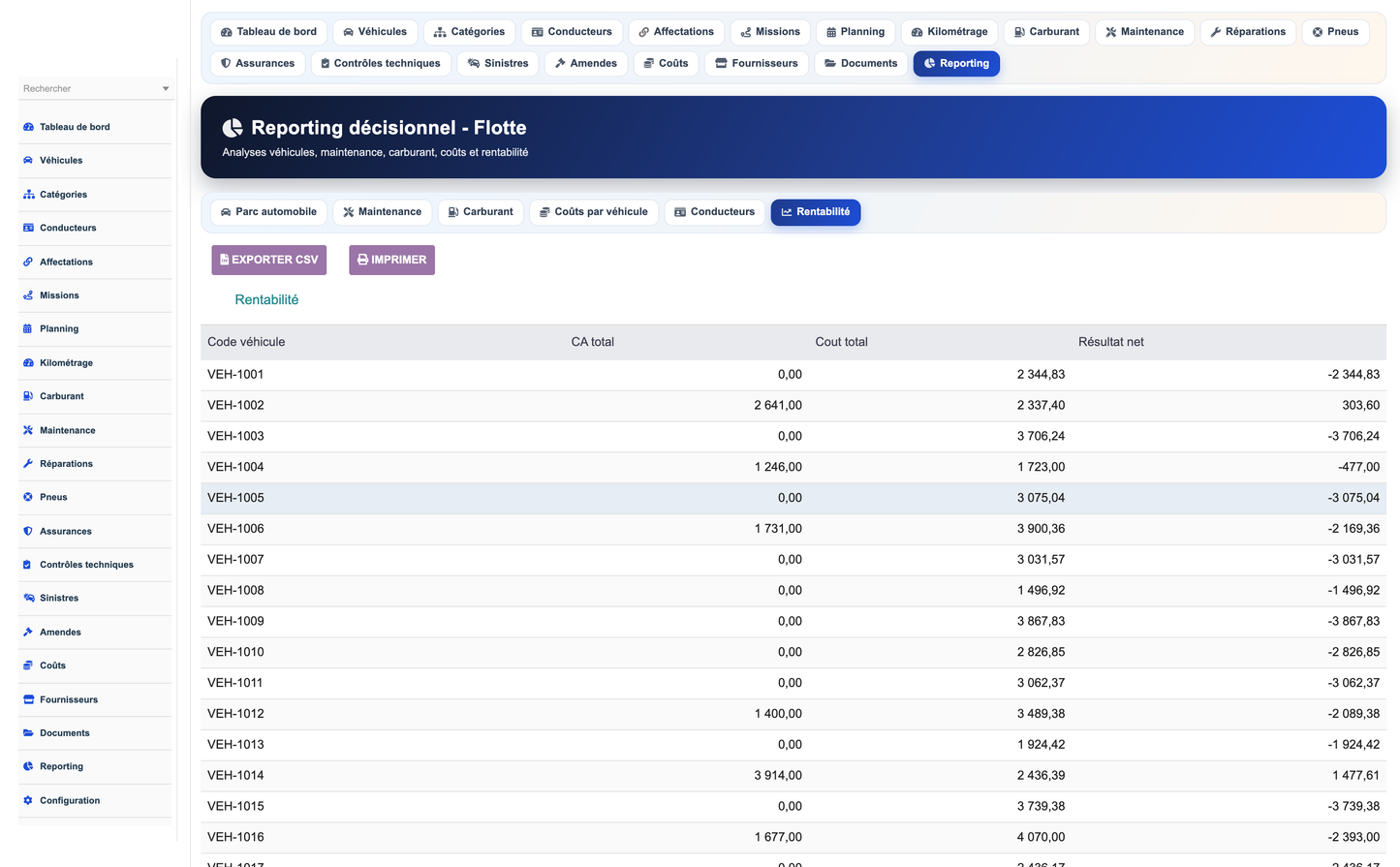
· Profitability per vehicle: revenue generated, total costs and net result.
· Per-driver analysis: missions, distance, accidents and fines.
· Consolidation of fuel, maintenance and other costs.
· Decision support for fleet renewal.
· Accident/claim management: date, vehicle, driver, responsible party, repair cost.
· Link to insurance and claim number, status tracking.
· Fine management: infraction type, driver, vehicle, amount and payment status.
· Complete history per vehicle and per driver.
· Settings page: currency, alert lead time, mileage threshold, email notifications.
· Install demo data button for a complete sample dataset.
· Remove demo data button to start from scratch.
· Permission management by user profile; multilingual (FR, EN, IT, DE, ES).
Administrator - Full access: module configuration, demo data, settings and permissions. Supervises the whole fleet.
Fleet Director - Global steering: vehicles, drivers, missions, costs, profitability and strategic reporting.
Maintenance Manager - Maintenance, repairs, tires, insurance and technical controls.
Vehicle Manager - Vehicles, categories, assignments, documents and administrative deadlines.
Driver - Own assignments, missions and mileage tracking; fuel entry recording.
Accountant - Financial follow-up: costs, fuel, suppliers, invoicing and Dolibarr accounting links.
Read only - Read-only consultation of records, planning and documents according to granted permissions.
· Third parties: garages, fuel stations, insurers and parts suppliers are created as native Societe records.
· Invoices & payments: fuel entries and costs can be linked to native Dolibarr invoices.
· Products & stocks: vehicles and parts can reference native products.
· Projects & agenda: missions can be attached to projects; deadlines feed the agenda.
· Accounting & bank: costs feed financial reporting and reconciliation.
· GED: documents (registration, insurance, technical control) are managed through Dolibarr's document system.
· Users: drivers can be linked to Dolibarr users and permissions.
· Copy the module into htdocs/custom/ and enable it from Home > Setup > Modules.
· Open the module setup page to configure currency, alert lead time and notifications.
· Use 'Install demo data' to load a realistic dataset, or 'Remove demo data' to reset.
· Assign permissions to each user group according to the seven profiles above.
· The dashboard, reporting and planning pages give day-to-day and strategic control.
(c) 2026 DoliResources - www.doliresources.com


