
Discover powerful Dolibarr extensions designed to automate your business processes
Gynecology Clinic Management turns Dolibarr into a specialised information system for a gynaecology and obstetrics clinic. It covers the complete patient journey...
Couldn't load pickup availability


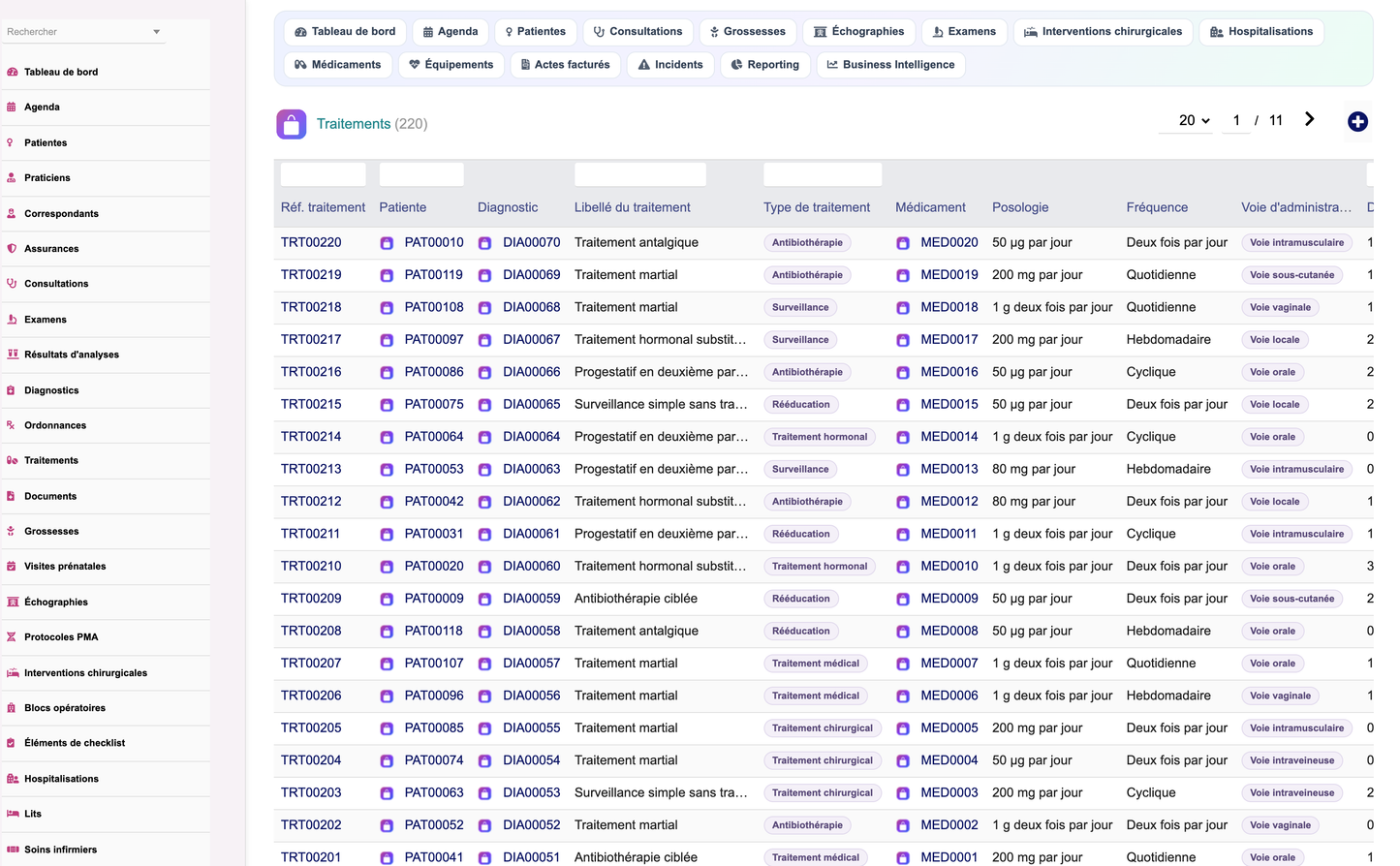
Gynecology Clinic Management turns Dolibarr into a specialised information system for a gynaecology and obstetrics clinic. It covers the complete patient journey — from the first appointment through consultation, examination, pregnancy follow-up, surgery and inpatient stay, to billing, insurance settlement and quality review — without leaving Dolibarr and without duplicating the data already held in its native modules.
The module is deliberately scoped as a management system. It records what was decided, done, used and billed; it does not advise on care.
|
Dimension |
Figure |
|
Business objects (and database tables) |
31 |
|
Business fields declared |
464 |
|
Controlled vocabularies / coded values |
69 / 344 |
|
Permissions (9 functional groups x read/write/delete, + reporting + admin) |
29 |
|
Menu entries |
37 |
|
Dashboard indicators / charts / alerts |
21 / 6 / 8 |
|
Reports (CSV, Excel and PDF export) |
14 |
|
REST API routes |
46 |
|
Interface languages |
French, English, Italian, German, Spanish |
|
Translation keys per language |
882 |
|
Dolibarr module number |
552000 |
· Gynaecologists and obstetricians — consultations, examinations, diagnoses, prescriptions, ultrasound reports and operative reports.
· Midwives — pregnancy follow-up, prenatal visits, foetal monitoring and birth plans.
· Nurses — inpatient care, vital signs, pain scores and the operative checklist.
· Medical secretaries — the diary, reminders, waiting list, patient records and documents.
· Referring doctors — a dedicated area for the patients they send in and the results.
· Clinic management — occupancy, revenue, profitability, stock, maintenance and quality.
The 31 business objects are organised into nine functional domains. Each domain maps to one permission group, so a receptionist, a midwife and a surgeon can be given exactly the access their role requires.
|
Domain |
Objects covered |
Permission |
|
People |
Patients, practitioners, referring doctors, appointments |
patient |
|
Clinical activity |
Consultations, examinations, laboratory results, diagnoses, prescriptions, treatments, medical documents |
clinical |
|
Obstetrics |
Pregnancies, prenatal visits, ultrasounds, assisted-reproduction protocols |
obstetrics |
|
Surgery |
Surgical procedures, operating rooms, operative checklist items |
surgery |
|
Inpatient care |
Hospital stays, beds and rooms, nursing care |
hospital |
|
Medical supply chain |
Medications, devices and implants, stock lots |
pharmacy |
|
Equipment |
Medical equipment, maintenance operations |
equipment |
|
Billing |
Billable acts, insurers and health funds |
billing |
|
Quality |
Incidents, audits, patient satisfaction surveys |
quality |
69 controlled vocabularies (344 values in total) govern every status, type and category field — consultation type, examination result, surgery type, bed status, lot status, incident severity and so on. Values are stored as language-independent codes and rendered as readable coloured badges in the interface. This keeps statistics reliable and makes the whole application translatable without touching the data.
|
Field |
Values held |
|
Consultation type |
Gynaecological, obstetric, follow-up, post-operative, prenatal, emergency, teleconsultation |
|
Examination result |
Normal, benign, atypical, suspicious, malignant, pending |
|
Pregnancy status |
Ongoing, delivered, terminated, miscarriage |
|
Risk level |
Low, moderate, high, critical |
|
Surgery status |
Planned, confirmed, in progress, performed, cancelled |
|
Bed status |
Free, occupied, being cleaned, blocked |
|
Lot status |
Available, reserved, consumed, expired, recalled |
|
Billing status |
Draft, billable, invoiced, paid, rejected |
|
Incident status |
Declared, under analysis, action plan, closed |
The patient file is the hub of the module. Everything else — consultations, pregnancies, examinations, surgeries, stays, documents and billed acts — attaches to it.
· Identity and contact — reference, name, date of birth, address, telephone, e-mail, photograph, emergency contact and marital status.
· Cover — insurer, policy number, health fund, and the third-party-payer agreement that applies.
· Clinical background — blood group, allergies, medical, gynaecological, obstetric and surgical history, and current treatments.
· Gynaecological baseline — gravidity, parity, age at menarche, cycle length and current contraception.
· Complete history — every consultation, pregnancy, examination, ultrasound, procedure, stay, prescription, document and billed act, reachable from the record.
|
Section |
Recorded |
|
Identity |
Reference, surname, first name, date of birth, photograph, marital status, occupation |
|
Contact |
Address, postcode, town, telephone, e-mail, emergency contact and number |
|
Cover |
Insurer, policy number, health fund, third-party-payer agreement |
|
Clinical |
Blood group, allergies, medical / gynaecological / obstetric / surgical history |
|
Gynaecological |
Gravidity, parity, age at menarche, cycle length, contraception |
|
Follow-up |
Referring doctor, current treatments, patient status, free notes |
· Practitioners — gynaecologists, obstetricians, midwives, nurses, anaesthetists, radiologists and medical secretaries, each with speciality, registration number, consultation fee and weekly hours.
· Referring doctors — external prescribers with their organisation, speciality and referral count, linked to the patients they send in.
· Insurers and health funds — cover percentage, third-party-payer flag, agreement reference and validity dates, used to split each billed act between the insurer and the patient.
Seven consultation types are supported — gynaecological, obstetric, follow-up, post-operative, prenatal, emergency and teleconsultation. Each records the reason, history, symptoms, clinical examination, weight, blood pressure, the diagnosis reached, the further tests requested, the treatment plan, observations and the final report, together with the fee and the invoice it belongs to.
Gynaecological examination, cervical smear, colposcopy, hysteroscopy, biopsy, mammography, foetal monitoring and hormone assays are all recorded with their indication, technique, findings, conclusion and a coded result — normal, benign, atypical, suspicious, malignant or pending. Laboratory results carry the analyte, value, unit and reference range, and are flagged automatically when out of range.
· Diagnoses across nine families — fibroids, endometriosis, ovarian cysts, infections, hormonal disorders, infertility, oncology, pregnancy risk and others — with ICD-10 coding, severity, laterality and a care plan.
· Prescriptions — medication, test requests, medical certificates, sick leave, contraception and physiotherapy, with posology, duration, validity and renewals.
· Treatments — linked to a diagnosis and optionally to a medication, with dosage, frequency, route, start and end dates, and a recorded tolerance and efficacy.
|
Examination |
Typical use |
|
Cervical smear |
Cervical cancer screening, with a coded cytology result |
|
Colposcopy |
Assessment of an abnormal smear, with acetic acid and Lugol |
|
Hysteroscopy |
Diagnostic or operative inspection of the uterine cavity |
|
Biopsy |
Histological sampling of cervix, endometrium or vulva |
|
Mammography |
Breast screening or diagnosis, where the clinic performs it |
|
Foetal monitoring |
Cardiotocography during pregnancy or labour |
|
Hormone assay |
FSH, LH, oestradiol, progesterone, TSH, beta-hCG |
A pregnancy record runs from the last menstrual period to delivery, and carries the whole antenatal pathway with it.
· Dating and term — last menstrual period, conception date, expected date of delivery, gestational age in weeks and the number of foetuses.
· Risk stratification — a four-level risk grade with the specific risk factors, so high-risk pregnancies surface on the dashboard.
· Monitoring — starting and current weight, blood pressure, rhesus status, vaccinations and the birth plan.
· Outcome — mode of delivery (vaginal, caesarean, instrumental), delivery date, newborn weight and the obstetric report.
Each visit belongs to its pregnancy and records the visit number, gestational age, weight, blood pressure, symphysis-fundal height, foetal heart rate, foetal movements, albuminuria and blood glucose. Visits that fall due without being carried out are raised as a dashboard alert.
Pelvic, endovaginal, obstetric, morphological, Doppler and growth scans are recorded with the trimester, gestational age, biparietal diameter, femur length, abdominal circumference, estimated foetal weight, amniotic fluid, placental position, findings and conclusion, and are linked to the equipment used.
Where the clinic offers it, protocols cover ovulation induction, intrauterine insemination, IVF, ICSI, freezing and transfer, recording the cycle number, stimulation drug, oocytes and embryos obtained, embryos transferred and frozen, and the outcome of the cycle.
|
Trimester |
Typical follow-up recorded by the module |
|
First |
Dating scan, booking bloods, rhesus status, risk assessment, first prenatal visit |
|
Second |
Morphology scan, glucose screening, monthly prenatal visits, symphysis-fundal height |
|
Third |
Growth and Doppler scans, foetal heart rate and movements, birth plan, delivery preparation |
Procedures are scheduled into a specific operating room with a surgeon, an anaesthetist and a named team. Eight procedure types are pre-configured — hysterectomy, caesarean section, myomectomy, prolapse repair, ovarian surgery, laparoscopy, operative hysteroscopy and conisation — each recording the anaesthesia type, ASA score, implants used, blood loss, operative report, complications and post-operative follow-up.
Every procedure carries its own safety checklist, structured in the three standard phases — before induction, time-out before incision, and before the team leaves the room. Each item records who checked it and when, so the file is auditable.
· Beds and rooms — ward, room and bed number, category, daily rate, private bathroom, and a live status (free, occupied, being cleaned, blocked).
· Stays — admission type (scheduled, emergency, day case, delivery), admission and discharge dates, length of stay, reason, discharge summary and discharge mode.
· Nursing care — vital signs, dressings, injections, infusions, hygiene, monitoring and patient education, each with temperature, blood pressure, pulse and pain score.
Bed occupancy is computed over the beds actually in service: beds that are blocked or being cleaned are excluded from the denominator, so a genuinely full ward is not reported as having spare capacity.
|
Procedure |
Anaesthesia typically recorded |
|
Total hysterectomy (laparoscopic) |
General |
|
Caesarean section |
Spinal or epidural |
|
Myomectomy |
General |
|
Prolapse repair (vaginal route) |
General or spinal |
|
Ovarian cystectomy |
General |
|
Diagnostic laparoscopy |
General |
|
Operative hysteroscopy |
General or sedation |
|
Conisation |
Local or sedation |
One diary covers consultations, ultrasounds, examinations, procedures, follow-ups and emergencies. Appointments carry a duration, location and reason, support SMS and e-mail reminders with a configurable lead time, and move through a full lifecycle — requested, confirmed, attended, missed, cancelled or rescheduled — including a waiting list.
· Medications — active ingredient, therapeutic family, galenic form, strength, route, CIP code, unit price, stock level and alert threshold, plus an explicit pregnancy-caution grade (allowed, caution, contraindicated).
· Devices and implants — intrauterine devices, contraceptive implants, pessaries, meshes, catheters, sutures and consumables, with manufacturer, CE marking, risk class and expected lifetime.
· Stock lots — lot and serial numbers, supplier, warehouse, quantities received and remaining, receipt and expiry dates, and the patient an implantable item was used on, giving end-to-end traceability.
Ultrasound scanners, colposcopes, hysteroscopes, foetal monitors, surgical columns, examination tables and sterilisers are tracked with serial number, location, purchase price, warranty end, service contract, calibration history and a maintenance frequency that drives the next due date. Preventive, corrective, calibration and regulatory operations are recorded with provider, technician, duration, cost and a conformity verdict; overdue maintenance is raised on the dashboard.
|
Item family |
Examples tracked |
Traceability |
|
Intrauterine devices |
Copper and hormonal coils |
Lot, expiry, patient |
|
Contraceptive implants |
Etonogestrel implants |
Lot, serial, patient |
|
Pessaries |
Ring and cube pessaries |
Lot, expiry |
|
Meshes and slings |
Sub-urethral tape, sacrocolpopexy mesh |
Lot, serial, patient |
|
Catheters and sutures |
Urinary catheters, absorbable sutures |
Lot, expiry |
|
Consumables |
Specula, sampling brushes, drapes, gloves |
Lot, expiry |
Every chargeable item — consultation, ultrasound, examination, procedure, hospital day or device — becomes a billable act with a code, quantity, unit price, VAT rate and family. The insurer's share and the patient's share are computed from the cover percentage on the patient's policy, and the act moves through draft, billable, invoiced, paid or rejected. Acts link to native Dolibarr invoices, so payments, banking and accounting stay in the standard modules.
· Incidents and non-conformities — clinical, medication, equipment, hygiene, organisational and patient-identification events, with severity, department, root-cause analysis, corrective action and closure date.
· Audits — internal, external, certification, hygiene and record audits against a named standard, with conformity and non-conformity counts, a score and an action plan.
· Patient satisfaction — surveys by paper, e-mail, SMS, tablet or telephone, scoring reception, waiting time, listening and cleanliness, with an overall mark, a Net Promoter Score and free-text comments.
A patient area presents upcoming appointments, shared reports, prescriptions, the pregnancy record and invoices; a referring-doctor area presents that doctor's own referred patients and their available results. In version 1.0 both are previews rendered inside the application for authenticated staff — they are not public authenticated portals.
|
Act family |
Billed from |
|
Consultation |
A recorded consultation, at the practitioner's fee |
|
Ultrasound |
A performed scan, by scan type |
|
Examination |
Smear, colposcopy, hysteroscopy, biopsy and similar |
|
Surgery |
A performed procedure, by procedure type |
|
Hospitalisation |
Length of stay multiplied by the bed's daily rate |
|
Device |
An implantable device fitted, traced to its lot |
A single cockpit page presents 21 indicators in five zones, 6 charts and 8 automatic alerts.
|
Zone |
Indicators |
|
Today's activity |
Consultations today, patients present, patients waiting, emergencies |
|
Obstetrics |
Ongoing pregnancies, prenatal visits this month, scheduled ultrasounds, high-risk pregnancies |
|
Theatre and inpatient |
Scheduled procedures, procedures performed this month, current stays, free beds and occupancy rate |
|
Finance |
Revenue this month, unpaid amounts, acts awaiting invoicing, average act value |
|
Logistics and quality |
Critical stock, lots nearing expiry, maintenance due, open incidents, patient satisfaction |
Charts cover twelve-month activity, consultation mix, procedures by type, activity by practitioner, monthly revenue and the satisfaction trend. Alerts — missed appointments, prenatal visits due, examinations due, upcoming surgery, low stock, expiring lots, overdue maintenance and open incidents — are clickable and lead straight to the list concerned.
14 consolidated reports cover medical activity, consultations, pregnancy follow-up, ultrasound, procedures, activity per practitioner, patients, revenue, profitability, stock and expiry, maintenance, quality, insurers and bed occupancy. Each exports to CSV, Excel and PDF with correct accented characters. A separate analytics page adds an activity forecast based on a three-month moving average of completed months, forecast occupancy, stock turnover, average length of stay, procedure cancellation rate and no-show rate.
|
Report |
Answers |
Report |
Answers |
|
Medical activity |
Volume by month |
Profitability |
Margin by act family |
|
Consultations |
Mix by type and doctor |
Stock and expiry |
What must be reordered |
|
Pregnancy follow-up |
Cohort and risk levels |
Maintenance |
What is due or overdue |
|
Ultrasound |
Scans by type and trimester |
Quality |
Incidents and audit scores |
|
Procedures |
Theatre throughput |
Insurers |
Exposure per insurer |
|
Per practitioner |
Activity and revenue |
Bed occupancy |
Occupancy by ward |
|
Patients |
Recruitment and profile |
Revenue |
Billed and collected |
29 permissions are granted across 9 functional groups, each with read, create/modify and delete, plus a read-only reporting permission and a module administration permission. Read and write are enabled by default on activation so the module is immediately usable; delete and administration are not.
|
Permission group |
Grants access to |
|
patient |
Patient records, practitioners, referring doctors, the diary |
|
clinical |
Consultations, examinations, laboratory results, diagnoses, prescriptions, treatments, documents |
|
obstetrics |
Pregnancies, prenatal visits, ultrasound, assisted reproduction |
|
surgery |
Procedures, operating rooms, operative checklists |
|
hospital |
Hospital stays, beds, nursing care |
|
pharmacy |
Medications, devices and implants, stock lots |
|
equipment |
Medical equipment and maintenance |
|
billing |
Billable acts, insurers and health funds |
|
quality |
Incidents, audits, satisfaction surveys |
|
reporting |
Reports and analytics (read-only) |
|
admin |
Module configuration and demonstration data |
Third parties, contacts, products and services, stock and warehouses, quotations, orders, invoices, payments, accounting, the agenda, document management, projects, users and groups. The module references native records rather than copying them, so there is one customer file, one product catalogue and one set of accounts.
46 documented routes expose patients, consultations, pregnancies, ultrasounds, examinations, procedures, equipment, billable acts and stock lots for read, create, update and delete, plus a read-only dashboard summary. Every route is authenticated and enforces the same permission groups as the interface.
· Five languages — French, English, Italian, German and Spanish, 882 keys each, all module-prefixed so no other installed module can override the wording.
· Demonstration dataset — one click generates a coherent twelve-month dataset (practitioners, patients, consultations, pregnancies, ultrasounds, procedures, equipment, stock, billing and quality); a second click removes only what the generator created, leaving user-entered data untouched.
· Settings — stock alert threshold, expiry notice period, default consultation duration, appointment reminder lead time and portal activation.
· Installation — copy the module folder into htdocs/custom, enable it in the module list; tables, menus and permissions are created automatically, and the schema self-heals on upgrade.
· Requirements — Dolibarr 16.0 or later, PHP 7.1 or later, with the Third Parties and Products modules enabled.
Medical disclaimer — This module is a management tool. Medical decisions, diagnoses, prescriptions and treatments remain the sole responsibility of the healthcare professionals who use it.


