
Discover powerful Dolibarr extensions designed to automate your business processes
Hospital Pharmacy Management turns a standard Dolibarr installation into a complete business solution for a hospital pharmacy: an inpatient pharmacy department, a clinic pharmacy, a...
Couldn't load pickup availability


Hospital Pharmacy Management turns a standard Dolibarr installation into a complete business solution for a hospital pharmacy: an inpatient pharmacy department, a clinic pharmacy, a hospital or hospital group, a pharmaceutical depot or a medico-social establishment running its own dispensary. It covers the medication circuit end to end, from referencing a product in the hospital formulary through procurement, receiving, storage, prescription, pharmaceutical review, dispensing and delivery to a care unit, and on to returns, quarantine, destruction and full traceability.
The delivered scope is 68 business objects backed by 68 dedicated tables, 136 list and record pages, an operations dashboard, a cold chain monitor, a controlled drugs register, a bidirectional traceability screen, 20 exportable reports, a REST API of 348 routes and a demonstration dataset of roughly 12 600 rows that can be loaded and purged in one click.
Everything is delivered in five languages (French, English, Spanish, Italian, German) from a single dictionary of 2 162 keys, so a multi-site or cross-border establishment runs one installation rather than one per language.
|
Safety and scope. Hospital Pharmacy Management is a management and organisation tool. It never replaces a healthcare professional and never takes a clinical decision automatically. Prescribing, the pharmaceutical review of a prescription, the decision to dispense, refuse or substitute, the release of a compounded batch, the decision to put a returned product back into stock and the handling of an adverse event all remain the responsibility of the authorised professional. The module records those decisions, names who took them and timestamps them; it does not make them and never applies them silently. |
Three design decisions shape the whole product. First, the lot is the unit of truth: every movement, dispensing line, preparation component, quarantine and destruction carries it, so traceability never relies on matching text. Second, a professional decision is always a record with an author, a timestamp and its own permission, distinct from ordinary data entry. Third, every indicator is computed from the same ledger the lists are drawn from, so a headline figure and the screen behind it cannot disagree.
The module answers four questions a hospital pharmacy must answer every day: what do we hold and where, what is committed and what is available, who decided what and when, and what did each product, care unit and patient stay actually cost.
The screens follow the circuit itself rather than the database. The dashboard renders it as a ten-step ring, and each step is a clickable entry point: referencing, purchasing, receiving, storage, prescription, pharmaceutical review, dispensing, declared administration, return and traceability. A user learns the module by following the process they already know.
· Master data: medications, active ingredients, compositions, therapeutic classes, medical devices, hospital formulary, equivalences, high-risk products, controlled drugs.
· Procurement: suppliers, contracts and tenders, demand forecasting, purchase requests with a two-stage validation, supplier orders and order lines.
· Receiving: deliveries, receiving lines with lot and expiry capture, and a documented control on twelve check points.
· Stock: lots, stock positions, movements, transfers, inventories, quarantine, destruction, locations down to the bin, and FEFO lot suggestion.
· Care units: ward stock allocations, unit requests and their lines, consumption per unit.
· Clinical: patient stays, prescriptions and lines, pharmaceutical review, interventions.
· Dispensing: patient-specific and bulk dispensing, double check, deliveries, returns, emergency dispensing, unit dose repackaging.
· Preparations: magistral and hospital preparations, components, controls, batch release, labelling.
· Cold chain: temperature-controlled units, readings, excursions and their decisions.
· Vigilance and quality: recalls, pharmacovigilance, materiovigilance, medication incidents, procedures, audits, non-conformities, corrective actions, continuity planning.
· Finance: equipment and maintenance, billing and cost allocation, reporting and analytics.
A generic ERP models a product, a quantity and a warehouse. A hospital pharmacy needs the lot, its expiry date, the care unit that consumed it, the patient stay it was charged to, the pharmacist who validated the prescription and the professional who released the batch. Those are not extra fields on a product record: they are objects with their own lifecycle, their own permissions and their own audit trail. That is what the 68 objects deliver, without modifying the Dolibarr core and while reusing its third parties, products, warehouses, supplier orders, invoices, projects, agenda and document management.
Eight of the 68 objects are hubs: they open on a record card carrying its own indicator cockpit and the panel of the lines attached to it. The rest are either reference data, line objects belonging to a hub, or event records such as a movement, a reading or a declaration.
Table 1 - The eight hub objects
|
Hub object |
Its cockpit shows |
Its lines |
|
Medication |
Quantity available, number of lots, form, route, formulary and product status |
Composition lines |
|
Purchase request |
Total excluding tax, priority, request state |
Requested products |
|
Supplier order |
Ordered and received quantities, fill rate, amount, state |
Order lines |
|
Receiving |
Received and refused quantities, controls passed, cold chain, state |
Receiving lines |
|
Lot |
Available and dispensed quantities, days to expiry, unit cost, state |
- |
|
Prescription |
Type, high-risk lines, reviews, interventions, state |
Prescription lines |
|
Dispensing |
Mode, total quantity, FEFO compliance, double checks, state |
Dispensing lines |
|
Preparation |
Type, quantity produced, yield, controls passed, state |
Component lines |
Authorisation is granular: 31 functional groups each carrying read, write and delete, twelve of them carrying an extra professional right, plus six cross-cutting rights. That is 111 permissions in total. Read and write are granted by default so the module is usable immediately; delete, every professional decision right, cost access, data export and module administration are switched off and must be granted deliberately.
The professional rights are the ones that matter for accountability. They are separate from ordinary write access precisely so that recording a fact and taking a regulated decision are never the same privilege.
Table 2 - The twelve professional rights, all disabled by default
|
Professional right |
Group |
What it authorises |
|
approve |
formulary |
Approve a hospital formulary entry |
|
validate |
purchase |
Validate a purchase request |
|
accept |
receiving |
Accept or refuse a delivery after control |
|
validate |
inventory |
Validate an inventory and its adjustments |
|
decide |
quarantine |
Decide the fate of a quarantined product |
|
decide |
review |
Record the pharmaceutical review decision |
|
validate |
dispensing |
Validate a dispensing before delivery |
|
decide |
delivery |
Decide on a care-unit return |
|
release |
preparation |
Release a compounded batch |
|
countersign |
narcotic |
Countersign a controlled-drug movement |
|
decide |
coldchain |
Decide on a temperature excursion |
|
reprint |
label |
Reprint a label, with a recorded reason |
Typical role mapping: a chief pharmacist holds every professional right; a clinical pharmacist holds review and intervention; a pharmacy technician holds dispensing and preparation write access without release; a storekeeper holds stock and receiving; a ward manager holds care unit requests only; an auditor and a controller hold read plus reporting.
The twenty-four roles described in a typical hospital pharmacy organisation chart - from the chief pharmacist and the clinical pharmacist to the technician, the storekeeper, the receiving agent, the cold chain manager, the ward manager, the biomedical technician, the billing manager, the auditor and the read-only user - are built by combining these groups rather than by hard-coding profiles, so an establishment can match its own organisation instead of adapting to the software.
The dashboard is the module's home page: the Hospital Pharmacy Operations and Medication Safety Center. It opens on the medication-circuit ring, followed by a map of the establishment where every pharmacy store and every care unit is a card showing its stock value or its pending requests, coloured by its own alert count.
Below the map, eight themed zones group about fifty indicators, then six charts drawn over a rolling twelve-month window.
Table 3 - The eight dashboard zones
|
Zone |
Representative indicators |
|
Master data |
Active references, medications, devices, formulary entries, high-risk, controlled, thermosensitive, expensive |
|
Procurement |
Open orders, late orders, expected receivings, non-conforming receivings, purchase value, service rate, average delay |
|
Stock |
Stock value, stockouts, below minimum, lots near expiry, expired lots, quarantined, coverage in days, rotation |
|
Prescriptions |
To review, to clarify, validated, review coverage, interventions, unanswered interventions, acceptance rate, average review time |
|
Dispensing |
To prepare, awaiting double check, deliveries today, pending unit requests, returns to process, emergencies, FEFO compliance, double-check coverage |
|
Preparations and cold chain |
Preparations in progress and awaiting release, temperature alerts, open excursions, controlled-drug movements and discrepancies |
|
Vigilance and quality |
Open recalls, open incidents, open non-conformities, overdue corrective actions, maintenance due |
|
Finance |
Monthly consumption, billed amount, amount paid, outstanding, cost per stay, cost per care unit |
The six charts are: purchases against consumption by month, consumption by care unit, consumption by therapeutic class, orders against receivings, prescriptions received against reviewed, and incidents by process step. Every ratio on the dashboard divides the same population on both sides, so a figure can never be depressed by records that were never eligible in the first place.
Each indicator is a link into the filtered list behind it, so the dashboard is a working surface rather than a display. Colour is used sparingly and consistently: a counter turns amber when work is waiting and red when a safety or availability threshold is crossed, and a counter that is legitimately at zero stays neutral rather than green.
The medication record is the module's central reference. It carries the commercial name, the international nonproprietary name, the CIP code and barcode, the therapeutic class, the galenic form, strength and unit, route of administration, packaging and dispensing unit, manufacturer and main supplier, regulatory and formulary status, storage conditions, minimum and maximum stock, lead time, purchase and internal price, VAT and shelf life.
Four independent flags drive behaviour across the whole module: thermosensitive, high-risk, controlled drug and expensive product. They decide which store a lot is routed to, whether a reinforced double check is required, whether a movement must reach the controlled-drug register, and which alerts a prescription raises.
Ingredients are referenced separately with their default unit, maximum daily dose, narrow therapeutic margin and cytotoxic flags, and an interaction note. A medication is linked to one or more ingredients through composition lines that state quantity, unit and the role played in the formulation, so a multi-component product and its excipients are documented explicitly.
Therapeutic classes carry an ATC code, a class level, a surveillance level and an annual budget, and are the axis of the consumption and cost analyses. Medical devices are managed with their own record: category, regulatory class from I to III, sterile, single-use, implantable and patient-traceability flags, reference code, barcode and packaging. An implantable device flagged for patient traceability follows the same lot-level chain as a medication.
Table 4 - The medication record at a glance
|
Field group |
Content |
|
Identification |
Internal reference, commercial name, INN, CIP code, barcode, linked Dolibarr product |
|
Pharmaceutical form |
Therapeutic class, galenic form, strength and unit, route of administration |
|
Packaging |
Packaging description, units per pack, dispensing unit |
|
Sourcing |
Manufacturer, main supplier, lead time, purchase price, internal price, VAT |
|
Regulatory |
Regulatory status, formulary status, product status |
|
Handling flags |
Thermosensitive, high-risk, controlled drug, expensive, storage condition |
|
Stock policy |
Minimum stock, maximum stock, shelf life in months |
Regulatory status distinguishes over-the-counter products, prescription lists I and II, controlled drugs, hospital-use-only products, specialist prescription, early access authorisation, clinical trial supply and magistral preparations. Product status covers active, manufacturer shortage, suspended, discontinued and archived, and a product in shortage is surfaced on the dashboard rather than being discovered when a request fails.
Fourteen therapeutic classes are delivered as a starting point, covering systemic antibacterials, analgesics, antithrombotics, antineoplastics, diabetes medication, infusion solutions, psycholeptics, antihypertensives, cardiac medication, anti-inflammatories, antiulcer agents, immunosuppressants, anaesthetics and systemic antivirals. Each carries a surveillance level - standard, reinforced, restricted or expensive-product watch - which the reporting uses to segment consumption and cost.
The hospital formulary records, per medication, the internal indication approved by the drugs and therapeutics committee, the care units allowed to use it, prescribing restrictions, authorised prescribers, the dispensing condition, an alternative product, the listing and review dates, the committee that approved it and a version number. Entries move through proposed, under evaluation, approved, approved with restrictions, suspended, withdrawn and archived.
An equivalence links a source product to an equivalent one and states the type (generic, therapeutic, galenic, dosage or shortage substitute), the dose ratio, whether the route and form are identical, the conditions of use, the validating pharmacist and the period of validity. The module can propose a configured equivalence; it never applies a substitution. The record exists to make the professional decision explicit and auditable.
High-risk products are classified by family - high-alert medication, concentrated electrolyte, anticoagulant, insulin, cytotoxic, opioid, controlled drug, thermosensitive, narrow margin, look-alike sound-alike, paediatric risk - and by level from low to very high. Each record states the hazard, the barriers in place and three switches: double check required, pharmacist required, and alert at prescribing. Those switches are read by the dispensing and review screens rather than being documentation only.
Dispensing conditions attached to a formulary entry are enforced as information at the point of use: free dispensing, patient-specific only, pharmacist validation required, specialist prescription required, committee approval required, or protocol driven. The entry also names an alternative product, which is what a pharmacist actually needs when the referenced product is in shortage.
Controlled substances are handled by a dedicated register rather than by ordinary stock movements. Every entry records the date and time, the medication and lot, the secured store, the movement type, the quantity in and out, the resulting running balance, the care unit and patient reference where applicable, the prescriber, the pharmacist, the witness, a justification and any discrepancy.
The movement vocabulary is deliberately specific: opening balance, receipt, issue to a care unit, patient-specific issue, return from a care unit, destruction, inventory count and adjustment. A witness can be made mandatory by configuration, and countersigning is a separate permission from writing.
The register screen shows the balance recomputed from the movements themselves, so the headline figure and the last row of the ledger are identical by construction. Any row carrying a non-zero discrepancy is highlighted, and the number of discrepancies is a dashboard indicator with its own reconciliation state: recorded, countersigned, reconciled, discrepancy found, under investigation, closed.
Controlled drugs are also isolated physically in the data model: a dedicated secured store, a secured-access flag on the store, a controlled-drug zone flag, and staff records carrying an explicit authorisation to handle them. A daily reconciliation and a reinforced inventory type are provided, and the discrepancy count is one of the indicators the daily alert job reports.
Eight movement types are distinguished so the register reads as a register rather than as a stock journal, and the running balance is carried on every row. An extract of the register for one product over a chosen period is available as a PDF document, which is the form an inspection expects.
Suppliers carry their contact details, lead time, minimum order amount, measured service rate, quality rating, number of non-conformities and annual committed amount, and can be linked to a Dolibarr third party. Contracts cover public tenders, framework agreements, annual and spot contracts, group purchasing and service or maintenance agreements, with their lot scope, period, committed quantity, amount, consumed amount, penalties and renewal terms.
A forecast computes, per product and period, the average consumption, a seasonality adjustment, the safety stock, the supplier lead time, the stock on hand and on order, and the resulting need. Three independent risk indicators - shortage, overstock and expiry - are derived from the cover the stock actually provides. Forecasts are presented as a logistics aid; they never place an order.
A purchase request moves through draft, submitted, under analysis, pharmacist validated, budget validated, approved, ordered and closed, with refused and cancelled as terminal states. The two validations are recorded separately, each with its validator and date, because a pharmaceutical opinion and a budget approval are different acts.
Supplier orders exist as standard, urgent, contract, blanket, automatic replenishment and shortage sourcing, and track ordered against received quantities, back orders, amounts, the delivery store, the delay in days and an optional link to a native Dolibarr supplier order. The fill rate on an order card divides what that order received by what that order asked for.
Supplier performance is measured rather than declared. The service rate compares what was actually delivered to what was ordered, restricted on both sides to the orders that reached a delivered state, so an order still legitimately in transit never counts as a failure. The average delay, the number of late lines and the number of non-conformities complete the picture and feed the supplier report.
The chain is deliberately explicit rather than implicit. A request states what is needed and why, with the stock on hand and the observed consumption on each line so the validator can judge it. Once approved it becomes an order, which states what was actually committed to a supplier and at what price. The order becomes one or more receivings, which state what physically arrived, in which lots, with which expiry dates and in what condition. Each step keeps its own quantities, so a shortfall is visible at the step where it happened instead of being absorbed silently.
A receiving is created against an order and records the delivery note, date and time, receiving store, the agent who received and the pharmacist who controlled, the transport temperature, and three conformity switches: cold chain respected, packaging intact, documents complete. Its lines capture, per product, the lot number, serial number, manufacturing and expiry dates, the expected, received and refused quantities, the unit price and the storage location.
The receiving state machine is explicit: expected, received, under control, accepted, partially accepted, placed in quarantine, refused, returned to the supplier, closed. Only an accepted or partially accepted receiving creates lots in stock.
Table 5 - The twelve receiving control points, grouped
|
Check point group |
Points controlled |
|
Identity |
Product identity, supplier identity, lot number |
|
Quantity |
Quantity received against ordered, order match, delivery note match |
|
Condition |
Packaging, physical integrity, labelling |
|
Shelf life |
Expiry date and remaining shelf life |
|
Cold chain |
Transport temperature for thermosensitive products |
|
Documents |
Accompanying documents and certificates |
Each control records the expected value, the observed value, a conformity flag, a severity, the controller, the date and the decision taken - accept, accept partially, place in quarantine, refuse, return to the supplier - together with an attachment reference for a photograph and a free comment.
Receiving is the point where the pharmaceutical responsibility begins, which is why the receiving agent and the controlling pharmacist are two separate fields and the acceptance decision is a separate permission. A refused or quarantined receiving creates no lot in stock, so a product that failed its control can never be dispensed by accident.
The lot is the anchor of the whole traceability chain. It carries the lot number, the product or device, the supplier and originating receiving, manufacturer, serial number, manufacturing, expiry and receipt dates, the received, available, reserved, dispensed, returned and destroyed quantities, the store and location, the unit cost and the days remaining to expiry.
Table 6 - Lot lifecycle
|
Lot state |
Meaning |
|
received / checking |
Physically received, control in progress |
|
available / reserved |
Usable, in part committed to a dispensing |
|
quarantine / blocked |
Held pending a decision, not dispensable |
|
recalled |
Named by a recall notice, blocked |
|
expired |
Past its expiry date and still held |
|
depleted / destroyed / returned |
Terminal states |
Stock positions are held per product and store, and separate the physical quantity from the available, reserved, quarantined and blocked quantities, alongside minimum and maximum levels, average monthly use, cover in days and stock value. The state - normal, below minimum, critical, out of stock, overstock, blocked - drives the alert tiles.
Locations model the physical hierarchy from site down to zone, aisle, cabinet, shelf and bin, each with a barcode, a capacity, its storage conditions and the products allowed in it. When a dispensing is prepared, the module proposes the conforming lots closest to expiry, First Expired First Out, and records on every dispensing line whether that suggestion was followed. FEFO compliance is therefore a measurement, not an assumption, and it is reported as such.
Stock movements form the ledger behind every quantity displayed. Fourteen movement types are distinguished - receipt, issue, internal transfer, dispensing, return from a care unit, return to the supplier, inventory adjustment, loss, destruction, quarantine, release from quarantine, use in a preparation, repackaging and opening balance - each carrying the lot, the source and destination store, the care unit, the quantity, the unit cost, the resulting value, the originating document and the operator. Consumption reporting and cost analysis read this single ledger, so a chart can never contradict the stock it is drawn from.
A location record carries its own barcode, capacity in units, current occupancy, storage conditions and the products it is allowed to hold, and can be free, occupied, full, blocked or out of service. Combined with the store types - main store, secondary store, cold room, quarantine area, controlled drugs vault, devices store, preparation unit store, ward stock cabinet, operating theatre store and emergency store - this describes the physical pharmacy closely enough to drive picking and inventory rather than merely documenting it.
Inventories exist as general, annual, rolling, by store, by care unit, by product, by lot, controlled drugs and expensive products. Each line compares the theoretical quantity to the counted quantity, computes the gap and its value, and requires a reason when a gap exists: counting error, data entry error, breakage, suspected theft, expired stock removed, untraced issue, return not posted, or unexplained. The accuracy rate is computed over the lines of that inventory only.
A quarantine record blocks a quantity of a lot for a documented reason - recall, temperature excursion, damaged packaging, suspected quality defect, expiry issue, labelling defect, receiving non-conformity, return awaiting a decision or an ongoing investigation - and blocks it from reservation, dispensing and transfer. The record stays in an awaiting-decision state until a pharmacist records a decision: release, return to the supplier, destroy or refuse.
Destructions record the quantity, the reason, the destruction route, the provider, the certificate reference, the pharmacist and, for controlled drugs, the witness, together with the value lost. Every destruction posts a stock movement, so the loss appears in the cost analysis rather than disappearing from the ledger.
Because a quarantine blocks a quantity rather than a whole lot, the remainder of a lot stays dispensable while the questioned fraction is held. The blocked value is computed and reported, which is what a pharmacy needs when arbitrating between destroying a batch and requesting a supplier credit.
Nine inventory scopes are provided, from a full general count to a rolling count, a single store or care unit, a single product or lot, and the two reinforced scopes a pharmacy needs most often: controlled drugs and expensive products. Each inventory records its operator, its validator and the validation date separately.
Care units are described with their type - internal medicine, surgery, intensive care, emergency, operating theatre, maternity, paediatrics, oncology day unit, dialysis, geriatrics, ambulatory, laboratory, imaging, rehabilitation - their building and floor, head physician and head nurse, bed count, occupancy, delivery days and slot, and their dispensing mode.
An allocation defines what a unit is entitled to hold: fixed ward stock, variable ward stock, emergency trolley, operating theatre kit, intensive care allocation or a custom list, with a replenishment frequency. Each line states the target, minimum and maximum quantity, the quantity actually on hand, the unit cost and whether the product is critical for that unit. The compliance rate is the share of lines within their own band.
A unit request covers replenishment, an additional request, a new product request, an emergency, a substitution request or a return request, with a priority from normal to vital. It moves through draft, submitted, awaiting validation, validated, being prepared, prepared, delivered, received by the unit, refused or cancelled, and its lines track asked against delivered quantities and the quantity already held by the unit.
Five dispensing modes are declared per care unit - patient-specific, bulk, ward stock replenishment, unit dose and a mixed organisation - and the module adapts the dispensing screens accordingly. A paediatric or geriatric unit typically runs unit dose, an emergency department and an operating theatre run ward stock, and a medical ward runs patient-specific dispensing; a single establishment can run all of them at once.
Consumption is attributed to the care unit on every dispensing movement, which is what makes the per-unit consumption chart, the per-unit cost analysis and the ward-stock compliance rate possible without any additional data entry by the wards themselves.
Patient stays are recorded with a stay reference, a display name deliberately reduced to a surname and an initial, the care unit, room and bed, birth year, sex, weight, admission and discharge dates, declared allergies, renal status and the insurance cover. The module stores what a pharmacy needs to review a prescription, not a full medical identity.
Prescriptions arrive from an electronic patient record, an API call, a scanned paper form, a confirmed telephone order or manual entry, and exist as initial, renewal, modification, discharge, protocol-based, chemotherapy, parenteral nutrition or a discontinuation order. Lines carry the dose and unit, route, frequency, doses per day, duration, start and end dates, total quantity and a high-risk flag.
The review screen is where a pharmacist works. It records the reviewing pharmacist, the date, the review level - prescription screening, review with patient data, or clinical pharmacy at the bedside - the alerts raised on dose, interaction, duplication, allergy and restriction, the time spent, and the decision: validated, validated with a comment, clarification requested, intervention raised, suspended pending an answer, not validated, or referred to a senior pharmacist.
|
Safety and scope. Hospital Pharmacy Management is a management and organisation tool. It never replaces a healthcare professional and never takes a clinical decision automatically. Prescribing, the pharmaceutical review of a prescription, the decision to dispense, refuse or substitute, the release of a compounded batch, the decision to put a returned product back into stock and the handling of an adverse event all remain the responsibility of the authorised professional. The module records those decisions, names who took them and timestamps them; it does not make them and never applies them silently. |
An intervention documents a proposal made to the prescriber: dosage adjustment, substitution, route, duration, interaction, duplication, allergy, monitoring, discontinuation, cost optimisation or a clarification request. It records whether the prescriber was contacted and how, the answer received, whether the proposal was accepted, and any saving achieved. The acceptance rate is computed over the interventions that actually received an answer.
A prescription progresses through received, to review, under review, to clarify, validated, dispensed, suspended, refused, expired and closed. Review coverage is reported as the share of prescriptions that actually reached the pharmacy and obtained a recorded decision, so an expired prescription that was never transmitted does not depress the indicator.
The reviewing pharmacist sees the prescription and its lines, the patient stay with the declared allergies and renal status, the weight, the care unit and the prescriber, and the high-risk flags carried by the products. Five configurable alert families are recorded on the review - dose, interaction, duplication, allergy and restriction - and they are recorded as what the pharmacist considered, not as an automated verdict. The module surfaces information and captures a decision; it does not arbitrate.
Dispensing exists in five modes: patient-specific, bulk, ward stock replenishment, unit dose and emergency. A dispensing is built either from a validated prescription or from a served care-unit request, and tracks its preparer, its pharmacist, the preparation time, the lines with their lot, expiry, requested, dispensed and returned quantities, and the FEFO flag.
The double check is a first-class record, not a checkbox. It states the mode - manual, two-person, barcode assisted, QR code assisted or reinforced for high-risk products - the operator and the checker, which of the six points were verified (patient, product, dose, quantity, lot, expiry), how many discrepancies were found and what they were, and the result: conform, corrected before delivery, blocked, or not yet performed. It can be made mandatory by configuration, with a separate switch for high-risk products.
Deliveries record the type, the carrier, the number of containers, whether the cold chain was required and the temperature on arrival, the receiver's name, the receipt proof and the acknowledgement time. Returns from a care unit record the reason, whether packaging was intact and storage conditions were respected, the remaining shelf life, and the pharmacist's decision: return to stock, place in quarantine, destroy, return to the supplier or refuse. The module never restocks a returned product on its own.
An emergency dispensing documents what was delivered outside the normal circuit, at which urgency level, which checks were performed and which were deferred, who received it, and when it was regularised against a prescription. Open and unregularised emergencies are a dashboard indicator.
Dispensing states run to prepare, being prepared, awaiting double check, validated, delivered, received, returned and cancelled, and the tiles on the dashboard count exactly those queues. Because the double check is an object rather than a flag, its coverage can be measured over the dispensings that were actually validated or delivered, and the discrepancies caught before delivery are counted and analysed rather than lost.
Table 7 - The five dispensing modes
|
Dispensing mode |
Typical care unit |
What is prepared |
|
Patient-specific |
Medical and surgical wards |
One tray per patient from a validated prescription |
|
Unit dose |
Paediatrics, geriatrics |
Individually identified single doses |
|
Bulk |
Maternity, dialysis, ambulatory |
A consolidated order for the unit |
|
Ward stock replenishment |
Emergency, operating theatre |
Top-up of the unit's allocation to its target levels |
|
Emergency |
Any unit, out of hours |
Immediate issue, regularised afterwards |
Preparations cover magistral and hospital preparations, sterile and non-sterile work, chemotherapy, parenteral nutrition, reconstitution, paediatric formulations and repackaging batches. A preparation record carries the formula reference and protocol, the patient or series, the internal batch number, the preparer and checker, the equipment used, the environment class from ISO A to D, the theoretical and produced quantities, the yield, the expiry date assigned to the preparation and its total cost. Component lines consume identified lots, so a preparation is traceable to the lots it was made from.
Controls are recorded per parameter - documentary, visual, weight, volume, pH, osmolarity, analytical assay, sterility, endotoxin and labelling - each with the expected value, the observed value, the tolerance and a conformity flag. Release is a separate act with its own permission: released, conditionally released, kept in quarantine, rejected or awaiting a decision, with the releasing pharmacist and the timestamp. The workflow runs draft, planned, being prepared, awaiting control, awaiting release, released, quarantine, rejected, destroyed.
Unit dose repackaging records the source lot and quantity, the number of units produced and rejected, the operator, the equipment, the checker, the internal batch and the assigned expiry date. Label print jobs are tracked for medications, unit doses, preparations, devices, bins, locations, transport, patients and care units, and a reprint always records its reason - an uncontrolled reprint is exactly what a labelling error looks like afterwards.
The preparation yield - produced against theoretical quantity - is recorded per batch and averaged per preparation type, which makes a drifting process visible before it becomes a non-conformity. Control conformity is reported over the controls actually performed, and a rejected batch keeps its controls attached so the reason for the rejection is auditable.
Nine preparation types are supported: magistral, hospital preparation, sterile, non-sterile, chemotherapy, parenteral nutrition, reconstitution, paediatric formulation and repackaging batch. Six environment classes, from ISO A to a standard room, are recorded per batch, which is what an inspection asks for when reviewing a sterile preparation.
Temperature-controlled units are referenced individually: pharmaceutical refrigerators, freezers, cold rooms, ultra-low freezers, insulated transport boxes, refrigerated vehicles and standalone data loggers. Each declares its allowed range, volume, reading frequency, probe reference, whether it has a data logger and an alarm, and its calibration dates.
Readings are captured manually, by data logger, wired probe, connected sensor, CSV import, API call or mobile entry. Each reading stores the value, the period minimum and maximum, humidity, the source, the operator, a conformity flag computed against that unit's own range, and a state: within range, close to the limit, out of range, missing or invalidated.
On the cold chain monitor the card border reflects the equipment state and the temperature figure is coloured by whether that reading is inside that unit's range. Two different signals get two different supports, so a perfectly conforming reading in a unit under maintenance is never shown as an alert.
An excursion records the start and end, the duration, the minimum and maximum observed, the cause - door left open, power cut, equipment breakdown, overload, probe fault, transport incident, defrost cycle or cause not identified - the lots, quantities and value impacted, and the immediate action taken. It then waits for a decision: release the products, release with a shortened expiry, keep in quarantine, destroy or return to the supplier. The module blocks the products and computes nothing about their fitness for use.
The daily alert job also reports a cold unit that has produced no reading for longer than the configured delay. A missing reading is a distinct state from an out-of-range reading, because the two require different actions: one is a monitoring failure, the other a product event.
Cold units can be attached either to a pharmacy store or to a care unit, so a refrigerator standing in an intensive care ward is monitored under the same regime as one in the pharmacy itself. Calibration dates and the next calibration due date are held on the unit, and the maintenance module schedules the intervention against it.
Seven reading sources are recognised - manual entry, data logger, wired probe, connected sensor, CSV import, API call and mobile entry - and the source is stored with each reading, because a manual reading and a logger reading do not carry the same evidential weight.
Recalls record the notice date, the products and lot numbers named, the manufacturer and supplier, the type and urgency, the quantity in stock and recovered, the number of care units notified and patients concerned, and progress through notified, stock blocked, units notified, recovery in progress, returned, destroyed and closed.
Pharmacovigilance and materiovigilance reports capture the patient or device, the lot, the event as declared, the severity and outcome as declared, the reporter and their role, the immediate action, the professional informed, the date sent to the authority and the follow-up. The module deliberately establishes no causality: it records a declaration.
Medication incidents are classified by type - wrong patient, product, dose, route or time, omission, expired product, transcription, labelling, storage or preparation error, near miss - by process step and by detection stage, with an explicit flag for whether the patient was reached, the immediate action, the root cause, the owner and a due date.
Procedures, audits, non-conformities and corrective actions form a closed loop. Audits cover fourteen scopes from procurement to data security and record criteria, conformity rate and findings. A corrective action can be raised from a non-conformity, an incident or an audit, and carries an owner, a due date, an effectiveness check and an effectiveness verdict.
Equipment records seventeen types from refrigerators to dispensing robots, isolators, balances, label printers and pneumatic tube stations, with installation and warranty dates, purchase and maintenance cost, availability, breakdowns, downtime, MTBF, MTTR, next maintenance date and qualification state. Maintenance covers preventive, corrective, calibration, qualification, periodic checks, upgrades and deep cleaning. Continuity plans document eleven scenarios, from a power failure to a mass recall, each with its criticality, degraded procedure, fallback supplier, maximum tolerable downtime and drill results.
A recall is the point where traceability stops being theoretical. From the lot numbers named in the notice, the module identifies the stock still held, the care units that received the product and the patient stays concerned, blocks what remains and tracks the recovery through to closure.
A trigger writes the five safety-critical events - a quarantine opened, a recall notified, a temperature excursion detected, a controlled-drug discrepancy recorded and a medication incident declared - to the system log and to the Dolibarr agenda, so they surface in the establishment's normal event stream rather than only inside the module.
Twelve medication-incident types and eight detection stages are provided, which is what makes the incident analysis useful: knowing that most errors are caught at the double check rather than at the bedside is precisely the kind of finding that justifies keeping the double check.
Billing allocates pharmacy consumption to the right payer: the stay, the patient, the care unit, an insurer, a convention, an expensive-product line, a device, a preparation, or a credit note. Each record separates the amount excluding tax, VAT, the amount including tax, the covered share, the patient share and the amount paid, and can be linked to a native Dolibarr invoice.
Cost records are computed per period and scope - whole pharmacy, care unit, therapeutic class, supplier, patient stay or preparation - across nine categories: purchases, storage, preparation, dispensing, logistics, losses, expiries, destruction and maintenance, each with its budget, actual and gap. Cost per stay always divides by the distinct stays of the period.
Table 8 - The 20 delivered reports
|
Reporting area |
Reports |
|
Master data |
Pharmaceutical master data, hospital formulary |
|
Procurement |
Suppliers and contracts, purchase requests and orders, receivings and controls |
|
Stock |
Stock and lots, expiries and destructions, inventories and gaps, consumption |
|
Clinical |
Prescriptions and reviews, dispensing and deliveries, care units and ward stock |
|
Regulated |
Controlled drugs, preparations, cold chain, vigilance and recalls |
|
Support |
Equipment and maintenance, quality and audits, costs and budgets, billing and payments |
Every report accepts a period, renders a chart and a table, and exports to CSV under a dedicated export permission. Analyses provided include consumption forecasting, shortage, overstock and expiry risk, supplier performance and average delay, service rate, stock rotation, cost evolution, the impact of substitutions, dispensing and preparation workload and expensive-product consumption. They are decision aids for pharmacists and administrators.
Because consumption, purchases and losses are read from the same movement ledger, the cost report and the consumption chart are two views of one dataset. Budget and actual are held side by side per category and per period, and the gap is what a pharmacy committee reviews.
Beyond the standard reports, the delivered analyses support consumption and requirement forecasting, shortage, overstock and expiry risk scoring, supplier performance and average delay, service and stockout rates, stock rotation and cover, cost evolution by class, care unit and supplier, the financial impact of accepted pharmaceutical interventions, dispensing and preparation workload, expensive-product consumption, equipment utilisation, losses and destructions, budget variance and care-unit satisfaction. All of them remain administrative, logistical and pharmaceutical decision aids.
The REST API exposes 348 routes: five generic operations - list, fetch, create, update, delete - over each of the 68 objects, plus eight convenience routes for catalogue search, a lot with its remaining quantity and days to expiry, prescriptions awaiting review, dispensings to prepare, posting a temperature reading, open excursions, open recalls, and a full traceability chain for a lot number.
Authentication uses the standard Dolibarr API key; a missing or wrong key returns 401 and a valid key without the right permission returns 403. Every route is gated by the same permission map the screens use. No route takes a clinical decision: nothing validates a prescription, releases a batch or settles a return through the API.
· 111 granular permissions with least privilege; delete and every professional right off by default.
· CSRF tokens on every form, values escaped, sort fields whitelisted against the real column list.
· Output escaped on screen; exports escaped so accented characters survive intact.
· Multi-entity isolation applied to every query.
· Creation and modification author and timestamp on every record.
· Safety-critical events written to the syslog and the Dolibarr agenda by a trigger.
· Demonstration data tagged and purgeable without ever touching real records.
Forward, the chain runs supplier, order, receiving, receiving line, lot, store and location, stock movement, dispensing, dispensing line, delivery, care unit or patient stay, and finally return or declared administration. Backward, the same chain is walked in reverse from a care unit or a patient stay to the supplier. Both directions are available from a dedicated screen and from the API, and both are gated by a traceability permission. Because every consuming record carries the lot identifier, no leg of the chain depends on a text match.
Two integration patterns are supported out of the box: an electronic patient record pushing prescriptions into the module, and a temperature monitoring system pushing readings. Both are write operations on factual records; neither can validate, release or decide anything.
Table 9 - The eight convenience routes
|
Convenience route |
Purpose |
|
GET pharmacy/medications |
Search the catalogue by name, class or status |
|
GET pharmacy/lots/{id} |
A lot with its remaining quantity and days to expiry |
|
GET pharmacy/prescriptionstoreview |
The pharmacist's review queue |
|
GET pharmacy/dispensingstoprepare |
The preparation queue |
|
POST pharmacy/tempreadings |
Push a temperature reading from a monitoring system |
|
GET pharmacy/openexcursions |
Excursions still awaiting a decision |
|
GET pharmacy/openrecalls |
Recalls still in progress |
|
GET pharmacy/traceability/{lotnumber} |
The complete chain for a lot, in one call |
Patient data is kept to what a pharmacy needs: a stay reference, a display name reduced to a surname and an initial, the care unit, the year of birth, the weight and the declared allergies. The module holds no full civil identity, which keeps its data-protection footprint proportionate to its purpose.
The clearest way to describe the module is to follow one day through it.
The pharmacist opens the dashboard and sees the prescriptions awaiting review. Opening one shows the patient stay, the care unit, the prescriber and the lines, with high-risk products flagged. The pharmacist records the review: the alerts considered, the time spent and the decision. Where a change is proposed, an intervention is created, sent to the prescriber and tracked until an answer is received. Validated prescriptions become dispensings in the preparation queue.
A technician prepares the trays. For each line the module proposes the conforming lots closest to expiry and records whether that suggestion was followed. A second professional performs the double check on patient, product, dose, quantity, lot and expiry; a discrepancy caught here is recorded and corrected before delivery. The delivery is created, the carrier and containers noted, and the receiving nurse acknowledges it.
A supplier delivery arrives. The receiving agent captures the lines with their lot numbers and expiry dates, and the pharmacist runs the control on the twelve check points, recording the transport temperature for thermosensitive products. Accepted lines create lots in stock; a non-conforming line is refused or quarantined and never becomes dispensable. Meanwhile the cold chain monitor shows the latest reading of every temperature-controlled unit, and an excursion detected overnight waits for a pharmacist's decision on the products it impacted.
The controlled drugs register is reconciled, countersigned and any discrepancy investigated. Care-unit returns awaiting a decision are processed one by one: back to stock, to quarantine, or to destruction. The daily job then reports the open items - stockouts, lots approaching expiry, recalled lots still held, reviews and checks still pending, missing temperature readings, overdue corrective actions - so the next morning starts from a known position.
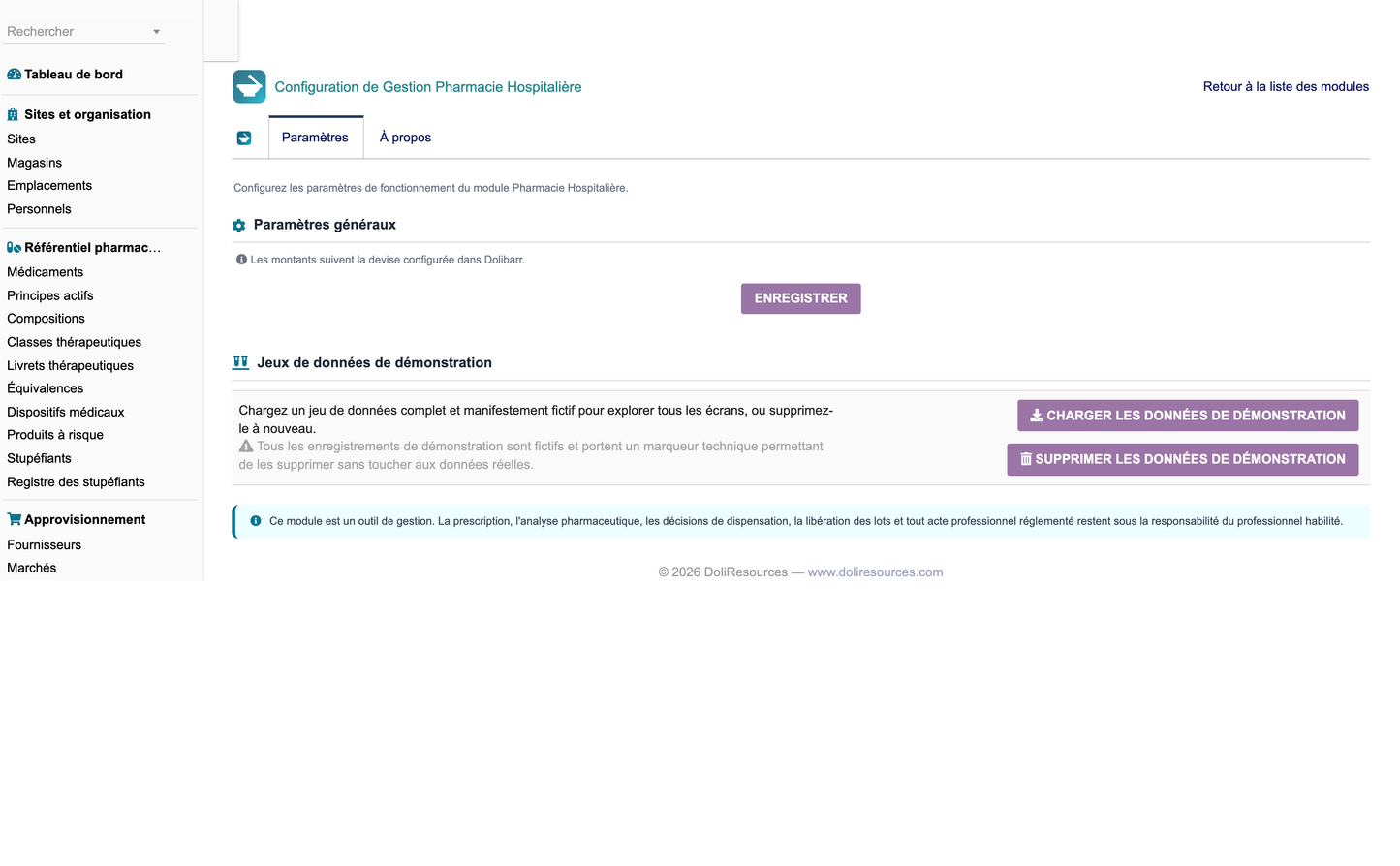
Thirteen parameters drive the module's behaviour, editable from its own configuration page. They set the expiry alert window and the stock alert threshold, whether a double check and a reinforced high-risk check are required, whether FEFO suggestion is active, the temperature tolerances and the missing-reading alert delay, the target pharmaceutical review time, the standard delivery lead time, whether a witness is mandatory for controlled drugs, the default VAT rate and the default PDF model.
One button loads a complete and clearly fictitious dataset of roughly 12 600 rows across all 68 tables, and a second removes it. Every generated row carries a technical marker, and the purge deletes only marked rows, cascading first onto any record a user created underneath a demonstration parent. The dataset is deliberately realistic: activity spread over twelve months with a share in the current month, every workflow stage populated, and rates in credible bands rather than a uniform distribution.
Copy the module folder into the custom directory, enable it from the module list, and the tables, permissions, menus and default parameters are created automatically. The module targets Dolibarr 18 to 23 on PHP 8 with MySQL or MariaDB, in mono- or multi-entity mode, and never modifies the Dolibarr core: it uses only the published extension points. Disabling the module removes its menus, permissions and parameters but deliberately keeps the business tables, so hospital data is never destroyed by a deactivation.
Table 10 - Delivered artefacts
|
Deliverable |
Content |
|
module_hospitalpharmacy-1.0.zip |
The installable module, 400 files |
|
screenshots/ |
89 documentation screenshots, 3200 x 1980 |
|
User training manual (FR) |
120-page illustrated PDF |
|
Complete functional documentation (EN) |
Full 65-section Word document |
|
Essential feature summary (EN) |
This document |
|
Technical documentation (EN) |
Architecture, schema, API, security, extension points |
|
Safety and scope. Hospital Pharmacy Management is a management and organisation tool. It never replaces a healthcare professional and never takes a clinical decision automatically. Prescribing, the pharmaceutical review of a prescription, the decision to dispense, refuse or substitute, the release of a compounded batch, the decision to put a returned product back into stock and the handling of an adverse event all remain the responsibility of the authorised professional. The module records those decisions, names who took them and timestamps them; it does not make them and never applies them silently. |
Table 11 - The configuration parameters and what they drive
|
Parameter |
Default |
Effect |
|
Expiry alert window |
90 days |
When a lot starts appearing in the expiry alerts |
|
Stock alert threshold |
110 percent of minimum |
When a position is reported as low |
|
Double check required |
Yes |
Blocks delivery until the check is recorded |
|
Reinforced high-risk check |
Yes |
Requires the reinforced mode for high-risk products |
|
FEFO suggestion |
Enabled |
Proposes the lots closest to expiry |
|
Temperature tolerances |
0.5 C either side |
Grace band before a reading is an excursion |
|
Missing reading alert |
26 hours |
Alerts when a cold unit stops reporting |
|
Target review time |
20 minutes |
Benchmark for the review workload report |
|
Delivery lead time |
4 hours |
Standard lead time for care unit deliveries |
|
Controlled-drug witness |
Required |
Makes the witness field mandatory |
|
Default VAT rate |
2.1 percent |
Applied to pharmacy invoicing |
|
Default PDF model |
hph_document |
Model used for generated documents |
Because the demonstration dataset populates every screen and every workflow stage, an evaluator can open the module immediately after activation and see a working pharmacy: prescriptions waiting for review, dispensings waiting for a double check, a supplier order in transit, lots approaching expiry, an open temperature excursion, a recall in progress and a twelve-month history behind every chart. Removing the demonstration data afterwards leaves the installation clean and ready for real data.


