
Discover powerful Dolibarr extensions designed to automate your business processes
HR Offboarding Management is a comprehensive Dolibarr ERP/CRM module published by DoliResources that digitalizes and standardizes the entire employee departure lifecycle. From...
Couldn't load pickup availability


HR Offboarding Management is a comprehensive Dolibarr ERP/CRM module published by DoliResources that digitalizes and standardizes the entire employee departure lifecycle. From the moment a departure is declared until the case is formally closed, the module orchestrates every operational, administrative, legal and human dimension of an offboarding, ensuring nothing is forgotten and that every step is traceable. It transforms a traditionally scattered and error-prone process into a structured, auditable and measurable workflow.
The module covers the full range of departure situations encountered by an HR department: resignation, dismissal, mutual (contractual) termination, end of fixed-term contract, end of mission, end of internship, end of apprenticeship, retirement, death, internal mobility and inter-company transfer. Each situation is driven by its own departure type and motive, which in turn conditions the checklists, documents, legal attestations and settlement rules that apply.
At a glance, the module delivers:
· 35 interconnected business objects organized around the offboarding case as the central hub.
· A premium operational dashboard, the Exit Management Center, structured as an end-to-end exit journey.
· Around 21 key performance indicators and a rich set of analytical charts.
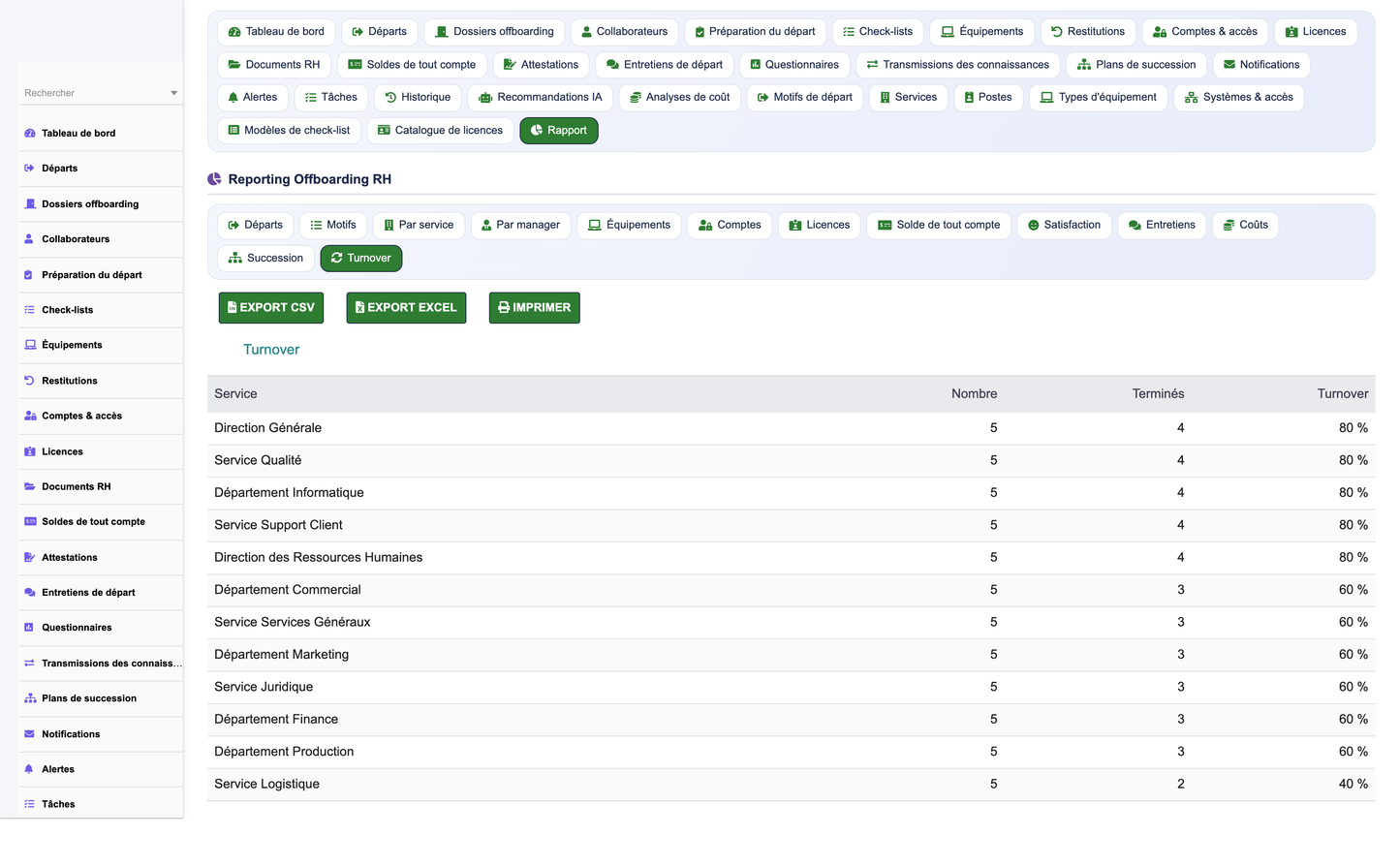
· 13 exportable reports (CSV / Excel / print) covering departures, assets, settlements, satisfaction and turnover.
· A documented REST API for integration with external HRIS, payroll and IT systems.
· 26 fine-grained permissions across 9 rights groups, with full audit logging and GDPR-oriented data handling.
· Full localization in French, English, Italian, German and Spanish (841 translation keys per language).
· A one-click demo data generator to evaluate the module with a realistic dataset.
The module is designed to be non-intrusive: it introduces no core modifications to Dolibarr, is multi-entity (MultiCompany) aware, and integrates natively with the standard Users, Third parties, Agenda, Projects, HR and ECM/GED modules.
Employee offboarding is a high-risk, high-cost moment for any organization. A poorly managed departure exposes the company to legal disputes, unreturned assets, lingering system access, loss of critical knowledge and a damaged employer brand. Gestion Offboarding RH was built to address these risks head-on and to turn offboarding into a source of operational reliability and strategic insight.
Primary business objectives
· Guarantee compliance: ensure every legal document, attestation and final settlement is produced on time and archived securely.
· Eliminate operational leakage: track every piece of equipment, every software license and every system account to full return or deactivation.
· Protect the organization: close all access rights promptly to reduce security and data-protection exposure.
· Preserve knowledge: capture and transfer critical know-how before the collaborator leaves through structured knowledge-transfer plans.
· Improve retention insight: systematically collect exit-interview feedback to understand and reduce avoidable turnover.
· Ensure business continuity: plan succession for key positions so departures do not disrupt operations.
Measurable outcomes
· Reduced time-to-close for offboarding cases and fewer overdue tasks.
· Near-zero unreturned assets and orphaned accounts.
· Quantified departure costs and turnover rates by department, manager and motive.
· Actionable satisfaction and exit-interview analytics feeding continuous HR improvement.
The offboarding case is the beating heart of the module. Every departure creates a case that aggregates the collaborator, the department and position, the departure type and motive, key dates (notification, last working day, effective departure), and the full set of dependent records: checklists, preparation steps, equipment returns, account deactivations, licenses, documents, the final settlement, attestations, the exit interview, the knowledge-transfer plan and, where relevant, the succession plan.
The workflow is deliberately staged so that responsibilities are clear and progress is measurable at every moment. The Exit Management Center renders this progression as a visual exit journey, letting HR see at a glance which stage each case has reached and where bottlenecks are forming.
The eight canonical stages of the exit journey
|
Stage |
Purpose |
|
1. Preparation |
Open the case, select departure type/motive, generate the checklist from a template, assign owners and deadlines. |
|
2. Equipment return |
Inventory and reclaim all physical assets (laptops, phones, badges, vehicles, keys). |
|
3. Access deactivation |
Disable every system account and revoke every software license held by the collaborator. |
|
4. Final settlement |
Compute and validate the settlement (balance, leave, severance) with itemized settlement lines. |
|
5. Documents |
Produce and archive legal attestations and mandatory end-of-contract documents. |
|
6. Exit interview |
Conduct the structured interview and record the questionnaire responses. |
|
7. Knowledge transfer |
Execute the transfer plan so critical knowledge items reach the right successors. |
|
8. Closure |
Verify every checklist item is complete, run a final audit and formally close the case. |
Throughout the workflow, checklists and preparation steps ensure no task is missed, while tasks, notifications and alerts keep every stakeholder informed of upcoming and overdue actions. An AI recommendation engine can surface next-best-actions and highlight cases at risk of delay.
Beyond the high-level journey, the exit process is driven by concrete, reusable operational building blocks. Each offboarding case is populated from checklist templates that encode the organization's standard procedures, guaranteeing that a resignation, a retirement or a dismissal each follow the correct, situation-specific path.
Checklists and preparation steps
· Checklist templates: predefined sets of items tailored to each departure type, applied automatically when a case is created.
· Checklist items: individual, assignable, dateable tasks with completion status feeding the case progress indicators.
· Preparation steps: sequenced actions that structure the early phase of the departure before the last working day.
· Tasks, notifications and alerts: operational reminders that escalate as deadlines approach or are missed.
The departure record itself captures the formal event, linked to a departure type (motive) such as resignation, dismissal, mutual termination, end of fixed-term/mission/internship/apprenticeship, retirement, death, internal mobility or transfer. Motives are fully configurable through the departure-type referential, so the module adapts to local labor law and internal HR policy without any code change.
Every action taken on a case is written to the audit log, and a dedicated cost-analysis object accumulates the financial impact of the departure (replacement cost, unreturned assets, settlement amounts), feeding the cost and turnover reports.
Unreturned company assets are one of the most common and costly failures of manual offboarding. Gestion Offboarding RH provides a dedicated equipment and equipment-return sub-system that tracks each physical asset from assignment to confirmed return, leaving no room for ambiguity.
Capabilities
· Equipment catalog organized by equipment types (laptops, mobile phones, access badges, vehicles, keys, tooling).
· Assignment of equipment to collaborators, with condition and value tracked for cost analysis.
· Equipment-return records capturing the return date, receiving party, condition on return and any deductions.
· Return status surfaced directly in the exit journey and in the equipment-return KPI and chart.
· A dedicated equipment report, exportable to CSV/Excel, listing outstanding and completed returns.
The equipment-return stage of the exit journey cannot be silently skipped: outstanding items remain visible on the dashboard and in the case checklist until each is reconciled, and the REST API exposes a PUT equipments/{id}/return route so external asset-management or IT systems can confirm returns programmatically.
Prompt revocation of system access is a security and data-protection imperative. The module manages accounts (system access) and licenses (software entitlements) as first-class objects, each linked to the collaborator and to a systems referential describing the applications and platforms in use across the organization.
Capabilities
· Account inventory per collaborator across all referenced systems (email, ERP, VPN, business applications).
· Deactivation tracking with status, effective date and responsible owner for each account.
· License management: reclaim, reassign or terminate paid software licenses to avoid unnecessary cost.
· Access-deactivation KPI and chart quantifying how quickly accounts are closed after the effective departure.
· Dedicated accounts and licenses reports for audit and IT reconciliation.
By making account deactivation an explicit, measured stage of the exit journey, the module closes the security gap that arises when access lingers after an employee has left, and provides evidence of timely revocation for compliance and audit purposes.
Exit interviews turn every departure into a learning opportunity. The module structures the exit interview around configurable questionnaires composed of questions, with each collaborator's responses stored for analysis. This standardization means feedback is comparable across departments, managers, motives and time.
Capabilities
· Reusable questionnaires with typed questions (rating scales, multiple choice, free text).
· Structured capture of responses linked to the offboarding case and collaborator.
· Satisfaction scoring aggregated into a dedicated satisfaction KPI and chart.
· Interviews and satisfaction reports revealing recurring themes and drivers of avoidable turnover.
Because responses are structured data rather than free-form notes, HR can quantify satisfaction trends, correlate them with departure motives and departments, and feed the insights back into retention initiatives.
When a collaborator leaves, their tacit and explicit knowledge must not leave with them. The knowledge-transfer sub-system lets HR and managers define a knowledge-transfer plan composed of individual knowledge-transfer items - documented responsibilities, procedures, contacts, ongoing files and know-how - each assigned to a receiving colleague with a target completion date.
Capabilities
· Knowledge-transfer plan attached to the offboarding case, scoped to the departing collaborator's role.
· Granular knowledge-transfer items with owner, recipient, status and deadline.
· Progress tracked within the exit journey so closure cannot occur while critical transfers remain open.
· Linkage with native document management (ECM/GED) so transferred materials are archived, not lost.
This ensures operational continuity: the organization retains the critical know-how of every departing employee and the receiving team members are explicitly identified and accountable.
For key positions, a departure is also a continuity risk. The module includes succession planning, allowing HR to attach a succession plan to a case or position and to record one or more candidate successors, ranked and annotated with readiness information. This transforms offboarding from a purely reactive process into a forward-looking talent-continuity exercise.
Capabilities
· Succession plan linked to the position and to the offboarding case.
· Multiple successor candidates with ranking, readiness and notes.
· Succession report giving HR and management visibility over coverage for critical roles.
· Integration with the AI recommendation engine to suggest suitable internal candidates.
By planning succession as part of the exit process, organizations avoid capability gaps and ensure that critical positions are covered before the incumbent leaves.
The module ships with 13 ready-to-use reports, each exportable to CSV, Excel and print. They give HR, finance and management a 360-degree analytical view of the offboarding activity, from raw departure volumes to financial cost and turnover rates.
|
# |
Report |
What it answers |
|
1 |
Departures |
Volume and timeline of departures over the period. |
|
2 |
Motives |
Distribution of departures by motive / departure type. |
|
3 |
By department |
Departure volumes and rates broken down per department. |
|
4 |
By manager |
Departures grouped by responsible manager. |
|
5 |
Equipment |
Outstanding and completed asset returns. |
|
6 |
Accounts |
System-access deactivation status and delays. |
|
7 |
Licenses |
Software licenses reclaimed, reassigned or terminated. |
|
8 |
Settlement |
Final-settlement amounts and itemized lines. |
|
9 |
Satisfaction |
Aggregated exit satisfaction scoring. |
|
10 |
Interviews |
Exit-interview coverage and recurring themes. |
|
11 |
Cost |
Financial cost of departures (replacement, assets, settlement). |
|
12 |
Succession |
Coverage of critical positions by successors. |
|
13 |
Turnover |
Turnover rates across dimensions and time. |
All reports honour the module's fine-grained permissions, so users only see the data they are entitled to, and exports are equally governed by rights.
The centerpiece of the module is the Exit Management Center, a premium operational dashboard that presents the entire offboarding activity as a single, coherent exit journey. Rather than a flat list of numbers, it guides the eye stage by stage - preparation, equipment return, access deactivation, final settlement, documents, exit interview, knowledge transfer and closure - so HR immediately grasps where each case stands and where attention is required.
The dashboard surfaces approximately 21 key performance indicators alongside a rich set of charts, giving both a real-time operational picture and longer-term analytical trends.
Representative indicators and charts
· Monthly departures trend (time series over the last twelve months).
· Departures by motive and by departure type.
· Departures by department.
· Equipment-return progress and outstanding items.
· Account-deactivation progress and delays.
· Exit satisfaction score.
· Case-status distribution across the exit journey.
· Open vs. overdue tasks, current-month departures and cost indicators.
The dashboard respects the active entity in a MultiCompany installation and reflects the current user's permissions, ensuring the figures shown are both scoped and authorized.
Gestion Offboarding RH is engineered to fit naturally into an existing Dolibarr installation. It performs no core modifications and instead builds on and reuses the standard modules, so that offboarding data is consistent with the rest of the ERP.
Native Dolibarr integrations
· Users: collaborators map to Dolibarr users and HR records.
· Third parties: departments and external stakeholders reuse the third-party framework.
· Agenda: tasks, reminders and deadlines surface in the shared calendar.
· Projects: offboarding cases and transfers can be linked to projects and tasks.
· HR: leverages the native human-resources data model.
· ECM / GED: attestations, settlement documents and transferred materials are archived in document management.
· REST API: exposes offboarding data to external HRIS, payroll and IT systems.
The module is MultiCompany aware, so a group operating several legal entities can run offboarding independently per entity while sharing a common configuration where desired.
Offboarding handles some of the most sensitive data an organization holds - identities, contracts, settlements and access credentials. Security and data protection are therefore built into the module at every level rather than bolted on.
Security features
· Fine-grained permissions: 26 distinct rights across 9 groups, enforced on every page, report and API route.
· Full audit log: every create, update, deactivation and closure is recorded with author and timestamp for complete traceability.
· GDPR-oriented handling: sensitive personal data is processed and retained in line with data-protection principles.
· Secure archiving: legal documents and attestations are stored through Dolibarr's document-management layer.
· Entity isolation: MultiCompany scoping ensures data does not leak between legal entities.
· API authentication: every API call requires a valid DOLAPIKEY and passes the same permission checks as the UI.
Read and write permissions are granted by default at activation to streamline initial setup, after which administrators can tighten access group by group according to the principle of least privilege.
The module exposes a documented REST API under the base path /api/index.php/gestionoffboardingrh/, enabling external HRIS, payroll and IT-service-management platforms to read offboarding data and to confirm asset returns programmatically. The API follows Dolibarr's standard REST conventions.
Authentication and authorization
· Every request must carry a valid API key in the DOLAPIKEY header.
· Each route is protected by the same per-route permissions as the user interface.
· An invalid or missing key returns HTTP 401 (Unauthorized).
· A valid key with insufficient rights returns HTTP 403 (Forbidden).
Available routes
|
Method |
Route |
Description |
|
GET |
/cases |
List offboarding cases. |
|
GET |
/cases/{id} |
Retrieve a single offboarding case. |
|
GET |
/departures |
List departures. |
|
GET |
/equipments |
List equipment records. |
|
PUT |
/equipments/{id}/return |
Confirm the return of a piece of equipment. |
|
GET |
/accounts |
List system accounts. |
|
GET |
/settlements |
List final settlements. |
|
GET |
/interviews |
List exit interviews. |
|
GET |
/dashboard/kpis |
Retrieve the dashboard key performance indicators. |
All routes are relative to the /api/index.php/gestionoffboardingrh/ base. Responses are JSON and honour the active entity, so integrations behave correctly in MultiCompany environments.
The module follows the standard Dolibarr module architecture (descriptor, DAO classes, SQL schema, triggers, language files, templates and REST controllers) and introduces no modification to the Dolibarr core. It is built around 35 business objects, with the offboarding case acting as the central hub that binds the others together.
Technical characteristics
· Module number 938000, family Human Resources.
· Compatible with Dolibarr 16 and above, and PHP 7.1 through 8.x.
· 35 business objects across 9 rights groups; 26 permissions.
· Multi-language: French, English, Italian, German and Spanish, with 841 translation keys per language.
· MultiCompany / multi-entity aware; no core modifications.
The 35 business objects grouped by functional domain
|
Domain |
Objects |
|
Case & organization |
Offboarding case, Departure, Departure type (motive), Collaborator, Department, Position |
|
Process & tasks |
Checklist, Checklist item, Preparation step, Task, Notification, Alert |
|
Assets & access |
Equipment, Equipment return, Account, License, Document |
|
Settlement & legal |
Final settlement, Settlement line, Attestation |
|
Interviews |
Exit interview, Questionnaire, Question, Response |
|
Continuity |
Knowledge transfer, Knowledge-transfer item, Succession plan, Successor |
|
Analytics & intelligence |
Audit log, AI recommendation, Cost analysis |
|
Referentials |
Equipment types, Systems, Checklist templates, License catalog |
Access to the module is governed by 26 permissions distributed across 9 rights groups, mirroring the functional domains of the module. This granularity lets administrators tailor access precisely - for example, granting the IT team rights over accounts and licenses while restricting settlement data to HR and payroll.
The 9 rights groups
|
# |
Rights group |
Typical scope |
|
1 |
Offboarding cases |
Read/write offboarding cases and departures. |
|
2 |
Checklists & preparation |
Manage checklists, items and preparation steps. |
|
3 |
Equipment & returns |
Manage equipment inventory and asset returns. |
|
4 |
Accounts & licenses |
Manage system-access deactivation and software licenses. |
|
5 |
Settlements & documents |
Manage final settlements, lines, attestations and documents. |
|
6 |
Exit interviews |
Manage questionnaires, questions and responses. |
|
7 |
Knowledge & succession |
Manage knowledge transfer and succession planning. |
|
8 |
Reports & dashboard |
Access reports, exports and the Exit Management Center. |
|
9 |
Administration & referentials |
Configure referentials, templates and module settings. |
At activation, read and write permissions are granted by default so the module is immediately usable. Administrators then refine each group according to their internal segregation-of-duties policy.
Installation follows the standard Dolibarr module procedure and takes only a few minutes. Ensure the target installation runs Dolibarr 16 or later on PHP 7.1 to 8.x before you begin.
Step-by-step
1. Download the module package (DoliResources_Gestion_Offboarding_RH) from DoliResources.
2. Deploy it via Home > Setup > Modules/Applications > Deploy/install external module, or unzip it into the custom directory of your Dolibarr installation.
3. In Home > Setup > Modules/Applications, locate 'Gestion Offboarding RH' under the Human Resources family and activate it.
4. Confirm activation: the 35 objects and their tables are created, and default read/write permissions are granted.
5. Open the module configuration to review referentials (equipment types, systems, checklist templates, license catalog) and adjust departure types to your local policy.
6. Assign the 26 permissions across the 9 rights groups to the relevant users and groups.
7. Optionally, generate the demo dataset to explore the module with realistic data.
Demo data
The module ships with a built-in demo data generator. A single button installs a complete, realistic dataset - 60 offboarding cases, 82 collaborators, together with the associated equipment, accounts, licenses, documents, settlements and exit interviews - so evaluators can experience the full Exit Management Center immediately. A second button removes only the demo data, leaving any real records untouched. This makes the module safe to trial in a production-like environment and easy to reset afterwards.
Once installed and configured, HR teams can begin declaring departures and driving each case through the exit journey, with the Exit Management Center providing continuous visibility over the entire offboarding operation.
© 2026 DoliResources — www.doliresources.com — HR Offboarding Management v1.0.0


