
Discover powerful Dolibarr extensions designed to automate your business processes
HR Onboarding Management (technical name: gestiononboardingrh) turns Dolibarr ERP/CRM into a complete employee onboarding and integration solution - with...
Couldn't load pickup availability


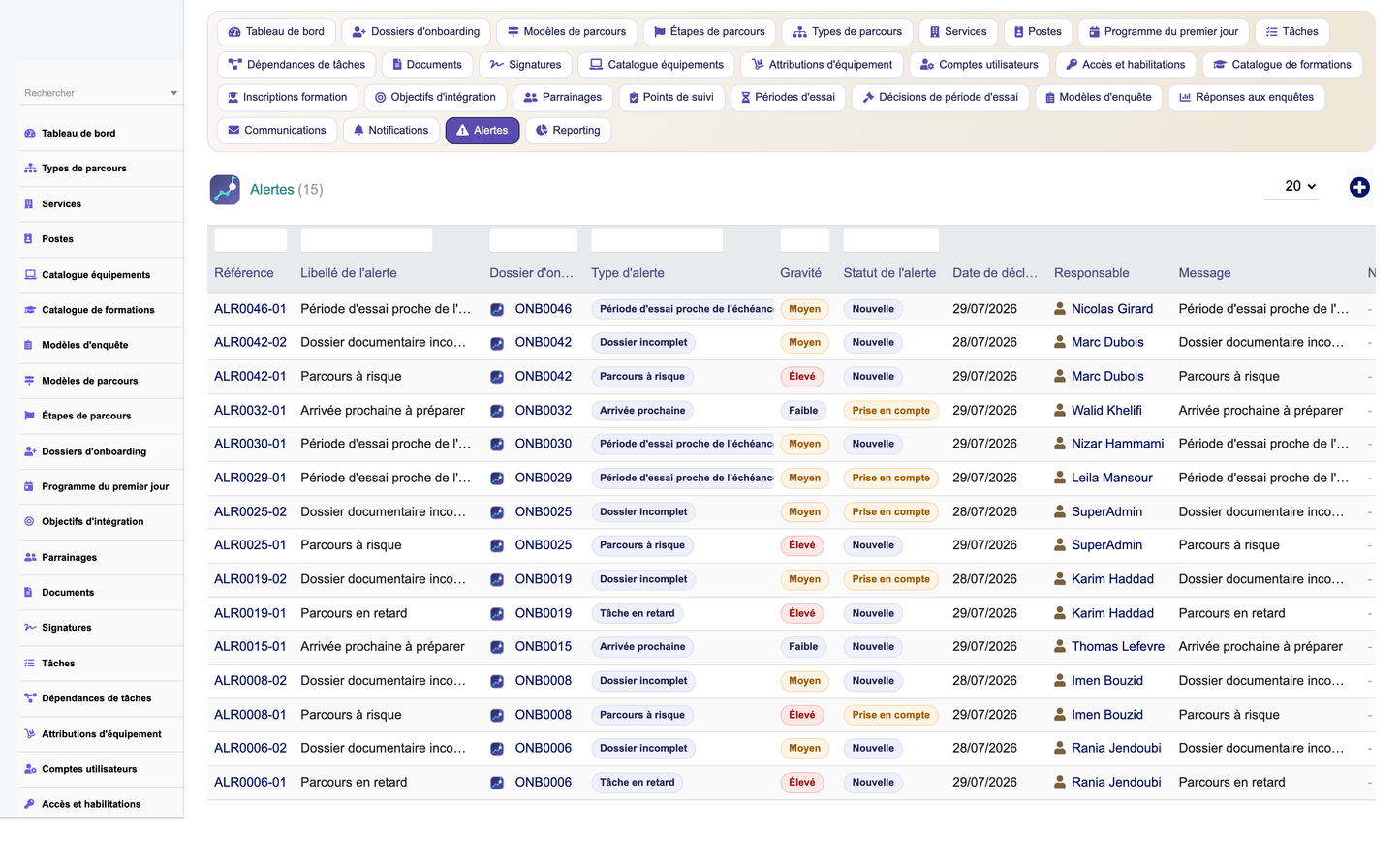
HR Onboarding Management (technical name: gestiononboardingrh) turns Dolibarr ERP/CRM into a complete employee onboarding and integration solution - with no need for a separate HR onboarding system. It covers the entire new-hire journey: pre-onboarding and employee portal, structured integration journeys and templates, task management across HR/Manager/IT/Admin, document collection and verification, electronic signatures, first-day planning, equipment allocation, user accounts and access rights, training, buddy and mentoring programs, integration objectives, structured follow-ups (7/15/30/60/90/180 days), probation-period management, satisfaction surveys and NPS, decision dashboards and people analytics.
· Deliver a consistent, engaging onboarding experience for every new hire.
· Reduce time-to-productivity through structured journeys and automated tasks.
· Ensure every administrative, IT and compliance step is completed on time.
· Centralise documents, signatures, equipment and access provisioning.
· Track integration progress, follow-ups and probation decisions in one place.
· Measure onboarding quality and satisfaction (NPS) to continuously improve.
· Dolibarr administrator - activation, settings, permissions, demo data.
· HR manager - journeys, templates, tasks, documents, probation, surveys, steering.
· Manager - team onboarding, first-day program, follow-ups, probation decisions.
· IT / Admin - equipment allocation, user accounts, access rights provisioning.
· New employee - portal, pre-onboarding forms, documents, training, surveys.
· Buddy / mentor - accompanying the new hire during integration.
· Executive management / auditor - consolidated KPIs and read-only consultation.
Before day one, the new hire accesses a dedicated portal to complete personal information, upload required documents, discover the company, the team and the first-day agenda, and confirm practical details.
· Welcome space with company presentation, team and first-day agenda.
· Pre-boarding forms for personal data and administrative information.
· Document upload and status tracking before arrival, reducing day-one friction.
Onboarding journeys (dossiers) group every step for a given new hire. Reusable journey templates and step templates industrialise integration by profile, department, position and contract type.
· Journey types and reusable templates by role, department and contract.
· Configurable steps with sequencing, owners, durations and deliverables.
· A creation wizard instantiates a full journey from a template in a few clicks.
· Tasks assigned to HR, Manager, IT or Admin with due dates, priority and status.
· Dependencies between tasks so blocking steps are completed in the right order.
· Automations that generate and schedule tasks from the journey template.
· Progress tracking with overdue detection and reminders.
The module centralises every onboarding document (ID, contract, certificates, banking details, forms) with collection status, verification workflow, reminders and secure storage in the Dolibarr GED/ECM.
· Required-document checklists per journey, profile and contract.
· Verification workflow (requested, received, checked, validated, rejected).
· Automatic reminders for missing or expiring documents.
Documents requiring a signature (contract, charters, policies) are tracked through an electronic signature workflow with signer, request date, status and signed-document storage.
· Signature requests linked to the relevant onboarding documents.
· Status tracking (pending, signed, refused) with audit trail.
· Signed documents archived in the GED for compliance.
A structured first-day program schedules the arrival: welcome, HR and IT appointments, workstation setup, team introductions, tour, lunch and key meetings.
· First-day activities with time slots, owners and locations.
· Coordinated agenda shared between HR, manager and the new hire.
· Checklist ensuring nothing is forgotten on arrival.
· Equipment catalogue (laptop, phone, badge, keys, uniform, tools).
· Allocation records per new hire with status, serial number and return tracking.
· Coordination with IT/logistics so equipment is ready for day one.
· Provisioning of user accounts and business-application access for the new hire.
· Access & authorisation records (systems, applications, physical access, badges).
· Status tracking (requested, granted, active, revoked) for security and offboarding.
· Training catalogue with objectives, format, duration and target audience.
· Onboarding training enrolments per new hire with status and completion tracking.
· Mandatory/compliance training coverage as part of the integration journey.
Each new hire can be paired with a buddy or mentor to accelerate cultural and operational integration.
· Buddy/mentor pairing records with roles, period and objectives.
· Follow-up of the accompaniment throughout the onboarding.
· Support for knowledge transfer and social integration.
Integration objectives define what the new hire should achieve during the onboarding period, per milestone.
· Objectives by period with target, owner and success indicator.
· Progress tracking against the integration timeline.
· Basis for probation-period assessment and decisions.
Structured follow-up points at 7, 15, 30, 60, 90 and 180 days verify that integration is on track, collect feedback and trigger corrective actions when needed.
· Scheduled follow-up points with owner, checklist and feedback capture.
· Status and satisfaction recorded at each milestone.
· Alerts when a follow-up is due, overdue or flags a risk.
· Probation periods with start/end dates, duration and renewal rules.
· Assessment linked to integration objectives and follow-up feedback.
· Probation decisions (confirm, renew, extend, end) recorded with justification and dates.
Satisfaction surveys measure the quality of the onboarding experience and compute an onboarding NPS.
· Survey templates dispatched at key milestones of the journey.
· Response collection with scoring and NPS computation.
· Analytics on satisfaction drivers to improve the onboarding process.
The dashboard - "Onboarding Journey Command Center" - centralises the onboarding activity around key indices (active journeys, on-track rate, task completion, document/signature status, satisfaction/NPS).
· KPIs: new arrivals, active journeys, completed vs. overdue tasks, documents to collect, signatures pending, equipment/accounts to provision, trainings to complete, follow-ups due, probation decisions upcoming, average satisfaction and NPS.
· Charts: arrivals over time, journeys by department/contract, task completion trend, satisfaction and NPS evolution, probation outcomes.
· Operational widgets: tasks overdue, missing documents, pending signatures, follow-ups and probation decisions due this week.
A reporting menu with multi-criteria filters produces standard onboarding reports, exportable to HTML/CSV and printable, with room for scheduled reports.
· Reports: arrivals, by department, by contract type, tasks, equipment, trainings, probation periods and satisfaction.
· People analytics on time-to-productivity, completion rates and satisfaction drivers.
· Users & contacts (new hire to Dolibarr user), third parties (agencies, training bodies).
· Agenda (first-day agenda, follow-ups, probation deadlines) and Projects/tasks for onboarding steps.
· Products/Stock for equipment allocation and GED/ECM for documents and signed files.
· Granular server-side permissions per functional domain (read/write/delete/admin).
· CSRF protection, input validation, prepared queries / secure Dolibarr methods, XSS protection.
· Audit logging, entity isolation and GDPR-aware handling of personal onboarding data.
A secured REST API exposes the onboarding domain under base URL /api/index.php/gestiononboardingrh/... , respecting permissions and returning JSON with pagination, filters and sorting. Authentication uses the Dolibarr API key (DOLAPIKEY) and every endpoint enforces server-side rights checks.
· GET onboardings, GET onboardings/{id}, POST onboardings.
· GET tasks, PUT tasks/{id}/complete.
· GET documents, GET equipment, GET trainings, GET probations, GET followups.
· GET notifications, GET dashboard/kpis.
A one-click seeder generates a realistic, coherent and fully demo-tagged dataset (journeys, templates, steps, departments, positions, equipment, trainings, survey templates, first-day activities, integration objectives, buddy pairings, tasks, dependencies, documents, signatures, equipment allocations, user accounts, access rights, training enrolments, follow-up points, probation periods and decisions, survey responses, communications, notifications and alerts). A secured purge removes only demo-tagged rows, preserving real data, in dependency order.
The module follows Dolibarr conventions strictly and never modifies core files.
· 27 business objects as CommonObject classes with dedicated tables (llx_gonb_*), entity-aware and demo-taggable.
· A generic list/card engine with column selector and multi-criteria filters.
· SQL install scripts with schema self-heal (gonbEnsureSchema) that reconciles missing tables/columns on load.
· Module descriptor, top & left menus, granular permissions, REST API and demo-data seeder.
· Translations in 5 languages (fr, en, es, it, de).
· Deploy module_gestiononboardingrh-1.0.zip via Home > Setup > Modules > Deploy external module.
· Or copy the gestiononboardingrh folder into htdocs/custom/ then enable it.
· On activation tables, menus and permissions are created and demo data is seeded automatically.
· Administrator, HR manager, Manager, IT/Admin, New employee, Buddy/mentor, Executive management, Auditor (read-only).


