
Discover powerful Dolibarr extensions designed to automate your business processes
HR Training Management transforms Dolibarr into a complete, professional-grade training and skills-development platform. It covers the full learning lifecycle — from...
Couldn't load pickup availability


HR Training Management transforms Dolibarr into a complete, professional-grade training and skills-development platform. It covers the full learning lifecycle — from the expression of a training need, through planning, budgeting, delivery and evaluation, all the way to certification, ROI measurement and people-analytics reporting — without requiring any external Learning Management System (LMS).
The module is built natively on Dolibarr's object framework and reuses the platform's third parties, users, projects, products, agenda, purchasing and accounting subsystems. This gives HR departments a single source of truth: training activity is connected to the same suppliers, employees, budgets and documents the rest of the organisation already uses.
· Centralise the training function — collect needs, arbitrate them, plan, deliver and evaluate from one workspace.
· Remove the external-LMS dependency — catalog, sessions, e-learning, quizzes, attendance and certificates are all built in.
· Master training budgets — plan, commit and consume by department and cost centre, with proactive alerts.
· Secure funding — track OPCO, CPF, subsidies, Pôle emploi and regional aid from request to receipt.
· Prove value — explainable ROI and a maturity-driven analytics hub demonstrate the impact of learning.
· Stay compliant — regulatory/mandatory training, Qualiopi providers, attendance evidence, GDPR and audit trails.
HR managers and training officers who orchestrate the annual plan; line managers who request development for their teams; internal and external trainers who deliver it; finance teams who fund it; and general management and auditors who need visibility and assurance.
Training needs are the entry point of the learning cycle. The module captures both individual and collective needs, records where each one originates, and routes it through a structured arbitration workflow before it becomes a funded action.
· Individual and collective needs — a single employee, a team, a department or the whole organisation.
· Origins — annual appraisal, professional interview, manager request, employee self-request, regulatory obligation, strategic/skills-gap analysis, mobility or reorganisation.
· Attributes — target competency, priority, desired period, estimated cost and expected outcome.
Each need moves through explicit statuses so nothing is lost and every decision is traceable:
|
Status |
Meaning |
|
Draft |
Being described; not yet submitted. |
|
Submitted |
Sent for review to the manager / HR. |
|
Under arbitration |
Being prioritised against budget and strategy. |
|
Accepted |
Approved and eligible for planning. |
|
Deferred |
Valid but postponed to a later period. |
|
Rejected |
Not retained; reason recorded. |
|
Planned |
Converted into a catalog action or session. |
A training request is the formal ask that turns an accepted need — or a spontaneous demand — into an actionable decision. Requests follow a multi-level validation chain so that operational, HR and budgetary approvals are all captured.
· Manager approval — the line manager confirms business relevance and timing.
· HR review — HR checks eligibility, catalog fit, provider and modality.
· Budget validation — the request is checked against the department/cost-centre envelope and committed.
At every step the requester is notified, comments are recorded, and the request can be returned for revision. Once fully validated, the request feeds session planning and, where relevant, a purchase order to the training provider.
Competency development plans consolidate accepted needs and validated requests into a coherent, budgeted programme. Both annual and multi-year plans are supported, allowing HR to align skills development with the organisation's strategic roadmap.
· Planned — the amount forecast for each action or axis of the plan.
· Committed — amounts engaged through validated requests and purchase orders.
· Consumed — amounts actually spent once sessions are delivered and invoiced.
Before locking a plan, HR can run simulations: adjust the volume of actions, shift periods, or reallocate envelopes and immediately see the effect on planned, committed and residual budget. This turns the annual plan into a decision tool rather than a static list.
The catalog is the reference library of everything the organisation can offer. Each catalog action is richly typed so that reporting, compliance and funding rules can be applied automatically.
· Internal training (designed and delivered in-house).
· External training (delivered by an outside provider).
· E-learning (self-paced online modules).
· Certifying training (leads to a recognised certificate).
· Regulatory training (required by law or industry rules).
· Classroom (face-to-face)
· Remote (distance learning)
· Virtual class (live online)
· E-learning (asynchronous)
· Blended (mixed face-to-face and online)
· Tutoring
· Coaching
· Seminar
· Workshop
· Levels — initiation, intermediate, advanced and expert to match audience maturity.
· Mandatory / regulatory flags — mark actions that are compulsory or legally required, feeding compliance dashboards.
· Validity — define how long a completed action or its certificate remains valid, driving renewal alerts.
Beyond single actions, the module structures learning into reusable building blocks so that complex curricula can be assembled and re-used.
· Pedagogical modules — the smallest teaching unit, with objectives, duration and content.
· Programs — ordered collections of modules that form a complete course.
· Learning paths — multi-step journeys (e.g. onboarding, management track, expert path) that sequence programs and actions toward a target profile.
Paths make it easy to standardise onboarding, role-based upskilling and certification tracks, and to measure progression across the whole journey rather than action by action.
A session is a concrete, scheduled instance of a catalog action. Session management brings together the calendar, the people and the resources needed to deliver training.
· Calendar — start/end dates, times and multi-day scheduling, synchronised with the Dolibarr agenda.
· Assignments — trainer(s), room, and delivering organisation.
· Capacity — minimum and maximum seats, with automatic waitlist beyond capacity.
· Waitlist — candidates queue when a session is full and are promoted automatically when a seat frees up.
|
Status |
Meaning |
|
Draft |
Being prepared; not yet open. |
|
Planned |
Scheduled and visible. |
|
Open |
Enrollment is open. |
|
Confirmed |
Minimum seats reached; delivery secured. |
|
In progress |
Currently being delivered. |
|
Completed |
Delivered; ready for evaluation and attestation. |
|
Cancelled |
Called off; enrollees notified. |
Enrollment connects employees to sessions. It supports both individual sign-up and bulk operations for team- or department-wide training campaigns.
· Individual enrollment — one employee onto one session, with eligibility checks.
· Bulk enrollment — enroll a whole team or list in a single operation.
· Validations — manager/HR approval before a seat is confirmed.
· Waitlist promotion — the first waitlisted candidate is promoted automatically when capacity opens.
Each enrollment carries its own status (requested, validated, confirmed, waitlisted, attended, cancelled, no-show) so attendance, evaluation and billing can be tracked per person.
Trainers are managed as first-class records whether they are internal staff, external consultants or freelancers.
· Types — internal, external and freelance trainers.
· Specialties — domains and competencies each trainer can deliver, used to match trainers to sessions.
· Rates — daily/hourly rates for cost estimation and purchasing.
· Ratings — aggregated evaluation scores build a quality history per trainer.
External training organisations are recorded with the attributes needed for compliance and procurement.
· Qualiopi — certification status for eligibility to publicly funded training.
· NDA number — the déclaration d'activité registration number of the provider.
· Linked third party — each organisme is tied to a Dolibarr third party for orders, invoices and accounting.
· Ratings — quality scores aggregated from session and trainer evaluations.
Physical and material resources are managed so that sessions can be scheduled without conflicts.
· Rooms — capacity, location and features for classroom sessions.
· Equipment — projectors, computers and other bookable devices.
· Materials — consumables and pedagogical supplies attached to a session.
· Availability — resource calendars prevent double-booking, integrated with the Resources module.
The module includes a built-in assessment engine so learning can be measured before, during and after delivery — no external tool required.
· Single choice (one correct answer)
· Multiple choice (several correct answers)
· True / false
· Open / free-text
· Matching and ordering
· Hot evaluation — satisfaction captured immediately at the end of the session.
· Cold evaluation — impact re-measured at 30, 60 and 90 days after the training.
· Knowledge pre-test — baseline assessment before the session.
· Knowledge post-test — measures acquisition after the session; compared against the pre-test.
Success and pass thresholds are configurable per quiz or module. A learner who meets the threshold is marked successful, which can trigger attestation generation and certification.
Certifications and qualifications are tracked over their entire life so the organisation always knows who holds what, and what is about to lapse.
· References — the catalog of recognised certifications and qualifications.
· Holders — which employees hold each certification.
· Obtain & expiry dates — when a certification was earned and when it lapses.
· Statuses — valid, expiring soon, expired, renewed.
Proactive alerts are raised on a graduated schedule so renewals are never missed. Notifications fire at 180, 90, 60, 30, 15 and 7 days before expiry.
Attendance is recorded with legally usable evidence, supporting several signature methods to fit classroom, remote and blended delivery.
· Manual sign-off
· Electronic signature
· QR-code check-in
· Personal-code validation
· Trainer validation
· Badge / access-card capture
Attendance data feeds attestations, funding evidence (e.g. OPCO), billing of per-attendee training, and no-show reporting.
Budgets are managed per department and cost centre, mirroring the organisation's financial structure, and are kept live throughout the year.
· Initial budget — the envelope allocated at the start of the period.
· Adjustments — in-year revisions (transfers, top-ups, cuts).
· Committed — amounts engaged by validated requests and purchase orders.
· Consumed — amounts actually spent once training is delivered and invoiced.
Configurable alerts warn when commitment or consumption approaches or exceeds the envelope, preventing overspend before it happens.
Training is rarely fully self-funded. The module tracks every funding source across its lifecycle so that net cost is always known.
· OPCO (skills operators)
· CPF (personal training account)
· Public subsidies
· Pôle emploi
· Regional aid
· Requested — amount applied for from the funder.
· Granted — amount approved by the funder.
· Received — amount actually paid, reconciled against the training cost.
Training procurement and billing reuse Dolibarr's native commercial documents, so there is no parallel finance system to maintain.
· Purchasing — generate supplier orders and record supplier invoices to external providers directly from a session or request.
· Customer invoicing — bill training delivered to clients or inter-company entities using standard customer invoices.
· Quotes — capture provider proposals as quotes before committing budget.
· Accounting — all documents flow into the Dolibarr accounting subsystem for a consolidated view.
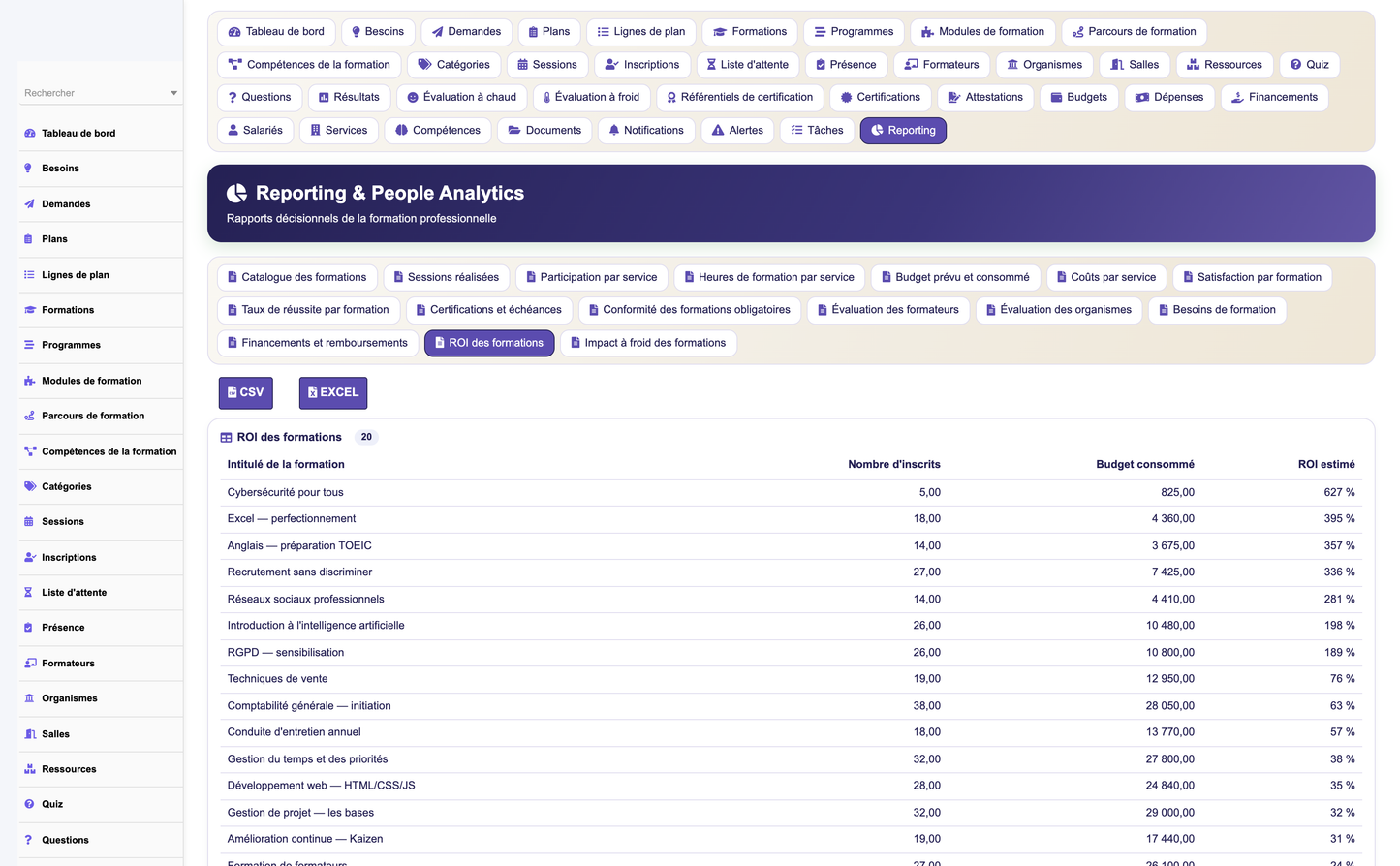
The module quantifies the return on training with an explainable, auditable formula rather than a black box. Every input hypothesis is shown alongside the result.
ROI (%) = ( ( Estimated benefits − Costs ) / Costs ) × 100
Costs aggregate provider fees, trainer time, resources and internal participant time. Estimated benefits are derived from declared hypotheses — for example productivity gains, error/defect reduction, reduced turnover or avoided external hiring. Because the hypotheses are displayed, stakeholders can challenge and adjust them, making the ROI a shared, defensible figure.
The flagship dashboard, the Learning Growth Hub, gives HR and management an at-a-glance read on the health and maturity of the training function.
· Maturity index — a single headline score summarising the organisation's training maturity.
· Five axes — Needs, Planning, Participation, Acquisition and Impact, each scored and trended.
· ~30 KPIs — coverage, completion, satisfaction, pass rates, budget consumption, funding ratio, certification validity and more.
· Operational widgets — upcoming sessions, pending validations, expiring certifications, budget alerts and waitlists.
· ~9 analytics charts — distributions and trends across modalities, departments, costs, evaluations and ROI.
A dedicated reporting workspace provides 14 ready-made reports covering the full training function — needs coverage, plan execution, session attendance, evaluation results, budget and funding, certification status and ROI, among others.
· 14 reports — operational and analytical, filterable by period, department, provider and modality.
· Exports — every report can be exported to CSV and Excel for offline analysis and sharing.
The module is designed to amplify Dolibarr rather than sit beside it. It integrates natively with the following core subsystems:
|
Dolibarr module |
How Training Management uses it |
|
Users |
Employees, trainers, roles and permissions. |
|
Third parties |
Providers, client entities and linked organismes. |
|
Products |
Catalog actions and services as billable items. |
|
Quotes |
Provider proposals before commitment. |
|
Supplier orders & invoices |
Procurement of external training. |
|
Customer invoices |
Billing delivered training. |
|
Projects |
Grouping training initiatives and budgets. |
|
Agenda |
Session calendar and reminders. |
|
Resources |
Rooms and equipment availability. |
|
ECM / GED |
Storing attestations, materials and evidence. |
|
Leave |
Cross-checking availability for sessions. |
|
Expense reports |
Travel and expenses tied to training. |
|
Contracts |
Framework agreements with providers. |
|
Accounting |
Consolidated financial view. |
Security is enforced at every layer, following Dolibarr's hardening conventions.
· CSRF protection — tokens on all state-changing actions.
· XSS prevention — output escaping across the interface.
· Input validation — server-side validation of every submitted value.
· SQL safety — parameterised, escaped queries throughout.
· Entity isolation — multi-company data separation.
· GDPR — personal training data handled per data-protection rules.
· Audit — traceability of sensitive actions and decisions.
A REST API exposes the module to external systems and integrations. It is implemented by the API class Gestionformationrh, authenticated by API key, guarded by the module's permission rights, and paginated on list endpoints.
|
Method |
Route |
Purpose |
|
GET |
/courses |
List catalog actions (paginated). |
|
GET |
/courses/{id} |
Retrieve a single catalog action. |
|
GET |
/sessions |
List training sessions. |
|
GET |
/enrollments |
List enrollments. |
|
GET |
/needs |
List training needs. |
|
POST |
/needs |
Create a training need. |
|
GET |
/certifications |
List certifications and holders. |
|
GET |
/dashboard/kpis |
Retrieve dashboard KPIs. |
All endpoints require a valid API key and are checked against the caller's rights; unauthorised calls are rejected. List responses support pagination parameters.
The module emits trigger events that can drive Dolibarr workflows, notifications and external webhooks. Events cover the whole lifecycle:
· Need created / validated
· Request created / validated
· Enrollment confirmed
· Session created / modified / cancelled
· Attendance recorded
· Training completed
· Evaluation submitted
· Attestation generated
· Certification obtained / expiring
· Budget exceeded
A one-click demo dataset populates a realistic training environment across all 36 business tables — needs, plans, catalog actions, sessions, enrollments, trainers, providers, evaluations, certifications, budgets and funding — so evaluators can explore every feature immediately.
The demo generator is safe: its purge routine removes only the demo records it created and preserves any real data already present in the database.
The module follows Dolibarr's standard module architecture end to end and never modifies core files.
· Descriptor — a standard module descriptor declaring numéro, rights, menus and triggers.
· Business classes — one PHP class per business object with CRUD and business logic.
· Generic list/card engine — consistent list and detail pages across all objects.
· Hooks — integration points into core pages and other modules.
· Permissions — 32 rights across 11 groups.
· Menus — top and left menu entries for every workspace.
· SQL scripts — table creation and keys for the llx_gfrh_ schema.
· REST API — the Gestionformationrh API class.
· Language files — five languages (FR, EN, ES, IT, DE); French is the reference language.
|
Property |
Value |
|
Technical name |
gestionformationrh |
|
Module numéro |
1032000 |
|
Table prefix |
llx_gfrh_ |
|
Business tables |
36 |
|
Permission rights |
32 rights across 11 groups |
|
Languages |
FR (reference), EN, ES, IT, DE |
|
Compatibility |
Dolibarr 16+ · PHP 7.1+ |
|
Dependencies |
modSociete, modUser |
Installation follows the standard Dolibarr module procedure:
1. Upload the module ZIP through Home ▸ Setup ▸ Modules ▸ Deploy/install an external module.
2. Enable the HR Training Management module from the module list.
3. On activation, the llx_gfrh_ tables are created automatically.
4. Optionally seed the demo dataset in one click to explore the module.
5. Assign permission rights to the relevant user groups.
Prerequisites: Dolibarr 16 or later, PHP 7.1 or later, and the modSociete (Third parties) and modUser (Users) modules enabled.
The module's 32 rights, grouped into 11 permission groups, map onto the following typical roles. Rights are assigned through Dolibarr's standard permission screen.
|
Role |
Typical responsibilities |
|
Module administrator |
Configures the module, manages settings, rights and reference data. |
|
Training manager |
Owns the catalog, sessions, planning and evaluations. |
|
HR manager |
Arbitrates needs, validates requests, oversees budget and funding. |
|
Manager |
Requests and approves training for their team; validates enrollments. |
|
Employee |
Expresses needs, self-enrolls, attends and completes evaluations. |
|
Internal trainer |
Delivers sessions, records attendance, validates learners. |
|
External organisation / trainer |
Delivers external training; provides evaluations and evidence. |
|
General management |
Consults dashboards, ROI and strategic analytics. |
|
Auditor |
Read-only access to records, evidence and audit trails. |
The module manages 36 business tables under the llx_gfrh_ prefix. The table below summarises the principal objects grouped by functional domain.
|
Domain |
Principal business objects |
|
Needs & planning |
Training need, arbitration, development plan, plan line. |
|
Requests |
Training request, request validation. |
|
Catalog |
Catalog action, program, pedagogical module, learning path, path step. |
|
Sessions |
Session, session resource, waitlist entry. |
|
Enrollment |
Enrollment, enrollment status history. |
|
People & providers |
Trainer, trainer specialty, provider (organisme). |
|
Resources |
Room, equipment, material, availability. |
|
Assessment |
Quiz, question, answer, evaluation (hot/cold), pre/post-test. |
|
Certification |
Certification reference, certification holder. |
|
Attendance |
Attendance record, signature. |
|
Budget & funding |
Budget line, budget adjustment, funding source, funding record. |
|
ROI & reporting |
ROI record, report definition. |
(36 tables in total; the list above groups them by domain for readability.)
A full visual walkthrough of the module is provided as a set of approximately 60 screenshots in the Captures_Ecran folder that ships alongside this document. They cover the dashboard, needs and requests, the catalog, session and enrollment management, evaluations, certifications, budgets, funding, the ROI analysis and the reporting workspace.
© 2026 DoliResources — www.doliresources.com


