
Discover powerful Dolibarr extensions designed to automate your business processes
IT Hardware Company transforms Dolibarr ERP/CRM into a specialised, end-to-end management solution for companies that sell and distribute computer hardware. It covers the...
Couldn't load pickup availability


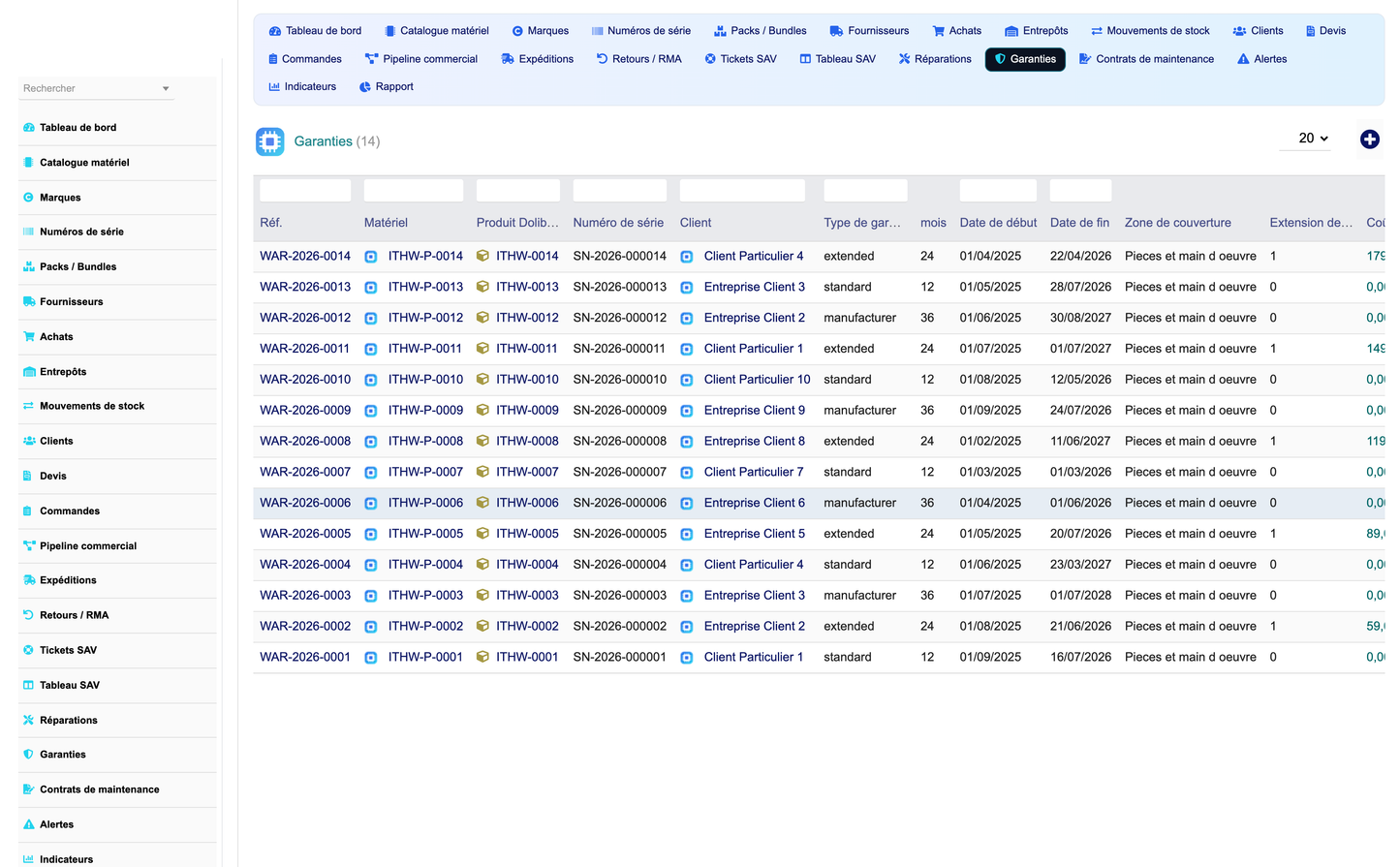
IT Hardware Company transforms Dolibarr ERP/CRM into a specialised, end-to-end management solution for companies that sell and distribute computer hardware. It covers the entire business chain — purchasing, warehousing, sales, logistics, after-sales support (SAV), warranties and commercial management — while remaining 100% integrated with native Dolibarr modules and never duplicating existing Dolibarr functionality.
The module is designed around eighteen dedicated business objects, a premium executive dashboard, an advanced BI reporting engine, a real-time alert engine, and a rich demonstration dataset — all available in five languages (English, French, Italian, German, Spanish).
· Domain-specific: purpose-built for IT hardware distributors (PCs, laptops, servers, components, peripherals, networking, storage, accessories).
· Full business chain: procurement, multi-warehouse stock, B2B/B2C sales, logistics, and after-sales in a single coherent module.
· Native integration: enriches Dolibarr products, third parties, warehouses, orders, invoices, projects, tickets and contracts instead of replacing them.
· Premium UX: a modern tech/IT-enterprise dashboard with dynamic KPI cards, interactive flow map, charts, Kanban boards and advanced list filters.
· Decision-ready: margin analysis, customer profitability, stock rotation, supplier performance and after-sales analytics out of the box.
The module is built as a business layer on top of Dolibarr. Every hardware object can be linked to the corresponding native record so that accounting, invoicing and stock remain the single source of truth:
|
Native Dolibarr area |
How IT Hardware Company uses it |
|
Third parties (Companies) |
Suppliers, brands/manufacturers and B2B/B2C customers link to native societe records. |
|
Products / Services |
Each IT catalog item extends a native product with technical specifications. |
|
Stock / Warehouses |
Advanced multi-warehouse stock, movements and valuation on top of native entrepôts. |
|
Customer & supplier orders |
Sales orders and purchases reference native commande / commande fournisseur. |
|
Proposals / Invoices |
Quotes link to native proposals; billing flows through native invoicing. |
|
Projects & Contracts |
Maintenance contracts and SLAs link to native contrats and projects. |
|
Tickets (Helpdesk) |
SAV tickets can bind to the native ticket system. |
|
Bank / Accounting |
All monetary flows are posted through native financial modules — no ledger duplication. |
A brand-new premium dashboard (not the standard Dolibarr one) in a tech/IT-enterprise style (electric blue, carbon black, metal grey, digital green, cyan accents).
· Interactive supply-to-support flow map: Suppliers → Warehouses → Products → Customers → SAV.
· Dynamic KPI cards grouped in zones: Commercial, Stock & Catalog, Support (SAV), Purchasing.
· Headline KPIs: total revenue, net margin, ongoing orders, pending quotes, average basket, catalog size, available stock units, stock value, stockouts, warehouses, open tickets, ongoing repairs, customer satisfaction, expiring warranties, active contracts, active suppliers, purchase cost YTD, average lead time.
· Alert tiles for stockouts, expiring warranties, open returns and open alerts.
· Charts: revenue evolution, stock rotation (in vs out), stock value by category, supplier performance.
A specialised catalog for computer hardware, each item extending a native Dolibarr product.
· Categories: PC, laptop, server, component, peripheral, networking, storage, accessory.
· Technical specifications: CPU, RAM, storage, GPU, screen size, EAN.
· Condition management: new, refurbished or used.
· Warranty duration (months), serial/IMEI tracking flag.
· Purchase price, sale price and automatically tracked margin percentage.
· Links to brand and preferred supplier.
Manage the hardware brands you distribute (HP, Dell, Lenovo, Asus, Apple, MSI, …).
· Brand code, country, website, product lines.
· Manufacturer support URL and support phone for SAV escalation.
· Warranty policy per brand.
· Optional link to a native manufacturer third party.
Unit-level traceability for every serialised device.
· Serial number, IMEI and MAC address tracking.
· Links each unit to its IT product, warehouse and customer.
· Condition and purchase date per unit.
· Per-unit warranty end date feeding the warranty-expiry alerts.
Sell pre-configured bundles (e.g. PC + accessories, gaming packs, office packs).
· Bundle type, component list and item count.
· Bundle buy price, sell price, discount and computed margin.
· Optional link to a main native product.
· Active/inactive flag for catalog control.
A supplier file and purchasing workflow tailored to hardware distribution.
· Supplier categories: distributor, manufacturer, wholesaler, importer.
· Lead time, minimum order amount, payment terms, incoterm, volume discount and rating.
· Purchases with status workflow (draft, ordered, partial, received, cancelled).
· Expected date, amount, currency, receiving flag and linked native supplier order.
· Full supplier history and performance ranking.
Advanced stock management across multiple sites, on top of native warehouses.
· Warehouse types: main, regional, repair, returns — with capacity and surface.
· Stock movements: in, out, transfer, adjustment, each with quantity, date and resulting level.
· Minimum/maximum thresholds, stockout and low-stock detection.
· Real-time stock valuation from movements and purchase prices.
· Products in transit and per-warehouse views.
A commercial customer file distinct from, but linked to, native third parties.
· Customer type (B2B / B2C) and market segment.
· Per-customer discount, credit limit and loyalty points.
· Assigned sales representative.
· Feeds customer profitability and top-customer reporting.
Personalised commercial quotes with margin visibility.
· Quote status workflow (draft, sent, accepted, refused, expired).
· Amounts HT/TTC, discount and computed margin.
· Validity date and link to native proposal.
· Assigned sales representative and customer.
Complex customer orders with a visual sales pipeline.
· Order status workflow: draft, quote, confirmed, preparing, shipped, delivered, cancelled.
· Payment status: unpaid, partial, paid.
· Amounts HT/TTC and per-order margin.
· Kanban sales pipeline grouping orders by stage with counts and totals.
· Links to native customer order and delivery warehouse.
Logistics and delivery follow-up.
· Order preparation and shipment status (preparing, shipped, in transit, delivered, returned).
· Carrier, tracking number, weight and number of packages.
· Ship and delivery dates for on-time analysis.
· Links each shipment to its sales order and customer.
Manage material returns and exchanges.
· Return type: refund, exchange, repair, warranty.
· Return status: requested, approved, received, refunded, rejected.
· Reason, quantity and amount per return.
· Links to the original order and product/serial.
A complete help desk and repair workshop for hardware support.
· Support tickets with type (repair, question, warranty, complaint, installation) and priority.
· Ticket status workflow (open, in progress, waiting, resolved, closed) on a Kanban SAV board.
· Customer satisfaction capture on closed tickets.
· Repairs / RMA with fault description, diagnosis, repair type (repair, replace, refund), cost and under-warranty flag.
· Full after-sales history per product, per serial number and per customer.
Manage standard, extended and manufacturer warranties.
· Warranty type and duration, start and end dates.
· Coverage description and extension flag.
· Warranty status (active, expiring, expired, claimed).
· End-of-warranty alerts (60-day horizon) driven automatically.
· Links to product, serial number and customer.
Recurring maintenance and service-level agreements.
· Contract type: maintenance, SLA, support, on-site.
· SLA level, billing period and auto-renewal flag.
· Start/end dates and contract amount.
· Contract status (active, suspended, expired, cancelled) and link to native contract.
A real-time and scheduled alert system for operations.
· Alert types: stockout, low stock, warranty end, delivery delay, return.
· Severity levels: low, medium, high, critical.
· A daily cron job scans stock levels and warranties to raise fresh alerts (idempotent, no duplicates).
· An alert cockpit groups alerts by type and severity with one-click resolution.
A complete reporting workspace with a category tab bar. Each report combines KPI cards, charts and detailed data tables, with export to CSV (and print/PDF).
|
Report |
Content |
|
Sales report |
Revenue, margins, orders by month, by status and by sales representative; average basket. |
|
Stock report |
Stock in/out, stock value, movements by warehouse and by product category. |
|
Margin report |
Product margin %, order margins, global margin rate, best/worst products. |
|
SAV report |
Tickets by status/type/priority, satisfaction, repairs, warranties expiring soon. |
|
Supplier report |
Purchases, average lead time and rating, per-supplier breakdown. |
|
Customer report |
Customers by type and segment, revenue by customer, top customers. |
Exports: CSV (UTF-8), plus print and PDF-ready views.
A dedicated admin page centralises module settings.
· Default warranty duration (months).
· Low-stock threshold for alerts.
· Default currency.
· Automatic SAV alerting on/off.
· Default carrier.
· Product categories, brands, warranty types and client types.
Two one-click buttons let administrators install and remove a rich, realistic demo dataset (brands, suppliers, IT products, customers, purchases, quotes, orders, stock movements, shipments, returns, SAV tickets, repairs, warranties, contracts and alerts). Removal deletes only the module's own demo records.
The interface ships fully translated in English, French, Italian, German and Spanish.
· Prepared/escaped SQL: all queries are parameter-escaped to prevent SQL injection.
· CSRF/XSS protection: actions use Dolibarr security tokens and output escaping.
· Granular permissions: eight rights groups (catalog, supplier, stock, sales, logistics, SAV, alert, reporting) with read/write/delete.
· Multi-company: every table is entity-scoped for multi-company installations.
· Audit: user actions and object changes are logged through Dolibarr triggers.
The module adds eighteen business objects (database prefix llx_it_hardware_company_):
|
# |
Object |
Purpose |
|
1 |
Brand |
Hardware brands / manufacturers |
|
2 |
Supplier |
Hardware suppliers and purchasing partners |
|
3 |
IT Product |
Catalog item with technical specifications |
|
4 |
Serial |
Serial number / IMEI unit tracking |
|
5 |
Warehouse |
Multi-site warehouses |
|
6 |
Stock movement |
In / out / transfer / adjustment movements |
|
7 |
Customer |
B2B / B2C commercial customers |
|
8 |
Quote |
Commercial quotes |
|
9 |
Sales order |
Customer orders with pipeline |
|
10 |
Bundle |
Product bundles / packs |
|
11 |
Purchase |
Supplier purchases |
|
12 |
Shipment |
Deliveries and parcel tracking |
|
13 |
Support ticket |
After-sales (SAV) tickets |
|
14 |
Repair |
Repairs / RMA workshop |
|
15 |
Warranty |
Standard / extended warranties |
|
16 |
Contract |
Maintenance & SLA contracts |
|
17 |
Return |
Material returns / RMA |
|
18 |
Alert |
Stock and warranty alerts |
|
Item |
Value |
|
Module name |
IT Hardware Company |
|
Technical name |
ithardware |
|
Version |
1.0 |
|
Publisher |
DoliResources — https://www.doliresources.com |
|
Dolibarr compatibility |
16.0 and above (validated on 17.x) |
|
PHP requirement |
7.1 or higher (PHP 8 compatible) |
|
Dependencies |
Products, Third parties, Stock (native Dolibarr modules) |
|
Database prefix |
llx_it_hardware_company_ |
|
Languages |
English, French, Italian, German, Spanish |
|
Business objects |
18 |
|
Rights groups |
8 (read / write / delete) |
|
License |
GPL v3+ |
|
Copyright |
© 2026 DoliResources — All rights reserved |
© 2026 DoliResources — All rights reserved. https://www.doliresources.com


