
Discover powerful Dolibarr extensions designed to automate your business processes
Gestion Maroquinerie turns Dolibarr into a genuine trade...
Couldn't load pickup availability


Gestion Maroquinerie turns Dolibarr into a genuine trade solution for the leather goods industry. It covers the complete value chain of a leather goods workshop or fashion house - from purchasing hides and findings, through design, bill of materials, workshop manufacturing and quality control, to finished goods stock, retail sales, after-sales repairs and bespoke customisation - without requiring any additional software.
The module does not replace Dolibarr: it extends it. It relies on the native third party, product, quote, sales order, invoice, stock, project and agenda modules, and enriches them with sixteen business objects, a trade-specific dashboard and a decisional reporting suite designed for leather goods manufacturers.
· Artisan leather workshops producing bags, wallets, belts and small leather goods.
· Leather goods houses managing collections, seasons and a retail network.
· Manufacturers working to order for luxury or fashion brands.
· Retailers offering repair, restoration and personalisation services.
· A single system for materials, production, stock, sales and after-sales.
· Leather stock managed in square decimetres (dm2), the reference unit of the trade.
· Real cost price per model, computed from the bill of materials and the operation routing.
· Live workshop visibility: every production order is tracked through cutting, stitching, assembly, finishing and control.
· Measured quality: conformity and scrap rates computed from actual inspections.
· Available in five languages and delivered with a realistic demonstration dataset.
The module ships sixteen dedicated business objects. Each one provides a filterable list with a column selector, a detail card, creation and editing forms, a status workflow and a linked-records panel that connects it to every related object.
|
Object |
Table |
Main content |
|
Leathers & Hides |
maroq_hide |
Hide reference, leather type, tanning, origin, tannery, colour, finish, thickness, surface and stock in dm2, price per dm2, quality grade |
|
Hardware & Findings |
maroq_hardware |
Clasps, buckles, zips, snap hooks, rivets, studs, eyelets, threads: type, material, finish, supplier, unit price, stock, alert threshold |
|
Tanneries & Suppliers |
maroq_supplier |
Supplier directory linked to the native Dolibarr third party: type, specialty, contact, lead time, rating, country |
|
Models & Collections |
maroq_model |
Article catalogue: reference, name, category, collection, product line, main leather, colour, dimensions, weight, sale and cost price, VAT, season, designer |
|
Bills of materials |
maroq_bom |
Component list per model: component type, linked hide or hardware, quantity, unit, consumed surface, unit cost |
|
Operation routings |
maroq_route |
Manufacturing sequence per model: step number, operation, workstation, operating and setup time, labour cost |
|
Production orders |
maroq_order |
Workshop orders: reference, model, status, planned/produced/scrapped quantities, workshop, priority, start/due/end dates, total cost, linked sale |
|
Production steps |
maroq_order_step |
Per-step execution: step number, operation, workstation, operator, time spent, conforming and non-conforming quantities, step status |
|
Workshops & Stations |
maroq_workshop |
Workstations: type (cutting, stitching, assembly, finishing, control), location, lead, capacity in hours, number of artisans, equipment |
|
Quality control |
maroq_quality |
Inspections: control type, checked/conforming/defective quantities, defect type, conformity rate, controller, date, decision |
|
Finished goods stock |
maroq_stock |
Multi-site stock: model, site, colour, available and reserved quantities, alert threshold, location, unit value, last movement |
|
Sales & Orders |
maroq_sale |
Customer sales: reference, customer, boutique, date, status, channel, totals, margin, payment status, linked quote/order/invoice, delivery date |
|
Sale lines |
maroq_sale_line |
Line detail: sale, model, colour, quantity, unit price, discount, line total, personalisation |
|
Boutiques & Stores |
maroq_boutique |
Retail network: type (flagship, corner, outlet, franchise, online), city, address, manager, floor area, sales count, revenue |
|
Repairs & After-sales |
maroq_repair |
Service records: customer, model, item description, repair type, diagnosis, status, received/promised dates, quote amount, technician, warranty flag |
|
Customisation |
maroq_custom |
Bespoke work: type (monogram, engraving, patina, colour, embroidery, unique piece), linked sale and model, initials, details, extra price, duration, status, artisan |
The materials area holds the noble raw materials of the trade. Leathers are described by type (box-calf, calf, vachette, lambskin, goatskin, buffalo, crocodile, python, nubuck, suede), tanning method (vegetable, chrome, mixed), origin, colour, finish, thickness and quality grade. Stock and pricing are expressed per square decimetre, so the value of the leather inventory is always current.
Hardware and findings cover clasps, buckles, zips, snap hooks, rivets, snap buttons, D-rings, feet, eyelets, sliders, key hooks and waxed threads, each with material, finish, supplier, unit price, stock and an alert threshold that feeds the dashboard alerts. Tanneries and suppliers are linked to the native Dolibarr third party record, with specialty, lead time and a rating used to arbitrate purchasing.
Models are the articles produced and sold: bags, wallets, belts, luggage, small leather goods and accessories, organised into collections, product lines and seasons. Each model carries its main leather, colour, dimensions, weight, sale price, cost price and VAT rate, and may be linked to a native Dolibarr product so that it can be quoted and invoiced through the standard sales cycle.
The bill of materials lists every component consumed by a model - outer leather, lining, hardware and thread - with quantity, unit, consumed surface and unit cost. The operation routing describes the manufacturing sequence (cutting, skiving, edge preparation, stitching, assembly, finishing, control) with operating time, setup time and labour cost per step. Together they give the true cost price of an article.
A production order drives the manufacture of a batch of one model. It records the planned, produced and scrapped quantities, the assigned workshop, a priority, the start, due and completion dates and the total cost. Its status follows the real workshop sequence: planned, cutting, stitching, assembly, finishing, control, completed or cancelled. An order may be attached to a customer sale for make-to-order production.
Production steps record what actually happened at each workstation: operation, operator, time spent and the conforming and non-conforming quantities. Workshops describe the stations of the manufacture with their type, lead, capacity in hours, number of artisans and equipment.
Quality control registers inspections carried out during or at the end of production: control type, quantities checked, conforming and defective, defect type (cutting, stitching, dyeing, hardware, gluing, scratch), the computed conformity rate, the controller and the decision taken - accepted, rework or rejected.
Finished goods stock is held per model, per site (workshop, boutique, warehouse) and per colour, with available and reserved quantities, an alert threshold, a storage location and a unit value. Lines below their threshold are surfaced as stock alerts on the dashboard and in the stock report.
Sales record customer orders with their boutique, sales channel, status (quote, confirmed, in production, ready, delivered, invoiced, cancelled), totals excluding and including tax, commercial margin, number of items, payment status and delivery date. Each sale can reference the corresponding Dolibarr quote, sales order and invoice, keeping the module and the native commercial cycle in step.
Sale lines detail each article sold with colour, quantity, unit price, discount, line total and any personalisation. Boutiques describe the distribution network - flagship stores, corners, outlets, franchises and online - with manager, floor area, sales count and revenue.
Repairs manage the after-sales activity that is central to leather goods: the customer item is received, diagnosed, quoted, repaired and returned. The record holds the item description, repair type (stitching, dyeing, hardware, lining, fastening, cleaning, restoration), diagnosis, assigned technician, warranty flag, received and promised dates, quote amount and status.
Customisation covers the bespoke work that creates most of the perceived value: monograms, engraving, patina, special colours, embroidery and unique pieces. Each request is linked to a sale and a model and carries the initials, the details, the extra price charged, the lead time in days, the assigned artisan and its status.
The dashboard is the entry point of the module and deliberately departs from the standard Dolibarr look. It uses a leather and brass colour scheme - deep brown, cognac, camel and gold - with a gradient hero banner, rounded KPI cards with coloured accents, a workshop kanban and integrated charts. It is organised in five zones: Production & Workshop, Production orders by stage, Analytics & charts, Sales & Customers, and Materials, Stock & Services.
|
Indicator |
Definition |
|
Production orders in progress |
Orders not yet completed or cancelled |
|
Orders started today |
Workload launched into the workshop today |
|
Pieces produced (month) |
Units completed since the first day of the current month |
|
Conformity rate |
Conforming quantity divided by inspected quantity, across all controls |
|
Scrap rate |
Scrapped quantity over total output |
|
Production cost (month) |
Cumulated cost of the orders launched this month |
|
Total revenue / revenue this month |
Sales excluding cancelled ones |
|
Commercial margin |
Sale price less cost price across all sales |
|
Average basket |
Mean value of a customer sale |
|
Number of sales / active models |
Commercial activity and live catalogue size |
|
Leather stock value |
Stock in dm2 valued at the price per dm2 |
|
Stock alerts |
Finished goods and hardware below their alert threshold |
|
Repairs in progress |
After-sales records not yet completed or returned |
|
Customisations in progress |
Bespoke requests not yet delivered |
· Production evolution over twelve rolling months (bar chart of pieces produced).
· Leather stock distribution by leather type (pie chart in dm2).
· Best-selling models by quantity sold (bar chart).
· Sales by article category (pie chart of revenue).
Production orders are displayed as a horizontal kanban following the real workshop sequence. Each column shows the stage name, the number of orders in that stage and the total planned quantity, with the completed and cancelled columns visually distinguished.
A dedicated Reporting menu provides six decisional reports covering the whole activity. Each report is displayed as a sortable table, can be exported to CSV and printed directly from the browser.
|
Report |
Content |
|
Production |
Twelve rolling months: number of production orders, pieces produced, monthly production cost |
|
Models |
Best-selling models with category, cumulated quantity sold and revenue generated |
|
Quality |
Per control type: number of inspections, quantities checked, average conformity rate |
|
Stock |
Per storage site: number of references, total available quantity, references in alert |
|
Sales |
Twelve rolling months: number of sales, revenue, average basket, commercial margin |
|
Materials purchasing |
Leather stock by type and tanning, quantity in dm2 and total immobilised value |
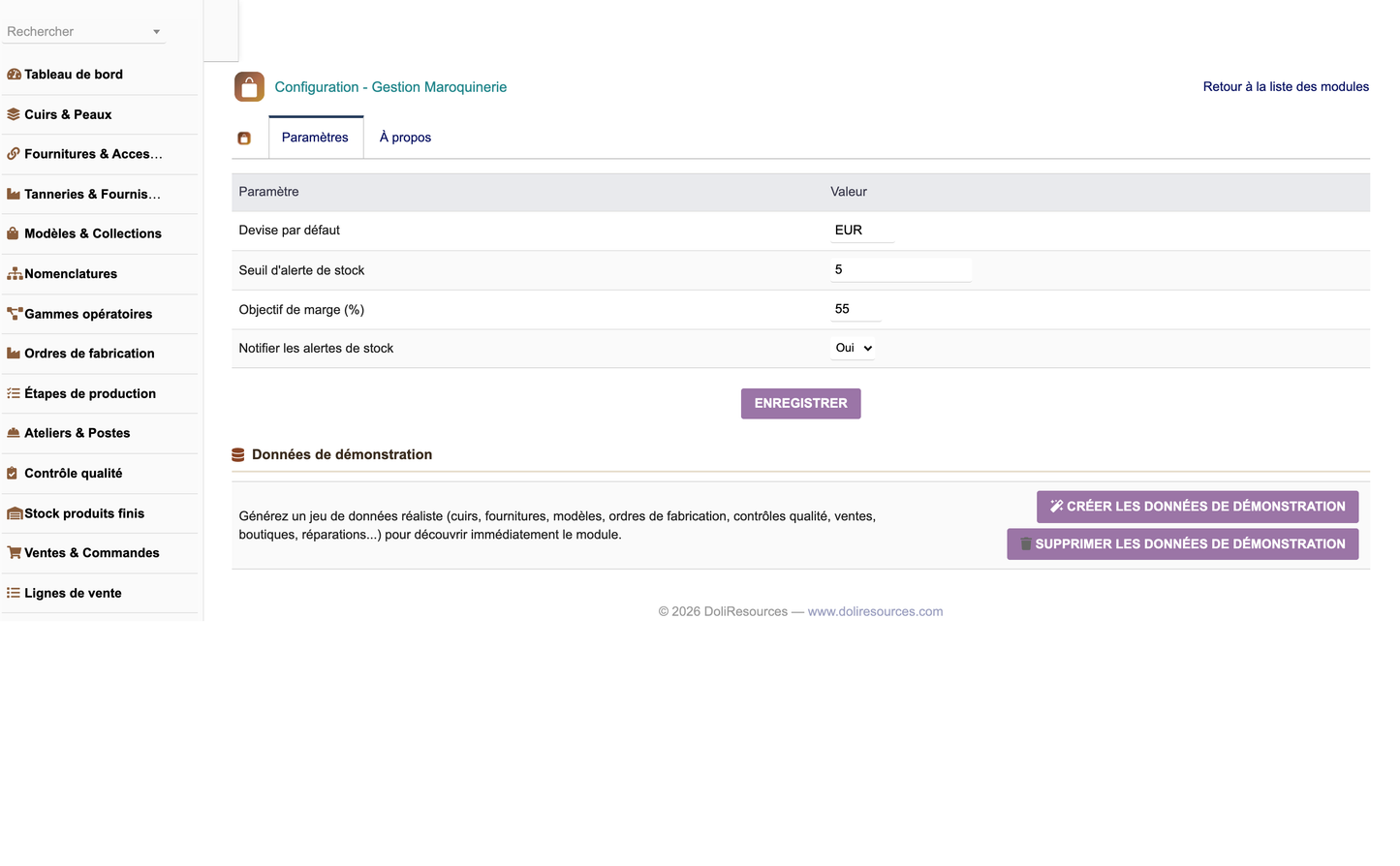
· Default currency used across the module.
· Stock alert threshold applied to finished goods and hardware.
· Target margin percentage used as a commercial reference.
· Notification of stock alerts (enabled or disabled).
The configuration page provides two dedicated buttons. "Install demo data" generates a complete and consistent dataset - leathers, hardware, suppliers, models, bills of materials, routings, workshops, production orders and steps, quality controls, finished goods stock, sales and sale lines, boutiques, repairs and customisations - together with the associated Dolibarr third parties. The data is realistic: conformity rates, scrap rates, production volumes and revenue are drawn within plausible business ranges, and recent records are dated so that every dashboard indicator is immediately meaningful.
"Remove demo data" purges the entire demonstration dataset, including the third parties it created, without ever touching the real data of the company. Every demonstration record is tagged with a dedicated import key, which guarantees a clean and complete removal. The dataset is also generated automatically on the first activation of the module, and is versioned so that an upgrade can refresh it.
The module is designed to extend Dolibarr rather than duplicate it. All commercial and third party data remains in the native tables, and the module references it.
|
Native module |
Integration |
|
Third parties (Societe) |
Customers of sales and repairs; tanneries and suppliers of leathers and hardware |
|
Products |
Each model may be linked to a native Dolibarr product for selling and invoicing |
|
Quotes (Propal) |
A sale can reference the originating Dolibarr quote |
|
Sales orders (Commande) |
A sale can reference the confirmed Dolibarr sales order |
|
Invoices (Facture) |
A sale can reference the Dolibarr invoice issued to the customer |
|
Users |
Workshop leads, operators, controllers, technicians, artisans and boutique managers |
|
Stock / Warehouses |
Finished goods stock complements native stock management per site |
|
Projects & Agenda |
Standard Dolibarr project and event association on module records |
Access is governed by seven functional groups plus an administration permission. Each group offers read, write and delete rights; read and write are granted by default on activation so the module is immediately usable, while delete and administration remain closed.
|
Permission group |
Scope |
|
material |
Leathers & hides, hardware, tanneries and suppliers |
|
catalog |
Models, collections, bills of materials and routings |
|
production |
Production orders, production steps, workshops and quality control |
|
stock |
Finished goods stock |
|
sales |
Sales, sale lines, boutiques and points of sale |
|
service |
Repairs / after-sales and customisation |
|
reporting |
Access to the decisional reporting suite (read only) |
|
admin |
Module administration and configuration |
The module ships fully translated in five languages: French, English, Spanish, Italian and German. All labels, menus, statuses, field names, dashboard indicators, reports and configuration texts are covered.
Every language key is generated from a single source table, and all menu and section keys are prefixed so they can never be overridden by another installed module - a real risk on a Dolibarr instance running many third-party modules, where all language files are merged into one table.
|
Item |
Value |
|
Technical name |
maroquineriemanagement |
|
Module number |
530600 |
|
Version |
1.0.0 |
|
Dolibarr version |
16.0 and above (validated on 17.0.3) |
|
PHP version |
7.1 and above (validated on PHP 8.1) |
|
Dependencies |
Third parties (modSociete) and Products (modProduct) |
|
Database tables |
16 tables prefixed llx_maroq_ |
|
Permissions |
20 permission records |
|
Menu entries |
1 top menu and 19 left menu entries |
|
Languages |
fr_FR, en_US, es_ES, it_IT, de_DE |
|
Licence |
GNU GPL v3 or later |
|
Publisher |
DoliResources - www.doliresources.com |
· In Dolibarr, open Home > Setup > Modules/Applications and select the "Deploy/install external app" tab.
· Upload the archive module_maroquineriemanagement-1.0.zip, or unzip it manually into the custom directory.
· Locate "Gestion Maroquinerie" in the module list and enable it.
· On activation the tables are created, the menus and permissions are installed and the demonstration dataset is generated.
· Open the module configuration page to adjust the settings, or to remove the demonstration data before entering real data.
(c) 2026 DoliResources - www.doliresources.com


