
Discover powerful Dolibarr extensions designed to automate your business processes
Legal Office Management (technical name: legalofficemanagement) is a complete Dolibarr module that turns Dolibarr into a specialised ERP/CRM for law...
Couldn't load pickup availability


Legal Office Management (technical name: legalofficemanagement) is a complete Dolibarr module that turns Dolibarr into a specialised ERP/CRM for law firms and legal-advisory practices. It covers the full lifecycle of legal work — from prospect and case intake through analysis, procedure, hearings, correspondence, deadline monitoring, billing and closing — within a single platform.
The module is a business layer built ON TOP of native Dolibarr. It extends the native objects (third parties, invoices, payments, bank, projects, contracts, agenda, DMS, users) and never duplicates the native commercial or financial engine, guaranteeing data consistency and future compatibility.
Editor: DoliResources — Copyright © 2026 DoliResources — www.doliresources.com — GNU GPL v3+.
· Standard Dolibarr modular architecture: a descriptor class (modLegalOfficeManagement) declares tables, menus, permissions, a cron job and triggers.
· 12 business objects backed by dedicated SQL tables (llx_legalofficemanagement_*), each extending the native CommonObject class with PDO / native database APIs.
· A shared, field-driven generic list & card engine (search, column selector, foreign-key links, linked-records panels) keeps the code compact and consistent.
· Business trigger (BILL_PAYED) keeps fees coherent with native invoice payments.
· Daily cron job supervises procedural deadlines and flags overdue items.
· Responsive UI with a dedicated CSS charter (navy / bordeaux / gold), Font Awesome 5 icons and Bootstrap-compatible markup. Multi-company aware.
Object model:
|
Object |
Purpose |
Key native link |
|
Client |
Law-firm client (extends third party) |
Societe |
|
Case (Dossier) |
Litigation / advisory case, Kanban |
Project, User, Court |
|
Court |
Court / jurisdiction directory |
— |
|
Hearing |
Court hearing / audience |
Case, Court, User |
|
Deadline |
Procedural / contractual deadline |
Case, Client, User |
|
Consultation |
Legal consultation |
Client, Case, User |
|
Time entry |
Time tracking (billable/non-billable) |
Case, Client, User |
|
Contract |
Contract with versioning |
Client, Case, Contrat |
|
Fee |
Fee (fixed/hourly/success/retainer) |
Client, Case, Facture |
|
Correspondence |
Inbound/outbound letters, emails |
Case, Client, User |
|
Document |
Legal document manager (GED) |
Case, Client, User |
|
Team |
Team assignment / workload |
Case, User |
A modern, profession-specific cockpit (distinct from the standard Dolibarr dashboard) with KPI cards grouped in five zones (case portfolio, agenda & deadlines, firm activity, fees & billing, analytics) and four interactive charts.
Litigation, advisory, arbitration, mediation and drafting cases across eight legal domains. A drag & drop Kanban board moves cases through six stages (Intake, Analysis, Procedure, Hearings, Awaiting ruling, Closed) with instant AJAX persistence.
· Court / jurisdiction directory (civil, appeal, cassation, administrative, commercial, labour, criminal).
· Hearings with date, court, room, judge, type and result, syncable with the native agenda.
· Legal agenda grouping upcoming hearings and procedural deadlines by month with one-click completion.
· Procedural deadlines (procedure, pleadings, appeal, hearing, contract, renewal) with daily cron supervision.
· Legal consultations by mode (appointment, phone, video, email) with duration and amount.
· Time tracking per case, client and lawyer, distinguishing billable and non-billable time and hourly rate.
· Contracts (engagement, fee agreement, commercial, employment, lease, NDA) with versioning and signature tracking.
· Fees: fixed, hourly, success, retainer and disbursement — linked to native Dolibarr invoices.
· Billing cockpit: invoiced fees, fees to invoice, retainers held, turnover and unpaid invoices, plus per-client billing.
· Correspondence: inbound/outbound letters, emails, fax and notifications, linked to cases and clients.
· Legal document manager (GED): pleadings, summons, judgments, contracts, letters, evidence, minutes, notes — with versioning, confidentiality and archiving.
· Team workload & performance based on native users: cases, hearings, hours logged, billable hours and performance rate.
Twelve decision-support reports (cases, clients, hearings, time, fees, billing, payments, productivity, profitability, deadlines) with CSV, Excel and print / PDF exports.
Prospect → Case intake → Legal analysis → Engagement → Consultations → Hearings → Correspondence → Deadline monitoring → Billing → Closing → Archiving.
Every commercial and financial operation reuses the native Dolibarr objects:
· Third parties & contacts — clients extend native Societe records.
· Customer invoices, payments & bank — fees and billing use native invoicing; turnover and unpaid KPIs read llx_facture.
· Projects & contracts — cases link to native projects; contracts link to native Contrat.
· Agenda — hearings and deadlines feed the legal agenda, syncable with the native agenda.
· DMS (GED) — legal documents integrate with the native document management.
· Users — lawyers, collaborators and assistants are native Dolibarr users; team analytics build on them.
A dedicated top menu “Legal Office” exposes the full left-menu tree:
· Dashboard, Clients, Cases, Cases board (Kanban), Courts, Hearings, Legal agenda, Deadlines,
· Consultations, Time tracking, Contracts, Fees, Billing, Correspondence, Documents,
· Team workload, Team, Reporting, Setup.
Thirteen permission groups, each with read / create-modify / delete rights (reporting is read-only), enabling role-based profiles (administrator, partner, lawyer, paralegal, legal assistant, secretary, accountant, reader) and per-case confidentiality.
|
Group |
Read |
Write |
Delete |
|
Clients |
yes |
yes |
yes |
|
Cases |
yes |
yes |
yes |
|
Hearings |
yes |
yes |
yes |
|
Deadlines |
yes |
yes |
yes |
|
Consultations |
yes |
yes |
yes |
|
Time entries |
yes |
yes |
yes |
|
Contracts |
yes |
yes |
yes |
|
Fees |
yes |
yes |
yes |
|
Courts |
yes |
yes |
yes |
|
Correspondence |
yes |
yes |
yes |
|
Documents |
yes |
yes |
yes |
|
Team |
yes |
yes |
yes |
|
Reporting |
yes |
— |
— |
· Installation: copy the legalofficemanagement folder into htdocs/custom/, then enable the module from Home > Setup > Modules.
· On first activation the module creates its tables, menus, permissions and a realistic demonstration dataset (clients, cases, courts, hearings, deadlines, consultations, time, contracts, fees, correspondence, documents, team and native invoices).
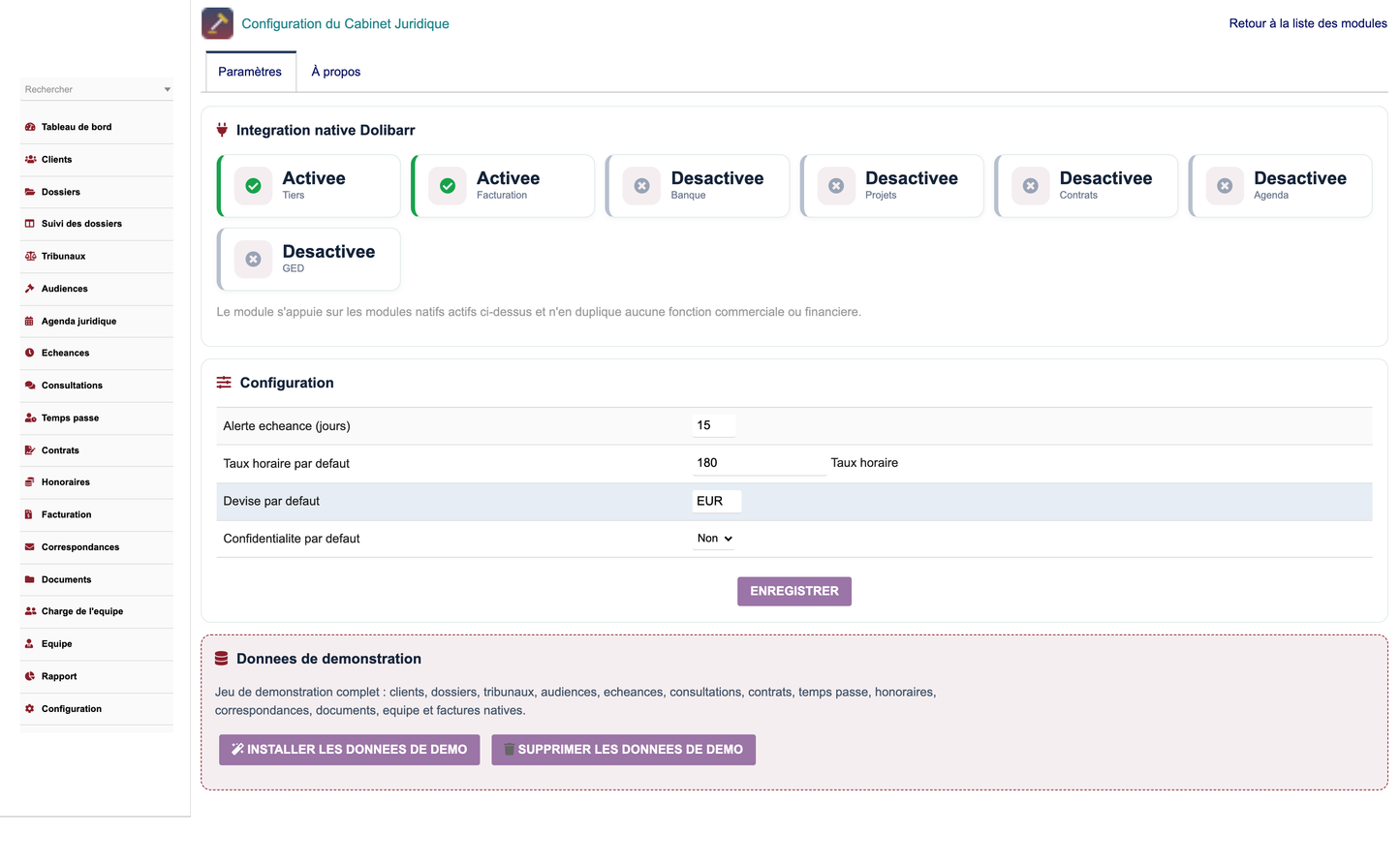
· Configuration page: native-integration status, deadline alert (days), default hourly rate, default currency, default confidentiality, plus buttons to install or securely remove the demonstration data.
· The demo purge deletes only the rows created by the module (import key LOMDEMO) and the native third parties / invoices it created.
· A daily cron job supervises procedural deadlines and flags overdue items.
· Languages: French, English, Spanish, Italian and German.


