
Discover powerful Dolibarr extensions designed to automate your business processes
1. Overview
Maintenance & GMAO turns Dolibarr into a full Computerized...
Couldn't load pickup availability


1. Overview
Maintenance & GMAO turns Dolibarr into a full Computerized Maintenance Management System (CMMS/GMAO). It provides a single, connected platform to manage the entire maintenance lifecycle of an organization’s assets — vehicles, machinery, plant equipment, installations and tooling — from the moment a maintenance need is expressed to the final closure of the work order with its actual costs, spare-part consumption and audit trail.
The module is designed around the day-to-day reality of a maintenance department: a central asset registry, preventive and corrective/curative work orders, a maintenance request desk, preventive maintenance plans triggered by calendar, mileage or runtime, an equipment-health diagnostic layer, workshops and technicians, a spare-parts store with stock thresholds, supplier quotes and purchase orders, tyre lifecycle management, regulatory inspections, maintenance contracts, failure analysis (MTBF/MTTR), automatic deadline alerts, a weekly planning board and a decision-support reporting suite. All monetary values are expressed in Moroccan Dirham (MAD) and the interface is available in French, English, Spanish, Italian and German.
The module is natively integrated with the Dolibarr core: third parties (suppliers and service providers), users and the standard permission system. It ships with a complete, realistic demonstration dataset so that every dashboard, KPI, chart, planning board and report is immediately meaningful after activation.
2. Functional Scope
The application is organized into twenty functional areas, accessible from the left navigation menu and from an in-page tab bar present on every screen.
Equipment & Asset Registry
The central hub of the system. Every asset (vehicle, machinery, machine, installation, building, tooling) is recorded with its reference, designation, category, brand/model, registration plate or serial number, commissioning date, odometer and hour-meter readings, criticality level, health-score index, home workshop, site, location and responsible person. Each asset card shows a live cockpit (mileage, health score, number of work orders, total maintenance cost, open alerts) together with all linked records.
Diagnostics & Health Monitoring
A per-system condition log (engine, braking, tyres, suspension, transmission, battery, lighting, electronics, hydraulics, cooling). Each diagnostic records a measurement, a state (compliant, monitoring, alert, critical) and a recommendation, feeding the asset health score.
Meter Readings
Chronological odometer, hour-meter and cycle readings per asset, captured manually, from telematics or during a work order. Meter readings drive distance- and runtime-based preventive plans.
Maintenance Requests (Work Requests / DI)
A centralized intake desk where any department (logistics, production, transport, operations, technical…) can raise a maintenance request against an asset, with a requester, department, service, category, request type (curative/preventive), priority and hour index. Requests flow from New to Accepted, Planned, Rejected or Closed, and can be converted into a work order.
Work Orders (Interventions)
The operational core. Each work order carries its type (preventive, corrective, curative, improvement, predictive), the target asset, the executing workshop and technician, priority, planned/start/end dates, duration, labour cost, parts cost, total cost, completion percentage and status (to plan, planned, in progress, quality check, on hold, completed, cancelled). Spare parts consumed are recorded as movement lines.
Preventive Maintenance Plans
Reusable maintenance schedules (oil change, service, inspection, greasing, calibration, filters, brakes, tyres, timing belt) attached to an asset with a trigger (calendar, distance, runtime or mixed), a periodicity, the last completion and the next due date/mileage. Plans arriving within 30 days feed the dashboard and alerts.
Failure Analysis
A breakdown log recording the symptom, root cause (wear, part defect, misuse, accident, maintenance defect, external), severity, production-stop flag and downtime hours. This layer powers the operational MTBF and MTTR indicators.
Weekly Planning Board
A calendar board with assets in rows and days of the week in columns, showing scheduled work orders colour-coded by type, with the assigned technician and status. Week navigation and a highlighted current day are provided.
Workshops
Internal, external and mobile maintenance workshops, with type, linked service provider, city, manager, bay capacity and contact details.
Technicians
The maintenance workforce, with specialty (mechanics, electrics, bodywork, tyres, hydraulics, electronics, generalist), workshop, seniority level, hourly rate and linked Dolibarr user. The hourly rate feeds work-order labour costing.
Spare Parts Store
A spare-parts inventory with category, OEM reference, supplier, unit price, on-hand quantity, minimum/maximum stock, storage bin and a stock status (in stock, low stock, out of stock, on order). Stock value and shortage counts are surfaced on the dashboard.
Part Movements
Stock issues, receipts, returns and adjustments, linked to the consuming work order, with quantity, unit price and total. Movements appear as lines under each work order.
Supplier Quotes
Repair and supply quotations from external providers, linked to a work order and asset, with amounts, validity and a status (pending, in negotiation, accepted, rejected, expired).
Purchase Orders
Parts and service purchase orders, linked to a work order and asset, with amounts, delivery date and a status (generated, in progress, delivered, invoiced, cancelled). Open purchase orders are tracked on the dashboard.
Contracts
Maintenance contracts with providers (warranty, full service, preventive, breakdown cover), with start/end dates, annual amount, response-time SLA and status (active, expired, terminated, to renew).
Tyre Management
A dedicated tyre lifecycle module: each tyre is tracked by position (front/rear, left/right, spare), brand, model, dimension, distance run, wear percentage, pressure, mounting and last-rotation date, next action (rotation, swap, check, replacement) and status (good, monitor, replace, scrapped).
Technical Inspections
Regulatory controls (roadworthiness test, emissions, safety, regulatory) with inspection and expiry dates, result (pass, retest required, fail), cost and inspection centre. Inspections due within 30 days are flagged.
Documents
A per-asset document library (manuals, diagrams, invoices, reports, certificates, photos, warranties, procedures) with file metadata and a shared flag.
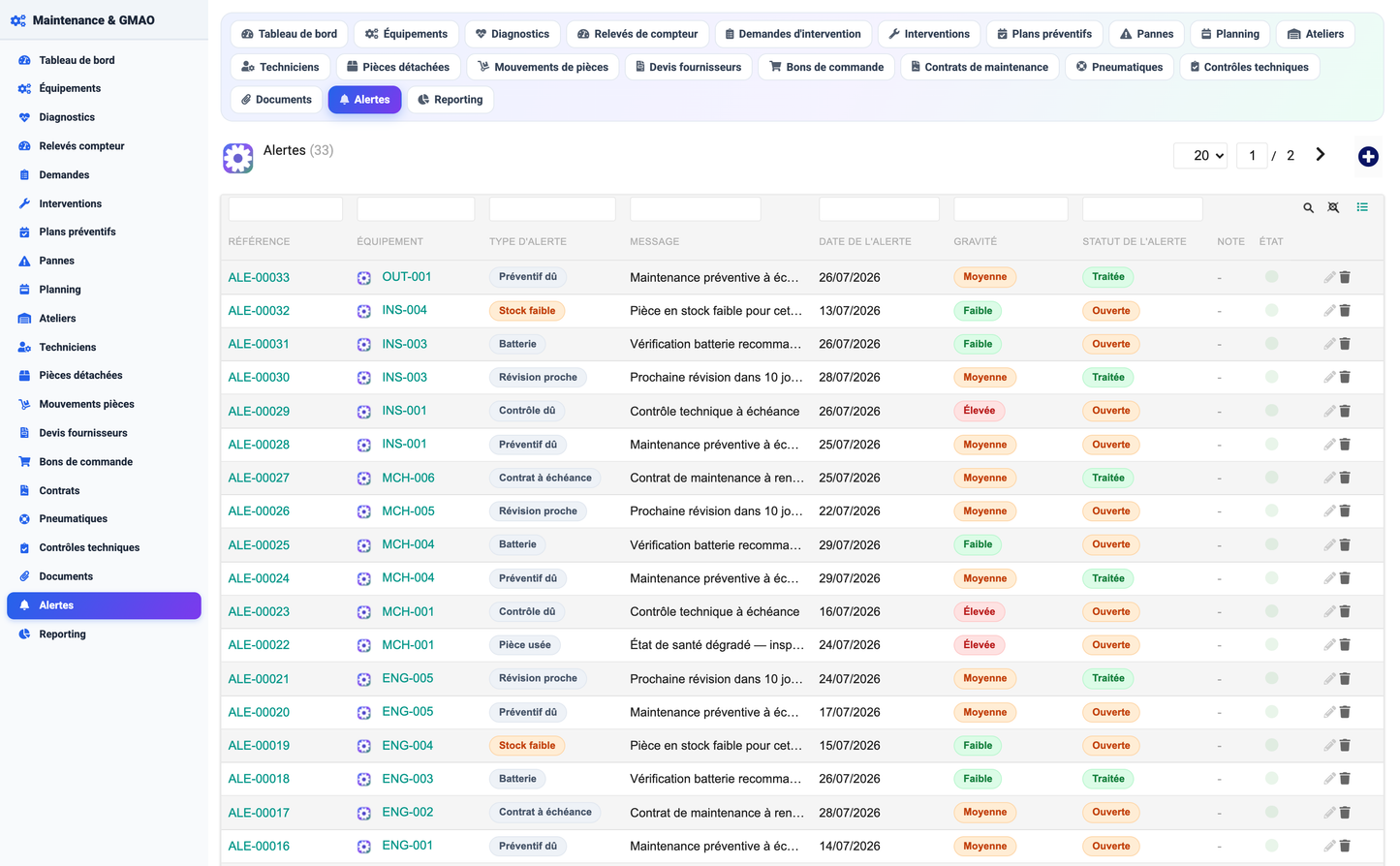
Maintenance Alerts
Automatically-themed deadline alerts (preventive due, worn part, service due soon, battery, low stock, inspection due, contract expiring) with severity (low, medium, high, critical) and status (open, handled, ignored).
Reporting
A decision-support analytics screen: cost by category, assets by category and by site, work orders by type, cost by equipment (top 10), failures by root cause and a twelve-month cost-evolution trend.
3. Steering Dashboard
The dashboard is the entry point of the module and provides a real-time, one-screen overview of the maintenance operation, organized in four zones:
· Assets & Health — total equipment, active equipment, equipment in maintenance, stopped equipment, fleet availability gauge and average health-score gauge.
· Work Orders & Maintenance — a maintenance cost-breakdown donut (labour, parts, subcontracting, tyres, inspections, contracts) with total amount, plus work-order counts by status, monthly and annual maintenance cost, preventive due, and the operational MTBF and MTTR indicators.
· Parts & Purchasing — referenced parts, in-stock, low-stock and out-of-stock counts, stock value, open purchase orders and pending quotes, with parts-by-category and work-orders-by-status charts.
· Alerts & Deadlines — open alerts, inspections due, contracts expiring and open failures, with a live table of the most recent open alerts.
4. Roles & Security
Access is governed by the standard Dolibarr permission system, through seven permission groups. Read and write are granted by default on activation; delete and administration are opt-in.
|
Permission group |
Scope |
|
Equipment |
Read/manage equipment, meters and diagnostics |
|
Interventions |
Read/manage work orders, requests, plans and failures |
|
Workshop |
Read/manage workshops and technicians |
|
Parts |
Read/manage parts and stock movements |
|
Purchasing |
Read/manage quotes, orders and contracts |
|
Compliance |
Read/manage inspections, tyres, documents and alerts |
|
Reporting |
Access reporting and dashboards |
5. Technical Architecture
· Platform — Dolibarr module (numero 1072000), compatible with Dolibarr 16 and above, PHP 7.1+.
· Dependencies — depends on the native Third Parties (Societe) module; integrates with Users.
· Data model — 18 dedicated database tables (prefix llx_mgm_*), each with entity, status, audit and import-key columns; a schema self-heal routine adds any missing column on upgrade.
· Languages & currency — French (authoritative), English, Spanish, Italian and German; all displayed amounts in Moroccan Dirham (MAD).
· Demo data — a complete, FK-coherent demonstration dataset (equipment, work orders, parts, purchase orders, tyres, alerts…) installed on first activation and re-installable/erasable from the setup page.
· User experience — modern KPI cards, colour-coded status badges, cost donut, gauges and charts, a consistent house style across all screens, and a column show/hide selector with per-column filters on every list.
Editor: DoliResources — www.doliresources.com. Copyright © 2026. Licensed under the GNU GPL v3.


