
Discover powerful Dolibarr extensions designed to automate your business processes
Messaging Management turns Dolibarr into a centralised professional communication platform. Instead of scattering business correspondence across personal mail clients,...
Couldn't load pickup availability


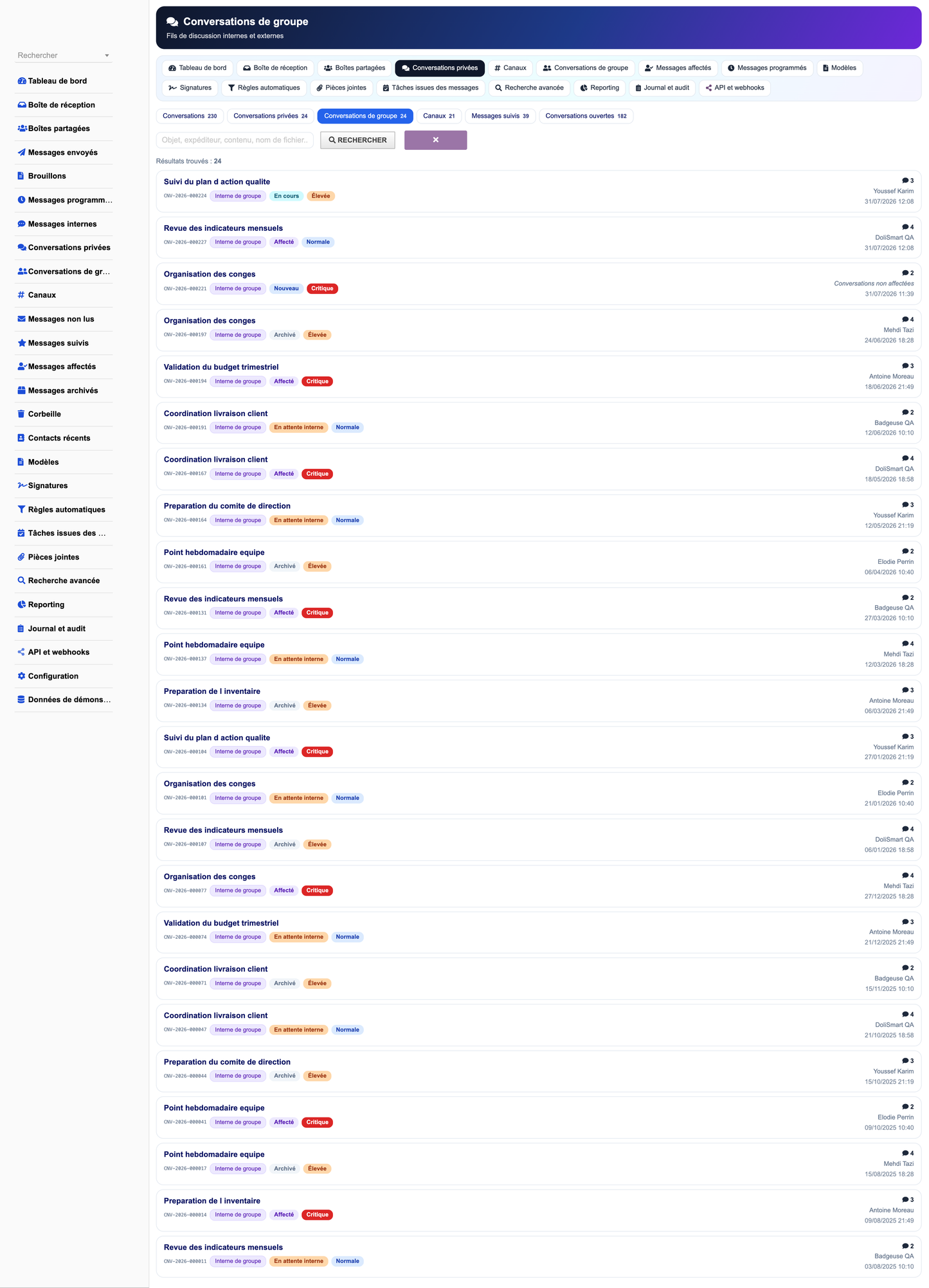
Messaging Management turns Dolibarr into a centralised professional communication platform. Instead of scattering business correspondence across personal mail clients, shared spreadsheets and a separate chat tool, the module brings e-mail, internal messaging, team channels and departmental shared inboxes into the ERP itself — next to the third parties, quotations, orders, invoices and projects the conversations are actually about.
The result is a single, auditable record of who said what to whom, when, about which business object, and how quickly the organisation responded.
· Eliminate the loss of context between an e-mail thread and the ERP record it concerns.
· Make departmental mailboxes accountable: every conversation has an owner, a status and a deadline.
· Measure responsiveness objectively through first-reply time, resolution time and SLA compliance.
· Reduce manual routing through an automation rule engine.
· Provide a defensible audit trail for regulated and contractual correspondence.
· Keep communication data inside the organisation's own database, under its own retention policy.
|
Department |
Primary use |
|
Management |
Cross-department visibility, SLA and workload dashboards |
|
Sales |
Quotation follow-up, customer threads linked to the opportunity |
|
Customer service |
Shared support inbox, assignment, SLA, escalation |
|
Accounting |
Invoice reminders, payment disputes, document requests |
|
Purchasing |
Supplier negotiation threads linked to purchase orders |
|
Logistics |
Shipment notifications, delivery complaints |
|
Human resources |
Confidential internal exchanges, onboarding channels |
|
Project teams |
Per-project channels with decisions and shared files |
|
IT and quality |
Audit trail, retention policy, GDPR operations |
· One inbox for the whole organisation, filtered by permission rather than by mailbox password sharing.
· Every conversation carries a status, a priority, an owner and an SLA deadline.
· Automatic linking of a thread to the third party, quotation, order, invoice or project it concerns.
· Rule-driven routing removes the daily manual triage of a shared mailbox.
· Real measurement replaces impressions: first-reply time, resolution time, SLA compliance, reopen rate.
· A message becomes a task, a ticket or an agenda event in one click, with its context preserved.
· Full audit trail and configurable retention, with archiving that never silently deletes.
· Five languages, so a multinational team uses one system in its own words.
The module is a standard Dolibarr external module. It modifies no core file, so a Dolibarr upgrade does not break it. It installs into htdocs/custom/ and registers itself through the ordinary module descriptor contract.
|
Item |
Value |
|
Technical name |
messagingmanagement |
|
Module class |
modMessagingManagement |
|
Module number |
1316000 |
|
Table prefix |
llx_messagingmanagement_ |
|
Business tables |
35 |
|
Permissions |
38 |
|
Menu entries |
28 |
|
Scheduled tasks |
11 |
|
Languages |
5 (781 keys each) |
|
Minimum PHP |
8.1 |
|
Databases |
MySQL, MariaDB |
The 35 business objects share one generic list engine and one generic card engine, so filtering, pagination, column selection and permission checks behave identically everywhere and evolve in one place.
The Communication Command Center is organised in three zones plus analytical components.
· Zone 1 — Communication pulse: messages received and sent today, unread, priority, assigned, unassigned, awaiting reply, active internal conversations.
· Zone 2 — Activity centre: open and closed conversations, active channels and groups, unread mentions, drafts, scheduled messages, tasks created from messages, recent conversations and active shared inboxes.
· Zone 3 — Alerts and performance: unanswered messages, breached deadlines, send failures, IMAP and SMTP errors, blocked and suspicious attachments, overloaded queues, unassigned conversations, plus SLA, reply-rate and read-rate gauges.
· Six interactive charts: daily inbound and outbound flow, conversations by status, messages per mailbox, priority breakdown, monthly SLA compliance, monthly average reply time.
· Communication heatmap by weekday and hour, revealing genuine peak load.
· Conversation Radar: open conversations ranked by a composite risk score built from priority, remaining SLA time, assignment state and thread volume.
· Private one-to-one conversations between Dolibarr users.
· Group conversations with owner, administrators, members and roles.
· Reply, forward, quote, edit within a configurable window, delete by permission.
· Mark unread, mark important, pin, archive, mute.
· Mentions with their own notification path and unread tracking.
· Reactions on any message.
· Attachments, drafts and scheduled sending on internal messages too.
· Read receipts, configurable per instance.
Private conversations are not visible to non-participants. A dedicated privateaudit permission exists for legally authorised inspection; granting it is an explicit and auditable act rather than an administrator side effect.
· Name, description, picture, owner, administrators and members.
· Types: private, visible, temporary, project-related, customer-related, department-related.
· Temporary groups carry an expiry date.
· Invitations, removal, role changes, per-member muting.
· Pinned messages and shared files.
Eleven channel types cover the usual organisational structure.
|
Type |
Typical use |
|
public / private |
Company-wide or restricted discussion |
|
team |
A standing team's working channel |
|
project |
Created alongside a Dolibarr project |
|
customer / supplier |
Dedicated to one third party |
|
support / sales |
Front-office coordination |
|
accounting / logistics / HR |
Back-office coordination |
· Visibility: open, restricted, confidential.
· Owner, moderators, members with notification levels (all, mentions, none).
· Join, leave, invite, restrict, archive, reactivate, close, export.
· Activity counters and last-activity tracking.
· Receive, send, reply, reply all, forward, Cc, Bcc.
· Drafts, scheduled sending, cancellation of a scheduled send.
· Priority, signature and template insertion, attachments.
· Classify, assign, follow, archive, delete, restore, search.
· Per-recipient delivery status and read timestamp.
· Message list showing sender, recipients, subject, date, size, attachments, status, priority, labels, assignment and linked ERP objects.
A shared inbox is a departmental queue with its own members, supervisors, SLA and workload. The cockpit shows, per queue: open conversations, unassigned backlog, breached deadlines, unread count, member count, average first-reply time and an SLA compliance bar. A queue above its load threshold is flagged visually, and a mailbox in IMAP or SMTP error is flagged in red.
Conversation statuses: new, unassigned, assigned, in progress, waiting for customer, waiting internally, resolved, closed, archived.
· Periodic and manual retrieval, folder management, UID tracking.
· Duplicate protection on (mailbox, UID): re-running never doubles a message.
· MIME header decoding and charset conversion to UTF-8.
· Thread resolution by In-Reply-To, then by normalised subject on the same mailbox.
· Automatic resolution of the sender address onto a Dolibarr third party.
· Batch limiting so a large mailbox degrades into several runs instead of a timeout.
· Error handling that flags the mailbox and writes an audit row without ever logging a secret.
· Degraded mode when the PHP imap extension is absent: everything else keeps working.
· Immediate and deferred sending through Dolibarr's own mail transport.
· Delivery queue with retry accounting and a configurable retry ceiling.
· Hourly rate limiting per mailbox to stay within provider limits.
· Statuses: draft, scheduled, queued, sent, failed, cancelled, to retry.
· Failures surface on the dashboard rather than disappearing into a log.
Eleven categories ship with the module: sales e-mail, quotation follow-up, order confirmation, invoice reminder, shipping notification, document request, support reply, invitation, reminder, internal message and automatic reply. Each template carries a language, subject, HTML and text bodies, variables, an attached signature, visibility and a usage counter.
Available variables include contact name, user, company, quotation, order and invoice references, amount and date.
Signatures are scoped: personal, per mailbox, per department, per language, per message type, per entity or global. Each carries job title, phone, e-mail, website, logo, legal notice and both HTML and plain-text bodies.
· Size limit and extension deny-list enforced by configuration.
· MIME type and extension both recorded; a mismatch is a review signal.
· MD5 checksum for integrity and duplicate detection.
· Scan status: accepted, rejected, pending, suspicious — ready for an external antivirus connector.
· Rejected and suspicious files surface on the dashboard instead of being dropped silently.
· Per-file download counting and storage accounting by type.
A conversation can be assigned to a user, a group, a team, a department or a queue, manually, automatically, by load balancing or by self pick-up. The module keeps the full assignment history: who assigned, from whom, why, when it was accepted and when it was released.
An internal note is attached to an external conversation but is never sent to the customer. It is visually distinct, can mention a colleague, can carry an attachment and appears in the audit trail.
Ten label categories ship by default: urgent, sales, support, billing, order, complaint, supplier, project, dispute and VIP. Labels carry colours, can be private or shared, and are applied manually or by rule.
Five priority levels — low, normal, high, urgent, critical — drive the SLA policy and the Conversation Radar risk score.
A rule combines a trigger, criteria and actions, with an execution order and an optional stop-processing flag.
|
Criteria |
Actions |
|
from, to, from_domain |
set priority |
|
subject_contains, body_contains |
apply label |
|
has_attachment, size_gt |
archive |
|
priority |
assign to team |
|
outside_business_hours |
assign to user |
An unknown criterion is ignored rather than treated as a match, so a typo can never make a rule fire on everything. Every evaluation is logged with its result, duration and error.
Seven reply types: out of office, acknowledgement of receipt, case opening, request confirmation, closing hours, deadline exceeded and status change. Each has a period, applicable days, hours, language, template, a maximum per sender, an anti-loop cooldown and an exclusion list — so two responders can never loop against each other.
Choose a date and time, edit or cancel before it leaves, duplicate it, watch the queue and its status, and be notified on failure. Delivery is performed by a Dolibarr scheduled task.
Full-text search combined with filters on sender, recipient, subject, content, date range, mailbox, priority, direction, status, label, attachment presence and file name. Searches can be saved, marked favourite and shared.
A configurable retention window drives an archiving task. Archiving never deletes: erasure remains an explicit, permissioned operation. Per-mailbox retention overrides the global default. Deactivating the module does not delete any data.
|
Object |
Integration |
|
Third party |
Messagerie tab, conversations, exchange statistics |
|
Contact |
Exchange history, address completion |
|
Quotation |
Thread linked to the quotation, follow-up, reminders |
|
Sales order |
Confirmation, clarification, complaint handling |
|
Purchase order |
Supplier requests and confirmations |
|
Invoice |
Sending, reminders, payment disputes, proof of exchange |
|
Shipment |
Notification, tracking, delivery complaints |
|
Contract |
Renewal reminders, contractual correspondence |
|
Project and task |
Project channel, message converted into a task |
|
Ticket |
Message converted into a ticket, replies attached |
|
Agenda |
Events and follow-up reminders created from a message |
|
DMS |
Attachment archiving and permissions |
|
Users and groups |
Native accounts, groups and permissions reused |
An authenticated REST API exposes mailboxes, conversations, messages, channels, attachments, search, aggregated KPI, assignment, status change and mailbox synchronisation. Credentials are never returned. Sort fields are whitelisted against the real table columns. Write routes append an audit row.
Outgoing webhooks are disabled by default. Each payload is signed with HMAC-SHA256 so the receiver can authenticate it, each call is bounded by a timeout and fully logged, and ten consecutive failures deactivate the webhook automatically.
· Volume: received, sent, internal, total and conversations per mailbox.
· Performance: average first-reply and resolution time, SLA compliance, open and closed conversations.
· Quality: unanswered, overdue, reopened, send failures, unassigned.
· Sales: conversations, message volume and responsiveness per customer.
· Support: distribution by status with delays and derived tasks.
· Storage: attachment count, total and average size and rejections by file type.
· Period filters, twelve-month trend chart, CSV and JSON export.
· Permission check on every page and every action.
· CSRF protection through the Dolibarr token mechanism.
· Parameterised and escaped SQL; whitelisted sort fields.
· Escaped output; inbound message bodies rendered inert.
· Encrypted credential storage, never redisplayed, never logged.
· Attachment size, extension and MIME controls with checksums.
· Entity separation on every table and every query.
· Seventeen audited action types with actor, IP, user agent and severity.
Export of a contact's communications, permissioned anonymisation and erasure, configurable retention, access restriction and full logging of the operations themselves. A warning precedes any definitive deletion.
French, English, Spanish, Italian and German, 781 keys each, all authored explicitly. There is no English fallback: a missing translation is a build error, not a silently English screen.
A dedicated configuration tab populates and clears a complete twelve-month dataset covering every workflow state, so the module can be evaluated immediately. Every generated row is tagged, and the purge acts only on those tags — real data is never touched.
|
Component |
Requirement |
|
Dolibarr |
19.x and above |
|
PHP |
8.1 and above |
|
Database |
MySQL 5.7+ or MariaDB 10.3+ |
|
Required extensions |
mysqli, mbstring, json |
|
Optional extensions |
imap (mailbox retrieval), curl (webhooks) |
|
Dolibarr modules |
Third parties enabled |
Developed by DoliResources
Copyright © DoliResources
Website: www.doliresources.com


