
Discover powerful Dolibarr extensions designed to automate your business processes
2 people are viewing this right now
Couldn't load pickup availability


· MRI Center Management (Gestion Centre IRM) turns Dolibarr into a specialised business tool for a magnetic resonance imaging centre. It covers the administrative, medical-organisational, technical, financial, logistical and quality activities of the centre without requiring a second management system.
· The module is designed for independent MRI centres, imaging practices, clinics and hospital MRI departments, multi-modality radiology centres, MRI networks, multi-site organisations, teleradiology providers and centres specialised in neurological, musculoskeletal, cardiac, breast or paediatric MRI, including centres performing examinations under sedation or anaesthesia.
· It remains a management, planning and traceability tool. It never replaces the medical decision, the radiologist's diagnosis, the validation of the MRI protocol, the assessment of contraindications, the decision to administer a contrast agent, medical supervision or the establishment's own safety procedures. Every sensitive clinical decision must be validated by an authorised professional.
· Editor: DoliResources - www.doliresources.com. Version 1.0.0.
· Centralise the complete patient pathway, from the examination request to the delivery of the report and the settlement of the invoice.
· Make MRI safety systematic and auditable: screening questionnaire, implant clearance, safety zones, zone IV checklist, incidents and cryogenic register.
· Increase scanner utilisation through multi-site, multi-room and multi-scanner planning with waiting-list and emergency handling.
· Shorten report turnaround by tracking every stage from dictation to signature and delivery.
· Give management reliable figures on activity, performance, costs, margins, quality and safety.
· Integrate with the native Dolibarr modules rather than duplicating them.
· 31 business objects: sites, rooms, MRI scanners, coils, equipment, patients, referring physicians, exam types, protocols, sequences, examination requests, appointments, safety questionnaires, implants and devices, zone access, admissions, examinations, contrast media, injections, sedations, radiology reports, teleradiology, insurance, coverage, billing, consumables, maintenance, quality controls, incidents, cryogenic register and staff.
· Six dedicated screens: operations dashboard, weekly planning board, MRI safety center, patient portal, referrer portal and decision-support reporting.
· Twelve reports with period filtering and CSV export.
· Five languages: French, English, Spanish, Italian and German.
· The module declares 72 permissions across 22 functional areas, each exposing read, create/modify and delete, plus four read-only areas (reporting, export, API, demonstration data), a distinct report validation and signature right, and module administration.
· Typical profiles: administrator, management, medical director, radiologist, locum radiologist, radiographer, nurse, anaesthetist, sedation staff, medical secretary, receptionist, billing manager, cashier, insurance officer, quality manager, MRI safety officer, biomedical technician, maintenance manager, storekeeper, accountant, external referring physician, patient (portal) and read-only user.
· Read and write are granted by default so the module is usable immediately after activation; delete and administration are not. The principle of least privilege applies.
· The MRI Operations & Safety Command Center aggregates the centre's activity in real time.
· Today's activity: patients, appointments, scheduled and completed examinations, contrast and sedation examinations, emergencies, interruptions, cancellations and no-shows.
· Scanner cards: one interactive card per scanner showing site, room, safety zone, field strength, manufacturer and model, status, current patient and examination, examinations today, helium level and next maintenance, colour-coded by availability.
· Patient journey: distribution of examinations across the twelve pathway stages.
· MRI safety: incomplete questionnaires, pending safety validations, implants to clear, raised alerts, open incidents, overdue quality controls, expired authorisations and pending zone IV checklists.
· Analytics: examinations over twelve months, breakdown by anatomical region, examinations per scanner and share of contrast examinations.
· Operational performance, finance, stock and maintenance blocks complete the picture.
· Patient record: internal identifier, civility, name, birth name, administrative gender, date and place of birth, official identifier, address, telephone, e-mail, emergency contact, treating physician, referring physician, insurer, complementary insurer, membership number, preferred language, accessibility needs, mobility, legal guardian, weight and height.
· GDPR consent is recorded with its date. Examination history and last examination date are maintained automatically.
· Multi-criteria search, sortable columns, configurable column selector and pagination.
· Records for referring physicians, clinics, hospitals, health centres, practices and partner companies, with specialty, facility, professional identifier, convention reference, delivery preference and portal access.
· Activity is consolidated per referrer: number of requests and associated revenue.
· Each referrer can be linked to a native Dolibarr third party.
· Weekly planning board with one column per day, filtered by site and scanner, showing time, duration, patient, examination type, scanner and status for each slot.
· Statuses: planned, to confirm, confirmed, patient arrived, completed, no-show, cancelled, postponed.
· Emergency slots are highlighted; waiting list, reminders and confirmations are tracked.
· Planned maintenance automatically blocks the affected slots.
· Each request carries the patient, referring physician, examination type, prescription reference and date, indication, anatomical region, urgency level, planned contrast and sedation, safety validation and coverage check.
· Workflow: draft, received, to check, awaiting documents, awaiting safety validation, validated, scheduled, completed, refused, cancelled.
· Missing documents are listed explicitly so the front desk knows what to chase.
· Versioned questionnaire covering pregnancy, breastfeeding, previous surgery, implants of every kind (pacemaker, defibrillator, neurostimulator, cochlear implant, implantable pump, vascular clip, heart valve, stent, prosthesis, intrauterine device), metal fragments, occupational metal exposure, tattoos, permanent make-up, medication patches, hearing aids, dental devices, renal failure with eGFR value, allergies, previous contrast reaction, diabetes, claustrophobia, epilepsy, inability to remain still, weight, height, need for sedation and need for a companion.
· A sensitive answer raises an alert, may require a document, a verification, a validation by an authorised professional, a postponement, a motivated refusal or a redirection to a suitable protocol.
· The module never decides eligibility on its own.
· Implant register with type, brand, model, manufacturer, serial number, implantation date and supporting documentation.
· Declared compatibility status: MR safe, MR conditional, MR unsafe, unknown, verification required.
· Conditions of use: maximum field strength, SAR limit, gradient limit, waiting period after implantation, restrictions and specific protocol.
· Human validation by an authorised professional is always required before the examination.
· Configurable zones I to IV with access control, badges, companions, visitors, contractors and authorised staff.
· Access register with person, category, zone, screening performed, escort requirement, entry and exit times and authorisation validity.
· Alerts when an unauthorised person attempts access, an incompatible device is assigned, an authorisation has expired, a companion has not been screened or a questionnaire is incomplete.
· Admission record covering identity, prescription, coverage, safety questionnaire, implants, allergies, pregnancy, laboratory results, consent signature, removal of metallic objects, locker, gown, intravenous line and claustrophobia management.
· A mandatory zone IV checklist must be validated before entering the magnet room.
· Pathway timestamps feed the waiting time and turnaround indicators.
· Versioned protocols per examination type: indication, scanner, field strength, coil, patient position, duration, contrast use and phase, gating, breath hold, SAR limit, instructions, author, validator and validation date.
· Sequences carry order, name, type, orientation, TR, TE, flip angle, slice thickness, matrix size, field of view, number of averages, duration, post-contrast flag and quality criteria.
· The final selection of sequences remains under the control of authorised staff.
· Contrast products by molecule and class (macrocyclic gadolinium, linear gadolinium, hepatospecific, saline), concentration, volume, lot number, expiry date, supplier, stock, minimum quantity, unit cost and storage location.
· Each administration records patient, examination, product, lot, dose, flow rate, route, date and time, operator, validator, injector, observations and any reaction.
· Alerts for declared allergy, previous reaction, missing laboratory result, expired product, blocked lot, insufficient stock or missing document.
· The module never computes or recommends a medical dose without validation.
· Optional sub-module for centres performing examinations under sedation or anaesthesia.
· Records the request, pre-assessment, consent, responsible professional, room, equipment, timings, monitoring notes, recovery, discharge, companion and incidents.
· It provides traceability and organisation only; every medical decision remains the responsibility of authorised professionals.
· Each examination carries an identifier, accession number, patient, request, appointment, type, protocol, site, room, scanner, coil, radiologist and radiographer.
· Full pathway timestamps: scheduled time, arrival, preparation start, acquisition start and end, exit, with computed preparation, acquisition, total, waiting and delay durations.
· Records sequences performed and repeated, contrast and sedation use, interruptions with reason, delay reason and image quality.
· Carries the Study Instance UID and the PACS link. Statuses run from planned to closed.
· Configurable integration layer for DICOM Modality Worklist, patient data retrieval, accession number, Study Instance UID, Series Instance UID, examination status, PACS link, external viewer, synchronisation, reconciliation, logs, errors, retry, connection test and per-site and per-scanner configuration.
· The REST worklist route exposes the examinations a scanner is expected to perform, with the identifiers and patient identity a modality needs.
· The module does not replace a PACS. Large images stay in the dedicated system; Dolibarr stores only metadata, identifiers, links, statuses, lightweight documents and exchange logs.
· Configurable interfaces for patients, appointments, requests, examinations, reports, results, billing and statuses.
· Mapping, log, status, error, retry, identifiers, test and production environments and per-interface activation.
· All external dependencies are documented and disabled by default.
· Templates per examination type and per radiologist, with structured sections: indication, technique, findings, conclusion, recommendations, comparison and attachments.
· Lifecycle: to dictate, dictated, transcribing, draft, to review, to validate, validated, signed, sent, corrected, archived.
· Optional dictation integration with microphone, audio files, external transcription service, assignment to a transcriber, correction and validation. Any automatic transcription must be reviewed and validated by an authorised radiologist.
· No validated version is ever overwritten; turnaround time is computed automatically.
· Delivery to the patient and to the referring physician, through a secure portal, download, printing, secure transmission, PACS link or digital media, with acknowledgement, date, user and history.
· The patient portal shows appointments, safety questionnaire status, released results and invoices. Only validated, signed or sent reports are visible.
· The referrer portal shows submitted requests, their status, released reports and activity indicators including average turnaround.
· Sending centre, remote radiologist, specialty, contract, availability, examination, urgency, sending, acceptance, reading and validation timestamps, report, cost, turnaround, status and log.
· Insurers, complementary insurers, paying organisations, conventions, negotiated tariffs, ceilings, rates, deductibles, third-party payment, required documents, delays, rejections and appeals.
· Per examination: organisation, membership number, coverage, validity, covered amount, patient share, authorisation, document and status.
· Billing linked to the patient, the examination and the paying organisation, with total amount, insurance share, patient share, paid amount, outstanding amount, payment method and date, due date and status.
· Integrates with the native Dolibarr quotes, invoices, payments, banks and accounting modules.
· Contrast media, syringes, needles, catheters, tubing, gels, gloves, hearing protection, positioning accessories, disinfection products, MRI-compatible material and spare parts.
· MR compatibility is explicit on every reference, which prevents introducing non-compatible material into zone IV.
· Lots, expiry dates, minimum and maximum levels, movements, consumption, inventory, quarantine, blocking, traceability, alerts and valuation.
· Sites, rooms, scanners, coils, injectors, consoles, workstations, MRI-compatible monitors and anaesthesia equipment, detectors, trolleys, cooling and cryogenic systems.
· Each item records manufacturer, model, serial number, field strength, location, installation and service dates, supplier, warranty, contract, status, documentation, cost, history and usage hours.
· Integrated CMMS: preventive, corrective, condition-based and regulatory maintenance, work orders, failures, technicians, providers, spare parts, contracts, counters, history, costs and downtime.
· Availability, utilisation, failures, downtime, maintenance cost, lost activity and preventive completion rate are computed. Planned maintenance blocks the affected slots.
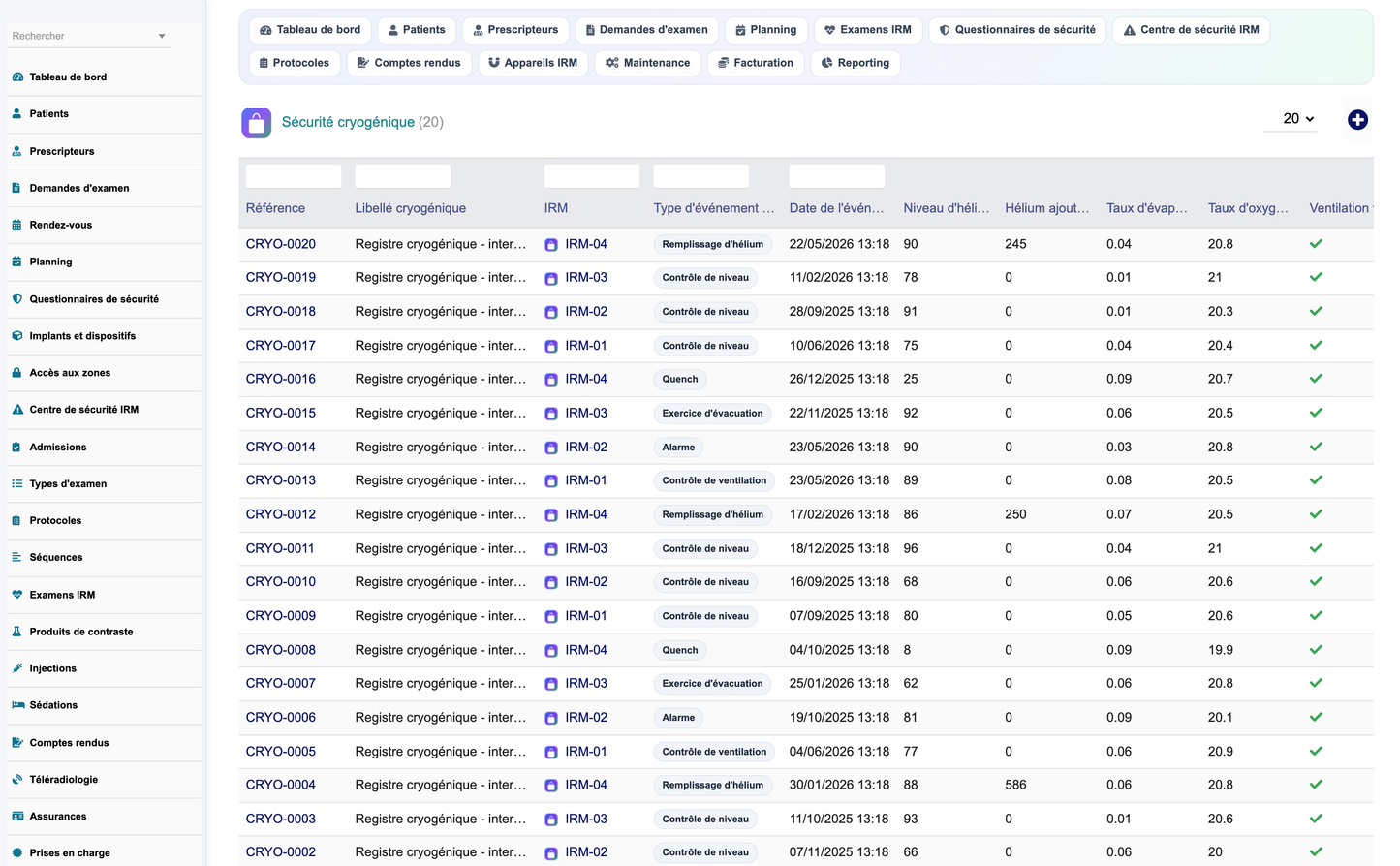
· Register of cryogenic system events: helium level checks, refills, boil-off rate, oxygen level, ventilation and quench pipe checks, alarms, evacuations and drills.
· Procedures, exercises, inspections, incidents, corrective actions, responsible persons, dates, documents and statuses.
· The module never triggers a physical action on the equipment.
· Daily, weekly, monthly, quarterly and annual controls, manufacturer checks, phantom tests, coil checks.
· Measured parameters: signal-to-noise ratio, uniformity, geometric distortion, spatial resolution and artefact detection, compared against explicit tolerance bands.
· Non-conformities trigger a corrective action and a new control. Overdue controls are surfaced on the dashboard.
· Incident types: ferromagnetic object, unauthorised access, implant-related incident, contrast reaction, burn, claustrophobia episode, faintness, fall, breakdown, interruption, quench, alarm, IT incident, identity error and other.
· Each record carries number, date, site, room, scanner, linked examination and patient, type, severity, description, declarant, immediate actions, analysis, root cause, corrective action, responsible person, due date, documents and closure.
· Twelve reports: activity, appointments, scanners, referrers, report turnaround, contrast media, safety, quality, maintenance, stock, billing, and costs and margins.
· Each report supports period filtering and CSV export; exports are decoded so no HTML entity leaks into the file.
· Cost and margin analysis excludes examinations whose real cost was never captured: a missing cost is unknown, never zero.
· Decision support covers activity forecasting, staffing and consumable needs, saturated slots, planning optimisation, cancellation and delay analysis, repeated examinations, occupancy, costs, margins, failures and maintenance forecasting. Recommendations are explainable and reviewable; the module never generates an automatic medical diagnosis.
· Secured REST API under /api/index.php/mricenter/ exposing patients, referrers, requests, appointments, examinations, reports, scanners and the DICOM worklist feed.
· Authentication through the DOLAPIKEY header; every route checks the authenticated user's permissions. An invalid key returns 401, a missing right returns 403.
· Pagination, filtering, whitelisted sort fields, structured errors and log entries.
· CSRF and XSS protection, prepared statements, strict permission checks, session handling, controlled downloads and protected API.
· Sensitive properties are stripped from API responses. Health data is accessible only to authorised users.
· Validated reports are locked. Consent, anonymisation, retention and controlled deletion are supported.
· All lang keys are namespaced so no other module can silently override a label with different wording.
· A single button generates a complete fictitious MRI centre: 3 sites, 8 rooms, 4 scanners, 18 coils, 10 equipment items, 12 staff, 8 referring physicians, 60 patients, 14 examination types, 14 protocols with their sequences, 4 insurers, 10 contrast lots, 13 consumables, plus twelve months of coherent activity and three weeks of forward bookings.
· The dataset is versioned: improving it and bumping the version re-seeds automatically on upgrade.
· A second button removes only the generated data, including records created afterwards under a demonstration parent.
· All demonstration patient data is fictitious and clearly identified as such.
· Install by copying mricenter/ into htdocs/custom/ or by deploying module_mricenter-1.0.zip from Setup, Modules, Deploy external module.
· Compatible with Dolibarr 16 to 23 and PHP 8.0 or above, on MySQL or MariaDB (PostgreSQL where compatible), Apache or Nginx, Linux or Windows Server, single or multi-entity, single or multi-site.
· Deliverables: the module ZIP, the screenshot set, the French user training manual (PDF), this English functional documentation (DOCX) and the English technical documentation (Markdown).
· DoliResources
· www.doliresources.com
· Copyright (C) 2026 DoliResources. All rights reserved.


