
Discover powerful Dolibarr extensions designed to automate your business processes
Nursery Management is a business module that turns Dolibarr into a complete production-management system for plant nurseries. It follows every plant from the seed...
Couldn't load pickup availability


Nursery Management is a business module that turns Dolibarr into a complete production-management system for plant nurseries. It follows every plant from the seed lot or the mother plant it came from to the customer who received it: the production space it occupied, the sowing, pricking out, potting or grafting that created it, every cultural operation, watering, feeding and plant-protection treatment it received, the growth measurements and losses recorded on its batch, the quality grading it passed, the cost it accumulated and the margin it returned.
The module adds 50 business objects to Dolibarr, grouped into 17 menu areas, governed by 10 permission groups totalling 33 rights, and driven by 79 controlled vocabularies that keep the nursery trade language consistent across every screen, every report and every export. Fourteen cross-functional reports export to CSV, Excel, Word and PDF, a dashboard consolidates forty key indicators and ten charts, and a REST API exposes the data to field applications and third-party tools.
Nothing in the Dolibarr core is modified. Third parties, products, stock, users and documents remain those of your ERP; nursery data attaches to them. The module installs as a standard external module, is multi-entity aware, and ships in five languages.
· A single production record — one production batch carries its species, variety, rootstock, seed lot, location, planned, sown, germinated, real, lost, available, reserved and sold quantities, and its germination, success and loss rates.
· A modelled production space — nursery, sector, zone, greenhouse, polytunnel, growing bench, growing row and growing position, each with its own capacity and occupancy, so saturation is visible before it becomes a problem.
· A complete propagation record — sowing, pricking out, potting and propagation by cutting, grafting, budding, layering, division and in-vitro culture, each with its take rate and its cost.
· A defensible plant-health register — diseases and pests, authorised products with their marketing authorisation number, treatments with pre-harvest and re-entry intervals, and scouting observations against an action threshold.
· Real production costs — cost entries by category and nature, cost per plant, per batch and per species, revenue against cost, and margin by species, variety and batch.
· End-to-end traceability — upstream to the seed lot and its supplier, downstream to the shipment, its plant passport number and the customer, openable from a scanned QR code.
The module is designed for plant producers whose business is growing plants for sale rather than growing a crop for harvest. The vocabulary, the units and the indicators are those of the nursery trade: plug trays, godets and containers rather than hectares; germination rate, take rate and grading rather than tonnage; production cycle stages rather than a single harvest date.
The module publishes one top menu and 17 menu groups. The order of the groups is the order of the nursery workflow: you describe the production space, then the botanical material, then what you bought to propagate it, then the campaign and the batches, then everything that happens to those batches, then what you sell, and finally what it all cost.
A production batch is the spine of the module. It is created against a campaign, placed in a zone, a greenhouse or on a growing bench, and linked to a species, a variety, optionally a rootstock, and to the seed lot or plant material it came from. It then walks the nine stages of the production cycle, and every operation recorded against it feeds three things at once: its quantities, its traceability chain and its cost.
Every table below lists the fields the module actually manages on the object, the type of each field and, where the value is chosen from a controlled list, the vocabulary that supplies it. Every object additionally carries a reference, a status, an entity (for multi-company installations), creation and modification stamps and the users who created and last modified the record.
The production space is modelled on seven levels, so a plant can be located as loosely or as precisely as the business needs: nursery, sector, zone, greenhouse or polytunnel, growing bench, growing row and growing position. Every level carries its own area, plant capacity and current occupancy, which is what makes the occupancy rate and the saturation alert possible.
A nursery can be linked to a Dolibarr third party, carries its plant passport registration number and its certifications, and holds GPS coordinates that feed the schematic nursery map. The map is drawn server-side from the recorded areas and occupancy rates: no external tile service is ever contacted.
· Zones record cover type, ground type, and whether they carry irrigation, heating and shading.
· Greenhouses record structure and cover type, dimensions, heating type, target temperature and humidity, misting and benching.
· Polytunnels record cover type and cover year, dimensions and ventilation.
· Benches record bench type (fixed, rolling, ebb-and-flood, mesh, ground, hydroponic), tray capacity and heating.
· A growing position can be bound to the production batch that currently occupies it.
The botanical database is the reference the whole module reads from. A species record carries its commercial and scientific name, its botanical family and genus, its type and habit, and the growing requirements that drive the cultural calendar: minimum, ideal and maximum temperature, ideal humidity, water and light requirement, growing medium and soil pH range, germination time in days, production time in months, best season and preferred propagation method.
Varieties and cultivars are attached to their species and carry the breeder, the registration number, the colour, and five agronomic ratings expressed on the same five-level scale: productivity, cold resistance, drought resistance, disease resistance and vigour. Rootstocks carry the conferred vigour, tolerance to soil, limestone, drought and nematodes, and grafting affinity.
Plant material is registered as a lot, whatever its nature: seeds, bulbs, rhizomes, cuttings, scions, rootstocks, plantlets, tubers, layers or in-vitro material. Each lot carries its supplier lot number, its origin country, its germination rate, its purity and its thousand-seed weight, the quantity purchased and the quantity still available, the storage temperature and place, the certificate reference and the organic flag.
Two dates drive the alerts: the harvest date and the expiry date. A lot whose expiry falls inside the configured notice period is reported on the dashboard, and a lot can be moved through its own life cycle, from in stock to in use, reserved, depleted, expired, quarantined or rejected.
A campaign is the annual frame of the nursery: its start and end dates, its target and produced plant counts, the quantity sold, the target and actual revenue and the total cost. Batches, forecasts, orders and cost entries all attach to it, which is what allows one season to be compared with another.
The production batch is the central object of the module. It records where the plants came from (species, variety, rootstock, seed lot, material type and propagation method), where they are (nursery, zone, greenhouse, bench), how many there are at every point of the cycle (planned, sown, germinated, real, lost, available, reserved, sold), how well they did (germination rate, success rate, loss rate), what they are worth (unit cost, total cost, selling price) and what stage of the cycle they have reached. It also carries its own QR code, which opens the traceability screen.
· The germination rate, success rate and loss rate are computed from the recorded quantities of the same batch, never from unrelated populations.
· Expected and real ready dates make the gap between plan and reality measurable.
· Quality grade and container size on the batch are the ones the sales screens read.
The cycle is modelled as nine ordered stages: preparation, sowing, germination, pricking out, potting, growing on, hardening off, available and marketed. The batch carries the stage it is standing in now; the stage records keep the history.
Each historised stage stores its order in the cycle, its start and end dates and its duration in days, the quantity that entered it, the quantity that came out of it and the quantity lost inside it, the zone it happened in, the operator responsible and the cost accumulated during the stage. That is what turns a cycle into an auditable record: where the plants were lost, and what each step of the cycle really cost.
Four dedicated objects record how plants are created and moved on, because the data each one needs is genuinely different.
Sowing records the seed lot used, the sowing method, the number of seeds, the number of trays and cells per tray, the sowing depth, the growing medium and the volume used, the temperature and humidity held, the expected and real germination dates and the germination rate obtained. Pricking out records the move from one zone to another, the container and growing medium used, the spacing and the quantities in, out and discarded. Potting records the potting type (first potting, repotting, potting on, root ball, containerising, final pot), the container it came from and the container it went into, and separates the container cost from the growing-medium cost.
Propagation covers the vegetative methods: cutting, grafting, budding, layering, division, in-vitro culture and suckers. It records the grafting type used, the mother plant reference, the rooting hormone, the quantities prepared, taken and failed, the resulting take rate and the date the take was checked.
Every other piece of work done on a batch is recorded as a cultural operation: pruning, weeding, staking, spacing, hardening off, labelling, sales preparation, sorting, cleaning, watering, feeding and treatment. An operation carries a planned date and an actual date, so the module can report what is late, a priority level and a status, the number of operators and the hours spent, the quantity of plants treated, the equipment used and its labour and input costs.
· Operations flagged as planned with a past planned date feed the overdue-work alert.
· The labour cost is derived from the operator hourly rate, the input cost from the materials consumed; both roll up into the cost of the batch.
Growth is measured on a sample, not on a guess: sample size, height, collar and stem diameter, number of leaves and branches, root length, fresh weight, leaf colour, health state, vigour and homogeneity, with an optional photograph. The growth screen plots height, collar diameter and leaf count over time for one batch and compares it with the other batches of the same species at a comparable age.
Losses are recorded separately, with their cause taken from a thirteen-value list (non-germination, disease, pest, drought, over-watering, frost, heat stress, handling, growing medium, transport, quality, theft, unknown), the stage of the cycle they happened in, the quantity and rate lost, the unit cost and the value destroyed, whether the loss was avoidable and the corrective action decided.
Forecasting answers the question a nursery is asked months in advance: how many saleable plants of that species and that variety will be ready in that month. A forecast carries the campaign, the species and variety, the target month, the forecast, confirmed and real quantities, the resulting accuracy, the expected price and revenue and a confidence level, so forecasting quality itself can be measured season after season.
Water is managed from the resource down to the individual watering. A water source records its type (borehole, well, mains, rainwater, pond, river, recycled, canal), its capacity, flow rate and annual quota, the volume already consumed, its pH, electrical conductivity and quality rating, the date of the last analysis, its price per cubic metre and whether it is pumped.
An irrigation programme binds a zone or a greenhouse to a water source with a method (sprinkler, drip, sub-irrigation, misting, boom, manual, capillary, flooding), a frequency, a number of cycles per day, a duration, a volume per cycle, a start time and a season. Individual watering records then carry the real duration and volume, the volume per plant, the water temperature, whether the pass was a fertigation, and the water and energy cost, so consumption and cost can be read per batch and per greenhouse.
The fertiliser register carries the type, the supplier and commercial reference, the N, P, K and Mg content, the organic-matter percentage, the physical form, the organic certification flag, the minimum and maximum dose with its unit, the stock held and its alert threshold and the unit price.
Applications record what was really applied: the batch and zone, the product, the date, the method (broadcast, fertigation, foliar, incorporated, top dressing, slow release), the dose and quantity used, the area and number of plants treated, the solution volume, the EC and pH of the solution, the product and labour cost and a rating of the observed effect.
Plant protection is built as a register that can be produced at an audit. The disease and pest database describes each problem: its type (fungus, bacterium, virus, insect, mite, nematode, mollusc, weed or physiological disorder), the organ affected, the symptoms, the conditions that favour it, the season of risk, its default severity, the prevention advice and whether it is a quarantine organism.
The product register carries the active substance and concentration, the marketing authorisation number, the physical form, the dose range, the pre-harvest interval in days, the re-entry period in hours, the maximum number of applications per season, the toxicity class, whether the product is allowed in organic production, and the stock held with its alert threshold.
Each treatment records the batch and zone treated, the product and the target disease, the treatment type and application method, the dose and quantity used, the solution volume, the area and number of plants treated, the calculated end of the pre-harvest interval and of the re-entry period, the weather conditions and temperature, the measured efficacy, the equipment and operator, and whether personal protective equipment was worn. When the corresponding setting is enabled, a batch still inside its pre-harvest interval is blocked from shipment.
Health observations are the scouting side of the same register: sample size, number of plants affected, infestation percentage, severity, organ affected, whether the action threshold was reached, the action required and the treatment that answered it.
The module manages the three stock families a nursery consumes daily, each with its own characteristics. Growing media carry their composition, pH, electrical conductivity, density, water retention, porosity, sterilisation and organic certification, stock in litres and price per litre. Containers carry their type, size, material, volume, diameter, height and number of cells, recyclability and biodegradability, stock and unit price. Supplies cover everything else: tools, packaging, irrigation parts, energy, consumables and spares, optionally linked to a native Dolibarr product.
Every entry, exit, transfer, adjustment, consumption, scrapping, inventory correction and return is recorded as a stock movement carrying its value and the batch that consumed it. Inventories record the count itself: type, number of items counted, number of gaps found, theoretical, counted and gap values and the resulting accuracy.
Customers are typed by trade (garden centre, landscaper, local authority, wholesaler, retailer, farmer, forestry operator, individual, exporter), linked to a Dolibarr third party, and carry their discount, payment terms, order count, cumulative revenue, last order date and loyalty level.
A sales order line binds a customer to a batch, a species and a variety with a container size and a quality grade, the quantity ordered and delivered, the unit price and discount, the amounts excluding and including tax, and — because the cost is known — the unit cost, the margin amount and the margin rate on the very same row. The order can reference the native Dolibarr order it belongs to.
Shipments record the dispatch itself: date, expected date, quantity shipped, number of pallets and Danish trolleys, total weight, carrier, tracking number, destination town, distance and transport cost, the plant passport number and the QR code printed on the consignment.
Purchasing closes the loop upstream: supplier orders and receipts for seed lots and supplies, with ordered and received quantities, unit price, amounts and the supplier invoice reference.
Quality checks are recorded by type: visual, sizing, root system, sanitary, homogeneity, packaging and final check. Each carries the sample size, the number of conforming and non-conforming plants, the resulting conformity rate, the average height and diameter, the root and foliage quality, the homogeneity, the grade awarded (Extra, A, B, C or discard), the result, the cause of any non-conformity and the corrective action.
Certifications record the scheme (organic, plant passport, GlobalG.A.P., ISO 9001, MPS, Label Rouge, specialised plant labels), the certificate number, the issuing body, the issue and expiry dates, the scope, the last and next audit dates, the annual cost and the supporting document. A certificate whose expiry falls inside the configured notice period is reported on the dashboard.
Operators are recorded with their job role, contract type, hire and end dates, hourly cost, weekly hours, skill level and — for plant-protection work — whether they hold a spraying licence and its number. An operator can be linked to a Dolibarr user.
Time entries bind an operator to a batch, a zone and an operation on a given day, with hours worked and overtime, the quantity done, the resulting productivity per hour, the hourly cost and the labour cost, and a validation flag. The field-entry screen is a large-target, mobile-friendly form that records and costs one operation in a few taps.
Equipment carries its type, brand, model, serial number, purchase date and price, power, hours of use, hourly cost, next service date and status. Maintenance records the intervention: type, provider, duration, downtime, parts and labour cost and the next due date.
Cost entries are the analytical backbone. Each one carries a category (seed, growing medium, container, fertiliser, plant protection, labour, water, energy, equipment, transport, packaging, overhead) and a nature (direct, indirect, fixed, variable), and is attached to a campaign, a batch, a nursery or a species. Because it also carries the number of plants concerned, it produces a cost per plant directly.
The costs and profitability screen consolidates cost by category, by batch and by species, then sets revenue against cost per campaign and per month to give the gross margin and the margin rate. The reference prices used when a cost is not entered manually — water per cubic metre, energy per kWh, labour per hour and growing medium per litre — are module settings.
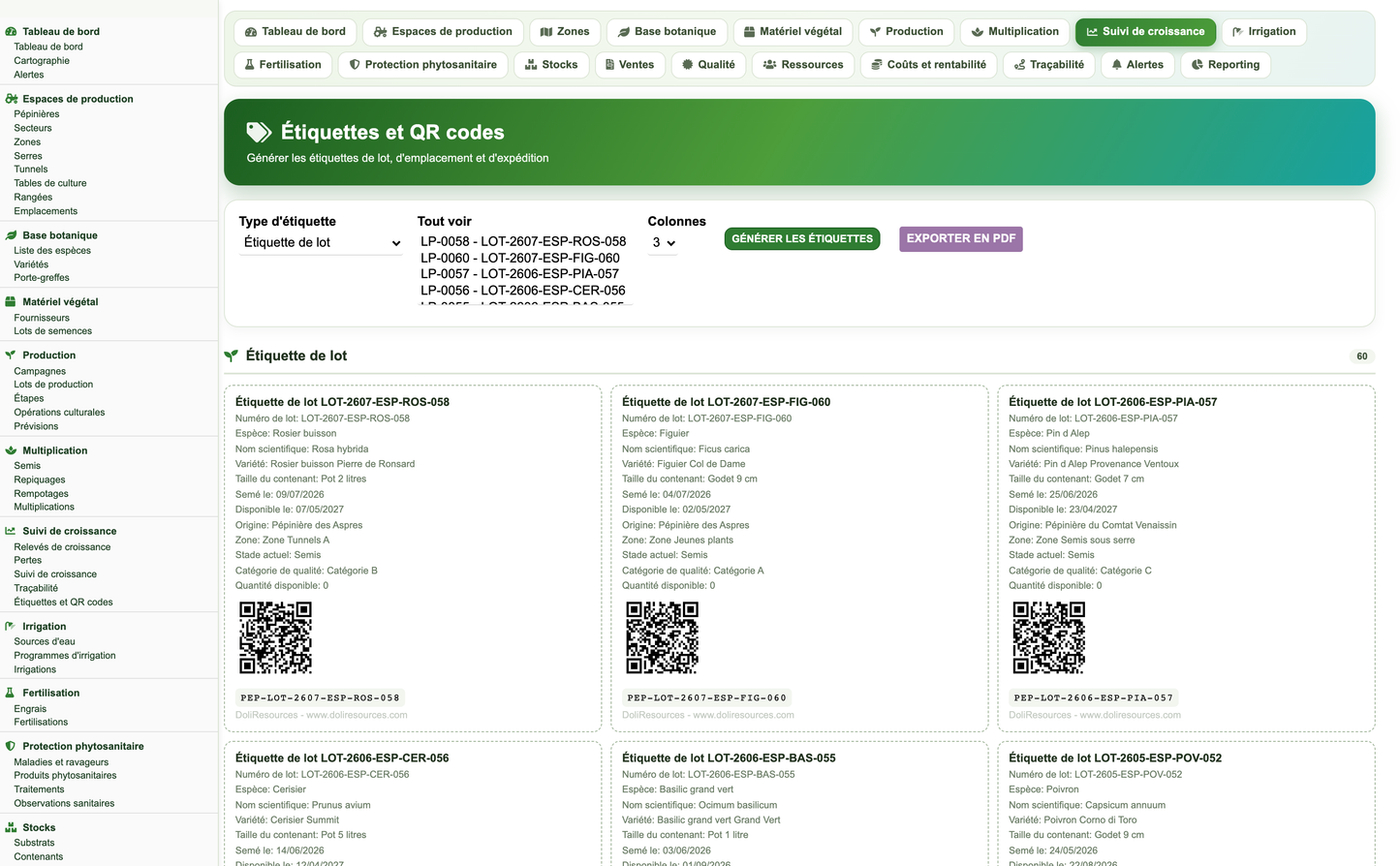
Every production batch and every shipment carries a QR code. The traceability screen opens either from the batch or directly from a scanned code, and rebuilds the whole chain in one page: upstream, the seed lot or plant material, its supplier, its lot number, origin and certificate; in the middle, the batch itself with every cultural operation, treatment, watering, feeding and consumed input recorded against it; downstream, the sales orders, the shipments, the plant passport numbers and the customers who received the plants.
The label generator prints production batch, growing position and shipment labels with an inline QR code and exports them as a PDF sheet. The QR matrix is built server-side and drawn as plain SVG rectangles: no image and no pixel is ever fetched from a remote service, so labels print identically on a nursery with no internet connection.
Alerts are persisted objects, not screen decorations. Each one carries its type, its severity, the date it was raised and the date it is due, the nursery, zone and batch concerned, a reference to the object that raised it, the message, the recommended action, the operator it is assigned to, its closing date and its status (open, acknowledged, in progress, resolved, closed).
A daily scheduled job recomputes the whole alert set, and the alert console can recompute it on demand. Thirteen situations are watched:
· Supplies below the alert threshold
· Seed lots close to expiry
· Germination rate below threshold
· Plant health observations above threshold
· Batches within pre-harvest interval
· Overdue crop operations
· Batches ready to market
· Orders to deliver
· Batches with abnormal loss rate
· Zones close to saturation
· Certifications to renew
· Equipment out of order
· Maintenance to schedule
The dashboard is the landing page of the module. It presents 40 indicators grouped into seven themed zones, the nine-stage production cycle with the number of batches standing in each stage and the current stage highlighted, the latest health observations, the supplies closest to their alert threshold, the alerts still to be handled, and ten charts. The number of rows shown in each dashboard table is a module setting.
Monthly charts are always built from a complete twelve-month axis ending on the current month, so a month with no activity is shown as an empty column instead of silently shifting the series.
The reporting engine publishes 14 cross-functional reports. Each report declares the filters it honours, so a filter that cannot apply to a report is never offered, and each report offers a status selector fed by its own controlled vocabulary. Rows, totals, indicator cards and charts are produced from the same raw result set and formatted in a single pass, so the screen, the CSV, the spreadsheet and the PDF can never drift apart.
Every report exports to four formats from the same screen. All fourteen reports support all four formats.
· Accented characters are decoded before they are written to CSV and PDF and escaped for the Excel and Word exports, so no export ever shows an HTML entity.
· Every export carries the report title, the period covered, the generation date, the row cap actually applied and the publisher line.
· The default reporting window covers the whole recorded campaign history, not the civil year, so a production cycle that straddles two years is never cut in half.
· The number of rows returned by a report is a module setting.
Permissions are organised into ten business groups plus reporting, demonstration-data management and administration, for a total of 33 rights. Each business group grants read, write and delete independently, so least privilege can genuinely be applied: an irrigation technician never sees the sales figures, and a salesperson cannot alter a plant-protection record.
Read and write are granted by default so the module is usable immediately after activation. Delete, demonstration-data management and administration are off by default and must be granted explicitly. Menu groups are hidden from users who do not hold the matching read right, and every page and every API route re-checks the right server-side.
The settings page is reached from Administration, Settings inside the module. It is reserved to Dolibarr administrators and is organised into seven sections: general settings, production cycle, irrigation, plant protection, stock and alerts, dashboard and reports. Every posted value is whitelisted and normalised before it is stored: a numeric setting can never be negative, and a list setting only accepts a code the vocabulary actually offers.
The general section additionally holds the default currency used by the cost and margin screens (PEPINIERE_DEFAULT_CURRENCY), which is initialised from the currency of the Dolibarr instance.
The settings page carries two buttons and a live counter of the demonstration rows currently present, counted straight from the module business tables.
The module declares a dependency on Third parties and Products and reuses the native objects rather than duplicating them. Where a nursery record points at a Dolibarr object, the list and card screens render it as the standard clickable Dolibarr link, with its own icon and its own tooltip.
The module publishes its own REST API under the /pepiniere/ prefix of the native Dolibarr API. Authentication uses the Dolibarr API key: the key is issued on the user record and sent on every call in the DOLAPIKEY header, exactly as for the native endpoints. Every route re-checks the caller's rights against the permission group of the object family it touches, and answers 401 when the caller is not authenticated, 403 when the right is missing, 404 when the object type or the record does not exist and 400 when a filter names a column that does not exist.
Generic routes cover reading and writing every one of the 50 object types; the named routes below are convenience shortcuts and computed views on top of them.
· Collection routes accept sortfield, sortorder, limit, page and an optional column:value filter; the sort and filter columns are whitelisted against the real table columns before they reach the SQL.
· Every result set is scoped to the caller's entity.
· The traceability route returns the whole chain of a batch in a single response: seed lot and supplier upstream, operations, treatments, waterings, feedings and consumed inputs in the middle, orders, shipments and customers downstream.
· Standard external module — installs into custom/ or as a ZIP through the module deployment screen; activation creates the tables, the menus and the rights and can seed the demonstration dataset.
· Self-healing schema — Dolibarr only ever creates tables, never alters them, so the module verifies its own schema at activation and adds any column introduced by a later version.
· No core modification — no native file is patched, renamed or overridden; removing the module leaves Dolibarr exactly as it was.
· Multi-entity — every query filters on getEntity('pepiniere'), so a multi-company installation keeps each entity's nurseries strictly separate.
· Responsive interface — list and card screens, the dashboard and the field-entry form adapt to tablet and phone widths; the field-entry form is built for large touch targets and works with gloves on.
· Offline-friendly — the map, the charts and the QR codes are rendered server-side; the module never contacts an external service, a tile server or a CDN.
· Every write action is protected by a CSRF token and every form issues a fresh one.
· Every posted setting is whitelisted and normalised before storage; a list setting only accepts a code the vocabulary offers, a numeric setting is clamped.
· Sort fields and filter columns arriving from the interface or the API are validated against the real columns of the table before they reach the SQL.
· Every page and every API route checks the permission of its own object family, server-side, in addition to the menu being hidden.
· Delete, demonstration-data management and administration rights are off by default.
· Output is escaped; codes are always rendered through their translated label and never printed raw.
· No hard-coded credential, no plain-text password, no outbound call to a third-party service.
The 79 vocabularies below are the closed lists the module offers on its selectors. Values are stored as stable codes and displayed through their translated label, which is what allows the same database to be read in five languages and keeps reports comparable from one season to the next.
The module ships in five languages: French, English, Spanish, Italian and German, with 1 488 translation keys per language. Not a single visible string is hard-coded in PHP or JavaScript.
· Every key is prefixed with Pep, so wording coming from another installed module can never overwrite the nursery vocabulary.
· The nursery labels are re-asserted after the page header is rendered, because rendering the header reloads the language files of the other active modules.
· The trade vocabulary itself — the 79 controlled lists — is translated key by key, so a report produced in Spanish reads as a Spanish nursery report, not as English codes.
One click installs a complete, coherent and entirely fictitious nursery business, so the module can be evaluated with populated screens, meaningful charts and non-empty reports from the first minute. A second click removes it, touching only the rows technically marked as demonstration data.
The dataset spans the whole functional scope: sowings, prickings out, pottings and propagation operations, cultural operations, waterings, fertiliser applications, plant-protection treatments and health observations, growth measurements and losses, stock movements and inventories, quality checks and certifications, operators, time entries, equipment and maintenance, customers, orders, shipments, purchases, cost entries and alerts.
· Every batch stage of the nine-stage cycle is populated, so the cycle strip on the dashboard is never empty.
· Every monthly series covers at least twelve months, so no chart is flat because the history is too short.
· Deliberate outliers are included — seed lots inside and past their expiry window, batches above the loss threshold, zones close to saturation, overdue operations, equipment out of order — so every alert can be seen working.
· All demonstration rows are tagged, which is what makes the removal exact.
All demonstration data is fictitious and provided for demonstration purposes only. Names, quantities, doses, thresholds and prices are illustrative and are not a technical recommendation.
This module is a management tool. It does not replace agronomic diagnosis, plant-protection prescription, or the regulatory obligations regarding plant passports and traceability.
The pre-harvest and re-entry intervals, doses, toxicity classes and marketing authorisation numbers recorded in the module are those entered by the user. It is the responsibility of the nursery to keep them aligned with the product labels and with the regulations in force in its own country, and to comply with the conditions of use of every plant-protection product it applies. The blocking of shipment during a pre-harvest interval is a configurable aid, not a legal guarantee.
The plant passport numbers, certificate numbers and traceability chains produced by the module reflect the data captured by the user. They do not constitute an official certification and do not discharge the operator from the registration, labelling, record-keeping and notification duties imposed by the plant-health authority of its territory.
Thresholds, reference prices and standard cycle lengths supplied as defaults are starting points for configuration, not agronomic or financial advice. The module is distributed under the GNU General Public License v3, without warranty of any kind, to the extent permitted by applicable law.
Nursery Management 1.0.0 — published by DoliResources
www.doliresources.com
Copyright © 2026 DoliResources · Document issued on 22 July 2026


