
Discover powerful Dolibarr extensions designed to automate your business processes
Nutrition Practice Management turns Dolibarr into a complete business solution for a nutrition practice. It covers the whole patient journey, from the...
Couldn't load pickup availability


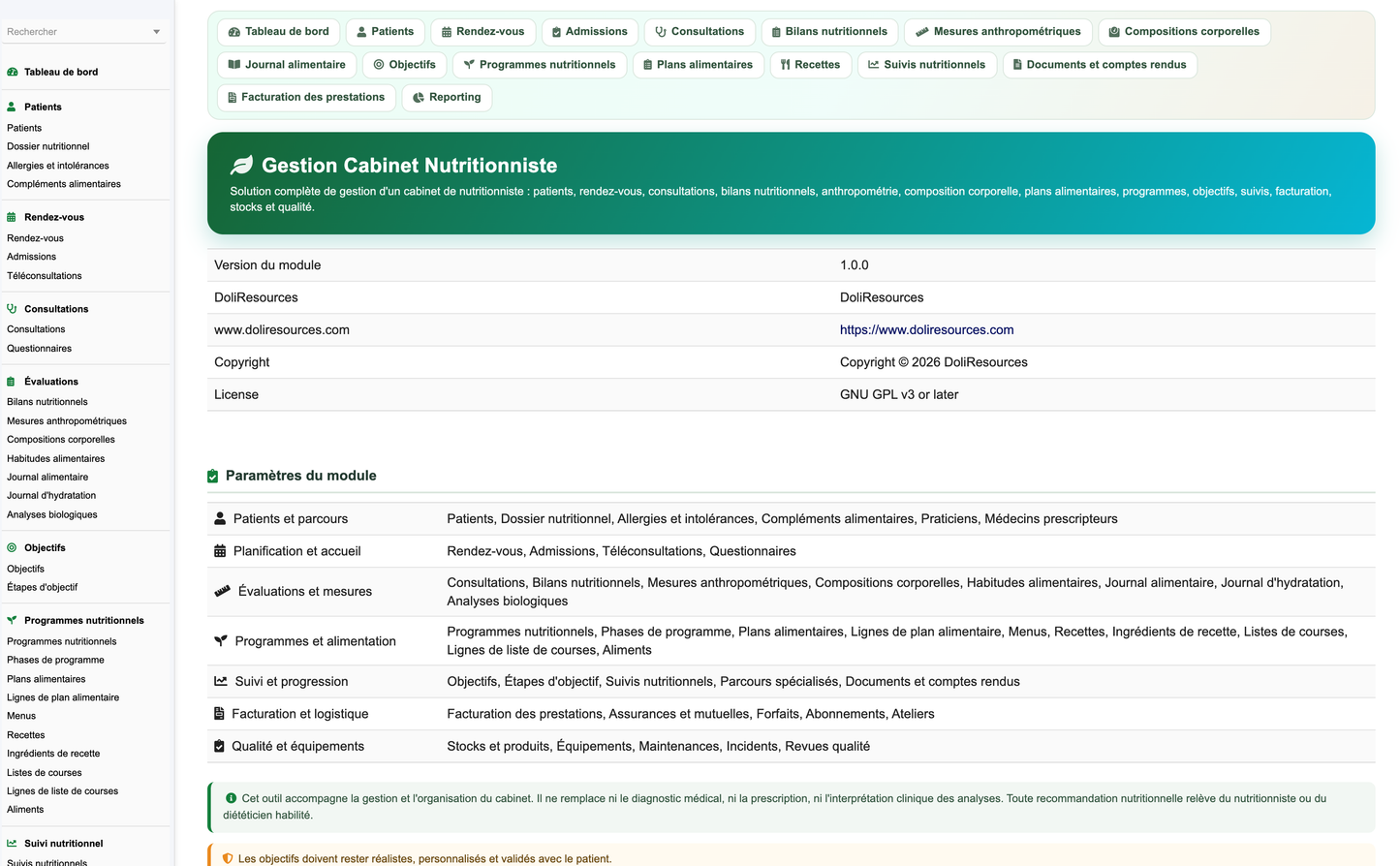
Nutrition Practice Management turns Dolibarr into a complete business solution for a nutrition practice. It covers the whole patient journey, from the first appointment request through assessment, goal setting, programme delivery, periodic follow-up and billing, and adds the administrative, commercial, logistical, quality and analytical layers a practice needs to run without a second piece of software.
· 43 business objects, 43 database tables and 46 PHP classes.
· 99 granular permissions across 30 functional groups, least privilege by default.
· Five languages: French, English, Spanish, Italian and German, 1 402 keys each.
· 215 REST endpoints across 43 resources, with per-group right enforcement.
· A decision-support dashboard with 45 indicators, a balanced-plate activity view and six charts.
· Fifteen reports with CSV, Excel and print exports.
· A demonstration dataset of 13 671 rows building a complete fictitious practice.
· Full integration with native Dolibarr third parties, products, stock, quotations, orders, invoices, payments, projects, agenda and document management.
The module is designed for independent nutritionists, dietitians, medical nutritionists, nutrition practices, dietetics centres, clinical nutrition units, dietary rebalancing centres, clinics with a nutrition service, prevention centres, multi-site practices, nutritionist networks and teleconsultation providers.
· Give the practitioner a single, structured patient record instead of scattered notes.
· Make longitudinal follow-up measurable: every measurement, goal and diary entry is dated and comparable.
· Shorten administrative time: admission, billing, insurance coverage and document production are one flow.
· Make the commercial side explicit: packages, subscriptions, session consumption and margins.
· Keep equipment, stock and quality traceable, as a health-adjacent practice requires.
· Provide management analytics without turning them into clinical conclusions.
The module is a management and organisation tool. This boundary is deliberate and is enforced throughout the interface and the generated documents.
· It never replaces medical diagnosis, therapeutic decisions, a physician's opinion or a prescription.
· It never interprets laboratory results: values are recorded for follow-up, and the clinical reading is left to the physician.
· It never assesses eating disorders and never handles urgent care or referral decisions.
· It produces no automatic diagnosis, no automatic supplement recommendation and no restrictive plan without explicit human validation.
· It promotes neither excessively restrictive diets, nor unrealistic weight targets, nor dehydration, nor unsupervised prolonged fasting, nor supplement overuse, nor guaranteed results.
· Wording throughout avoids stigmatising language about weight or appearance and focuses on health, balance, realistic progress and personalisation.
· Body composition screens state that values depend on the device used and must be interpreted by the professional.
· Teleconsultation screens warn when a physical measurement cannot be taken remotely.
Twenty-three professional profiles are supported through 30 permission groups. Read and write are granted on activation; delete, validation, signature, cost visibility, export and demonstration-data management stay off until an administrator grants them.
|
Profile |
Typical rights |
|
Administrator |
All groups plus admin |
|
Management |
Read all, reporting, costs, export |
|
Medical nutritionist |
Patients, records, consultations + validate, assessments, programmes + validate, documents + sign |
|
Nutritionist |
Patients, consultations, assessments, measurements, programmes, meal plans, goals, follow-ups |
|
Dietitian |
Same as nutritionist, usually without programme validation |
|
Associate nutritionist |
Own patient scope, no delete |
|
Locum practitioner |
Read plus write on consultations and follow-ups |
|
Nutrition assistant |
Measurements, body composition, diaries, admissions |
|
Nurse |
Measurements, laboratory results, admissions |
|
Partner psychologist |
Patients read, consultations, questionnaires |
|
Authorised coach |
Goals, follow-ups, diaries read |
|
Medical secretary |
Appointments, admissions, patients, documents |
|
Reception agent |
Appointments, admissions |
|
Billing manager |
Billing, packages, subscriptions, insurance |
|
Cashier |
Billing read and payment recording |
|
Insurance manager |
Insurance, billing, claims |
|
Stock manager |
Stock, supplier flows |
|
Quality manager |
Quality, incidents, reporting |
|
Biomedical technician |
Equipment, maintenance |
|
Accountant |
Billing read, costs, export |
|
External referring physician |
Referrer portal scope |
|
Patient via portal |
Own record, diaries, plans, documents |
|
Read-only user |
Read on the groups granted |
The dashboard is titled Nutrition Health Intelligence Center. Its centrepiece is a balanced-plate view: a plate seen from above whose slices are the practice's activity areas, each sized by its share of the current load and each linking to its list.
· Balanced plate with seven slices: consultations, assessments, goals, meal plans, follow-ups, programmes and billing, with a live legend and monthly total in the centre.
· Nine-step operational journey: appointment, initial assessment, evaluation, goals, programme, follow-up, adjustment, results, billing, each step a shortcut.
· Ten alert cards that appear only when they have something to report: overdue follow-ups, goals to review, meal plans to validate, documents to sign, subscriptions expiring, critical stock, products near expiry, maintenance due, open incidents, patients waiting.
· Forty-five indicators grouped into seven zones: scheduling, patients, assessments, nutrition, follow-up, back office, quality.
· Six charts: twelve-month activity, consultations by type, programmes by status, monthly revenue, patients by age band and specialised pathways by type.
· Palette drawn from the nutrition brief: natural green, mint, soft orange, light yellow, turquoise, white, light grey and natural beige, with dark green for positive results, orange for watch points, red for administrative alerts and violet for specific programmes.
· Every element respects the caller's permissions and is fully responsive.
The dashboard publishes 45 indicators. Ratio indicators use the same population on both sides of the ratio, and indicators whose basis is unknown are excluded rather than reported as zero.
|
Zone |
Indicators |
|
Scheduling |
Appointments today, consultations planned, patients on site, patients waiting, teleconsultations this month, average waiting time, average consultation duration, workshops this month |
|
Patients |
Active patients, new patients this month, first consultations, follow-up consultations, consultations completed, cancellation rate, no-show rate, patient satisfaction |
|
Assessments |
Assessments completed, measurements recorded, body composition records, laboratory results, food diaries completed, diary completion rate |
|
Nutrition |
Active programmes, completed programmes, goals in progress, goals reached, goals to review, meal plans to validate |
|
Follow-up |
Overdue follow-ups, average follow-ups per patient, average weight change, documents to sign |
|
Back office |
Revenue today, revenue this month, payments received, unpaid amounts, active subscriptions, subscriptions expiring, average cost per consultation, average margin per package |
|
Quality |
Critical stock, products near expiry, equipment available, maintenance due, open incidents |
The patient record is the hub of the module. It carries identity, contact, coverage, care context and anthropometric summary, and links to every other object.
· Internal reference, title, name, date of birth, administrative sex, identification number.
· Address, telephone, email, emergency contact, trusted person.
· General practitioner, referring physician, assigned practitioner, insurer, membership number.
· Occupation, work pattern, preferred language.
· Height, starting weight, latest weight, latest body mass index, care context.
· Minor flag with legal guardian, consent to care, consent to data processing, portal access.
· Status, first and last visit dates, consultation counter, free notes.
· Multi-criteria search on reference, name, date of birth, town, telephone, email, identification number, referrer, practitioner, insurer, care context and status.
· Column chooser and persistent filters on every list.
· The card shows a live cockpit: consultations, assessments, programmes, goals, diaries, allergies, latest weight and latest body mass index.
History items are recorded as typed, dated entries rather than free text, so they can be filtered, counted and carried into a consultation.
· Types: medical history, family history, surgical history, current treatment, reported digestive disorder, previous diet, previous programme, lifestyle, personal constraint, other.
· Each item carries a start date, an optional end date, an active flag, a severity and the source of the declaration (patient, practitioner, physician, legal guardian).
· Free detail and notes fields for context that does not fit a code.
Appointments cover every consultation type the practice offers, on any site, in any room, on site or remote.
· Types: first consultation, follow-up, anthropometric review, body composition, sports, paediatric, pregnancy, senior, post-operative, group session, teleconsultation.
· Eleven statuses: requested, to confirm, confirmed, reminder sent, patient arrived, waiting, in consultation, completed, no-show, cancelled, postponed.
· Duration, room, site, remote flag, reason, reminder flag, arrival time, waiting time, cancellation reason.
· Optional link to a subscription so a session is drawn from the patient's package.
· Filters by practitioner, room, type, status, patient and site.
Admission is the front-desk step between arrival and consultation, and it feeds the waiting list view.
· Identity check, coverage check, consent signature, pre-consultation form completion.
· Reason, room, arrival time and computed waiting time.
· Statuses: registered, waiting, in care, completed, left.
· The waiting list shows patient, scheduled time, arrival time, waiting time, consultation type, practitioner and status.
The consultation record captures what happened, what changed and what was decided, and it is the anchor for billing and documents.
· Fourteen types: first consultation, follow-up, dietary rebalancing, clinical nutrition, sports, paediatric, pregnancy, senior, post-operative, allergies and intolerances, digestive disorders, prevention, teleconsultation, group consultation.
· Reason, patient expectations, change since the last consultation, difficulties, achievements.
· Weight and body mass index recorded at the visit, linked programme, adjustments, advice.
· Documents handed over, next appointment date, amount excluding tax.
· Seven statuses: draft, in progress, to complete, to validate, validated, closed, cancelled.
· Validation is a separate permission, so recording and validating can be different people.
The initial assessment is a structured questionnaire covering everything the brief calls for, stored as coded fields so it can be compared over time and across a patient population.
· Main reason, expectations, reported weight history.
· Number of meals, meal times, reported snacking, daily water intake.
· Consumption frequency for fruit, vegetables, cereals, protein sources, dairy, processed products and sugary drinks, on a six-level scale.
· Reported caffeine per day and reported alcohol units per week, suppressed for minors and pregnancy.
· Preferences, aversions, cultural constraints, food budget level, kitchen equipment, available cooking time.
· Reported sleep duration, activity level, stress level, digestion and transit.
· A professional synthesis field, explicitly for human judgement.
· The module never generates a diagnosis from this assessment.
Measurements are historised so they can be compared, charted and exported. The focus is health progress, never appearance.
· Weight, height, computed body mass index.
· Waist, hip, arm, thigh, chest and neck circumferences, plus the computed waist-to-hip ratio.
· Date and time, practitioner, equipment used, measurement conditions, observations.
· Correction is possible and traced through the measurement status.
· Series are exportable and chartable by period.
Body composition records are stored alongside the device that produced them, because the values are device-dependent.
· Weight, fat mass in kilograms and percent, lean mass, muscle mass, body water percent, visceral fat index, bone mass.
· Basal metabolic rate and metabolic age as reported by the device.
· Device model, serial number, operator, measurement conditions.
· Every screen states that values depend on the equipment and must be interpreted by the professional.
Longitudinal charts are built from the measurement series and the follow-up records.
· Weight, body mass index, waist circumference, fat mass, muscle mass and hydration over time.
· Goal progression, consultation frequency and diary completion.
· Period comparison and period filtering.
· Print, PDF and Excel output; patient-portal display subject to authorisation.
· Representations deliberately avoid framing that would add appearance pressure.
A dated habits sheet, kept as a series so change over time is visible.
· Number of meals, meal duration, meal location, eating alone or not.
· Share of home-cooked meals, meals eaten out per week.
· Reported snacking, hunger level, satiety level, eating speed.
· Daily water intake, preferences, aversions.
· Current and previous records are distinguished so two points in time can be compared.
The diary can be filled by the patient through the portal or by the professional, and every entry records its own origin.
· Date and time, meal type, description, linked food or recipe, declared quantity and unit.
· Place, context, hunger before, satiety after, reported mood.
· Entry source: patient portal, entered at the practice, reported by phone, imported.
· Patient validation flag and a separate practitioner comment.
· Statuses: draft, submitted by patient, reviewed, commented, archived.
· Weekly synthesis and a completion rate that counts only patients who were asked to keep a diary.
· Calorie counting stays optional and is shown only when the professional enables it.
A lightweight companion to the food diary, focused on daily intake.
· Date and time, drink type, volume in millilitres.
· Daily target and computed daily total.
· Entry source, free comment.
· Weekly tracking and charting; portal display for the patient.
A configurable reference table used by recipes, meal plans and shopping lists.
· Code, name, food group, description, reference portion and unit.
· Optional nutrition values per 100 g: energy, protein, carbohydrate, fat, fibre.
· Allergen group, data source, last update date, status.
· Fifteen groups: fruit, vegetables, cereals and starches, pulses, meat, fish and seafood, eggs, dairy, fats and oils, nuts and seeds, drinks, prepared foods, sweet products, herbs and condiments, other.
· Import, export, activation and archiving; per-entity customisation.
Allergen management is a first-class concern and is surfaced wherever food is selected.
· Four kinds: food allergy, reported intolerance, reported sensitivity, medically advised exclusion.
· Seventeen allergen groups, from gluten and lactose to lupin and sulphites.
· Foods concerned, declaration date, source of declaration, recorded vigilance level, medical confirmation flag, supporting document.
· Alerts are raised when adding a food, building a recipe, composing a meal plan and generating a shopping list.
· The module flags known incompatibilities; final validation remains with the professional.
A recipe library with ingredient lines drawn from the food database.
· Reference, title, category, description, portions, preparation and cooking time, difficulty.
· Ingredient lines with quantity, unit, order, optional flag and a substitute suggestion.
· Equipment needed, allergen group, alternatives, preparation steps, advice, optional energy per portion.
· Author, language, status.
· Duplication, portion scaling, assignment to a programme or a menu, print, PDF export, portal sharing.
Meal plans are versioned documents, locked once given to the patient.
· Reference, patient, practitioner, programme, period, objective, context.
· Number of meals, indicative meal times, hydration target, exclusions, advice.
· Detail lines per day and per meal, each linking a food or a recipe with quantity, unit and an alternative.
· Eight statuses: draft, to validate, validated, given to patient, in progress, revised, completed, archived.
· Version number, date given, lock flag; validation is a separate permission.
· No restrictive plan is ever generated automatically.
A programme is the container that ties consultations, plans, goals, diaries and follow-ups into one accompanied journey.
· Twelve configurable types, from dietary rebalancing and metabolic prevention to sports, competition preparation, pregnancy, post-partum, paediatric, senior, post-operative, digestive, allergy and fully personalised programmes.
· Six phases: assessment, set-up, adaptation, consolidation, autonomy, closing, each with its own window, objective and session count.
· Duration in weeks, current phase, main objective, progress percentage, diary completion.
· Counters for consultations and meal plans, optional link to a commercial package.
· Template flag so a programme can be reused as a model.
· Seven statuses: draft, to validate, active, paused, completed, stopped early, archived.
Goals are explicit, measurable and agreed with the patient.
· Nine families: health, nutrition, behaviour, organisation, sports, hydration, regularity, meal preparation and personalised.
· Thirteen tracked indicators, from body weight and waist circumference to vegetable servings, daily water intake and diary completion.
· Start value, target value, current value, unit and computed progress.
· Start date, target date, priority, owner and an explicit agreed-with-patient flag.
· Steps with their own order, target date, completion date and status.
· Nine statuses: proposed, agreed, in progress, to review, reached, partly reached, paused, abandoned, closed.
· Goals must stay realistic, personalised and agreed with the patient; the interface says so.
Menus organise meals over a period, for one patient or a family.
· Scopes: daily, weekly, monthly, by programme, by patient, by family, by objective, by season and custom.
· Breakfast, morning snack, lunch, afternoon snack, dinner and drinks.
· Season, start date, number of days, number of people.
· Link to a meal plan, allergen checking, duplication, export and print.
Shopping lists are generated from a meal plan or a menu, or built by hand.
· Source plan or menu, period, number of days, number of people, item count.
· Lines grouped by food group, with quantity, unit, tick box and a substitute suggestion.
· Excluded allergens carried from the patient record.
· Statuses: draft, generated, given to patient, used, archived.
· PDF export, print, and patient-portal access.
Results are recorded for follow-up. The module never interprets them.
· Ten families: glycaemic, lipid, liver, kidney, vitamins, minerals, inflammatory markers, thyroid, iron status and other.
· Test label, date, laboratory, value, unit, supplied reference bounds, source document.
· Statuses: requested, sample collected, result received, reviewed, archived.
· A practitioner comment and a follow-up plan can be attached.
· Every screen states that clinical interpretation is a matter for the physician.
Specialised pathways structure long-running accompaniment without turning the module into a diagnostic tool.
· Twenty-two configurable pathways, including diabetes, prediabetes, lipid disorders, blood pressure, metabolic syndrome, digestive disorders, allergies, undernutrition, renal, hepatic and cardiovascular follow-up, oncology nutrition support, post-operative and bariatric follow-up, and fully personalised pathways.
· Each pathway tracks consultations, laboratory results, measurements, goals, programmes, diaries, documents, the professionals involved and the next check date.
· Coordination notes record what was shared with the treating physician.
· Statuses: open, active, close monitoring, stable, closed.
A dedicated pathway for athletes, without promoting extreme practices.
· Discipline, training hours per week, competition calendar context.
· Goals, habits, hydration, recovery, sleep and body composition tracking.
· Diaries, meal plans and declared supplements.
· The module never recommends supplements or extreme practices automatically.
An age-appropriate pathway, with the safeguards a paediatric context requires.
· Child record with legal guardians and a minor flag.
· Growth data through the measurement series, habits, meals, preferences.
· Allergies and intolerances, reported activity, family environment.
· Health goals, documents, follow-up.
· Wording avoids guilt-inducing and appearance-centred language; care stays age-appropriate and validated by the professional.
A pathway covering pregnancy and the post-partum period.
· Reported week of pregnancy, history, laboratory results, habits.
· Reported nausea, digestion and hydration.
· Prescribed or declared supplements, goals, follow-up, documents.
· Coordination with the physician or midwife is recorded.
· The module never generates a prescription.
A pathway adapted to older patients and their carers.
· Autonomy and mobility context, appetite, hydration.
· Reported chewing and swallowing difficulty, food texture (normal, soft, minced, pureed, liquid, thickened drinks).
· Treatments, carers, delivered meals, weight tracking, recorded risks.
· Goals, documents and coordination.
Pathways for digestive, bariatric and general surgery, plus configurable others.
· Surgery date, surgery type, establishment and report reference.
· Dietary phase and food texture, reported tolerance, hydration.
· Prescribed supplements, laboratory results, measurements, symptoms.
· Appointments, goals, documents, incidents and evolution.
· Every recommendation is validated by the professional.
Supplements are recorded, never recommended automatically.
· Product, brand, dosage form, declared dose, frequency, start and end dates.
· Origin is explicit: prescribed by a practitioner, advised at the practice, sold at the practice, or reported by the patient.
· Prescriber, reason, lot number, reported effect, stop reason.
· Statuses: ongoing, planned, stopped, completed.
Sixteen document types cover everything the practice hands out or sends.
· Consultation report, initial assessment report, follow-up report, meal plan, menu, shopping list, recipe sheet, hydration sheet, goal sheet, advice sheet, letter to physician, follow-up certificate, attendance certificate, programme summary, final report and educational sheet.
· Dynamic variables, recipient, body, version number.
· Signature and lock flags; signature is a separate permission.
· Seven statuses: draft, to proofread, to validate, validated, signed, sent, archived.
· PDF generation through a dedicated model, with the management disclaimer on every page.
Remote consultations are first-class records, linked to the consultation they realise.
· Scheduling, consent capture, pre-consultation form.
· External video meeting link, document reception flag, declared weight.
· Duration, platform, connection quality.
· An explicit on-site-visit-required flag, plus a standing warning that some physical measurements cannot be taken remotely.
· Statuses: scheduled, completed, cancelled, technical failure.
· Linked report, programme, documents, invoice and payment.
Portal access is a per-patient opt-in and is bounded by permissions.
· Consult appointments and confirm or cancel within the practice's rules.
· Consult programmes, meal plans and menus; download recipes and shopping lists.
· Fill in the food diary, the hydration diary and the authorised measurements.
· Track goals and view the authorised charts.
· Upload laboratory results and download reports.
· Consult invoices, payments and remaining package sessions.
· Receive reminders, send an administrative request, update selected contact details.
· The patient can only modify what the permissions allow.
Referring physicians get a bounded view of the patients they sent.
· Send a request and attach documents.
· Consult the authorised reports and the authorised progress.
· Download documents and send a secure message.
· Track the status of the request.
· Portal access is a per-referrer flag.
A configurable questionnaire engine for the recurring themes of a nutrition practice.
· Nine templates: eating habits, hydration, reported activity, sleep, digestion, meal organisation, satisfaction, programme follow-up and pre-consultation form.
· Question count, answered count, simple score against a maximum, stored answers.
· Version number and history.
· Statuses: sent, partly answered, answered, reviewed, archived.
· Questionnaires never produce a diagnosis.
Commercial offers are modelled explicitly, with real costs so margin is meaningful.
· Ten offer types: single consultation, consultation pack, three-month programme, six-month programme, annual follow-up, monthly subscription, teleconsultation offer, family programme, company programme and workshop pass.
· Number of sessions, duration in months, services included, documents included.
· Price excluding tax, VAT rate, cost excluding tax, conditions, status.
· Margin reporting excludes packages with no recorded cost rather than reporting a 100 percent margin.
A subscription is a patient's instance of a package, with session accounting.
· Start and end dates, sessions included, sessions used, sessions remaining.
· Amount, amount paid, payment plan, automatic renewal flag, renewal date.
· Six statuses: active, expiring soon, expired, suspended, renewed, cancelled.
· Alerts fire before expiry and when sessions are nearly exhausted.
· An appointment can draw a session from the subscription.
Group sessions and company interventions, with attendance and satisfaction.
· Seven themes: nutrition, cooking, label reading, prevention, sports education, follow-up group and company session.
· Title, facilitator, date, duration, place, capacity.
· Registrations, attendance, price, satisfaction score.
· Statuses: planned, registration open, fully booked, completed, cancelled.
· Documents and invoicing attach to the workshop.
Insurers, complementary health funds and payer organisations, with their agreements.
· Five organisation types: statutory health insurance, complementary health fund, private insurer, company scheme, international insurer.
· Coverage rate, ceiling amount, sessions covered per year, direct-billing flag.
· Agreement reference, validity period, contact, required documents.
· Per service: organisation, membership number, patient, service, covered amount, patient share, claim status and supporting documents.
· Claim statuses: not applicable, submitted, accepted, rejected, under appeal.
Billing lines are derived from real activity and link back to everything that produced them.
· Twelve service types, from consultation and nutrition assessment to body composition, programme, package, subscription, teleconsultation, workshop, custom document, product and supplement sales.
· Amount excluding tax, VAT rate, amount including tax, covered amount, patient share, amount paid.
· Six payment methods: cash, card, cheque, bank transfer, direct billing, online payment.
· Six statuses: draft, issued, partly paid, paid, unpaid, credit note.
· Each line links to the patient, the consultation, the programme, the subscription, the workshop, the insurer and the native Dolibarr invoice.
· Native Dolibarr quotations, customer orders, customer invoices, payments, banks and accounting remain the system of record for the financial flow.
Stock covers everything a nutrition practice holds, sells or consumes.
· Eight families: food supplement, nutritional product, demonstration food, educational material, book, measurement kit, consumable, hygiene consumable.
· Brand, lot number, expiry date, quantity on hand, minimum and maximum, unit.
· Unit cost and unit price, warehouse, supplier, monthly quantity sold.
· Statuses: normal, low stock, critical, near expiry, expired.
· Optional link to a native Dolibarr product so stock movements, lots and serial numbers stay in the native modules.
Purchasing is handled through the native Dolibarr supplier flow, linked from the stock record.
· Suppliers, supplier orders, receptions, supplier invoices and supplier payments.
· Purchase requests, orders, receptions, lot and expiry checking.
· Order, reception and invoice reconciliation, returns and claims.
Every measuring and office device is tracked, because measurement quality depends on it.
· Twelve types: scale, paediatric scale, bioimpedance analyser, body composition analyser, stadiometer, measuring tape, skinfold caliper, blood pressure monitor, workstation, tablet, telemedicine kit, workshop equipment.
· Manufacturer, model, serial number, site, room.
· Installation and commissioning dates, supplier, warranty end, contract reference, purchase cost.
· Next calibration date, measurement counter, breakdown counter, downtime hours.
· Statuses: available, in use, under maintenance, out of order, retired.
Preventive, corrective, control and calibration operations, with their cost and impact.
· Planned and completion dates, provider, technician, parts used.
· Cost excluding tax, downtime hours, and a flag that makes the equipment unavailable in the schedule.
· Statuses: planned, in progress, completed, overdue, cancelled.
· Aggregates: breakdown count, downtime, maintenance cost and completion rate.
Quality reviews and patient satisfaction, measured rather than asserted.
· Five review types: audit, control, patient satisfaction, procedure review, non-conformity review.
· Scope, auditor, checks performed, non-conformities found, satisfaction score, conformity rate, corrective action, next review date.
· The conformity rate is computed from the same population of checks on both sides of the ratio.
Incident reporting covering the practice's real risk surface.
· Seven types: patient-related, equipment-related, documentation, allergen management, hygiene, organisational, data security.
· Date, reporter, linked patient, consultation, programme, equipment or stock item.
· Description, severity, immediate action, root cause analysis, owner, due date, closing date.
· Statuses: open, under analysis, action in progress, closed.
Fifteen reports, each with a twelve-month period filter, a chart and a data table, exportable to CSV and Excel or printed.
|
Report |
Content |
|
Activity |
Consultations, appointments, follow-ups, teleconsultations and assessments per month |
|
Patients |
Population by care context, with consultation count and average body mass index |
|
Assessments |
Assessments, measurements, body composition and laboratory results per month |
|
Programmes |
Programmes by type with progress, duration and goals reached |
|
Diaries |
Food and hydration entries, completion rate and adherence per month |
|
Pathways |
Specialised pathways by type, consultation load and active count |
|
Teleconsultations |
Volume by status, duration and connection quality |
|
Workshops |
Sessions by theme, registrations, attendance and satisfaction |
|
Billing |
Amount, paid, unpaid and line count per month |
|
Insurance |
Coverage and patient share by organisation, with accepted claims |
|
Packages |
Active subscriptions, sessions used and margin per package |
|
Stock |
Quantities, minimums, monthly sales, expiry and status |
|
Equipment |
Measurements, breakdowns, downtime and status |
|
Quality |
Incidents by type, open count and severity |
|
Profitability |
Consultations, revenue, average and duration per practitioner |
The analytical layer is deliberately framed as management insight, never as clinical conclusion or promise of result.
· Activity and appointment forecasting from the twelve-month series.
· Cancellation, no-show and waiting-time analysis.
· Load per practitioner and average number of follow-ups per patient.
· Programme evolution, renewal rate, diary completion and goal progression.
· Package utilisation, stock forecasting, cost and margin analysis.
· Profitability by service and by programme, maintenance forecasting, patient satisfaction.
· None of these analyses is ever presented as a diagnosis, a prescription or a guaranteed outcome.
Alerts appear on the dashboard only when they have something to report, and are also produced daily by a scheduled job.
· Unconfirmed appointments, patients waiting too long, incomplete questionnaires.
· Assessments to complete, programmes to validate, meal plans to hand over, unfilled diaries, goals to review, overdue follow-ups.
· Subscriptions near expiry, sessions nearly exhausted, late payments, unsigned documents.
· Low stock, products near expiry, unavailable equipment, upcoming maintenance, open incidents, expired insurance agreements.
· Channels: Dolibarr notification, email, agenda, SMS when configured, and webhook.
A secured REST API exposes all 43 resources, with per-group permission enforcement.
· 215 endpoints: list, get, create, update and delete for each of the 43 resources.
· Authentication by API key; the authenticated caller is resolved through the Dolibarr API access layer, never the global user.
· Pagination, sorting and universal SQL filters on every list endpoint.
· Sort fields are whitelisted against the real table columns before reaching the query.
· Structured errors: 401 for missing or insufficient rights, 404 for unknown resource or record, 500 for persistence failure.
· Verified end to end: create, read back, update, read back, delete, and 404 afterwards.
Security controls follow Dolibarr conventions and add health-data-specific handling.
· CSRF tokens on every form; XSS escaping on every output; escaped values and whitelisted identifiers in every query.
· Typed input reading, per-page access guards and per-object right checks.
· Multi-entity partitioning on every query.
· Validated documents and meal plans are locked against further edits.
· An audit trail records user, date, action, object and label for every create, modify and delete.
· Exports require an explicit export permission.
· Consent to care and to data processing are recorded per patient; minors carry a legal guardian.
· Portal access is opt-in per patient; diary entries record their own origin.
· No patient-identifying value is written to the technical log.
The setup page carries a Demonstration data sets section with two actions: Load the demonstration data and Clear the demonstration data.
· 13 671 rows across all 43 tables, with no table left empty.
· 10 practitioners, 10 referring physicians, 6 insurers, 10 packages, 120 patients, 65 foods, 26 recipes, 16 equipment items and 25 stock items, plus the full clinical, programme, follow-up, document, commercial and quality history.
· Twelve months of history for every series that feeds a monthly chart, and a cohort dated today so every daily indicator is populated.
· Plausible rates rather than perfect ones: 11.2 percent cancellation, 5.0 percent no-show, 8.3 out of 10 satisfaction, 64 percent diary completion, 55.1 percent average margin.
· All data is clearly fictitious and labelled as such.
· Clearing removes only rows tagged with the demonstration marker, cascades onto children created under a demonstration parent, runs inside a transaction, reports what it deleted and never touches real records.
The module installs like any Dolibarr external module and needs no core modification.
· Upload module_nutritionpractice-1.0.zip through Home, Setup, Modules, Deploy an external module, then enable Gestion Cabinet Nutritionniste in the Health family.
· Or unzip into htdocs/custom and enable it from the modules page.
· Activation creates 43 tables and their indexes, inserts 99 rights, 60 menu entries and the module constants, self-heals the schema and seeds the demonstration dataset.
· Requires the Third parties and Products modules.
· Dolibarr 16 minimum, tested on 17.0.3, targets 18 through 23; PHP 8 recommended.
The delivery folder NutritionPractice_DoliResources_1.0 contains the following.
|
File |
Content |
|
module_nutritionpractice-1.0.zip |
The installable module, containing nutritionpractice/ at the root |
|
screenshots/ |
63 interface screenshots at 3200 by 1980 pixels |
|
Nutrition_Practice_User_Training_Manual_FR.pdf |
Illustrated French user and training manual |
|
Nutrition_Practice_Complete_Features_EN.docx |
This functional documentation |
|
Nutrition_Practice_Technical_Documentation_EN.md |
Architecture, data model, API, security and extension points |
Nutrition Practice Management is published by DoliResources, a publisher of business solutions for Dolibarr ERP and CRM.
DoliResources — www.doliresources.com
Copyright © 2026 DoliResources. All rights reserved. Distributed under the GNU General Public License, version 3 or later.


