
Discover powerful Dolibarr extensions designed to automate your business processes
Omnichannel E-commerce Management (technical name: ecommerceomnicanal) turns Dolibarr into a professional omnichannel e-commerce platform. A company can run its...
Couldn't load pickup availability


Omnichannel E-commerce Management (technical name: ecommerceomnicanal) turns Dolibarr into a professional omnichannel e-commerce platform. A company can run its entire online-commerce business from Dolibarr — online shop, marketplaces, commercial social networks, physical stores and mobile applications — without any external software.
It covers the full cycle: customer acquisition → product catalog → omnichannel order → preparation → shipment → delivery → invoicing → loyalty → performance analysis.
The module follows the official Dolibarr module architecture and is installed like a native module in htdocs/custom/ecommerceomnicanal/.
· Module descriptor: core/modules/modEcommerceOmnicanal.class.php (unique id 512800).
· 16 business objects, each with its own SQL table (llx_eom_*), CommonObject class, generic list & card pages.
· Shared generic engine: objectlist.inc.php / objectcard.inc.php (search, column selector, hub cockpits, linked records).
· Dashboard (dashboard.php) and decisional reporting (reporting.php) built on Dolibarr's DolGraph charts.
· Helper library lib/ecommerceomnicanal.lib.php, in-page navigation lib/ecommerceomnicanal_menu.php.
· Demo data generator class/ecommerceomnicanalsampledata.class.php (install & purge).
· Self-healing schema (ensureSchema) and safe re-activation (delete_menus at init).
· Security: per-domain Dolibarr permissions, SQL escaping, entity multi-company support.
The module builds on and enriches native modules: Third parties, Products, Stocks, Orders, Invoices, Shipments, Projects, Agenda, Users & permissions. Sales channels and orders link to native third parties; the customer 360° record links to the native Societe; products can reference native Dolibarr products (reference, SKU, barcode, price, VAT).
A modern strategic dashboard, distinct from the classic Dolibarr home, using a digital-commerce charter (blue / violet / green gradients, rounded KPI cards, modern icons).
· KPIs: total revenue, revenue today, revenue this month, number of orders, average basket, commercial margin, conversion rate, products sold.
· Orders-by-status board covering the full lifecycle.
· Interactive charts: revenue evolution (12 months), revenue by channel, top products, customer segmentation.
· Second-level KPIs: active/new/VIP customers, active campaigns, critical stock, shipments in progress, open returns, abandoned carts.
Manage every commercial touchpoint from one place.
· Web shop, marketplaces (Amazon, eBay, Etsy…), social networks (Facebook, Instagram, TikTok, WhatsApp), physical stores, mobile apps.
· Per channel: name, type, platform, URL, API key, manager, last synchronization, number of orders, revenue.
A centralized omnichannel catalog.
· SKU, barcode, brand, collection, category, sale/cost price, VAT, stock, weight.
· Short & long descriptions, image, SEO title and keywords.
· Multichannel publishing, product variants (size/color/model/material) and bundles/packs.
All orders regardless of the originating channel.
· Order number, channel, customer, items, payment, shipping, status.
· Lifecycle: new, confirmed, preparing, prepared, shipped, delivered, returned, cancelled.
· Order lines, automatic links to channel and third party.
Cart tracking and conversion analysis.
· Abandoned / active / converted carts, viewed products, recovery flag.
· Feeds the dashboard conversion-rate KPI.
An enriched customer record with a full omnichannel view.
· Profile, purchases, channels used, last interaction, customer value.
· Segmentation: new, loyal, VIP, dormant, prospect.
· Loyalty: level, points, score. Linked to the native Dolibarr third party.
A complete marketing space.
· Promotions: promo codes, percentage/amount discounts, validity, conditions.
· Campaigns: email, SMS, notifications, social — with sends, opens, clicks, orders, revenue and ROI.
· Loyalty program: rewards and customer tiers (Bronze, Silver, Gold, Platinum).
· Intelligent automations (cart recovery, low-stock alert, welcome email, dormant reactivation…).
Omnichannel stock across sites.
· Stock per site: shop, store, warehouse, marketplace.
· Available / reserved quantities, alert threshold, location, last movement.
Shipping, returns and payments.
· Shipments: carrier, tracking, zone, cost, status.
· Returns: request, inspection, refund/replacement.
· Payments: card, cash on delivery, transfer, wallet, marketplace — received/pending/refunded.
A reporting suite for decision-making.
· Reports: sales, top products, customers, stock, channels, finance.
· CSV export and printing (PDF via print).
A dedicated configuration page.
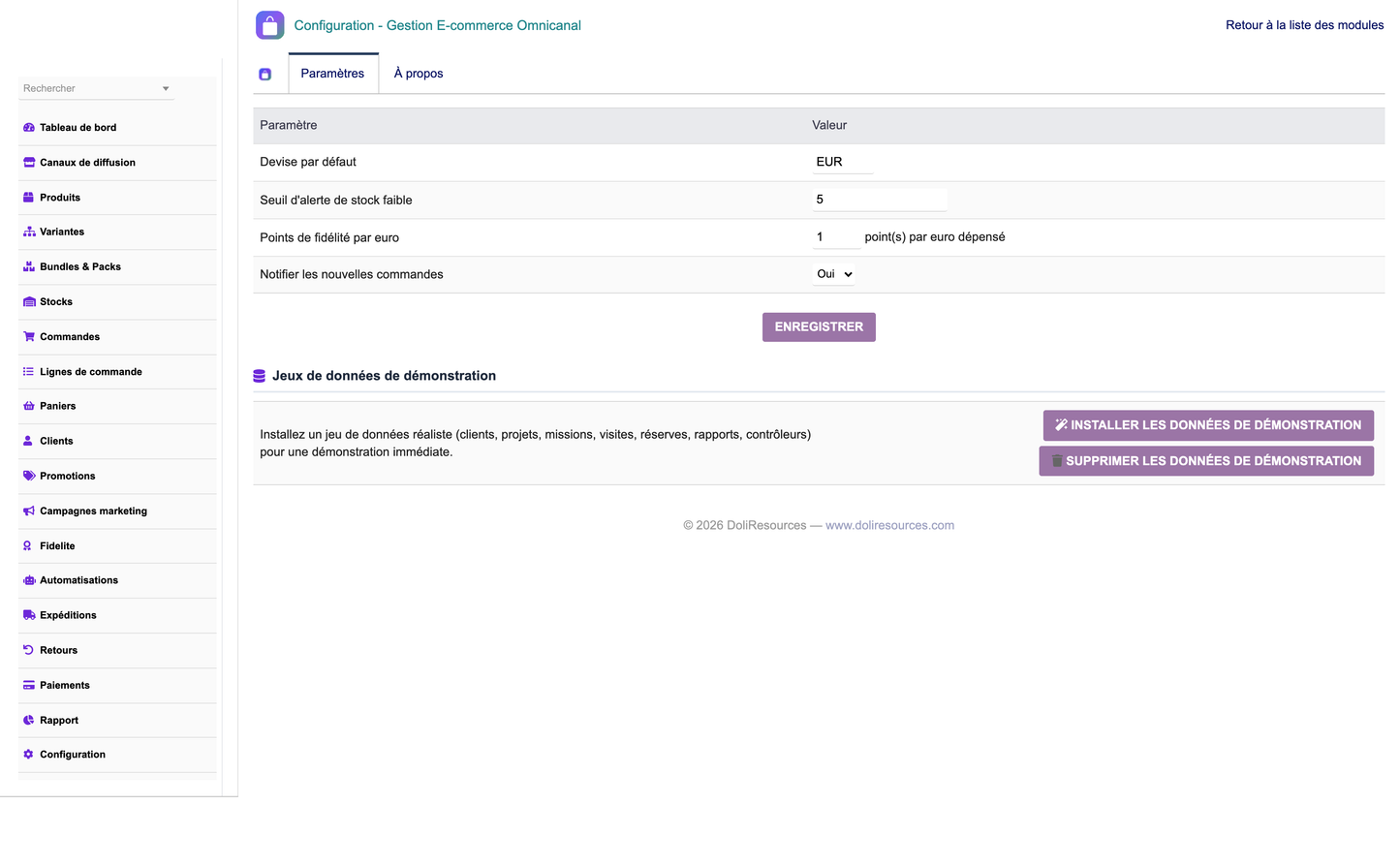
· General settings: currency, low-stock threshold, loyalty points per euro, notifications.
· One-click demo dataset creation and removal (removes only module-created data).
· Per-domain permissions.
The module ships 16 business objects, each with list, card, search, column selector and status management:
· Sales channels
· Products (catalog)
· Product variants
· Bundles & packs
· Omnichannel orders
· Order lines
· Carts
· Customers 360°
· Promotions
· Marketing campaigns
· Loyalty rewards
· Multi-site stock
· Shipments
· Returns
· Payments
· Automations
· Copy the ecommerceomnicanal folder into htdocs/custom/.
· Enable the module from Home → Setup → Modules → Omnichannel E-commerce Management.
· Tables, menus, permissions and demo data are created automatically at activation.
Grant per-domain rights (read/write/delete) to user groups: channels, catalog, orders, customers, marketing, stock, logistics and reporting.
From the module setup page, use ‘Install demo data’ to generate a realistic dataset and ‘Remove demo data’ to clean only the data created by the module.
The module ships translations for French, English, Spanish, Italian and German.
· Dolibarr >= 16.0
· PHP >= 7.1 (PHP 8.x compatible)
© 2026 DoliResources — www.doliresources.com


