
Discover powerful Dolibarr extensions designed to automate your business processes


1. Overview
OPC Project Management Pro transforms Dolibarr ERP/CRM into a complete OPC platform (Ordonnancement, Pilotage et Coordination — Scheduling, Steering and Coordination) dedicated to construction, infrastructure, building and civil-engineering projects. It covers the full scope of work of an OPC firm, a project owner (MOA), a project supervisor (MOE) or an engineering office, from the master schedule down to the lifting of the last reserve.
The module is designed as a real-time "Construction Control Center": a single platform where the OPC manager schedules the works, steers operations, coordinates the intervening companies, tracks progress and delays, manages reserves, risks and documents, and reports to every stakeholder — without any third-party software.
Premium design — Construction Control Center
The interface follows a construction-grade visual charter built around four colours: Technical Blue, Site Orange, Concrete Grey and Progress Green. It offers dynamic cards, an interactive timeline, visual progress bars, intelligent alerts and a real-time project view.
2. OPC Dashboard — Construction Control Center
The dashboard is inspired by the control rooms of large infrastructure projects. Its central real-time view exposes, at a glance, the health of the whole portfolio:
· Global progress (%) — weighted average completion of the portfolio
· Active lots — technical lots currently in progress
· Detected delays — lots, tasks and milestones running late
· Reached / late milestones — contractual, technical and financial milestones
· Open / lifted reserves — snags under treatment vs. cleared
· Pending actions — actions and decisions awaiting completion
Strategic KPI zones
Beyond the central view, the dashboard groups the strategic indicators into four steering zones:
· Project steering — global progress, open tasks, completed tasks, realization rate.
· Coordination — intervening companies, meetings held, open and closed actions.
· Worksite — lots in progress, completed lots, late lots, open reserves.
· Financial performance — forecast budget, consumed budget, budget gap, unpaid invoices.
Charts
The dashboard embeds interactive charts: lots distribution, reserves evolution (opened vs. lifted), progress by lot and company workload. The reporting hub additionally provides the progress curve, the project S-curve, the delays evolution and the risks evolution.
3. OPC Projects & Technical Lots
OPC projects
Each project records the full contractual context: reference, name, client, project owner (MOA), project supervisor (MOE), responsible OPC manager and location, together with the operational data: surface, forecast budget, consumed budget, start and end dates, phase and progress. A project can be linked to a native Dolibarr project for accounting and time-tracking continuity.
Technical lots
Projects are broken down into the standard technical lots of a construction operation: structural works (gros œuvre), VRD (roads & utilities), electricity, plumbing, HVAC, architecture and finishing works. Each lot carries its titular company, its responsible, its amount, its planning and its progress, and automatically surfaces its delay in days.
4. Master Schedule & Detailed Schedule
Master schedule (Gantt)
A strategic Gantt view displays the project phases, the milestones, the task bars grouped by lot and the critical path (highlighted in red). Progress is overlaid on each bar. The timeline can be switched between day, week, month and year scales.
Detailed schedule
The operational schedule manages tasks and sub-tasks with their assignments, planned start/end and actual start/end dates, durations, progress and critical-path flag — enabling a precise follow-up of the variance between forecast and reality.
Milestones
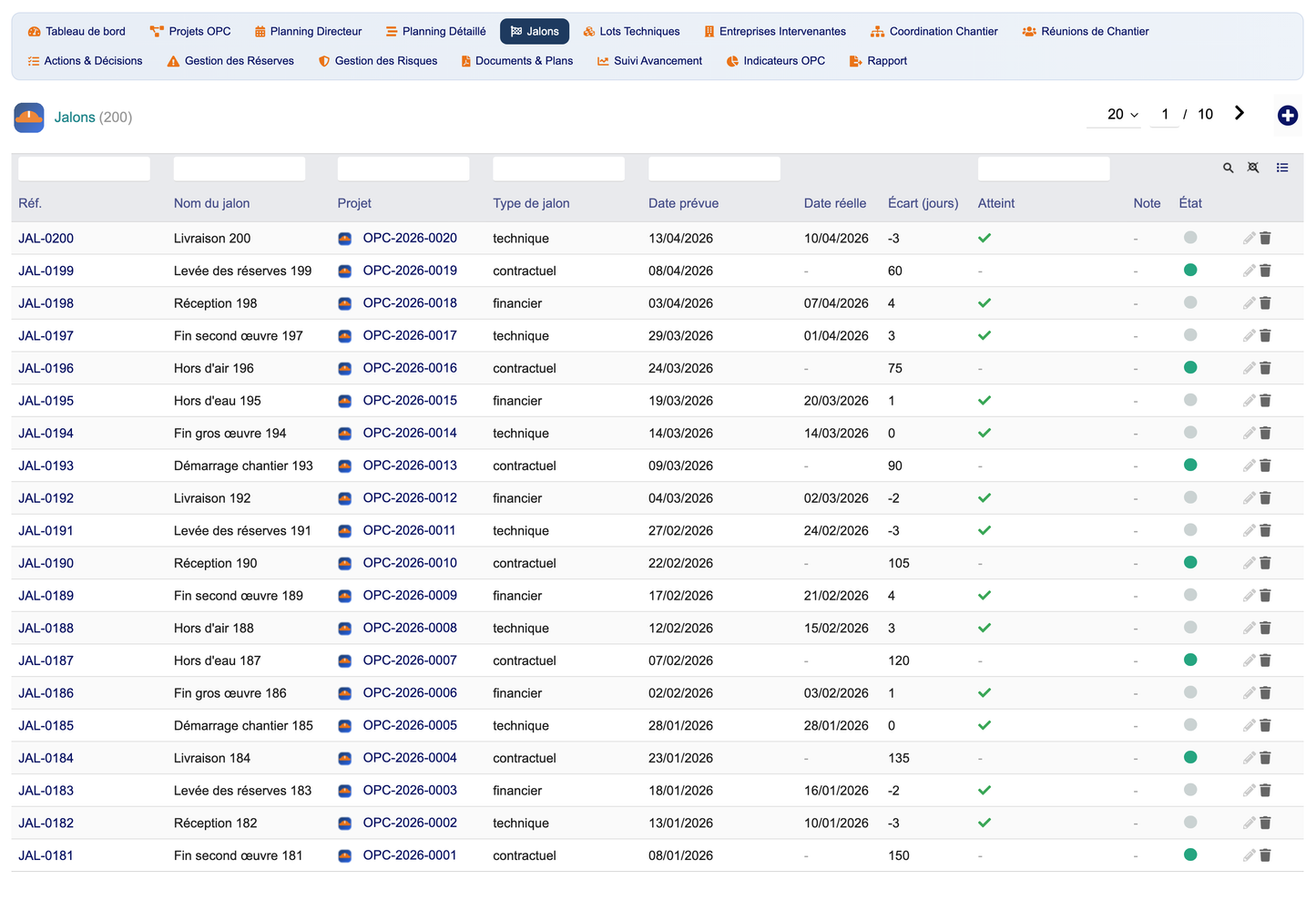
Contractual, technical and financial milestones are tracked with their planned date, actual date and gap in days, and a reached/late status that feeds the dashboard and the alerts.
5. Coordination, Meetings, Reports & Actions
Intervening companies
Every company working on the project has a complete record: coordinates, assigned lots, contract reference, decennial insurance and expiry, linked Dolibarr third party, and a history of meetings, reserves and delays.
Site coordination
A drag-and-drop Kanban board drives the coordination of stakeholders through the action workflow (to do → in progress → waiting → done → validated), covering technical interfaces, schedule conflicts, resolution and validation.
Site meetings & meeting reports
Site meetings store the convocation, agenda, attendees and animator. Each meeting generates a meeting report (compte rendu) with its summary and validation state, exportable to PDF and Word.
Actions & decisions
Corrective actions, preventive actions and site decisions are tracked with their responsible, due date, priority and workflow stage, and remain linked to the originating meeting and company.
6. Reserves, Risks & Delays
Reserve (snag) management
Technical, quality and safety reserves follow a full lifecycle — opening, assignment, lifting and validation — with their localization, severity and responsible company. The reserve-lift rate is computed automatically.
Risk management
The risk register classifies technical, financial and schedule risks, computes the criticality as probability × impact, and presents a colour-coded 5×5 risk matrix together with the mitigation plan and the risk owner.
Delay management
Delays are detected automatically by lot, task and milestone, with their severity, causes and impacts, so corrective actions can be triggered before they become critical.
7. Documents, Drawings & Visa Workflow
The document register manages plans, calculation notes, reports and minutes (PV) with full versioning. A visa (approval) workflow board organises documents into three columns — submitted, approved, rejected — with one-click approve / reject / resubmit actions, the visa date and the approver.
8. Progress Tracking & OPC Indicators
Progress tracking
Progress is computed automatically along three axes: physical progress (average of lot progress), financial progress (consumed budget over forecast budget) and documentary progress (share of approved documents), each shown as a colour progress bar per project.
OPC indicators
The indicators page exposes the standard project-control metrics:
· SPI — Schedule Performance Index — compares completed tasks with the tasks expected to be done by now.
· CPI — Cost Performance Index — compares earned value with the actual cost.
· Realization rate — share of completed tasks.
· Delay rate — share of lots running late.
· Reserve-lift rate — share of reserves cleared.
The risk matrix completes the page with the portfolio risk exposure.
9. BI Reporting Hub
A complete reporting hub groups the reports by family: planning (master & detailed schedule), progress (global & by lot), reserves (open & lifted), delays (by lot & critical), meetings (reports & actions) and risks (matrix & action plans). Every report can be printed and exported to CSV, Excel, PDF and Word.
10. Client Portal & Native Integration
Secure client portal
A per-project secure portal lets the client consult progress, schedules, reserves, meeting reports and downloadable reports.
Native Dolibarr integration
The module enriches native Dolibarr and links directly with third parties, contacts, projects, tasks, agenda, ECM (document management), quotes, orders, invoices, payments and HR. Built-in automation integration points map an OPC project to a Dolibarr project, a meeting to the agenda, an action to a task and a report to the ECM.
Automation engine
A daily cron engine refreshes the milestone states (reached / gap), the lot delays (from actual vs. planned schedule), the project physical progress and the risk criticality, and can raise delay and open-reserve alerts with Email / WhatsApp notifications.
11. Demonstration Data & User Profiles
Demonstration dataset
From the setup page, a one-click generator installs a full, coherent demonstration dataset — 20 projects, 100 companies, 140 lots, 500 tasks, 200 milestones, 300 reserves, 100 risks, 200 meetings, 200 reports, 500 actions and 150 documents, plus native third parties, quotes and invoices — and a secure purge removes it completely.
User profiles & permissions
Granular permission groups support the OPC user profiles — project director, OPC, project manager, site coordinator, MOE, MOA, consultant and administrator: Projects & lots, Planning & milestones, Coordination, Reserves & risks, Documents & visas, Progress & indicators, Reporting and Administration. Read and write are granted by default so the module is usable immediately after activation.
12. Technical Specifications
· Compatibility — Dolibarr v16 → v23+, PHP 8+, MySQL / MariaDB.
· Architecture — Multi-entity, multi-company, SaaS-ready.
· Languages — French, English, Italian, German, Spanish.
· Data model — 13 dedicated SQL tables (llx_opc_*), all carrying entity, status, audit and import-key columns.
· Engine — Generic key-driven engine, self-healing schema, GPLv3 licence.
Planned evolutions
BIM integration & IFC viewer · AI-based delay prediction & schedule optimisation · drone worksite monitoring · OPC & worksite mobile apps · OCR of drawings & meeting minutes · Microsoft Project & Primavera P6 synchronisation · Power BI & Autodesk Construction Cloud connectors · electronic signature, advanced client portal and full REST API.
© 2026 DoliResources — https://www.doliresources.com


