
Discover powerful Dolibarr extensions designed to automate your business processes
Orthopedic Practice Management (technical name orthopedicpractice, version 1.0.0, module numero 563200) is a Dolibarr ERP extension published by DoliResources. It turns a standard Dolibarr...
Couldn't load pickup availability


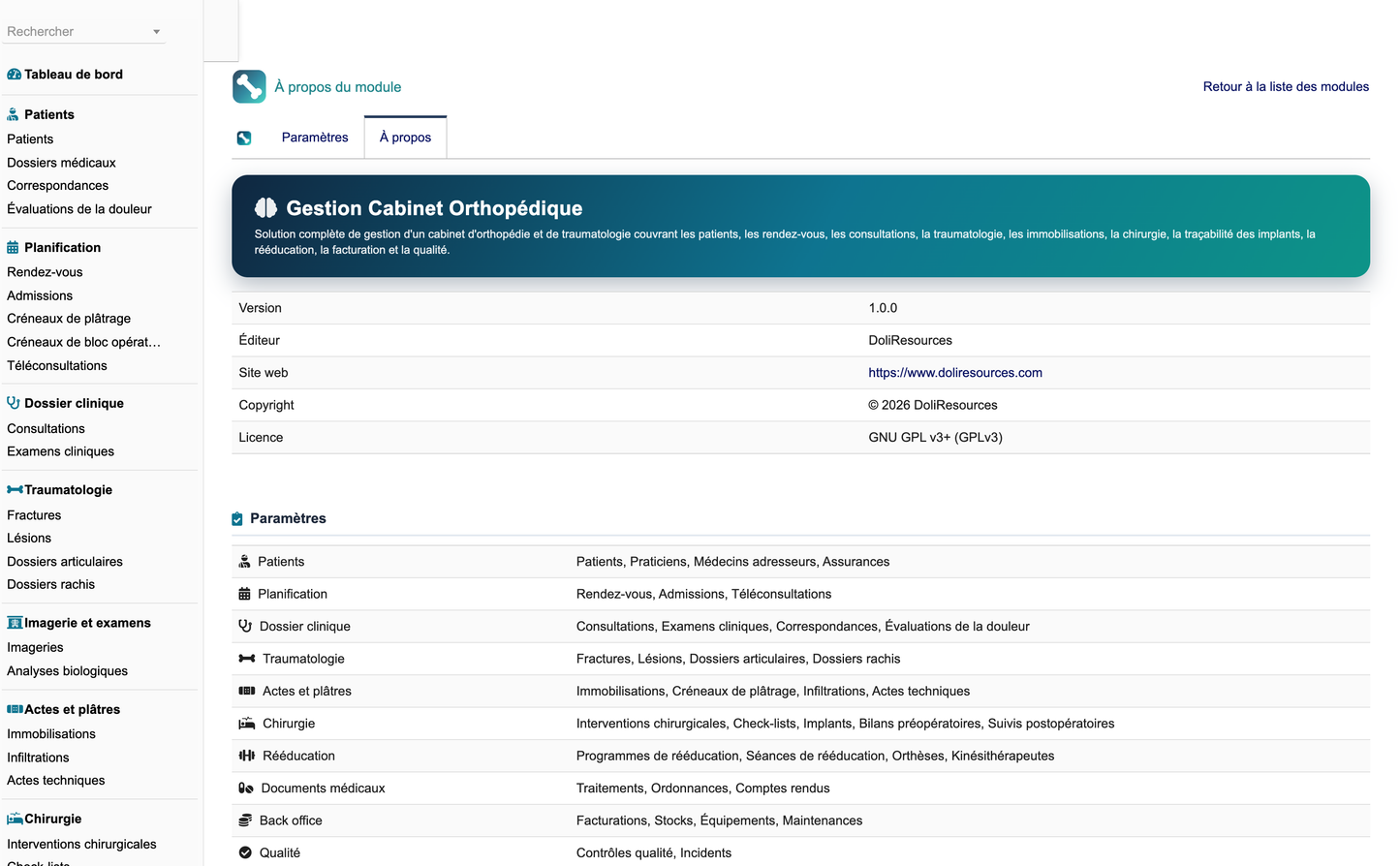
Orthopedic Practice Management (technical name orthopedicpractice, version 1.0.0, module numero 563200) is a Dolibarr ERP extension published by DoliResources. It turns a standard Dolibarr installation into a complete management solution for an orthopaedic surgery and traumatology practice, from a single-surgeon office to a multi-site clinic with its own operating theatre.
The module delivers 46 business objects backed by 46 dedicated database tables, all prefixed llx_ortho_, so no table name can collide with the Dolibarr core or with another extension. Each object has its own list view, record card, permission set and REST endpoints.
Functional coverage follows the real working day of an orthopaedic team. It starts with the patient file and the orthopaedic record, continues through scheduling, admission, consultation and structured musculoskeletal examination, then covers traumatology, imaging, immobilisation, injections, procedures, surgery with full implant traceability, post-operative follow-up and rehabilitation, and ends with prescriptions, reports, billing and archiving.
Administrative and logistic activity is covered with equal depth: insurance and coverage, billing built on native Dolibarr invoices and payments, cost and margin analysis per operation, consumable stock, supplier orders, biomedical equipment, maintenance, sterilisation, quality reviews and incident management.
The centrepiece of the user experience is the Orthopedic Mobility Command Center dashboard: an interactive, clickable SVG skeleton map covering 20 anatomical areas, a nine-step care-pathway strip, some 38 key-performance cards, 8 alert tiles and 8 charts computed over a rolling twelve months.
|
Business objects and database tables |
46 |
|
Granular permissions / functional groups |
98 / 29 |
|
Menu entries / menu sections |
62 / 11 |
|
Interface languages |
5 (fr, en, es, it, de) — 1 438 keys each |
|
Controlled vocabularies (coded columns) |
104 |
|
REST API routes |
230 |
|
Report families |
14 |
|
Demonstration dataset |
approx. 8 400 fictitious rows |
|
Compatibility |
Dolibarr 18 to 23, PHP 8.0+ |
|
This module is a practice-management tool. Diagnosis, image interpretation, immobilisation decisions, injection and surgical indications, implant choice, prescription and report validation all remain the sole responsibility of the authorised health professional. The module performs no automated diagnosis and issues no clinical recommendation. |
The module was specified around a small number of measurable objectives that an orthopaedic organisation can verify after deployment.
· Reduce administrative time per patient: clinical, administrative and financial data live in one application, so a recorded consultation immediately feeds the report, the prescription and the billable line without re-keying.
· Make the traumatology pathway traceable end to end: every step is an object with a status, an author, a timestamp and an audit entry.
· Secure the surgical act: the operating checklist is blocking, and implant traceability by lot and serial number is enforced at the point of use rather than reconstructed afterwards.
· Give management reliable figures: activity, waiting times, theatre occupancy, cost and margin per operation are computed from the operational data itself, not from a parallel spreadsheet.
· Coordinate the external network: referring physicians and partner physiotherapists work through dedicated portals with a strictly bounded view of the file.
· Patients: patient file, orthopaedic record, antecedents, anatomical markers, pain and functional assessments.
· Scheduling: appointments, admissions and waiting queue, plaster-room slots, theatre slots, teleconsultations.
· Clinical file: consultations, structured orthopaedic examinations.
· Traumatology: fractures, dislocations and sprains, joint disorders, spine disorders.
· Investigations: imaging requests, laboratory tests.
· Acts: immobilisations, injections and aspirations, orthopaedic procedures.
· Surgery: interventions, theatre slots, checklists and checklist items, implants, implant usage lines, pre-operative and post-operative follow-up, sterilisation cycles.
· Rehabilitation: rehabilitation prescriptions, sessions, orthoses and external prostheses, partner physiotherapists.
· Documents: treatments, prescriptions and certificates, medical and operative reports.
· Back office: billing lines, insurers, coverage claims, consumable stock, supplier orders, equipment, maintenance, quality reviews, incidents.
104 columns hold a language-independent code rather than free text — statuses, anatomical areas, fracture patterns, implant categories, immobilisation types and so on. Each is rendered as a translated coloured badge. The PHP map and the translation keys are emitted from a single source, so a stored code can never appear raw on screen because the two drifted apart.
The data model assumes a practice recording tens of consultations a day, hundreds of interventions a year and a few thousand implants in circulation. Lists are paginated and every foreign key is indexed, so list and search response time stays flat as the file grows; the demonstration dataset of roughly 8 400 rows is deliberately sized to exercise that behaviour rather than to look full.
The module is not a PACS, not a DICOM viewer, not a laboratory information system and not a medical device. It stores references and conclusions produced by those systems; it never interprets an image or a biological result.
The same application serves organisations of very different sizes, because the functional blocks are gated by permission and by menu rather than by edition. A single practitioner activates what they need; a clinic activates everything.
· A self-employed orthopaedic surgeon or traumatologist running a consulting practice, who needs the patient file, scheduling, consultations, immobilisations, documents and billing.
· A specialised orthopaedic practice with several practitioners, a plaster room and a shared secretariat, which adds the waiting queue, the plaster-room schedule and multi-practitioner reporting.
· A trauma centre handling unscheduled attendances, which relies on admission, priority handling and the traumatology records.
· An orthopaedic clinic with its own operating theatre, which adds surgical planning, theatre scheduling, blocking checklists, implant traceability and sterilisation.
· A multi-site practice or a network of surgeons, where site is carried on practitioners, appointments and equipment and every list and report can be filtered by location.
· A hospital orthopaedic department that needs the clinical, surgical and logistic chain without deploying a full hospital information system.
· Consulting only: patients, scheduling, consultations, examinations, documents and billing. Surgery, theatre and sterilisation stay switched off by permission.
· Consulting and plaster room: adds immobilisations, the plaster-room schedule and consumable stock.
· Full surgical activity: adds planning, theatre slots, checklists, implants, pre- and post-operative follow-up and sterilisation.
· Extended network: adds the three portals so referring physicians and partner physiotherapists contribute directly instead of by telephone and email.
Beyond activation, a realistic deployment defines its sites and rooms, its practitioners and their roles, its insurers and coverage rules, its consumable and implant catalogue, and the seven operating thresholds described later in this document. The demonstration dataset can be loaded first to explore the module, then removed in one click before real data is entered.
Access is governed by 98 granular permissions organised into 29 functional groups. Each group carries read, write and delete rights, and some carry an additional sensitive right: validate, plan, sign or trace.
· Read and write are granted by default so the module is usable immediately after activation.
· Delete, clinical validation, report signature, surgical planning and implant traceability are off by default and must be granted explicitly.
· Administrative rights, cost and profitability access, and data export are separate rights, so a manager can see margins without gaining clinical write access.
· Every list, card, API route and action is gated by the group that owns the object; a user without the right never sees the menu entry.
· Orthopaedic surgeon and traumatologist: full clinical file, surgical planning, report signature, implant traceability.
· Associate and locum: clinical file and consultations, without signature or planning.
· Anaesthetist and radiologist: read access to the surgical and imaging context they contribute to.
· Nurse, healthcare assistant, plaster technician: immobilisations, plaster room, procedures, dressings.
· Theatre manager, implant manager, sterilisation manager: scheduling, implant park, sterilisation cycles.
· Medical secretary and reception agent: patients, appointments, admissions, documents.
· Billing manager, cashier, insurance officer: billing, payments, insurers and claims.
· Quality manager and biomedical technician: quality reviews, incidents, equipment, maintenance.
· Accountant and management: reporting, costs and profitability, in read-only.
Patients, referring physicians and partner physiotherapists are not Dolibarr users. They are granted portal access individually on their own record, and each portal exposes a strictly bounded subset of the file. Portal access can be withdrawn at any time without affecting the underlying data.
Each object below has its own database table, list view with configurable columns, record card, permission group and five REST routes. The table is the definitive scope of the module: anything not listed here is not stored by it.
|
Patients |
llx_ortho_patient |
|
Practitioners |
llx_ortho_practitioner |
|
Referrers |
llx_ortho_referrer |
|
Physiotherapists |
llx_ortho_physio |
|
Insurances |
llx_ortho_insurance |
|
Appointments |
llx_ortho_appointment |
|
Admissions |
llx_ortho_admission |
|
Teleconsultations |
llx_ortho_teleconsult |
|
Consultations |
llx_ortho_consultation |
|
Medical Records |
llx_ortho_record |
|
Examinations |
llx_ortho_examination |
|
Mappings |
llx_ortho_mapping |
|
Pain Assessments |
llx_ortho_pain |
|
Fractures |
llx_ortho_fracture |
|
Lesions |
llx_ortho_lesion |
|
Joint Cases |
llx_ortho_joint_case |
|
Spine Cases |
llx_ortho_spine |
|
Imaging Studies |
llx_ortho_imaging |
|
Lab Tests |
llx_ortho_labtest |
|
Immobilizations |
llx_ortho_immobilization |
|
Cast Slots |
llx_ortho_cast_slot |
|
Injections |
llx_ortho_injection |
|
Procedures |
llx_ortho_procedure |
|
Surgeries |
llx_ortho_surgery |
|
Theatre Slots |
llx_ortho_or_slot |
|
Checklists |
llx_ortho_checklist |
|
Checklist Items |
llx_ortho_checklist_item |
|
Implants |
llx_ortho_implant |
|
Implant Uses |
llx_ortho_implant_use |
|
Preoperative Assessments |
llx_ortho_preop |
|
Postoperative Follow-ups |
llx_ortho_postop |
|
Rehabilitation Programmes |
llx_ortho_rehab |
|
Rehab Sessions |
llx_ortho_rehab_session |
|
Orthoses |
llx_ortho_orthosis |
|
Treatments |
llx_ortho_treatment |
|
Prescriptions |
llx_ortho_prescription |
|
Reports |
llx_ortho_report |
|
Billings |
llx_ortho_billing |
|
Claims |
llx_ortho_claim |
|
Stocks |
llx_ortho_stock |
|
Supplier Orders |
llx_ortho_supplier_order |
|
Equipment |
llx_ortho_equipment |
|
Maintenances |
llx_ortho_maintenance |
|
Sterilizations |
llx_ortho_sterilization |
|
Quality Controls |
llx_ortho_quality |
|
Incidents |
llx_ortho_incident |
Objects whose name is plural in the interface are collections of lines belonging to a parent — checklist items belong to a checklist, implant usage lines to an operation, rehabilitation sessions to a rehabilitation prescription — and are deleted with their parent.
The Orthopedic Mobility Command Center is the landing page of the module. It answers, in one screen, what is happening today, what is late, what is scheduled and what it costs.
A clickable SVG skeleton covers 20 anatomical areas: shoulder, arm, elbow, forearm, wrist, hand, fingers, hip, thigh, knee, leg, ankle, foot, toes, cervical, thoracic and lumbar spine, sacrum, pelvis and rib cage. Limb areas are drawn on both sides; both copies select the same area, because the real side is carried by the affected-side column of each record.
· Areas already carrying activity are highlighted; the selected area turns deep blue.
· Selecting an area filters the panel beside it: consultations, fractures, soft-tissue lesions, immobilisations, injections, operations, imaging requests and rehabilitation programmes for that area.
· An implant-traceability line totals the implants actually placed on the selected area, resolved through the implant usage lines that bind an implant to an operation.
· A legend under the drawing lists every area with its volume; a single link clears the filter.
· The map works without JavaScript: each area is an ordinary link, so it is keyboard reachable and printable.
A nine-step strip mirrors the real pathway — appointment, consultation, imaging, diagnosis, procedure or surgery, immobilisation, rehabilitation, follow-up, billing — and each step opens the corresponding list. It doubles as navigation and as a reminder of the intended sequence.
Roughly 38 indicator cards are grouped by zone: front desk, traumatology, surgery, back office and quality. Eight alert tiles light up when an action is owed — casts to check, post-operative checks due, operations without a reserved implant, incomplete pre-operative files, unsigned reports, low stock, upcoming maintenance, unpaid invoices — and each opens the filtered list behind it.
Eight charts cover a rolling twelve months: monthly activity, consultations by type, fractures by anatomical area, immobilisations by type, operations by type, cases by pathology, monthly revenue and operations performed. Thresholds that colour an indicator are configuration values, not literals, so an administrator can tune them.
· Front desk: appointments today, consultations today, patients present, patients waiting, new patients this month, teleconsultations, average waiting time, average consultation duration.
· Traumatology: trauma consultations this month, fractures recorded this month, immobilisations in progress, casts to check, casts to remove, injections this month, procedures performed, imaging results awaited.
· Surgery: operations scheduled, operations performed this month, post-operative patients, implants reserved, implants used this month, rehabilitation sessions prescribed, reports to validate, theatre occupancy rate.
· Back office: revenue today, revenue this month, payments collected, outstanding invoices, average cost per operation, average margin per procedure, cancellation rate, no-show rate.
· Quality and resources: equipment available, critical stock items, implants expiring soon, maintenance due, open incidents, patient satisfaction.
Each card is a link to the underlying filtered list, so an indicator is never a dead end: the user moves from the figure to the records that produced it in one click. Cards are rendered only for the permission groups the user holds, so a receptionist and a surgeon see different dashboards from the same page.
The patient file carries identity and administrative data, the contact network, insurance coverage, and the functional context that drives orthopaedic decisions.
· Identity: civility, name, date of birth, administrative sex, national identifier, address and contact details, emergency contact and trusted person.
· Network: general practitioner, referring physician, linked Dolibarr third party for invoicing.
· Coverage: insurer, membership number, third-party payment eligibility.
· Functional context: profession and physical demand of the work, level of sport practice, dominant side, height and weight, autonomy level and walking aid — all of which condition rehabilitation objectives and surgical discussion.
· Safety: known allergies and current treatments are displayed in clear text wherever an act is recorded.
· Governance: consent to care and to data processing, portal access, and minor status with legal guardian.
The file assembles a chronological view of everything recorded for the patient: consultations, examinations, imaging, immobilisations, injections, procedures, operations, follow-up visits, rehabilitation, documents and invoices. Because each object carries its own date and status, the timeline is produced from the data itself and never has to be maintained separately.
· Duplicate detection on identity and contact details, with a secure merge that preserves the clinical history of both records.
· Multi-criteria search across identity, contact, insurer, referring physician and anatomical area.
· Archiving and anonymisation for patients who leave the practice or exercise their erasure rights.
· Minor status with legal guardian, and restricted access for files that require it.
· Every access to a patient file is written to the audit trail, with the user, the timestamp and the action.
The record is the memory of the file. Ten families of antecedent are managed: medical, orthopaedic, traumatic, surgical, family, allergy, previous treatment, hospitalisation, existing implant and lifestyle.
· Each entry carries a type, an anatomical area, a side, a date and a severity.
· A still-active flag separates a resolved event from an evolving condition.
· The entry source records whether the information came from the practice, the patient, the referring physician or a telephone call.
· Implants already in place are declared here, which is what secures the planning of any new operation on the same area.
Markers place a pain point, a fracture site, a surgical scar, an implant location, swelling, a deformity, an injection site or a wound on the body map, with coordinates, an intensity and a date. They are attached to the patient and, where relevant, to the consultation that documented them, which allows the same point to be tracked over time.
The schedule covers every reason for attendance: consultation, follow-up check, cast application and removal, injection, dressing, pre-operative, surgery, post-operative, rehabilitation and teleconsultation.
· Each appointment carries a practitioner, a room, a site, a duration, an anatomical area and a priority.
· The status follows the full cycle: requested, to confirm, confirmed, reminder sent, patient arrived, waiting, in consultation, completed, no-show, cancelled, postponed.
· A teleconsultation flag and a waiting-list flag are managed on the record itself.
· The cancellation reason is retained, which is what makes the cancellation-rate analysis meaningful.
· Filtering is available by surgeon, room, act, equipment, status, patient, referring physician and insurer.
Admission registers the arrival, verifies the administrative file and feeds the live queue shown on the dashboard.
· Arrival time, planned time and start-of-care time are recorded separately, which is how real waiting time is computed rather than estimated.
· Identity check, insurance check and consent collection are traced individually.
· The trauma mechanism is captured at reception for unscheduled traumatology attendances.
· Priority, walking aid and need for assistance drive the order of passage.
· Statuses registered, waiting, in care, completed and left feed the patients-present and patients-waiting tiles.
Teleconsultation is a first-class appointment type. Consent, the preliminary questionnaire and any uploaded imaging are traced; the platform, the meeting link and the connection quality are recorded. A notice systematically reminds the practitioner of the limits of remote assessment whenever a direct physical examination or imaging is required. The session produces the same reports, prescriptions and billing lines as a face-to-face consultation.
The consultation is the central object of the clinical file. Twelve types are managed, from first consultation to post-operative review, including trauma, joint, spine, paediatric, sports medicine and teleconsultation.
· The reason, anatomical area, side, trauma mechanism and trauma date are captured for traumatology attendances.
· The history summary and the clinical findings are recorded in structured free text.
· The diagnosis and the pathology code are entered by the specialist; the module proposes none.
· Flags for imaging requested, surgery proposed, immobilisation applied and rehabilitation prescribed create the corresponding objects.
· Advice given, next appointment date and consultation fee close the record.
· The validation cycle runs from draft through in progress, to complete, to validate, validated, closed and cancelled.
· First consultation and follow-up consultation, which differ in the depth of history taken.
· Trauma consultation, for an acute injury, with the mechanism and the date of the accident.
· Joint and spine consultations, which open or continue a long-running degenerative file.
· Paediatric orthopaedics and sports medicine, where growth and return-to-play drive the discussion.
· Pre-operative and post-operative consultations, bound to the intervention they frame.
· Follow-up check, teleconsultation and urgent consultation.
The examination sheet structures the musculoskeletal assessment by joint. It is deliberately closer to a clinical form than to a free-text note, so two examinations of the same joint can be compared.
· Inspection, palpation, swelling and deformity.
· Active and passive range of motion, measured in degrees and compared against the reference for that joint; the resulting mobility state is qualified as normal, limited, severely limited or ankylosed.
· Stability, distinguishing stable, laxity and unstable.
· Muscle strength graded from 0 to 5, sensitivity and neurovascular state — the last checked systematically under immobilisation.
· Gait and weight-bearing status.
· Specific clinical manoeuvres and measurements in free text, with a conclusion that remains the responsibility of the surgeon.
Each assessment pairs a pain score with a measure of its functional consequence, so that improvement can be demonstrated rather than asserted.
· Score, type (mechanical, inflammatory, neuropathic, mixed or undetermined) and timing (at rest, on exertion, at night, permanent, intermittent).
· Frequency and duration in weeks.
· Triggering and relieving factors, recorded in clear text.
· A specific night-pain flag, which is clinically discriminating in several shoulder and hip conditions.
· Three impact indices — walking, work and sport — each on a comparable scale.
· A global functional score allowing longitudinal follow-up.
· An evolution column summarising the trend between two assessments: improving, stable, worsening or fluctuating.
|
These scales are follow-up instruments completed by the professional. The module computes no clinical score, produces no severity classification and issues no therapeutic recommendation. |
The fracture record covers the whole pathway, from the initial trauma to consolidation.
· Trauma mechanism and date; the mechanism vocabulary covers fall, sports injury, road traffic accident, occupational accident, domestic accident, direct blow, twisting injury and repetitive strain.
· Anatomical area, side, bone and bone segment — the bone offered always belongs to the injured area, so an anatomically impossible pair cannot be recorded.
· Open or closed character, displacement, fracture pattern and classification, all entered by the specialist.
· Skin state and neurovascular state, which condition the urgency of management.
· The chosen treatment links the fracture to an immobilisation or to a surgical intervention.
· Radiological follow-up counts the control examinations; consolidation moves from pending to in progress and achieved, with explicit detection of delayed union and non-union.
· Associated lesions and complications are documented separately.
A single object covers dislocations, subluxations, sprains, ligament and tendon injuries, ruptures, chronic instability, meniscal tears and cartilage lesions. Grouping them keeps the soft-tissue pathway consistent: the clinical questions asked of a grade II ankle sprain and of a shoulder subluxation are structurally the same, even though the treatment differs.
· The lesion grade and the anatomical structure involved are specified.
· The gesture performed — reduction under analgesia, strapping, immobilisation — is recorded.
· Estimated recovery time in weeks and the observed evolution support the return-to-activity discussion.
· Rehabilitation can be prescribed directly from the record.
· Residual instability and other complications are tracked to closure.
The joint pathway follows a condition over months or years rather than over a single episode. It covers osteoarthritis, tendinopathy, bursitis, adhesive capsulitis, impingement, meniscal disorders, cartilage lesions, chronic instability and tendon rupture.
· Pain score and functional score are tracked over time on the same scale.
· Conservative management, the number of injections performed and any rehabilitation prescribed are totalled on the record.
· A surgical indication flag moves the file into the operative planning circuit.
· The next review date feeds the schedule automatically.
· Arthroplasty follow-up continues after the operation, so a prosthesis remains monitored for its whole service life.
A dedicated area covers the cervical, thoracic and lumbar spine and the sacrum, with the pathology and the level involved.
· Pathologies covered: low back pain, neck pain, disc herniation, spinal stenosis, scoliosis, spondylolisthesis and other deformities.
· Radiation, sensitivity and muscle strength document the neurological consequence.
· Walking distance is tracked, which is the practical measure in lumbar spinal stenosis.
· The Cobb angle is recorded for deformities.
· Conservative care, injections, rehabilitation and any surgical indication are held on the same record.
The module manages the request, the scheduling, the receipt and the interpretation of imaging examinations. Eight modalities are covered: plain radiography, CT, MRI, musculoskeletal ultrasound, bone densitometry, bone scintigraphy, arthro-CT and a configurable other.
· Indication, administrative urgency and performing centre are recorded with the request.
· Request date, appointment date and result date are three distinct dates, so genuine turnaround is measurable.
· The received report and the specialist's own conclusion are stored separately; the module never interprets an image.
· A link to the study allows the images to be opened in the archiving system used by the practice.
· The status runs from requested to scheduled, performed, result received and interpreted.
· Previous imaging on the same area is retrievable from the record, which supports comparison over time.
Laboratory work-up supports orthopaedic follow-up and surgical preparation. Seven families are provided, including the pre-operative panel, inflammatory markers, coagulation, bacteriology and joint fluid analysis.
· The requesting laboratory, request date and result date are traced.
· An abnormal-result flag highlights the reports that require a clinician's attention.
· Results feed the pre-operative file, where a missing work-up blocks the operative go-ahead.
The immobilisation object covers plaster casts, synthetic resin casts, splints, orthoses, strapping, slings, walker boots, knee braces and ankle braces.
· Material, size, treated area and the professional who applied the device are recorded.
· Three dates structure the follow-up: application, scheduled check and planned removal.
· Skin state and neurovascular state are checked at every visit — the safety point of any circumferential immobilisation.
· Permitted weight-bearing is stated explicitly: none, partial, progressive or full.
· Statuses planned, applied, to check, replaced and removed feed the dashboard alerts for casts to check and casts to remove.
· Printable patient instructions are produced from the record.
A dedicated plaster-room schedule organises application, check, change, repair and removal. Slots are sequential per room and per day, so two patients cannot occupy the same slot, and the consumables used are recorded against the slot for stock consumption.
The module covers intra-articular and peri-articular injections, joint aspiration, drainage of a collection and trigger-point injection.
· The product used, its lot number and the quantity are traced for every gesture.
· Consent collection and the guidance method — anatomical landmarks or ultrasound guidance — are recorded.
· The volume aspirated is noted for aspirations.
· The efficacy reported by the patient is collected at the following visit, which is what makes outcome analysis possible.
· The module never proposes a product or a dose: both are chosen by the practitioner.
Acts performed in the office are managed separately from theatre interventions: dressings, sutures, suture removal, closed reduction, immobilisation, aspiration, injection, removal of superficial hardware, wound care and post-operative checks. Each carries an indication, an area, a practitioner, a room, a duration, consent, a checklist flag and a billable amount.
Fourteen intervention types are managed, from arthroscopy to spinal surgery, including osteosynthesis, arthroplasty, hip and knee replacement, shoulder, hand and foot surgery, ligament reconstruction, tendon repair, fracture surgery and hardware removal.
· The cycle runs from proposed indication through to confirm, confirmed, ready, in progress, performed, postponed and cancelled.
· Four independent prerequisites are tracked as separate locks: signed consent, complete pre-operative work-up, insurance agreement and reserved implants.
· Anaesthesia type, patient position and surgical approach are documented before the day of surgery.
· Planned and real durations are recorded separately, which is what makes theatre planning improve over time.
· Costs are broken down into implants, consumables and theatre occupancy, then compared with the amount billed.
The theatre schedule assigns each intervention to a room and a slot, including set-up and cleaning time. Slots are sequential per room and per day, so no overlap is possible; the team — surgeon, anaesthetist, nurse — and the required equipment are assigned to the slot. Because set-up and cleaning are counted, the occupancy rate reported on the dashboard is measured against the window actually opened rather than a notional working day.
The patient-safety checklist is mandatory and blocking. Fifteen control points are verified, from identity and side confirmation to the final swab and instrument count. The list is deliberately close to the recognised surgical safety checklist: identity, procedure and side confirmed with the patient, signed consent present, complete file and imaging available in the room, pre-operative work-up reviewed, coverage agreement obtained, allergies verified, sterile instrument set available, implant present with size and lot verified, implant traceability prepared, full and identified team, antibiotic prophylaxis given if indicated, tourniquet time noted, and the swab and instrument count planned.
· Blocking items prevent the checklist from reaching validated status until they are confirmed.
· Counters of confirmed items and of remaining blocking items are visible directly on the list.
· Each item records its state — pending, confirmed, not compliant or not applicable — with a timestamp and the name of the person who checked it.
· A transverse view of all control points allows compliance to be audited across every intervention, and feeds the quality reviews.
Implant traceability is the most regulated part of the module and is enforced at the point of use, not reconstructed afterwards.
· Ten categories are covered: prostheses, plates, screws, intramedullary nails, suture anchors, interbody cages, spinal implants, prosthetic components, wires and pins, and other devices.
· Each unit carries a manufacturer, a model reference, a size consistent with its category, a lot number, a serial number, an expiry date, a unit cost and a storage location.
· Statuses are in stock, reserved, allocated, used, returned, quarantined and expired.
· The expiry date feeds the dashboard alert for implants approaching their limit, over a configurable window.
Implant usage lines bind an implant to the operation that consumed it. The line freezes the lot number and the serial number as they were at the moment of implantation, together with the quantity, the unit cost and the resulting line cost, and distinguishes the reservation date from the actual use date. This is the record that answers, years later, which device was placed in which patient during which operation.
When the corresponding setting is enabled — it is by default — the application refuses to record the use of an implant that is expired, returned or quarantined. The refusal is enforced on the server for both creation and update, and is reported to the user with an explicit message; it is not merely a hidden field or a client-side warning.
It would be tempting to record the implant reference directly on the operation. That design fails in practice for three reasons: an operation frequently consumes several implants of different categories; the same implant reference exists in many physical units with different lots; and a device may be opened, reserved and finally not used. A separate usage line, carrying its own quantity, lot, serial number, reservation date and use date, is what makes each of those cases representable — and what allows the question to be reversed, from a recalled lot back to the list of patients concerned.
The implant park is valued by category, consumption is analysed to support supplier negotiation, and any implant-related incident can be attached to the device, its lot and the operation concerned, which is what makes a recall workable.
The pre-operative file centralises everything that must be assembled before the operation: quotation, signed consent, laboratory work-up, imaging, anaesthetic consultation and insurance agreement, each tracked individually.
· Treatments to be suspended and the allergy verification are traced explicitly.
· The list of missing items is displayed in clear text rather than implied by an incomplete form.
· Statuses open, awaiting documents, complete, validated and blocked feed the incomplete-file alert on the dashboard.
Follow-up organises the scheduled reviews after the operation, typically at fifteen, forty-five and ninety days.
· Pain, wound state, mobility and permitted weight-bearing are assessed at each visit.
· Dressing change, suture removal and radiological control are traced.
· Complications and the length of sick leave are recorded.
· The next control date feeds the alert for overdue post-operative checks.
The rehabilitation prescription coordinates the practice with the partner physiotherapist. Technique, permitted weight-bearing, objectives and the number of sessions are prescribed by the surgeon; progress is computed from the sessions actually performed, and the physiotherapist's report is attached to the prescription. Each session records the technique used, pain before and after, and any gain in range of motion, so improvement is evidenced rather than asserted.
Ten families are covered, from wrist splints and knee braces to lumbar supports, corsets, hand orthoses, orthopaedic insoles and footwear, and external limb prostheses. The circuit runs from prescription through quotation, order, measurement, fitting, delivery and adjustment, with warranty tracking. Price, covered amount and the patient's remaining share are computed for each device.
Drug treatments are followed over time with their form, dosage, route and frequency, their start and end dates, the prescriber, reported adherence, declared side effects and, where applicable, the reason for stopping. Current treatments are surfaced wherever an act is recorded, which is what makes the safety display useful at the point of care.
Ten document types are managed: drug prescriptions, imaging and laboratory requests, rehabilitation and orthosis prescriptions, nursing care, medical certificates, sick-leave notices, sports fitness certificates and letters to colleagues.
· Issue date and validity date are distinct, and an expired document is flagged as such.
· The number of days of sick leave is captured on sick-leave notices, and duration is tracked for renewals.
· A timestamped signature locks the document against further modification.
· Renewals are traced so a repeatedly reissued prescription is visible as such.
Thirteen report templates are provided, from the consultation report to the operative report, including trauma, joint assessment, fracture, immobilisation, injection, procedure, pre-operative summary, post-operative, rehabilitation, teleconsultation and letters to the referring physician. Templates carry dynamic variables, so patient identity, anatomical area, side and clinical content are injected automatically rather than retyped.
· The validation cycle runs from draft through to proofread, to validate, validated, signed, sent and archived.
· A version number tracks successive corrections, and signature locks the document.
· Dispatch to the referring physician is traced.
· The operative report records the approach, the gestures performed, the intraoperative findings and the implants placed with their lot numbers.
· A configurable delay defines when an unsigned report becomes an alert, so only genuinely late reports are reported.
Three external portals expose a bounded view of the file to three different audiences. Access is granted individually on the patient, referrer or partner record and can be withdrawn at any time.
· Consult appointments and confirm or cancel them within the rules set by the practice.
· Download validated prescriptions, certificates and reports.
· Consult immobilisation instructions and the post-operative follow-up plan.
· Consult invoices and payments, and upload documents or imaging results.
· Update a limited set of contact details and receive reminders.
· Submit a referral with attached documents and follow its status.
· Consult authorised results and download the reports explicitly sent to them.
· Consult the authorised history of patients they referred.
· Send a secure message to the practice.
· Consult the rehabilitation prescription and its objectives.
· Record sessions performed, with the technique used and the measured progress.
· Submit an interim or final report and attach documents.
· Report an incident occurring during a session.
In every case the portal shows only what its audience needs: a referring physician never sees the billing file, and a physiotherapist never sees the surgical record beyond the prescription that concerns them.
Seven types of payer are managed, including statutory health insurance, complementary funds, private insurers, company schemes, occupational injury schemes, motor insurance and international insurers. Each carries a coverage rate, a ceiling, third-party payment eligibility and whether prior agreement is required.
A coverage claim follows the request submitted to the payer: requested amount, granted amount and remaining patient share are distinct, the agreement reference and date are retained, and the status runs from being prepared through submitted, accepted, partly covered, rejected and under appeal, with the rejection reason kept for the appeal.
Billing covers consultations, immobilisations, injections, procedures, interventions and implants, and is built on native Dolibarr invoices and payments rather than a parallel ledger.
· Amount, covered share and remaining patient share are computed line by line.
· Payment method and payment date are recorded; statuses cover draft, issued, partly paid, paid, unpaid and credit note.
· Every line stays attached to the patient and to the consultation or intervention that generated it, so an invoice can always be traced back to the clinical act.
· Tariffs can be defined per surgeon, per site, per convention and per insurer, and surgical packages are supported.
The cost of an intervention is assembled from implants, consumables, theatre time and team time. Planned cost, actual cost, amount billed and gross margin are reported per intervention type and per surgeon.
|
Interventions with no captured cost are excluded from the averages. A missing cost is unknown, not zero: including such rows would silently inflate the reported margin towards one hundred percent. Access to cost and profitability data is protected by its own permission. |
Stock covers plaster-room, dressing, theatre and sterilisation consumables, managed on native Dolibarr products, warehouses, lots and serial numbers.
· Minimum and maximum thresholds drive replenishment alerts; statuses are normal, low, critical and expired.
· Lot number and expiry date are tracked, and stock value is computed from the unit price.
· Consumption is recorded against the act that used it, which is what links clinical activity to logistics.
Orders cover implants, devices and consumables. Ordered and received quantities are tracked separately, which handles partial receipts; lot checking on receipt is traced; and statuses run from draft through sent, partly received, received, invoiced and cancelled.
The equipment park covers examination tables, the image intensifier, ultrasound scanners, plaster-room equipment, arthroscopy towers and scopes, surgical motors, tourniquets, the autoclave and rehabilitation devices.
· Serial number, site, room, supplier, warranty and maintenance contract are recorded.
· Number of uses, number of failures and downtime feed an availability rate.
· Preventive maintenance, corrective maintenance, safety checks and calibrations are planned and traced with their provider, technician, parts and cost.
· A scheduled maintenance can make the equipment unavailable in the schedule, so the theatre plan reflects reality.
Sterilisation cycles are traced from loading to release: cycle number, cycle type, autoclave, operator, load contents, temperature, pressure and duration. Indicator and biological controls condition release, the use-by date is derived from the release, and a non-conforming cycle is rejected and cannot be assigned to an operation.
Quality reviews cover audits, controls, patient satisfaction surveys, procedure reviews, sterilisation reviews and non-conformities. Each records the number of checks performed, the number compliant and the number of non-conformities, together with an action plan, a responsible person and a due date.
Incident declaration covers events related to the patient, an implant, equipment, documentation, hygiene, organisation and data security.
· Severity is graded from minor to critical.
· An incident can be attached to the patient, the intervention, the implant, the lot or the equipment concerned — which is what makes device vigilance and recall practicable.
· Immediate action, root-cause analysis and corrective action are distinct fields, so a containment measure is never mistaken for a fix.
· Statuses open, under analysis, action in progress and closed follow the treatment to completion.
Fourteen report families are provided, all exportable to CSV and printable: activity, patients, traumatology, surgery, implants, rehabilitation, imaging and tests, billing, insurance, stock, equipment, quality, costs and profitability, and referring physicians.
· The period is freely configurable and the chart and table are always synchronised.
· Activity is compared over twelve rolling months so seasonality is visible.
· Traumatology is analysed by anatomical area, surgery by intervention type, implants by category and rehabilitation by technique.
· Access to each family follows the permission of the underlying data, and export is a separate right.
Two rules keep the reported figures honest. A ratio is always computed over one single population, so a rate is never diluted by records that could not belong to its numerator. And a missing value is treated as unknown rather than as zero, which is why interventions with no captured cost are excluded from cost and margin averages instead of dragging them towards a fictitious hundred-percent margin. Theatre occupancy follows the same logic: it is measured against the window actually opened each day, not against a notional working day, which is the difference between a believable rate and a meaningless one.
Beyond the standard reports, the data model supports activity and appointment forecasting, cancellation and no-show analysis, waiting-time and turnaround analysis, workload by surgeon and by theatre, room and equipment utilisation, implant and consumable consumption forecasting, profitability by intervention, by surgeon and by anatomical area, and longitudinal patient follow-up.
|
None of these analyses is ever turned into a diagnosis, a clinical prediction or an automated surgical decision. They describe the activity of the organisation, not the condition of a patient. |
The module never duplicates a capability Dolibarr already provides. Where the standard application has an object, the orthopaedic object links to it rather than reimplementing it. This keeps accounting, stock and document management in one place and avoids two divergent sources of truth.
· Third parties and contacts: a patient can be linked to a Dolibarr third party, which is what allows a standard invoice to be issued in their name; insurers and suppliers are third parties as well.
· Quotations and customer orders: a surgical quotation follows the native circuit, so the commercial documents an accountant expects are the ones actually produced.
· Customer invoices and payments: billing lines feed native invoices; payments, bank reconciliation and the cash register are the standard ones.
· Accounting: because invoices are native, the accounting export requires no bridge specific to the module.
· Products and services: consumables, implants and external devices are Dolibarr products, so purchase price, sale price and supplier references are managed once.
· Stock and warehouses: consumption recorded against a clinical act moves native stock; the plaster room, the theatre and the main store are warehouses.
· Lots and serial numbers: implant traceability relies on the native lot and serial capability rather than a parallel register.
· Supplier orders, receptions and supplier invoices: the purchasing circuit is the standard one, including partial receipt and three-way matching.
· Agenda: appointments, theatre slots and maintenance windows are visible in the shared calendar.
· Document management: reports, certificates, consents and imaging documents are stored in the native document system, with its access control and versioning.
· Projects and tasks: a complex episode of care, a quality action plan or an equipment installation can be followed as a project.
· Users and groups: permissions are Dolibarr permissions, so an existing user directory and its groups are reused unchanged.
· Notifications, triggers and scheduled tasks: the module publishes its events through the standard mechanisms, so an external workflow can subscribe to them.
The links are bidirectional and visible in the interface. From a patient the user reaches consultations, fractures, immobilisations, operations, prescriptions, invoices and payments. From an operation they reach the implants consumed, the consumables, the team and the invoice. From an implant they reach the product, its lot, the patient and the operation. From a piece of equipment they reach its failures and its maintenance history. From a product they reach its consumption and the interventions that used it.
The objects described in the previous chapters are not independent registers: they form one continuous pathway. This chapter reads the module the way a team actually uses it, over a single traumatology episode.
Appointment booking, patient creation or identification, administrative verification, admission, orthopaedic consultation, clinical examination, imaging request, diagnosis entered by the specialist, procedure or immobilisation or surgical planning, prescription and rehabilitation, follow-up, billing, coverage claim and archiving.
· The appointment creates the admission, which records the real arrival time and feeds the waiting queue.
· The admission opens the consultation, which inherits the patient, the practitioner, the anatomical area and the side, so nothing is retyped.
· The consultation creates the examination, the pain assessment and the anatomical markers, and its flags create the imaging request, the immobilisation, the rehabilitation prescription or the surgical indication.
· The fracture or lesion record links back to the consultation that diagnosed it and forward to the immobilisation or the operation that treated it.
· The operation carries its theatre slot, its blocking checklist, its implant usage lines, its pre-operative file and its post-operative visits.
· Every billable act produces a billing line attached to the clinical object that generated it, and the coverage claim is built from that line.
· Reports and prescriptions are attached to the object they describe and follow their own validation and signature cycle.
Because the chain is explicit, three questions can be answered without reconstruction: what happened to this patient and in what order, what remains to be done today across the whole practice, and what a given episode of care actually cost. The dashboard alerts are simply the second question asked continuously.
Sites are carried on practitioners, appointments and equipment, so a practice operating from several locations can filter every list and every report by site. Dolibarr multi-company is respected throughout: every query is isolated by entity, so two legal entities sharing one installation never see each other's records.
The module ships with seven settings, all editable from the module setup page and all consumed at runtime. A setting that is stored but never read would be a dead control, so each one is bound to a specific behaviour.
|
Default consultation duration |
Pre-fills the duration on any new record exposing the field. Default 30 minutes. |
|
Expiry alert window |
How far ahead implants and consumables are reported as approaching expiry. Default 60 days. |
|
Waiting-time alert threshold |
Above this average, the waiting-time indicator turns to alert colour. Default 30 minutes. |
|
Report signature target delay |
Only reports older than this appear in the unsigned-report alert. Default 7 days. |
|
Immobilisation check interval |
Look-ahead window for the casts-to-check alert. Default 7 days. |
|
Block expired implants |
When enabled, the application refuses to record the use of an expired, returned or quarantined implant. Enabled by default. |
|
Default report PDF template |
Template used to generate medical and operative reports. |
A daily scheduled job compiles the alert digest of the practice: appointments of the day, casts to check and to remove, post-operative checks due, incomplete pre-operative files, operations without a reserved implant, implants approaching expiry, reports late for signature, stock below its minimum, overdue maintenance and unpaid invoices. The digest uses the same thresholds as the dashboard, so the two never disagree.
The interface is delivered in French, English, Spanish, Italian and German, with 1 438 keys in each language. No functional text is hard-coded. Every key is namespaced to the module, which matters on an installation carrying many extensions: an unprefixed key would otherwise be resolved to whatever module loaded last, and a field would silently display another module's wording.
The 104 controlled vocabularies are rendered as coloured badges whose tone reflects the meaning of the state — favourable, pending or adverse — so a list can be scanned without reading every cell.
The module exposes 230 REST routes under /api/index.php/orthopedicpractice/, covering list, read, create, update and delete for all 46 objects.
· Authentication uses the standard Dolibarr DOLAPIKEY header; an invalid key returns 401 and an unknown identifier returns 404 with a structured JSON body.
· Every route is gated by the same permission group as the corresponding screen, and results are isolated by Dolibarr entity.
· Pagination, sorting and universal filters are supported; sort fields are validated against the real columns.
· Typical uses are synchronising an external agenda, feeding a data warehouse and integrating a third-party imaging or laboratory system.
|
GET /patients?limit=50&page=0 |
List patients, paginated |
|
GET /patients/{id} |
Read one patient; 404 when unknown |
|
POST /surgeries |
Create a surgical intervention |
|
PUT /immobilizations/{id} |
Update an immobilisation |
|
GET /implants?sqlfilters=(t.implant_status:=:'instock') |
Filter the implant park |
|
GET /implantuses |
Read the implant traceability lines |
|
DELETE /appointments/{id} |
Cancel and delete an appointment |
· CSRF protection, escaped and parameterised queries, and input validation on every write path.
· Strict permission gating on lists, cards, actions and API routes; least-privilege defaults.
· An audit trail covering creation, modification and deletion of all 46 objects, derived from the object registry so it cannot fall out of step with the model.
· Locking of validated and signed documents, controlled downloads, and no sensitive data written to application logs.
· Consent tracking, anonymisation and pseudonymisation support, and traceability of exports and of implant records.
A fictitious dataset of approximately 8 400 rows populates all 46 tables from the setup page and can be removed just as easily. It is built to be realistic rather than merely present: activity is spread over twelve months so every chart is populated, a cohort is pinned on the current day so the today indicators are never zero, theatre and plaster-room slots never overlap, and anatomically impossible combinations are excluded. Every record is tagged, and removal deletes only tagged data together with any child records created underneath it, leaving real data untouched.
On upgrade the module reconciles the physical schema with the declared one: Dolibarr only ever runs CREATE TABLE, so a column introduced by a later version would otherwise be missing on an existing installation. Uninstallation removes the menus, the permissions and the module constants; business tables are deliberately left in place so that deactivating the module can never destroy clinical data. Dropping them remains an explicit administrative decision.
· Copy the orthopedicpractice folder into htdocs/custom/, then activate the module from Home, Setup, Modules.
· Open the module setup page to adjust the seven configuration settings and, optionally, load the demonstration dataset.
· The module never modifies the Dolibarr core: it uses hooks, triggers, business objects, permissions, PDF templates, the document management system, the agenda, notifications, the REST API and scheduled tasks.
· Delivered artefacts: the installable ZIP archive, this functional documentation, the complete English feature documentation, the English technical documentation, the illustrated French training manual and the screenshot set.
|
Final reminder. Orthopedic Practice Management is a practice-management tool. Every diagnosis, image interpretation, immobilisation decision, injection or surgical indication, implant choice, prescription and report validation remains the sole responsibility of the authorised health professional. |


