
Discover powerful Dolibarr extensions designed to automate your business processes
Passenger Transport Management turns Dolibarr into a complete, industry-specific ERP for passenger transport operators. It covers intercity and urban transport,...
Couldn't load pickup availability


Passenger Transport Management turns Dolibarr into a complete, industry-specific ERP for passenger transport operators. It covers intercity and urban transport, coaches, minibuses, shuttles, tourism, school transport, staff transport, hotel and airport shuttles, VIP transport and chauffeur-driven hire — without requiring any external software. Every commercial operation reuses native Dolibarr objects (third parties, products, quotes, orders, invoices, payments, banking, accounting, agenda, documents).
Create lines → Create schedules → Plan trips → Assign vehicle → Assign driver → Open bookings → Issue tickets → Departure → Trip tracking → Arrival → Invoicing → Reporting.
· Technical name / directory: passengertransportmanagement (htdocs/custom/passengertransportmanagement).
· 18 business objects driven by a generic, key-driven engine (list / card / search views, column selector), each with its own SQL table (llx_ptm_*), CommonObject class, list and card pages.
· Self-healing schema: missing columns are added automatically on activation/upgrade.
· Dedicated stylesheet (mobility charter: transport blue / anthracite / signal green / safety orange) and JavaScript, loaded through module_parts.
· Triggers (third-party / user deletion detach) and a daily cron job for the alert/automation engine.
· Fully responsive, multi-entity / multi-company (SaaS) ready, secured by per-group permissions.
· Trip: Operational hub with a lifecycle Kanban (planned, preparation, in progress, completed, cancelled), line, route, service type, date, times, vehicle, driver, seats, fill rate, revenue, punctuality.
· Vehicle: Coaches, minibuses, shuttles: registration, brand, model, year, seats, category, mileage, GPS, insurance & technical-inspection expiry, availability.
· Driver: Identity, licence categories & number, licence and medical expiry, experience, hire date, availability.
· Line: Urban, intercity, tourism, school and shuttle lines: origin, destination, distance, average duration, base fare.
· Route: Itineraries of a line: direction, number of stops, total distance/duration, variants and diversions.
· Stop: Stations, terminals, stopping points with type, town, address and GPS coordinates.
· Schedule: Regular, exceptional and public-holiday schedules with days of week, departure time and frequency.
· Reservation: Individual, group, company and tourism bookings with seat selection, channel and status.
· Ticket: Electronic tickets with QR code, seat number, price and status (issued, valid, used, cancelled).
· Subscription: Monthly, quarterly, annual, student, company and school passes with validity and status.
· Passenger: Directory with category, loyalty points, preferences and optional company link.
· Group: Tourism, company, school and association groups with contact and headcount.
· Contract: School, company, local-authority and tourism contracts with period and amount.
· Maintenance: Servicing, repairs, tyres, oil changes and overhauls with cost, garage and next-due alerts.
· Fuel: Fuel logs with litres, unit price, total cost, odometer and station.
· Expense: Tolls, fuel, servicing, insurance, salaries and miscellaneous costs.
· Employee: Drivers, controllers, mechanics and administrative staff with role, contract and salary.
· Automation: Alert / automation rules with trigger, threshold and action, executed by the daily engine.
The module adds a dedicated top-menu entry with the following left-menu tree:
· Dashboard
· Trips
· Trip pipeline (Kanban)
· Reservations
· Tickets
· Planning
· Lines
· Routes
· Stops
· Schedules
· Vehicles
· Maintenance
· Fuel
· Drivers
· Employees
· Passengers
· Groups
· Subscriptions
· Contracts
· Expenses
· Invoicing
· Alerts & automations
· Reporting
· Configuration
A real-time cockpit with alert tiles (trips today, in progress, expiring vehicle documents, maintenance due, expiring licences, low-fill trips), four KPI zones (operations, fleet, commercial, finance) and interactive charts (revenue by month, trips by service type, trips by status, punctuality).
Trips are managed through a drag-and-drop Kanban board (planned → preparation → in progress → completed / cancelled). Each card shows the line, route and revenue; moving a card updates the status via AJAX.
Bookings (individual, group, company, tourism) with seat selection and channel, and electronic tickets with QR codes and lifecycle statuses. Subscriptions and a passenger directory with loyalty complete the commercial layer.
The coach/minibus fleet tracks seats, category, mileage, GPS and document expiry, while driver files track licences, medical checks and availability. Maintenance and fuel logs feed cost and utilisation reporting.
A timeline of trips, maintenance and document expiries with automatic detection of vehicle/driver conflicts.
Any trip can be turned into a native Dolibarr quote, order or invoice in one click, with linked-document tracking.
Eight reports (operations, profitability by line, vehicle utilisation, drivers, sales & reservations, subscriptions, fuel, financial) with period filters and CSV / Excel / PDF exports.
Nine permission groups gate the module, each with read / create-modify / delete (read and write are granted by default on activation so the module is usable immediately):
· Operations (trips, reservations, tickets)
· Fleet (vehicles, maintenance, fuel)
· Drivers & employees
· Network (lines, routes, stops, schedules)
· Passengers, groups & subscriptions
· Contracts
· Expenses & finance
· Alerts & automations
· Reporting (read only)
These map to the operational roles of a passenger transport company: administrator, operations manager, planning manager, fleet manager, maintenance manager, driver, accountant, sales and read-only.
The module leverages and enriches native Dolibarr modules rather than duplicating them:
· Third parties & contacts (customers, schools, companies, local authorities, suppliers)
· Products & services (fares, passes, charter services)
· Quotes, orders, invoices & payments (created from trips)
· Banking & accounting
· Stocks
· Agenda & resources
· Projects
· Documents (ECM/DMS)
· Users & permissions
1. Copy passengertransportmanagement into htdocs/custom/, or deploy the ZIP from Configuration → Modules → Deploy external module.
2. Enable the module. Tables, menus, permissions and the cron job are created automatically.
3. A demonstration dataset is generated on first activation.
4. Configure the module from Configuration → Passenger Transport Management.
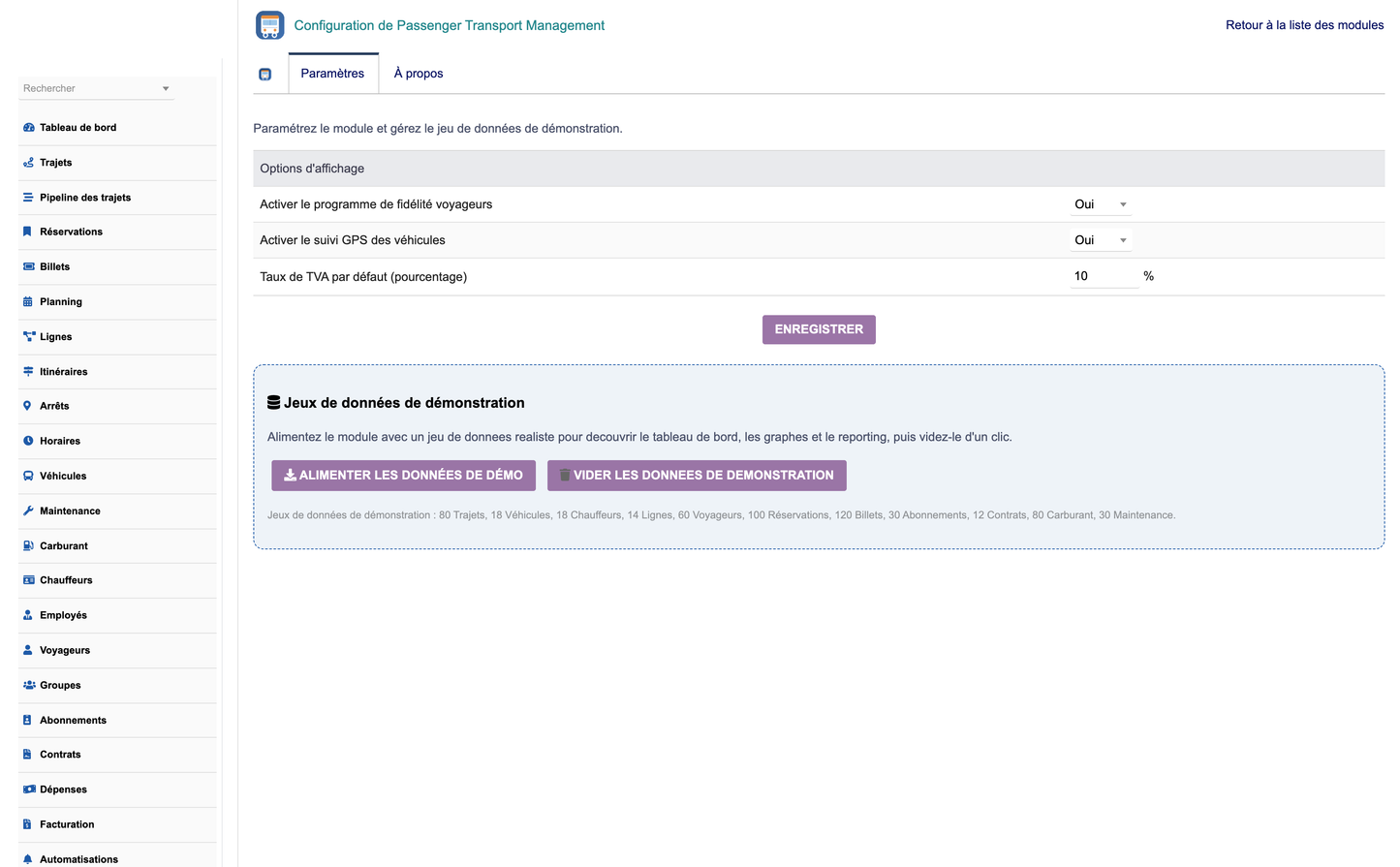
· Display options: passenger loyalty program, vehicle GPS tracking, default VAT rate.
· Buttons to create and delete the demonstration dataset (only auto-generated data is removed).
· A daily cron job (PtmRunAutomations) evaluates alert rules: expiring vehicle documents, expiring licences/medicals, maintenance due, low-fill trips, expiring subscriptions and auto-closing of completed trips.
· The engine can also be run on demand from the Alerts & automations screen.
· Installable Dolibarr module ZIP: module_passengertransportmanagement-1.0.zip
· Screenshots folder (dashboard, trips, pipeline, vehicles, drivers, lines, reservations, tickets, planning, reporting, configuration, …)
· French training manual (PDF): Manuel_Formation_Passenger_Transport_Management.pdf
· English functionality documentation (this document, Word format)
DoliResources — Copyright © DoliResources — www.doliresources.com


