
Discover powerful Dolibarr extensions designed to automate your business processes
The Passenger Transport Management module (technical name passengertransportmanagement) turns Dolibarr...
Couldn't load pickup availability


The Passenger Transport Management module (technical name passengertransportmanagement) turns Dolibarr ERP/CRM into a dedicated operations platform for road passenger carriers — intercity coach operators, urban bus networks, school and staff transport, airport shuttles and tourism services. It centralizes the entire value chain, from network design and fleet upkeep to over-the-counter ticket sales, cash reconciliation and management reporting, inside a single reference database shared by every agency.
This document describes the functional scope of the module: the business problems it solves, the operational workflow it supports, the data objects it manages, the access-rights model, and the screen-by-screen features delivered in version 1.0.0.
· Sales & agencies — counter and reservation agents issuing travel and baggage tickets;
· Operations — dispatchers building trips, assigning vehicles and drivers, and tracking punctuality;
· Fleet — fleet managers monitoring maintenance, technical inspections, insurance and fuel;
· Finance — cashiers and controllers reconciling daily agency cash;
· Management — network and general managers steering revenue, occupancy and profitability.
The module is organized around six functional pillars that mirror the real operating cycle of a passenger-transport company — configure, sell, cash, operate, maintain and steer.
|
Pillar |
What it delivers |
|
Lines & Tariffs |
Departures, arrivals, distances, stops, itineraries and timetables, with a fare grid that applies by line, season, customer category and baggage. |
|
Multi-Agency |
Several agencies on one instance sharing the same reference data, each with its own line availability and ticket issuance. |
|
Reservations & Tickets |
Real-time seat availability, seat-map selection, and instant issuance of travel and baggage tickets with automatic fare calculation. |
|
Connected Cash Desk |
Daily cash entries and exits per agency, consolidated with ticket sales into a live global balance. |
|
Steering & BI |
Revenue by agency, line, driver and vehicle; occupancy, mileage, cash position and revenue trend, exportable to CSV, Excel and PDF. |
|
Unified Operations |
One thread linking agency sales, operational control and management decisions through shared data, exports and printouts. |
The landing page is a real-time control tower for the whole network. A row of alert tiles surfaces the figures that demand action — trips today, trips in progress, vehicle documents due, maintenance due, driver licences/medicals expiring and low-occupancy trips. Below, KPI zones summarize operations (yearly and daily trips, in-progress and completed, punctuality, average fill rate, cancellation rate) and fleet & drivers (vehicle count, availability, vehicles in maintenance, driver count, park value, yearly mileage). Two charts render monthly revenue and the split of trips by service type.
· Alert tiles for documents, maintenance and licences approaching expiry.
· Operations and fleet KPI zones with punctuality, fill rate and cancellation rate.
· Monthly revenue bar chart and service-type distribution donut.
The ticketing desk reproduces the counter experience. The agent selects a line, departure date/time, bus and service type, then picks seats on a live seat map that distinguishes available, occupied and selected places. A reservation summary and a fare breakdown (base fare, baggage supplement, promotional discount, total) are computed instantly, and the agent can confirm, print the ticket or reset. Live KPIs show available seats, tickets sold today, occupancy rate and revenue of the day, and a recent-reservations table tracks status.
· Interactive seat map with available / occupied / selected states.
· Automatic fare computation from reference data, baggage and promotions.
· Adult / child / infant passenger counters and one-way / baggage options.
· Recent reservations with confirmed / pending status badges.
The connected cash desk tracks every counter movement across all agencies. Ticket and reservation sales feed the till as entries; ticket cancellations (refunds) and petty-cash disbursements feed it as exits — while fuel, wages and insurance are settled by bank and stay out of the drawer. Each movement carries a reference, date, time, agency, movement type, payment method, in/out amount, running balance and the agent who booked it. Four headline indicators consolidate total in, total out, the global balance and the number of agencies.
· Unified ledger of ticket sales, baggage sales, cancellations and disbursements.
· Cash vs card payment method and per-agent attribution.
· Running balance per movement and global consolidated balance.
· Filters by agency, payment method and movement type.
The multi-agency control tower steers the entire network from a single centralized platform. Agencies are listed with their active-line count; selecting one shows its line-availability board (line, origin, destination, departure time, available seats, occupancy and open/almost-full status) together with the agency's active lines, departures of the day, tickets sold, available seats and a latest-activity feed. Network-wide indicators aggregate agencies, lines, tickets and average occupancy.
· Agency directory with active-line counts.
· Per-agency line-availability board with occupancy bars and status.
· Selected-agency statistics and live activity feed.
The network is described by four related objects. Lines carry origin, destination, type, distance, average duration and base fare. Routes (itineraries) define the ordered stops and direction (outbound / return) of a line. Stops hold the physical points served, with town, address, geolocation, zone and shelter information. Schedules attach timetables — days of week, departure time, frequency and validity window — to a line and route. Together they form the reference network on which trips and tickets are built.
· Lines with distance, duration, colour and base fare.
· Routes with ordered stops, direction and variants (e.g. roadworks detour).
· Stops with geolocation, zone and shelter flag.
· Schedules with days of week, frequency and validity dates.
Trips are the operational heart of the module. Each trip binds a line, route, vehicle and driver to a date, departure and arrival time, seat capacity, bookings, fill rate, revenue and a workflow stage (planned, preparation, in progress, completed, cancelled). A Kanban pipeline lets dispatchers drag trips across stages, and a weekly planning board shows resource allocation at a glance.
· Trip records with capacity, bookings, fill rate, revenue and punctuality.
· Kanban pipeline across the five operational stages.
· Weekly planning board of trips, vehicles and drivers.
The fleet is managed end-to-end. Vehicles record registration, type, brand, model, year, seat count, category, fuel type, odometer, GPS id, insurance and technical-inspection expiry, acquisition value and availability status. Maintenance logs interventions and next-due dates; Fuel logs refuellings with litres, cost and odometer for cost-per-kilometre analysis.
· Vehicles with documents, capacity, odometer and availability.
· Maintenance with intervention type, cost and next-due date.
· Fuel log feeding cost-per-kilometre and consumption reporting.
Drivers hold licence categories, licence and medical expiry, experience, hire date and availability — with expiry alerts surfaced on the dashboard. Employees cover the wider staff (controllers, mechanics, administrative) with role, contract type and salary.
· Drivers with licence/medical expiry monitoring.
· Employees with role, contract type and salary.
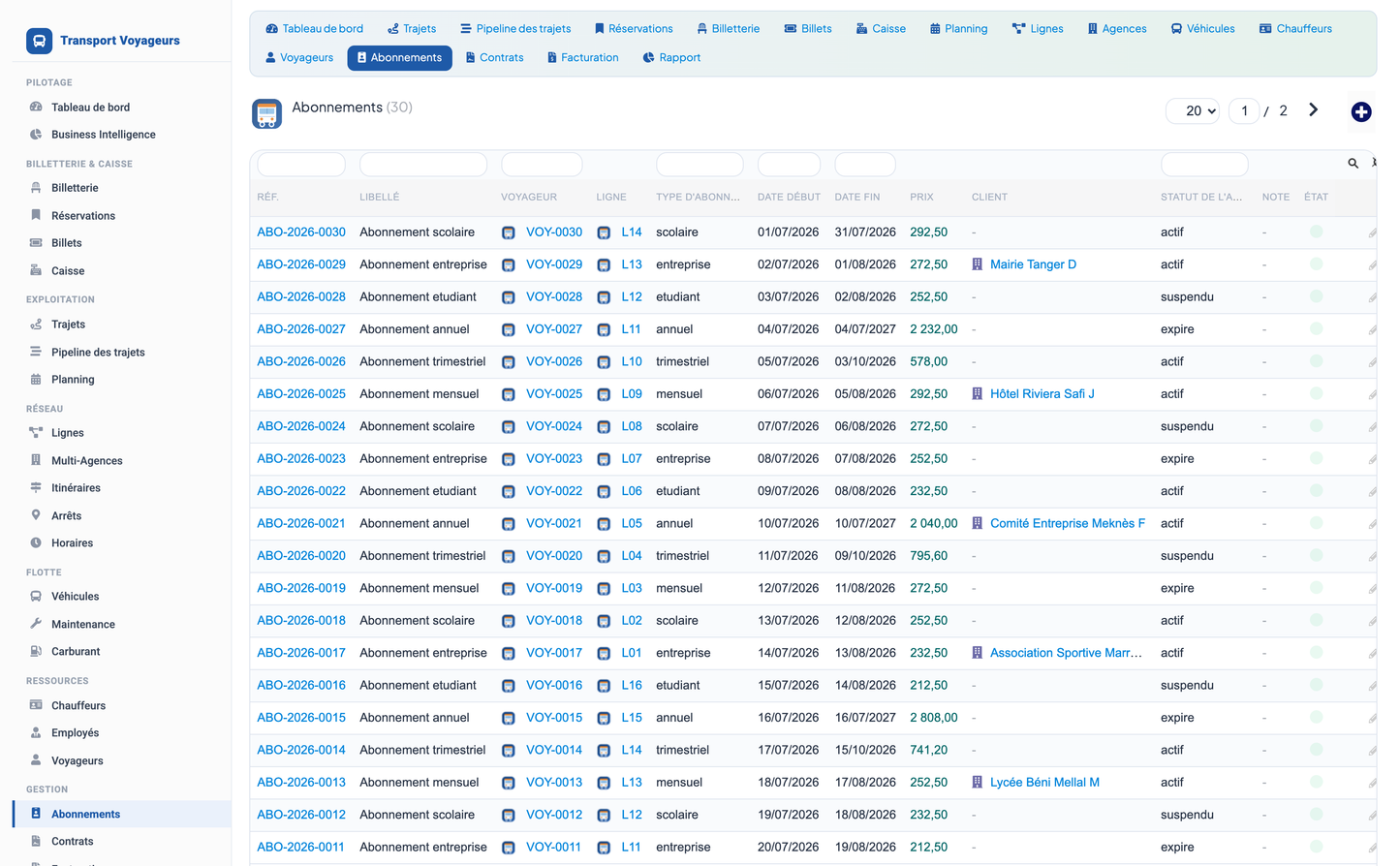
Passengers store contact details, category, loyalty points and seat preferences. Groups gather tourism, corporate, school and association bookings. Subscriptions manage monthly, quarterly, annual, student, corporate and school passes with validity windows and status.
· Passenger profiles with loyalty points and preferences.
· Group bookings by type and company.
· Subscription passes with validity and status.
Contracts formalize school, corporate, local-authority and tourism agreements linked to third parties. Expenses capture tolls, fuel, maintenance, insurance, wages and miscellaneous costs. The invoicing screen bridges transport services to native Dolibarr quotes and invoices for billed customers.
· Contracts linked to Dolibarr third parties.
· Expense capture by type for cost control.
· Invoicing bridge to native Dolibarr commercial documents.
The reporting hub produces decision-grade situations across eight report families — trips, profitability by line, vehicle usage, drivers, sales, subscriptions, fuel and financials. Each report offers KPI cards, a detailed table with totals, an optional date filter and one-click export to CSV, Excel and PDF, plus a print-ready view.
· Eight report families spanning operations, sales, fleet and finance.
· Date-range filter, KPI cards and totalled tables.
· CSV, Excel, PDF export and print-ready output.
An automation engine watches the operational data and raises alerts — expiring documents, maintenance due, low-occupancy trips — so nothing critical is missed. Rules and their triggers are managed from a dedicated screen.
· Rule-based alerts on documents, maintenance and occupancy.
· Dedicated automation management screen.
The module ships 20 business objects, each with list and detail (card) views generated by a shared, column-safe engine, plus a self-healing schema and a versioned demonstration dataset.
|
Object |
Role |
|
Vehicle |
Coaches, minibuses, shuttles — documents, capacity, odometer, availability. |
|
Driver |
Licence categories, licence & medical expiry, experience, availability. |
|
Employee |
Staff roles, contract type and salary. |
|
Line |
Origin, destination, type, distance, duration, base fare. |
|
Route |
Ordered stops, direction and variant of a line. |
|
Stop |
Physical stop with town, address, geolocation, zone, shelter. |
|
Schedule |
Timetable: days, departure time, frequency, validity. |
|
Trip |
Operated service with vehicle, driver, capacity, stage, revenue. |
|
Reservation |
Seat booking with channel, seats, amount and status. |
|
Ticket |
Issued travel/baggage ticket with seat, price and QR code. |
|
Passenger |
Traveller profile, category, loyalty points, preferences. |
|
Group |
Tourism / corporate / school / association group bookings. |
|
Subscription |
Monthly to annual passes with validity and status. |
|
Contract |
School / corporate / authority / tourism agreements. |
|
Maintenance |
Interventions with type, cost and next-due date. |
|
Fuel |
Refuellings with litres, cost and odometer. |
|
Expense |
Tolls, fuel, maintenance, insurance, wages, misc. |
|
Automation |
Alert & automation rules and triggers. |
Routes and stops are supported by additional relational tables; the network model coherently links every trip to its line and originating agency city.
Permissions are grouped so administrators can grant exactly the scope each role needs. Read and write are enabled by default on activation so the module is immediately usable; delete and admin are opt-in.
|
Permission group |
Covers |
|
Operations |
Trips, reservations and tickets. |
|
Network |
Lines, routes, stops and schedules. |
|
Fleet |
Vehicles, maintenance and fuel. |
|
Drivers |
Drivers and employees. |
|
Passengers |
Passengers, groups and subscriptions. |
|
Contracts |
Transport contracts. |
|
Finance |
Expenses and cash desk. |
|
Automation |
Alerts and automation rules. |
|
Reporting |
Business intelligence and reports. |
· Platform: Dolibarr 17.0+ (compatible with the 17–23 line), PHP 7.4 to 8.2.
· Dependencies: depends on the native Products/Services and Third-Parties modules.
· Languages: French, English, Spanish, Italian and German interface language files.
· Currency: MAD (Moroccan dirham) figures throughout the demonstration dataset; instance currency configurable.
· API: a REST API class exposes the objects for integration with external systems.
· Demo data: first-activation demonstration dataset (Moroccan network) with a secure, versioned purge.
· Robustness: self-healing schema, collision-safe menu positions and module-unique interface labels.
1. Copy the passengertransportmanagement folder into the Dolibarr custom/ directory (or upload module_passengertransportmanagement-1.0.0.zip from Home ▸ Setup ▸ Modules ▸ Deploy module).
2. Enable the module from Home ▸ Setup ▸ Modules. Tables, menus, rights and the demonstration dataset are created automatically on activation.
3. Grant the relevant permission groups to each user profile, then open the Passenger Transport top menu to reach the dashboard and every functional screen.


