
Discover powerful Dolibarr extensions designed to automate your business processes
1. Executive Summary
Pediatrics...
Couldn't load pickup availability


1. Executive Summary
Pediatrics Practice Management turns Dolibarr into a complete business solution for a paediatrics practice. It covers the whole journey of a child, from the newborn follow-up to the adolescent consultation, and every administrative, clinical, preventive, organisational, documentary, logistical, financial, qualitative and analytical dimension that surrounds it.
The module is designed for a self-employed paediatrician, a paediatrics practice, a paediatric medical centre, a paediatric clinic, a polyclinic, a newborn follow-up unit, a vaccination centre, a multi-site practice, a network of paediatricians and any organisation delivering paediatric teleconsultations.
It is deliberately a MANAGEMENT tool. It never replaces the paediatrician's diagnosis, the medical assessment of the child, the interpretation of growth charts, the developmental assessment, prescribing, the vaccination decision, referral to emergency care, the therapeutic decision or the validation of a medical report. Every sensitive clinical decision stays under the control of an authorised health professional, and the permissions that carry those decisions are switched off by default.
Publisher: DoliResources - www.doliresources.com. Version 1.0.0, licensed under the GNU GPL v3.
2. Business Objectives
Give a paediatrics practice a single system of record so that no second piece of software is needed: children and families, appointments, consultations, growth, development, nutrition, vaccination, documents, billing, stock, equipment, quality and analytics all live in one place.
Make the preventive dimension of paediatrics first class. Vaccination schedules, boosters, overdue doses, cold chain integrity, growth surveillance and developmental milestones are not add-ons: they are the core of the daily workload and they drive the dashboard.
Protect minors by construction. Legal guardians, authorised persons, scopes of authorisation, validity windows, consents and a complete audit trail are built into the data model rather than bolted on.
Keep the clinical boundary explicit. The system stores and presents what professionals recorded; it derives no clinical conclusion.
Stay a good Dolibarr citizen: no core modification, and native integration with third parties, products, stock, quotations, orders, invoices, payments, projects, the agenda and the document management system.
3. Functional Scope
39 business objects served by a generic list and card engine, organised in ten functional sections: children and families; appointments and front desk; consultations; growth and development; vaccinations; examinations and documents; paediatric follow-up; billing and resources; portals; quality and incidents.
Dedicated operational pages complete the object model: the live waiting queue, the longitudinal growth charts, the vaccination board, the cold chain monitoring console, the family portal and the referring physician portal.
A reporting workspace with eight thematic tabs, 44 reports, a period filter, automatic charts and permission-controlled CSV and Excel exports.
A REST API exposing 197 routes, a daily alert cron job, an audit trigger, a PDF report model and a home-page widget.
4. User Roles
The permission model has 26 functional groups, each with read, write and delete, plus five clinical escalations and seven cross-cutting rights: 90 permissions in total.
Roles the model supports: administrator, management, paediatrician, associate paediatrician, locum physician, authorised general practitioner, nurse, paediatric auxiliary, medical assistant, medical secretary, reception agent, vaccination manager, billing manager, cashier, insurance manager, quality manager, biomedical technician, accountant, external referring physician, legal guardian through the portal, authorised adolescent through the portal and read-only viewer.
Read and write are granted on activation so the practice is usable immediately. Delete, consultation validation, vaccine administration, prescription validation, certificate signature, report signature, portal access, cost and profitability visibility, data export, demonstration data management and module administration are all off by default.
5. Child Data Protection
Every access, modification and transmission of a child's data is journalised by a dedicated trigger that records the user, the date, the action, the object and the child concerned.
The module never exposes a child's record through a portal unless the person requesting it is a legal guardian actually linked to that child, and only documents whose workflow has reached a shareable state are surfaced.
Consents are explicit and stored per child: consent to care, consent to data processing and consent to portal access.
The adolescent case is handled specifically: a configurable age threshold marks where reinforced confidentiality applies under the local legislation, and the interface carries a standing reminder that the disclosure of such information is a decision for the health professional.
6. Legal Guardians
Each child carries a main legal guardian and an optional second guardian, the relationship to the child, full contact details, an identity document, the date the identity was verified and a proof of parental authority.
The parental authority arrangement is itself recorded: joint authority, sole authority of the mother or the father, legal guardianship, foster placement, adoption or institutional care.
Authorised persons are a separate object with their own scope: may accompany the child, may receive documents, may book appointments, may give care consent, may collect the child, or full authority. Each authorisation carries a start date, an end date, a status (valid, temporary, expired, revoked), the person who granted it and any specific restriction.
Admission re-checks the identity of the child, the identity of the accompanying adult, the authorisation, the insurance and the consents, and stores each check as a separate flag.
7. Dashboard
The dashboard is titled Pediatrics Child Health Journey Center. It opens on a visual timeline of the child journey in six age bands - newborn, infant, early childhood, childhood, pre-adolescence, adolescence - each showing the number and the share of the followed population, and each clickable through to the filtered list.
Below it, the operational flow of the practice is laid out as nine linked steps: appointment, admission, consultation, growth, development, vaccination, prescription, follow-up, billing.
39 indicators are grouped in five zones: today's activity, prevention and vaccination, growth and development monitoring, financial activity, resources and logistics. Twelve alert tiles then surface the work waiting for a human, colour-coded green, orange or red.
Eleven charts close the page: planned versus completed activity over twelve months, planned versus administered vaccinations, growth measurements, new children, activity by age band, by consultation type, by practitioner, by condition, developmental outcomes, feeding types and monthly revenue.
The palette follows a paediatric charter: sky blue, turquoise, mint green, soft yellow, coral and light violet on white, with green for normal situations, orange for watch points and red for alerts.
8. Children Records
The child record holds the internal reference, names, date and place of birth, administrative sex, age band, national identifier, address, main language, school and class, the referring paediatrician, the general practitioner, the referring physician, the insurance and membership number, the blood group, an allergy summary, a treatment summary, the prematurity and chronic-condition flags, the three consents, the status and the first, last and next visit dates.
Multi-criteria search, a column selector, archiving and a full history are provided by the generic list engine. The record links to the guardians, and the card shows a cockpit of consultations, growth measurements, vaccines administered, follow-up pathways and age band.
9. Birth Data
A dedicated birth record stores the date and time of birth, the maternity unit, the gestational age, the mode of delivery, multiple birth, birth rank, birth weight, length and head circumference, the Apgar scores at one and five minutes, the blood group, declared complications, any neonatal stay and its duration, the initial feeding and the screening performed.
These values are the natural first point of every growth curve: the growth chart page prepends them to the weight, height and head circumference series.
10. Pediatrics Records
The paediatric record is a chronological set of history entries typed as medical, surgical, family, perinatal, hospitalisation, past infectious disease, allergy, previous treatment, schooling, family environment or declared exposure.
Each entry carries the date of the event, the age of the child at the time, a severity, whether it is still current, the source of the entry and who declared it.
Allergies are a separate object with the allergen, its type, the severity, the date of discovery, the declared reaction, whether it was confirmed by testing, whether an emergency kit was provided and the avoidance instructions.
11. Appointments
Appointments cover the first consultation, follow-up, newborn, infant, growth check, vaccination, school, adolescent, urgent, control and teleconsultation types.
Each appointment carries the child, the guardian, the practitioner, start and end, duration, room, site, reason, priority, status, reminder state, teleconsultation flag, who booked it, the booking channel and any cancellation reason.
The status model follows the real front-desk workflow: requested, to confirm, confirmed, reminder sent, child arrived, waiting, in consultation, completed, no-show, cancelled, postponed.
12. Patient Admission
Admission records the arrival, the accompanying adult, the four verification flags (identity, authorisation, insurance, consent), the arrival, call and end times, the waiting time, the priority, the room, the practitioner and the reason.
The waiting queue page presents the same data as a live board: one card per child with the age, the age band, the planned time, the arrival time, the running wait, the accompanying adult and their relationship, the practitioner, the room, the reason and the status, with a configurable threshold that turns a card red when the wait becomes too long.
13. Consultations
Fourteen consultation types are supported: newborn, infant, general, follow-up, growth, development, vaccination, nutrition, school, adolescent, chronic disease review, post-operative, teleconsultation and urgent.
A consultation holds the reference, the child, the practitioner, the linked appointment and admission, the type, date and duration, the exact age in months and the age band, who accompanied the child, the reason, a symptom summary, the duration of evolution, the clinical examination, the diagnosis entered by the paediatrician, the condition code, the advice given, whether vaccination was checked, whether growth was recorded, whether development was assessed, the number of examinations requested, the next appointment, the status and the fee.
The workflow is draft, in progress, to complete, to validate, validated, closed, cancelled.
14. Vital Signs
Vital signs are recorded per consultation and timestamped: temperature, heart rate, respiratory rate, oxygen saturation, systolic and diastolic pressure, pain score and blood glucose when measured, together with who measured them and with which device.
The module presents these values as recorded. It produces no automatic medical conclusion from them.
15. Growth Monitoring
A growth measurement carries the date, the exact age in months, the corrected age when the child was born preterm, weight, height or length, head circumference, body mass index, mid-upper arm circumference, the z-scores, the reference curve in use, the operator, the device, a status and an annotation.
The status supports the traceable-correction requirement: a measurement can be recorded, flagged for a recheck, or corrected, and the correction is visible rather than silent.
16. Growth Charts
The growth chart page draws four longitudinal curves for a selected child - weight, height, head circumference and body mass index - against the age in months, starting from the birth data point.
Below the curves, the full measurement table lists every value with its z-scores, the operator, the status and any annotation, and the reference curve in use is stated explicitly.
The page states plainly that values are displayed as entered and that their interpretation is the paediatrician's responsibility. The growth reference itself is configurable so it can be aligned with the country, the age range and the applicable rules.
17. Development Monitoring
Developmental assessments are recorded per domain: gross motor skills, fine motor skills, language, communication, social interaction, autonomy, declared hearing, declared vision, behaviour and learning.
Each assessment carries the date, the age, the result (acquired, emerging, not yet acquired, not assessed), a score, the guardian's opinion, the paediatrician's conclusion, whether a referral is needed and to whom, the next check and a status.
A separate dictionary of developmental milestones is configurable by age band: label, domain, minimum and maximum age in months, whether the milestone is a vigilance marker, guidance text and display order.
The module never produces an automatic diagnosis of a developmental disorder.
18. Nutrition
Nutrition records store the feeding type (exclusive breastfeeding, mixed feeding, infant formula, diversified diet, family meals, special diet), the number of meals per day, the appetite level, the hydration, the month of food introduction, food allergies, prescribed supplements, the advice given, the objective and the evolution.
Because the feeding type is age dependent, the dataset naturally distinguishes the newborn, the infant, the young child, the schooled child, the adolescent and the child with a specific nutritional need.
The wording throughout the weight follow-up pathway is deliberately non-stigmatising: it is framed as health monitoring and professional recommendation, never as a judgement.
19. Breastfeeding
Breastfeeding is tracked inside the nutrition record: the feeding type distinguishes exclusive breastfeeding from mixed feeding and from infant formula, and the duration in weeks is stored so the practice can follow it over time and report on it.
The infant formula brand is recorded when relevant, together with the month at which food was introduced.
20. Sleep Monitoring
The optional sleep record holds the bedtime, the wake-up time, the hours of night sleep, the number and duration of naps, the number of night wakings, the declared difficulty (none, difficulty falling asleep, night waking, night terrors, declared snoring, declared pauses, early waking), the source of the entry, the advice given and the evolution.
Entries can come from the practice or from the family, which is what makes a family sleep diary possible.
21. Vaccination Management
A vaccination act records the child, the vaccine, the linked Dolibarr product, the lot, the consultation, the practitioner, the dose number, the planned and administered dates, the route, the injection site, the vaccine category, the age at the act, the deviation from the schedule in days, the next booster, any declared reaction, the reason for a postponement or refusal, who gave consent, whether a certificate was issued and the status.
The status model is scheduled, to confirm, administered, postponed, refused, cancelled, not applicable. The paediatrician can therefore record a contraindication or a postponement; the module never decides whether a vaccine is to be administered.
The vaccination board summarises the practice: coverage of mandatory vaccines measured on the same population on both sides of the ratio, doses administered over the last thirty days, upcoming doses, overdue doses with their delay, postponements, refusals and available lots.
22. Vaccine Calendars
Vaccination schedules are data, not code. A schedule line carries the calendar name, the country, the year version, the vaccine, the dose number, the target age in months, the age band, the vaccine category, the acceptable window and whether the dose is a booster.
Several calendars can therefore coexist by country, by year and by age band, and mandatory, recommended, catch-up, travel and specific schedules are distinguished.
23. Vaccine Inventory
Vaccines are a dictionary: code, label, family, category, manufacturer, linked Dolibarr product, route, dose volume, number of doses in the schedule, storage temperature range, unit price and the contraindications to be assessed by the paediatrician.
Lots carry the lot number, the vaccine, the supplier, the reception and expiry dates, the quantities received, used and remaining, the refrigerator holding them, the unit cost, the status and, when applicable, the quarantine reason.
24. Cold Chain Management
Cold chain readings are recorded per refrigerator: date, temperature, daily minimum and maximum, the configured thresholds, the exposure duration when a deviation occurred, the lots potentially affected, the status, the decision taken by the manager and who recorded the reading.
The monitoring console shows the number of refrigerators, the conformity rate, open alerts, deviations, resolved deviations, quarantined lots and the configured thresholds, a thirty-day min/max temperature chart, the list of current deviations and the latest readings with each temperature badged in or out of range.
Readings can be entered manually or imported, and the object model is ready for an API or IoT feed.
25. Newborn Follow-Up
The newborn pathway combines the birth record, the growth series starting at the birth point, the feeding and breastfeeding records, the sleep records, the clinical examination items covering skin, head, abdomen and the rest, the screening recorded at birth, the treatments, the vaccinations due in the first weeks and the next check.
The dashboard counts followed newborns as a first-class indicator, and the child status distinguishes a newborn under follow-up from the other populations.
26. Prematurity Follow-Up
Prematurity is a flag on the child and a gestational age on the birth record. Every growth measurement of a preterm child carries a corrected age in months alongside the chronological age, and the growth curves are plotted against the corrected age.
A dedicated follow-up pathway of type prematurity ties together the consultations, the episodes, the hospitalisations, the objective, the care team, the evolution and the next review.
27. Chronic Disease Follow-Up
Configurable pathways exist for asthma, allergy, diabetes, epilepsy, congenital heart disease, respiratory disease, digestive disease, kidney disease, skin disease, weight follow-up, undernutrition, growth delay, prematurity, developmental disorder, neurological disorder and rare disease.
A pathway carries the child, the condition, the label, the start date, the practitioner, the protocol, the review frequency, the number of consultations, episodes and hospitalisations, the objective, the care team, the evolution, the last and next review and the status.
A journal of events hangs off each pathway: acute episodes, reported symptoms, treatment intake, hospital admissions, emergency visits, school absences and measurements taken at home, each with a severity, a duration, a trigger factor, the action taken and who declared it.
For asthma and allergy specifically, the declared symptoms, their frequency, the triggers, the treatments including inhaled ones, the confirmed allergies, external test results, the episodes and the plan entered by the paediatrician are all present. The module never generates a therapeutic plan by itself.
28. Treatments
A treatment records the medicine, the linked product, the pharmaceutical form, the dosage entered by the prescriber, the route, the frequency, the start and end dates, the indication, the prescriber, the reported adherence, any reported side effects, the reason for stopping and the status.
The module stores the dosage the prescriber entered; it never proposes a paediatric dose.
29. Prescriptions
Prescriptions are typed as drug prescription, examination request, imaging request, laboratory request, nursing care, rehabilitation, dietary advice or medical device.
Each prescription carries the child, the consultation, the prescriber, the date, the weight the prescriber used for the paediatric dosing, the content, the number of lines, the duration, whether it is renewable and how many times, who validated it, the validation and expiry dates and the status.
The workflow is draft, to validate, validated, signed, delivered, expired. Only a professional holding the validation right can move a prescription forward.
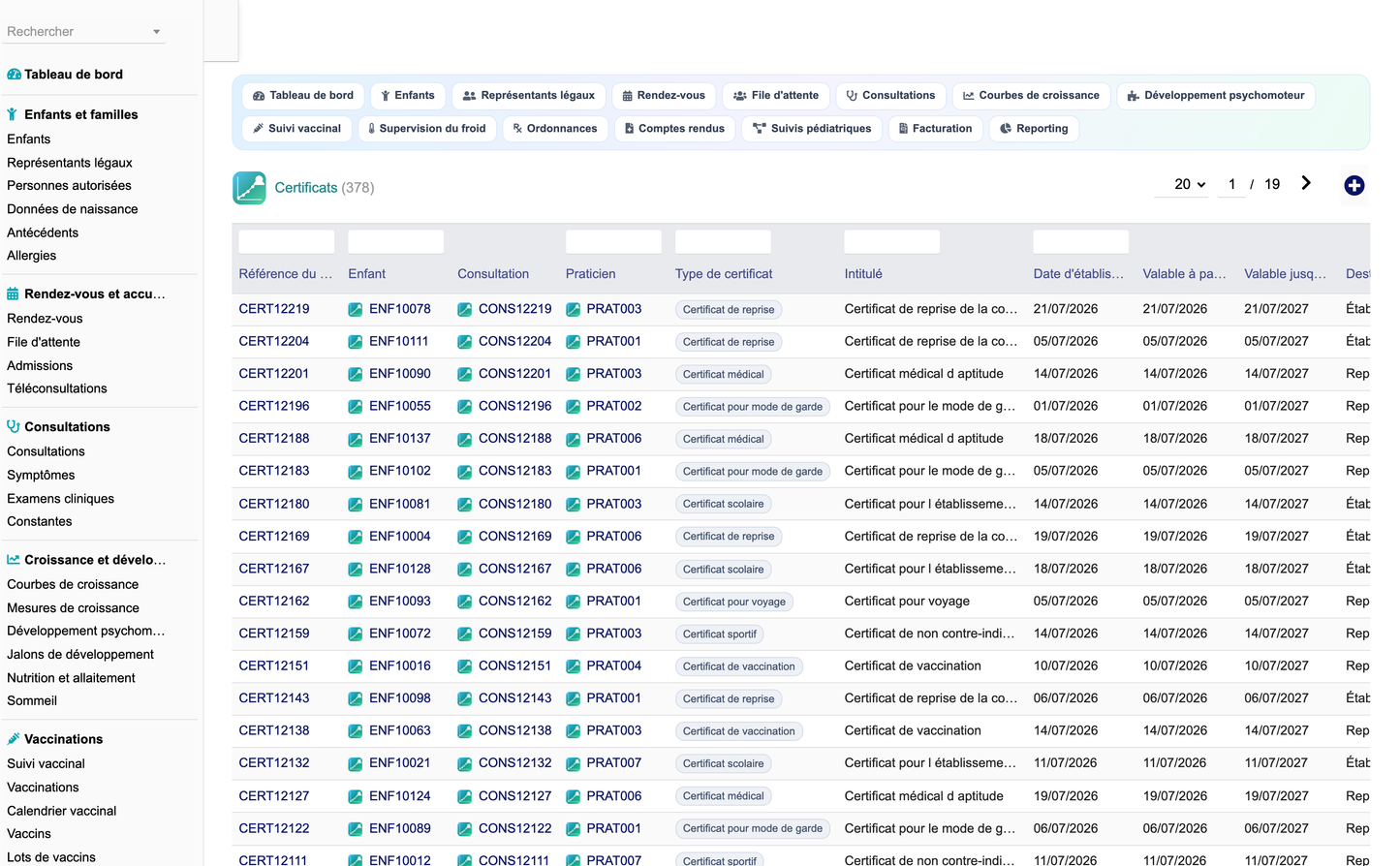
30. Medical Certificates
Certificate types cover the medical certificate, the school certificate, the sports certificate, the vaccination certificate, the absence certificate, the return-to-school certificate, the childcare certificate and the travel certificate.
A certificate carries the child, the consultation, the practitioner, the type, the title, the issue date, the validity window, the recipient, the content, who signed it, the signature date, a verification code and the status.
The vaccination certificate draws on the vaccination history: identity of the child, guardian, list of vaccinations with dates and lots, professional and establishment, signature, verification code and generation date. Access is gated by the certificate permission.
31. Medical Reports
Report templates exist for the newborn consultation, the infant consultation, the general consultation, growth, development, vaccination, nutrition, the adolescent consultation, chronic follow-up, teleconsultation, the letter to a physician and the medical summary.
The workflow is draft, to proofread, to validate, validated, signed, sent, archived. A report carries a version number, who validated it, the validation, signature and sending dates, the signature delay in days and a lock flag that freezes the content once signed.
A PDF model renders the report on A4 with the practice header, the child identity block, the practitioner block, the body, the conclusion, the signature block and the standing management-document notice.
32. Teleconsultation
A teleconsultation records the child, the guardian, the practitioner, the session date, the duration, the platform, the external meeting link, the consent obtained, whether the preliminary questionnaire was completed, the number of documents received, the connection quality, whether a physical examination is required, the status and the fee.
The interface carries an explicit reminder that a teleconsultation allows no direct physical examination and that the paediatrician must refer to an in-person consultation or to emergency care whenever they consider it necessary.
33. Family Portal
The family portal presents, for a selected authorised legal guardian, the children they actually represent, the upcoming appointments, the vaccinations and boosters, the available documents, the prescriptions and the invoices and payments.
The scope is enforced in the query itself: only children linked to that guardian appear, and only reports that are signed, sent or archived and certificates that are signed or delivered are surfaced. A guardian without portal access sees an explicit message rather than data.
34. Referrer Portal
The referring physician portal presents, for a selected referrer, the children referred to the practice, the pending examination requests with their type, urgency, request date and status, and the reports transmitted with their type, dates and status.
As in the family portal, a referrer without portal access sees an explicit message and no data.
35. Insurance
Insurers are typed as statutory health insurance, complementary health fund, private insurer, company scheme, international insurer or state scheme for minors.
Each carries a reference, a name, a linked third party, a contact, a convention reference, a coverage rate, a coverage ceiling, whether direct billing applies, the required documents and the validity window.
Every billing line records the insurer, the child, the payer, the covered amount, the out-of-pocket share, the claim reference and the claim status: not applicable, submitted, accepted, rejected or under appeal.
36. Billing
Billing lines record the child, the payer, the consultation, the insurer, the linked native invoice, the date, the service, the amount excluding and including tax, the covered amount, the out-of-pocket share, the amount collected, the payment method, the payment date, the claim status and reference, the cost price and the billing status.
The statuses are draft, issued, partly paid, paid, unpaid and credit note, which supports partial payments, direct billing, credit notes and the tracking of outstanding amounts.
The cost price is stored per line, which is what allows a genuine margin report. A line without a cost price is treated as unknown rather than free, so the margin can never silently read as one hundred percent.
Native Dolibarr modules remain the accounting system of record: quotations, customer orders, customer invoices, payments, banks and accounting are integrated rather than duplicated.
37. Inventory
The consumable stock covers vaccines, medicines, syringes, needles, compresses, gloves, dressings, solutions, paediatric devices, hygiene consumables, care kits and office supplies.
Each item carries the linked Dolibarr product, the lot number, the current, minimum and maximum quantities, the unit, the unit cost, the stock value, the supplier, the storage location, the expiry date, the last movement, the monthly usage and a status of normal, low, critical or expired.
Vaccine lots are managed separately with their own traceability, quarantine handling and cold chain linkage.
38. Equipment
Equipment records cover baby scales, paediatric scales, stadiometers, measuring tapes, thermometers, pulse oximeters, paediatric blood pressure monitors, nebulisers, otoscopes, vaccine refrigerators, medical workstations and telemedicine kits.
Each record holds the code, the label, the type, the manufacturer, the model, the serial number, the site and room, the installation and commissioning dates, the supplier, the warranty end, the contract reference, the purchase cost, the number of uses and failures, the downtime, the mean time between failures, the mean time to repair, the availability percentage, the next maintenance date and the status.
39. Maintenance
Maintenance operations are typed as preventive maintenance, corrective maintenance, safety check or calibration, and carry the equipment, the label, the planned and completion dates, the provider, the technician, the duration, the downtime, the parts used, the cost, a flag marking whether the operation makes the equipment unavailable in the schedule, the result and the status.
Availability, failure count, downtime, mean time between failures, mean time to repair and maintenance cost are reported per equipment type.
40. Quality
Quality records are typed as audit, control, family satisfaction survey, procedure review or non-conformity, and carry the scope, the auditor, the planned and completion dates, the number of checks, the number of non-conformities, the conformity rate, the satisfaction score, the number of responses, the action plan, the owner and the status.
Family satisfaction is reported as an average score and is one of the dashboard indicators.
41. Incidents
An incident carries a number, the date, the declarant, the type (child-related, vaccination-related, cold chain, equipment-related, documentation, hygiene, organisational, data security), the linked child, consultation, vaccination or equipment, the lot number, the label, the description, the severity, the immediate action, the root cause analysis, the corrective action, the owner, the due date, the closing date and the status.
The status model is open, under analysis, action in progress, closed, and open incidents are surfaced on the dashboard and by the daily alert job.
42. Reporting
Eight tabs group 44 reports: activity, children, growth and development, vaccination, documents and prescriptions, billing and profitability, stock equipment and quality, and forecast and analysis.
Every tab accepts a period filter, renders each report as a table with translated badges for coded values, and adds a chart when the report is a two-column numeric series.
Exports to CSV and to Excel are available and are gated by the export permission. Every exported cell is HTML-decoded so no entity leaks into the file, and the HTML-flavoured export escapes only the characters that need escaping so real accents survive.
43. Business Intelligence
The forecast tab projects the vaccine boosters expected per month, the forecast workload per practitioner from the appointments already booked, the forecast consumable usage expressed as months of stock remaining, the upcoming maintenance operations and the chronic follow-ups that need to be scheduled.
The activity tab analyses cancellations and no-shows, the waiting time per month and the teleconsultation volume; the children tab analyses the age-band distribution, prematurity and the condition mix.
None of these analyses is, or may be turned into, an automated medical diagnosis, and the reporting page states so.
44. API
The REST API exposes 197 routes: full CRUD over the 39 business objects, a practice-level reporting summary and a catalogue of the exposed endpoints.
Authentication uses the standard Dolibarr API key; the authenticated caller is resolved from the API access layer and every route re-checks the matching module permission, so an API client can never exceed the rights of its user.
Listing supports pagination, sorting and the Dolibarr universal filter syntax. The sort field is whitelisted against the real table columns before it reaches the query. Errors are structured HTTP responses: 400 for an invalid filter, 401 for a missing right, 404 for an unknown record, 500 for a persistence failure.
45. Security
CSRF protection on every posted form, XSS escaping on every printed value, cast or escaped values in every query, whitelisted sort fields, strict permission gates on every page and every API route, and the multi-entity clause on every query.
Documents are locked once signed. Portal access is scoped to the children a guardian actually represents. Exports are permission-controlled. The audit trigger journalises every create, modify and delete.
No sensitive value is written to the logs, and the demonstration dataset is tagged so it can never be confused with real data.
46. Demo Data
The configuration page offers Populate the demonstration data and Purge the demonstration data. The dataset is entirely fictitious and clearly labelled as such on every row.
It covers twelve months and contains around 38 000 rows: paediatricians, nurses, auxiliaries, assistants, secretaries and technicians; referring physicians; insurers; families, legal guardians and authorised persons; children spread across all six age bands; birth data, medical history and allergies; appointments, admissions and consultations with symptoms, clinical examination items and vital signs; longitudinal growth series; developmental assessments and milestones; nutrition and sleep records; the vaccine dictionary, the vaccination schedule, lots, vaccination acts and cold chain readings; examination requests, treatments, prescriptions, certificates and reports; follow-up pathways and their event journals; billing lines; native products and third parties; stock, equipment, maintenance, incidents and quality records.
The purge deletes only rows carrying the technical marker, cascades onto records a user created under a demonstration parent, runs inside a transaction, produces a per-table report and leaves real data untouched.
47. Installation
Unzip module_pediatricspractice-1.0.zip into htdocs/custom/ so the tree is htdocs/custom/pediatricspractice/, then enable Gestion Cabinet Pediatre in Home, Setup, Modules.
Activation creates the 39 tables and their indexes, inserts the 90 permissions and the 60 menu entries, sets the 11 configuration constants, self-heals the schema and installs the demonstration dataset.
Requirements: PHP 7.1 or later (tested on PHP 8), Dolibarr 16 to 23, MySQL or MariaDB, and the native Third parties and Products modules.
48. Deliverables
module_pediatricspractice-1.0.zip - the installable module, containing the pediatricspractice/ folder directly.
screenshots/ - 63 screenshots at 3200 by 1980 pixels covering the dashboard, every functional area, the portals, the reporting tabs, the configuration and the about page.
Pediatrics_Practice_User_Training_Manual_FR.pdf - the illustrated French user and training manual.
Pediatrics_Practice_Complete_Features_EN.docx - this document.
Pediatrics_Practice_Technical_Documentation_EN.md - the technical documentation: architecture, SQL schema, classes, hooks, triggers, permissions, API, cron, installation, update, uninstall, security and extension points.
Medical scope notice
Pediatrics Practice Management is a practice-management tool. It never replaces the paediatrician's diagnosis, the medical assessment of the child, the interpretation of growth charts, the developmental assessment, prescribing, the vaccination decision, referral to emergency care, the therapeutic decision or the validation of a medical report. Every sensitive clinical decision remains under the control of an authorised health professional.
Copyright DoliResources - www.doliresources.com


