
Discover powerful Dolibarr extensions designed to automate your business processes


Project Management is a comprehensive project-portfolio management platform for the Dolibarr ERP, designed specifically for construction and infrastructure companies. It enables a contractor to steer many concurrent projects across multiple sites, decompose each project into work lots by trade, and keep continuous control over budgets, subcontractors, procurement, milestones, progress, documentation and risk — all from a single, modern dashboard enriched with charts, an interactive Gantt planning board and decision-oriented analytics.
The module is inspired by DigiParc's project-management solution and translates that discipline into the Dolibarr environment. Rather than managing a project as an isolated task list, Gestion des Projets treats the project as a financial and operational hub: every lot, purchase order, invoice, expense, milestone and acceptance report is connected back to the project so that forecast, committed and actual budgets always reconcile, and so that delays or overruns surface early as actionable alerts.
· Construction and civil-engineering companies running several building or infrastructure projects in parallel.
· Project directors and project managers who need a consolidated portfolio view of cost, schedule and progress.
· Procurement and financial controllers tracking commitments, subcontractor invoices and cash exposure.
· Site managers coordinating lots, interventions, meeting minutes and acceptance reports on the ground.
· End-to-end budget control. Forecast, committed and actual budgets are tracked at project and lot level, so consumption and commitment rates are always visible.
· Trade-based structure. Work lots align with real construction trades (earthworks, structural works, HVAC, electrical, VRD, and more), matching how the site is actually organised.
· Subcontractor governance. Assignments, purchase orders, invoices and ratings keep the subcontractor relationship measurable and auditable.
· Proactive risk management. Automatic alerts flag budget overruns, schedule delays, milestone deadlines, unpaid invoices and unresolved reservations.
· Decision-ready analytics. A rich dashboard, a Gantt planning board and a reporting suite turn operational data into management insight.
· Native Dolibarr integration. Third parties, users and multi-entity support are reused directly, avoiding duplicate master data.
The table below summarises the principal functional areas delivered by the module.
|
Functional area |
Description |
|
Project portfolio |
Central register of all construction projects with client/owner, project manager, site, type, dates, budgets, progress and status. |
|
Multi-site management |
Organise projects by geographic site (Casablanca, Rabat, Tangier, Marrakech, Fez, Agadir) with per-site budget and project counts. |
|
Work-lot breakdown |
Decompose each project into work lots by trade domain, each carrying its own budget, subcontractor, progress and schedule. |
|
Budget tracking |
Forecast vs. committed vs. actual budgets at project and lot level, with consumption and commitment rates. |
|
Subcontractor management |
Directory of subcontractors with specialty, contacts, ratings, committed budget and number of lots. |
|
Procurement |
Purchase orders and subcontractor invoices with tax handling and status workflows. |
|
Expense tracking |
Committed, actual and invoiced expenses categorised by nature (labour, materials, equipment, subcontracting, studies). |
|
Milestones & progress |
Milestones (jalons) and periodic progress readings that feed the schedule and completion rates. |
|
Documentation |
Central document library (drawings, contracts, invoices, site photos, reports) with versioning and sharing flag. |
|
Site governance |
Meeting minutes, acceptance reports (PV) and interventions record on-site decisions and reservations. |
|
Dashboard & analytics |
KPI cards, budget-consumption bars, donuts, trends, gauges, alerts and a recent-activity feed. |
|
Gantt planning |
Interactive Gantt chart of work lots on a month timeline, coloured by status with a today marker. |
|
Reporting |
Budget and commitment analytics by category, type, domain, site, project and subcontractor. |
|
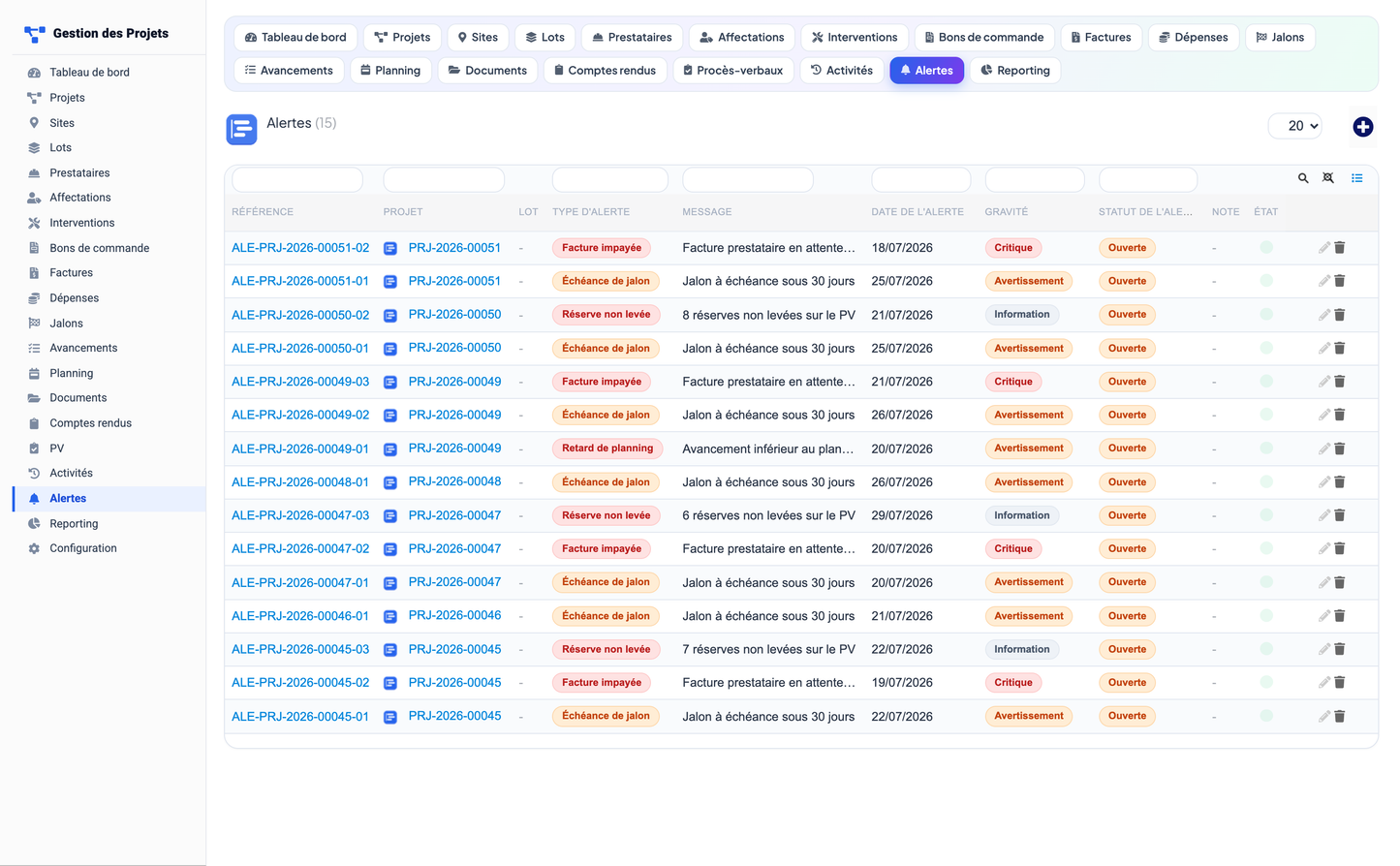
Alerts |
Severity-graded alerts for overruns, delays, deadlines, unpaid invoices and open reservations. |
|
Security |
Seven permission groups with read/write/delete plus an administration permission. |
|
Multilingual UI |
French (default), English, Spanish, Italian and German. |
The module is built around 16 business objects. Every object provides a list view (with search filters, column show/hide and coded-enum status badges) and a card (detail) view. Objects are grouped below by functional area. All tables use the gpr_ prefix and monetary values are expressed in Moroccan Dirham (MAD).
|
Object |
Purpose |
Key attributes |
Status values |
|
Project |
Portfolio hub linking all other objects |
Ref, name, client/project-owner (Third Party), project manager, site, project type, start & end dates, forecast/committed/actual budget, progress %, description |
Planned · In execution · Finalisation · Completed · Suspended |
|
Site |
Geographic grouping of projects |
Name, city, address, manager, number of projects, total budget |
Status |
Project type values: Building, Industrial, Infrastructure, Civil engineering, Development, Rehabilitation. Site cities: Casablanca, Rabat, Tangier, Marrakech, Fez, Agadir.
|
Object |
Purpose |
Key attributes |
Status values |
|
Work Lot |
Budget hub within a project, aligned to a trade |
Parent project, name, domain, assigned subcontractor, forecast/committed/actual budget, progress %, dates |
Planned · In progress · Completed · Suspended |
Lot domains: Technical studies, Earthworks, Structural works, Steel structure, Fit-out, Electrical, HVAC, Plumbing, Networks & telecom, Roads & utilities (VRD), Equipment, Development.
|
Object |
Purpose |
Key attributes |
Status / values |
|
Subcontractor |
Directory of external firms (prestataires) |
Name, linked Third Party, specialty, contact, phone, email, number of lots, committed budget |
Rating: Excellent · Good · Average · Poor |
|
Assignment |
Role of a subcontractor on a project/lot |
Project, lot, subcontractor, role, dates, contract amount |
Role: Main contractor · Joint contractor · Subcontractor |
|
Object |
Purpose |
Key attributes |
Status values |
|
Purchase Order |
Commitment to a subcontractor (bon de commande) |
Project, lot, subcontractor, subject, date, amount excl./incl. tax, VAT rate |
Draft · Approved · Sent · Received · Invoiced · Paid |
|
Invoice |
Subcontractor invoice (facture) |
Project, subcontractor, purchase order, invoice date, amounts, due date |
Received · Approved · Paid · Overdue · Disputed |
|
Expense |
Cost line against project/lot (dépense) |
Project, lot, subcontractor, type, label, date, amount |
Committed · Actual · Invoiced |
Expense types: Labour, Materials, Equipment, Subcontracting, Studies, Other.
|
Object |
Purpose |
Key attributes |
Status / values |
|
Milestone |
Key project checkpoint (jalon) |
Project, lot, name, type, planned date, actual date |
Upcoming · Reached · Overdue · Postponed |
|
Progress report |
Periodic completion reading (avancement) |
Project, lot, reading date, progress rate, actual amount, comment, author |
— |
Milestone types: Kick-off, Delivery, Acceptance, Validation, Payment, Meeting.
|
Object |
Purpose |
Key attributes |
Status / values |
|
Document |
Central document library entry |
Project, lot, category, name, version, file name, size, author, date, shared flag |
Category: Drawings · Contracts · Contracts & tenders · Purchases · Invoices · Meetings · Site photos · Reports |
|
Meeting minutes |
Record of a project meeting (compte rendu) |
Project, subject, meeting date, location, attendees, author, content |
Status |
|
Acceptance report |
Formal site acceptance (PV) |
Project, lot, type, subject, date, number of reservations |
Type: Provisional acceptance · Final acceptance · Site report · Clearing of reservations |
|
Intervention |
On-site intervention record |
Project, lot, subcontractor, subject, date, description |
Status |
|
Object |
Purpose |
Key attributes |
Status / values |
|
Activity log |
Feeds the recent-activity feed (activité) |
Project, type, label, date, author |
— |
|
Alert |
Risk signal on a project/lot (alerte) |
Project, lot, type, message, date |
Severity: Info · Warning · Critical / Status: Open · Handled · Ignored |
Alert types: Budget overrun, Schedule delay, Milestone deadline, Unpaid invoice, Unresolved reservation.
The portfolio dashboard is the module's landing page. It consolidates the status of the whole portfolio into a single screen combining key-figure cards, budget and progress visualisations, and live operational tables.
A row of key-performance-indicator cards presents the headline figures of the portfolio:
· Total projects
· Projects in execution
· Planned projects
· Completed projects
· Active subcontractors
· Sites
|
Visualisation |
What it shows |
|
Budget-consumption bar |
Forecast vs. committed vs. actual budget with associated consumption rates. |
|
Committed-budget donut |
Committed budget broken down by expense category. |
|
Budget-by-site bar chart |
Distribution of budget across the sites. |
|
12-month actual-spend trend |
Monthly evolution of actual spend over the last twelve months. |
|
Projects-by-status pie |
Share of projects in each status. |
|
Progress-by-project bars |
Completion percentage per project. |
|
Average-progress gauge |
Mean progress across the active portfolio. |
|
Commitment-rate gauge |
Committed budget as a share of forecast budget. |
· Open alerts — the current risk signals, ordered by severity, so managers can act immediately.
· Recent activity — the latest events across the portfolio, fed by the activity log.
The planning board renders the portfolio's work lots as an interactive Gantt chart. Lots are grouped by their parent project and positioned along a month-based timeline, giving an at-a-glance view of how the trades of every project overlap in time.
· Month timeline. Lots are laid out across a continuous month scale spanning the portfolio's active period.
· Today marker. A vertical marker highlights the current date, so slippage against plan is immediately visible.
· Status colouring. Each lot bar is coloured according to its status (planned, in progress, completed, suspended).
· Progress fill. Each bar carries a fill proportional to the lot's progress percentage.
· Project grouping. Bars are organised under their parent project for structural readability.
· Project filter. The board can be filtered to a single project to focus on one worksite.
The reporting module delivers decision-oriented analytics that aggregate the operational data along the axes most relevant to portfolio governance.
|
Report |
Analysis |
|
Budget by expense category |
Total budget grouped by category of expense. |
|
Projects by type |
Count and weight of projects per project type. |
|
Committed budget by lot domain |
Commitment concentration across trade domains. |
|
Committed budget by site |
Commitment distribution across geographic sites. |
|
Committed vs. actual by project |
Comparison of committed and actual amounts for each project. |
|
Top subcontractors by committed budget |
Ranking of subcontractors by the volume they are committed to deliver. |
|
12-month actual-spend trend |
Actual spend evolution over the trailing twelve months. |
Access is governed by seven functional permission groups, each offering read, write and delete rights, plus a dedicated administration permission. When the module is activated, read and write rights are granted by default so the team can begin working immediately; delete and administration rights can then be tuned per user or user group through Dolibarr's standard permission management.
|
Permission group |
Covers |
Rights |
|
Projects |
Projects and sites |
Read · Write · Delete |
|
Lots |
Work lots and budgets |
Read · Write · Delete |
|
Subcontractors |
Subcontractors and assignments |
Read · Write · Delete |
|
Budget |
Purchase orders, invoices and expenses |
Read · Write · Delete |
|
Operations |
Milestones, progress, interventions, meeting minutes, acceptance reports |
Read · Write · Delete |
|
Documents |
Document library |
Read · Write · Delete |
|
Reporting |
Dashboard and reporting views |
Read · Write · Delete |
|
Administration |
Module configuration and demo-data management |
Admin |
Gestion des Projets is a native Dolibarr module and reuses the platform's core services rather than duplicating them.
· Third-Parties (Societe). A hard dependency. Clients / project owners and subcontractors are linked to native third-party records, so commercial master data is maintained in one place.
· Users. Project managers, site managers, authors and approvers reference native Dolibarr users, and permissions plug into the standard user/group model.
· Multi-entity. The module is multi-entity aware, so it can operate within a specific entity in a multi-company Dolibarr installation.
· Standard UI conventions. List views, cards, search filters, column show/hide and status badges follow Dolibarr's standard interaction patterns, so users familiar with Dolibarr are immediately productive.
· Menus and dictionaries. The module registers its own top and left menus and status dictionaries, integrating cleanly into the Dolibarr navigation.
The module is installed like any Dolibarr module: place it in the modules directory and enable it from Home > Setup > Modules. On activation it creates its gpr_ tables, registers its menus and permissions, and grants read/write rights by default. The Third-Parties module must be enabled beforehand.
To help teams evaluate the module and to illustrate the dashboards, a realistic Moroccan construction demo dataset can be installed — and just as easily removed — from the module's setup page. The demo portfolio comprises:
|
Demo content |
Volume / examples |
|
Projects |
7 realistic projects (e.g. Construction Nouveau Site Industriel, Nouveau Siège Social, Station de Traitement des Eaux) |
|
Work lots |
34 lots spread across the projects and trade domains |
|
Subcontractors |
10 firms (e.g. TGCC, Steel Maroc, Elec Pro, ClimaTech, InfraNet) |
|
Sites |
6 sites across Moroccan cities |
|
Financial & operational records |
Purchase orders, invoices, milestones, progress reports, documents and more |
|
Total forecast budget |
Approximately 78 million MAD |
Because the dataset is fully installable and removable, evaluators can populate a live-looking portfolio for demonstrations and then restore a clean state without residual data.
|
Property |
Value |
|
Module name |
Gestion des Projets (Project Management) |
|
Version |
1.0.0 |
|
Module number |
1100000 |
|
Publisher |
DoliResources |
|
Website |
www.doliresources.com |
|
Database table prefix |
gpr_ |
|
Currency |
MAD (Moroccan Dirham) |
|
Dolibarr compatibility |
16.0 – 23.x |
|
PHP requirement |
7.1 or higher |
|
Required dependency |
Third-Parties (Societe) |
|
Native integrations |
Users, multi-entity |
|
Business objects |
16 (list + card views) |
|
Permission groups |
7 groups (read/write/delete) + administration |
|
User-interface languages |
French (default), English, Spanish, Italian, German |
© 2026 DoliResources — www.doliresources.com


