
Discover powerful Dolibarr extensions designed to automate your business processes
Purchasing & Procurement turns Dolibarr into a complete purchasing and procurement control tower. It covers the entire procurement...
Couldn't load pickup availability


Purchasing & Procurement turns Dolibarr into a complete purchasing and procurement control tower. It covers the entire procurement lifecycle — from the expression of a need to the final supplier payment — while remaining fully integrated with Dolibarr's native modules (Third Parties, Products, Stock and Users).
The module is organised around the four-stage procurement cycle used by best-in-class purchasing departments:
· Express the need — capture a flexible purchase request with supporting documents and a budget envelope.
· Compare & validate — consolidate supplier quotes and compare them side by side before committing.
· Order — generate purchase orders quickly, with fast re-ordering by duplication.
· Receive & invoice — record goods receipts and reconcile supplier invoices before payment.
Every object is multi-company aware, permission-controlled, fully translated (French and English shipped, Spanish/Italian/German scaffolded) and rendered through a modern, consistent user interface with dashboards, KPI cards, colour-coded status badges and decision charts.
· Centralised purchasing — a single, centralised place for requests, quotations, orders, receipts, invoices and payments.
· Budget visibility — budget envelopes with allocated, committed and consumed amounts, and overrun alerts.
· Better sourcing — comparative analysis of supplier proposals with best-price and best-lead highlighting.
· Controlled spending — automated three-way matching between order, delivery note and invoice.
· Supplier governance — only approved suppliers can be engaged; suppliers are rated and evaluated after each order.
· Compliance — a full, traceable audit trail across the request-to-pay chain.
· Time savings — order duplication, article repository auto-fill, automatic numbering and payment terms.
The module implements an end-to-end request-to-pay flow. Each document links to the next so that the entire chain is traceable from a single record:
|
Stage |
Document |
Purpose |
|
Express the need |
Purchase request (Demande d'achat) |
Formalise the need, requester, category, priority, estimated amount and budget. |
|
Compare & validate |
Supplier quotes (Devis) |
Collect and compare competing supplier proposals; retain the best offer. |
|
Order |
Purchase order (Bon de commande) |
Commit spend with the selected supplier; set payment terms and lead time. |
|
Receive |
Delivery note (Bon de livraison) |
Record goods receipt, quality control and stock update. |
|
Invoice |
Supplier invoice (Facture) |
Reconcile invoice with order and delivery (three-way matching). |
|
Pay |
Payment (Paiement) |
Register the settlement and track the payment status. |
Purchase requests are the entry point of the procurement cycle. Each request carries an object, a requester, a target supplier, a purchasing category, an estimated amount, a request and need-by date, a priority and a budget envelope. Requests are itemised through request lines.
· Priority levels: Low, Medium, High, Critical (colour-coded).
· Approval circuit through eight statuses (see §7).
· Line items reference the article repository (description, quantity, unit, estimated unit price).
· Budget envelope selection so spend is tracked against a fiscal allocation.
· One-click generation of orders once the request is approved.
Supplier quotes consolidate competing proposals for a request. Each quote records the supplier, received and validity dates, amounts (excl./incl. tax), lead time and a computed score.
· Multiple quotes per request with full history and traceability.
· Automatic scoring combining price, supplier rating and lead time.
· Statuses: Received, Under comparison, Selected, Rejected, Expired.
· Dedicated Quote Comparator page (see §6) with best-price and best-lead highlighting.
Purchase orders commit spend with the selected supplier. Orders auto-populate from the retained quote and the article repository, including payment terms, pricing and numbering.
· Rapid order generation and duplication for fast re-ordering (quick replenishment).
· Payment terms: cash, on receipt, net 30 / 45 / 60 days.
· Order lines with article, quantity, unit, unit price and line total.
· Statuses: Draft, Validated, Sent, Partially received, Received, Invoiced, Cancelled.
· Linked hub card showing related deliveries and invoices at a glance.
Deliveries record the receipt of ordered goods. Each delivery references its order, the supplier, the delivery date, the number of items, a quality control result and the destination warehouse.
· Quality control: Compliant, With reservations, Non-compliant.
· Received quantities per line versus ordered quantities.
· Automatic stock-update flag; received articles can feed native Dolibarr stock.
· Statuses: Expected, Partially received, Delivered, Validated.
· Overdue (still-expected past the due date) deliveries surface as alerts and dashboard KPIs.
Supplier invoices are checked against their order and delivery note before validation and payment. Each invoice records amounts (excl. tax, VAT, incl. tax), invoice and due dates, payment mode and a matching result.
· Automated three-way matching: invoice ↔ order ↔ delivery (Matched, Discrepancy, Unmatched).
· Payment-status tracking: Pending, Validated, Ready to pay, Paid, Disputed.
· Due date derived automatically from the supplier's payment terms.
· Invoice lines mirror the ordered items for line-level control.
· Downloadable, archivable digital invoice representation.
Payments register the settlement of validated invoices, with the payment date, amount, mode (bank transfer, cheque, bill of exchange, cash), a reference and a status (Issued, Cashed, Rejected).
· One payment per settled invoice, linked back to the invoice and supplier.
· Feeds the outstanding-to-pay KPI on the dashboard.
Budget envelopes are defined per purchasing category and fiscal year, with allocated, committed and consumed amounts and a period (yearly, half-yearly, quarterly, monthly).
· Real-time budget consumption percentage on the dashboard.
· Statuses: Open, Consumed, Closed, Overrun (over 100%).
· Purchase requests draw against the relevant category envelope.
· Overrun envelopes raise a critical budget alert.
The supplier repository links each purchasing supplier to a native Dolibarr third party and adds purchasing-specific data: category, payment terms, rating, number of orders and on-time rate. Only approved suppliers may be engaged.
· Supplier statuses: Approved, Under evaluation, Suspended, Rejected.
· Post-order evaluations rate quality, lead time and price, with an overall score and a recommendation.
· Rating and on-time rate feed the dashboard and the supplier reporting table.
The article repository standardises purchased items (spare parts, tyres, consumables, lubricants, tooling, services, equipment, supplies) with reference, description, unit, preferred supplier, unit price, VAT rate and stock thresholds.
· Auto-fills request, quote, order, delivery and invoice lines.
· Low-stock detection (stock at or below the minimum) raises an alert.
· Article statuses: Active, Listed, Obsolete.
Framework agreements, alerts and attached documents complete the module.
· Framework contracts: type (framework, tender, subscription, one-off), dates, committed amount, discount, renewal mode and status.
· Alerts: budget overrun, delivery delay, pending invoice, payment due, expired quote, low stock, expiring contract — with information / warning / critical severities.
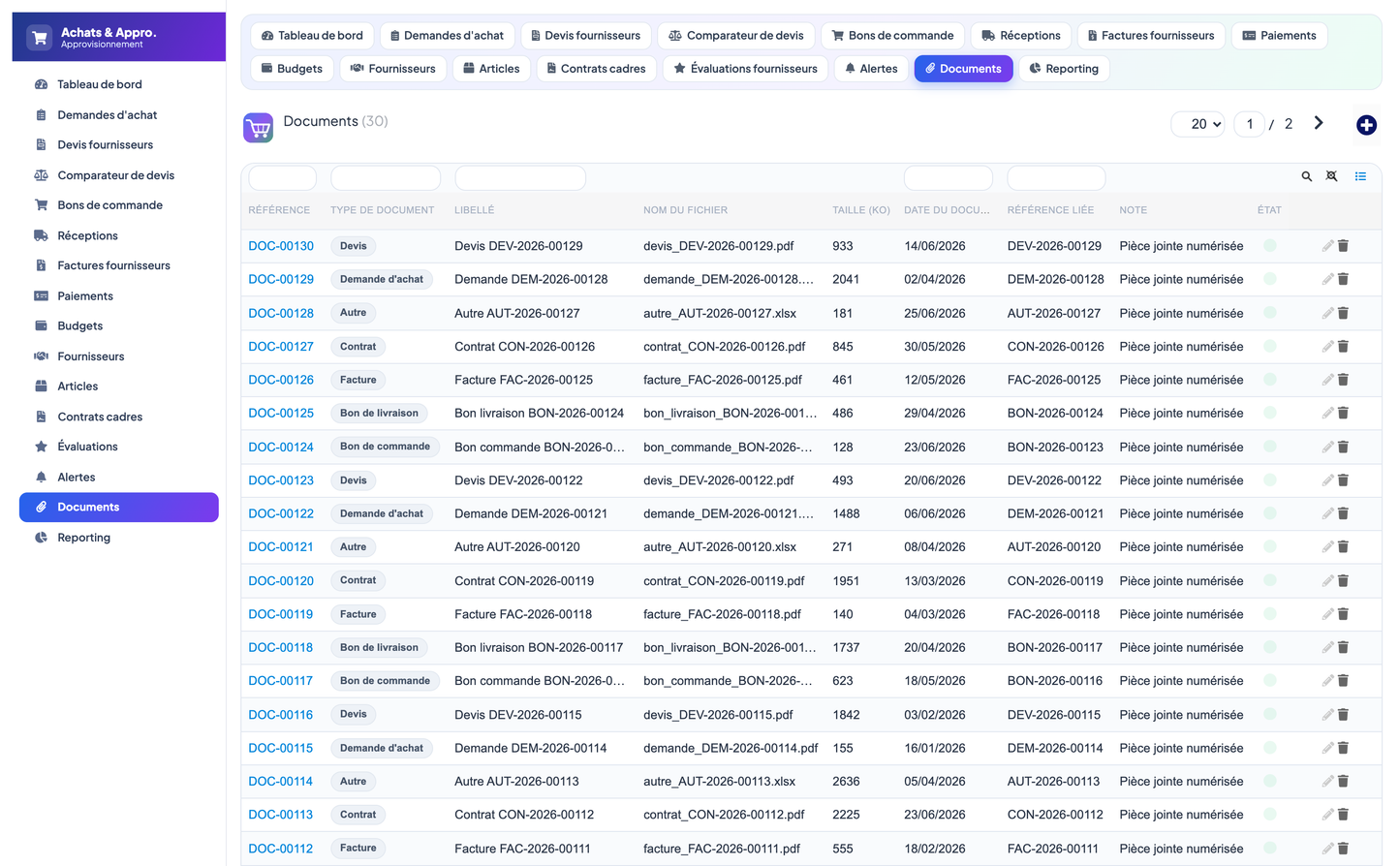
· Documents: typed attachments (request, quote, order, delivery, invoice, contract, other) with a related reference.
The dashboard provides real-time steering of the purchasing function, organised in four zones: Purchasing overview, Budget & commitment, Suppliers & lead times, and Alerts & deadlines. A procurement-cycle strip summarises the four workflow stages at the top.
|
KPI |
Description |
|
Purchase requests |
Total number of requests, with the number created this month. |
|
Quotes received |
Total number of supplier quotes received. |
|
Orders generated |
Number of purchase orders (excluding cancelled). |
|
Budget consumed |
Overall consumed / allocated budget percentage. |
|
Purchases this month / year |
Order amount (incl. tax) for the current month and year. |
|
Approved suppliers |
Number of suppliers with the Approved status. |
|
On-time rate / Conformity |
Average supplier on-time rate and receipt conformity gauges. |
|
Average lead time |
Average order lead time in days. |
|
Requests to approve |
Requests awaiting approval (open work). |
|
Pending / Ready-to-pay invoices |
Invoices pending validation and ready for payment. |
|
Overdue deliveries |
Deliveries still expected past their due date. |
|
Open alerts |
Number of open alerts, with a recent-alerts table. |
The dashboard also displays a spend-by-category donut chart (in MAD), a budget allocated-vs-consumed bar chart, a 12-month purchase-evolution chart, a top-suppliers-by-spend chart and a requests-by-status breakdown.
The Quote Comparator presents, for every request with two or more quotes, a side-by-side comparison of the competing supplier offers. Each row shows the supplier, amount (excl./incl. tax), lead time, score and status. The best price and the best lead time are highlighted, and the retained quote is flagged as Selected — supporting the Compare & validate decision before any commitment is made.
|
Status |
Meaning |
|
Draft |
Being prepared. |
|
Awaiting approval |
Submitted, pending validation. |
|
Approved |
Validated, ready for sourcing. |
|
Rejected |
Refused. |
|
Quotes received |
Supplier quotes have been received. |
|
Quote comparison |
Quotes are being compared. |
|
Order generated |
A purchase order has been created. |
|
Received |
Goods have been received. |
|
Document |
Statuses |
|
Order |
Draft · Validated · Sent · Partially received · Received · Invoiced · Cancelled |
|
Delivery |
Expected · Partially received · Delivered · Validated |
|
Invoice |
Pending · Validated · Ready to pay · Paid · Disputed |
|
Quote |
Received · Under comparison · Selected · Rejected · Expired |
|
Payment |
Issued · Cashed · Rejected |
|
Budget |
Open · Consumed · Closed · Overrun |
|
Supplier |
Approved · Under evaluation · Suspended · Rejected |
Access is governed by seven permission groups. Each group grants read, create/modify and delete rights independently (read and write are granted by default on activation).
|
Permission group |
Scope |
|
Purchase |
Purchase requests and supplier quotes. |
|
Order |
Purchase orders. |
|
Reception |
Goods receipts / deliveries. |
|
Invoicing |
Supplier invoices and payments. |
|
Referential |
Suppliers, articles, framework contracts, evaluations. |
|
Budget |
Budget envelopes. |
|
Reporting |
Dashboards, reporting, alerts and documents (read). |
· Architecture: Native Dolibarr module (descriptor, rights, menus, boxes) — no core modification.
· Data model: 18 business objects across dedicated llx_aap_* tables (multi-entity aware).
· Integration: Integrates with native Third Parties, Products, Stock and Users.
· Languages: French and English delivered; Spanish, Italian and German scaffolded.
· Currency: MAD (Moroccan Dirham); amounts rounded and formatted consistently.
· Requirements: Dolibarr 16.0+ and PHP 7.1+.
· Robustness: Module-prefixed labels, self-healing schema, safe activation and idempotent demo data.
Deploy the module folder into htdocs/custom and enable it from Home ▸ Setup ▸ Modules. On activation the module creates its tables, menus and permissions, self-heals the schema and installs a realistic demonstration dataset.
The demo dataset is economically coherent: 14 Moroccan suppliers, an article repository, budget envelopes, and a full request → quote → order → delivery → invoice → payment chain, plus evaluations, framework contracts, alerts and documents. It can be reinstalled or removed from the module configuration page.
|
# |
Object |
Role |
|
1 |
Supplier |
Purchasing supplier repository (hub). |
|
2 |
Article |
Purchased-item repository. |
|
3 |
Purchase request (+ lines) |
Expression of need (hub). |
|
4 |
Supplier quote (+ lines) |
Competing supplier proposals. |
|
5 |
Purchase order (+ lines) |
Spend commitment (hub). |
|
6 |
Delivery (+ lines) |
Goods receipt and quality control. |
|
7 |
Supplier invoice (+ lines) |
Invoice with three-way matching. |
|
8 |
Payment |
Invoice settlement. |
|
9 |
Budget |
Envelope and commitment tracking. |
|
10 |
Framework contract |
Framework / tender agreements. |
|
11 |
Evaluation |
Post-order supplier scoring. |
|
12 |
Alert |
Deadline and threshold notifications. |
|
13 |
Document |
Typed attachments. |
© 2026 DoliResources — www.doliresources.com. All rights reserved.


