
Discover powerful Dolibarr extensions designed to automate your business processes
Radiology Center Management turns Dolibarr into a full radiology information system. It covers the entire patient pathway — from the referring...
Couldn't load pickup availability


Radiology Center Management turns Dolibarr into a full radiology information system. It covers the entire patient pathway — from the referring physician's request through scheduling, admission, acquisition, reporting and result delivery, to billing, insurance settlement and archiving — so that a centre no longer needs a separate line-of-business application alongside its ERP.
The module is built exclusively on native Dolibarr mechanisms: business classes, hooks, permissions, menus, PDF models, the document management system and the REST API. The Dolibarr core is never modified, which keeps upgrades safe and predictable.
· Unify administrative, clinical, financial and technical management in a single system.
· Shorten the report turnaround time, the metric that referring physicians judge a centre on.
· Increase room and equipment utilisation through modality-aware scheduling.
· Secure the traceability of contrast media, radiation dose and consent.
· Give referrers and patients self-service access without exposing unvalidated results.
· Make cost per examination and margin by modality measurable rather than assumed.
|
Domain |
Coverage |
|
Clinical pathway |
Requests, appointments, admission, examinations, reports, delivery |
|
Referential |
Sites, rooms, modalities, equipment, examination types, protocols |
|
Safety |
Contrast media lots, injections, dosimetry, quality controls, incidents |
|
Financial |
Invoices, payments, cash desk, insurances, coverages, unpaid follow-up |
|
Logistics |
Consumables, stock movements, lots, expiry dates, alerts |
|
Technical |
Maintenance and CMMS, DICOM / RIS / PACS / HL7 / FHIR interface logs |
|
People |
Staff, roles, qualifications, authorisations, shifts and on-call duty |
The module is multi-entity and multi-site aware, so a group can operate several centres in one installation while keeping data segregated by entity.
The functional scope is expressed as 34 business objects. Eight of them are hubs — sites, equipment, patients, referring physicians, requests, appointments, examinations, reports and invoices — around which the remaining objects are organised. Every object comes with a list view, a record card, search and filtering, a column selector, and export.
The module ships twenty permission groups, each carrying read, write and, where relevant, delete rights, plus eight dedicated rights for sensitive actions. Read and write are granted by default so the module is usable immediately after activation; the sensitive rights are not.
|
Role |
Typical rights |
|
Administrator / management |
All groups, plus module administration and demo data |
|
Medical director / radiologist |
Examinations, reports, report validation and signature |
|
Locum physician |
Examinations and reports on assigned work |
|
Radiographer (technician) |
Appointments, admission, examinations, contrast and injections |
|
Nurse |
Admission, contrast media and injections |
|
Medical secretary / reception |
Patients, referrers, requests, appointments, admission |
|
Billing manager / cashier |
Invoices, payments; cash-in is an explicit right |
|
Insurance officer |
Insurances, conventions, coverages |
|
Quality manager |
Quality controls, dosimetry, incidents, claims |
|
Biomedical technician |
Equipment, maintenance, breakdowns |
|
Storekeeper |
Consumables, stock movements, contrast lots |
|
Read-only user |
Consultation of the groups granted, no write |
Validating a report, signing a report, cashing in a payment, consulting costs and margins, exporting data, managing demonstration datasets and administering the module are all disabled by default and must be granted deliberately. This is what keeps a clinical act attributable to a named, authorised professional.
The dashboard, titled Radiology Command Center, is the operational cockpit of the centre. It is organised in four zones: a live indicator grid, the patient journey, the room and modality board, and an alert panel, followed by trend charts.
A nine-stage strip shows how many records currently sit at each step: request, appointment, admission, preparation, examination, interpretation, validation, result and billing. Each stage links straight to the corresponding worklist, so a bottleneck is one click from being acted on.
Every examination room is rendered as a card showing its modality, equipment, current patient, examination type, scheduled and actual start time, radiologist, radiographer, expected duration, delay and equipment status. Colour coding distinguishes available, scheduled, patient in preparation, in progress, being reported, late, emergency, under maintenance and unavailable.
|
Family |
Indicators |
|
Activity |
Patients today, appointments today, scheduled / performed / pending examinations |
|
Pressure |
Emergencies, cancellations, no-shows, late examinations |
|
Efficiency |
Room occupancy, average waiting time, average examination duration |
|
Reporting |
Report turnaround, reports pending, reports validated |
|
Financial |
Revenue today and this month, amount cashed in, covered amount, outstanding, unpaid |
|
Profitability |
Average cost per examination, margin |
|
Logistics |
Contrast media consumption, critical stock items |
|
Technical |
Open breakdowns, upcoming maintenance |
|
Quality |
Quality incidents, conformity rate, average dose, patient satisfaction |
Cost and margin indicators deliberately exclude examinations with no recorded cost: an unknown cost is treated as unknown, not as zero, so the module never reports a flattering margin it cannot substantiate.
The patient record holds the full administrative identity — internal identifier, civility, name, birth name, sex, date and place of birth, national identifier, address, telephone, e-mail, emergency contact, legal guardian for minors, preferred language and accessibility needs — together with the insurer, membership number, data-processing consent and portal activation.
Alongside it, the module records only the clinical information that is useful to organising and safely performing the examination:
· Allergies, and specifically any declared contrast medium allergy.
· Known renal impairment and diabetes.
· Pregnancy and breastfeeding.
· Implanted devices and pacemakers, which condition MRI eligibility.
· Claustrophobia, reduced mobility and the need for an escort.
· Weight and height, used for positioning and technique.
These are surfaced as visible alerts at admission. They inform the professional; they never trigger an automatic decision.
Duplicate detection, multi-criteria search including search by telephone and identifier, modification history, archiving and anonymisation are provided. The record aggregates the patient's examinations, reports, invoices and payments in one place.
Referrers are recorded with their speciality, institution, professional identifier, contact details, preferred delivery channel and portal status. Institutions cover hospitals, clinics, practices, health centres and partner companies, each with its convention reference and expiry.
|
Tracked per referrer |
Purpose |
|
Number of requests |
Volume and share of activity |
|
Associated revenue |
Commercial weight of the relationship |
|
Average report turnaround |
Service level actually delivered to that referrer |
|
Delivery preference |
E-mail, portal or print |
A request carries the patient, referrer, institution, examination type, modality, indication, body area, prescription reference and date, urgency, attached documents, declared contraindications, insurer and coverage status. It follows a fifteen-state workflow from draft through received, to be checked, complete, validated, scheduled, in preparation, performed, interpreted and closed — with incomplete, waiting for document, refused, cancelled and postponed as explicit outcomes.
The planning board can be read by room, modality, radiologist or radiographer, in day or week view, with filters on site, examination type, status, priority and referrer. Appointments are positioned on a half-hourly time grid and colour-coded by status.
· Booking, moving, duplicating, confirming, rescheduling and cancelling.
· Waiting list, emergency slots, recurring and multi-examination appointments.
· Blocked ranges, leave and unavailability.
· Planned maintenance automatically blocks the affected room's slots.
· Automatic reminders by e-mail, notification or portal.
The admission sheet is a safety checklist completed before the patient enters the room. It records arrival, admission and preparation times, and confirms identity, prescription, insurance cover, signed consent, safety questionnaire, allergies, pregnancy, implants, fasting and the availability of any required laboratory results, together with room assignment and waiting time.
|
Priority |
Handling |
|
Normal |
Standard scheduling |
|
Priority |
Advanced in the queue, highlighted |
|
Urgent |
Dedicated queue, notification, rapid assignment |
|
Critical |
Immediate escalation; priority changes are traced and justified |
The module covers conventional radiography, ultrasound and Doppler, mammography, CT, MRI, bone densitometry, dental imaging and interventional radiology, and accepts further configurable modalities. Each examination type declares its modality, body area, expected duration, compatible room and equipment, preparation and fasting requirements, required documents, whether contrast is possible, whether consent is required, its price, tax rate, standard cost and report template.
Protocols are versioned and carry the indication, positioning, sequences, acquisition parameters, contrast use, indicative dose, precautions, reconstructions and post-examination instructions, with author, validator and date of application. The final choice of protocol always remains with authorised personnel.
An examination links the patient, request, appointment, type, modality, site, room, equipment, protocol, radiologist, radiographer and referrer. It records planned, actual start and end times, real duration, series and image counts, accession number, study identifier and the PACS viewer link, together with dose indicators and technique values. Its lifecycle runs from scheduled through patient arrived, in preparation, ready, in progress, interrupted, completed, to interpret, being reported, validated and delivered, with cancellation possible at any point.
Contrast products are managed by lot: family, concentration, volume, quantity received and remaining, unit cost, receipt and expiry dates, storage conditions and lot status including quarantine and blocking. Every administration records the patient, examination, product, lot, dose, route, flow rate, time, operator, validator, injector, any reaction and a signature.
Alerts are raised for a declared allergy, an expired product, a blocked lot, insufficient stock or a missing mandatory document. The module never proposes a dosage without validation by an authorised professional.
Reports are structured into indication, technique, results, conclusion and recommendations, with comparison to prior examinations, attachments and free text. Templates can be defined per examination type and per radiologist.
|
Status |
Meaning |
|
To dictate / dictated |
Awaiting or holding the radiologist's dictation |
|
Being transcribed |
With the transcriber |
|
Draft / to proofread |
Text produced, awaiting review |
|
To validate |
Awaiting validation by an authorised professional |
|
Validated / signed |
Clinically approved, and electronically signed |
|
Sent / corrected / archived |
Delivered, amended, or closed |
A validated version can never be overwritten: corrections create a new version and the history is preserved. Validation and signature each require a dedicated right that is not granted by default, and the validating user and timestamp are recorded. Critical findings can be flagged for escalation.
Dictation supports recording by the radiologist, assignment to a transcriber, optional external speech recognition, correction and final validation. The audio file, author, date, version, transcript, corrections and validator are retained. Any automatic transcription is always proofread and validated by an authorised professional before it becomes a report.
Results can be handed over at the centre, sent to the referring physician, delivered by secure e-mail, published on the portal, printed, written to digital media or shared as an image viewer link. Each delivery records the channel, recipient type, date, delivering user, acknowledgement and download count.
· Secure links carry an access code and an expiry date.
· Downloads are logged; links can be revoked and regenerated.
· Only reports that are validated, signed or sent are ever exposed.
Payers are recorded as statutory health insurance, complementary insurers, private insurers, company schemes or other organisations, each with its convention reference, coverage rate, ceiling, deductible, third-party payment arrangement, required documents and payment delay.
Per patient and per examination the module tracks the coverage request, validity dates, total amount, covered amount, patient share, authorisation reference and, where applicable, the rejection reason and any appeal.
Billing is integrated with the native Dolibarr invoicing, payment, bank and accounting modules. Pricing can follow the examination type, a convention, an insurer agreement or a patient tariff.
· Individual, grouped, third-party-payer invoices and credit notes.
· Third-party payment with automatic split between covered amount and patient share.
· Deposits, partial payments, refunds, authorised discounts.
· Cash desk sessions and closing, unpaid invoice follow-up.
Every invoice is linked to its patient, examination, request, payer, convention and payments, so a figure on a report can always be traced back to the act that produced it.
Stock covers contrast media, syringes, needles, catheters, gels, gloves, drapes, disinfectants, imaging film, paper, digital media, technical consumables and spare parts, using the native product, stock, warehouse and lot modules.
|
Capability |
Detail |
|
Lot and expiry management |
Traceability from receipt to consumption on an examination |
|
Thresholds |
Minimum and maximum stock, low and critical status, alerts |
|
Movements |
Entry, issue, consumption, transfer, inventory adjustment, return, scrapping |
|
Control |
Quarantine, blocking, release, valuation |
The equipment register covers radiography tables, ultrasound systems, mammography units, CT and MRI scanners, bone densitometers, injectors, consoles, diagnostic workstations, printers, backup systems and radiation protection equipment. Each item records its manufacturer, model, serial number, site, room, modality, installation and commissioning dates, supplier, contract, warranty, purchase and maintenance cost, examination count, hours of use and next maintenance date.
Preventive, corrective, regulatory and condition-based maintenance are planned and tracked with their technician or external provider, contract reference, description, actions performed, parts used, downtime and costs. Planned maintenance blocks the affected room in the appointment planning automatically, so an intervention cannot silently collide with booked patients.
|
Metric |
Basis |
|
Availability and utilisation rate |
Hours of use against opening hours |
|
Number of breakdowns and downtime |
Corrective interventions and their duration |
|
MTBF and MTTR |
Interval between failures and time to repair |
|
Maintenance cost |
Parts, labour, contracts |
|
Preventive maintenance completion |
Planned versus performed |
Internal, external, regulatory, acceptance and daily quality controls are recorded with their measured value, tolerance limits, unit, conformity verdict, controller, external body, corrective action and next due date. Overdue controls are surfaced as alerts.
For each examination the module stores the relevant dose indicators — dose length product, CT dose index, dose area product, entrance skin dose — against the applicable reference level, flagging any value above it for analysis by the radiation protection officer. Values are recorded and compared; they are never interpreted automatically.
Incidents and adverse events are declared, analysed, assigned a root cause, a corrective action, an owner and a due date, then verified and closed. Patient and referrer claims follow a comparable cycle with a satisfaction score.
The patient portal exposes appointments, preparation instructions, forms, invoices, payments and validated reports with their secure download and image viewer links. The referrer portal lets a prescriber submit a request with its prescription, follow its status, retrieve authorised reports and review their own activity and turnaround times. Both are strictly scoped: a query is always constrained to the identified patient or referrer, and only reports that are validated, signed or sent are ever visible.
Examinations entrusted to a remote radiologist are tracked from to transmit, transmitted, accepted and being read, through to validated, refused or closed, with the sending site, remote reader, contract, speciality, urgency, timestamps at each step, resulting turnaround and cost.
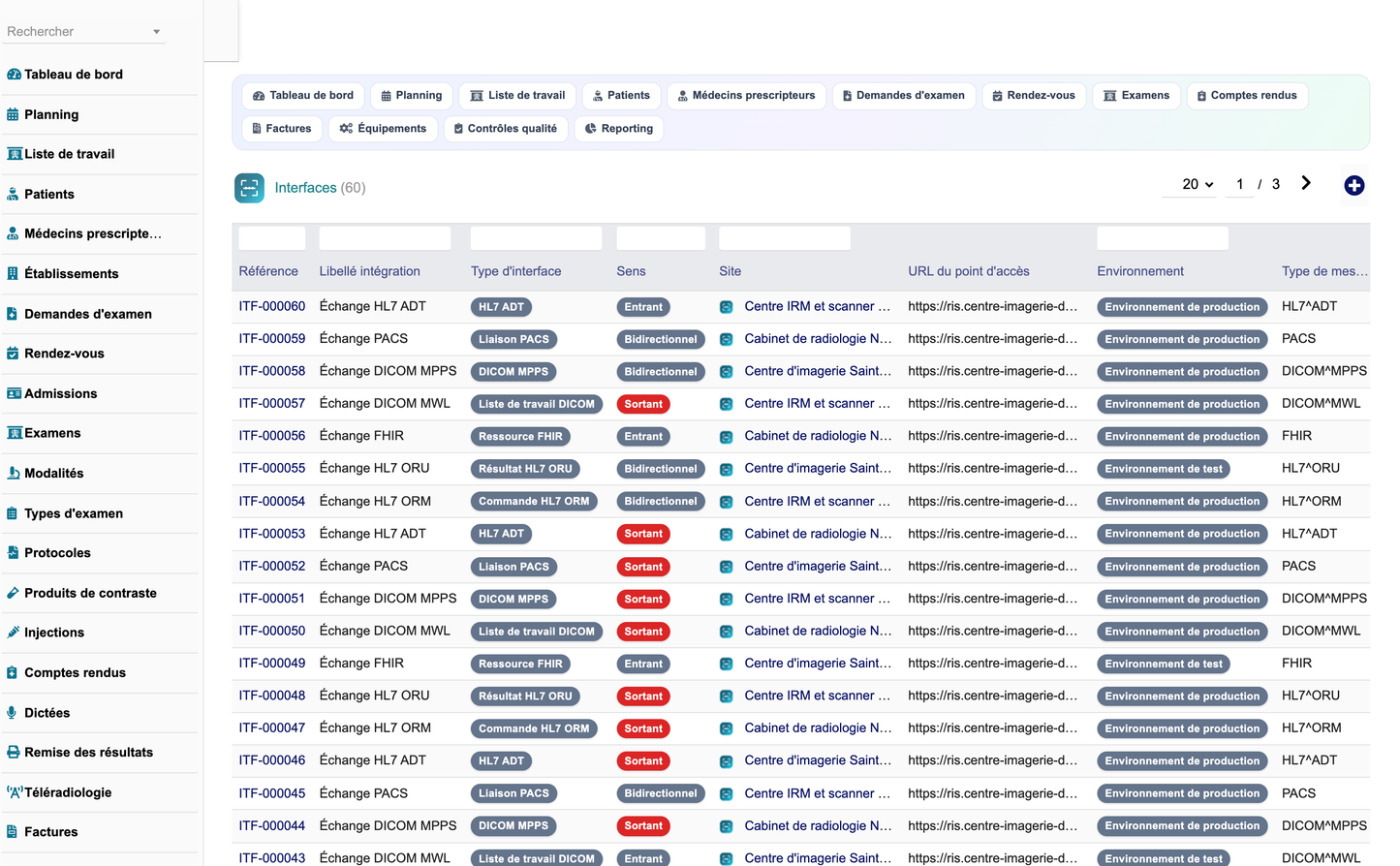
The module provides a configurable integration layer and an exchange log covering DICOM Modality Worklist and MPPS, PACS links, HL7 ADT, ORM and ORU messages, and FHIR resources, with direction, environment, external identifier, status, retry count and error message. Dolibarr manages metadata, links, statuses and documents; heavy medical images remain in the PACS. The module does not attempt to replace a PACS.
· Authenticated REST API over the main objects, with pagination, filtering and structured errors.
· Permission enforcement on every route; report validation requires its dedicated right.
· Prepared and escaped queries, CSRF protection, entity filtering on all data access.
· Locked validated reports, audit of consultations and modifications, controlled exports.
· Expiring, code-protected and revocable result links with download logging.
A one-click generator installs a complete, entirely fictitious dataset covering twelve months of activity, and a second button removes it without touching real records. The delivery comprises the installable module archive, this summary, the complete English feature specification, the English technical documentation, the French training manual and the screenshot set.
|
Scope of use. Radiology Center Management is a management and organisation tool. It never replaces the radiologist's medical decision, never interprets an examination without human validation, and never proposes a contrast medium dosage without validation by an authorised professional. Every analytic output is explainable and remains subject to review by an authorised user. |


