
Discover powerful Dolibarr extensions designed to automate your business processes
Lotissement Management turns Dolibarr ERP/CRM into a complete, specialized platform for managing the sale...
Couldn't load pickup availability


Lotissement Management turns Dolibarr ERP/CRM into a complete, specialized platform for managing the sale of building plots in a real-estate subdivision ("lotissement"). It covers the entire business cycle of a property-development or land-development company: creation and management of subdivision projects, division into zones and phases, a full plot catalogue with an interactive color-coded plan, an integrated real-estate CRM with a visual sales pipeline, plot options and reservations, sale contracts, payment schedules (installments), collections, sales-rep and partner commissions, an administrative document vault, a premium executive dashboard, a full commercial & financial reporting hub, and an automation engine.
The goal is to let Dolibarr users manage their entire plot-sales activity without any external software, while fully reusing and enriching the native Dolibarr ecosystem.
The module follows Dolibarr native standards: object-oriented PHP, native CommonObject classes, the Dolibarr permission framework, hooks and triggers, a responsive interface and Dolibarr security standards.
· Technical name: lotissementmanagement — unique module number 509100 — editor DoliResources.
· 13 business objects, each backed by a llx_lotissement_* table with entity, status, audit columns and import_key.
· Generic, registry-driven list/card engine (search, sortable columns, column show/hide selector, hub cockpits, auto-discovered linked records, create/edit/delete, status workflow).
· A daily cron automation engine and a KPI dashboard box widget.
· 5 languages: French, English, Italian, German, Spanish (317 translation keys each).
· Subdivision project (lotissement): the development program: name, promoter, address, total surface, number of lots, launch & commercialization dates, budget, revenue target and status.
· Zone / phase: division of a project into zones, tranches, sectors or phases with surface, lot count and plan.
· Plot (lot): the central object: number, type (villa, commercial, industrial, residential, bare land), land & buildable surface, total price, price per m², VAT, fees, discount, commercial status and grid position for the interactive plan.
· Prospect: CRM lead with contact details, budget range, desired type, source and pipeline stage.
· Reservation: plot option/reservation linking a plot, a prospect and a buyer, with option duration, expiry date, deposit amount and sales rep.
· Sale contract: definitive or reservation contract: plot, buyer, sale price, discount, fees, payment mode, installments, notary, deed reference and status.
· Payment schedule (installment): the installment plan of a contract: number, due date, amount, paid amount and status (pending, partial, paid, late).
· Payment: collections against contracts and schedules: amount, method, type (deposit, installment, balance) and invoice link.
· Sales representative: the internal sales team: assigned zone, objective, closed sales and commission rate.
· Partner: external agents, introducers and partners with a partnership contract and commission rate.
· Commission: commercial and partner commissions computed on each sale, with base, rate, amount and status.
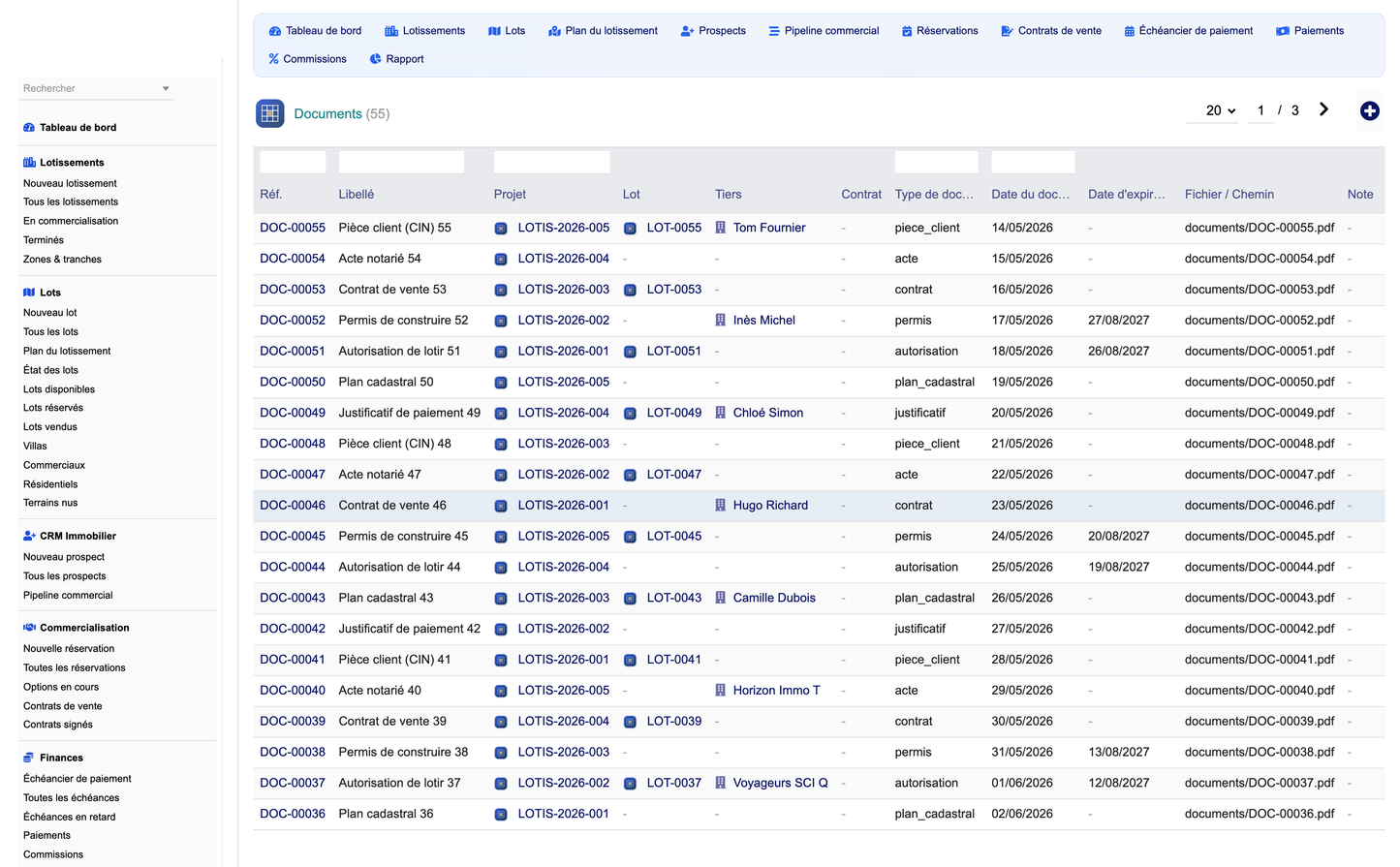
· Administrative document: document vault: cadastral plans, authorizations, permits, contracts, deeds, client documents and receipts.
· Automation rule: IF/THEN operational rules executed daily by the cron engine.
· Executive dashboard. A premium "command center" (real-estate blue / green / gold charter) showing plot inventory tiles (total, available, under negotiation, reserved, sold), commercial KPIs (projects, prospects, active reservations, signed contracts, conversion rate, sell-through rate), a mini sales pipeline, financial KPIs (revenue generated, amount collected, remaining, overdue, reservation deposits, commissions to pay), profitability indicators and two charts (revenue by month, plots by status).
· Interactive subdivision plan. A modern graphical view where every plot is colored by its commercial status (green = available, blue = under negotiation, orange = reserved, red = sold, grey = cancelled), grouped by zone, filterable by project and zone, with click-through to each plot card.
· Plot catalogue & status board. Full plot management with type, surfaces, pricing and status, plus a real-time status board grouping every plot by availability.
· Real-estate CRM & pipeline. Prospect management with source tracking and a drag-and-drop Kanban pipeline (first contact, site visit, proposal sent, negotiation, converted buyer) updated live via AJAX.
· Reservations & options. A reservation workflow with option duration, expiry and deposit, and lifecycle statuses (new, confirmed, expired, transformed, cancelled).
· Sale contracts. Complete contract management with payment mode, notary and deed data, and a status workflow (draft, signed, notarized, completed, cancelled).
· Payment schedules & collections. A financial engine tracking installments per contract (paid, remaining, overdue) and recording payments (deposit, installments, balance).
· Commissions. Automatic commercial and partner commission tracking with base, rate, amount and payment status.
· Sales team & partners. Management of internal sales reps (objectives, results, commission rate) and external partners/agents/introducers.
· Document vault. A central store for cadastral plans, authorizations, permits, contracts, deeds, client documents and receipts, each linked to a project, plot, client or contract.
· Reporting hub. 13 commercial & financial reports (sales, reservations, prospects, sales reps, revenue, collections, unpaid, cash-flow forecast, available plots, sold plots, status by subdivision, profitability, commissions) with CSV, Excel and PDF export and direct printing.
· Automation engine. A daily cron engine handling option expiry, installment reminders, unpaid follow-ups and commission alerts, configurable through IF/THEN rules.
· Demo dataset. A one-click, first-activation demonstration dataset (projects, zones, plots, prospects, reservations, contracts, schedules, payments, commissions, documents) plus a secure purge that only removes generated data.
1. Create the subdivision project and divide it into zones/phases.
2. Build the plot catalogue (type, surfaces, pricing) and visualize it on the interactive plan.
3. Capture prospects in the CRM and advance them through the sales pipeline.
4. Place an option / reservation on a plot for a prospect, with a deposit and expiry date.
5. Convert the reservation into a sale contract, choosing the payment mode (cash, installments, credit, custom).
6. Generate the payment schedule and record collections; track paid, remaining and overdue amounts.
7. Compute and follow sales-rep and partner commissions.
8. Store all administrative documents (plans, permits, deeds, client papers) against the project, plot or contract.
9. Monitor the whole activity through the dashboard and the reporting hub.
· Third parties: buyers (individuals, companies, investors, associations) are native Dolibarr third parties; every sold plot is linked to a third party.
· Products / services: each plot can be linked to a native Dolibarr product; fees and services are catalogued as products.
· Quotes: reservation and sale quotes can be created and converted to orders or invoices.
· Orders: reservation and definitive sale orders with commercial history.
· Invoicing: deposit invoices, installment invoices and balance invoices with payment status.
· Bank: collections and client payments are reconciled with the native bank & treasury modules.
· Documents: the administrative vault complements the native ECM for contracts, plans, deeds and client papers.
· Projects & agenda: each subdivision can be linked to a native Dolibarr project and events.
· Nine granular permission groups (projects, plots, CRM, sales, finance, partners, documents, automation, reporting) each with read / write / delete rights, plus an administration right.
· Read and write are granted by default on activation so the module is immediately usable; delete and admin stay restricted.
· All access is gated through the Dolibarr permission framework; multi-entity aware.
· Change history and activity are tracked through the native audit columns and Dolibarr logs.
After activation, open the module top menu. The dashboard gives the global picture. Use the left menu to reach each area: Subdivisions, Plots (and the interactive Plan), Real-estate CRM, Sales (reservations & contracts), Finance (schedules, payments, commissions), Team & partners, Documents, Invoicing, Automations and Reporting. The Configuration page lets you set the default currency, VAT rate, option duration and commission rate, and install or remove the demonstration dataset.
© 2026 DoliResources — www.doliresources.com — All rights reserved.


