
Discover powerful Dolibarr extensions designed to automate your business processes
The Restaurant Management Module is a vertical ERP that turns Dolibarr into a complete restaurant management solution. It is designed for restaurants, cafes,...
Couldn't load pickup availability


The Restaurant Management Module is a vertical ERP that turns Dolibarr into a complete restaurant management solution. It is designed for restaurants, cafes, fast-foods, snacks, tea rooms, food courts, pizzerias, burger restaurants, caterers and franchises of any size.
The module covers the entire food-service business from a single platform: clients, tables, reservations, orders, menus, dishes, recipes, kitchen operations, servers, cash register, food stock, purchasing, suppliers, deliveries, promotions, loyalty, profitability and statistics. Everything is managed directly inside Dolibarr, with no external software required.
By building on top of native Dolibarr modules for third parties, products, quotes, orders, invoices, payments and stock, the module gives restaurateurs a unified, coherent back office while adding the specialised, restaurant-specific workflows that a generic ERP lacks.
· Multi-establishment and multi-POS management from a single Dolibarr instance.
· Interactive floor plan with live table states: available, occupied, reserved, cleaning and out-of-service.
· Guest profiles with visit history, allergies, preferences and loyalty status.
· Reservations with a month calendar agenda and statuses: pending, confirmed, arrived, finished and cancelled.
· Orders for on-site, takeaway and delivery with a full lifecycle board: new, preparing, ready, served and paid.
· Kitchen Display System (KDS) with preparation times and priorities.
· Menus for every service: lunch, dinner, student, classic, event and seasonal.
· Dishes catalogue with categories, VAT rates, preparation time and photo.
· Recipes with ingredients and automatic food-cost and gross-margin calculation.
· Cash register with open/close sessions, cash count and gap detection.
· Payments by cash, card, cheque and mobile.
· Deliveries board to track orders out for delivery.
· Promotions including happy hour, coupons and discounts.
· Loyalty programme with points earned and redeemed plus rewards.
· Food stock movements for raw materials, drinks, packaging and finished goods (in, out and inventory).
· Suppliers and purchasing through native Dolibarr integration.
· Executive dashboard in a marron/beige/rouge charter with KPIs and charts.
· Reporting hub with 10 reports and CSV / print export.
· Multilingual interface: FR, EN, IT, DE and ES.
· Demo dataset generator plus secure purge.
The module follows the standard Dolibarr MVC module architecture. Its technical name is "restaurant", module number 512600, published by DoliResources. It depends on the native modSociete (third parties) and modProduct (products/services) modules.
It is built around 17 business objects, each with a list view and a card view driven by a generic, key-driven engine:
establishment, dining_room, resto_table, guest, menu, dish, dish_ingredient, reservation, resto_order, order_line, server, cash_session, payment, delivery, promotion, loyalty_ledger and stock_movement.
The left menu exposes 18 sections. Access control is enforced by 26 permissions organised across 9 right groups: catalog, tables, reservations, orders, service, finance, delivery, stock and reporting.
The module integrates natively with Dolibarr: third parties (customers and suppliers), products, quotes, orders, invoices, payments and stock. It ships with a self-healing schema and a versioned demo dataset. All language keys are module-prefixed to avoid cross-module collisions.
The dashboard is the entry point of the module and presents the key performance indicators of the business at a glance. Using the marron/beige/rouge charter, it surfaces revenue, orders, reservations and other KPIs together with charts. From here managers get an immediate overview of daily activity and can drill into any area of the module.
The reservations list gives a searchable, filterable view of every booking with its status: pending, confirmed, arrived, finished or cancelled. Each reservation is linked to a guest, a table and a service time so staff can prepare the dining room in advance.
The planning agenda shows the same reservations on a month calendar, making it easy to spot busy days, gaps and overbookings. Managers can plan capacity and staffing directly from this visual view.
The interactive floor plan mirrors the physical dining rooms and shows each table with its live state: available, occupied, reserved, cleaning or out-of-service. Servers and hosts use it to seat guests quickly and to keep track of table turnover. States update as orders and reservations progress through their lifecycle.
Orders can be taken for on-site dining, takeaway or delivery, each with its own lines, VAT and totals. The order list centralises every ticket and links it to the relevant table, guest and server.
The order board tracks each ticket through its lifecycle: new, preparing, ready, served and paid. This Kanban-style view keeps the front-of-house team aligned on what is in progress and what is ready to serve.
The Kitchen Display System (KDS) presents incoming orders to the kitchen brigade in real time, with preparation times and priorities. Cooks can see what must be prepared next and in which order, reducing tickets lost on paper. As dishes are completed the board keeps front and back of house synchronised.
Menus can be created for every service type - lunch, dinner, student, classic, event and seasonal - grouping the dishes offered at a given time. This lets the restaurant switch its offering by service or season in a few clicks.
The dishes catalogue holds every item with its category, VAT rate, preparation time and photo. Dishes are the building blocks reused across menus, orders and recipes.
Recipes describe the ingredients that compose each dish and their quantities. From this the module automatically computes the food cost and the gross margin, so owners know the exact profitability of every plate. This turns menu engineering into a data-driven exercise rather than guesswork.
The cash register manages open and close sessions with a cash count and automatic gap detection between expected and counted amounts. Payments can be recorded by cash, card, cheque or mobile. Each session provides an auditable record of the day's takings.
The deliveries board tracks orders that leave the restaurant for delivery, from dispatch to completion. Staff can follow the status of each delivery and keep customers informed. It connects the order lifecycle to the last mile.
The loyalty programme records points earned and redeemed by guests and the rewards available to them. Alongside it, promotions such as happy hour, coupons and discounts help drive traffic and reward regulars. Together they support retention and targeted commercial campaigns.
Food stock is managed through movements for raw materials, drinks, packaging and finished goods, covering in, out and inventory operations. This keeps ingredient levels accurate and feeds recipe costing with up-to-date data. Managers can anticipate shortages before they impact service.
Purchasing and supplier management rely on native Dolibarr integration, so purchase orders, suppliers and supplier invoices live in the same system as the rest of the business. This avoids double entry and gives a consolidated view of costs. Replenishment ties directly back to stock movements.
The reporting hub gathers 10 reports covering the main dimensions of the activity, each exportable to CSV or print. Owners and accountants use them to analyse sales, profitability and operations over any period. Reports complement the live dashboard with detailed, shareable output.
The servers section manages the waiting staff and their assignment to tables and orders. It allows performance to be followed per server and links service to the rest of the workflow. This helps organise shifts and measure front-of-house productivity.
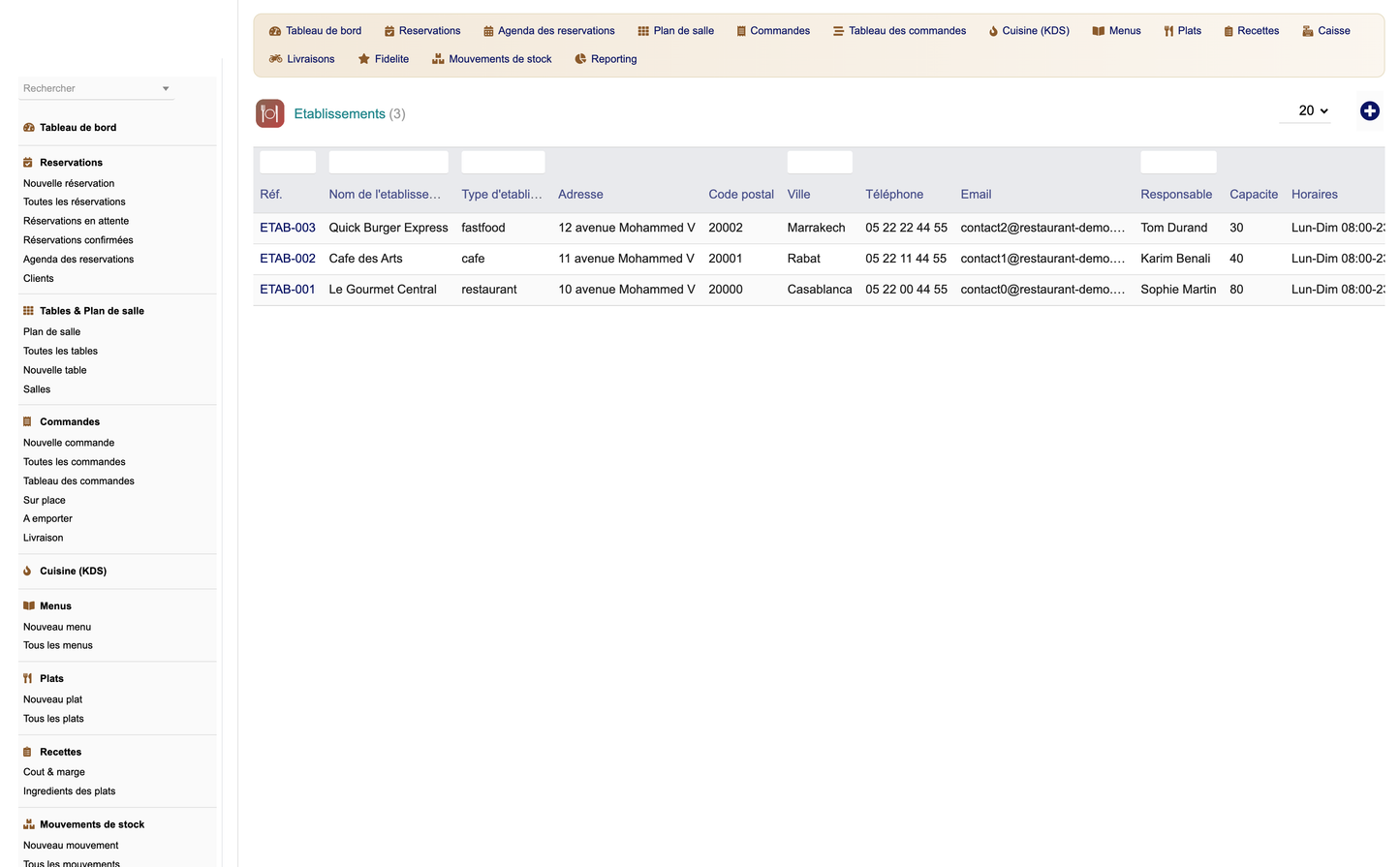
Establishments let a group or franchise manage several points of sale within one Dolibarr instance. Each establishment carries its own configuration while sharing the same catalogue and reporting framework. This makes the module suitable from a single snack bar to a multi-site franchise.
· Unzip module_restaurant-1.0.zip into the htdocs/custom directory of your Dolibarr installation.
· Enable the module from Home > Setup > Modules (family Products / Services).
· Open the module setup page to configure it.
· Set the default currency.
· Set the default VAT rate.
· Set the default service duration.
· Set the loyalty rate (points earned per amount spent).
· Optionally install the demo dataset to explore the module with sample data.
· Confirm the module appears and is active in the modules list.
· Open the dashboard and check that KPIs and charts render.
· Create an establishment, a dining room and a few tables.
· Add a guest, then create and confirm a reservation.
· Take an order, move it through the order board and the kitchen display.
· Open a cash session, register a payment and close the session.
· Verify a recipe computes food cost and gross margin.
· Run at least one report and export it to CSV.
· If demo data was installed, run the secure purge to remove it.
For support, updates and additional modules, please visit DoliResources.
DoliResources
www.doliresources.com
Copyright (C) 2026 DoliResources. All rights reserved.


