
Discover powerful Dolibarr extensions designed to automate your business processes
SAV / After-Sales Service Management transforms Dolibarr into a complete, professional after-sales-service (SAV) platform....
Couldn't load pickup availability


SAV / After-Sales Service Management transforms Dolibarr into a complete, professional after-sales-service (SAV) platform. It covers the entire SAV cycle - from the first customer claim through diagnostic, intervention planning, repair, spare-parts management, quality control, RMA returns, invoicing and performance analysis - without any external software.
The module is designed for any company that handles customer claims, warranties, repairs, field or workshop interventions, spare parts, maintenance contracts and SLAs: electronics, home appliances, HVAC, machines, IT equipment and industrial equipment. It centralises every after-sales operation in a single, native Dolibarr environment.
The module follows the complete after-sales service lifecycle:
· Customer claim
· SAV ticket creation
· Technical diagnostic
· Intervention planning
· Repair / corrective & preventive maintenance
· Spare-parts management
· Quality control
· Customer return (RMA)
· Invoicing
· Performance analysis
The module is fully integrated into the native Dolibarr ecosystem and reuses its core modules rather than duplicating them: third parties, contacts, products, services, stock, warehouses, customer orders, quotes, invoices, payments, bank, accounting, projects, agenda, resources, users, GED/ECM documents, e-mails, multi-entity and multi-currency.
It ships 18 dedicated business objects that structure the whole SAV activity:
· Tickets
· Repairs
· Ticket lines
· Interventions
· Diagnostics
· Warranty assets
· Warranties
· Technicians
· Spare parts
· Suppliers
· Purchases
· RMA returns
· Maintenance contracts
· SLA rules
· Payments
· Customer messages
· Alerts
· Automations
Technical foundation:
· PHP object-oriented / MVC architecture.
· MySQL / MariaDB database with secured SQL queries.
· Bootstrap-based, responsive user interface.
· Native Dolibarr permission system.
· Multilingual: 5 languages - French, English, Italian, German, Spanish.
· Module technical name: savmanager. Module number: 513100. Editor: DoliResources.
A modern control center providing an at-a-glance view of the entire after-sales activity.
· KPIs: open, urgent and critical tickets, SLA breached, repairs in progress, planned interventions, average resolution time, customer satisfaction, SLA compliance and parts consumed.
· Financial zone: SAV revenue, SAV cost and SAV margin.
· 8 interactive charts: tickets by month, by type and by channel, technician performance, most-failing products, top clients, SLA compliance and warranty split.
The central intake point for every after-sales request, with rich classification and workflow.
· Multi-channel intake: phone, email, web, store, mobile app and sales rep.
· Classification: claim, breakdown, technical question, return, warranty and maintenance.
· Priority levels: low, normal, high and critical.
· Workflow status: new, assigned, diagnostic, waiting customer, repairing, done and closed.
· Configurable column selector on the ticket list.
A visual board that makes the ticket flow immediately readable and actionable.
· Visual board organised by status.
· Drag & drop to advance a ticket through the workflow.
· SLA badge on each card.
· Colored priority for instant triage.
The complete SAV folder for a single ticket, aggregating everything about the case.
· KPI cockpit at the top of the card.
· Full detail: client, product, serial number and SLA.
· Chronological activity timeline.
· Linked repairs, interventions, diagnostics, payments and communications.
Tracks the individual equipment covered by after-sales service, identified by serial number.
· Register of customer assets with serial numbers and installation data.
· Link between each asset, its warranties and its SAV history.
· Basis for warranty checks and traceability across the whole equipment life.
Manages the different warranty types and their expiry.
· Warranty types: manufacturer, legal, extended and contract.
· Expiry alerts to anticipate warranty end and renewals.
· Warranty status directly usable when qualifying a new ticket.
A structured returns process (RMA) from request to final decision.
Workflow: request -> validation -> transport -> reception -> diagnostic -> decision.
· Decision outcomes: repair, replace, refund or reject.
· Full traceability of the returned product at each step.
· Native link to the originating ticket and to invoicing.
Manages repair work orders from opening to quality-checked completion.
· Repair statuses across the whole work-order lifecycle.
· Assigned technician.
· Time and cost tracking.
· Quality control before closing the repair.
Handles every intervention mode required by after-sales service.
· Intervention types: workshop, on-site and remote.
· Native link to the Dolibarr agenda for scheduling and follow-up.
· Connection to the related ticket, repair and technician.
A planning view to organise and dispatch interventions efficiently.
· Visual planning of upcoming interventions.
· Assignment of technicians to interventions.
· Overview of workload and availability over time
A dedicated technician repository driving assignment and planning.
· Skills and specialties.
· Geographic zone of operation.
· Availability and current workload.
Full spare-parts management, from stock to purchasing.
· Spare-parts catalogue with stock levels.
· Minimum and reserved quantities.
· Stock valuation.
· Suppliers and purchasing workflow.
Dedicated inventory view for spare-parts stock control and movements.
Manages recurring maintenance and extended-service agreements.
· Contract types: annual, premium and extended-warranty.
· Included interventions per contract.
· Associated SLA commitments.
Defines the service-level commitments that drive ticket priorities and alerts.
· Response and resolution time per priority level.
· Coverage scope of each agreement.
· Penalties for SLA breaches.
Records the technical diagnostic performed on a ticket or a returned product.
· Structured diagnostic linked to the ticket, asset and repair.
· Basis for the repair, replace, refund or reject decision.
· Traceable diagnostic history per equipment.
A dedicated reporting hub covering the whole after-sales activity, with export.
· Reports: activity, technicians productivity, costs, profitability, warranty, satisfaction, SLA, parts consumption and returns.
· Export to CSV, Excel and PDF.
Handles the financial side of after-sales service using native Dolibarr documents.
· Deposit and balance payments.
· Multiple payment methods.
· Native Dolibarr quotes and invoices generated from SAV operations.
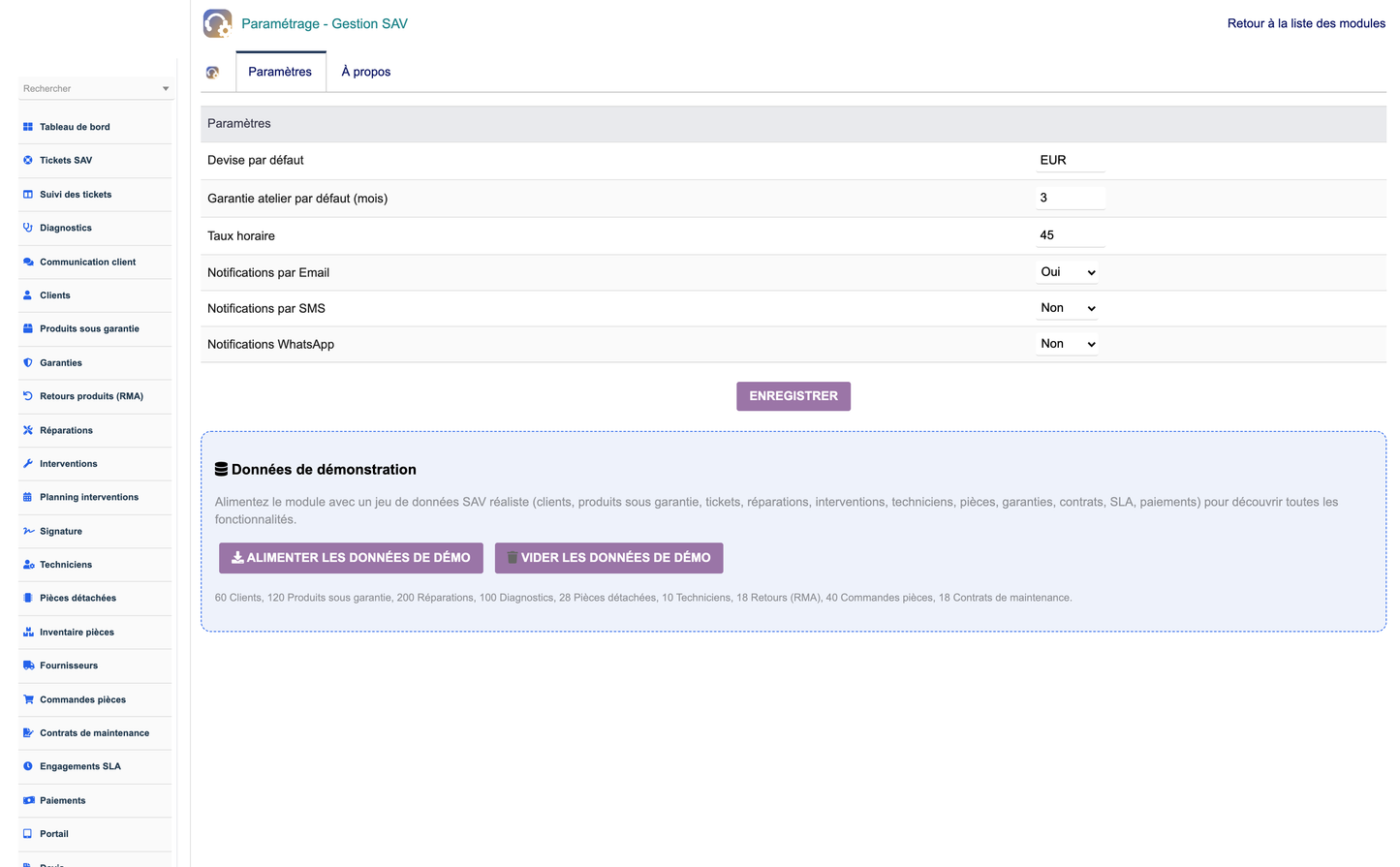
Central setup for the module and one-click demonstration data.
· Module settings and options.
· Create and Delete demo-data buttons.
· Permission management.
· Multilingual configuration.
· Copy the module into htdocs/custom/savmanager.
· Activate the module from Home > Setup > Modules.
· The demonstration dataset is loaded automatically on first activation.
Rights are organised so each role sees only what it needs:
· Administrator - full configuration and management.
· SAV Manager - tickets, repairs, interventions, contracts and reporting.
· Technician - assigned interventions, repairs and diagnostics.
· Sales rep - customer-facing tickets, warranties and quotes.
The configuration screen centralises module settings, SLA rules, alerts, automations and multilingual labels, all editable without touching the code.
The Create demo-data button populates a realistic SAV dataset (tickets, repairs, interventions, warranties, contracts, parts, payments and dashboard statistics). The Delete demo-data button securely removes only the module's demo rows, leaving the rest of the database untouched.
SAV / After-Sales Service Management delivers a complete, professional after-sales platform inside Dolibarr, unifying claims, warranties, repairs, interventions, spare parts, maintenance contracts, SLAs, RMA returns, invoicing and performance analysis in one native, multilingual solution.
(c) 2026 DoliResources - www.doliresources.com


