
Discover powerful Dolibarr extensions designed to automate your business processes
School College Management turns Dolibarr into a...
Couldn't load pickup availability


School College Management turns Dolibarr into a dedicated ERP solution for middle-school (collège) institutions. The module covers the entire set of business processes of a school — administrative, academic, financial, human resources, communication, school life, exams, statistics, reporting and steering — without requiring any external software, while leveraging and enriching the native features of Dolibarr.
|
Commercial name |
School College Management (Gestion École Collège) |
|
Technical name |
schoolcollegemanagement |
|
Publisher |
DoliResources — www.doliresources.com |
|
Version |
1.0.0 |
|
Module number |
504300 |
|
Family |
Projects / Institutions |
|
Compatibility |
Dolibarr v16, v17, v18, v19, v20, v21, v22, v23 and above |
|
Languages |
French, English, Italian, German, Spanish |
|
Environment |
PHP 7.1 → 8.x — MySQL / MariaDB — Multi-company (MultiCompany) |
|
Table prefix |
llx_scol_ |
· Administrative: students, parents, enrollments, school years, documents.
· Academic: levels, classes, subjects, timetables, courses, exams, grades, report cards.
· Human resources: teachers and staff (administration, supervision, library, laboratory, IT, maintenance, transport, canteen).
· School life: absences, delays, discipline, infirmary, extracurricular activities.
· Services: library, laboratories, canteen, school transport.
· Financial: school fees, payments, due dates, reminders, Dolibarr invoicing.
· Steering: dashboard, statistics and multi-format reporting.
The module offers a completely new interface, distinct from the classic Dolibarr style, inspired by the academic world. The visual identity relies on a school palette: academic blue, education green, pedagogic orange, white and light grey. The interface uses modern cards, widgets, interactive charts, colored indicators and a responsive design (PC, tablet, mobile), compatible with dark mode.
The dashboard is organized into thematic zones grouping the following indicators:
· Total number of students
· Students present today
· Students absent today
· New enrollments
· Re-enrollments
· Active teachers
· Administrative staff
· Number of classes
· Overall average of the institution
· Success rate
· Scheduled exams
· Completed exams
· Courses delivered
· Monthly revenue
· Yearly revenue
· Payments received
· Pending fees
· Overdue payments
· Monthly absences
· Discipline incidents
· Active library loans
· Canteen subscribers
· Transport subscribers
· Rooms in use
· 12-month enrollment trend
· Payments trend
· Boys / girls distribution
· Headcount by level
· Kanban preview of the enrollment pipeline
· Monthly and yearly financial indicators
Each chart is generated through Dolibarr's native DolGraph engine and updates according to the institution's real data.
The module manages 27 interrelated business objects. Each object provides a list with advanced filters, a column selector and search, a detailed record, a change history and automatic links to related records.
|
Object |
Business role |
Key fields / characteristics |
|
Students |
Highly detailed student record (central "hub" object) |
Photo, ID number, last name, first name, gender, date and place of birth, nationality, address, phones, email, level, class, group, enrollment date, previous school, health notes, allergies, insurance, family situation, emergency contact and phone, Dolibarr third-party link, internal notes. |
|
Parents |
Father, mother or guardian |
Contact details, profession, financial responsible, Dolibarr third-party link, several children attached, student link. |
|
Enrollments |
Full admission workflow (Kanban view) |
Reference, student, school year, level, class, stage (pre-registration, validation, acceptance, admission, refusal, re-enrollment), type, request / decision / signature dates, fees paid, previous school. |
|
School years |
Year reference data |
Code, label, start and end date, current year. |
|
Object |
Business role |
Key fields / characteristics |
|
Levels |
6th, 7th, 8th, 9th grade |
Code, label, cycle, display order. |
|
Classes |
Classes and sections |
Code, label, level, section, capacity, room, main teacher, school year, student list and occupancy. |
|
Rooms |
Classrooms, laboratories, library |
Code, label, room type, capacity, building, floor. |
|
Subjects |
Taught disciplines |
Code, label, level, coefficient, yearly teaching hours, teacher, curriculum. |
|
Timetables |
Weekly graphical planning |
Grid by class / teacher / room / subject, weekday, start and end time, school year. |
|
Courses |
Planning and delivery |
Subject, class, teacher, room, date, times, type (Course, tutorial, practical), topic, materials. |
|
Object |
Business role |
Key fields / characteristics |
|
Teachers |
Complete teacher record ("hub" object) |
ID number, last name, first name, speciality, diplomas, phones, email, hire date, availability, Dolibarr user link, HR link, attached subjects and classes. |
|
Staff |
Administration, supervision, library, laboratory, IT, maintenance, transport, canteen |
ID number, last name, first name, department, job, contact details, hire date, user link. |
|
Object |
Business role |
Key fields / characteristics |
|
Exams |
Tests, assignments, exams, term papers, resits ("hub" object) |
Reference, label, type, subject, class, teacher, date, time, max score, coefficient, room. |
|
Grades |
Student grading (lines attached to exams) |
Exam, student, subject, score, appreciation, teacher, date. |
|
Report cards |
School report cards ("hub" object) |
Reference, student, class, school year, term, overall average, class rank, appreciation, council decision, absence and delay counts; PDF export. |
|
Object |
Business role |
Key fields / characteristics |
|
Absences |
Daily attendance, delays, justifications |
Student, class, date, type (absence / delay), period, justified, reason, related course. |
|
Discipline |
Incidents and sanctions |
Reference, student, date, incident type, sanction, severity, description, reporting staff. |
|
Infirmary |
Visits and medical follow-up |
Student, visit date, reason, treatment, prescription, temperature. |
|
Extracurricular activities |
Sports, clubs, outings, trips, competitions |
Reference, label, type, date, supervisor, capacity, price, location. |
|
Object |
Business role |
Key fields / characteristics |
|
Library |
Document collection |
Reference, title, author, category, ISBN, publisher, quantity, available copies. |
|
Loans |
Lending and returns |
Book, student, loan date, due date, return date, penalty. |
|
Laboratories |
Labs and equipment |
Code, label, type, room, capacity, equipment. |
|
Canteen |
Subscriptions and catering |
Student, formula, period, price, allergens, subscription status. |
|
Transport routes |
Buses, drivers, routes, stops |
Code, label, driver, bus plate, capacity, stops. |
|
Transport subscriptions |
School transport registrations |
Student, route, stop, start date, price, status. |
|
Object |
Business role |
Key fields / characteristics |
|
School fees |
Registration, tuition, canteen, transport, uniform, activities, exams, library, laboratory |
Reference, student, fee type, label, amount, due date, linked Dolibarr invoice. |
|
Payments |
Collections |
Reference, fee, student, amount, date, payment mode, settlement reference. |
Financial management supports payment schedules, reminders and unpaid tracking, with optional generation of native Dolibarr quotes, orders, invoices and payments.
Enrollment tracking is handled through an interactive Kanban board with drag & drop. Each request progresses along the stages:
· Pre-registration
· File validation
· Acceptance
· Admission / Enrollment
· Refusal
· Annual re-enrollment
Moving a card from one stage to another automatically updates the enrollment status (admitted, refused, in progress).
The main objects (student, enrollment, teacher, exam, report card) are "hub" records that automatically display an indicator cockpit and all linked entries — for example, on a student record: their enrollments, grades, absences, report cards, fees and payments — with a one-click add button that pre-fills the link.
The timetable is displayed as a weekly grid filterable by class, showing subject and room per time slot, complemented by the list of upcoming courses and exams.
The module fully integrates with the Dolibarr ERP and enriches its native features:
· Third parties and contacts (linking students and families)
· Agenda and projects
· Products and services
· Quotes, orders, invoices and payments generated from school fees
· Bank and accounting
· DMS (electronic document management)
· Emails and contracts
· Point of sale if the module is installed
School fees can therefore automatically generate quotes, orders, invoices and payments in Dolibarr, ensuring full accounting continuity.
The module centralizes the institution's documents — certificates, report cards, photos, contracts, authorizations, exam papers and administrative documents — with versioning and archiving through Dolibarr's native DMS.
A dedicated reporting menu gathers numerous reports, all exportable to PDF, Excel, CSV and print:
· Headcount by level
· Headcount by class
· Enrollments by stage
· Averages by class and success rate
· Results by subject
· Absences and delays by class
· Discipline incidents by type
· Fees by type
· Unpaid fees
· Payments by settlement mode
· Teachers by subject
· Staff by department
· Loans by category
· Transport by route
· Canteen by formula
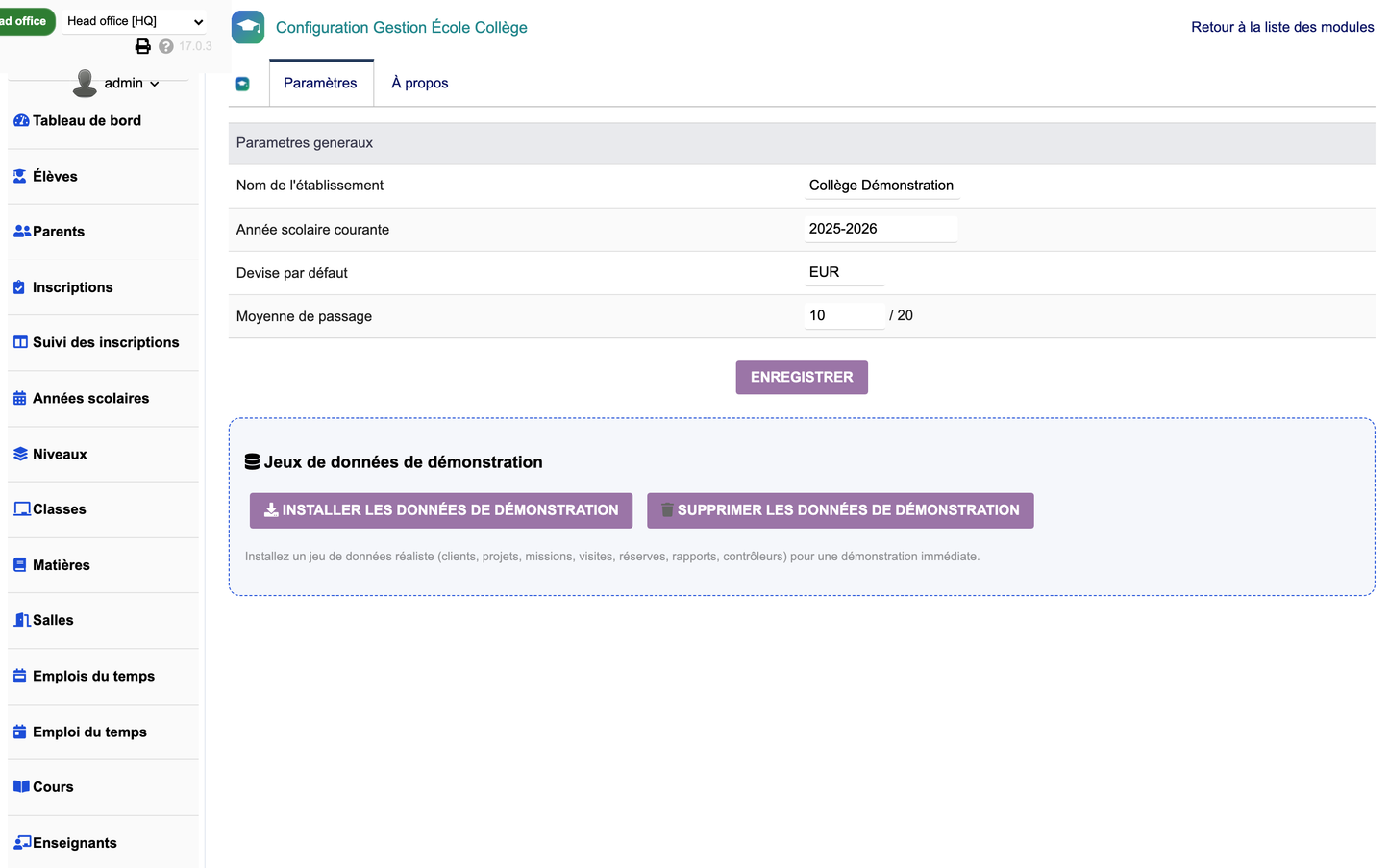
The configuration page allows fine-grained setup of the institution:
· General settings (institution name)
· Current school year
· Default currency
· Passing average
· Numbering
· PDF templates
· Notifications and emails
· Colors and dashboard
· Permissions
Two dedicated buttons manage a complete and realistic demonstration dataset:
· Install demonstration data: automatically creates school years, levels, rooms, subjects, teachers, staff, classes, students, parents, enrollments, timetables, courses, exams, grades, report cards, absences, discipline, library, loans, laboratories, canteen, transport, infirmary, activities, fees and payments.
· Remove demonstration data: removes only the demonstration data created by the module, without affecting real data.
The demonstration dataset includes about 120 students, 16 teachers, 8 classes, 240 fees, 360 grades and more than 2,100 records in total.
· CSRF protection on forms (tokens)
· XSS escaping of outputs
· Prepared / escaped SQL queries
· Rights and fine-grained permission management by domain (students, academics, teachers, exams, school life, services, finance, reporting, administration)
· Logging (dol_syslog)
· MultiCompany (multi-entity) compatibility
· Responsive design (PC, tablet, mobile)
· Advanced filters and search
· Column selector on lists
· Widgets, charts, badges and cards
· Kanban view where relevant
· Dark mode compatibility
The module complies with the official Dolibarr architecture and relies on a clean, documented and optimized object-oriented design. It is built on a generic engine driven by an object registry, avoiding any code duplication, with the directories class/, core/ (modules, boxes, triggers), admin/, sql/, langs/, css/, js/, img/, lib/ and doc/.
The 27 SQL tables are prefixed with llx_scol_ and a schema self-healing mechanism (ensureSchema) automatically adds missing columns during version upgrades.
The module is delivered as a ZIP archive directly installable from the Dolibarr module manager, without any further modification.
1. Home → Setup → Modules → Deploy / install an external module.
2. Select the file module_schoolcollegemanagement-1.0.zip.
3. Enable the "School College Management" module in the list.
4. Tables, menus, permissions and a demonstration dataset are created automatically.
Disabling the module from the module list removes menus and permissions; data is preserved (in accordance with Dolibarr's behavior) and can be purged beforehand from the configuration page.
Compatible with Dolibarr v16 to v23 and above — tested and verified under real conditions (installation, activation, page rendering, PDF/Excel/CSV exports, demonstration data, uninstallation).
© 2026 DoliResources — www.doliresources.com


